 MetaTrader 5
 Experts
 Indicateurs
 Scripts
 Bibliothèque
 Stockage
Voir comment télécharger gratuitement des robots de trading
Retrouvez-nous sur Twitter !
Rejoignez notre page de fans
Rejoignez notre page de fans
Vous avez aimé le script ? Essayez-le dans le terminal MetaTrader 5

Execution Quality Logger - slippage, fill delay and spread of every deal - expert pour MetaTrader 5
Augusto Martin D'anna

MQL5 & Pine Script developer | Trader since 2019 | Strategy validation
As a trader, I know a bot is only as good as the logic behind it. I bridge
trading concepts and clean code: I don't just follow instructions, I make
sure your EA behaves exactly the way your strategy intends.
As a trader, I know a bot is only as good as the logic behind it. I bridge
trading concepts and clean code: I don't just follow instructions, I make
sure your EA behaves exactly the way your strategy intends.
- Vues:
- 119
- Note:
- Publié:
- Mise à jour:
-
 Vous manquez des opportunités de trading :
- Applications de trading gratuites
- Plus de 8 000 signaux à copier
- Actualités économiques pour explorer les marchés financiers
Inscription Se connecterVous acceptez la politique du site Web et les conditions d'utilisation
Si vous n'avez pas de compte, veuillez vous inscrire -
 Besoin d'un robot ou d'un indicateur basé sur ce code ? Commandez-le sur Freelance
Aller sur Freelance
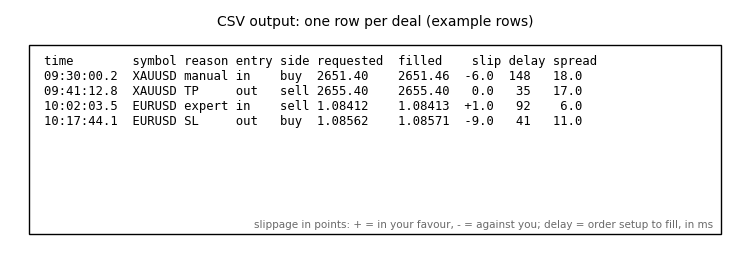
Execution Quality Logger measures how your broker really fills your orders. For every deal on the account - manual trades, any EA, and stop loss or take profit executions - it records the price you asked for, the price you got, the difference in points, the delay from order to fill and the spread at that moment. It writes one CSV row per deal and keeps a running summary on the chart. It does not open, modify or close any trade.
What it records
- Requested price - for market orders, the price when the order was sent; for SL/TP closes, the stop or target level.
- Filled price - the deal price.
- Slippage in points - positive = in your favour, negative = against you (buying higher or selling lower than requested).
- Delay in milliseconds - from the order setup time to the deal time.
- Spread at the moment of the deal, plus symbol, side, volume, entry/exit, magic and the reason (manual, expert, SL, TP, stop out).
Requests sent by programs on the same terminal that are rejected or requoted are also reported in the Experts log with their return code.
Inputs
- CSV file and Use the Common\Files folder - where the log is written (append mode, the header is written once).
- Only this symbol - empty = all symbols.
- Only this magic - -1 = all, 0 = manual trades only.
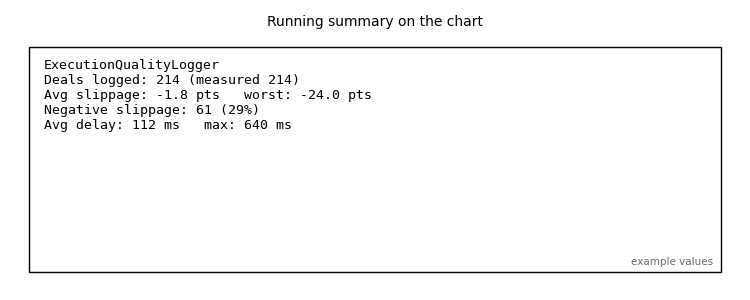
- Show the summary on the chart - average and worst slippage, % of negative slippage, average and maximum delay.
How to use it
- Attach it to any one chart and leave it running while you or your EAs trade. Open the CSV in Excel or Python to compare brokers, sessions (for example news or the open) or account types.
- Useful before moving an EA from demo to live, and to document execution problems with a broker using real numbers.
- In the Strategy Tester it works too, but the tester fills at the requested price, so slippage there is zero by design: the value of this tool is on demo and live accounts.
Update: deals now wait until their order reaches the history before being logged, so the requested price and the delay are measured reliably. On servers that do not store the requested price of market orders, the quote (ask for buys, bid for sells) at the moment the order was placed is used.
Equity Target Closer - close all trades at a profit or loss level
Closes all positions and pending orders when the account profit or loss reaches your target, in money or % of balance. Floating or full-day P/L, symbol and magic filters.
 Simple License - lock your EA to accounts, expiry date, demo-only or server
Minimal include file to license your own EAs and indicators: allowed account numbers, expiry date, demo-only trial mode and broker server filter. Example EA included.
Common Folder Copier - copy positions between MT5 terminals on the same PC
Local MT5-to-MT5 trade copier through the Common files folder. One EA in Master or Slave mode: lot multiplier or fixed lot, symbol prefix/suffix, reverse, SL/TP and partial close sync.
 Correlation Matrix Dashboard
Live rolling-correlation heatmap across your watchlist — spot hidden overlapping exposure before you stack three “different” trades that are secretly one trade.