 MetaTrader 5
 Experts
 Indicateurs
 Scripts
 Bibliothèque
 Stockage
Rejoignez notre page de fans

EA Auditor. What an Expert Advisor really does, from its deal history - script pour MetaTrader 5

- Vues:
- 65
- Note:
- Publié:
-
 Vous manquez des opportunités de trading :
- Applications de trading gratuites
- Plus de 8 000 signaux à copier
- Actualités économiques pour explorer les marchés financiers
Inscription Se connecterVous acceptez la politique du site Web et les conditions d'utilisation
Si vous n'avez pas de compte, veuillez vous inscrire -
 Besoin d'un robot ou d'un indicateur basé sur ce code ? Commandez-le sur Freelance
Aller sur Freelance
Besoin d'un robot ou d'un indicateur basé sur ce code ? Commandez-le sur Freelance
Aller sur Freelance
Every Expert Advisor comes with a description, and the description is written by the seller. It can say no martingale, no grid, a stop on every trade, and nothing in the terminal checks it. The deal history, on the other hand, does not lie. If the lot doubles after every loss, the history shows it. If new trades are added against an open one, the history shows that too.
EA Auditor reads the deal history of your account and writes a short note in plain words about how the trading was done. It looks at when the EA enters, whether it sets a stop and a take and moves them, how the lot changes, how many trades it keeps open at once, at what hours it trades and how long it holds a trade. At the end it says what to watch out for. The note appears in the Experts tab, on the chart and in a text file, in English or in Russian.
What it looks for
A martingale shows itself in the lot. The auditor compares the lot of each trade with the lot of the trade before it. If after a loss the next lot is usually at least one and a half times larger, and clearly larger than after a win, the note calls it a martingale, whatever the description calls it.
Averaging shows itself in the prices. When the EA opens a new trade at a worse price while an earlier trade in the same direction is still open, that is an add against itself. One or two such trades can be a coincidence, so the note warns only when it happens at least three times and in at least five percent of the trades. Several trades opened in the same second are a different thing, usually one position split into parts with different takes, and the note says so instead of calling it a grid.
A stop that closes a trade in profit means the stop was moved, so the note reports a trailing stop or break even. A trade that opens without a stop and only gets one later is unprotected until then, and the note says that as well. When the stop is placed much farther than the take, the note gives the win rate the EA needs just to break even, because a high win rate proves nothing in that case.
Two examples
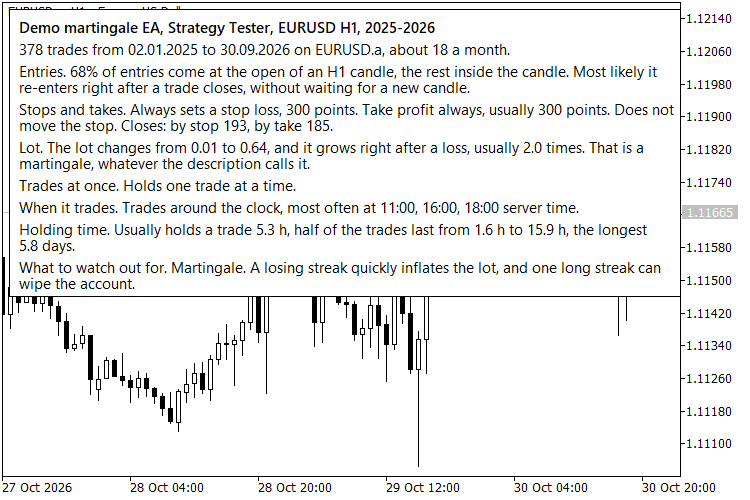
Both runs are the Strategy Tester on EURUSD H1 from January 2025 to October 2026. The first is a small demo EA that doubles the lot after every loss. The auditor never looks at the code, it finds the martingale from the history alone.
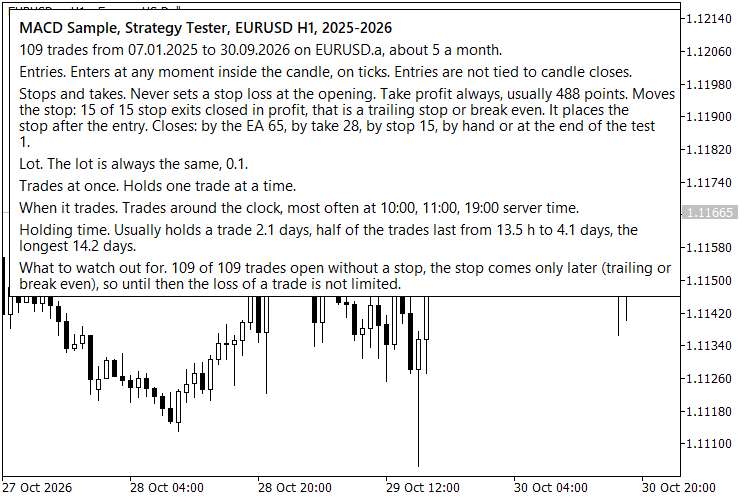
The second is the MACD Sample that comes with the terminal. It looks harmless, and it is not a martingale, but every one of its 109 trades opened without a stop. Fifteen of them got a stop later from the trailing, the others never had one, so a losing trade had no limit until the EA itself decided to close it.
How to use it
Put EA_Auditor.mq5 and EAAudit.mqh into the same folder under MQL5\Scripts, compile the script and drop it on any chart. By default it reads the whole history of the account. You can limit it to one symbol, to one magic number or to a period, which is useful when the account also has manual trades or other EAs. The note is saved as MQL5\Files\EA_Audit_ followed by the account number, and with the CSV switch on the deals are saved next to it.
A simple way to check an EA before you trust it with money is to run it on a demo account for a few weeks and then run the script. To audit your own EA in the Strategy Tester, include EAAudit.mqh in it and call EAAuditTester() from OnDeinit. At the end of the test the note is written to the common folder of the terminals as EA_Audit_ followed by the EA name.
| #include "EAAudit.mqh" void OnDeinit(const int reason) { EAAuditTester(AUDIT_EN); } |
What it does not do
It says nothing about profit and does not try to. A clean note means the EA trades without the patterns that usually blow accounts, not that it will make money. With twenty or thirty trades any conclusion is weak, so give it a history of at least a hundred. Positions opened before the selected period are skipped, and the hours are server time.
The script only reads the history and draws a panel on the chart. It never places, modifies or closes orders.
 Key Levels with Touch Counter - previous day/week/month highs and lows plus round numbers, with touch and sweep counts
Draws the previous day, previous week and previous month high and low, plus automatic round-number levels around the current price. Every level carries a label with how many times price touched it and how many times a bar swept it (pierced the level and closed back on the original side). Counts use closed bars only, so they do not repaint. Optional alerts (popup, push, email, sound) for sweeps and new touches. Touch tolerance is a fraction of ATR or a fixed number of points. The 6 previous-period levels and their touch counts are exposed in 12 indicator buffers for use from an Expert Advisor with iCustom(). Works on any timeframe up to H4. Read-only: it never opens, modifies or closes a trade. No DLLs, no web requests.
ORB Box + VWAP Stats - opening range box, 1R/2R targets, session VWAP and historical break statistics
Draws the opening range of a configurable session (start time and length in minutes, with a server time zone adjustment), the 1R and 2R levels above and below the box, and the session VWAP (tick volume, or real volume when the broker provides it). A small panel counts, over the last N finished sessions, how many broke the range up only, down only, on both sides, or not at all, and how often price reached 1R and 2R after the first break. The statistics are historical counts: they describe the past and do not predict anything. Only closed bars are used, so nothing repaints; optional popup, push and sound alerts fire once per direction per session when a closed bar closes outside the box. Eight buffers (range, targets, VWAP, break state) can be read from an Expert Advisor with iCustom(). Works on M1 to M30, recalculates only new bars and deletes its chart objects when removed. Read-only: it never trades. No DLLs, no web requests.
 Trailing Stop Breakeven Manager
Trailing stop and breakeven manager for Gold (XAUUSD), forex and any symbol: moves the stop to breakeven with an offset, then trails it in points or ATR multiples on manual trades and on any EA, filtered by magic and symbol. Open source code.
MACD Signals
Indicator edition for new platform.