 MetaTrader 5
 Experts
 Indicateurs
 Scripts
 Bibliothèque
 Stockage
Rejoignez notre page de fans

Candle Pattern Stats - engulfing, pin bar and inside bar with a rolling historical hit rate - indicateur pour MetaTrader 5

I build clean, well-tested Expert Advisors and indicators for MetaTrader 4 and 5, with a focus on rule-based strategies and solid risk management.
What I can do for you:
- Vues:
- 167
- Note:
- Publié:
-
 Vous manquez des opportunités de trading :
- Applications de trading gratuites
- Plus de 8 000 signaux à copier
- Actualités économiques pour explorer les marchés financiers
Inscription Se connecterVous acceptez la politique du site Web et les conditions d'utilisation
Si vous n'avez pas de compte, veuillez vous inscrire -
 Besoin d'un robot ou d'un indicateur basé sur ce code ? Commandez-le sur Freelance
Aller sur Freelance
Besoin d'un robot ou d'un indicateur basé sur ce code ? Commandez-le sur Freelance
Aller sur Freelance

What it does
On every closed bar the indicator checks five patterns and draws an arrow when one is found:
- Bullish / bearish engulfing: the body of the bar covers the body of the previous bar, in the opposite direction, and is larger.
- Bullish / bearish pin bar: the dominant wick is at least Pin bar: dominant wick % of the bar range and the body is at most Pin bar: body % of the range. Both limits are inclusive: a bar exactly on the limit counts.
- Inside bar: high below the previous high and low above the previous low. The direction of the case is the direction of the mother bar (the previous bar). A mother bar with no body (open = close) is ignored.
- A pattern is only marked if the range of the signal bar (the mother bar for the inside bar) is at least Minimum bar range times the ATR (Wilder).
- Optional trend filter: bullish cases only if the close is above the EMA, bearish only if below.
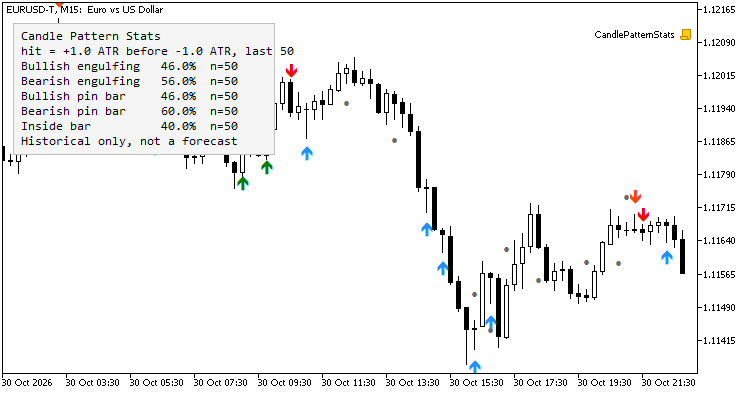
The rolling statistic
Each pattern occurrence opens a case at the close of the signal bar. The take level is entry +/- X * ATR in the pattern direction and the adverse level entry -/+ Y * ATR , both using the ATR of the signal bar. The case is resolved by the first of the following bars that reaches one of the levels: reaching X first is a hit, reaching Y first is a miss. If both levels are reached inside the same bar the case counts as a miss (the order inside the bar is unknown). If neither level is reached within Bars to wait bars the case is discarded and is not counted either way.
The panel shows, per pattern, hits / resolved cases over the last N resolved cases and the number of cases in the sample. A case counts only from the bar where it is resolved, so the value on any bar uses nothing from the future; reloading the indicator gives the same history.
This is a description of what happened on the loaded history of that symbol and timeframe. It does not include spread, commission or slippage, it depends on the chosen X, Y and N, and it says nothing about what the next occurrence will do. Small samples are noisy: look at the number of cases next to every percentage. Not financial advice.
No repainting
Only closed bars are evaluated, each bar once. The bar being formed has no arrow and no signal. Alerts fire once per closed bar, and nothing is alerted for the existing history when the indicator is attached.
Buffers (iCustom)
| Buffer | Content |
|---|---|
| 0 | Arrow price, bullish engulfing (EMPTY_VALUE if none) |
| 1 | Arrow price, bearish engulfing |
| 2 | Arrow price, bullish pin bar |
| 3 | Arrow price, bearish pin bar |
| 4 | Arrow price, inside bar |
| 5 | Signal bullish engulfing: 1 on the bar with the pattern, else 0 |
| 6 | Signal bearish engulfing: -1 / 0 |
| 7 | Signal bullish pin bar: 1 / 0 |
| 8 | Signal bearish pin bar: -1 / 0 |
| 9 | Signal inside bar: 1 if the mother bar is bullish, -1 if bearish, 0 none |
| 10-14 | Rolling hit rate in % (0-100) for patterns 0-4 as known at that bar close; EMPTY_VALUE until the pattern has a resolved case |
| 15-19 | Number of resolved cases in the rolling sample (0..N) for patterns 0-4 |
Read shift 1 for the last closed bar; shift 0 (the forming bar) always has signal 0. Passing only the indicator name uses the default inputs. Example:
int h = iCustom(_Symbol, PERIOD_H1, "CandlePatternStats");
double sig[1], rate[1], n[1];
if(CopyBuffer(h, 5, 1, 1, sig) == 1 && sig[0] > 0.0 &&
   CopyBuffer(h, 10, 1, 1, rate) == 1 && CopyBuffer(h, 15, 1, 1, n) == 1)
   PrintFormat("Bullish engulfing, hit rate %.1f%% over %d cases", rate[0], (int)n[0]);
Inputs
- Definitions: ATR period, minimum bar range (ATR), pin bar wick % and body %, enable each family.
- Trend filter: on/off, EMA period.
- Statistics: X (ATR), Y (ATR), N (sample), bars to wait.
- Look: panel on/off, top-left or bottom-left, offsets, colours, arrow distance.
- Alerts: popup, push, sound and file name.
Notes
- Works on any symbol and timeframe. The first ATR-period bars of the history have no patterns.
- Inside bar statistics follow the direction of the mother bar; if you prefer a different convention, the signal buffer tells you the direction used.
- The indicator is deterministic: attaching it twice to the same history gives the same arrows and the same numbers.
- Read-only: it does not open, modify or close trades.
Testing
The signals, arrows, rolling hit rates and sample sizes were exported for the whole EURUSD M15 history of a demo account (694,770 bars, about 288,000 patterns) and recomputed with an independent Python implementation of the same rules: every value matched (0 differences in 3.47 million bar/pattern cells). The Python reference itself was checked against a brute-force forward scan on random data. Only closed bars are evaluated, so the values do not change after the bar closes.
 Daily Loss Guard - daily loss and total drawdown limits for funded / prop-firm accounts
Utility Expert Advisor that watches the account equity against two limits: a maximum daily loss and a maximum total drawdown. Each limit can be set as a percentage or as a money amount, and the daily loss can be measured from the balance or from the equity at the start of the day, as many prop firms do. When a limit is touched the EA closes all positions, deletes all pending orders and keeps the account locked until the next trading day: anything opened in the meantime, by another EA or by hand, is closed again. Optional early warning at a percentage of the limit (Alert and push), a small on-chart panel, a magic number / symbol filter, a configurable day-reset time and retries when a close fails. The state is stored in terminal global variables, so a restart does not unlock the account. Works on hedging and netting accounts. No DLLs, no web requests. It never opens trades (only the optional Strategy Tester demo mode does).
Trade Journal Exporter - closed trades to CSV, one row per position, with MFE/MAE, R multiple and session
Exports your closed trade history to a CSV file with one row per position (not per deal), ready for Excel, Python or any journal. Each row has ticket, symbol, magic number, comment, side, volume, entry and exit time and price, duration, initial SL and TP when known, gross profit, commission, swap, net result and R multiple. It also calculates MFE and MAE (best and worst price reached while the trade was open, in points and in money) from the M1 bars between entry and exit, plus the entry session (Asia, London, New York) and weekday. Filter by magic number (lists and ranges) and symbol (wildcards), pick the period, the column separator (; or ,) and the decimal mark, and save to MQL5\Files or the common folder. Tested on hedging accounts and in the Strategy Tester (netting logic included; feedback welcome), where the file is written when the test ends. Read-only: it never opens, modifies or closes a trade. No DLLs, no web requests.
Session High Low Alerts - Asia, London and New York session highs and lows with non-repainting break alerts
Draws the high and low of the Asia, London and New York sessions as boxes or lines extended to the end of the day, with configurable session hours and a server time zone adjustment. Optional previous day and previous week high/low. When a CLOSED bar breaks the high or low of a session that has already finished, it can raise a popup alert, a push notification and/or a sound, once per level per day. Alerts are evaluated on closed bars only, so they do not repaint. The 10 levels are exposed in indicator buffers, so an Expert Advisor can read them with iCustom(). It recalculates only new bars, works on any timeframe up to H1, and deletes all its chart objects when removed. Read-only: it never opens, modifies or closes a trade. No DLLs, no web requests.
ORB Box + VWAP Stats - opening range box, 1R/2R targets, session VWAP and historical break statistics
Draws the opening range of a configurable session (start time and length in minutes, with a server time zone adjustment), the 1R and 2R levels above and below the box, and the session VWAP (tick volume, or real volume when the broker provides it). A small panel counts, over the last N finished sessions, how many broke the range up only, down only, on both sides, or not at all, and how often price reached 1R and 2R after the first break. The statistics are historical counts: they describe the past and do not predict anything. Only closed bars are used, so nothing repaints; optional popup, push and sound alerts fire once per direction per session when a closed bar closes outside the box. Eight buffers (range, targets, VWAP, break state) can be read from an Expert Advisor with iCustom(). Works on M1 to M30, recalculates only new bars and deletes its chart objects when removed. Read-only: it never trades. No DLLs, no web requests.