 MetaTrader 5
 Experts
 Indicateurs
 Scripts
 Bibliothèque
 Stockage
Rejoignez notre page de fans

- Vues:
- 131
- Note:
- Publié:
-
 Vous manquez des opportunités de trading :
- Applications de trading gratuites
- Plus de 8 000 signaux à copier
- Actualités économiques pour explorer les marchés financiers
Inscription Se connecterVous acceptez la politique du site Web et les conditions d'utilisation
Si vous n'avez pas de compte, veuillez vous inscrire -
 Besoin d'un robot ou d'un indicateur basé sur ce code ? Commandez-le sur Freelance
Aller sur Freelance
Besoin d'un robot ou d'un indicateur basé sur ce code ? Commandez-le sur Freelance
Aller sur Freelance
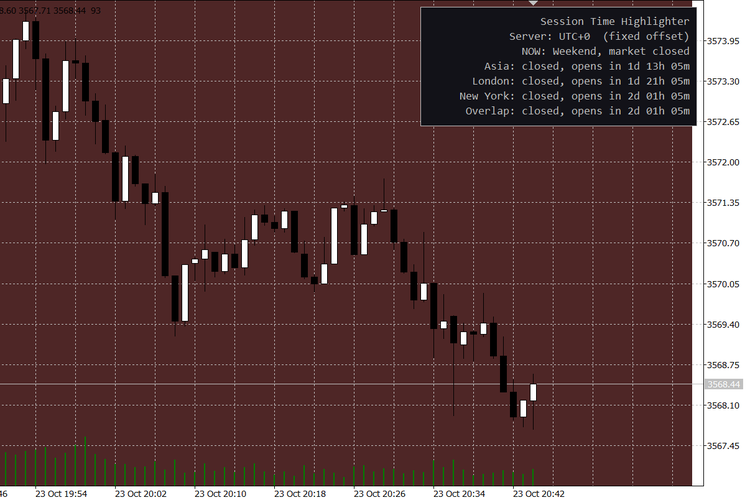
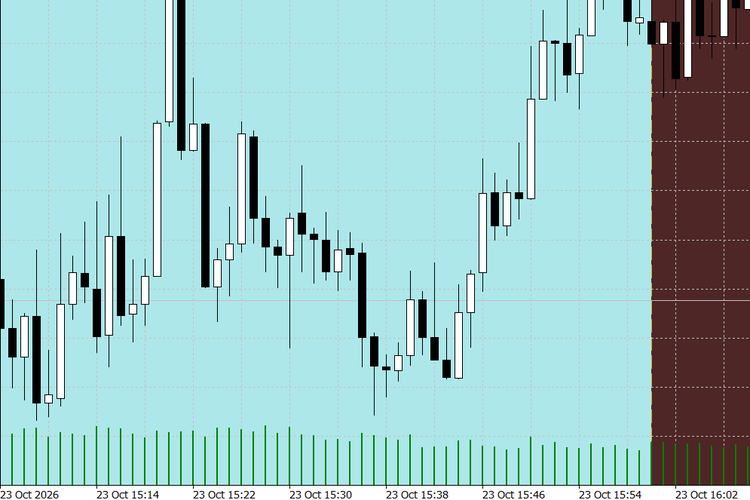
Many session indicators ask you to enter session hours in your broker’s server time. That breaks twice a year when daylight saving changes, and again whenever you move to a broker with a different server time.
This indicator defines every session in the local time of its own city:
- Asia: 09:00 to 18:00 Tokyo time
- London: 08:00 to 17:00 London time (UK daylight saving applied)
- New York: 08:00 to 17:00 New York time (US daylight saving applied)
- Overlap: the period when London and New York are both open
It converts these times to your broker’s server time automatically, including the weeks in March and October/November when the UK and US clocks change on different dates.
How to read it
- Each session is drawn as a box covering its high and low, or as full height shading.
- The London/New York overlap is shown as a dashed outline.
- The panel in the top right corner shows a “NOW” line (for example “London + New York (overlap)”, “Between sessions” or “Weekend, market closed”). Open sessions are highlighted in green, and every session shows a countdown to its next open or close.
- Hover over a box to see its exact start and end in server time.
Inputs
- Server time mode: Auto detect, NY-close broker (UTC+2 winter / UTC+3 summer), or Manual fixed offset. Manual offset: the broker’s offset from UTC in hours.
- Display: days of history, box style, fill on/off, session labels, panel on/off, text, active and panel colors, and the highest timeframe on which boxes are drawn (H1 by default).
- Sessions: on/off, start and end time in the city’s local time, and color for Asia, London and New York; on/off and color for the overlap.
Notes
- In the Strategy Tester the terminal does not provide real UTC, so Auto detect uses the NY-close model there. If your broker uses a different server time, choose Manual and enter its offset.
- Weekends are skipped. The indicator uses chart objects only, has no buffers, and removes everything it drew when detached.
Useful for intraday traders on XAUUSD, indices and major FX pairs who time entries around the London open, the New York open and the overlap.
 Order Watchdog - alerts on unknown magic, duplicates, no SL, stop outs (read-only)
Read-only watchdog for MT5: alerts on unknown magic numbers, duplicate positions after reconnects, missing SL, stop outs and what happened while it was off. Never trades.
 Opening Gap Tracker: daily and weekend gaps with fill tracking, alerts and a CSV log
Marks daily and weekend opening gaps on any chart, tracks when each gap is filled, alerts on new gaps, logs one CSV line per gap and exposes the gap to iCustom.
 Garch: GARCH, GJR-GARCH and EGARCH volatility models with forecasts
Fits GARCH(1,1), GJR-GARCH and EGARCH with normal, Student t or GED shocks by maximum likelihood, with robust standard errors and variance forecasts.
VpsToolkit - safe order send and restart-safe state for VPS EAs
Include for EAs running 24/7 on an MQL5 VPS or PC: run-where switch, order send with OK/FAIL/UNKNOWN result (no duplicate orders after a timeout), restart-safe counters, positions closed while the EA was off, append-only log and optional Telegram. No trading logic inside.