 MetaTrader 5
 Experts
 Indicateurs
 Scripts
 Bibliothèque
 Stockage
Rejoignez notre page de fans

Extreme Price Filter - indicateur pour MetaTrader 5

I'm working on several indicator projects and EA concepts.
- Vues:
- 217
- Note:
- Publié:
- Mise à jour:
-
 Vous manquez des opportunités de trading :
- Applications de trading gratuites
- Plus de 8 000 signaux à copier
- Actualités économiques pour explorer les marchés financiers
Inscription Se connecterVous acceptez la politique du site Web et les conditions d'utilisation
Si vous n'avez pas de compte, veuillez vous inscrire -
 Besoin d'un robot ou d'un indicateur basé sur ce code ? Commandez-le sur Freelance
Aller sur Freelance
Besoin d'un robot ou d'un indicateur basé sur ce code ? Commandez-le sur Freelance
Aller sur Freelance
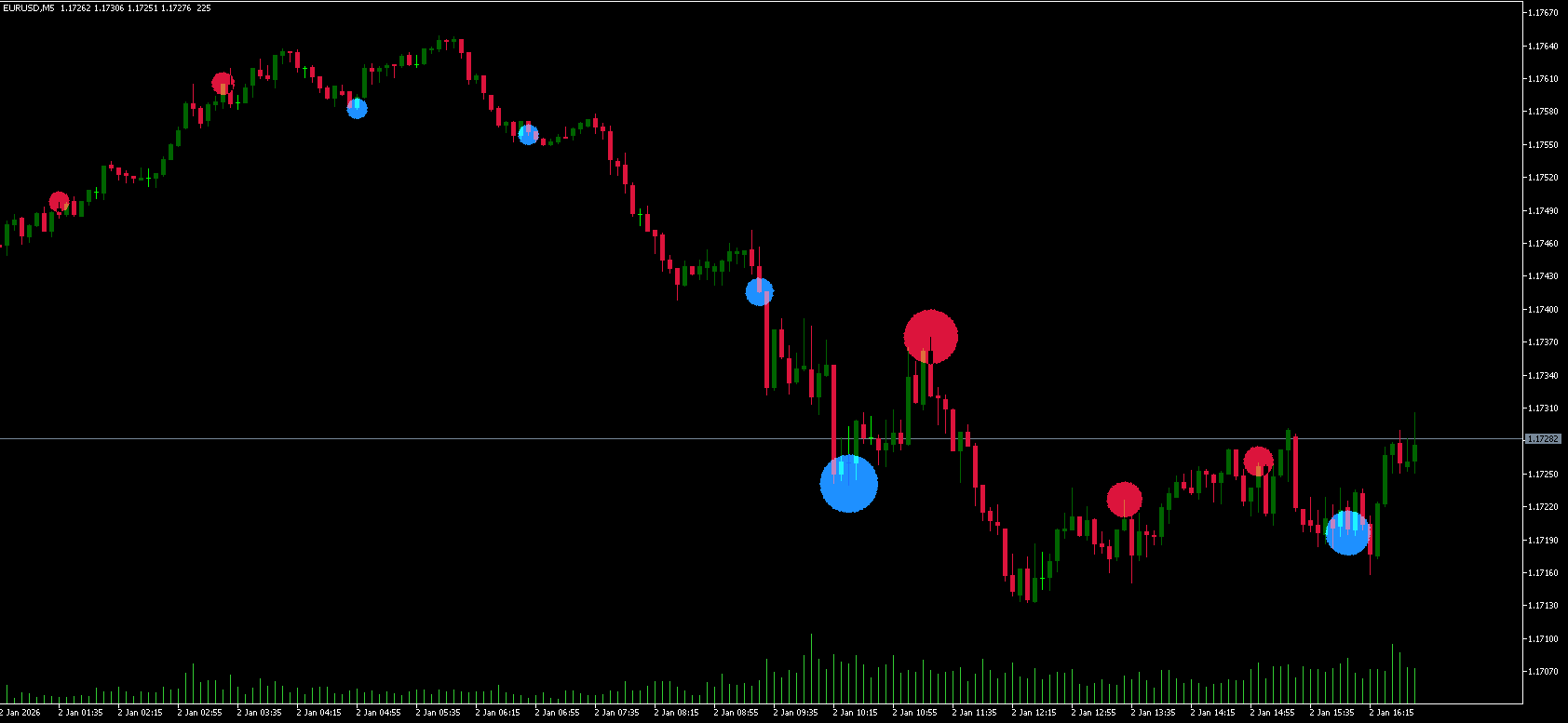
This is a filter to detect when the current price bar highs are at a local high extreme, or when current price bar lows are at a local low extreme.
The logic is:
High breach = high[i] > Local high extremum - ATR * multiplier
Low breach = low[i] < Local low extremum + ATR * multiplier
It uses two modes
1. Live bar: It will detect when the high or low of the current unclosed bar is breaching the extreme boundary
2. Closed bar only: It will only examine when closed bars have breached the extreme boundary, and this option might be more ideal for automation if the automated system only considers closed bars
Many entry signal based indicators and systems have no idea of extreme local highs and local lows. As such, they can signal a buy at an extreme high, or a sell at an extreme low. By trading these signals, you can fall into the classic Bull Trap or Bear Trap.
The purpose of this is therefore to help other signal indicators (or trading systems).
How to read it visually:
Red markers urge you not to trade a buy position on that price bar.
Blue markers urge you not to trade a sell position on that price bar.
EA usage:
input group "Extreme Price Filter"
input bool use_ext_filter = false; // Use extreme price filter
input int    DonchianPeriod  = 40;    // Extreme channel period
input int    AtrPeriodExt    = 14;    // ATR period
input double AtrMultiplier   = 0.6;   // ATR multiplier (inward band offset)
input int    InpMinBars      = 0;     // Minimum bars between breach zones
input ENUM_BREACH_MODE InpBreachMode = BREACH_CLOSED; // Breach evaluation mode
input int    InpExtFilterBars = 10;    // Bars after a sweep that still block entries


int OnInit(){

   ext_handle = iCustom(_Symbol, _Period, "::Indicators\\Custom\\Extreme Price Filter", DonchianPeriod, AtrPeriodExt, AtrMultiplier, InpMinBars, InpBreachMode, DrawObjects,
   MaxCircleBars, CircleAtrFactor, CircleWidthBars, CircleColorUp, CircleColorDown);


   if(ext_handle == INVALID_HANDLE)
     {
      Print("Error creating handle for 'Extreme Price Filter.ex5': ", GetLastError());
      return INIT_FAILED;
     }


    ArraySetAsSeries(extFilter, true);

        return INIT_SUCCEEDED;
}


bool ExtremeSweepDetected(const int side, const int bars)
  {
   int wanted  = MathMax(bars, 1);
   int available = ArraySize(extFilter);
   int n       = MathMin(wanted, available);

   if(n <= 0)
      return(false);

   for(int k = 0; k < n; k++)
     {
      if(extFilter[k] == (double)side)
         return(true);
     }

   return(false);
  }


void OnTick(){

   int ext_bars = MathMin(MathMax(InpExtFilterBars, 1);

   if(CopyBuffer(dchannel_handle, 2, 0, ext_bars, extFilter) <= 0)
     {
      Print("Error copying extreme price filter buffer: ", GetLastError());
      return;
     }

   bool ext_sweep_high = use_ext_filter && ExtremeSweepDetected(-1, InpExtFilterBars);
   bool ext_sweep_low  = use_ext_filter && ExtremeSweepDetected( 1, InpExtFilterBars);

   if(myBuySignal && !ext_sweep_high) Buy...
   if(mySellSignal && !ext_sweep_low) Sell...
}
ICT Model Tracker - Sweep, MSS and FVG Setups with Honest Statistics
Detects the ICT model on closed bars (killzone liquidity sweep, MSS with displacement or inverted FVG, retrace entry with SL and TP) and follows every setup to its result with worst-case statistics. It never trades and never repaints; EA-ready buffers.
Risk Lot Panel
On-chart panel that turns a risk setting into a lot size and shows what the broker's volume step and minimum lot do to that risk. Display only - it never places, modifies or closes an order.
 Trade Environment Check: account mode, symbol trading rules and open positions in one report
Script that reports what an EA has to cope with here: hedging or netting, trade permissions, filling modes, stop and freeze levels, volume rules, swaps and the positions already open on the symbol. Saves a report file you can attach to a Freelance order.
Opening Gap Tracker: daily and weekend gaps with fill tracking, alerts and a CSV log
Marks daily and weekend opening gaps on any chart, tracks when each gap is filled, alerts on new gaps, logs one CSV line per gap and exposes the gap to iCustom.