 MetaTrader 5
 Experts
 Indicateurs
 Scripts
 Bibliothèque
 Stockage
Rejoignez notre page de fans

- Vues:
- 135
- Note:
- Publié:
-
 Vous manquez des opportunités de trading :
- Applications de trading gratuites
- Plus de 8 000 signaux à copier
- Actualités économiques pour explorer les marchés financiers
Inscription Se connecterVous acceptez la politique du site Web et les conditions d'utilisation
Si vous n'avez pas de compte, veuillez vous inscrire -
 Besoin d'un robot ou d'un indicateur basé sur ce code ? Commandez-le sur Freelance
Aller sur Freelance
Besoin d'un robot ou d'un indicateur basé sur ce code ? Commandez-le sur Freelance
Aller sur Freelance

Margin Call Radar is a read-only risk panel for MetaTrader 5. It answers one question: how far is the account from margin call and stop out, and what happens to the margin level if the market moves against you. The indicator never opens, modifies or closes orders, so it is safe to run next to any other EA or manual trading.
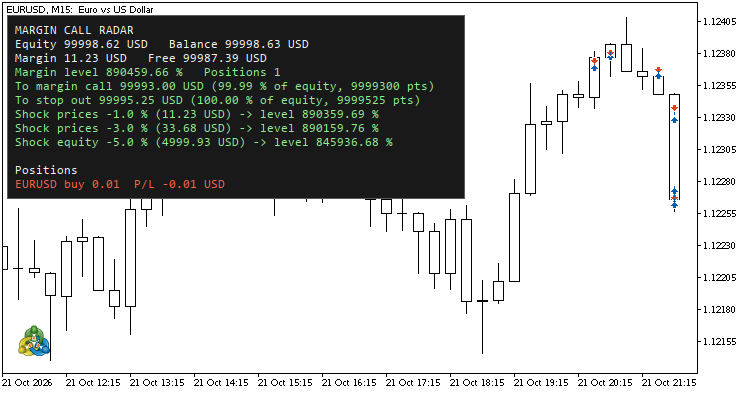
Margin Call Radar on a demo account with one EURUSD buy 0.01 position
Key Features
- Margin level in percent with color status: green = safe, gold = below margin call, red = below stop out.
- Distance to margin call and to stop out in three units: account currency, percent of equity and points of the whole book.
- Shock scenarios: adverse price move of 1% and 3% across all positions, and an equity drop of 5%, each with the margin level after the shock.
- Hedge-aware: exposure is netted per symbol, so buy 0.01 + sell 0.01 on the same symbol is not counted as double risk.
- Supports brokers with stop out in money (ACCOUNT_STOPOUT_MODE_MONEY) as well as in percent.
- Positions table: symbol, side, volume and P/L including swap.
- Prints a full report to the Experts log on start - handy on a VPS.
- Separate calculation library with a self-test indicator (30 checks).
How It Works
- Margin level = equity / margin * 100.
- Target equity for a level L = L / 100 * margin (in money mode L is used as money directly). Distance = equity - target equity.
- Point value of a position = tick value * point / tick size, scaled by the volume. Trade functions (OrderCalcProfit, OrderCalcMargin) are not available in indicators, so the panel does not use them.
- Points to a level = distance in money / point value of the netted book. For a fully hedged book a move in points is not defined, so the panel shows "n/a".
- The panel is refreshed by timer, not by ticks, so it keeps updating on quiet symbols.
Input Parameters
Panel
- InpCorner (default: upper left) - panel corner.
- InpX / InpY (default: 12 / 20) - offset from the corner, pixels.
- InpFontSize (default: 9) - font size.
- InpTextColor, InpOkColor, InpWarnColor, InpDangerColor - text and status colors.
- InpShowBackground (default: true), InpBgColor, InpBorderColor - panel background.
- InpRefreshSeconds (default: 1) - refresh interval, seconds.
Scenarios
- InpPriceMove1 (default: 1.0) - scenario 1: adverse price move, %.
- InpPriceMove2 (default: 3.0) - scenario 2: adverse price move, %.
- InpEquityShock (default: 5.0) - scenario 3: equity drop, %.
Positions
- InpShowPositions (default: true) - show the positions table.
- InpMaxPositions (default: 8) - maximum rows in the table.
Installation
- In MetaTrader 5 open File > Open Data Folder.
- Create the folder MQL5/Indicators/MarginCallRadar/ and copy all three files into it: MarginCallRadar.mq5, RadarCore.mqh and MarginCallRadarTests.mq5. The files include RadarCore.mqh from their own folder, so they must stay together.
- Open MarginCallRadar.mq5 and MarginCallRadarTests.mq5 in MetaEditor and compile them (F7), then refresh the Navigator.
Usage
Drag Margin Call Radar onto any chart: any symbol and timeframe will do. The panel appears in the chosen corner and covers the whole account, not only the chart symbol. To check the calculations, attach the MarginCallRadarTests indicator to any chart: it prints "RadarCore: all checks passed" to the Experts log and shows the result in the chart comment.
Example
Demo account, balance 100 000 USD, one position EURUSD buy 0.01:
Margin level 890459.66 %
To margin call 99993.00 USD (99.99 % of equity, 9999300 pts)
To stop out 99995.25 USD (100.00 % of equity, 9999525 pts)
Shock prices -1.0 % (11.23 USD) -> level 890359.69 %
Shock prices -3.0 % (33.68 USD) -> level 890159.76 %
Shock equity -5.0 % (4999.93 USD) -> level 845936.68 %
Manual check: 0.01 lot EURUSD = 0.01 USD per point, 1% of 1.1230 = 1123 points = 11.23 USD.
Notes
- Scenarios are estimates: a real gap, swap, commission or a change of margin requirements by the broker can make the result different.
- Please test on a demo account first.
Feedback and suggestions are welcome in the comments.
 HTF Candles (ICT Power of Three) - higher timeframe candles next to your chart
Draws the last candles of one or two higher timeframes (auto: M15 -> H4 + D1, H1 -> D1 + W1) next to your chart at real prices, with a countdown, lines to the live candle's open, high and low, alerts and EA buffers.
ICT Premium / Discount and OTE - dealing range, standard deviations, IPDA ranges
ICT dealing range from confirmed swings: premium and discount zones, equilibrium, the OTE band (62 - 79 %, 70.5 %), standard deviation targets and the IPDA 20 / 40 / 60-day ranges. No repaint. Alerts and EA buffers.
 News Lines Utility – Economic Calendar Lines and Event Panel
Short description (for the "Short description" field) Shows economic news events directly on your chart as colour-coded vertical lines with tooltips, plus a draggable event panel with upcoming and recent releases. Works on every symbol and timeframe, with filters for impact level and instrument groups (Gold & Silver, Forex Majors, Indices, Oil & Gas).
 AttachExpert: attach an EA with inputs to a chart from code
AttachExpert.mqh attaches an Expert Advisor to a chart from MQL5 code, with the inputs you choose and with "Allow Algo Trading" on or off.