 MetaTrader 5
 Experts
 Indicateurs
 Scripts
 Bibliothèque
 Stockage
Rejoignez notre page de fans

ICT Kill Zones - Asian, London, New York in New York time, with summer time - indicateur pour MetaTrader 5

I build and fix trading tools for MetaTrader 4 and MetaTrader 5:
• Expert Advisors (EAs) built from your strategy rules
• Custom indicators, alerts and on-chart panels
- Vues:
- 132
- Publié:
-
 Vous manquez des opportunités de trading :
- Applications de trading gratuites
- Plus de 8 000 signaux à copier
- Actualités économiques pour explorer les marchés financiers
Inscription Se connecterVous acceptez la politique du site Web et les conditions d'utilisation
Si vous n'avez pas de compte, veuillez vous inscrire -
 Besoin d'un robot ou d'un indicateur basé sur ce code ? Commandez-le sur Freelance
Aller sur Freelance
Besoin d'un robot ou d'un indicateur basé sur ce code ? Commandez-le sur Freelance
Aller sur Freelance
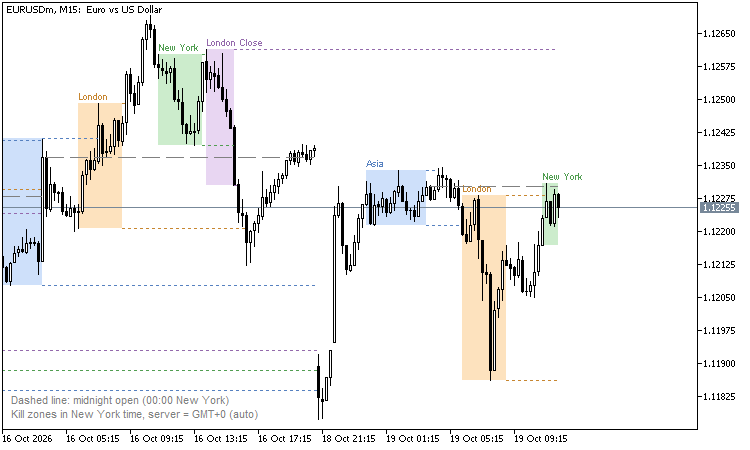
Kill zones are the hours in which ICT (Inner Circle Trader) traders expect the important moves of the day. They are defined in New York local time:
- Asian kill zone: 20:00 - 00:00
- London kill zone: 02:00 - 05:00
- New York kill zone: 07:00 - 10:00
- London Close kill zone: 10:00 - 12:00
Every time can be changed (HH:MM-HH:MM, New York time).
The problem with kill zones in MetaTrader: the chart shows the broker's server time, and the broker and New York change their clocks for summer time, in the USA and in Europe on different dates. This indicator converts every candle to New York time, so the boxes stay at the right hours all year.
Broker server clock (input)
- Auto (default): reads the server's GMT offset from the terminal. GMT+2 / GMT+3 servers are treated as "New York + 7 h", the usual forex server clock; other servers (for example GMT+0) as a fixed offset. The chart corner shows what is used.
- New York + 7 h: server midnight is 17:00 in New York, all year.
- GMT+2 / GMT+3 with European summer time dates.
- Fixed GMT offset (for example 0 or +3).
US summer time: second Sunday of March to first Sunday of November.
What it shows
- A box for each kill zone from its high to its low, with its name.
- The high and low of each finished kill zone extended to the right until price trades through them: liquidity that is often taken later, for example the Asian high or low taken in London.
- The midnight open (00:00 New York opening price) as a dashed line.
- The last 5 trading days (input). Kill zones are a few hours long, so they are drawn on M1 - H1 charts; on higher time frames the indicator shows only a short note.
- Hover a box or a line to see its prices.
Alerts
- When a kill zone starts.
- When price takes the high or low of a finished kill zone.
- Popup, push notification and e-mail.
Buffers for Expert Advisors (iCustom, not drawn)
They hold the high and low of the last FINISHED kill zone of each kind, so they never repaint:
- 0 / 1: Asian high / low
- 2 / 3: London high / low
- 4 / 5: New York high / low
- 6 / 7: London Close high / low
- EMPTY_VALUE when there is none (and on charts above H1)
Example: a London breakout EA reads buffers 0 and 1 (the Asian range) on the last closed candle.
Good to know
- The Strategy Tester has no real GMT clock, so Auto uses New York + 7 h there. In the tester, choose your broker's clock if it is different.
- The trading day starts at 17:00 New York (the usual forex day), so the Asian kill zone belongs to the next day.
- It works on any symbol.
- The indicator only draws and calculates; it never trades.
Order Blocks and Breaker Blocks (SMC) - no repaint, with mitigation and alerts
Marks the order block behind each break of market structure (the last opposite candle before the move), tracks when it is used and turns failed blocks into breaker blocks. No repaint. Alerts and buffers for EAs.
 XlsxWriter: Excel .xlsx files from MQL5 without DLL
An include file that writes real Excel workbooks (.xlsx) from MQL5 without DLLs: several sheets, numbers, text and real Excel dates, a frozen bold header and filters. Example script: the account deals and the daily results to Excel.
TesterStats: Strategy Tester report statistics in MQL5 code
Calculates the Strategy Tester report statistics from the deal history, including Z-Score, AHPR, GHPR, LR Correlation and LR Standard Error, which TesterStatistics() does not return. Checked value by value against the tester.
Session Range Breakout: Asia, London and New York high/low levels
Session Range Breakout draws the high and low of up to three intraday sessions (Asia, London and New York by default) and extends each level to the right with optional H/L labels and a range rectangle. Session hours, names and colours are configurable in server time. Optional popup, sound and push alerts fire when a bar closes outside a session range. The levels are fixed once the session closes, so the drawing does not repaint. The indicator draws chart objects only and never opens trades.