 MetaTrader 5
 Experts
 Indicateurs
 Scripts
 Bibliothèque
 Stockage
Rejoignez notre page de fans

Prop Firm Equity Guard - Daily Loss Limit and Max Drawdown Protection - expert pour MetaTrader 5

What I do:
- Vues:
- 115
- Note:
- Publié:
-
 Vous manquez des opportunités de trading :
- Applications de trading gratuites
- Plus de 8 000 signaux à copier
- Actualités économiques pour explorer les marchés financiers
Inscription Se connecterVous acceptez la politique du site Web et les conditions d'utilisation
Si vous n'avez pas de compte, veuillez vous inscrire -
 Besoin d'un robot ou d'un indicateur basé sur ce code ? Commandez-le sur Freelance
Aller sur Freelance
Besoin d'un robot ou d'un indicateur basé sur ce code ? Commandez-le sur Freelance
Aller sur Freelance

Prop Firm Equity Guard protects a trading account from breaking the most common prop firm rules. It watches equity every second and, when a limit is reached, closes all positions, deletes pending orders and keeps closing any new trade until the lock expires. It works with manual trading and with any other Expert Advisor on the same account. On a live chart it never opens trades.
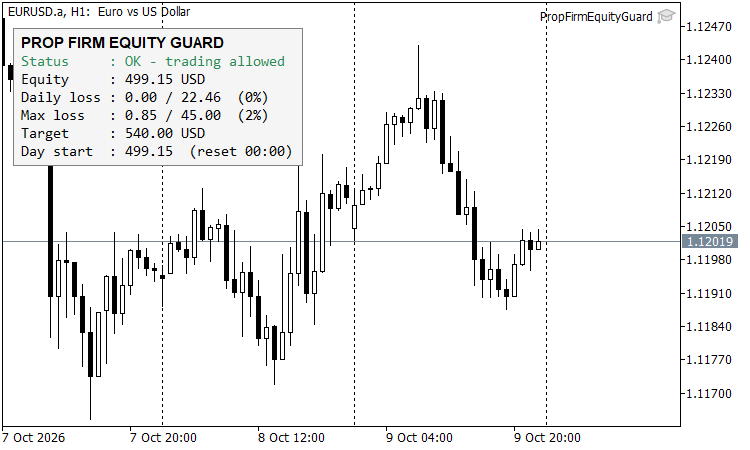
Figure 1. Prop Firm Equity Guard panel with daily loss and drawdown limits
Rules it enforces
- Daily loss limit - measured from the balance, the equity or the higher of the two at the start of the trading day. When equity falls below that level minus the limit, everything is closed and trading stays blocked until the next daily reset.
- Maximum loss - measured from the initial account balance. When it is reached, trading is blocked permanently until you reset the EA.
- Profit target (optional) - closes everything once equity reaches the target, so a passed challenge is not given back.
- Early warnings - a message and push notification when a set percentage of a limit is used (default 80%).
Features
- Status panel on the chart: lock state, equity, daily loss used, maximum loss used, target and the day start value.
- State is saved in terminal global variables, so restarting the terminal or the EA does not reset the daily start value or an active lock.
- Daily reset hour is configurable to match your firm's server time rules.
- Filters: manage all trades on the account, or only one magic number, or only the chart symbol.
- Checks on every tick of the chart symbol and once per second on a timer, so trades on other symbols are also covered.
Input parameters
- InpDailyLossPct - daily loss limit in percent (default 5).
- InpDailyBase - measure the daily loss from Balance, Equity or the Higher of both at day start.
- InpMaxLossPct - maximum overall loss in percent of the initial balance (0 turns it off).
- InpInitialBalance - initial balance of the challenge (0 = balance when the EA is first attached).
- InpProfitTargetPct - profit target in percent (0 turns it off).
- InpResetHour - hour of the daily reset in server time.
- InpWarnLevel - warning level in percent of a limit.
- InpMagic - manage only this magic number (-1 = every trade on the account).
- InpAllSymbols - manage all symbols or only the chart symbol.
- InpPushAlerts - send MT5 push notifications.
- InpTesterDemo - in the Strategy Tester only, opens one sample trade per day so you can watch the guard lock and release. It has no effect on a live chart.
Important
The guard closes trades at the first price update after a limit is crossed. In fast markets, at the weekly open or on news, the final loss can be larger than the limit because of slippage and gaps. Set the limits slightly below your firm's rules, for example 4.5% for a 5% daily rule, and keep AutoTrading enabled so the guard is able to close trades. Always check your firm's exact rule definitions.
Tested in the Strategy Tester on EURUSD H1 (January - February 2025, 2% daily limit, 10% maximum loss): 10 daily locks with automatic release at the next reset, one permanent maximum loss lock, and no failed close operations.
BotGuard - Terminal Health Heartbeat for VPS Monitoring
A lightweight, non-trading Expert Advisor that writes a JSON health heartbeat (connection, AutoTrading state, equity, daily P/L) and an equity log, so a VPS watchdog can detect frozen or disconnected terminals and alert you.
 Fractal Dimension Trend Strength Index
A rolling, Katz-style fractal dimension of price that collapses toward 1.0 during directional moves and rises toward 2.0 during choppy, range-bound action, giving traders a single number for how "trendy" the current market is.
Session High Low - Asian, London and New York Range Boxes
Draws the Asian, London and New York session ranges as colored boxes with their high and low, plus dotted extension lines for breakout trading. Same ranges on every timeframe up to H1.
Daily PnL Percentage Overlay - prop firm daily loss limit
Displays today's floating PnL as % of balance plus how much of the daily-loss budget is consumed — the number that actually matters for prop firm rules (FTMO, Apex, TopStep). Color code: green under 50% of limit, orange under 80%, red above. Configurable reset hour. Free to use. Inputs: InpLimitPct (daily loss limit %), InpResetHour (day reset, server time), colors, font size. Attach to any chart — reads account equity live.