 MetaTrader 5
 Experts
 Indicateurs
 Scripts
 Bibliothèque
 Stockage
Rejoignez notre page de fans

ATS Risk Library - lot size from the stop, daily loss, drawdown and exposure guards - bibliothèque pour MetaTrader 5

- Vues:
- 39
- Note:
- Publié:
-
 Vous manquez des opportunités de trading :
- Applications de trading gratuites
- Plus de 8 000 signaux à copier
- Actualités économiques pour explorer les marchés financiers
Inscription Se connecterVous acceptez la politique du site Web et les conditions d'utilisation
Si vous n'avez pas de compte, veuillez vous inscrire -
 Besoin d'un robot ou d'un indicateur basé sur ce code ? Commandez-le sur Freelance
Aller sur Freelance
Besoin d'un robot ou d'un indicateur basé sur ce code ? Commandez-le sur Freelance
Aller sur Freelance
ATS Risk Library is one include file, ATS_RiskLib.mqh, with five classes. You call them from your own EA; nothing in the library opens, changes or closes a trade.
The classes
CAtsSizer - lot size from the stop distance
- Modes: fixed lot, % of balance, % of equity, fixed money amount.
- Floors the lot to the volume step. It NEVER rounds up. If the allowed risk is smaller than the broker minimum lot, Lots() returns 0.0 and LastReason() says why. Rounding up to the minimum lot is a common way for a "1% risk" EA to risk more than that on a small account.
- Optional lot cap, and a free-margin check (OrderCalcMargin).
CAtsDayGuard - daily limits
- Daily loss limit as % of the day-start balance and/or a money amount (the smaller one wins), optional daily profit target, max trades per day.
- You choose the server hour at which a new day starts, and whether open profit/loss counts.
- Day-start balance and lock are saved in GlobalVariables: restarting the terminal in the middle of the day does not reset the limit.
- Remaining(), Used() and Level() (OK / WARNING / LIMIT REACHED) are ready for a panel.
CAtsDrawdownGuard - maximum total loss
- Static (from the initial balance), trailing on equity, or trailing on balance.
- Optional "floor stops at the initial balance" for trailing rules.
- High-water mark and lock are saved, so a restart cannot forget them.
CAtsExposure - open positions and money at risk
- Counts positions (whole account, one symbol or one magic number) and adds up the money lost if every stop loss is hit. Positions without a stop loss are counted separately.
- CanAdd(extraRisk) answers whether one more trade fits under a position limit and a total-risk limit (% of equity).
CAtsFilters - spread, session, Friday cutoff
- Maximum spread in points, a trading window in server time (windows that cross midnight work), and an hour after which Friday trading stops.
How to use it in an EA
#include "ATS_RiskLib.mqh" CAtsSizer sizer; CAtsDayGuard day; CAtsDrawdownGuard dd; CAtsFilters flt;
OnInit():
  sizer.Init(_Symbol, ATS_LOT_RISK_BALANCE, 0.0, 1.0);          // risk 1% of balance
  day.Init("mybot", "", -1, true, 0, 3.0, 0.0, 0.0, 0);         // daily loss 3%
  dd.Init("mybot", ATS_DD_STATIC, 10.0, 0.0, true);              // max loss 10%
  flt.Init(_Symbol, 30, false, 0, 0, 0, 0);                      // spread <= 30 points
Before an order: string why; day.Update(); dd.Update(); if(day.CanOpen(why) && dd.CanOpen(why) && flt.Ok(why)) { double lots = sizer.Lots(slDistance, ORDER_TYPE_BUY, SymbolInfoDouble(_Symbol, SYMBOL_ASK)); if(lots > 0.0) { /* send the order */ } else Print(sizer.LastReason()); }
Call day.MarkDirty() from OnTradeTransaction when a deal is added, so the next Update() rescans the history.
Files
- ATS_RiskLib.mqh - the library. Put it next to your EA, or in MQL5\Include and change the include line to <ATS_RiskLib.mqh>.
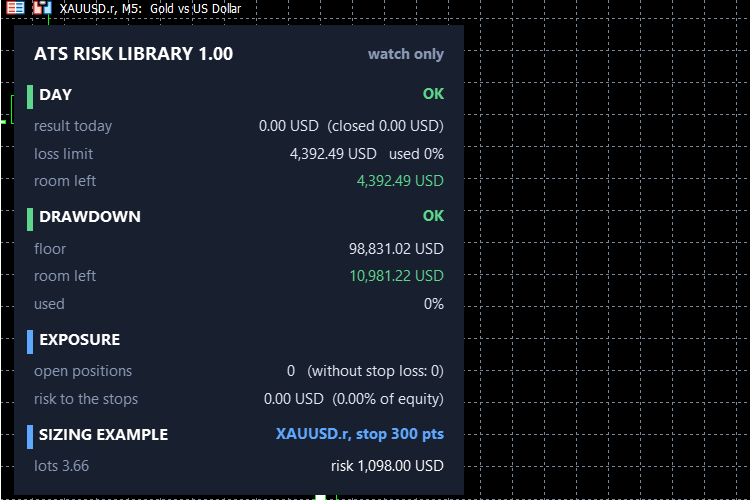
- ATS_RiskLib_Demo.mq5 - an account guard that opens no trades. It draws a small status panel (day, drawdown, exposure, and the lot your rule gives for a stop you choose) and raises an alert at the warning level and when a limit is reached. InpEnforce is false by default: it only watches. If you switch it on, it closes the positions of the account (or of one magic number) when a limit is reached. Try it on a demo account first.
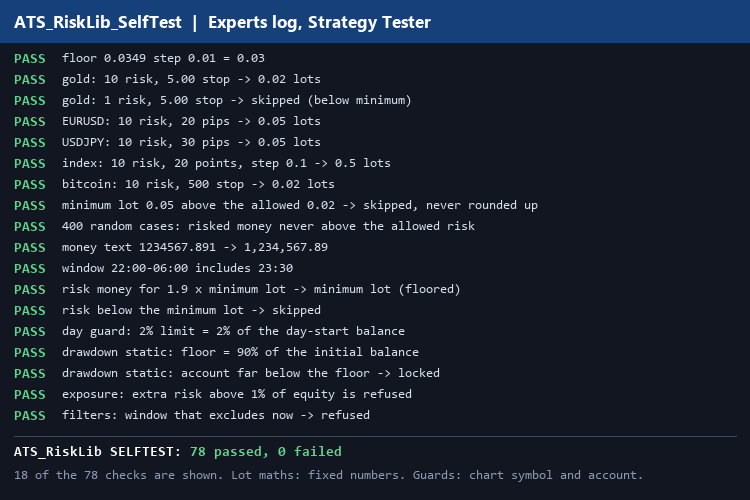
- ATS_RiskLib_SelfTest.mq5 - run it once in the Strategy Tester (any symbol, a short period). It prints PASS or FAIL for 78 checks and a summary line: "ATS_RiskLib SELFTEST: N passed, M failed". The lot maths is tested with fixed numbers that mimic gold, EURUSD, a JPY pair, an index and bitcoin; the guards are tested on the symbol and account of the chart.
A note on honesty
The checks above prove the arithmetic and the logic of the guards, including the rounding rule. They are not a guarantee that your broker's contract specifications, commissions or execution will match: always check the lot your rule gives against your own broker on a demo account. A daily or drawdown limit also cannot stop a gap or a fast move through your stop; it can only refuse new trades and, if you use the demo guard in enforcing mode, close positions as soon as it sees the limit reached.
Notes
No orders are sent by the library. The demo EA does not trade unless you set InpEnforce to true, and even then it only closes positions. Compiled without warnings in the MetaEditor of two MetaTrader 5 terminals; the self-test and the demo panel were run on a hedging demo account. Netting accounts were not tested.
 Trend BOSS
The Trend BOSS Indicator identifies regimes such as trending, ranging or volatile using a Bag-of-SFA-Symbols (BOSS) classifier. Gate your strategies behind specific regimes or use the indicator to identify various market conditions.
Market Activity from Quote Waits
Measures market activity from the waits between quotes. An ACD model with the daily rhythm removed gives one ratio per tick: 1 is normal, 2 twice as busy.
ATS Prop Rules Monitor - prop firm challenge scoreboard with the room left on every rule
One panel for the rules of a prop firm challenge: daily loss, maximum loss (static or trailing), profit target, minimum trading days and the best-day (consistency) rule. For each one it shows how much is used and how much room is left, in money. "One more trade" tells you the largest lot size that still keeps a stop-out inside the room left today and in the max-loss room. Read-only: it never opens, changes or closes a trade. The presets hold typical values; firms change their rules, so check yours and use the Custom preset. Built on the ATS Risk Library (ATS_RiskLib.mqh, included).
MACD Signals
Indicator edition for new platform.