 MetaTrader 5
 Experts
 Indicateurs
 Scripts
 Bibliothèque
 Stockage
Rejoignez notre page de fans

ICT Killzones and Session Pivots - indicateur pour MetaTrader 5

- Vues:
- 164
- Note:
- Publié:
-
 Vous manquez des opportunités de trading :
- Applications de trading gratuites
- Plus de 8 000 signaux à copier
- Actualités économiques pour explorer les marchés financiers
Inscription Se connecterVous acceptez la politique du site Web et les conditions d'utilisation
Si vous n'avez pas de compte, veuillez vous inscrire -
 Besoin d'un robot ou d'un indicateur basé sur ce code ? Commandez-le sur Freelance
Aller sur Freelance
Besoin d'un robot ou d'un indicateur basé sur ce code ? Commandez-le sur Freelance
Aller sur Freelance
Killzones are the windows of the trading day when price tends to move with intent: the Asian range, the London open, the New York morning and the New York afternoon. The concept comes from the ICT (Inner Circle Trader) methodology created by Michael J. Huddleston, and it has become one of the most used session tools among gold, index and forex traders.
This indicator brings killzones to MetaTrader 5 and solves the detail that usually breaks them on this platform: time. Sessions are set in New York time and converted from your broker's server clock automatically, including the daylight-saving changes in the United States and in Europe, so every box lands on the right candles all year round.
What it draws
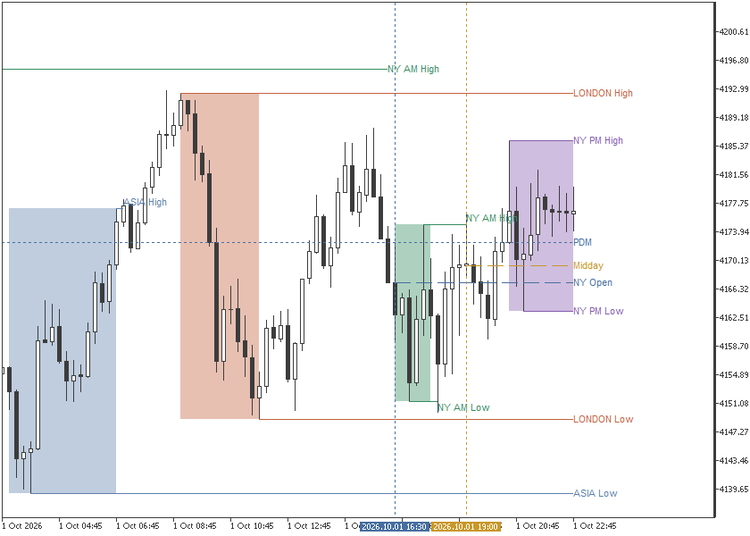
- Killzones: five configurable sessions (Asia, London, NY AM, NY Lunch and NY PM), each with its own name, color and time window.
- Session pivots: the high and low of every session, carried forward until price trades through them, with labels, an optional midpoint and an alert the moment a pivot is taken.
- Previous day, week and month: highs, lows and midlines, with hit-rate statistics in the tooltips.
- Key times: an opening-price line and a vertical marker at up to three times of your choice, such as the 09:30 New York open.
Set it once for your broker
The defaults fit most brokers whose server runs at GMT+2 in winter and follows the US daylight-saving calendar. If your broker follows the European calendar, as MetaQuotes-Demo does, set "broker daylight-saving calendar" to EU; if its winter offset is different, set "broker server GMT offset in winter". From then on, every session follows New York time automatically.
Inputs
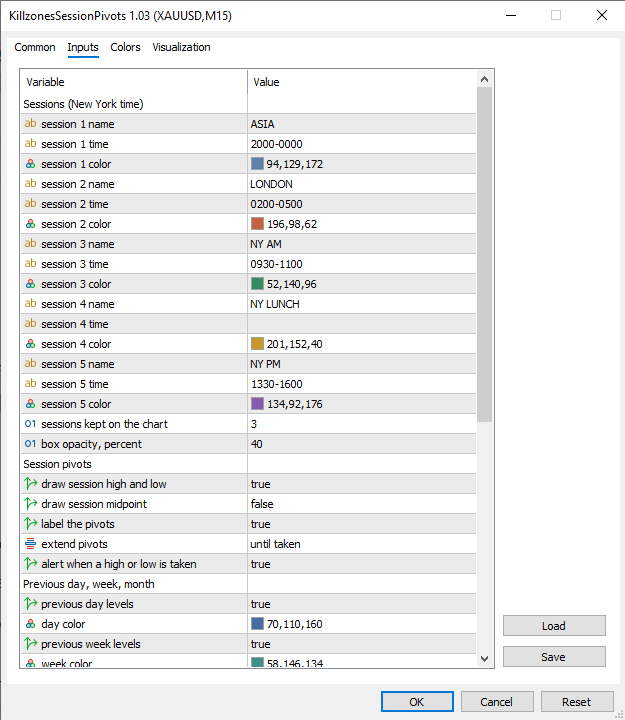
Every setting sits in five short groups, and every time is typed in New York time: HHMM-HHMM for a session, HHMM for a key time. Leave a time empty and that session or key time is switched off.
- Sessions: name, time window and color of each of the five killzones. The defaults follow the classic ICT schedule: Asia 20:00-00:00, London 02:00-05:00, NY AM 09:30-11:00 and NY PM 13:30-16:00, with NY Lunch ready to be filled in (12:00-13:00 is the usual choice). Two more settings decide how many past sessions stay on the chart and how strong the box fill looks.
- Session pivots: draw the high and low of each session, add the midpoint and label the lines. A pivot can stop at the bar that takes it, which shows at a glance where liquidity was swept, or keep running as a reference. The hover tooltip of every pivot shows how often that session's high or low has been taken across the history on the chart.
- Alerts: one switch. The alert fires once, at the moment price takes a session high or low or a previous day, week or month level.
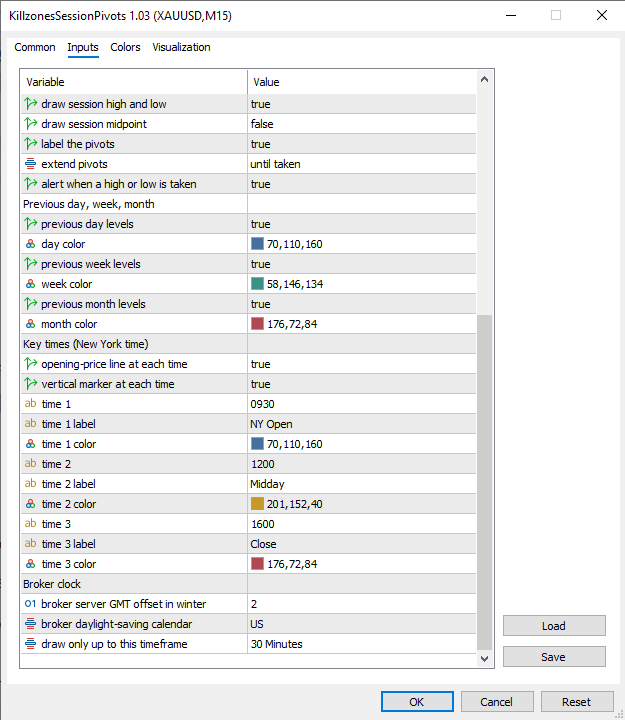
- Previous day, week, month: one switch and one color per period. Each period draws its high, low and midline, labeled PDH, PDL, PDM and so on, with the same hit-rate statistic in the tooltip.
- Key times: three times, each with its own label and color. At each one the indicator marks the opening price with a horizontal line and the moment with a vertical line, and either line can be turned off. Defaults: 09:30 NY Open, 12:00 Midday and 16:00 Close.
- Broker clock: the server's winter GMT offset and its daylight-saving calendar, all the indicator needs to place every session on the right candles, plus the highest timeframe it draws on. The default is M30, so H1 and above stay clean.
Works on any symbol, on timeframes up to M30 by default. One file, chart objects only, no DLL.
Arixis Market Regime Map - Trend, Range and Volatility Classifier
Arixis Market Regime Map is a non-repainting MT5 indicator that classifies market conditions as Trend Up, Trend Down, Range or Transition using price efficiency, normalized slope, volatility, market structure and multi-horizon agreement.
 Edge or Luck: bootstrap test of your average trade
Resamples your closed trades 10,000 times to show whether your average trade is an edge or could still be luck: the 95% range of the average and the chance it is below zero.
 AN Guard Lite - Trade Journal and Report for any EA
Writes a CSV journal of every trade with the exit reason, and a report that shows how far each trade ran, in R. It never trades.
Session Sweep Boxes
Draws Asian, London and New York session range boxes and marks liquidity sweeps: a closed bar that wicks beyond a completed session's high or low and closes back inside. Non-repainting arrows, extended session levels, alerts and iCustom-ready buffers.