 MetaTrader 5
 Experts
 Indicateurs
 Scripts
 Bibliothèque
 Stockage
Rejoignez notre page de fans

Session high-low indicator - indicateur pour MetaTrader 5

Building, learning, and sharing one project at a time.
- Vues:
- 1463
- Publié:
- Mise à jour:
-
 Vous manquez des opportunités de trading :
- Applications de trading gratuites
- Plus de 8 000 signaux à copier
- Actualités économiques pour explorer les marchés financiers
Inscription Se connecterVous acceptez la politique du site Web et les conditions d'utilisation
Si vous n'avez pas de compte, veuillez vous inscrire -
 Besoin d'un robot ou d'un indicateur basé sur ce code ? Commandez-le sur Freelance
Aller sur Freelance
Besoin d'un robot ou d'un indicateur basé sur ce code ? Commandez-le sur Freelance
Aller sur Freelance
Session High-Low
The idea behind it
Every session-based trading approach starts from the same manual step: mark where the range was before you can trade its breakout, its fade, or its overlap with the next session. This indicator removes that step. It watches every bar that falls inside a user-defined time window, records the highest high and lowest low reached during that window, and draws the result on the chart the moment the session closes — while the currently forming session stays live, growing on every tick until its own window ends.
It is symbol- and timeframe-agnostic by design: the session window is defined purely in hours/minutes of broker/server time, so the same inputs work whether you are marking the Asian range on Gold, the London range on a FX major, or a custom news-release window on an index. Lower timeframes (M1–M15) give the most precise range boundaries since the hour/minute check that opens and closes each session needs enough bar resolution to catch the transition cleanly.
How to interpret it
- The session window — from InpSessionStartHour:InpSessionStartMinute to InpSessionEndHour:InpSessionEndMinute, server time. Overnight windows (e.g. 23:00 → 08:00) are handled automatically, so the same logic covers same-day and cross-midnight sessions without extra configuration.
- The completed sessions — once a session's window has closed, its high/low is fixed and stays on the chart as a historical reference level. InpSessionsToShow controls how many of these remain plotted at once, so older sessions age off automatically instead of cluttering the chart indefinitely.
- The current session — the most recent, still-open window is redrawn on every tick rather than only on a new bar, so its high/low always reflects the latest price. With InpExtendCurrentSession enabled, its right edge is stretched forward to the current time instead of stopping at the session's nominal end, making the "still forming" state visually obvious.
- Display mode — a single rectangle spanning the session's full range ( Box ), or two independent horizontal lines for the high and the low ( Lines ), depending on which reads better on your chart.
External variables (inputs)
| Input | Default | Purpose |
|---|---|---|
| InpSessionStartHour / InpSessionStartMinute | 8 / 0 | Start of the session window, broker/server time. |
| InpSessionEndHour / InpSessionEndMinute | 16 / 0 | End of the session window, broker/server time. If earlier than the start, the window is treated as overnight. |
| InpSessionsToShow | 10 | Number of past sessions kept visible on the chart before they age off. |
| InpDisplayMode | Box | Draws the session range as a single rectangle (Box) or as separate high/low lines (Lines). |
| InpHighLineColor / InpLowLineColor | Lime / Red | Colors used for the high and low lines in Lines mode. |
| InpBoxColor | DodgerBlue | Border color of the rectangle in Box mode. |
| InpLineStyle / InpLineWidth | Dash / 1 | Line style and width applied to whichever display mode is active. |
| InpShowLabels | true | Shows a small "H: ... L: ..." price label next to each session. |
| InpExtendCurrentSession | true | Stretches the still-open session's right edge forward to the current time instead of its nominal end. |
Recommended use
Works on any symbol and any timeframe — the session logic is purely time-based, not price-pattern based, so it applies equally to marking the Asian range ahead of a London breakout, the London range ahead of the New York overlap, or a fixed window such as a news release. Check your broker's server time against the actual session hours you intend to mark before trusting the default inputs, since server-time offsets vary by broker and by daylight-saving changes on each side of a session's home timezone.
All chart objects are created under a single internal name prefix and are fully removed via ObjectsDeleteAll() in OnDeinit() when the indicator is detached, so it leaves nothing behind on the chart.
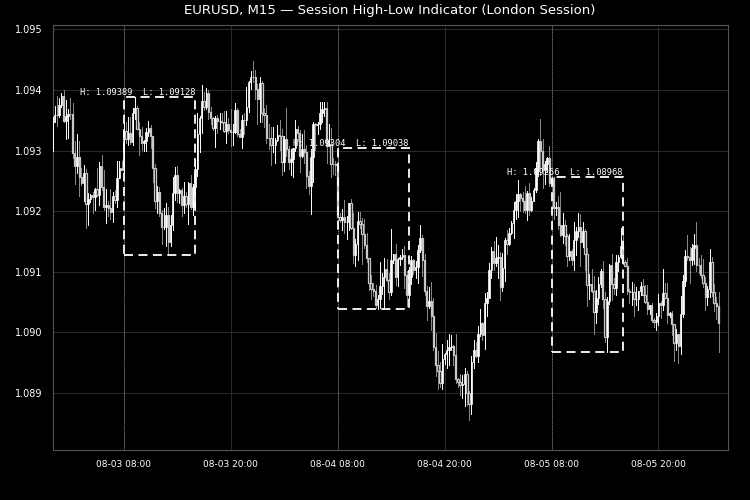
Fig. 1. Session ranges locked in as dashed boxes on XAUUSD M15, with the current session still extending live. Rendered in black and white per the Code Base image guidelines
Quantora Candle Countdown MT5 - Professional Candle Timer and Countdown Tool
Professional open-source Candle Countdown for MetaTrader 5. Displays a live digital candle timer, progress bar, elapsed and remaining time, market status and configurable countdown alerts with a modern Quantora dashboard.
 Professional Margin Requirement Calculator for MetaTrader 5
Professional open-source Margin Calculator for MetaTrader 5. Calculates required margin, Free Margin impact, Margin Level, position value and margin safety with a modern Quantora dashboard.
MT5 Trade Report
Displays a complete trading statistics table directly on the chart — Net Profit, Profit Factor, Drawdown, Win Rate and more — calculated from your full account history. Purely informational, free for everyone.
Quantora Session Clock MT5 - Professional Forex Trading Session Monitor
Professional open-source Session Clock for MetaTrader 5. Displays Sydney, Tokyo, London and New York trading sessions with live status, countdown timers, progress bars, overlap information and configurable alerts.