 MetaTrader 5
 Experts
 Indicateurs
 Scripts
 Bibliothèque
 Stockage
Rejoignez notre page de fans

Intraday Range Analyzer - indicateur pour MetaTrader 5

- Vues:
- 8642
- Note:
- Publié:
- Mise à jour:
-
 Vous manquez des opportunités de trading :
- Applications de trading gratuites
- Plus de 8 000 signaux à copier
- Actualités économiques pour explorer les marchés financiers
Inscription Se connecterVous acceptez la politique du site Web et les conditions d'utilisation
Si vous n'avez pas de compte, veuillez vous inscrire -
 Besoin d'un robot ou d'un indicateur basé sur ce code ? Commandez-le sur Freelance
Aller sur Freelance
Besoin d'un robot ou d'un indicateur basé sur ce code ? Commandez-le sur Freelance
Aller sur Freelance
A visual indicator designed to help traders understand the typical price movement during specific intraday sessions. By marking each historical session with a rectangle and calculating range statistics, it provides an immediate sense of "how much the market typically moves" during your trading window.
KEY FEATURES
- Visual session markers: each analyzed session is drawn as a rectangle on the chart, with the top at the session high and bottom at the session low
- Customizable session period: define any start and end hour (supports overnight sessions that cross midnight)
- Configurable lookback: choose how many historical days to analyze
- Multiple statistics displayed: average, minimum, maximum, and standard deviation of the session ranges
- Optional labels: show the range value (in points) directly on each rectangle
- Adaptive timeframe: works on any chart timeframe; calculations are performed on a configurable analysis timeframe (M5 default for higher precision)
- Color customization: rectangles, labels, and text colors fully configurable
- Information panel: clean text panel in the corner of the chart showing all statistics
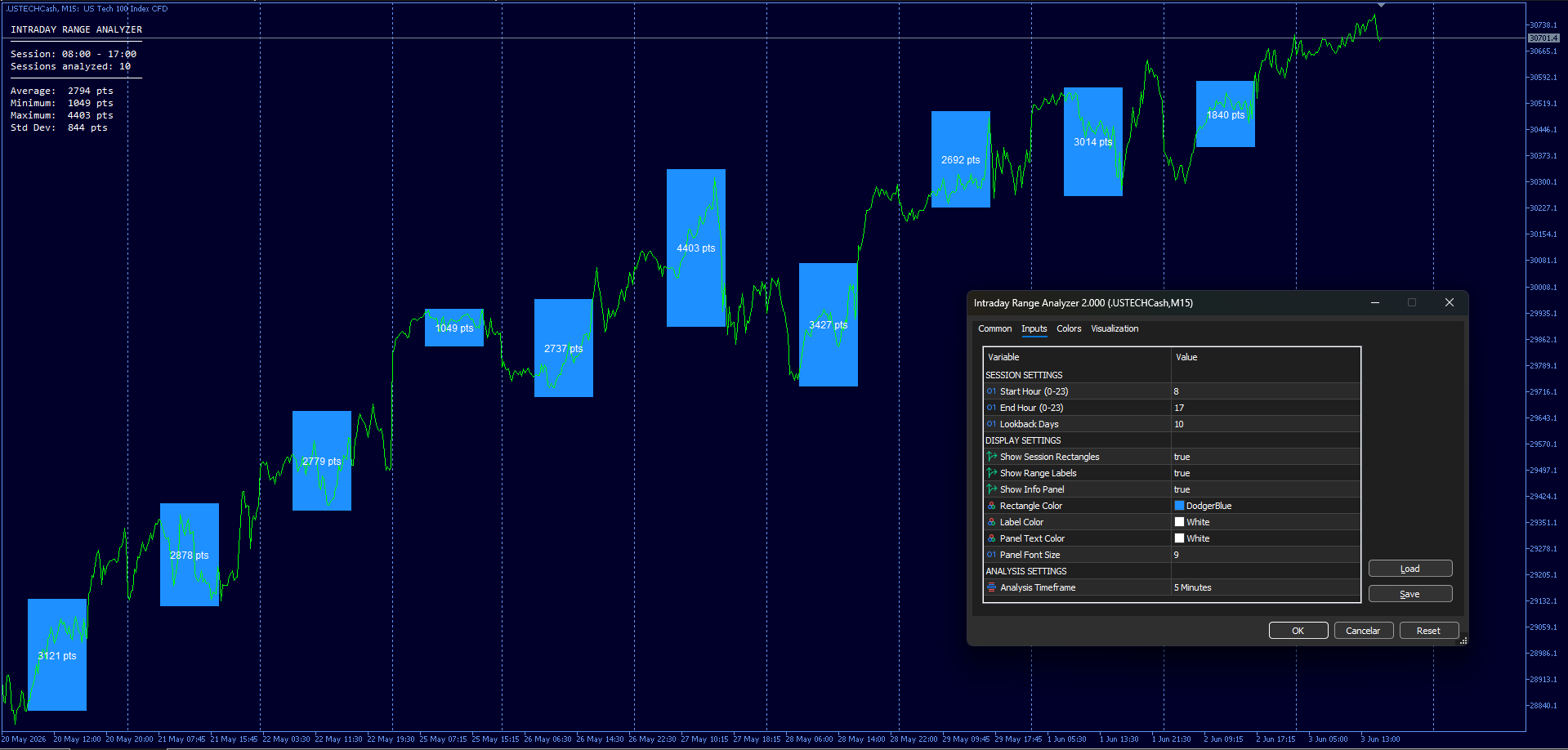
INPUT PARAMETERS
Session Settings:
- Start Hour: hour when the analyzed session begins (0-23)
- End Hour: hour when the analyzed session ends (0-23)
- Lookback Days: number of historical days to analyze
Display Settings:
- Show Rectangles: enable/disable session markers on the chart
- Show Labels: enable/disable range value labels inside rectangles
- Show Info Panel: enable/disable the statistics panel
- Rectangle Color, Label Color, Panel Text Color
Analysis Settings:
- Analysis Timeframe: timeframe used for high/low calculation (default M5)
USAGE TIPS
- For day trading: analyze the specific session you trade (e.g., London open, NY session) to understand typical range expectations
- For position sizing: use AIR to size positions according to session volatility
- For stop loss placement: ranges below 1x AIR are likely intraday noise; beyond 1x AIR may indicate real momentum
- Higher Lookback Days = more statistically stable averages, but slower to adapt to regime changes
- Use 5-10 days for short-term sensitivity, 20-30 days for stable benchmarks
SubScaler
This is a helper indicator which allows you to adjust vertical scale of a subwindow manually, which is useful for zooming in and zooming out graphs of your favourite indicator placed in the same subwindow.
The Decycler II
The Decycler II: John Ehlers, "Stocks & Commodities V. 33:09", стр.12-15
Extended Heikin Ashi Indicator
Extended version of the original Heikin Ashi indicator.
T3 floating levels (2)
Updated T3 floating levels