AbacuQuant 3.7 — The Complete User Manual: From Installation to Live Portfolio

AbacuQuant 3.7 — The Complete User Manual: From Installation to Live Portfolio
A comprehensive, practical guide to configuring, optimizing, and deploying AbacuQuant — the institutional-grade algorithmic trading system for MetaTrader 5. Covers all 11 strategies, 8-layer risk management, AI integration (Gemini, ChatGPT, DeepSeek), professional backtesting protocols, and real portfolio examples across 5 asset classes.
Author: Cristian Castillo | Version: 3.7 | Date: March 2026
Table of Contents
- What is AbacuQuant and Why It's Different
- Installation and First Steps
- System Architecture: How It Works Inside
- Complete Guide to Input Parameters
- The 11 Trading Strategies Explained
- 8-Layer Risk Management System
- AI Configuration (Gemini, ChatGPT, DeepSeek) — Detailed Setup
- The Importance of Backtesting and Forward Testing
- Validation with Every Tick Mode
- Professional Optimization Protocol
- Real Examples by Asset Class
- USA Compliance Mode (NFA/CFTC)
- Real-Time Dashboard and Notifications
- Secrets and Lessons Learned
- Frequently Asked Questions (FAQ)
1. What is AbacuQuant and Why It's Different
AbacuQuant is a professional Expert Advisor (EA) for MetaTrader 5 that combines multiple trading strategies, artificial intelligence, and an institutional-grade risk management system in a single .mq5 file. It requires no external DLLs, making it 100% compatible with the MQL5 Market and any VPS environment.
What AbacuQuant Offers
- 11 independent strategies: Imbalance (ATR), Fibonacci, Candle Patterns (17 patterns), Support/Resistance, Bollinger Bands, RSI, EMA, MACD, ADX, ATR Volatility, and Stochastic.
- AI integration: Connects with Google Gemini, OpenAI (ChatGPT/GPT-4o/GPT-5), DeepSeek, and any custom provider to confirm or analyze trading signals in real time.
- 8 layers of risk management: Stop Loss (real or virtual), Take Profit, Trailing Stop, Break Even, partial close, daily P/L limit, Equity Stop, and maximum drawdown control.
- Grid/Recovery system: Configurable controlled martingale with strict limits and intelligent loss recovery.
- Advanced filters: Spread filter, session filter (3 configurable sessions), MTF filter (multi-timeframe), correlation filter, and account load filter.
- USA NFA/CFTC compliance: Dedicated module for US brokers with FIFO rules, anti-hedging, and leverage limits.
- Binary persistence: Saves recovery data and statistics to disk to survive terminal restarts.
- Professional graphical dashboard: Real-time panel with performance metrics, strategy status, and AI analysis directly on the chart.
- Notification system: Push, email, and automatic trade journal.
- Adaptable to ANY instrument: Forex, indices, metals, oil, ETFs, individual stocks — AbacuQuant adapts via input optimization.
TIP: AbacuQuant is not a "black box." Every parameter is configurable and transparent. The key to its success lies in the intelligent optimization of its inputs for each specific instrument and timeframe.
Who is AbacuQuant For?
AbacuQuant is designed for both experienced traders looking to automate their strategies and those learning algorithmic trading. Its preset system (Conservative, Balanced, Aggressive) allows you to start quickly, while Custom mode offers complete control over every parameter.
2. Installation and First Steps
System Requirements
| Requirement | Minimum | Recommended |
|---|---|---|
| MetaTrader 5 | Build 3000+ | Latest version |
| Operating System | Windows 10 | Windows 11 / Server 2022 |
| RAM | 4 GB | 8+ GB |
| Historical Data | 1 year (H1) | 5+ years (with ticks) |
| Internet | Required | VPS with <10ms latency |
| Broker Account | Demo or Real | ECN/STP with low spreads |
Installation Steps
- Step 1: Copy the file AbacuQuant_3.7.mq5 to the MQL5/Experts/ folder in your MetaTrader 5 terminal.
- Step 2: Open MetaEditor and compile the file (F7). Make sure there are no errors.
- Step 3: In MetaTrader 5, open a chart of the desired instrument (e.g., EURUSD, NAS100, XAUUSD).
- Step 4: Drag AbacuQuant from the "Navigator" panel to the chart.
- Step 5: In the parameters window, select a Preset (we recommend CONSERVATIVE to start).
- Step 6: Enable "Allow Algorithmic Trading" in MT5 (menu Tools > Options > Expert Advisors).
- Step 7: If using AI, add the allowed URLs in Tools > Options > Expert Advisors > "Allow WebRequest for the following URLs."
WARNING: For the AI module, you MUST add the provider URLs to the WebRequest allowed list. Without this, MetaTrader 5 will block the connections and AI will not work.
URLs to Add in WebRequest
- https://generativelanguage.googleapis.com — for Google Gemini
- https://api.openai.com — for ChatGPT / GPT-4o / GPT-5
- https://api.deepseek.com — for DeepSeek
3. System Architecture: How It Works Inside
AbacuQuant operates with a modular architecture where each component can be activated or deactivated independently. This allows adapting the EA to any trading style and any financial instrument.
Execution Flow (OnTick)
- Synchronization: Validates connection, prices, and that the market is open.
- Pause controls: Checks if the EA is paused, equity stop triggered, or loss limit hit.
- Pre-trade filters: Active session, spread OK, account load, daily P/L limit.
- Open position management: Trailing Stop, Break Even, partial close, virtual SL.
- Signal detection (new bar only): Each active strategy evaluates conditions.
- Confluence: If multiple strategies share the same group, ALL must agree.
- AI confirmation (optional): If active, the signal is sent to AI for validation.
- Execution: If all validations pass, lot size is calculated and the trade is opened.
- Dashboard: The graphical panel is updated every 2 seconds.
Signal Groups System
Each strategy has a SignalGroupID parameter. When two or more strategies share the same GroupID, they form a "confluence group." This means ALL strategies in the group must signal at the same time for a trade to execute. For example, if you assign Imbalance and RSI to group 1, both must confirm the same direction.
If each strategy has a different GroupID, they operate independently. The Magic Number for each group is MagicNumberBase + GroupID , allowing you to track each strategy's performance separately.
Preset System
| Parameter | Conservative | Balanced | Aggressive |
|---|---|---|---|
| Risk per trade | 0.25% | 0.5% | 1.0% |
| Grid | Disabled | Disabled | Active (Max 3) |
| Recovery | Disabled | Active (x1.1) | Active (x1.2) |
| Max Drawdown | 10% | 15% | 20% |
| Trailing Stop | Disabled | Active | Disabled |
| Break Even | Disabled | Active | Disabled |
| Max Consec. Losses | 2 | 3 | 5 |
| SL / TP (pips) | 50 / 100 | 40 / 80 | 30 / 60 |
4. Complete Guide to Input Parameters
Main Settings
| Parameter | Default | Description |
|---|---|---|
| MagicNumberBase | 1234567 | Unique base number. Change it if using multiple instances on the same symbol. |
| USABrokerCompliance | Disabled | Activate for US brokers (FIFO, anti-hedging). |
| MaxOpenTradesPerSymbol | 0 (unlimited) | Limit of open trades per symbol (cross-magic). |
| MaxOpenTradesPerMagic | 0 (unlimited) | Limit of open trades per group/strategy. |
| SignalTimeframe | H1 | Timeframe for signal detection. Use H1 for Open Prices optimization. |
| TradeDirectionAllowed | Both | Long Only, Short Only, or both directions. |
| PauseEA | false | Pauses the EA without removing it from the chart. |
| EmergencyCloseAll | false | Closes ALL positions immediately and removes the EA. |
Lot Sizing Methods
1. Proportional Balance: Calculates lot proportionally to your current balance. If you set LotAtInitialBalance=0.01 and InitialBalanceForLotCalc=10000, when your balance reaches $20,000, the lot will be 0.02. The simplest and most predictable method.
2. Fixed Risk Percentage: Calculates lot based on a fixed risk percentage of your balance. For example, with RiskPercentPerTrade=0.5% and a $10,000 balance, you risk $50 per trade. The lot automatically adjusts based on Stop Loss distance.
Take Profit and Stop Loss Modes
| Mode | How It Works | Best For |
|---|---|---|
| Individual Pips | Fixed SL and TP in pips (e.g., SL=25, TP=50) | Simple strategies, beginners |
| Group Percent | Profit target per group of trades | Grid trading, recovery |
| ATR (Recommended) | Adaptive SL and TP based on ATR. E.g., SL=ATRx1.5, TP=ATRx2.0 | All instruments. Adapts to volatility. |
TIP: ATR mode is the most robust because it automatically adapts your stops to current volatility. For most instruments, start with AtrStopLossMultiplier=1.5 and AtrTakeProfitMultiplier=2.0.
5. The 11 Trading Strategies Explained
Each strategy can be activated independently. In our validated portfolio of 13 EAs, we primarily use the Imbalance (ATR) strategy because it has proven to be the most robust and adaptable across different instruments.
1. Imbalance Strategy (ATR-Based) — THE MOST USED
Detects candles with an abnormally large body ("imbalance") compared to the market's ATR. When the closed candle's body exceeds the ATR multiplied by the factor, a signal is generated. A bullish candle generates BUY, a bearish one generates SELL.
Key Parameters:
- AtrPeriod_Imbalance: ATR period (default: 14). Controls sensitivity.
- ImbalanceAtrFactor: ATR multiplier (default: 1.0). Higher values = fewer but stronger signals.
Example: If the ATR(14) of EURUSD on H1 is 0.00150 and the factor is 1.0, any candle whose body exceeds 0.00150 points generates a signal. If you raise the factor to 1.5, you'd need a body of at least 0.00225.
2. Fibonacci Strategy
Calculates the High-Low range of the last N candles and detects when price crosses a Fibonacci level (default 50%). Upward cross = BUY, downward cross = SELL.
3. Candle Pattern Strategy (17 Patterns)
Automatically recognizes 17 Japanese candlestick patterns: Engulfing (bullish/bearish), Hammer, Shooting Star, Doji, Morning/Evening Star, Piercing Line, Dark Cloud Cover, Harami, Tweezer Top/Bottom, Three White Soldiers, and Three Black Crows. Each individual pattern can be toggled on or off.
4-11. Additional Strategies
| # | Strategy | Signal Type | Typical Use |
|---|---|---|---|
| 4 | Support/Resistance | Bounce at calculated S/R | Range-bound markets |
| 5 | Bollinger Bands | Band bounce | Mean reversion |
| 6 | RSI | Overbought/oversold exit | Confluence with others |
| 7 | EMA | Price/EMA crossover | Trends |
| 8 | MACD | MACD/Signal crossover | Momentum |
| 9 | ADX | +DI/-DI cross with strong ADX | Strong trends |
| 10 | ATR Volatility | Directional candle with ATR in range | Active markets |
| 11 | Stochastic | Extreme zone exit | Reversals |
6. 8-Layer Risk Management System
AbacuQuant implements one of the most comprehensive risk management architectures available in any commercial EA:
Layer 1 — Stop Loss: Can be real (sent to broker) or virtual (managed internally). Virtual mode is useful to avoid "stop hunting" but requires the EA to be always active.
Layer 2 — Take Profit: Fixed in pips, by group, or ATR-based. ATR mode automatically adapts to volatility.
Layer 3 — Trailing Stop: Moves SL in favor of the trade when price advances. Parameters: distance, minimum step, and activation pips.
Layer 4 — Break Even: Moves SL to entry price + security pips when the trade reaches X pips of profit.
Layer 5 — Partial Close: Closes a percentage of the position when a profit target is reached, letting the rest run.
Layer 6 — Daily P/L Limit: Defines a daily profit target and daily loss limit as a percentage of balance.
Layer 7 — Equity Stop: If balance drops X% from startup, closes everything and halts the EA. Last-resort protection.
Layer 8 — Max Drawdown: If equity drawdown exceeds the defined percentage, pauses trading and closes positions. Reactivates when drawdown drops to 50% of the threshold.
Additional Risk Controls
- MaxOpenTradesPerSymbol: Limits total trades per symbol across all strategies.
- MaxOpenTradesPerMagic: Limits trades per individual group/strategy.
- MaxEquityLoadPercent: Blocks new trades if equity load exceeds a percentage.
- MaxDepositLoadPercent: Controls margin used as percentage of deposit.
- MaxConsecutiveLosses: Pauses trading after N consecutive losses for X hours.
- MaxHoursInTrade: Automatically closes trades that have been open too long.
7. AI Configuration — Detailed Setup for Gemini, ChatGPT, and DeepSeek
AbacuQuant can connect to 3 major AI providers to analyze and confirm trading signals. The AI can work in two modes: as an active filter (blocks trades if AI doesn't confirm) or as a passive auditor (analyzes the trade after execution without blocking it).
General AI Parameters
| Parameter | Description |
|---|---|
| EnableExternalAI | Activates/deactivates the entire AI module. |
| AI_Provider | NONE, OPENAI, GEMINI, DEEPSEEK, or CUSTOM. |
| AI_API_Key | Your personal API key from the chosen provider. |
| AI_Endpoint | Endpoint URL (auto-configured per provider for Gemini). |
| AI_Model | Exact model name to use (see tables below). |
| AI_MaxTokens | Maximum tokens for the response (500 recommended). |
| AI_ConfirmSignals | TRUE = active filter, FALSE = passive auditor. |
| AI_ShowAnalysisInHTML | Shows analysis in a visual panel on the chart. |
| AI_ConfirmationPrompt | The prompt sent to AI to analyze the signal. |
Google Gemini Configuration (Recommended)
Google Gemini is the recommended provider due to its excellent cost-performance ratio and generous free tier that allows testing at no cost.
| Parameter | Value to Configure |
|---|---|
| AI_Provider | GEMINI |
| AI_API_Key | Get yours at: https://aistudio.google.com/apikey |
| AI_Endpoint | (Auto-configured internally — leave default) |
| AI_Model (economy) | gemini-2.5-flash-lite |
| AI_Model (balanced) | gemini-2.5-flash |
| AI_Model (advanced) | gemini-3-flash-preview |
| AI_Model (maximum) | gemini-3.1-pro-preview |
NOTE: The endpoint AbacuQuant uses internally for Gemini is: https://generativelanguage.googleapis.com/v1beta/models/{MODEL}:generateContent?key={KEY} . You do NOT need to manually set the AI_Endpoint field; the EA builds it automatically.
WARNING: The models gemini-2.0-flash and gemini-2.0-flash-lite will be retired on June 1, 2026. If you're using them, migrate to gemini-2.5-flash-lite or higher. The model gemini-3-pro-preview was already shut down in March 2026 — use gemini-3.1-pro-preview instead.
OpenAI (ChatGPT) Configuration
| Parameter | Value to Configure |
|---|---|
| AI_Provider | OPENAI |
| AI_API_Key | Get yours at: https://platform.openai.com/api-keys |
| AI_Endpoint | https://api.openai.com/v1/chat/completions |
| AI_Model (economy) | gpt-4o-mini |
| AI_Model (standard) | gpt-4o |
| AI_Model (flagship) | gpt-5.4 |
| AI_Model (mini new) | gpt-5-mini |
NOTE: OpenAI requires a paid API key. There is no free tier for the API. The model gpt-4o remains available via API even though it was retired from ChatGPT. For new projects, OpenAI recommends gpt-5.4 as the flagship model.
DeepSeek Configuration
| Parameter | Value to Configure |
|---|---|
| AI_Provider | DEEPSEEK (or CUSTOM) |
| AI_API_Key | Get yours at: https://platform.deepseek.com/api_keys |
| AI_Endpoint | https://api.deepseek.com/chat/completions |
| AI_Model (chat) | deepseek-chat (based on DeepSeek-V3.2) |
| AI_Model (reasoning) | deepseek-reasoner (thinking/CoT mode) |
TIP: DeepSeek is the most economical option (up to 30x cheaper than OpenAI). Its API is 100% compatible with the OpenAI format. If you use AI_Provider=CUSTOM, set the endpoint to https://api.deepseek.com/chat/completions and the send format will be automatic.
Recommended Confirmation Prompt
The default prompt is: "Analyze signal. Respond strictly CONFIRM or REJECT. Then give a brief reason in ENGLISH." You can customize it, but make sure the response always contains CONFIRM or REJECT for the parser to work correctly.
8. The Importance of Backtesting and Forward Testing
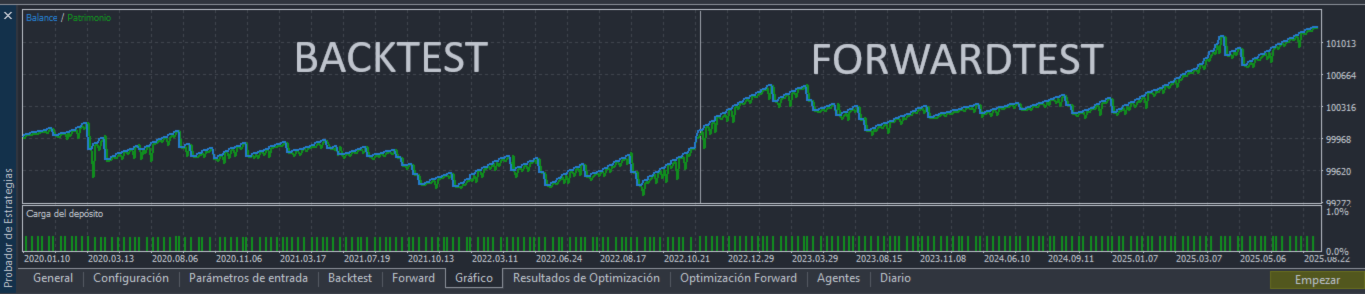
Backtesting and forward testing are NOT optional — they are the backbone of any serious trading system. Without them, you're trading blind. In our experience building a portfolio of 13+ EAs, we've learned that 90% of configurations that look profitable in backtest fail in forward test. Only those that survive BOTH tests deserve real money.
What is a Backtest?
A backtest runs your strategy on historical data to simulate how it would have performed in the past. MetaTrader 5 offers a powerful Strategy Tester that simulates every market tick.
Key metrics you must evaluate:
- Profit Factor (PF): Gross profit / Gross loss. Look for PF > 1.5.
- Linear Regression (LR): Measures equity curve consistency. Look for LR > 0.85.
- Max Drawdown (DD): Maximum drop from a peak. Look for DD < 15%.
- Recovery Factor: Net profit / Max Drawdown. Should be FALSE (no martingale to recover).
- Number of trades: Minimum 50+ for statistical significance.
- Win Rate: Suspicious if above 70% (possible overfitting).
What is a Forward Test?
The forward test is the TRUE acid test. When you optimize in MetaTrader 5, the optimizer separates data into two parts: the first for optimization (backtest) and the second for validation (forward test). The forward test simulates data the optimizer NEVER saw — it's like trading in real-time with future data.
WARNING: An excellent backtest with a bad forward test is the WORST possible combination because it gives you false confidence. Always configure the optimizer to separate 1/3 of the data as forward test (forward period). If the forward test is not profitable or has significantly worse metrics, DISCARD that configuration.
Our Selection Criteria (Portfolio v15)
| Criterion | Minimum Threshold | Why |
|---|---|---|
| Profit Factor | >= 1.5 | Sustainable profitability |
| Linear Regression | >= 0.85 | Consistent equity curve |
| Max Drawdown | < 15% | Controlled risk |
| Recovery (Martingale) | FALSE | Not dependent on doubling lots |
| Correlation with other EAs | < |0.35| | Real diversification |
| Forward Test profitable | Yes | Out-of-sample validation |
9. Validation with Every Tick Mode
MetaTrader 5 offers different simulation models for the Strategy Tester. Understanding the difference between them is critical to not deceiving yourself with false results.
The 3 Simulation Models
| Model | Accuracy | Speed | When to Use |
|---|---|---|---|
| Open Prices Only | Low (1 tick/bar) | Very fast | Initial genetic optimization (thousands of passes) |
| Every Tick | High (generated ticks) | Slow | Final validation of candidates |
| Every Tick (Real Ticks) | Maximum (real data) | Very slow | Definitive validation with Tick Story data |
Our 3-Phase Validation Protocol
PHASE 1 — Genetic Optimization (Open Prices Only):
Configure the Strategy Tester with: Model = Open Prices Only, Optimization = Genetic Algorithm, Criterion = Complex Max Criterion, Timeframe = H1, Forward = 1/3 of the period. Use ONLY local agents (required for the Forward Test tab to appear). This generates thousands of combinations quickly. From here come your "candidates."
PHASE 2 — Every Tick Validation:
Take the best candidates from Phase 1 and re-run them individually with the Every Tick model. The results must be SIMILAR to Open Prices results. If a configuration has a PF of 2.5 in Open Prices but only 1.1 in Every Tick, that configuration is "overfitted" to the simulation model and must be discarded.
PHASE 3 — Real Tick Validation (Tick Story):
For definitive validation, we use real tick data from Tick Story (custom instruments in MT5). This eliminates any simulation bias. Candidates that maintain their metrics with real ticks are the ones that pass to our portfolio.
KEY SECRET: The divergence between Open Prices and Every Tick is the #1 indicator of overfitting. If your results change drastically between models, the strategy is not robust. The best configurations show VERY similar results across all models.
10. Professional Optimization Protocol
This is the exact protocol we use to find profitable configurations for our portfolio. It's the most important part of the process and where money is made or lost.
Strategy Tester Configuration
| Field | Configuration |
|---|---|
| Expert Advisor | AbacuQuant_3.7 |
| Symbol | The instrument to optimize (e.g., EURUSD) |
| Timeframe | H1 (for initial optimization) |
| Dates | 3-5 years of historical data |
| Forward | 1/3 (leaves the last third for forward test) |
| Model | Open Prices Only (for optimization) |
| Deposit | $10,000 (or your actual capital) |
| Leverage | 1:100 (or your broker's) |
| Optimization | Slow Complete (or Genetic Algorithm) |
| Criterion | Complex Max Criterion (or Custom Max) |
What Parameters to Optimize
Do NOT optimize all parameters at the same time. This guarantees overfitting. Only optimize the critical parameters of the active strategy.
For Imbalance Strategy (the most used):
- AtrPeriod_Imbalance: Range 7-30, step 1
- ImbalanceAtrFactor: Range 0.5-3.0, step 0.1
- AtrTakeProfitMultiplier: Range 1.0-4.0, step 0.5
- AtrStopLossMultiplier: Range 0.5-3.0, step 0.5
- Session parameters (start/end hours)
- Days of the week (Monday-Friday on/off)
- TradeDirectionAllowed: Long Only vs Short Only vs Both
Parameters you should NOT optimize:
- RiskPercentPerTrade (fix it at 0.5% or 1%)
- MaxDrawdownPercent (fix it at 8-10%)
- MagicNumberBase (it's an identifier, not a parameter)
The Custom Max Criterion (OnTester)
AbacuQuant includes a custom criterion in the OnTester() function that penalizes overfitting. To use it, select "Custom Max" in the optimizer. The criterion combines Profit Factor and Recovery Factor, with bonuses for low drawdown and penalties for extreme win rates (>70% or <30%) and excessive trading.
11. Real Examples by Asset Class
One of AbacuQuant's strengths is its adaptability. Here we show a real configuration example for each asset class in our v15 portfolio, demonstrating how parameters change depending on the instrument.
Forex: EURUSD Long (EUR_L)
| Parameter | Value | Notes |
|---|---|---|
| Symbol | EURUSD | Major pair, low spread |
| Strategy | Imbalance | ATR-based |
| Direction | Long Only | Buys only |
| AtrPeriod | 14 | Default works well |
| ImbalanceAtrFactor | 1.2 | Slightly more selective |
| SL/TP Mode | ATR | Adaptive |
| Session | 08:00-17:00 UTC | London session |
| Days | Mon-Fri | No weekends |
Metals: XAUUSD Long (XAU_L)
| Parameter | Value | Notes |
|---|---|---|
| Symbol | XAUUSD | Gold, high volatility |
| Strategy | Imbalance | Adapts via ATR |
| Direction | Long Only | Secular bullish trend |
| AtrTP Multiplier | 2.0 | Wide TP for volatility |
| AtrSL Multiplier | 1.5 | Proportional SL |
| Session | 13:00-22:00 UTC | NY session overlap |
Indices: NAS100 Long (NDX_L)
| Parameter | Value | Notes |
|---|---|---|
| Symbol | NAS100/NDX | Nasdaq 100 index |
| Strategy | Imbalance | Detects strong impulses |
| Direction | Long Only | Structural bullish trend |
| ImbalanceAtrFactor | 1.5 | More selective (noisy index) |
| AtrTP Multiplier | 2.5 | Wide movements |
| Session | 14:30-21:00 UTC | US market hours |
Stocks: AMZN Long (AMZN_L)
| Parameter | Value | Notes |
|---|---|---|
| Symbol | AMZN | Amazon stock CFD |
| Strategy | Imbalance | Works on individual stocks |
| Direction | Long Only | Growth stock |
| Session | 14:30-21:00 UTC | US market hours |
| MaxOpenTradesPerMagic | 1 | One trade at a time |
Commodities: XTIUSD Short (OIL_S)
| Parameter | Value | Notes |
|---|---|---|
| Symbol | XTIUSD | WTI Crude Oil |
| Strategy | Imbalance | Same strategy, different direction |
| Direction | Short Only | Counter-trend on rallies |
| ImbalanceAtrFactor | 1.3 | Moderate selectivity |
| Session | 14:00-20:00 UTC | High liquidity hours |
KEY LESSON: Notice how the SAME EA with the SAME strategy (Imbalance) adapts to completely different instruments just by changing parameters. This is the power of optimization — you don't need a different EA for each market, you just need to find the optimal parameters for each one.
12. USA Compliance Mode (NFA/CFTC)
If you trade with a US-regulated broker, NFA and CFTC rules impose specific restrictions that AbacuQuant can handle automatically by activating USABrokerCompliance = Enabled .
- FIFO (First In, First Out): When closing positions, you must ALWAYS close the oldest one first, not the most recent.
- Anti-Hedging: You cannot have buy AND sell positions open simultaneously on the same symbol.
- Limited Leverage: Major pairs: maximum 50:1. Minor and exotic pairs: maximum 20:1.
- Virtual Book: AbacuQuant maintains an internal record of all sub-positions to manage FIFO correctly even on netting accounts.
13. Real-Time Dashboard and Notifications
AbacuQuant includes a professional graphical dashboard that draws directly on the MetaTrader 5 chart. It updates every 2 seconds and displays all relevant information without needing to open additional windows.
Information displayed:
- EA status (Active, Paused, Drawdown Pause, etc.)
- Balance, Equity, Margin level
- Real-time floating P/L
- Total trades, Win Rate, Profit Factor
- Max Drawdown ($ and %)
- Active strategies list
- AI module status (if active)
- USA compliance status (if active)
Configure push notifications on your phone and/or email to receive alerts when trades open, close, Break Even activates, prices approach SL/TP, or any safety limit triggers.
14. Secrets and Lessons Learned
These are the most valuable lessons we've discovered during months of development, optimization, and real trading with AbacuQuant. Each one cost us time and, in some cases, money.
1. Optimize by DIRECTION, not by instrument.
Don't optimize EURUSD as a whole. Optimize EURUSD-Long and EURUSD-Short separately. Each direction has a different edge at different hours. This was a paradigm shift in our process.
2. Correlation is the invisible enemy.
Two EAs can be individually excellent but if they're correlated, their combined drawdown will be devastating. Keep correlation between EAs below |0.35|. We discovered that EURUSD and USDJPY have -0.38 correlation and NDX with USDJPY +0.35 — the only two tolerated violations in our portfolio.
3. Hourly coverage matters as much as profitability.
It's useless to have 5 EAs that all trade at 15:00 UTC. Analyze the coverage map by hour and by day. Our v15 portfolio covers 23 of 24 hours (gap: 00:00 UTC) and all 5 weekdays. The weakest day is Thursday with only 5 EAs and 663 historical entries.
4. Open Prices + H1 is the magic combination for optimization.
It's fast (thousands of passes in minutes) and the difference with Every Tick on H1 is minimal. But ALWAYS validate the best results with Every Tick afterward.
5. Use ONLY local agents in the optimizer.
If you use remote or cloud agents, the Forward Test tab doesn't appear. Only local agents generate the forward test table you need for validation.
6. Recovery/Martingale is a trap.
In backtest it looks incredible because it always recovers losses. In reality, a prolonged drawdown can multiply lots until it destroys your account. Our criterion requires Recovery=FALSE in all portfolio EAs.
7. Win Rate > 70% = suspicious.
A very high hit rate generally indicates overfitting or that the TP is too small and the SL too large. Look for win rates between 40-65% with a favorable reward/risk ratio.
8. Print() kills optimizations.
Without the guard !MQL_OPTIMIZATION before each Print(), the terminal freezes after 2,000+ passes. This cost us days of work before we discovered it.
9. Memory leaks accumulate in optimization.
Each optimization pass is an OnInit/OnDeinit cycle. If you don't free dynamic arrays in OnDeinit, RAM runs out after thousands of passes. ArrayFree() on ALL dynamic arrays is mandatory.
10. The MQL5 Market validator is unpredictable with stops.
The validator uses extreme spreads and impossible conditions. Our solution: expand the minimum stop distance to 2x the stops_level + 20 points buffer, and if it fails, retry WITHOUT stops and let trailing handle it.
15. Frequently Asked Questions (FAQ)
Q: Can I use AbacuQuant on a demo account?
A: Yes, it works identically on demo and real accounts. In fact, we recommend always testing on demo before going live.
Q: Do I need a VPS?
A: For real 24/5 trading, yes. The EA must be running continuously. A VPS with low latency (<10ms) to the broker is ideal.
Q: Can I use multiple instances on the same chart?
A: Not on the same chart, but you can use multiple instances on different charts of the same symbol, as long as each has a different MagicNumberBase.
Q: Is AI mandatory?
A: No. AI is completely optional. AbacuQuant works perfectly without it. AI adds an additional analysis layer but is not a requirement.
Q: Does AI work in the Strategy Tester?
A: No. MetaTrader 5 blocks internet connections in the Strategy Tester. AI only works in live or demo real-time trading.
Q: What's the difference between Virtual SL and real SL?
A: The real SL is sent to the broker, who executes it even if your terminal disconnects. The virtual SL is managed by the EA internally, which avoids stop hunting but requires the EA to always be active.
Q: Can I trade cryptocurrencies?
A: If your broker offers crypto as CFDs on MetaTrader 5, AbacuQuant can trade them. You just need to optimize parameters for that specific instrument.
AbacuQuant 3.7 — Complete User Manual | Cristian Castillo © 2026 | All rights reserved
Professional algorithmic trading system — 100% autonomous — No DLL — MQL5 Market compatible