MT5 issues after update: CPU agent(core) reduced from 16 to 8
Forum on trading, automated trading systems and testing trading strategies
New MetaTrader 5 Platform Build 5200: Extended OpenBLAS support and enhanced control in MQL5
Eleni Anna Branou, 2025.08.03 17:26
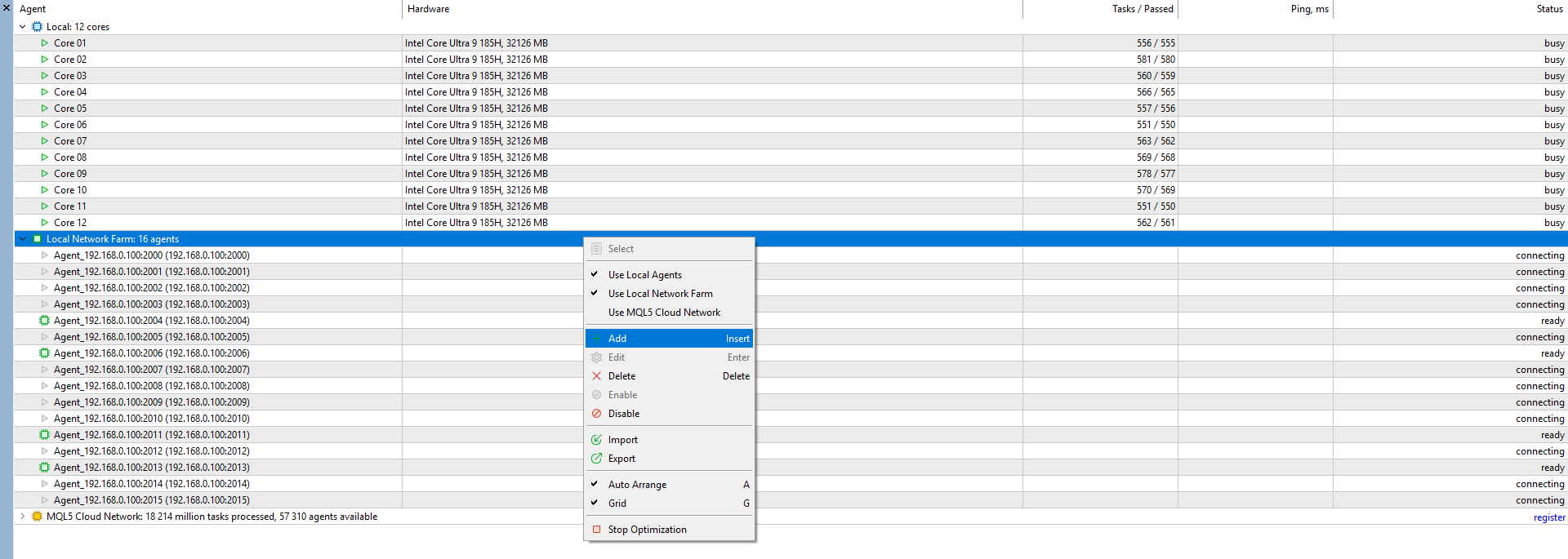
After the latest 5200 MT5 build update, in order to take advantage of all your processor's cores and threads in the Strategy Tester (locally), go to MT5 >> View >> Strategy Tester >> Agents >> Local Network Farm >> right click >> + Add >> Add Agents from Host (automatically) >> Next >> Done.
As I start optimisation, the local network farm agent will turn off automatically. How should I fix the issue?


After adding new agent, but the issues is still there. What should I do the next? The core 9-16 still don't work.
You need to tick the 'Use Local Network Farm' as in your second screenshot and the strategy tester will use these cores when are needed.
You may think that the 'Local Network Farm' cores are not used, but they are, you will see that in optimization times.
All these are only used during optimizations and not simple backtests, backtests use only 1 core.
You need to tick the 'Use Local Network Farm' as in your second screenshot and the strategy tester will use these cores when are needed.
You may think that the 'Local Network Farm' cores are not used, but they are, you will see that in optimization times.
All these are only used during optimizations and not simple backtests, backtests use only 1 core.
Isn't better to disable "Use Local Agents" and enabled only "Use Local Network farm" ?
I didn't try, but that seems less confusing.
Isn't better to disable "Use Local Agents" and enabled only "Use Local Network farm" ?
I didn't try, but that seems less confusing.
I didn't try that Alain, if I do disables the first (blue) local cores on top, but I don't know if that affects optimization time.
EDIT: Well, the optimization doesn't seem to start at all with the 'Local Agents' disabled, so I guess they are needed for a smooth operation.I didn't try that Alain, if I do disables the first (blue) local cores on top, but I don't know if that affects optimization time.
EDIT: Well, the optimization doesn't seem to start at all with the 'Local Agents' disabled, so I guess they are needed for a smooth operation.Let me check...
I didn't try that Alain, if I do disables the first (blue) local cores on top, but I don't know if that affects optimization time.
EDIT: Well, the optimization doesn't seem to start at all with the 'Local Agents' disabled, so I guess they are needed for a smooth operation.It works with 'Local Agents' disabled, but you need to 'Select' one agent of the Local Network farm firstly.

It works with 'Local Agents' disabled, but you need to 'Select' one agent of the Local Network farm firstly.
Hmm, I've done that Alain, but on my computer doesn't seem to work, the optimization doesn't start at all.
It works fine with 'Local Agents' enabled at similar times as before the 5200 update.
Maybe it has to do with the fact that I have the hybrid Intel Ultra 9-185H processor.
Hmm, I've done that Alain, but on my computer doesn't seem to work, the optimization doesn't start at all.
It works fine with 'Local Agents' enabled at similar times as before the 5200 update.
Maybe it has to do with the fact that I have the hybrid Intel Ultra 9-185H processor.
Yeah anyway, it's not that important I guess.

- Free trading apps
- Over 8,000 signals for copying
- Economic news for exploring financial markets
You agree to website policy and terms of use
I have meet an issue of MT5 after newest update. After auto update of MT5, the number of cores in Strategy Tester is reduced from 16 to 8 for optimization. I have try to remove MT5 completely and reinstall it. But the issues is still there, what should I do? I am using newest updated Windows 11 home and Intel i5 13500H Cpu.
Thx a lot for you help