New MetaTrader 5 Platform Build 5200: Extended OpenBLAS support and enhanced control in MQL5 - page 5

You are missing trading opportunities:
- Free trading apps
- Over 8,000 signals for copying
- Economic news for exploring financial markets
Registration
Log in
You agree to website policy and terms of use
If you do not have an account, please register
Small tricks to speed up the cycle (no magic involved):
- Use CLI compilation to avoid loading the GUI. This won't work miracles, but in large projects the difference is noticeable.
- Review includes and dependencies, avoid heavy cascading headers, separate utilities into well-defined .mqh files.
In MQL5, compilation is monolithic; each .mq5 file is "flattened" with all its #include statements and processed as a single block, without linking or intermediate modules. This is why the compiler cannot distribute the same file across multiple cores.
MetaEditor also does not parallelise multiple .mq5 files internally; it processes them one by one. If you want to take advantage of more cores, it is only possible by launching several instances of metaeditor64.exe from outside, each compiling a different file or group.
Small tricks to speed up the cycle (no magic involved):
- Use CLI compilation to avoid loading the GUI. This won't work miracles, but in large projects the difference is noticeable.
- Review includes and dependencies, avoid heavy cascading headers, separate utilities into well-defined .mqh files.
In MQL5, compilation is monolithic; each .mq5 file is "flattened" with all its #include statements and processed as a single block, without linking or intermediate modules. This is why the compiler cannot distribute the same file across multiple cores.
MetaEditor also does not parallelise multiple .mq5 files internally; it processes them one by one. If you want to take advantage of more cores, it is only possible by launching several instances of metaeditor64.exe from outside, each compiling a different file or group.
As MT5 compilation time is quite long compared to MT4, is there any better update for this?
For example:
1. Using all CPU cores for compiling different files at the same time
2. Auto MQL5 Cloud Protection
What is your specific use case?
During developement you can disable optimizations, moreover you can quickly check compilability (errorlessly) of any tree of modules (with included dependencies) by compiling a "root" mqh-file (no binary output produced), as opposed to mq5-file.
by compiling a "root" mqh-file (no binary output produced), as opposed to mq5-file
Compiling .mqh files is a great approach - I always do it this way. The main thing is to close the project because:
New MetaTrader 5 Platform Build 5100: Git migration, MQL5 Algo Forge developer hub, dark theme and interface enhancements
Renat Fatkhullin, 2025.05.31 03:58
Within an open .mqproj project, the entire project is built.
We are not going to change this.
Compiling .mqh files is a great approach - I always do it this way. The main thing is to close the project because:
You are right.
About Renat answer, how hard would it be to add an option to compile the whole project or the current file ? Unfortunately MetaQuotes doesn't care about people.
“Issue report: Charts flicker every full minute on Intel GPUs. Steps to reproduce below…”
Flickering on Chart Refresh Every Full Minute in Build 5200 (Intel GPU)
Hello,
After updating to MetaTrader 5 Build 5200 (released on 1 Aug 2025), I've encountered a new issue: System: GEEKOM Mini PC, Intel Core i9-13900H with integrated Intel Iris Xe Graphics OS: [Insert your Windows version here] Intel Graphics Driver: [Insert version here] MQL5 +11 MQL5 +11 MQL5 +11
Problem: Charts flicker exactly at the start of each full minute (e.g., 13:16:00, 13:17:00). This occurs when MT5 redraws bars at the minute boundary.
Tests performed: Same Intel driver + previous MT5 build (June 13, 2025) → works fine (no flicker). Same Intel driver + current build 5200 → flickering occurs every full minute.
Tried /nohwnd and /skip-dxva launch flags → no effect. Issue is visible across all charts/timeframes.
Conclusion: This appears to be a regression in Build 5200’s chart rendering engine, specifically when refreshing candles at minute close.
Can the development team please investigate? Other users with Intel GPUs may be affected too.
Thank you.
Dear Mql5 Team,
As a user,
WE REALLY NEED to be able to use CUSTOM INDICATORS on ANDROID version
If you want your portion of customers to stay and remain in the competition,
I know android is limited! And I know you worry to lose customers if make mql5 only available on newer versions
But when there is a WILL , there is a WAY (using third party os on Android is not one of those)
If you need fresh talent to do this, you should consider hiring to enhance the existing app
Instead of making mql6 and bringing a lot of problems to the table, the android version need Urgent attention as it is not competent at all.
Thank you for considering the issue
Small tricks to speed up the cycle (no magic involved):
- Use CLI compilation to avoid loading the GUI. This won't work miracles, but in large projects the difference is noticeable.
- Review includes and dependencies, avoid heavy cascading headers, separate utilities into well-defined .mqh files.
In MQL5, compilation is monolithic; each .mq5 file is "flattened" with all its #include statements and processed as a single block, without linking or intermediate modules. This is why the compiler cannot distribute the same file across multiple cores.
MetaEditor also does not parallelise multiple .mq5 files internally; it processes them one by one. If you want to take advantage of more cores, it is only possible by launching several instances of metaeditor64.exe from outside, each compiling a different file or group.
Thanks Miguel!! I have my magic auto key on GUI but your method of "CLI launching mutliple metaeditor64.exe" is so much smarter!
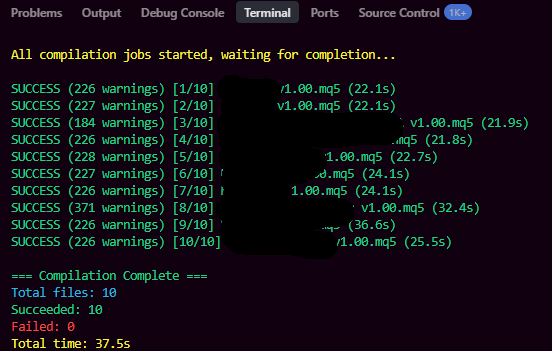
Though auto MQL5 protection seems hopeless in the near future, but still noticeable speedup is phenomenon.
After the latest build 5200 update, my MT5 only sees half of the cores. I’ve always had 32, now just 16. Why are there so many problems with the latest updates?
After the latest build 5200 update, my MT5 only sees half of the cores. I’ve always had 32, now just 16. Why are there so many problems with the latest updates?
At first, I also saw only 12 of my 22 cores after the 5200 build update. However, over the past couple of days, I now see 20 cores (out of 22) in the Local Agents, even though no new build update has been released.