Why Copylator Stands Out from Other MT5 Trade Copiers — COPYLATOR – MT5 Trade Copier

Product link:
https://www.mql5.com/en/ market/product/191385
Every trade copier is designed to copy trades. That is the starting point, not the real measure of quality.
What distinguishes one copier from another is how it handles everything surrounding the copying process: communication, execution, risk controls, account compatibility, trade modifications, and unexpected operating conditions.
This article examines the features that make COPYLATOR different and explains why they matter in practical trading environments. Rather than relying on broad claims about competing products, the focus is on COPYLATOR's architecture and capabilities.
1. Local File Communication Instead of an External Cloud Relay
One important architectural difference is how COPYLATOR communicates between Sender and Receiver terminals.
COPYLATOR uses the MetaTrader 5 Common Folder for local communication when the terminals operate on the same computer. This allows the Sender and Receiver to exchange trade information without routing every signal through a separate third-party cloud server.
Local communication can reduce the number of external network dependencies involved in transferring trade information. However, actual execution time still depends on terminal processing, polling intervals, computer performance, broker connectivity, liquidity, and order execution conditions.
This distinction can be particularly relevant for strategies that use relatively tight entry and exit levels. Even when communication is fast, a copier cannot guarantee identical execution prices between accounts. Spreads, slippage, market movement, and broker execution conditions can all affect the final result.
Important: The Common Folder architecture provides local communication on the same computer. Running terminals on separate computers requires an appropriate supported communication arrangement; the local Common Folder alone does not provide remote communication.
2. No DLL Dependency
COPYLATOR does not require DLL imports or external DLL libraries to perform its copying functions.
This is useful for traders who prefer to keep DLL imports disabled in MetaTrader 5. It can also simplify installation and reduce reliance on additional compiled components outside the normal MT5 Expert Advisor environment.
Some trading environments, including certain prop firm setups, restrict DLL usage. A copier that does not depend on DLL imports can therefore be easier to deploy in those environments, subject to the firm's other platform and EA rules.
For users who prioritize a simpler software setup, avoiding DLL dependencies is a practical advantage.
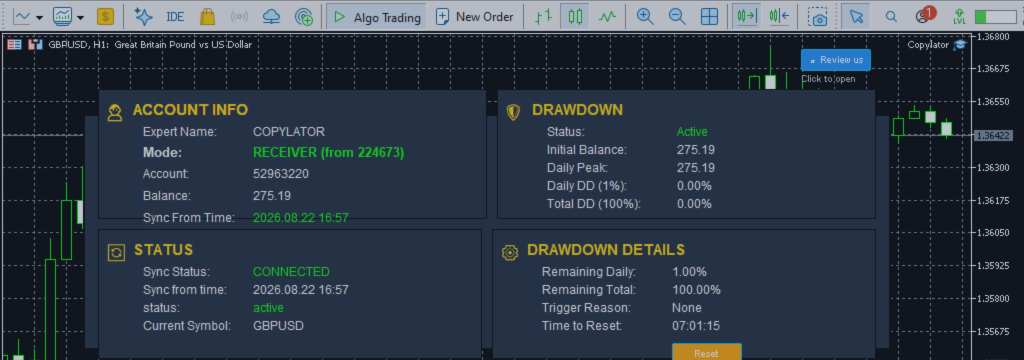
3. Drawdown Protection with Multiple Controls
Drawdown protection is not simply a percentage displayed in a settings window. The calculation method, the period being monitored, and the action taken after a threshold is reached all matter.
COPYLATOR provides several controls:
- Daily and total drawdown: Separate limits can be configured to monitor daily losses and broader account drawdown.
- Equity or Balance calculation: The selected calculation basis determines whether floating profit and loss is included.
- Configurable protection response: The system can block further copying, or be configured to close positions and delete pending orders when the relevant protection condition is triggered.
- Automatic daily reset: Daily drawdown monitoring can reset at a configured hour and minute using broker server time.
- Manual reset: The Receiver's Drawdown Details panel provides a manual reset that resets daily and total drawdown references and sets the initial balance reference to the current balance.
There is an important distinction between the two reset methods: the automatic daily reset does not reset the total drawdown baseline. The manual reset changes both daily and total references.
These options allow traders to configure protection around different account rules and risk preferences. They do not guarantee that realized losses will never exceed a configured threshold. Slippage, gaps, execution delays, and broker conditions can affect the final result.
4. Automatic Hedging and Netting Account Detection
MetaTrader 5 supports two different position accounting systems: Hedging and Netting.
On Hedging accounts, multiple positions can exist independently on the same symbol. On Netting accounts, trades on the same symbol are combined into a single net position.
COPYLATOR detects the account type automatically and adapts its trade-management behavior accordingly.
- Hedging: Positions can be managed individually.
- Netting: Trade volume and position changes must be handled in the context of the symbol's combined net position.
This reduces the need for users to select an account mode manually and helps the copier work with both MT5 account types.
5. Real-Time SL/TP Synchronization
Copying a trade at the moment it opens is only part of the process. Many strategies continue to modify stop loss and take profit levels after entry.
COPYLATOR supports synchronization of SL and TP changes during the life of a copied trade. This includes changes made after entry, such as adding a stop loss to a position that was initially opened without one.
For example, if the Sender moves a stop loss to break-even, the Receiver can receive the corresponding modification. If the Sender changes or removes a stop or target, the Receiver can be updated accordingly.
This helps maintain consistency between the Sender's trade-management decisions and the Receiver's positions.
Exact outcomes can still differ because brokers may apply different minimum stop distances, execution rules, available prices, and other trading constraints.
6. Symbol Mapping with Manual Override
Different brokers sometimes use different names for the same trading instrument. A symbol might have a suffix, prefix, or another naming variation.
Automatic symbol mapping can help identify corresponding instruments, but not every broker naming convention can necessarily be resolved automatically.
COPYLATOR supports manual mapping in the format:
SenderSymbol:ReceiverSymbol
When a symbol cannot be matched, a warning helps identify the issue so the user can investigate and configure the appropriate mapping.
Resolved mappings can also be cached, helping avoid unnecessary repeated lookup work.
This is important because a symbol mismatch can prevent a trade from being copied even when the Sender and Receiver terminals are otherwise operating normally.
7. Partial Close Support
Some trading strategies close only part of a position rather than exiting the entire trade at once. This is commonly known as scaling out.
COPYLATOR supports partial-close synchronization. When the Sender reduces a position, the Receiver's corresponding position can be reduced proportionally, subject to the Receiver broker's permitted volume steps and minimum trade size.
For example, if the Sender closes half of a position, the copier can reduce the corresponding Receiver exposure while leaving the remaining portion open.
This is particularly useful for strategies that take partial profits, reduce exposure in stages, or manage positions through multiple exit levels.
The final Receiver volume may differ slightly where broker volume restrictions prevent an exact proportional adjustment.
8. Investor Password Support for the Sender
COPYLATOR can operate on a Sender terminal logged in with an investor, or read-only, password when the broker and terminal permissions allow the required account information to be accessed.
In this arrangement, the Sender can read relevant positions and orders without having trading permission to execute trades on that account.
This can be useful for account owners who want to make trade information available for copying without sharing their main trading password.
There is an important distinction: an investor password is read-only. It is suitable for reading Sender account activity where supported, but it cannot be used by a Receiver that needs permission to place trades.
9. Multi-Sender and Multi-Receiver Configurations
Not every trader needs a simple one-Sender-to-one-Receiver arrangement.
COPYLATOR supports different configurations, including:
- One-to-many: One Sender distributes trades to multiple Receivers.
- Many-to-one: Multiple Senders provide trades to a Receiver.
- Many-to-many: Multiple Sender and Receiver instances can be configured for different copying relationships.
Each Sender requires a unique account number. A Receiver identifies the relevant Sender through the SenderAccountNumber parameter.
This flexibility is useful for traders operating several accounts, managing different strategies, or distributing trades to multiple receiving accounts.
When several Senders feed one Receiver, the Receiver's overall exposure and drawdown protection should be considered across the combined account activity.
10. Reliability and Operational Monitoring
A trade copier must be evaluated not only under normal conditions but also when something goes wrong.
Order rejection, terminal disconnection, broker maintenance, and unexpected restarts can all interrupt the copying process. A dependable setup should make it possible to identify and investigate these situations.
COPYLATOR includes mechanisms intended to support reliable operation and synchronization, including retry handling and Guardian-related monitoring.
Nevertheless, no copier can guarantee that every order will always be accepted or that two accounts will remain perfectly identical under every market and infrastructure condition. Users should monitor terminal operation, review relevant logs, and investigate rejected or unmatched trades.
11. No External Cloud Subscription or API Dependency
For local operation on the same computer, COPYLATOR uses the MT5 Common Folder rather than requiring a separate cloud relay service or external API connection for Sender-to-Receiver communication.
This means users do not need a separate copier cloud subscription or API key for that local communication method.
The MT5 terminals still require their normal broker connections to receive market information and execute trades. The copier also depends on the computer and terminals remaining operational.
For traders who prefer fewer external services in their trading setup, this architecture can simplify the overall infrastructure.
12. Single-Chart Installation
Despite its range of functions, COPYLATOR is designed to operate from a single chart per terminal.
The basic setup involves attaching the Expert Advisor to a chart, selecting Sender or Receiver mode, and configuring the required account information and parameters.
This keeps the installation process relatively straightforward without requiring a separate bridge application for local operation.
What These Differences Mean in Practice
The value of a trade copier is not determined by the number of features listed on its product page. It depends on whether those features address real operational needs.
Local communication can reduce reliance on external relay infrastructure. No DLL dependency simplifies deployment. Drawdown controls provide configurable risk responses. Automatic Hedging and Netting detection supports different MT5 account types. SL/TP synchronization and partial-close support help follow trade-management decisions beyond the initial entry.
Investor password support, flexible Sender/Receiver configurations, and the absence of a required external cloud subscription address additional needs for account owners and multi-account traders.
These capabilities do not eliminate market risk, broker differences, execution delays, or the need for account monitoring. They provide a broader set of tools for building and operating a trade-copying setup.
Summary: What Makes COPYLATOR Different?
COPYLATOR combines several capabilities in one MT5 trade copier:
- Local Sender-to-Receiver communication through the MT5 Common Folder on the same computer.
- No DLL imports required.
- Daily and total drawdown protection with configurable calculation and response options.
- Automatic Hedging and Netting account detection.
- SL/TP synchronization throughout the trade lifecycle.
- Automatic symbol mapping with manual override.
- Partial-close synchronization.
- Sender operation with an investor password where broker permissions allow it.
- One-to-many, many-to-one, and many-to-many configurations.
- Single-chart installation per terminal.
A trade copier should do more than transmit an entry signal. It should support the different stages of trade management, provide useful risk controls, and offer the flexibility needed for real-world MT5 account configurations.
That is the approach behind COPYLATOR: a combination of copying, synchronization, account compatibility, and risk-management features in one MT5 Expert Advisor.
Product link:
https://www.mql5.com/en/ market/product/191385