
Before You Press Buy: The Seven-Gate Checklist for Choosing, Testing and Running an Expert Advisor

Summary
An Expert Advisor can look perfect on a product page and still be wrong for you. This article gives you seven gates to pass before you risk real money. Research the seller. Understand the EA's risk. Match your broker and account. Back-test, and know its limits. Run a demo for a month. Set a drawdown and lot size that fit your life. Take profits out on a schedule.
It explains the maths of drawdown and recovery. It shows how lot size trades profit against pain. It includes a short MQL5 script that turns a back-test drawdown into numbers you can plan with. The last section applies the checklist to my own EA, Atropos Venus, including its uncomfortable parts. Nothing in this article is a forecast or a promise. Trading is high risk, and nothing in the market is guaranteed.
In this article
Introduction
Meet Maya. She is a nurse with some savings and no time to watch charts. Last month she found an Expert Advisor with a smooth, rising equity curve and a five-star rating. She bought it in ten minutes, attached it to her laptop and went to bed. Two paths follow from here.
The impulse path. Maya's broker has wide spreads, which the EA's description warned about. She did not read that part. Her laptop sleeps at night. A strong market move arrives while the internet is down, the EA cannot manage its open trades, and a large share of her account disappears. She blames trading, the EA and bad luck, in that order.
The checklist path. Maya spends one evening on seven questions. She checks who the seller is. She learns what kind of risk the EA takes. She checks that her broker fits. She runs a back-test, then a demo for a month. She decides how much drawdown she can truly afford, sizes her lots to match, and writes down when she will withdraw profits. The EA still carries risk. But now it is a risk she chose.
The difference between the two Mayas is not intelligence or luck. It is homework. This article is that homework, in seven gates. One honest note before we start: I am also a seller. I publish indicators, a utility and an Expert Advisor on the MQL5 Market. So do not take my word for anything here. Use the checklist on me as well. That is the whole point.
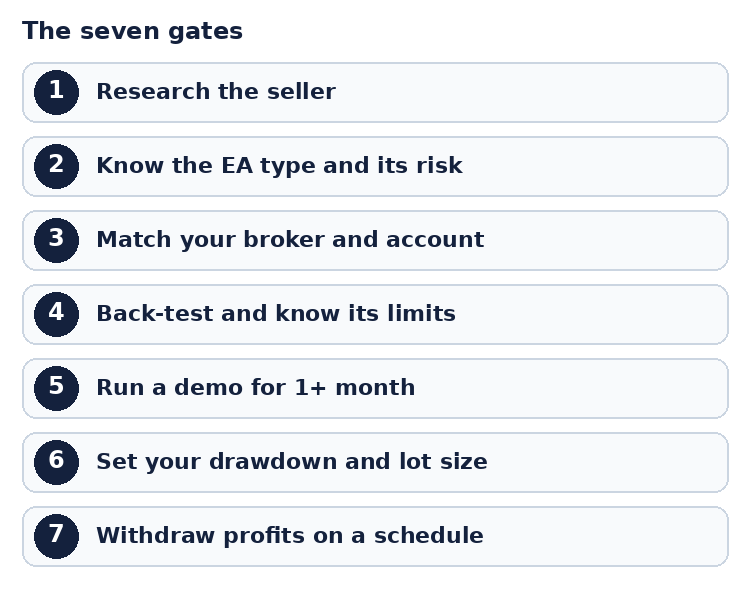
Figure 1. The seven gates before you risk real money
Gate 1. Research the seller before the strategy
An Expert Advisor is code you cannot read, running on your money. Before you judge the strategy, you are judging a person. An hour spent here is the cheapest protection you will ever get.
What to look for:
- Track record. How long has the seller been around? How many products do they have, and are those products still updated?
- A real, visible identity. A profile with a history, in the same name for years, without controversy, is worth more than any screenshot.
- Reviews and comments. Read the negative ones first. Then see how the seller answers: calmly and with specifics, or defensively and with excuses?
- Honest risk language. A trustworthy seller tells you the drawdown, the requirements and what the EA cannot do. If a page shows only profit, you are being sold a dream.
- No secrets. Be careful with "private settings" or set files that you only receive after paying.
- A free demo. A seller who lets you try before you pay is taking part of the risk too.
Ten questions worth asking any seller:
- What kind of strategy is this, and how does it lose?
- What is the maximum drawdown in your tests, and over what period?
- What account type, spread and balance does it need?
- Is a VPS required?
- Does it skip days or conditions (news, Fridays, specific dates)? Where is that written?
- Do I need a set file, or do the defaults work?
- What happens if the connection drops with trades open?
- What happens on a big gap or a news spike?
- Is there a free demo?
- Will you tell me, in writing, that results are not guaranteed?
Now the uncomfortable part. A back-test is only as honest as the person who built the EA. Nothing technical stops a developer from writing code that quietly skips bad days. You cannot see that from the outside. I cannot prove how often it happens. But the possibility is exactly why this gate comes first. It is also why you should ask question 5 above: legitimate filters are written down. Hidden ones are not.
If you do not know the seller and cannot verify anything about them, be honest with yourself: you are not investing, you are gambling. If you still go ahead, use only money you are fully prepared to lose.
Gate 2. Know what kind of risk the EA takes
Every EA has a shape of risk. Learn it before you buy. Do not judge an EA only by its profit. Judge it by the ways it can lose. The table below shows four common types and what each one asks of you.
| Type | How it takes risk | What to watch |
|---|---|---|
| Fixed stop loss on every trade | Many small, defined losses | Losing streaks, slippage, gaps over news |
| Averaging (several positions in one direction) | Adds positions as price moves against it, then closes the basket in profit | Long, deep floating drawdown in strong one-way moves |
| Martingale (bigger lots after losses) | Grows size to recover fast | Can destroy an account very quickly |
| No stop loss at all | Relies on price coming back | The one move that does not come back |
Many buyers say: "I only want an EA with a proper stop loss, no averaging, no martingale." That is a fair preference. But ask yourself one question. If a robot existed that made steady, guaranteed profit with tiny risk, why would its owner sell it for a few hundred dollars? It would be worth millions, and the owner would simply run it.
The honest answer is that no EA removes risk. News, gaps, broker problems or a changed market can break any formula. Your job is not to find a risk-free EA. It is to find one whose risk you understand, accept and can afford.
Gate 3. Match your broker and account to the EA
A fair test means following the seller's instructions. If you ignore them, you are not testing the EA. You are testing something else. Check each requirement below, one by one, before you start any test.
- Spread and account type. If the EA is built for a raw, low-spread account and your broker's spreads are high, your results will not match the back-test. Change the broker or skip the EA.
- Hedging or netting. Some EAs hold buys and sells on the same symbol at once. They need a hedging account. On a netting account those positions cancel each other.
- Symbol and timeframe. If it says gold on M5, use gold on M5.
- Minimum balance. Do not start with half the recommended balance and hope.
- VPS. If the seller says a VPS is mandatory, it is mandatory. Home internet drops, power fails and computers restart. An EA that manages open trades cannot work while it is offline, and one outage can change the whole result. MQL5 explains how to run an EA 24 hours a day in the article Run your EA on virtual hosting.
Gate 4. Back-test, and know what it cannot tell you
Back-testing is necessary. It is not proof.
How to do it well:
- Test the exact symbol and timeframe the seller states, with the default settings. For the steps, see the MQL5 article Test an indicator or trading robot before buying.
- Use "Every tick based on real ticks" if your broker provides it.
- Test a long period, five years or more if the data exists, not only the best year.
- Try several different start dates and see whether the shape of the result stays similar.
- Open the list of deals and read it. Look for gaps. Does the EA never trade in certain weeks? Is that explained in the description?
- Write down the maximum equity drawdown. It is the most important number in the report.
What a back-test cannot tell you:
- Your broker's real spreads, slippage and execution in the future.
- The quality of the historical data.
- Whether the developer hid something in the code.
- What the market will do next.
The hidden-code risk is the one you cannot solve with software. You can only reduce it with trust, which sends you back to Gate 1. This is why a great result from an unknown seller is worth far less than the same result from a seller with a visible history.
Gate 5. Run a demo for at least one month
A back-test shows what the EA did in the past. A demo shows what it does now, on your broker, with your internet and your spreads. Follow these rules for the demo.
- Run it for at least one month, following every instruction: account type, VPS, symbol, timeframe, settings.
- Compare the demo with a back-test of the same dates.
- Watch the drawdown, not only the profit. Ask yourself how it felt when the account was down.
Be careful with the conclusion. A good month can be luck. A month without a large drawdown does not mean the drawdown is not there. It means it has not happened yet. The back-test told you how deep it can go, so keep that number in front of you even when the demo looks calm.
| Compare | Back-test | Your demo |
|---|---|---|
| Same dates | ____ | ____ |
| Number of trades | ____ | ____ |
| Maximum drawdown | ____ % | ____ % |
| Average spread | ____ | ____ |
Gate 6. Set your own drawdown and lot size
This is where most people go wrong. They see "maximum drawdown 30%" in a back-test and treat it as the plan. It is not. It is what happened in the past. Your plan must allow for worse, and it must fit your life.
Think in three layers:
- The worst case in the back-test (for example, 30%).
- A bigger number you are willing to survive, because the future can be worse than the past (for example, 32% or more).
- What you can afford to lose, in money and in time to recover.
The recovery maths is brutal. If you lose 50%, you need a 100% gain just to get back to where you started. A 10% loss needs only an 11% gain. A 30% loss needs 43%. Deeper losses climb very fast, as the chart shows.
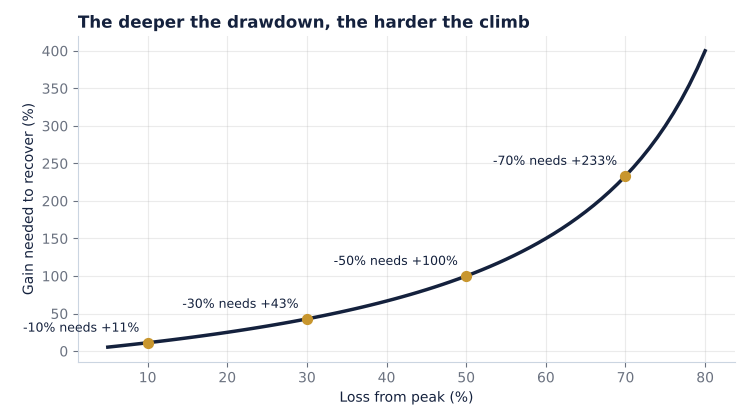
| Loss from peak | Gain needed to recover | Months at +3% a month |
|---|---|---|
| 10% | 11.1% | 3.6 |
| 20% | 25.0% | 7.5 |
| 30% | 42.9% | 12.1 |
| 40% | 66.7% | 17.3 |
| 50% | 100.0% | 23.4 |
| 60% | 150.0% | 31.0 |
(The 3% a month is only an example of a steady gain for the arithmetic. It is not a forecast. Real results are never steady.) So ask yourself: if the drawdown hits, how long would I need to recover? Could I wait that long without panicking or adding money?
Lot size is the dial
Many EAs size trades from the balance, for example 0.01 lot for every $1,000. That default is the seller's choice. You can choose a different one. A smaller or larger size changes both the profit and the drawdown. The three options below show how.
- $500 per 0.01 lot: about twice the default size. More profit potential, and about twice the drawdown in dollars.
- $1,000 per 0.01 lot (the default): the tested baseline.
- $2,000 per 0.01 lot: about half the default size. Lower profit potential, and about half the drawdown.
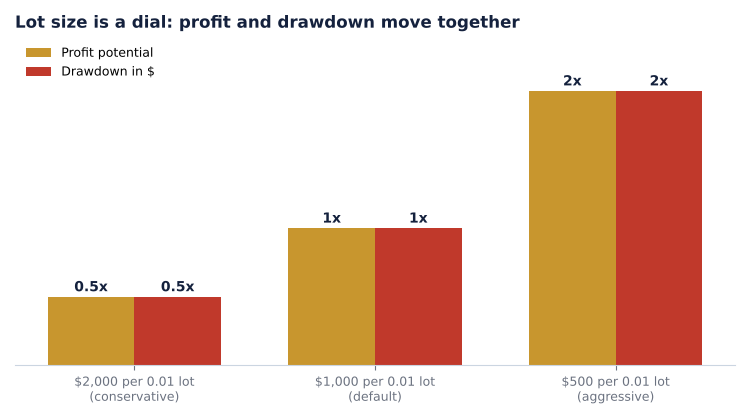
Figure 3. Lot size changes profit and drawdown together
There is no free lunch. A smaller size lowers the pain and also the profit. A gambler picks the biggest size and hopes. An investor with a plan picks the size that keeps the worst case inside the loss he can accept, even if the return is smaller. Changing the defaults is your own responsibility, so test any change before you use it.
A small MQL5 tool for the maths
Here is a script to make this easy. You enter your back-test drawdown and your own limit. It prints the drawdown in money, the gain needed to recover, the months to recover, and a lot size that fits your limit. In MetaEditor choose File, New, Script and paste the code. Press F7 to compile. Then drag the script from the Navigator onto any chart. The results appear in the Experts tab. A script runs once and places no trades.
It has three short parts:
- RecoveryGainPct() uses loss / (100 - loss) to get the gain needed to return to the peak.
- MonthsToRecover() uses logarithms to find how many months of steady gain that takes.
- OnStart() converts your limit into a lot size by scaling the default: new balance per step = default x (back-test drawdown / your limit).
//+------------------------------------------------------------------+ //| Atropos_Risk_Planner.mq5 | //| Simple drawdown and recovery planner for any Expert Advisor | //+------------------------------------------------------------------+ #property copyright "Ahmad Zehour" #property version "1.00" #property description "Turns a back-test drawdown into numbers you can plan with." #property script_show_inputs input double InpAccountBalance = 3000.0; // Account balance for the plan ($) input double InpBacktestMaxDDPct = 30.0; // Max drawdown seen in the back-test (%) input double InpYourLimitPct = 15.0; // Max drawdown YOU can accept (%) input double InpBalancePerStep = 1000.0; // EA default: balance per 0.01 lot ($) input double InpMonthlyGainPct = 3.0; // Realistic monthly gain used for recovery time (%) //--- gain (%) needed to get back to the peak after losing lossPct (%) double RecoveryGainPct(const double lossPct) { if(lossPct<=0.0 || lossPct>=100.0) return 0.0; return lossPct/(100.0-lossPct)*100.0; } //--- months needed to recover the loss at a steady monthly gain double MonthsToRecover(const double lossPct,const double monthlyGainPct) { if(lossPct<=0.0 || lossPct>=100.0 || monthlyGainPct<=0.0) return 0.0; return MathLog(1.0/(1.0-lossPct/100.0))/MathLog(1.0+monthlyGainPct/100.0); } void OnStart() { if(InpAccountBalance<=0.0 || InpBacktestMaxDDPct<=0.0 || InpBacktestMaxDDPct>=100.0 || InpYourLimitPct<=0.0 || InpYourLimitPct>=100.0 || InpBalancePerStep<=0.0) { Print("Atropos Risk Planner: please check the input values."); return; } Print("========== ATROPOS RISK PLANNER =========="); //--- 1. what the default settings mean in money double defaultLots = MathFloor(InpAccountBalance/InpBalancePerStep)*0.01; double defaultDDmoney= InpAccountBalance*InpBacktestMaxDDPct/100.0; PrintFormat("Default settings: %.2f lots, back-test drawdown %.1f%% = about $%.2f on $%.2f", defaultLots,InpBacktestMaxDDPct,defaultDDmoney,InpAccountBalance); //--- 2. recovery maths for that drawdown PrintFormat("To recover a %.1f%% loss you need a gain of %.1f%%, about %.1f months at %.1f%% per month", InpBacktestMaxDDPct,RecoveryGainPct(InpBacktestMaxDDPct), MonthsToRecover(InpBacktestMaxDDPct,InpMonthlyGainPct),InpMonthlyGainPct); //--- 3. lot size that matches YOUR limit (results scale roughly with lot size) double newStep = InpBalancePerStep*InpBacktestMaxDDPct/InpYourLimitPct; double newLots = MathFloor(InpAccountBalance/newStep)*0.01; PrintFormat("To keep the same history within %.1f%% drawdown, use about $%.0f per 0.01 lot (%.2f lots on $%.2f)", InpYourLimitPct,newStep,newLots,InpAccountBalance); if(newLots<0.01) Print("Warning: your balance is too small for this limit. Add balance or accept more risk."); PrintFormat("Your limit in money: about $%.2f. Recovery needs +%.1f%%, about %.1f months at %.1f%% per month", InpAccountBalance*InpYourLimitPct/100.0,RecoveryGainPct(InpYourLimitPct), MonthsToRecover(InpYourLimitPct,InpMonthlyGainPct),InpMonthlyGainPct); //--- 4. recovery table Print("--- Loss from peak -> gain needed -> months at the chosen monthly gain ---"); for(int loss=10; loss<=60; loss+=10) PrintFormat("-%d%% -> +%.1f%% -> %.1f months",loss,RecoveryGainPct(loss), MonthsToRecover(loss,InpMonthlyGainPct)); Print("Reminder: back-tests are not promises. Trade only money you can afford to lose."); }
Example with the default inputs: on a $3,000 account with a 30% back-test drawdown, the default size means a possible loss of about $900. If you decide you can only accept 15%, the script suggests about $2,000 per 0.01 lot, roughly half the size. The scaling is an approximation. Real results do not scale perfectly because of lot steps, spreads and the order of trades. Always back-test the new size.
Gate 7. Take profits out, and do not be greedy
An EA without strict stops lives or dies by how you handle the profit it makes. The rule is simple: a profit that stays in the account can be lost again.
- Withdraw regularly. Every week, or at least every month. If this month gives you $150 or $200, take it out and keep running the same settings.
- Recover your capital first. Keep withdrawing until you have taken out your starting capital, or at least a large share of it, such as 50%.
- Then you are trading with profits. After the capital is back, you can leave profits in or raise the risk a little. Do it slowly.
- Never raise the lot size to chase a loss. This is how small problems become account-ending ones.
- Never add money to an account that is down. It breaks the plan you wrote at the start.
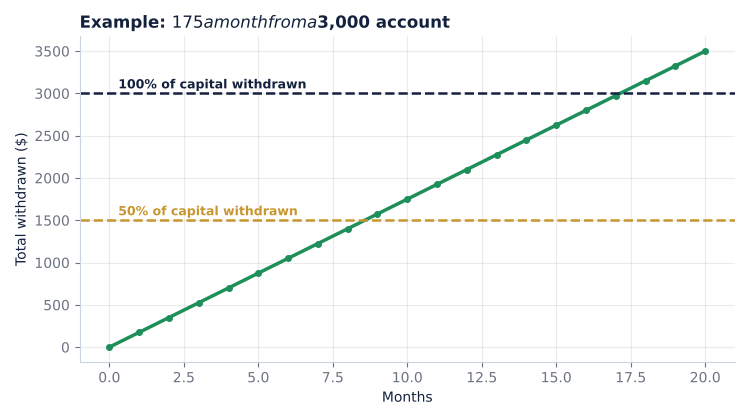
Figure 4. Example of withdrawing profits on a schedule
The chart is only arithmetic. At $175 a month, you would withdraw 50% of a $3,000 account in under 9 months. You would withdraw 100% in about 17 months. Real months vary, and some lose money. The point is the habit, not the number.
Five myths that cost people money
| Myth | Reality |
|---|---|
| "A smooth equity curve means low risk." | It may only mean the risk has not shown up yet. |
| "A big back-test profit means it will repeat." | It means it worked on that data. Nothing more. |
| "More lots means faster results." | More lots also means larger and faster losses. |
| "I can skip the VPS this time." | The one time you skip it is the time the connection fails. |
| "If it is down, I will add money to fix it." | That turns a drawdown into a bigger problem. |
Your one-page plan
Write this down before you buy. If you cannot fill it in, you are not ready.
- Seller researched, and I trust him or accept the risk of not knowing him: yes / no
- EA type and its risk understood: ____
- My broker and account match the requirements (spread, hedging, symbol, balance, VPS): yes / no
- Back-test done, maximum drawdown: ____ %
- Demo run for at least one month: yes / no
- My drawdown limit: ____ % (= $____)
- My lot setting: $____ per 0.01 lot
- Withdrawal rule: every ____ , until I have taken out ____ % of my capital
- I will never: add money to a losing account, raise the lot size to chase losses
A worked example: Atropos Venus
I promised to use myself as the example. Atropos Venus is my Expert Advisor for Gold (XAUUSD) on M5. Here is how it measures against the seven gates, including the uncomfortable parts.
- Gate 2, risk shape: it can open more than one position in the same direction while price moves against the first entry. Floating drawdown can become large in strong one-way moves. It is a high-risk design, and the product page says so.
- Gate 3, requirements: a hedging, raw / low-spread account, a minimum balance of $1,000 (recommended $3,000), Gold on M5, and a mandatory VPS.
- Gate 4, testing: I tested it for almost six years. I do not ask you to believe that. Run your own test with the steps above.
- Gate 5, demo: the Market page has a free demo. Use it, then run a demo account for a month.
- Gate 6, defaults and lot size: it is plug and play with no secret set files. I recommend the defaults. Any change to the lot size is your own responsibility and should be back-tested first.
- Built-in protections: it skips new baskets on weekends, late on Fridays and on major US news days, and it has a drawdown protection option in the inputs. These filters are documented, which is exactly what question 5 in Gate 1 asks for.
Whether it fits you depends on your answers to the checklist, not on my description. Apply Gates 1 to 7 to me the same way you would to anyone else.
Product page: Atropos Venus on the MQL5 Market
Conclusion
You cannot remove risk from trading. You can only choose it with open eyes. Research the seller. Understand the EA's risk. Follow its requirements. Back-test, but do not worship the result. Run a demo for a month. Set a drawdown you can live with, size your lots to match, and take profits out.
If an EA still looks attractive after seven gates, you are no longer gambling. You are taking a planned, limited risk with money you can afford to lose. That is the only kind of trading worth doing.
Attached files
| File | Description |
|---|---|
| Atropos_Risk_Planner.mq5 | Script that prints drawdown, recovery and lot-size numbers from your own inputs |
Risk notice: Trading leveraged products carries a high level of risk and may not be suitable for everyone. The numbers in this article are examples for explanation. They are not forecasts, and nothing here guarantees any result. Trade only with money you can afford to lose.