FX Power MT4 NG

80 USD
Demo heruntergeladen:
409
Veröffentlicht:
21 Juli 2023
Aktuelle Version:
4.58
Keinen passenden Roboter gefunden?
Geben Sie Ihren Eigenen in Auftrag
auf Freelance!
Gehen Sie zu Freelance
Geben Sie Ihren Eigenen in Auftrag
auf Freelance!
Wie man einen Roboter oder Indikator kaufen kann
Starte Deinen EA im
Virtual Hosting
Virtual Hosting
Teste einen Indikator/Roboter vor dem Kauf
Möchtest Du Geld im Market verdienen?
Wie man Produkte richtig präsentiert

Sie verpassen Handelsmöglichkeiten:
- Freie Handelsapplikationen
- Über 8.000 Signale zum Kopieren
- Wirtschaftsnachrichten für die Lage an den Finanzmärkte
Registrierung
Einloggen
Sie stimmen der Website-Richtlinie und den Nutzungsbedingungen zu.
Wenn Sie kein Benutzerkonto haben, registrieren Sie sich
Thanks for the reply.
The labels appeared.
I attached the screenshot. One of the boxes disappeared, I have no idea how.
Best regards...
Hm, this object should not remain on your chart, and I can't reproduce it because it works perfectly fine on my MT4.
I'm afraid this object has been left-over because the internal "delete"-process has been interrupted.
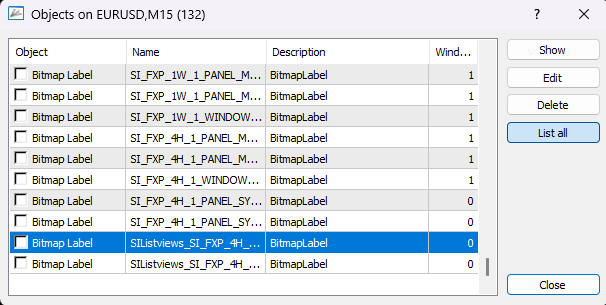
Option 1: Switch to a different time frame to force a reinitialization. If it disappears, it's good.
Option 2: Open your charts object list with Ctrl+O and look for a BitMap Label named SIList*** in Window 0 and delete it.
Option 3: Open a new chart and add FX Power NG to it. Use the different buttons and functions to see if it happens again.
So, if option 1 and 2 don't help use option 3 and configure a new chart.
Best regards
Daniel
Patience is king 🤑
Then have a look at our Breakout Tutorial Video
Hm, this object should not remain on your chart, and I can't reproduce it because it works perfectly fine on my MT4.
I'm afraid this object has been left-over because the internal "delete"-process has been interrupted.
Option 1: Switch to a different time frame to force a reinitialization. If it disappears, it's good.
Option 2: Open your charts object list with Ctrl+O and look for a BitMap Label named SIList*** in Window 0 and delete it.
Option 3: Open a new chart and add FX Power NG to it. Use the different buttons and functions to see if it happens again.
So, if option 1 and 2 don't help use option 3 and configure a new chart.
Best regards
Daniel
Hello again..
The box issue is solved, thanks.
Best regards...
I
If you like to know how to trade those breakouts,
we recommend having a look at our Breakout Strategy at https://www.mql5.com/en/blogs/post/754377
If a trading day is as boring as this one, it's best to go for a walk with the dogs. 🐕🤑😁
Get more details about the Dog Walk Strategy at https://www.mql5.com/en/blogs/post/754240
Happy weekend everyone 🥳
https://www.youtube.com/watch?v=A0GYL3SZvD0&list=PLRyQGGaNZNG785uqMTkfIze-kQaLbvhFS&pp=gAQBiAQB
Hi Daniel hope you are well I have rented your product looks great if you could let me know how to access the Telegram group or any other useful hints that would be great I already subscribe to the morning brief and fx volume channels , look forward to hearing from you
Hi themathtrader,
I sent the invitation via private message. Please check your inbox.
That's our Dog Walk Strategy at its best. I've been able to hit a perfect entry and got stopped out with a reward of 3 times the risk. 🥳
Now I'll wait patiently for the next opportunity on XAUUSD. 🙂
With the right tools, trading can be damn easy. 😉
Study our Dog Walk Strategy at https://www.mql5.com/en/blogs/post/754240
FX Power NG and IX Power need a lot of market data for their precise calculations, and MT4 is often not fast enough to provide this data before the very first start of these applications.
Hence, we have developed a history loader that downloads all the necessary market data from your broker's server.
You can download it free of charge here: https://www.mql5.com/en/market/product/96307
When you start this tool, please ensure that the option "All from Market Watch" is selected.Hello Stein,
I found there is a long "tail" on W1 chart. Tried two brokers and downloaded all the data but they're still the same.
Any idea?
Thanks.
Hello Stein,
I found there is a long "tail" on W1 chart. Tried two brokers and downloaded all the data but they're still the same.
Any idea?
Thanks.
Why do I still have two windows according to your tutorial settings? Mine is MT4
Dear athmytu,
You need to drag the second, and third instance into the subwindow of the first instance.
Please have a look at the first video of my FX Power NG tutorial video playlist, and you see it beginning from second 33.
Best regards,
Daniel
Q: What's the difference between FX Power NG and IX Power?
A: FX Power NG provides precise strength analysis for currencies and Gold, which is more complex than all other trading symbols.
I.e. For the USD strength, it analyses EURUSD, GBPUSD, AUDUSD, NZDUSD, USDCAD, USDCHF, USDJPY, and even XAUUSD.
IX Power provides precise strength analysis for indices, cryptos, oil, etc. based on the same algorithm as FX Power but using only the underlying symbols' data.
IX Power is available for your
MT4 at: https://www.mql5.com/en/market/product/109062
MT5 at: https://www.mql5.com/en/market/product/109063
Hi, Daniel, I just purchased your new indicator. I was wondering what time frame for the index should I put. I see that you put 4H, 1D and 1W. Can you either guide me how to trade those timeframe in relation to chart time frame if I were to use the 4H, 1D and 1W for the index. Thank you.
hi hnubci,
I prefer trading intraday on M5 which suits my workflow best, and I posted various trading strategies.
You'll find them at “Chapter 3 - Proven Trading Strategies” at our Stein Investments Welcome Page
Please drop me a line in case you need further assistance.
Best regards,
Daniel