Swing Structure Trailing Stop
- 实用工具
- 版本: 1.0
- 激活: 5

YOUR STOP LOSS CLIMBS THE STAIRS THE MARKET BUILDS: EACH NEW SWING LOW (OR HIGH) PULLS IT CLOSER, AND IT NEVER STEPS BACK.
Before: a buy on EURUSD runs 60 pips in your favour with the stop still 25 pips under the entry. A sharp pullback takes it all back and the trade closes for a full loss. After: three H1 swing lows formed on the way up, the stop stepped under each one, and the same pullback closes the trade with about 30 pips locked in. A 20-point trailing stop would have been shaken out in the first ordinary dip.
Built for traders who already know where a stop belongs: under the last swing for a buy, above it for a sell. One promise: your stop follows market structure on every position, every candle, without you watching the chart. Mechanism: on each closed candle of your timeframe it finds the last confirmed swing (a fractal of the depth you choose), places the stop a buffer beyond it, and moves it only when the new stop is tighter.
Works with: manual trades and other Expert Advisors or trade copiers on the same terminal (symbol scope and magic filter decide what it touches), hedging and netting accounts, every symbol (forex, gold, indices, crypto), and prop-firm style rules that want a stop on every position. It never opens a trade on a live account.
Try it free first: run Swing Structure Trailing Stop in the Strategy Tester with visual mode on. There it opens small demo positions with a stop two ATR away, so you can watch the green and red swing markers appear on the candles and the stop step behind them.
Who this is NOT for: scalpers who want a fixed trail of a few points on every tick, and anyone who wants the trade closed on a target; this tool only moves stops, it never takes profit or closes a position itself.
In short
- Structure trailing: buys trail under the last confirmed swing low, sells above the last confirmed swing high, on the timeframe you choose (H1 by default).
- One way only: a stop is moved only to a tighter price, by at least a minimum step. It never loosens your stop.
- Start rules: trail at once, or only after the price moved a set distance in profit, or only once the new stop locks profit beyond the open.
- Spread aware: sell stops can add the current spread so the ask does not tag them on a quiet wick.
- PROFIT LOCKED and STILL AT RISK in account currency, RUN KEPT bar per position, swing markers on the candles and the next swing stop as a dotted line.
- Alert-only mode shows every step it would make and sends nothing.
- Not a grid, no martingale, no averaging, no DLLs, no web requests, no extra files.
- Tester numbers (June 2026, EURUSD H1, defaults): 42 demo positions, 49 stop steps, 0 failed sends, 0 journal errors.
START HERE
Attach it to one chart, for example EURUSD H1. One copy trails every symbol of the account unless you limit it. Keep the defaults (H1 swings, depth 3, buffer 30 points, spread added to sells, minimum step 10 points). Turn on Algo Trading and watch the panel: each position shows HOLD, STEPPING, TRAILING or LOCKED. To watch first, switch to ALERT ONLY with the panel button: every possible step is then reported and nothing is sent.
Why structure beats a fixed trailing distance
A fixed trail in points does not know the market. On a quiet day it is too wide, on a fast day it is too tight and takes you out in the first normal pullback. A swing low is a price where buyers actually stepped in; as long as it holds, the move is alive. Placing the stop just beyond the last swing is how many discretionary traders trail by hand. This utility does exactly that, on every position in scope, on every closed candle, with the same discipline at 3 in the morning as at noon.
The life of one trailed position
Find. When a candle of your timeframe closes, the trail looks back up to 100 candles for the last confirmed swing: a candle whose low (for a buy) is lower than the 3 candles on each side. The swing is only confirmed once those 3 candles on its right have closed, so it never repaints.
Place. The new stop is the swing minus the buffer (buys) or the swing plus the buffer and the spread (sells). The panel shows its distance in the SWING column and the chart shows it as a dotted blue line with a marker on the swing candle.
Step. If that stop is tighter than the current one by at least the minimum step, and the start rules allow it, and it respects the broker's stops and freeze levels, the stop is moved. You get one message with the old and the new price. Positions without a stop get the swing stop too (can be switched off).
Lock. Once the stop passes the open price the state reads LOCKED and the position can no longer lose; its value moves from STILL AT RISK to PROFIT LOCKED.
Safety patterns inside
Before any send it checks that Algo Trading is allowed, that the symbol is tradable, that its trade session is open and that the last quote is no older than 5 minutes. A refused send is retried with a growing pause up to 2 minutes, with one alert after a set number of failures. Right before each send the position is selected again and its symbol, magic and current stop are checked again; if you moved the stop tighter yourself in the meantime, the trail never pulls it back. Per-position memory (step count, last swing used) is kept in GlobalVariables whose keys contain the chart symbol and the magic filter, so two copies on different charts never share a key.
Inputs, every one explained
SWING STRUCTURE
InpTF = H1. Timeframe of the swings. Current means the chart timeframe.
InpSwingDepth = 3. Candles on each side that a swing must beat. Higher = fewer, stronger swings and a wider trail.
InpLookback = 100. Closed candles searched for the last swing.
InpBufferPoints = 30. The stop sits this many points beyond the swing. Use more on gold and indices.
InpAddSpread = true. Sell stops add the current spread.
WHEN TO TRAIL
InpMode = 1. 0 alert only, 1 move the stop loss.
InpStartPoints = 0. Trail only after the price moved this many points in profit; 0 starts at once.
InpOnlyLockProfit = false. When true, the stop is moved only to a price at or beyond the open, plus InpLockPlusPoints (default 0).
InpMinStepPoints = 10. The smallest stop move, so the broker is not asked for one-point changes.
InpAdoptNoSL = true. Positions without a stop also get the swing stop.
EXECUTION
InpFailAlertAt = 3. One alert after this many failed attempts on one position.
FILTER - WHICH POSITIONS ARE TRAILED
InpSymbolScope = all symbols or the chart symbol only. InpMagicFilter = any magic, only manual trades (magic 0), or only the magic number InpMagic.
ALERTS
InpAlertPopup = true. InpAlertPush = false (push to the MetaTrader app on your phone).
PANEL
ShowPanel = true. ShowLines = true: swing markers, stop line and next swing stop line for chart-symbol positions. PanelX = 12, PanelY = 15, PanelFontSize = 9, MaxTableRows = 6, MaxHistoryRows = 4. The MOVE button drags the panel; on a short chart it drops its least important rows first.
STRATEGY TESTER DEMO
InpTesterDemo = true. In the Strategy Tester only: Monday to Friday 08 to 16 one demo position per 4-hour slot on the chart symbol with a stop two ATR(14) away, at most 3 open, margin checked times 1.5 before every order, closed after 5 days, stopped after a 20 percent balance loss. This code never runs on a live or demo chart.
The panel
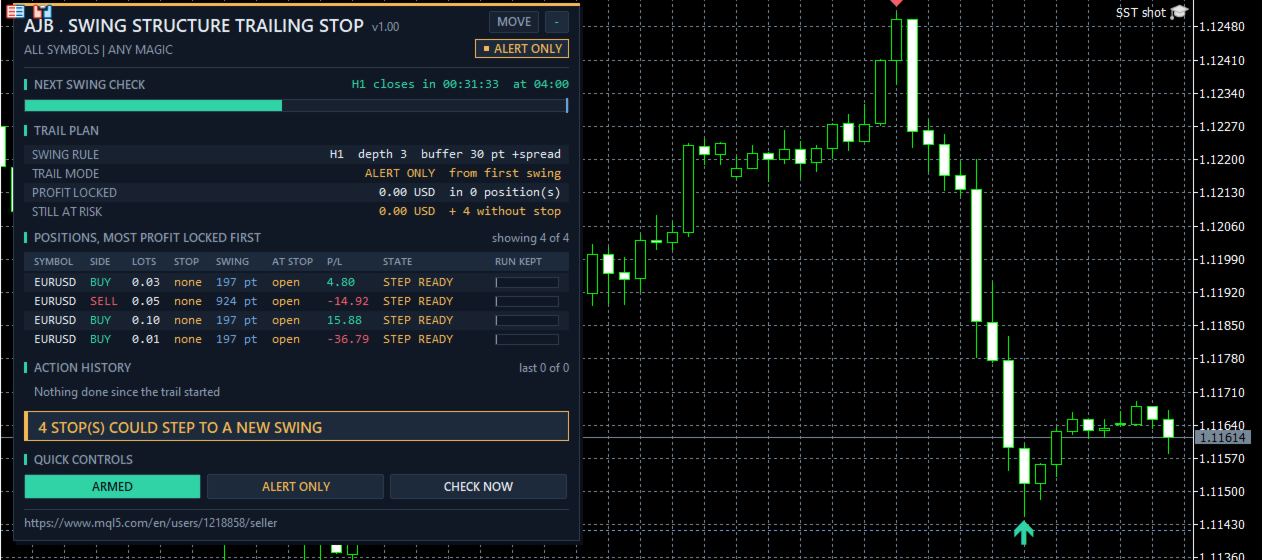
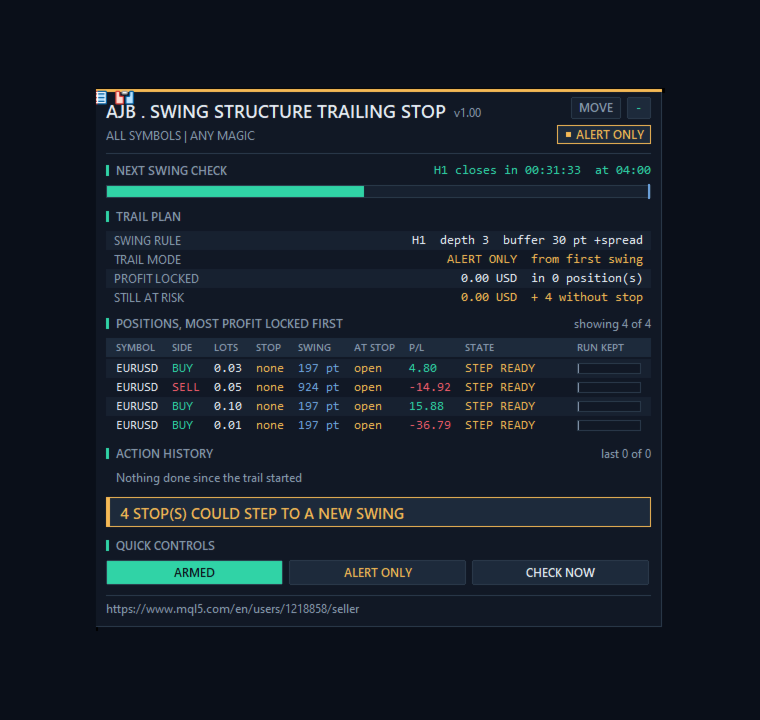
NEXT SWING CHECK: a bar that fills while the current candle runs; a new swing can only appear when it closes. TRAIL PLAN: swing rule, mode, profit locked, still at risk, steps done, biggest step, start rule, positions without a stop, last action, Algo Trading, failed sends, totals and positions in scope. POSITIONS, MOST PROFIT LOCKED FIRST: symbol, side, lots, distance to the stop and to the next swing stop in points, money at the stop, profit, state and a RUN KEPT bar showing how much of the run from the open the stop already holds. States include HOLD, STEPPING, TRAILING, LOCKED, STEP READY, WAIT, BELOW LOCK, NO SWING YET, SWING TOO NEAR, MARKET SHUT and RETRY. ACTION HISTORY lists every step with server time. QUICK CONTROLS: ARMED or PAUSED, the mode button and CHECK NOW. The right side of the chart stays clear.
What it cannot do
It does not pick entries or exits and it does not make a losing trade a winner. In a choppy range the last swing can sit close to the price and a normal swing can still be taken out; a higher depth or buffer gives the trade more room. It only works while it runs: with the terminal off, the last stop it set stays on the server. Keep the terminal running, for example on a VPS.
What was and was not tested
Tested in the Strategy Tester on a hedging account, 1 to 30 June 2026, 1-minute OHLC, H1, deposit 10000, leverage 100, three runs, with no journal error and no failed send. EURUSD defaults: 42 demo positions, 49 stop steps. XAUUSD with a 200 point start, profit lock plus 50 points and a 100 point buffer: 36 positions, 23 steps. EURUSD in alert-only mode: 35 positions, 99 step alerts, no stop changed. On a demo chart the panel ran in alert-only mode beside 4 open EURUSD positions without stops and changed nothing.
Not tested at the time of writing: real stop moves on a live or demo broker, a netting account, retries after a broker refusal, chart symbol scope, magic filters, pop-up and push alerts, and a terminal restart. These paths exist in the code and are described by design. Please try them on a demo account with your own broker first.
Try it in the Strategy Tester
Choose Swing Structure Trailing Stop, EURUSD or XAUUSD, H1, any recent month, visual mode, and press Start. Watch the swing markers appear and the dashed stop line climb behind them.
If the trail kept a profit a fixed trailing stop would have given back, or you think it should handle a case differently, an honest review on the product page helps other traders decide and tells me what to improve next.