CopyDeck Trade Copier MT4

CopyDeck Trade Copier MT4

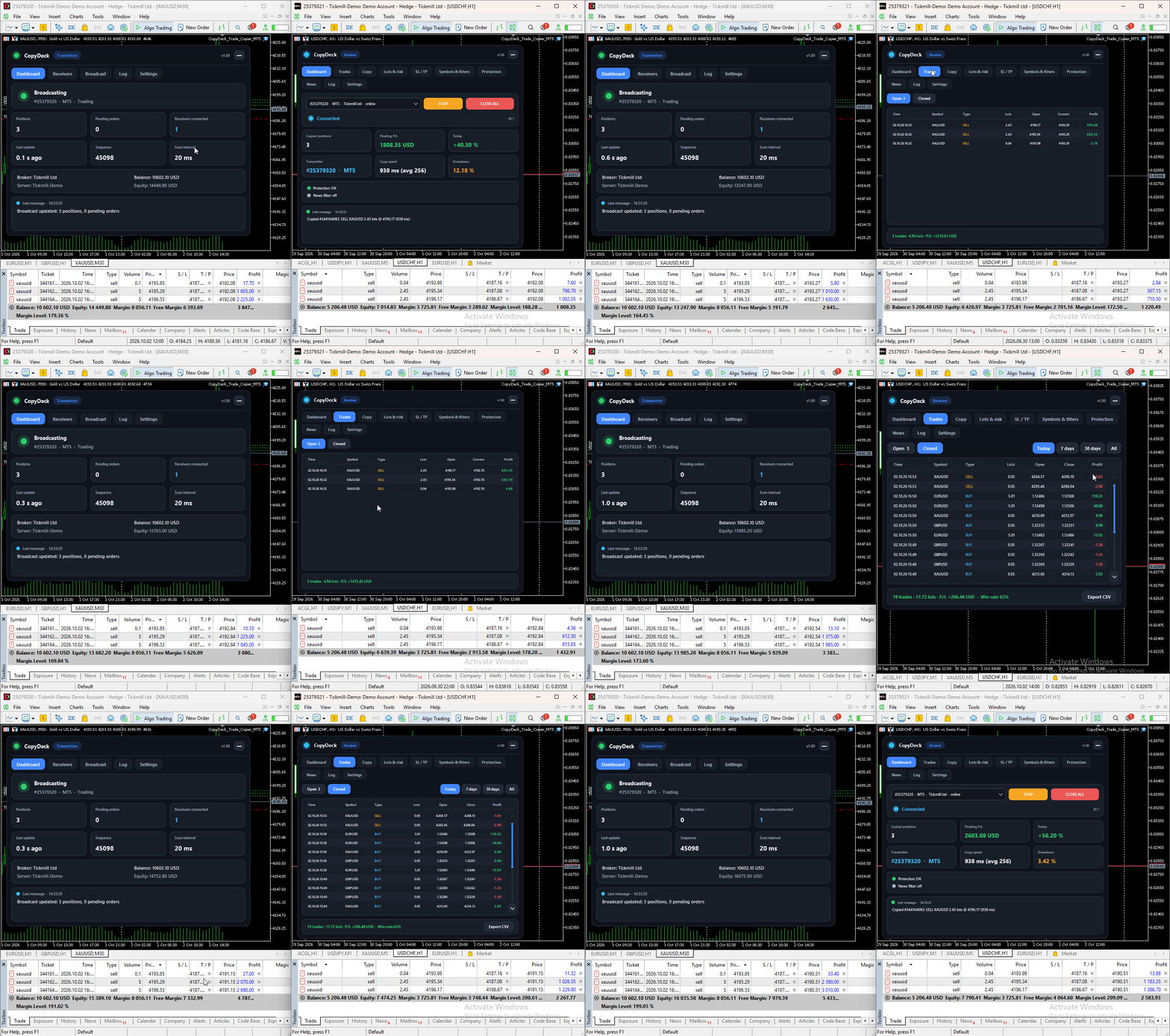
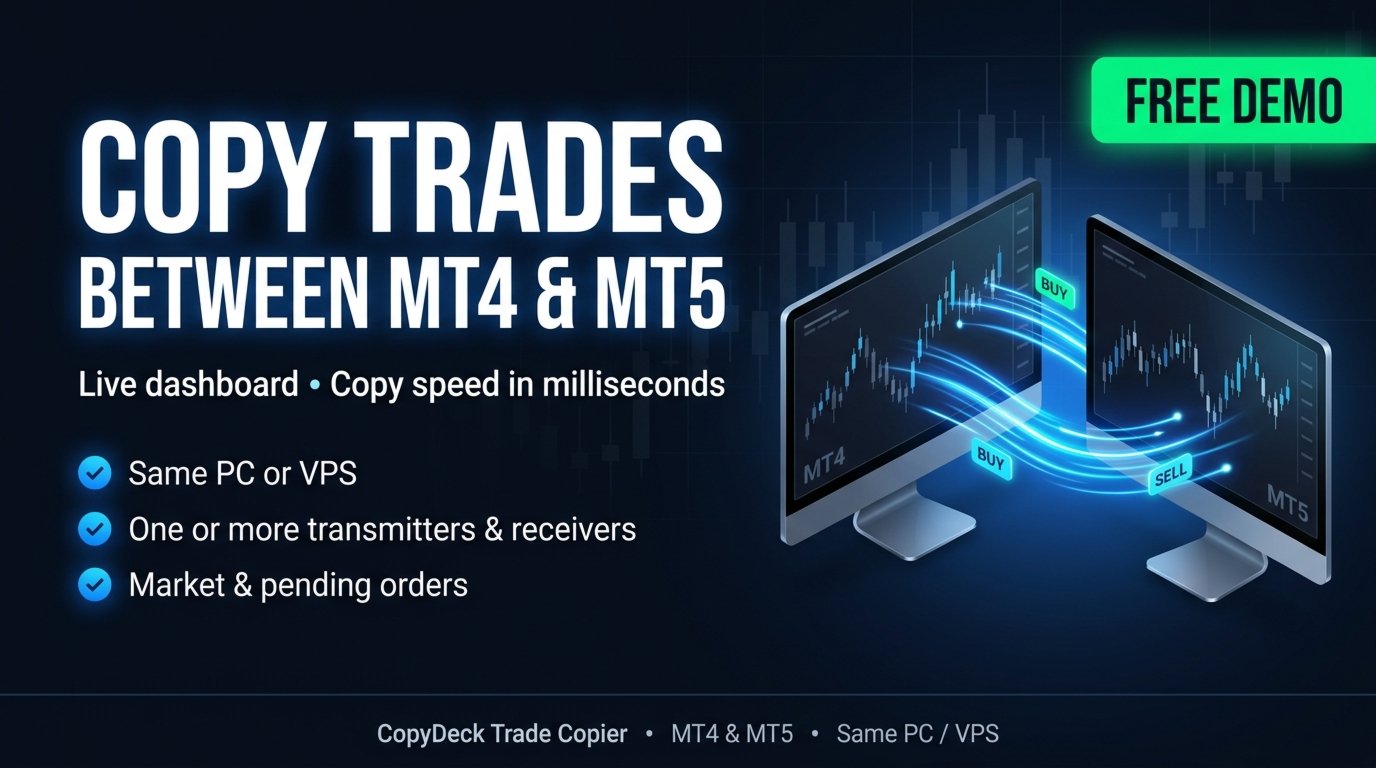
CopyDeck Trade Copier MT4 copies trades between MetaTrader terminals on the same Windows PC or VPS and lets you see and control every copied trade from a live dashboard on the chart.
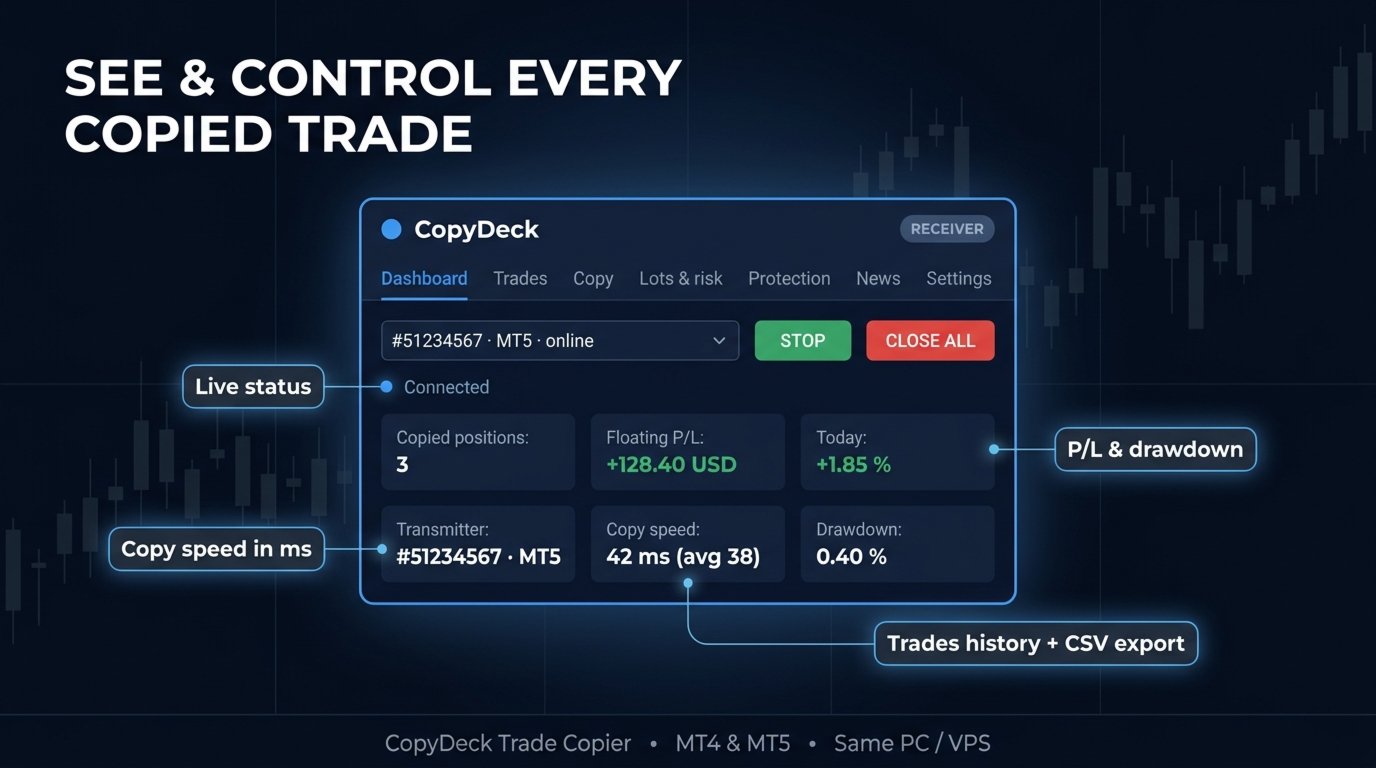
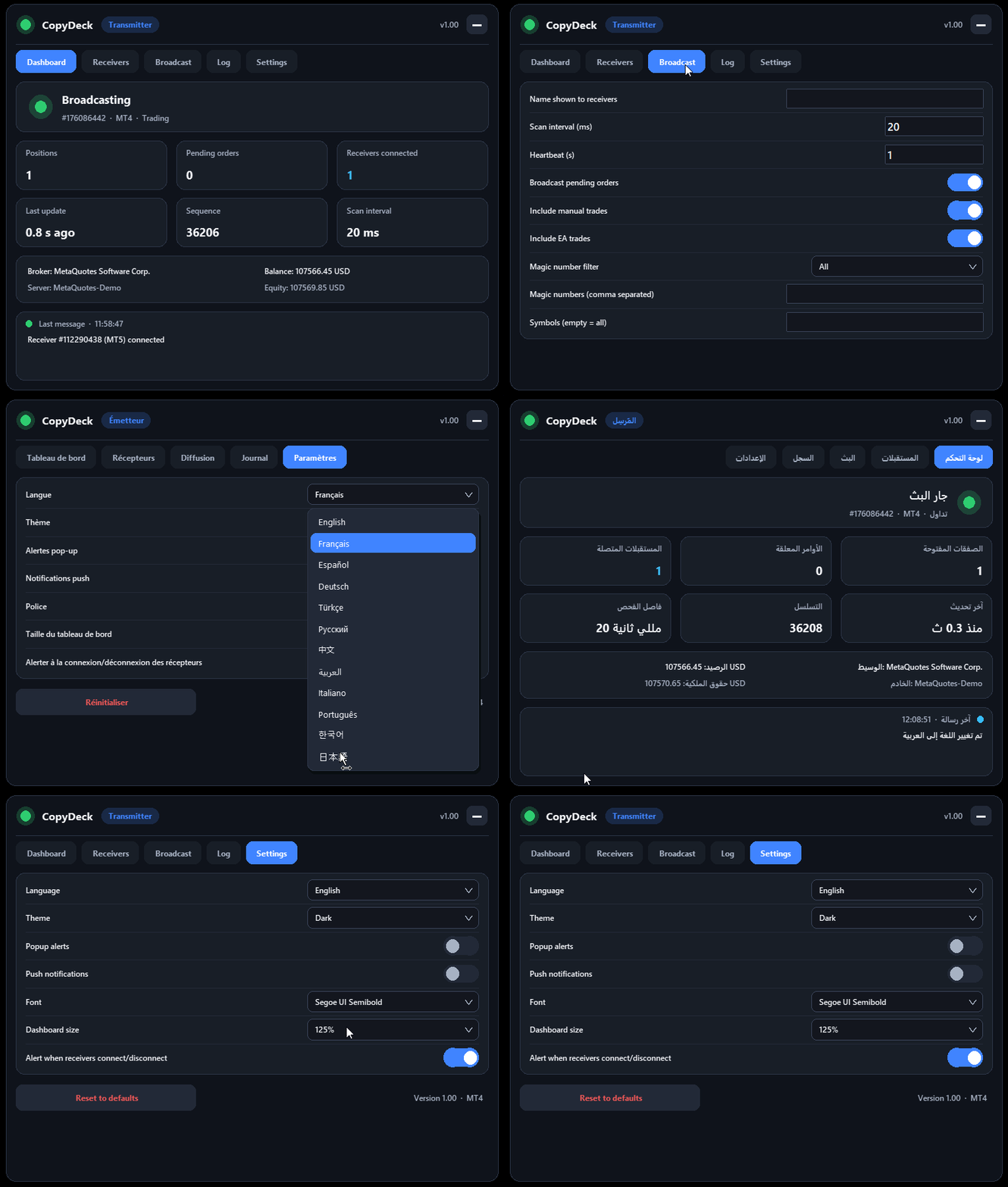
No input window to dig through and no guessing: connection status, copy speed, open copies, profit, drawdown, and every setting sit in one clean panel, in your language.

Why CopyDeck?

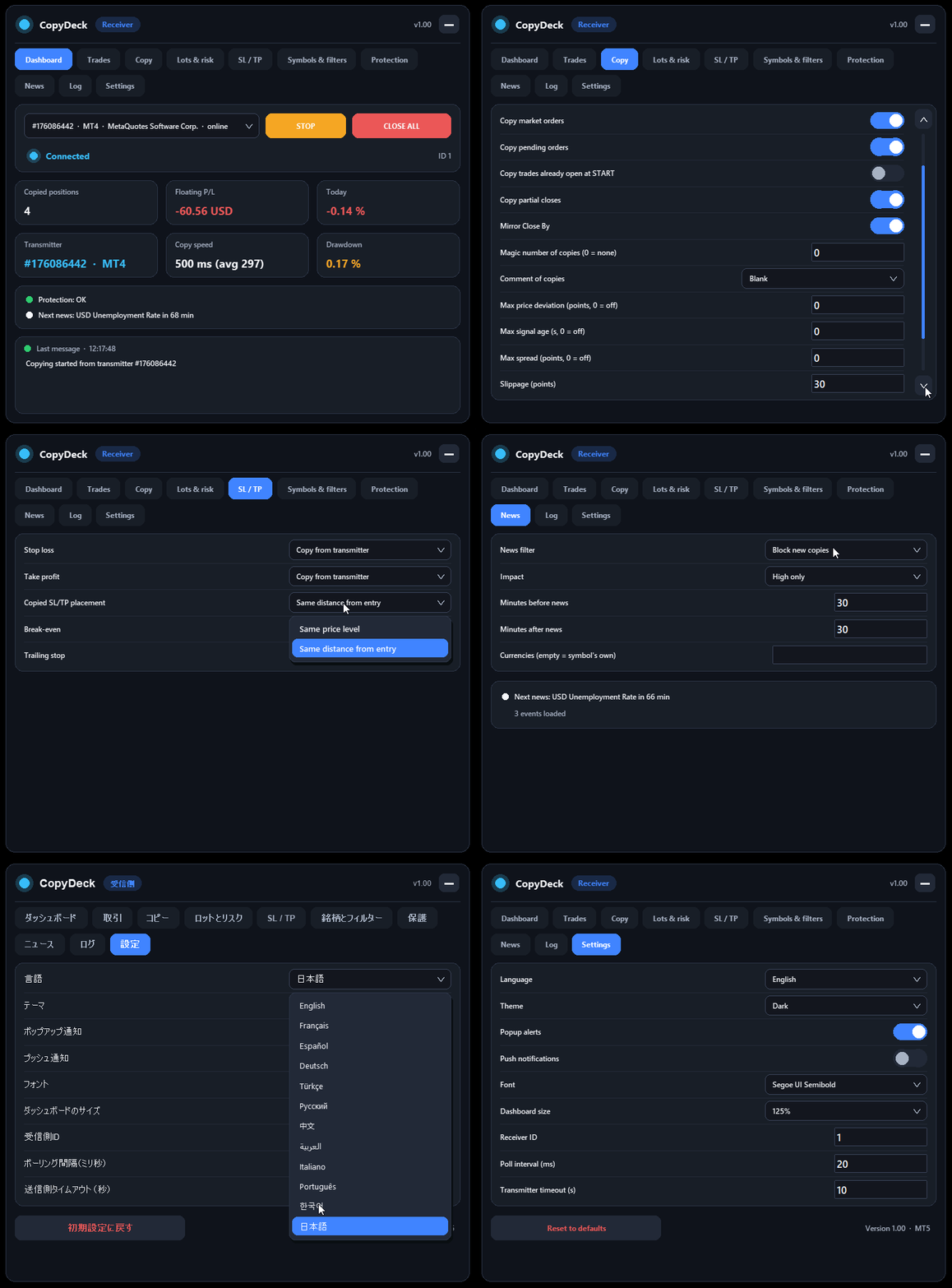
A real dashboard, not a list of inputs. Every setting lives in a tabbed on-chart dashboard and applies instantly: Dashboard, Trades, Copy, Lots & Risk, SL/TP, Symbols & Filters, Protection, News, Log, and Settings. Choose the transmitter from a dropdown, press START, and watch the copies arrive.

See your copy speed; don't just trust it. The dashboard measures and shows the copy time of every trade in milliseconds, with the latest and average values.

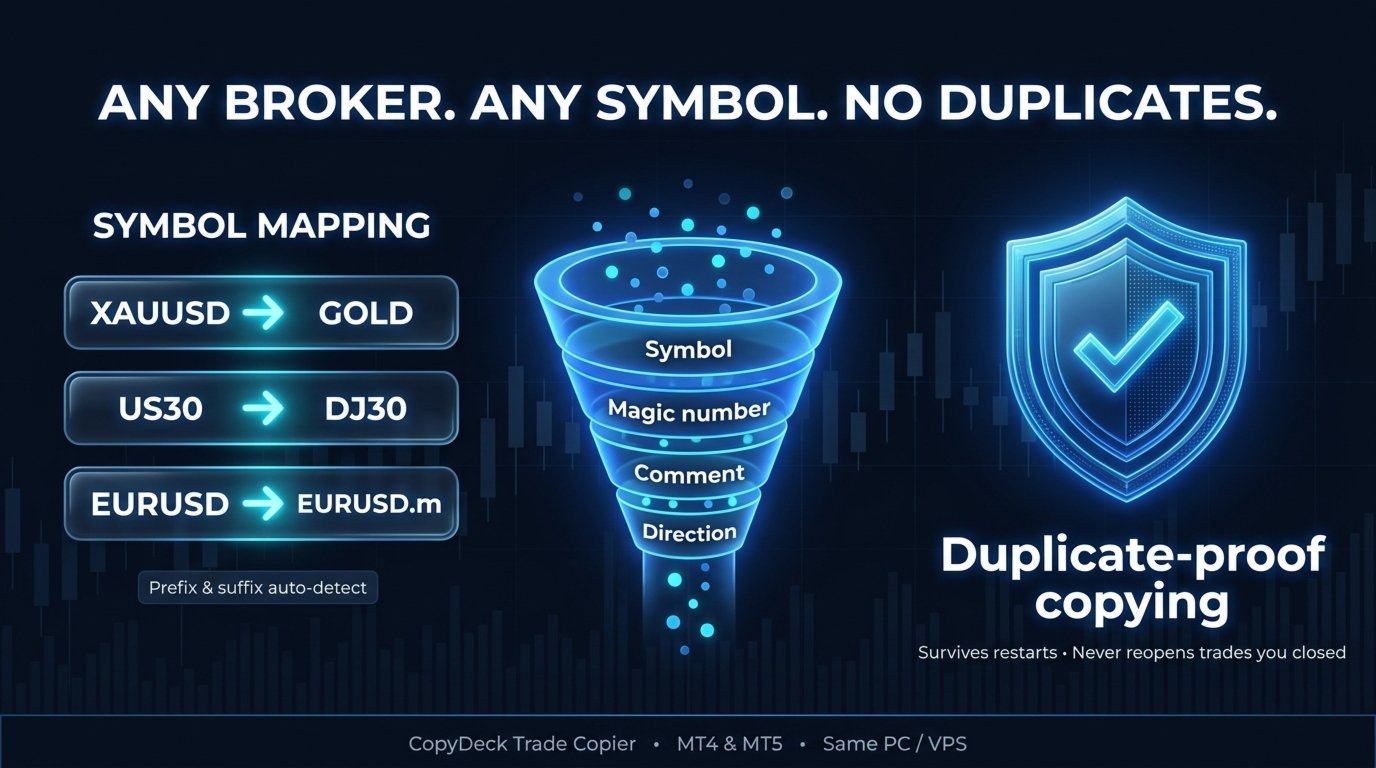
Duplicate-proof copying. Servers sometimes report an error for an order that was in fact executed. CopyDeck checks for that before any retry and adopts the existing position instead of opening a second one. Trade memory survives terminal restarts, and a copy you close manually on the receiver is never reopened.

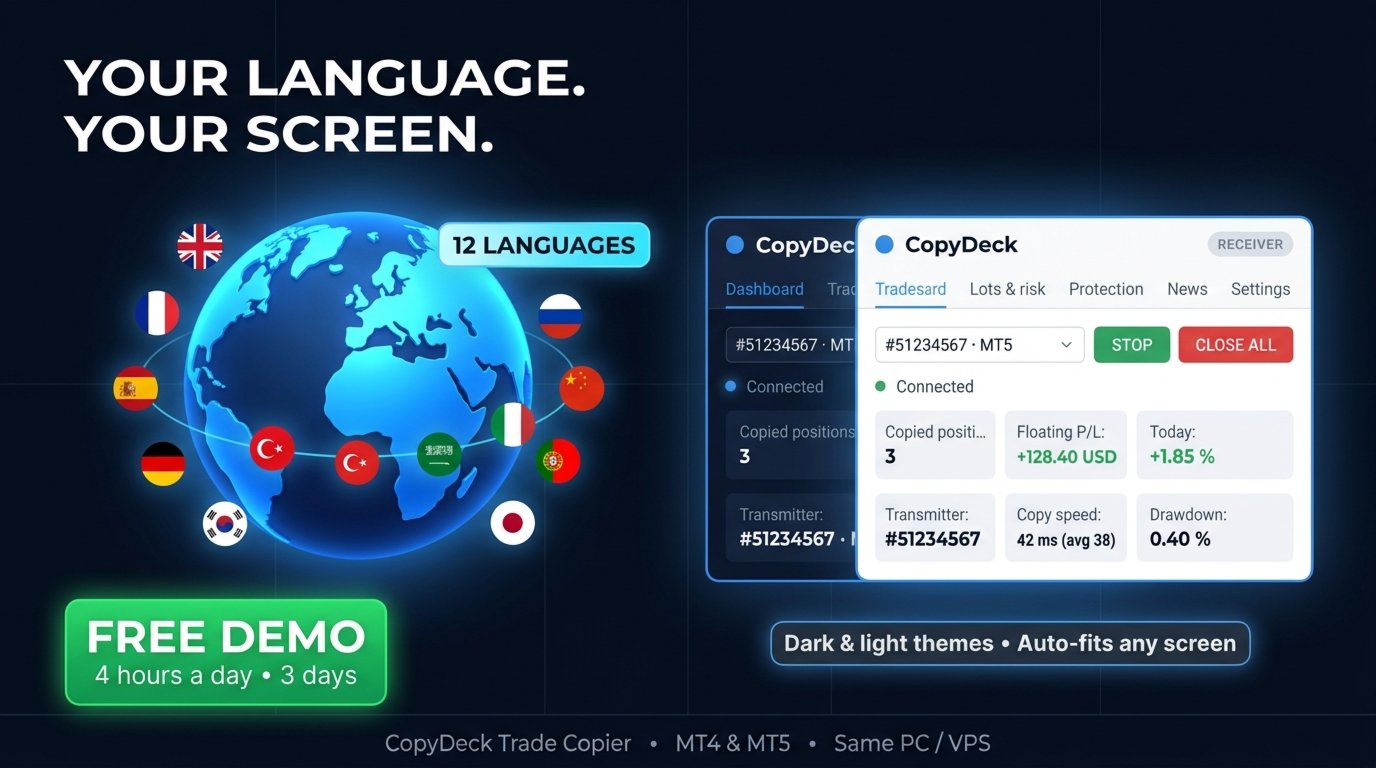
12 languages. English, French, Spanish, German, Turkish, Russian, Chinese, Arabic (with a right-to-left layout), Italian, Portuguese, Korean and Japanese. Switch the language from the dashboard at any time.

Built-in news filter. Block new copies, or close copies and block, around high-impact news. On MT4 it uses the built-in economic calendar, with a choice of impact level, minutes before and after, and currencies.

Trades tab with history. Open copies are shown live; closed copies are listed by Today, 7 days, 30 days or All, with totals, profit and win rate, and can be exported to CSV.

Simple setup

  1. Attach CopyDeck to a chart on the account you copy from and choose Mode: Transmitter.
  2. Attach CopyDeck to a chart on the account you copy to and choose Mode: Receiver.
  3. On the receiver dashboard, select the transmitter from the list and press START.

That's all. Every receiver has its own settings, and several receivers on one account get separate IDs automatically.

Copying

  • Market orders and all pending order types, including expiry, plus stop-limit orders between MT4 terminals
  • Stop loss and take profit changes, partial closes and Close By, all mirrored
  • Reverse copying, and buy-only or sell-only copying
  • Copy new trades only, or also the trades already open when you press START
  • Magic number and comment of the copies: blank, copier tag, custom text, or the same as the transmitter
  • Execution controls: maximum price deviation, maximum signal age, maximum spread, slippage and automatic retries
  • Manual trades and Expert Advisor trades are both copied

Lot sizing

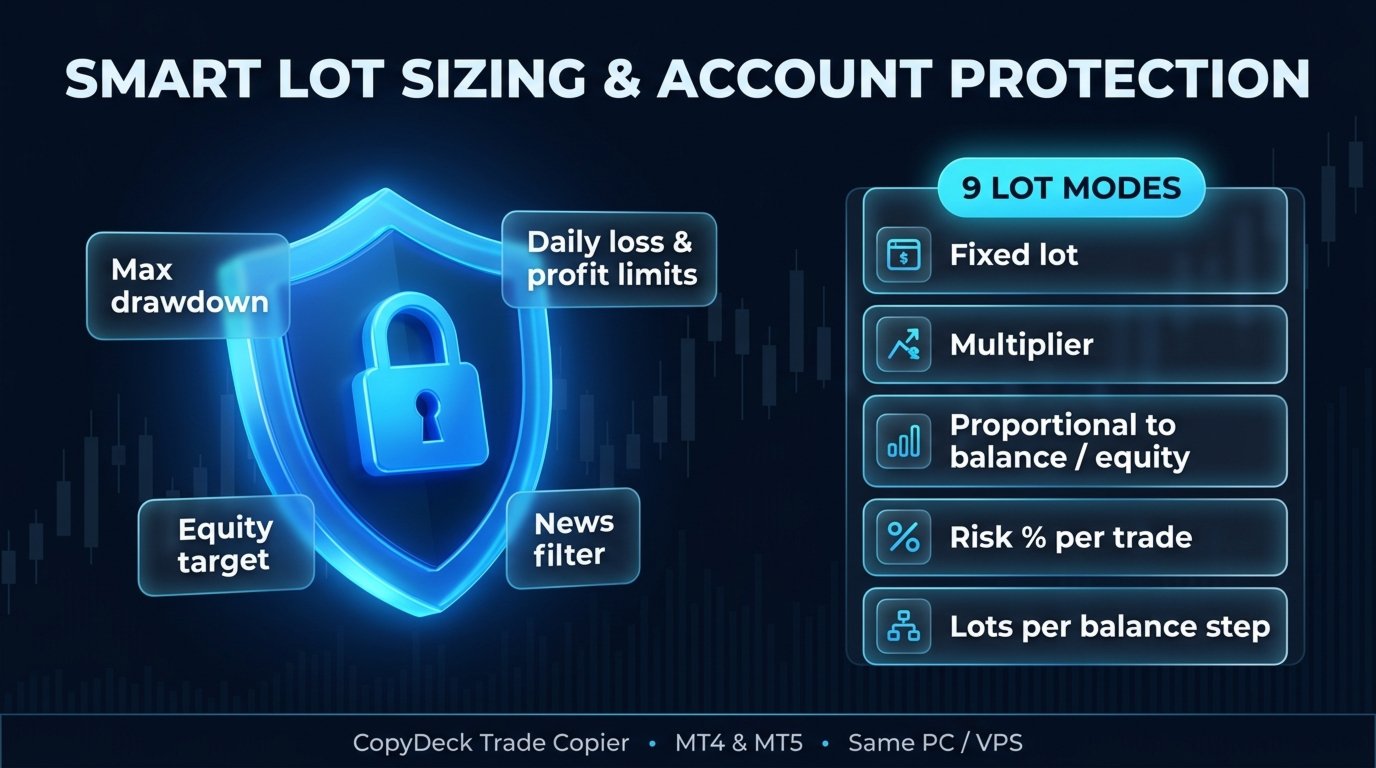
9 lot modes, each set per receiver:

  • Fixed lot
  • Multiple of the transmitter lot
  • Proportional to balance, equity or free margin
  • Risk % of balance, risk % of equity, or a fixed money risk per trade (using the stop loss)
  • Lots per balance step

On top of the mode: per-symbol lot factors (for example XAUUSD=0.5 ), automatic adjustment for different contract sizes, and minimum and maximum lot limits.

Stop loss, take profit and trade management

  • Copied SL/TP: copy from the transmitter at the same price level or the same distance from entry, use your own values in points, or none
  • Break-even: with a trigger and a locked-in profit
  • Trailing stop: with start, distance and step

Different brokers and symbols

  • Prefix and suffix, set manually or detected automatically
  • Custom symbol mapping, for example XAUUSD=GOLD or US30=DJ30
  • Copy between the same broker or different brokers, real or demo accounts

Filters

  • Symbols to copy or exclude
  • Magic numbers to copy or exclude
  • Comment contains / does not contain
  • Direction and copy hours

Account protection

  • Close all copies and stop: maximum drawdown %, minimum equity, or equity target
  • Close all copies and pause until the next day: daily loss % or daily profit %
  • Limits on new copies: minimum margin level, maximum number of copied trades, maximum total copied lots
  • Transmitter offline: keep the copies open, or close them after a set number of minutes
  • CLOSE ALL button on the dashboard, with confirmation
  • Popup and push notifications for important events

Transmitter dashboard

The transmitter shows its own status and a Receivers tab listing every connected receiver: account, platform, state and number of copies. It can run on an investor (read-only) login, because it only reads trades and never places them.

Requirements

  • All terminals run on the same Windows PC or Windows VPS. Copying is local, through MetaTrader's shared files folder, with no DLLs and no external server.
  • MT4 receiver accounts must use hedging mode. The transmitter works on any account type.
  • This is the MT4 version. For copying to or from MetaTrader 5 terminals, the CopyDeck Trade Copier MT5 version runs on those terminals. With both, you can copy MT5→MT5, MT5→MT4, MT4→MT5 and MT4→MT4.
  • When using prop-firm accounts, always check the firm's current rules on trade copying.

Free demo, guides and support

[Free demo link] 
[Installation guide] | [Settings guide] | [Troubleshooting]


Questions before or after buying? Message me through my MQL5 profile; I'm happy to help with your setup.

If CopyDeck works well for you, a review is greatly appreciated. If something doesn't, please contact me first so I can fix it.
推荐产品
Binary Options Copier Remote is an EA that allows to copy binary options trades between MT4 accounts at different computers. This is an ideal solution for signal provider, who want to share his trade with the others globally on his own rules. Provider can give free bonus license to 10 receivers. That means those 10 receivers can copy from provider by using Binary Options Receiver Free (no cost). From 11th one, receiver have to buy Binary Options Receiver Pro (paid version) in order to copy from
YPY Check Your Broker is a universal multifunctional software complex which uses primary tick data. It allows traders to perform comparative analysis of the trading conditions and execution quality, identify abnormal BID prices outside the indicative quotes. It also reflects the facts of redrawing bars in the terminal, spread extension, controls the leverage stop out level values, speed of execution and server connection breaks, maintains a detailed statistics on the slippages. The YPY Check You
Binary Options Copier Local is an EA that allows to copy binary options trades between MT4 accounts on the same computer. With this copier, you can act as either a provider (source) or a receiver (destination). All binary options trades will be copied from the provider to the receiver with no delay. Demo : Demo version for testing can be downloaded at: https://www.mql5.com/en/market/product/10047 Reference : If you need to copy between different computers over Internet, please check Binary Optio
Local Trade Copier   is an advanced tool designed for efficiently copying trades between accounts in the   local   mode. It allows for lightning-fast order replication from a master account to a slave account. In local mode, trades are copied instantly, while in remote mode, the copying process takes less than 1 second. MT5 Version MT5 Full Version (Local & Remote) MT4 Full Version (Local & Remote) Local mode refers to both MetaTrader platforms being installed on the same system. It fully suppo
Remote Trade Copier   is an advanced tool designed for efficiently copying trades between accounts in both   local   and   remote   modes. It allows for lightning-fast order replication from a master account to a slave account. In local mode, trades are copied instantly, while in remote mode, the copying process takes a second.  In new version, in remote mode , the copy operation can be performed with a delay of milliseconds or zero . After purchase, ask how to activate it MT4 Version (Only Loc
Crystal CopyCat Pro Trade Copier Ultra-Fast Master–Slave Copier with Zero-Delay Execution and Cross-Platform MT5 Compatibility Architecture:   MT4 → MT4 and MT4 → MT5 Full Compatibility MT5 Version Free :   https://www.mql5.com/en/market/product/144569 MT5 Version Pro :  https://www.mql5.com/en/market/product/165051 Complete User Setup Guide:-  https://www.mql5.com/en/blogs/post/764222   1. Overview Crystal CopyCat Ultimate 5.0 is a next-generation trade copy engine engineered for professi
Magic EA MT4
Kyra Nickaline Watson-gordon
3 (1)
Magic EA is an Expert Advisor based on Scalping, Elliot Waves and with filters such as RSI, Stochastic and 3 other strategies managed and decided with the robot smartly. Large number of inputs and settings are tested and optimized and embedded in the program thus inputs are limited and very simple. Using EA doesn't need any professional information or Forex Trading Knowledge. EA can trade on all symbols and all time frames, using special and unique strategies developed by the author. The EA wo
Harvest GOLD
Sayan Vandenhout
Harvest GOLD USES THE TREND WAVE INDICATOR AND IT CAN IDENTIFY THE BEGINNING AND THE END OF A NEW WAVE TREND MOVEMENT. AS AN OSCILLATOR, THE INDICATOR IDENTIFIES THE OVERBOUGHT AND OVERSOLD ZONES. IT WORKS GREAT TO CATCH THE SHORT TERM PRICE REVERSALS AND USES A MARTINGALE STRATEGY TO CLOSE ALL TRADES IN PROFIT. USE DEFAULT SETTINGS ON H1 OR HIGHER TIME FRAME ON ANY PAIR FOR MORE ACCURATE TRADES WHY THIS EA : Smart entries calculated by 3 great strategies The EA can be run on even a $30000
Forex Daily Scalping EA is a professional scalping advisor for daily work on the FOREX currency market. In trading, along with experience, traders usually come to understand that the levels of accumulation of stop orders, price and time play a significant role in the market. - Recommend ECN broker with LOW SPREAD: IC Market , Exness, NordFX , FXPRIMUS , Alpari , FXTM PARAMETERS: PRICE - the price distance to be covered in the allotted time period; TIME - time allotted in seconds; HL_PERIOD - n
H4 GBPUSD Trend Scalper is a trend signal scalper The EA trades according to the trend strategy using original built-in indicator for opening and closing orders. The external inputs for limiting trading on Fridays and Mondays are available. The purpose of the strategy is to use the current trend with the most benefit. According to the results of testing and working on demo and real accounts, the best results achieved by using the Н4 timeframe on the GBP/USD pair Works on MetaTrader 4 Build 971+
Forex Diamond EA
Lachezar Krastev
5 (6)
FOREX MEGA SALE! 50% OFF! Buy Forex Diamond EA with a huge –50% discount ! Promo Price: $267 (Regular Price: $547 — You Save $280! ) Act now before this deal ends! Live Results:   https://www.mql5.com/en/signals/2379493 Forex Diamond EA – Reliable Automated Trading Powered by Smart Algorithms Forex Diamond EA is a proven expert advisor designed to deliver consistent results using a combination of trend and counter-trend strategies. Trusted by thousands of traders since its launch, Forex Diamo
Local Account Monitor MT4 is a read-only local monitoring utility for traders who run multiple MetaTrader terminals on the same PC or the same Windows VPS . It combines Agent mode and Dashboard mode so you can monitor local accounts from one place, spot stale terminals quickly, review account health states, and inspect risk details without switching between many terminals. Public channel:   CLICK HERE What it is for Monitoring multiple local MT4 terminals from one dashboard Quickly identifying
FREE
Stock Flow
Ciprian Ghebanoaei
您是否希望将您的股票交易提升到一个新的水平? 凭借其智能算法和专家订单,您可以确保自己始终处于领先地位。 从上涨和下跌的市场中获利,轻松预测趋势,并保持投资组合的领先地位 - 有了 Stock Flow,一切皆有可能! 输入和输出订单由可以在任何 MT4 平台上找到的两个指标的组合给出:MACD 信号、动量指标和资金流量指标。 指标的周期和水平值以最佳组合进行调整,以获得最佳净利润。 它还包含止损和止盈,在波动性增加的时候提供资金安全。 Expert 测试了 2021 年 1 月 1 日至 2023 年 1 月的 GBPUSD M30 历史数据(在 MT4 上回测 2 年)。 请自行下载测试。 您还可以使用 Metatrader 4 平台中的优化功能来寻找更好的 EA 版本。 推荐: ü MaxLotSize - 最大允许交易手数。 仅当您真正了解自己在做什么时才更改此参数。 ü TakeProfit - 以点数获利。 ü StopLoss – 止损点数。 ü EAMagic - EA 的幻数,它允许顾问仅使用其位置。 每个图表必须有不同的值。 ü 本E
FREE
Still posting your trading results manually? Your trading performance is not just data. It is a monetizable asset. ️ IMPORTANT: This product requires external setup (X API + Google Apps Script).   Full Setup Guide (Required): Failure to follow the guide will result in the system not working. Problem Most traders: Post results manually Fail to stay consistent Never turn results into income You may be profitable… but still not making money from your audience. Your results are already valu
Trading Control Pad
Sukunthakan Ngernbamrung
Trading Control Pad is a useful tool for all traders. To send BUY/SELL, pending order, modify and automatic setting SL and TP in one click by the current symbol. The Trading Control Pad can help you being comfortable and quickly trading.  Pad can help you automatic and manual partially close some lot at the target, breakeven and trailing stop. The Trading Control Pad features / Functionality Showing the currency pair, the total positions, the number of buy and sell orders. Standard tools for op
Just Copier MT4
Agung Imaduddin
5 (5)
"Just copier" is designed to copy trading without any complicated settings. The copy can be done in one PC. One EA can be set as master (provider) or slave (receiver). The receiver lot can be set to multiple providers lots. Please also check this product at fxina.hostingerapp.com.  Any type of copy is available. MT4 -> MT5 MT4 -> MT4 MT5 -> MT5 MT5 -> MT4 If you want to copy MT4 -> MT5 or MT5 -> MT4, please purchase "Just copier" for MT4 and "Just copier" for MT5 separately. Just Copier can copy
Richestcousin EA
Vicent Osman Kiboye
INSTAGRAM Billionaire: @richestcousin PIONEER OF ZOOM BILLIONAIRES EA THE ONLY PROFITABLE TRADING ROBOT. To trade without withdrawals is Scamming. Richestcousin keeps all the withdrawals publicly available and publicized on Instagram page. The trades are fr His very own Robot software. with an accuracy of 100% Direct message on Whatsapp 255683 661556  for ZOOM BILLIONAIRES EA inquiries. ABOUT Richestcousin is a self made Acclaimed forex Billionaire with an unmatched abilities in discerni
BreakOut Grid
Catalin Zachiu
This expert is a combination between a grid and a scalper and it uses a grid of ten pending orders , five for long and five for short , with a 500 point spacing between them with a 100 point scalp target. It has three working modes , first , the entry by level , the expert starts operation when the price aproaches an important trade level ( a former resistance or support) , second , the entry by time , launches the expert at a specific time (input by user) and the third type is continuous operat
Expert Advisor: Breakout_Recovery_V2    Version: 2.3    Symbol: XAUUSD    Timeframe: M15 (recommended)    Strategy Type: Breakout + Smart Recovery (Bi-directional Martingale)    Platform: MetaTrader 4 (MT4) Description: Breakout_Recovery_V2 is a smart trading system that detects real breakout opportunities and uses a controlled recovery mechanism (martingale) when the market moves against the initial entry. Features: *Real breakout entry logic using a custom supply/demand
KumoJoy
Mick Prater
Overview Discover the power of automated scalping with KumoJoy , a smart Expert Advisor (EA) for MetaTrader 4. KumoJoy blends the trusted Ichimoku Kinko Hyo indicator with dynamic scalp zones to capture fast price reversals in active forex markets. Designed for traders who want hassle-free trading, KumoJoy delivers high-probability trades with low costs and built-in risk controls. With KumoJoy, you’ll enjoy: Easy Setup : Simple settings for beginners and pros alike. Live Insights : Chart labels
Grid Recovery EA Turn Any Manual Trade into a Fully Automated Grid System Auto Grid Layering EA   is a powerful trade management tool designed for traders who manually enter positions but want to automate advanced grid recovery, profit scaling, and risk control. Once you place a trade, the EA takes over and intelligently builds a grid of positions as the market moves against your entry, helping you manage drawdown and recover trades efficiently without constant monitoring. This is not a signal s
This is the ONLY Trade Copy EA that can copy TO and FROM many slave account. Trader can choose EA to work in ONE WAY (server => slaves) or TWO WAY (server <=> slaves) mode. The copy process is done without leaving magic number or any infomation in the comment field of the orders. Very clean. Order can be partialy closed on both server and slave account. EA only work with 28 currency pairs because CFD and metals sometime have different names on some brokers. EA has ability to protect account by s
Risepanel
Hossein Ahmadi Beni
1 (1)
Risepanel helps you open positions, close positions and analyze currencies. It works any time frame. For calculations to be correct, your account currency must be USD, EUR or GBP. Features Market information. Orders and Pending Orders (Stop & Limit). 8 kinds of Pending by trend line. Specifications and Margin Calculation Required by Buy or Sell. Calculate and determine Stop Loss by pip, currency pair price, monetary value and percentage of risk. Calculate and determine the take profit by pip, t
| Fully-automated Smart Money Concept (ICT) inspired trading solution with multi-strategy capabilities | Built by a grid trader >> for grid traders.  This is MT4 version, click  here  for  Blue CARA MT5  (settings and logics are same in both versions)     Real monitoring signal  -->  Cara Gold Intro Blue CARA EA   ('CARA') - short for  C omprehensive  A lgorithmic R esponsive A dvisor is a next-gen  multi-currency    multi-timeframe  EA base on the widely known (and perhapse most popular) Inn
Golge Guardian
Ismail Demirci
ENGLISH VERSION GOLGE GUARDIAN – Professional Gold Scalping EA Trade Gold with Precision GOLGE GUARDIAN is a professional Expert Advisor developed specifically for MetaTrader 4. It is designed to trade XAUUSD (Gold) on the 5-minute timeframe using an advanced algorithmic price engine and proprietary mathematical models . Unlike simple indicator-based robots, GOLGE GUARDIAN evaluates multiple market conditions before opening a trade. Every position is opened only after several technical filters a
Risk Commander
Adisorn Soodkanueng
Product Name: Risk Commander: Trade Assistant & Strategy Simulator Risk Commander is more than just a trade panel—it is a complete Manual Trading Ecosystem . It serves two powerful purposes: Live Assistant: Helps you execute trades with speed, precision, and perfect risk management in real-time markets. Training Simulator: Fully compatible with the Strategy Tester (Visual Mode) , allowing you to practice manual trading on historical data without risking a cent. NEW! Built-in Simulator Mode Stop
The Arrow Scalper
Fawwaz Abdulmantaser Salim Albaker
1 (2)
Dear Friend..  I share with you this simple Expert Adviser .. it is full automatic  this Expert Adviser following the trend of the pair you install on or any stocks or indices , it is works like that: - when the trend on H4 chart show a start of up trend the expert will wait till the 15M & 1H charts show an up trend the EA will open a buy order directly , and do the same for down trend and open a sell order the buy or sell  order lot size and take profit and stop loss will measured manually  by
FREE
你好!  任何人都可以在白天交易外汇或进行长期投资  所有你需要的是"临盘中EA " Pro盘中EA还通过在指定时间段内处理该工具的"当日最低值和最高值"来确定"安全买入/卖出"点来在此区域内进行买入/卖出。  1-提供购买区;购买1-购买2  2-提供销售区域;卖1-卖2  3-Dec Yesilmaz提供了一个等待区;在第一条红线和第一条绿线之间,EA不会在此区域采取行动! 专业盘中EA功能和功能 ; 1-根据您的趋势分析采取中长期头寸 2-仅限盘中交易,一种倒卖 3-EA可以在同一时间交易中期和长期 4-自动对冲系统(保护现有盈利头寸) 5-带自动对冲的保证金管理 6-运动的位置。. 能够根据位置在sl所在点的下方/上方再次工作 7-调整EA交易手数的能力 8-能够确定顾问的分析天数 9-建议的EA交易手数=账户余额500美元的0.01手。. 5000美元最多0.10手 10-它可以在所有仪器上使用;平价,盎司,指数,股票,密码! 专业日内EA专家顾问设置 : A)长期投资模式 :     所有你需要做的是:趋势分析的符号.       a)-如果符号显
Reverse copier is a tool that will open opposite buy/sell orders from your master account. It will help you with low profit EA's that lose consistenly and turn it to wins. Feel free to ask for new functions/features and I will add it. Now it's a simple MT5 to MT4 bridge with straightforward logic of one position open/close.  How to install: https://www.mql5.com/en/market/product/141604

FREE
Angry bull Option Binary
Fabio Oliveira Magalhaes
1 (1)
Angry Bull Option Binary   This is a Binary Options robot, which contains 7 strategies, you can backtest it to check what the best strategies are Settings Initial Batch Value Dynamic Investment = If activated it will use an automatic lot according to its capital Balance ($) w/ backtest = Starting balance to backtest PorcRiscoInvestment = It will be the value of % for the automatic lot if it is activated Expiration (in minutes) = It will be the expiration time of orders in Binary Options Magic
该产品的买家也购买
Trade Indicator Assistant is a powerful MT4 utility designed to turn indicators into automated trading systems. Its main feature is the ability to automatically detect an indicator’s   BUY and SELL signal buffers , without requiring you to know the buffer numbers, search through indicator settings, or modify the indicator source code. Bonus Indicator: After purchasing Trade Indicator Assistant, contact me to receive Trade Signal Pro completely free as a bonus indicator. [Download Demo Version]
Telegram to MT4 Multi-Channel Copier   可将您 Telegram 频道中的交易信号自动复制到 MetaTrader 4。无需机器人、无需浏览器扩展、无需手动复制。信号一到 Telegram,EA 几秒内就在您的终端开仓。 在复制某个频道之前,内置回测器还能告诉您该频道在您的账户上会有怎样的表现。 产品包含两个组件:一个监听您 Telegram 频道的 Windows 应用程序,以及在 MT4 终端执行信号的本 EA。同时提供 MT5 版本   点此 . 设置指南与应用下载:   https://www.mql5.com/en/blogs/post/768988 了解如何 回测任何 Telegram 信号频道 。 当前价格将来会上调。 工作原理 应用通过您自己的 Telegram 账号连接,因此能看到您关注的所有频道、群组、话题和机器人,包括私密和 VIP 频道。信号到达时,应用读取它,EA 按您的手数和设置在终端中开仓。 整个过程全自动,无需守在电脑前。专为 24/7 无人值守运行设计:Telegram 连接断开时,应用会自动重连。 打开应用并登录
The product will copy all telegram signal to MT4   ( which you are member  ) , also it can work as remote copier.  Easy to set up, copy order instant, can work with almost signal formats, image signal, s upport to translate other language to English Work with all type of channel or group, even channel have "Restrict Saving Content", work with  multi channel, multi MT5 Work as remote copier: with signal have ticket number, it will copy exactly via ticket number. Support to backtest signal. How to
Unlimited Trade Copier Pro is a tool to copy trade remotely to multiple MT4, MT5 and cTrader accounts at different computers/locations over internet. This is an ideal solution for you if you are a signal provider and want to copy your trades to other receivers globally on your own rules. One provider can copy trades to multiple receivers and one receiver can get trade from multiple providers as well. The provider can even set the subscription expiry for each receiver, so that receiver will not b
Strategy Builder offers an incredible amount of functionality. It combines a trade panel with configurable automation (covert indicators into an EA), real-time statistics (profit & draw down) plus automatic optimization of SL, TP/exit, trading hours, indicator inputs. Multiple indicators can be combined into an single alert/trade signal and can include custom indicators, even if just have ex4 file or purchased from Market. The system is easily configured via a CONFIG button and associated pop-up
Riskless Pyramid
Snapdragon Systems Ltd
5 (1)
Introduction This powerful MT4 trade mangement EA offers a way potentially to aggressively multiply trade profits in a riskfree manner. Once a trade has been entered with a defined stoploss and take profit target then the EA will add three pyramid add-on trades in order to increase the overall level of profit. The user sets the total combined profit target to be gained if everything works out. This can be specified either as a multiple of the original trade profit or as a total dollar amount. Fo


VirtualTradePad PRO SE MT4 — MetaTrader 4 高级交易面板和图表工作区 VirtualTradePad PRO SE 是一款适用于 MetaTrader 4 的专业交易面板和交易管理工作区。它帮助交易者通过一个基于图表的界面,更快速地开仓、管理、保护、平仓和分析交易。 该产品专为需要的不只是简单按钮集合的活跃手动交易者而创建。PRO SE 将一键执行、挂单、持仓控制、部分平仓、篮子利润/亏损逻辑、加仓均价层级、ATM 规则、信号监控、市场信息、策略测试器流程和面向 VPS 的准备整合到一个结构化工作区中。 MT5 版本 | 完整说明和截图 | 如何购买 | 如何安装 | 如何获取日志文件 | 如何测试与优化 | Expforex 的所有产品 为什么交易者会选择这套面板 图表一键交易 ,并支持键盘快速操作 快速完成开仓、平仓、修改、反转、锁仓与部分平仓 深度控制仓位、挂单、总利润与风控逻辑 自动参数计算,减少手动输入与重复劳动 相对于普通手动交易的优势 一个工作区替代多个窗口 — 交易执行、持仓控制、风险信息和管理工具都保留在图表上。 更快处理交易
EasyInsight AIO MT4
Alain Verleyen
4 (2)
EASY Insight AIO – 全能智能交易一站式解决方案 概述 想象一下,您可以在几秒钟内扫描整个市场——外汇、黄金、加密货币、指数,甚至股票——无需手动筛选图表、繁琐安装或配置指标。 EASY Insight AIO 是您专为 AI 交易打造的即装即用数据导出工具。它将整个市场快照一次性输出为简洁的 CSV 文件,直接支持 ChatGPT、Claude、Gemini、Perplexity 等各类 AI 平台的即时分析。 无需窗口切换,无需图表叠加,也没有任何杂乱。只需纯净、结构化的数据自动导出,让您专注于基于数据的高效决策,无需再盯盘耗时。 为什么选择 EASY Insight AIO? 真正的一体化 • 无需设置,无需安装指标,无图表叠加。只需安装、运行并导出——就是这么简单。 多资产全覆盖 • 扫描分析外汇、金属、加密货币、指数、股票——您的券商所能提供的一切市场。 AI 专属数据导出 • 高度结构化、针对 AI 优化的 CSV 文件,直接适配主流智能工具和平台。 完整导出内容: • 三个可选周期的货币强度分析 • 净多头头寸变化体现市场情绪 • 成交量变化、
RedFox Copier Pro
Rui Manh Tien
4.7 (10)
Time saving and fast execution Whether you’re traveling or sleeping, always know that Telegram To Mt4 performs the trades for you. In other words, Our   Telegram MT4 Signal Trader  will analyze the trading signals you receive on your selected Telegram channels and execute them to your Telegram to MT4 account. Reduce The Risk Telegram To Mt4   defines the whole experience of copying signals from   Telegram signal copier to mt4 platforms. Users not only can follow all instructions from the signa
面板 FFx 隐藏管理 轻松帮助您在图表上直接管理您的订单。下面描述所有特征: 止盈, 止损和尾随停止均隐藏 每笔交易在图表上都有自己的指示线 可按您的需要拖拽任何线来改变止盈/止损 当止盈 #1 到达,自动将止损位移到盈亏平衡位置的选项 选择止盈/止损类型的选项 (通过点数或价格) 选择尾随停止类型的选项 (通过点数, MA, 分形, PSAR 或 ATR) 定义哪些订单您希望在当前图表上进行管理 (所有订单或特定单号) 最大化 / 最小化面板按钮 在图表上将面板拖拽到任意位置 显示交易信息的选项 如何使用它? (参看以下截图) 选择您希望管理的订单 (所有或特定的) 设置您的目标, 止损和尾随停止 … 之后点击 “放置”。它们都独立工作,这样您就只需设置一次。 如果您希望删除一个止盈, 止损或尾随停止, 选择正确的订单 … 然后点击 “删除” 当您选择设置 “所有当前符号”, 则 “当前设置”显示在面板里。这些设置将自动用于所有新开订单。若要重置/删除这些设置, 点击 “重置所有”。 如果 “显示交易信息”被选中, 一个新的小表格显示在面板之下, 包括每笔订单及其当前的目标和尾随停
FFx Risk Calculator panel will help you to calculate very easily your trades size, SL or the risk directly on the chart. All features are described below: Option to select which parameter to calculate: Risk, Stop Loss or Lot Size The panel will show if the lot size is allowed according to the current account free margin Button to maximize/minimize the panel Drag and Drop the panel anywhere on the chart How to use it? Select the parameter you want to be calculated. It will be based on the 2 other
Trade Copier Pro
Vu Trung Kien
4.29 (14)
Trade Copier Pro 是一个强大的工具,多账户之间进行远程复制的贸易超过互联网不同的位置。这是一个信号提供商的理想解决方案,谁想要与全球范围内对自己规则的人分享他的贸易。一个供应商的交易可以复制到多接收器和一个接收器可以得到贸易额从多供应商也是如此。 供应商和接收器可与供电内置的数据库管理系统来管理他的合作伙伴名单。 这个工具允许全局配置模式(copy过来互联网)和本地模式(在同一台PC/服务器内复制)之间进行选择。 要求: MetaTrader4的4.00版构建670或以上。 参考: 如果你只需要在本地复制与更低的价格,你可以检查Auto Trade Copier在: https://www.mql5.com/en/market/product/4676 以下是亮点功能:     在一个工具提供商或接收器之间转换角色。     一个供应商的交易可以复制到多接收器和一个接收器可以从多个供应商收到交易。     供应/接收器可通过供电数据库管理系统,而无需额外的工具管理自己的接收器/供应商名单(添加,删除,编辑,启用/禁用)。     全球模式(copy过来互联网)和本
News Trader Pro
Vu Trung Kien
4.38 (16)
新闻操盘手专业版 是一个独特的机器人,让您使用您预先定义的策略进行消息交易。它从几个流行的外汇网站加载的每条消息的片断。您可以选择任何消息和预设的策略进行交易,之后新闻操盘手专业版根据选定的策略,在新闻来临时自动进行交易。 新闻发布给出了赚点数的机会,因为在那个时刻,价格通常有大动作。现在,利用这款工具,新闻交易变得比以往任何时候更容易,更灵活,更令人兴奋。不要等待,不要错失,不要再迷惑了。每周只需针对重要新闻设置一次,这个工具将完全按照您的计划进行精准交易。 演示版: 由于这不是一个自动交易机器人 (它是半自动), 您需要下载单独的演示版本: https://www.mql5.com/zh/market/product/5931 参考: 如果您只需要加载新闻 (无需交易), 您可以购买新闻加载机专业版: https://www.mql5.com/zh/market/product/5463 功能 包括所有 新闻加载机专业版 的功能 (查看详情)。 针对每条新闻构建您自己的策略,具有非常灵活的参数。 支持五种高级策略,带有大量控制参数 (止损, 止盈, 尾随, 网格间隔, 手数缩放,
FFx Watcher PRO
Eric Venturi-Bloxs
The FFx Watcher PRO is a dashboard displaying on a single chart the current direction of up to 15 standard indicators and up to 9 timeframes. It has 2 different modes: 1. Watcher mode: Multi Indicators User is able to select up to 15 indicators to be displayed User is able to select up to 9 timeframes to be displayed 2. Watcher mode: Multi Pairs User is able to select any number of pairs/symbols User is able to select up to 9 timeframes to be displayed This mode uses one of the standard indicat
NickZ Tool
Nicolas Zouein
This is a must have tool for a serious trader. It saves your precious time spent for opening/closing trades, creating pending trades and modifying your TP/SL in bulk according to either pips or price. If you need to quickly open several pending orders (Buy Stop, Sell Stop) at a certain distance from each other, this script will do all the routine for you! The first time you use this handy tool, you will realize it has already paid for itself. Instructions: Drag and drop this script onto a chart.
The product combines a manual trade panel with the ability to perform actions automatically in a highly configurable way. Actions include capturing indicator values and then based on those values raising alerts, open/close or partially close trades, scale-in, setting up pending orders, adjusting stop loss, take profit and more. On-chart controls can be configured, such as tick boxes and buttons, so can be fully interactive. The EA also handles money management, news events, hidden stop loss, tak
This panel is very simple to use and it is a very ally to manage your positions and orders. Also you can modify your risk, writing in fields directly on Panel. One click on buttons and the operation on market is done! Operations possible: BUY/SELL Break Even Split (close 50% all orders) Close All positions Hedging (opens reverse positions to cover) Close only BUY positions Close only SELL positions Close All pending orders Reverse all positions Please watch the video to verify the very simple u
Slow Pips OCO Trade Panel is an advanced trading panel for placing pending orders. Traders can use this panel to place two pending orders at once. One pending order would be of buy entry type and the other one would be of sell entry type. Both orders will have Stop Loss and Take Profit parameters. Since two pending orders are placed at the same time, the pending order for which the price hits first gets converted into a market order and the other pending order gets deleted (one order cancels the
This indicator changes the timeframe and chart profile for multiple charts. If you dispatched many charts (10~20 or more) in single MetaTrader terminal, it is very boring and difficult work to manage the timeframe and chart profile individually. If the indicators you use in a chart are numerous and the setting values are different from the default one, you might give up adding all the indicators to all charts. The changing of timeframes on multiple charts has the same problem, too. Whenever you
The Price Action Dashboard is an innovative tool to help the trader to control a large number of financial instruments. This tool is designed to automatically suggest signals and price conditions. The Dashboard analyzes all major Time Frame suggesting price action conditions with graphic elements. The Dashboard can suggest you the strength of the trend identifying directional movement, it is an indispensable tool for those who want to open position themselves using market trends identifiers. The
Elliott Wave Counter 是一个面板,用于快速和用户友好地手动标记 Elliott 波浪。可以选择一种颜色和一个级别的标记。还有用于删除最后一个标记和工具制作的整个标记的功能。一键制作标记。点击五次 - 有五波!艾略特波浪计数器对于艾略特波浪的初学者和专业分析师来说都是一个很好的工具。 艾略特波浪计数器安装和输入指南 如果你想得到   关于 EA 添加 URL (   http://autofxhub.com   ) MT5 终端的 通知 (见截图)。 MT4版本 https://www.mql5.com/en/market/product/14016 MT5版本 https://www.mql5.com/en/market/product/15081 一般输入: 波形类型按钮: 此按钮允许用户选择他们想要在图表上突出显示的波形类型。可用的选项包括推动波、调整波和其他自定义波模式。 波级按钮: 这个按钮   允许用户选择他们想要在图表上突出显示的波形级别。可用的选项包括初级、中级和次级波级别。 波浪颜色: 这个   按钮   允许用户选择他们想要在图表上突出显示的波浪图
If you wish to draw Support and Resistance lines, view: daily market opening, classical pivot levels, Fibonacci pivot levels, trend lines, Fibonacci levels, the remaining time to candle closing, and current spread. If you seek to place your orders with the exact lot that meets your desired stop loss risk. If you wish to do all this and more with just one click, then this is the perfect tool to use. This tool will allow you to feel more relaxed when deciding to open orders, as well as predicting
一键式分析工具是   基于键盘快捷键的对象创建   和 MetaTrader 的复制工具。只需单击一下,即可轻松使用 MetaTrader 中的分析工具。使用我们的工具,您可以在图表上快速绘制支撑和阻力位、斐波那契位、形状、通道、趋势线和所有其他对象。只需单击按钮,移动鼠标,一键式分析工具将为您完成剩下的工作。这可以节省您的时间并使您的图表分析更有效率,让您可以专注于根据您的分析做出明智的交易决策。 除了对象创建之外,一键式分析工具还包括   对象复制器 (   c   hart sync)   ,允许您轻松地将对象从一个图表复制到另一个图表。如果您打开了多个图表并且需要在它们之间复制对象,这会特别有用。 一键式分析工具允许您   对所有符号使用一个图表   在元交易者中。这意味着您可以在同一窗口中查看不同的图表,而无需在多个图表之间切换。当您切换到不同的符号时,一键式分析工具会自动从其他符号中隐藏对象,并在您返回第一个符号时再次显示它们。这可以帮助您节省时间并提高交易效率,让您可以轻松地在同一窗口上比较和分析不同的图表。 一键分析   安装和输入指南 如果您想获得有关 EA 添加 U
部分平仓专家 是一款将多种功能整合到一个自动化系统中的工具。该 EA 提供多种风险管理选项,并最大化潜在收益,从而帮助交易者更有效地管理仓位。 使用部分平仓专家,交易者可以设置   部分关闭   锁定利润的水平,     追踪止损   保护利润和限制损失的水平,     收支平衡   水平,以确保即使价格朝着不利于交易的方向变动,交易也能实现盈亏平衡,以及其他一些功能。 使用这款一体化智能交易系统,交易者可以节省时间和精力,因为他们无需时刻监控交易。相反,EA 会根据市场情况执行预设指令,从而为交易者提供更大的灵活性和对交易的控制力。 附加部分关闭专家,     按下键盘上的“p”   ,更改设置,然后就可以开始了。 部分关闭专家   安装和输入指南 如果您想收到有关 EA 的通知,请添加 URL(   http://www.betasoft.dev   )MT4/MT5 终端(见截图)。 MT4版本 https://www.mql5.com/en/market/product/14965 MT5版本 https://www.mql5.com/en/market/product/15
Master Trend Dashboard is a new generation indicator, compact, light and efficient. Each element of this Dashboard is designed to return specific signals as: Price Action, Breakout, Net Change (performance of the instrument), algorithmic studies, correlations and statistical calculations. This tool will change your way of trading allowing you to receive important information. See the Graphic Signals to understand every single signal below: Graphic Signals Symbol name and arrow color Green = Cur
Trade Copier Agent 旨在复制多个 MetaTrader(4/5) 账户/终端之间的交易。 使用此工具,您可以充当提供者(源)或接收者(目的地)。所有交易行为都将立即从提供者复制到接收者。 该工具允许您在同一台计算机上的多个 MetaTrader 终端之间复制交易,复制速度快如闪电,不到 0.5 秒。 贸易复印机代理安装和输入指南 请在开始复制之前或没有订单时在提供商帐户上应用设置! 有订单时的任何更改都会影响收款人帐户。 例如:如果提供者账户应用买单然后禁用接收者账户上的所有买单将被关闭。 如果您想获得有关 EA 添加 URL (   http://autofxhub.com   ) MT4 终端的通知(请参阅屏幕截图)。 MT5版本 https://www.mql5.com/en/market/product/77134 以下是亮点功能: 在 MT4 和 MT5 账户之间复制。 在一个工具内切换提供者或接收者。 每个账户既可以作为Provider又可以作为Receiver,因此账户之间可以通过2种传输方式相互复制。这就像一个贸易共享网络。 一个提供者可以将交易
Unlimited Binary Options Copier Remote is a powerful tool to copy binary options trades remotely between multiple accounts at different locations over internet. This is an ideal solution for signal provider, who want to share his binary options trades with the others globally on his own rules. One provider can copy trades to unlimited receivers and one receiver can get trade from unlimited providers as well. The provider can set the subscription expiry for each receiver, so that receiver will no
This is an Expert Adviser use for manual trading as a background EA or combine with external EA to open orders. Loss Recovery Trading is one of your options to handle the lose positions instead of using stop loss by setting a zone recovery area and target to exit the turn rounds sequence. How It Work? If the market goes against your first positions direction at the specific of losing points, the EA will open an opposite direction position with calculated larger lot size and also keep the first
如果产品有任何问题或者您需要在此产品上添加功能,请联系我 Contact/message me if you encounter any issue using the product or need extra feature to add on the base version. Dashboard Super Candle is an intuitive, and handy graphic tool to help you to: Have 28 pairs under control with one dashboard. Monitor candle direction, identify possible price movement and trend. Provide trading signals based on the candle direction selected by you. Automatically manage order once signal are generated. Have the ability to select which p
如果产品有任何问题或者您需要在此产品上添加功能,请联系我 Contact/message me if you encounter any issue using the product or need extra feature to add on the base version. There is Demo version of this panel Dashboard Super MA RSI CCI Demo in my product list, pls try it out to get familiar with all functionalities free . Dashboard Super MA RSI CCI is an intuitive, and handy graphic tool to help you to: Have 28 pairs under control with one dashboard Monitor price movement, identify possible trend based on MA, RSI, and CCI i
作者的更多信息
This EA helps to Close all Positions opened. It saves you the time of closing multiple positions manually. Parameters: Buy:  Close Buy Positions Only Sell:  Close Sell Positions Only Buy & Sell: Close Buy & Sell Positions Pending: Close Pending Orders More Advanced MT4 version available at:   https://www.mql5.com/en/market/product/93468?source=Unknown%3Ahttps%3A%2F%2Fwww.mql5.com%2Fen%2Fmarket%2Fmy More Advanced MT5 version available at:  https://www.mql5.com/en/market/product/93301?source=Unk
Introducing the Revolutionary   Trade Closing Assistant ! Are you tired of manually closing hundreds trades? Are you a   scalper ,   day trader ,   swing trader   and  you want to maximize your profits and minimize your losses by closing multiple positions at thesame time under different conditions? Are you a   Prop Firm Trader  who wishes to avoid hitting maximum daily drawdown? Search no further. This kit is the ultimate solution for all you. GUIDE TO USE THE KIT 1. Shows the total profit/lo
Candle Exit Pro 专为手动交易者设计的基于K线数量自动平仓工具 Candle Exit Pro 是一款轻量级交易管理工具,可在指定数量的K线完成后,自动关闭您手动开立的仓位。 无需持续监控交易,只需手动开仓,EA 将根据您设定的K线数量自动管理平仓时机。 主要功能 在用户设定的K线数量完成后自动关闭手动开立的交易 适用于任何交易品种和时间周期 设置简单,操作方便 不包含开仓逻辑,也不生成交易信号 非常适合采用时间周期退出策略的交易者 支持 Buy(买入)和 Sell(卖出)仓位 资源占用低 工作原理 将 CandleClose Pro EA 加载到图表中。 设置希望持仓的K线数量。 手动开立交易。 EA 将监控该仓位,并在达到指定数量的已完成K线后自动平仓。 示例 如果K线数量设置为   2 : 您在当前K线期间开立一笔交易。 EA 从开仓后开始统计已完成的K线数量。 当第二根K线收盘时,仓位将自动关闭。 适用对象 剥头皮交易者(Scalpers) 日内交易者(Day Traders) Price Action 交易者 基于时间的交易策略使用者 希望严格执行离场纪律的交易
Grid Recovery EA Turn Any Manual Trade into a Fully Automated Grid System Auto Grid Layering EA   is a powerful trade management tool designed for traders who manually enter positions but want to automate advanced grid recovery, profit scaling, and risk control. Once you place a trade, the EA takes over and intelligently builds a grid of positions as the market moves against your entry, helping you manage drawdown and recover trades efficiently without constant monitoring. This is not a signal s
Hidden SL and TP EA Hide Your Stop Loss, Take Profit, and Protect Your Trades from Broker Visibility StealthGuard EA is a professional trade protection tool designed for traders who want complete control over their exits while keeping Stop Loss and Take Profit levels hidden from their broker. Instead of placing SL and TP directly on the trading server, the EA monitors your positions locally and closes trades automatically when your hidden targets are reached. This means your broker only sees an
TradeKeys Pro EA Control Your Trades with the Power of Your Keyboard TradeKeys Pro EA is a professional trading utility that allows traders to execute and manage trades instantly using customizable keyboard hotkeys. No more searching for buttons, opening order windows, or manually modifying positions. Assign your preferred keyboard keys and perform critical trading actions in a fraction of a second. Designed for scalpers, day traders, prop firm traders, and active market participants who demand
This EA helps to Close all Positions opened. It saves you the time of closing multiple positions manually. Parameters: Buy:  Close Buy Positions Only Sell:  Close Sell Positions Only Buy & Sell: Close Buy & Sell Positions Pending: Close Pending Orders More Advanced MT5 version available at:  https://www.mql5.com/en/market/product/93301?source=Unknown%3Ahttps%3A%2F%2Fwww.mql5.com%2Fen%2Fmarket%2Fmy More Advanced MT4 version available at:   https://www.mql5.com/en/market/product/93468?source=Unk
Introducing the Revolutionary   Trade Closing Assistant ! Are you tired of manually closing hundreds trades? Are you a   scalper ,   day trader ,   swing trader   and  you want to maximize your profits and minimize your losses by closing multiple positions at thesame time under different conditions? Are you a   Prop Firm Trader  who wishes to avoid hitting maximum daily drawdown? Search no further. This kit is the ultimate solution for all you. GUIDE TO USE THE KIT 1. Shows the total profit/los
Candle Exit Pro 专为手动交易者设计的基于K线数量自动平仓工具 Candle Exit Pro 是一款轻量级交易管理工具,可在指定数量的K线完成后,自动关闭您手动开立的仓位。 无需持续监控交易,只需手动开仓,EA 将根据您设定的K线数量自动管理平仓时机。 主要功能 在用户设定的K线数量完成后自动关闭手动开立的交易 适用于任何交易品种和时间周期 设置简单,操作方便 不包含开仓逻辑,也不生成交易信号 非常适合采用时间周期退出策略的交易者 支持 Buy(买入)和 Sell(卖出)仓位 资源占用低 工作原理 将 CandleClose Pro EA 加载到图表中。 设置希望持仓的K线数量。 手动开立交易。 EA 将监控该仓位,并在达到指定数量的已完成K线后自动平仓。 示例 如果K线数量设置为 2 : 您在当前K线期间开立一笔交易。 EA 从开仓后开始统计已完成的K线数量。 当第二根K线收盘时,仓位将自动关闭。 适用对象 剥头皮交易者(Scalpers) 日内交易者(Day Traders) Price Action 交易者 基于时间的交易策略使用者 希望严格执行离场纪律的交易者
Grid Recovery EA Turn Any Manual Trade into a Fully Automated Grid System Auto Grid Layering EA is a powerful trade management tool designed for traders who manually enter positions but want to automate advanced grid recovery, profit scaling, and risk control. Once you place a trade, the EA takes over and intelligently builds a grid of positions as the market moves against your entry, helping you manage drawdown and recover trades efficiently without constant monitoring. This is not a signal sys
Hidden SL and TP EA Hide Your Stop Loss, Take Profit, and Protect Your Trades from Broker Visibility StealthGuard EA is a professional trade protection tool designed for traders who want complete control over their exits while keeping Stop Loss and Take Profit levels hidden from their broker. Instead of placing SL and TP directly on the trading server, the EA monitors your positions locally and closes trades automatically when your hidden targets are reached. This means your broker only sees an
TradeKeys Pro EA Control Your Trades with the Power of Your Keyboard TradeKeys Pro EA is a professional trading utility that allows traders to execute and manage trades instantly using customizable keyboard hotkeys. No more searching for buttons, opening order windows, or manually modifying positions. Assign your preferred keyboard keys and perform critical trading actions in a fraction of a second. Designed for scalpers, day traders, prop firm traders, and active market participants who demand
CopyDeck Trade Copier MT5 CopyDeck Trade Copier MT5 copies trades between MetaTrader terminals on the same Windows PC or VPS and lets you see and control every copied trade from a live dashboard on the chart. No input window to dig through and no guessing: connection status, copy speed, open copies, profit, drawdown, and every setting sit in one clean panel, in your language. Why CopyDeck? A real dashboard, not a list of inputs. Every setting lives in a tabbed on-chart dashboard and applies ins
筛选:
无评论
回复评论