AK Strategy Creator
- 实用工具
- 版本: 1.2
- 更新: 13 九月 2026
- 激活: 5

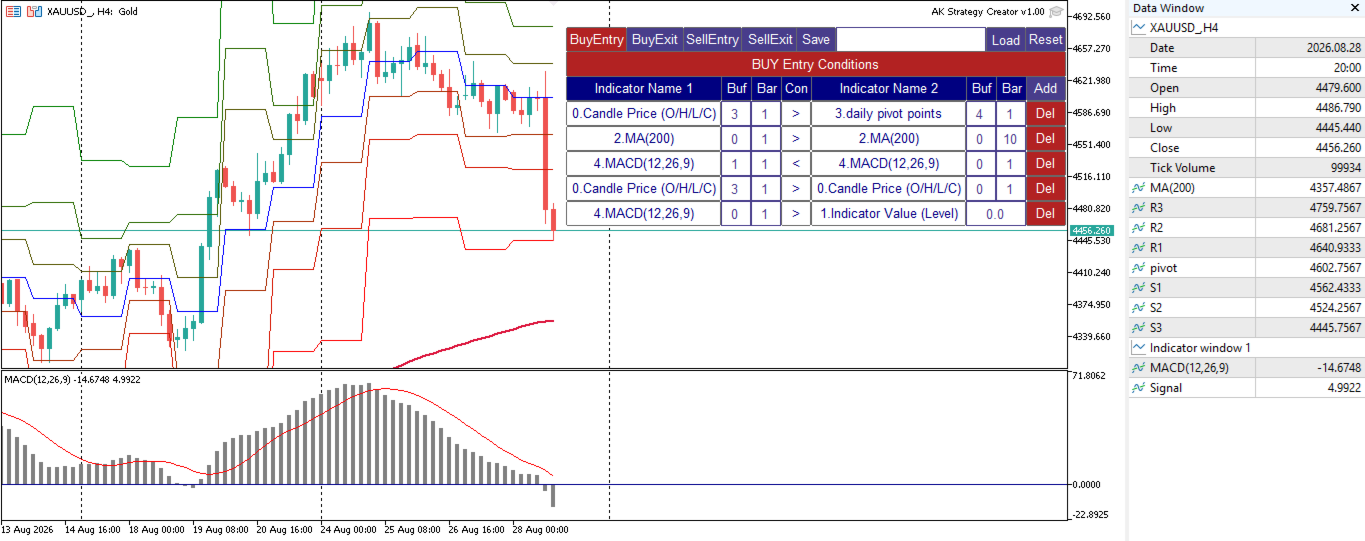
AK Strategy Creator (STC) enables traders to create, edit and save their own strategies using MT5 standard and custom indicators.
- Attach your strategy's indicators or load your chart template.
- Add/Remove indicators and modify their settings as needed.
- Once satisfied, save as chart template. Give the template a specific name as it will be needed for demo/live trading.
- To backtest the strategy in Strategy Tester, save the template also under the name "tester". If it's already available, overwrite it.
- After the template is ready, attach STC EA, which will read the attached indicators so that you can use them in defining Buy and Sell Entry and Exit conditions.
Two default indicators are always included in the indicator list to allow access to Candle (Bar) prices and indicator values:
- Candle Price (OHLC) : For Bar Open/High/Low/Close Price. Buffers are 0/1/2/3 respectivley. 0 for Open, 3 for Close.
- Indicator Value : Indicator level or value for Indicator1 for comparison. It is used for indicators like RSI, Stochastic, CCI, and is also used for Arrow indicators where indicator has a price value where arrow is shown and Empty or zero value when arrow is abscent. Empty value replacement number can be used in the EA settings to avoid confusion with indicators that have zero values/levels.
STC/STE Solution bundle
- Strategies created by STC can be back tested in MT5 Strategy Tester, forward tested on demo or executed on live accounts using AK Strategy Executer (STE).
- Strategies created by STC are saved in Terminal COMMON folder, with ".bin" extension as they are binary files.
- You can load/save different versions of a strategy as required
Condition Format :
Indicator1/Buffer1/Bar1/[Conditional Operator]/Indicator2/Buffer2/Bar2 (or Value1:Value of indicator1)
- Buffer indicates the indicator buffer number to be used. Buffers data appear in Data Window (CTRL+D).
- Buffer numbers usually start from 0. For example:
- indicators that have one line (MA, RSI, CCI, SAR, DeMarker, Momentum, ATR ... etc), has one buffer 0.
- indicators that have two lines (MACD, Stochastic) has 2 buffers, Buffer 0 for Main and Buffer 1 for Signal.
- For indicators that have more than 2 buffers, like BB,Ichimoku, custom indicators ... etc. You can check the Data Window and Indicator documentation to know the correct buffer numbering used.
- Bar indicates the bar (candle) to be used in the condition:
- 0 : Current unclosed candle. Curently not used because value of indicators at candle zero keep changing. It can be added in next update if needed by the traders.
- 1 : The last closed candle. This is the most used candle in EAs, because indicator value at candle 1 is fixed.
- 2 and above : those older candles can be used to compare indicator values with previous candles.
Condition Examples:
| Indicator1 | Buffer | Bar | Operator | Indicator2 | Buffer | Bar | Value | Description |
|---|---|---|---|---|---|---|---|---|
| RSI(21) | 0 | 1 | > (Greater) | Indicator Value | 75 | RSI(21) > 75 | ||
| RSI(7) | 0 | 1 | < (Less) | RSI(21) | 0 | 1 | RSI(7) < RSI(21) | |
| MACD(12,26,9) | 1 | 1 | > | MACD(12,26,9) | 0 | 1 | Macd Signal > Macd Main | |
| ReversalArrow | 0 | 1 | != (Not Equal) | Indicator Value | -999 | Buy Arrow. Note (-999) was used as a replacement of Empty_Value. | ||
| Candle Price (O/H/L/C) | 3 | 1 | > | Candle Price (O/H/L/C) | 3 | 2 | Bar1 Close > Bar 2 Close (Up Trend) | |
| BP MFI | 1 | 1 | = | Indicator Value | 1 | BP MFI custom indicator Histogram value = 1 |
More Examples available in the User's Manual.
Unified Conditions Format:
- All signals (Buy Entry, Sell Entry, Buy Exit and Sell Exit) use the same condition format.
- Multiple conditions can be added for each signal.
- If your exit signals are based on TakeProfit and StopLoass fixed pips, you don't need to add any conditions for exits, and controll them from STE EA.
Testing STC before buying:
Since STC is a grpahical utility tool, the free demo version downloaded from MT5 Market will not correctly work in MQL5 Strategy Tester. For this I provided a full functional demo version that can be used live. Strategies created by the STC Demo version can only be used in MQL5 Strategy Tester using the same STE EA.
Demo version product page : https://www.mql5.com/en/market/product/193149
In summary to test this solution (STC/STE) bundle you need to:
- download STC Demo version from MT5 Market.
- download STE from MT5 Market.
Your comments are highly appreciated, as I will continue enhancing this product to make creating trading strategies as easy as possible.
.