Vyxaxis Tick

VYXAXIS TICK

Strictly Manual Trading
No automated trading. No grid trading. No martingale.

https://youtu.be/OZgR6MVuYnc

VYXAXIS TICK

See Clearly. React Faster. Trade Your Way.

Brand Pronunciation: VYXAXIS is pronounced “VIX-A-SIX”.

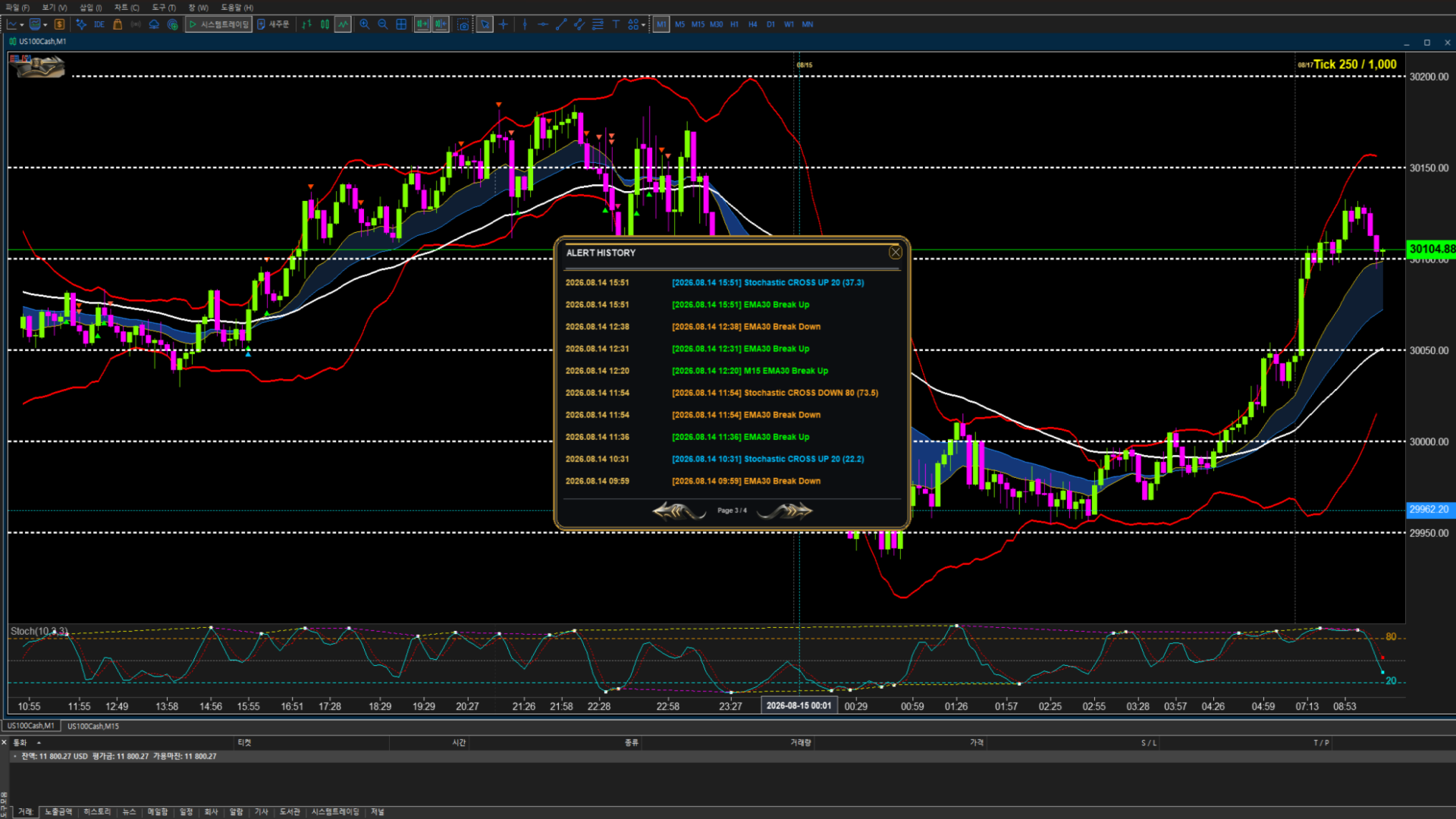
VYXAXIS TICK is a professional tick-chart trading utility for MetaTrader 5, designed for manual traders who want detailed market visualization, real-time market alerts, and a faster, more intuitive way to manage open positions.

It combines a dedicated tick-chart engine, visual trade management, dynamic trade telemetry, integrated technical analysis, historical tick navigation, and real-time alerts in a single trading workspace.

IMPORTANT: VYXAXIS TICK is a manual trading utility. It does not automatically open or close trades and does not execute an automated trading strategy.

IMPORTANT: VYXAXIS Dispatcher is a separate FREE product and is NOT included inside the VYXAXIS TICK product file. Users who want to use the Dispatcher architecture must download VYXAXIS Dispatcher separately from the MQL5 Market and attach it to a separate MT5 chart.

VISUAL TRADE MANAGEMENT

Entry Price, TP & SL — Directly on the Chart

VYXAXIS TICK works with the standard MetaTrader 5 trading interface.

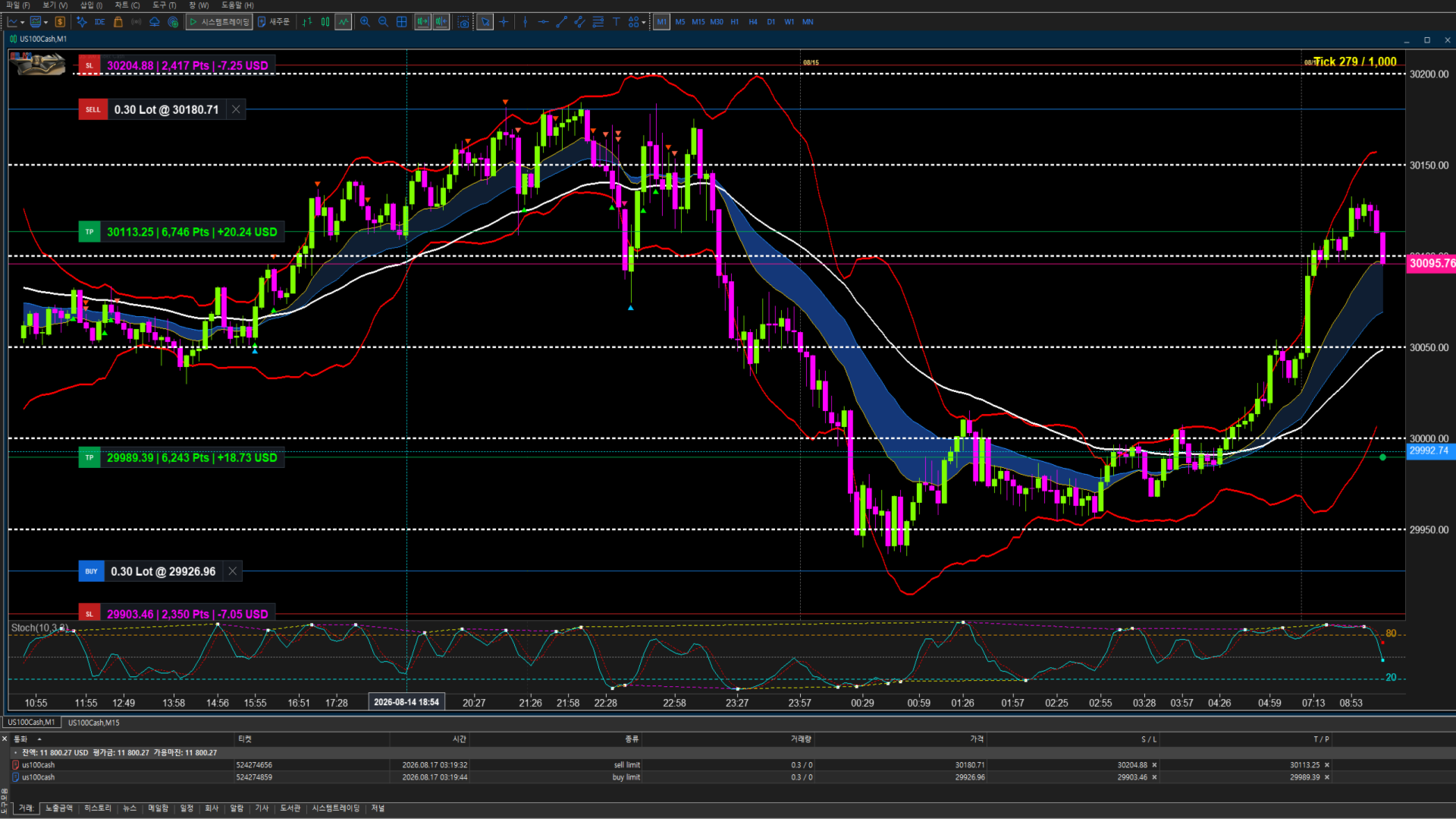
Simply use the normal Buy or Sell button to enter a position. After the position is opened, VYXAXIS TICK automatically displays the Entry Price, Take Profit (TP), and Stop Loss (SL) directly on the tick chart.

  • Buy / Long: TP is positioned above the entry price and SL is positioned below the entry price.
  • Sell / Short: TP is positioned below the entry price and SL is positioned above the entry price.

No manual price calculation is required. Enter the trade, then simply drag the TP or SL control to the desired price.

Drag-and-Drop TP / SL

  • Drag TP to change the take-profit level
  • Drag SL to change the stop-loss level
  • Adjust levels directly from the chart
  • Keep Entry Price, TP, and SL visible while analyzing the market
  • See updated trade information while moving the level

VYXAXIS TICK keeps important trade levels visible inside the trading workspace so the trader can manage an open position without repeatedly opening the standard position dialog.

Manual Break-Even & Profit Protection

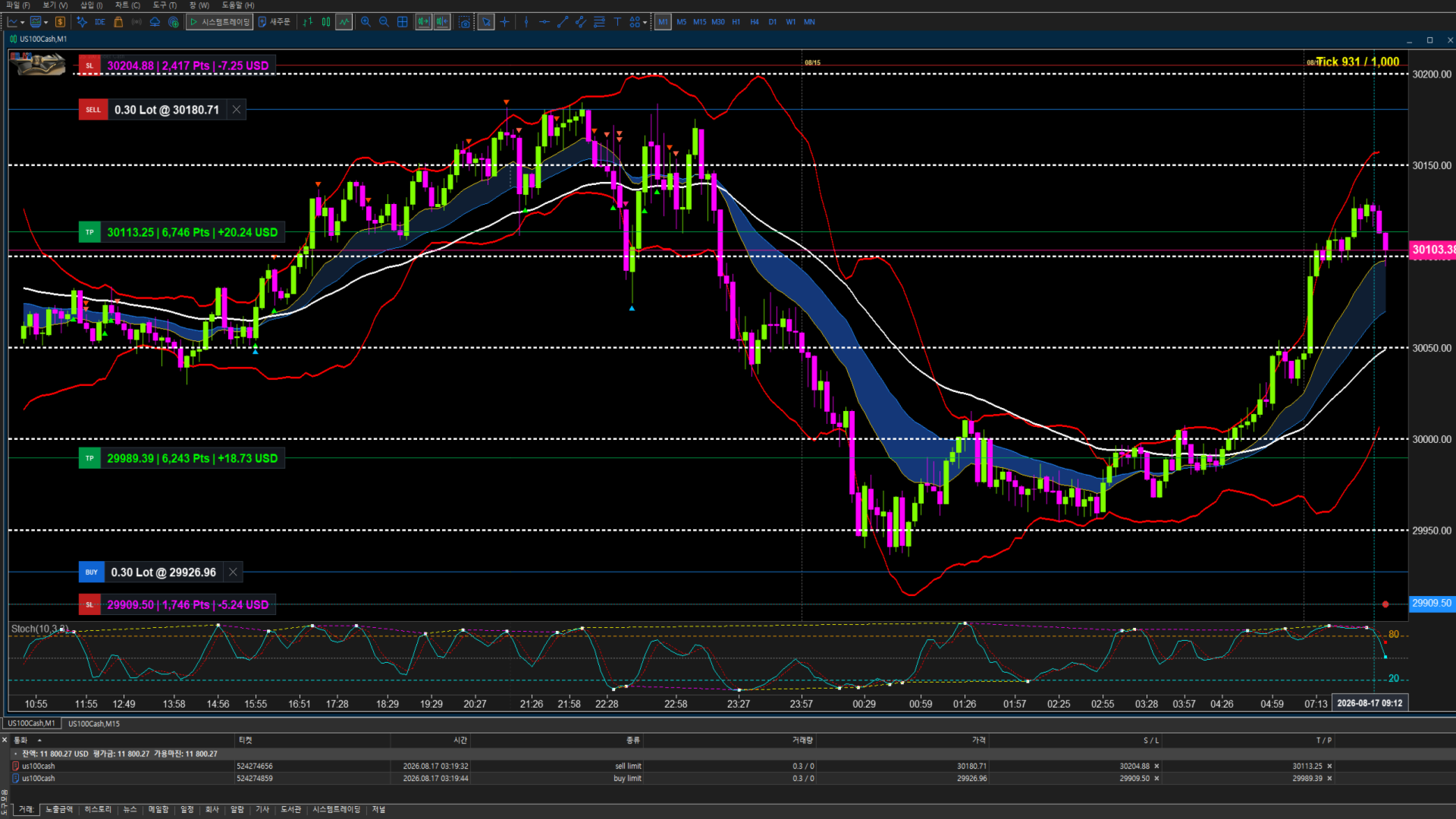
When a position moves into profit, traders can manually move the Stop Loss above or below the entry price to protect the position.

  • Buy / Long: Drag the SL above the Entry Price to secure break-even or protect part of the profit.
  • Sell / Short: Drag the SL below the Entry Price to secure break-even or protect part of the profit.

The new SL level is sent to MetaTrader 5 for the open position.
No automated break-even or trailing algorithm is used.
The trader remains fully in control of when and where the SL is moved.

Manual Profit Protection: Move the SL with the mouse, place it at the entry price for break-even, or move it further into profit to protect gains.

VYXAXIS TICK provides direct visual control over manual profit protection without taking the trading decision away from the trader.

DYNAMIC TRADE TELEMETRY

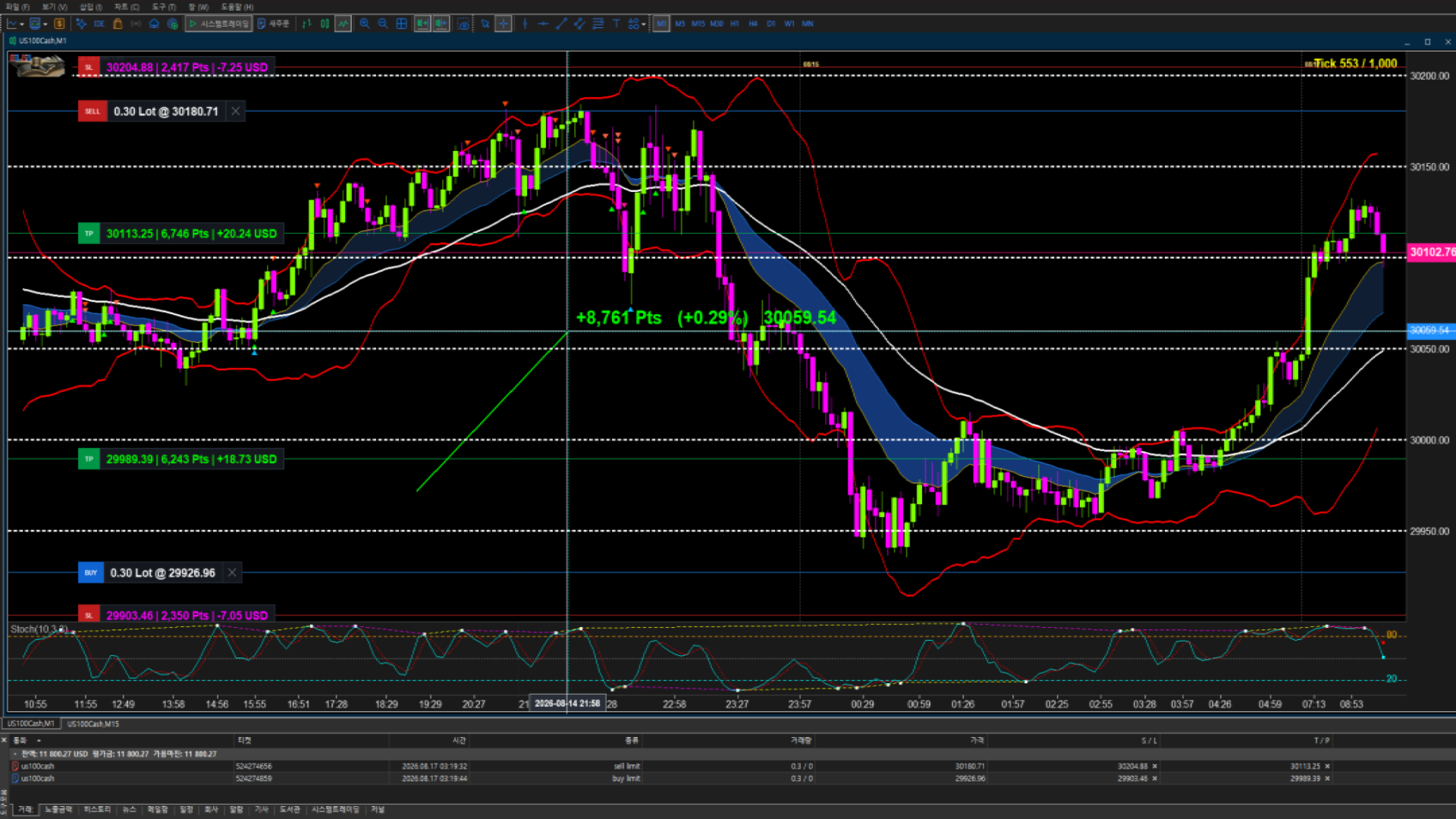
VYXAXIS TICK provides real-time trade information while dragging a TP or SL control.
The telemetry shows the potential effect of the selected price level before the level is released:

  • Points (P) — distance from the relevant trade level
  • Percentage (%) — relative price movement
  • Asset Price — exact price represented by the dragged level
  • Expected P/L — estimated position result at the selected level

Move the level. See the numbers. Make the decision.

Intelligent Workflow: Telemetry appears while the TP or SL control is being dragged. Once the mouse button is released, the temporary information disappears automatically, keeping the chart clean during normal market analysis.

MULTI-TICK WORKSPACE

Independent Tick Chart Instances

VYXAXIS TICK supports multiple independent tick-chart instances running at the same time.
Multiple VYXAXIS TICK charts can be opened simultaneously, including multiple charts for the same symbol with different tick-bar settings.

Tick-bar Settings: 1 to 10,000 Ticks

Each VYXAXIS TICK instance maintains its own chart state and tick-bar configuration, allowing different tick perspectives to operate independently.

Dual-Monitor Workflows

A dual-monitor setup can be configured in several ways.

Option 1 — Two Independent VYXAXIS TICK Charts
For example:

  • Monitor 1: 1,000-tick VYXAXIS TICK
  • Monitor 2: 5,000-tick VYXAXIS TICK

Or:

  • Monitor 1: 1,000-tick VYXAXIS TICK
  • Monitor 2: 10,000-tick VYXAXIS TICK

Different tick settings can be used simultaneously, including on the same symbol.

Option 2 — VYXAXIS TICK + Standard MT5 Chart
One monitor can display VYXAXIS TICK while the second monitor displays a standard MetaTrader 5 time-based chart.
For example:

  • Monitor 1: VYXAXIS TICK
  • Monitor 2: Standard MT5 1-minute chart

The standard MT5 chart can use 1-minute, 5-minute, or another preferred timeframe.
This allows traders to combine tick-based market analysis with conventional time-based chart analysis.

Example Workflows

VYXAXIS TICK + VYXAXIS TICK

  • 1,000-tick + 5,000-tick
  • 1,000-tick + 10,000-tick
  • 5,000-tick + 10,000-tick
  • VYXAXIS TICK + standard MT5 1-minute chart
  • VYXAXIS TICK + standard MT5 5-minute chart
  • Multiple VYXAXIS TICK charts for the same symbol with different tick-bar settings.

Use smaller tick settings for more detailed short-term market analysis and larger tick settings for broader market structure and trend development.
VYXAXIS TICK is designed specifically for independent multi-chart and multi-monitor workflows.

PROFESSIONAL TICK CHART

VYXAXIS TICK provides a dedicated tick-based chart environment for traders who want to examine market movement beyond standard time-based charts.
Instead of grouping price activity only by fixed time intervals, the tick chart builds market bars from incoming tick activity.
VYXAXIS TICK uses the market data provided to MetaTrader 5 by the trader's broker. It is designed to work with MetaTrader 5 market data from different brokers and symbols.

Tick Chart Features

  • Real-time tick data processing
  • Configurable tick-bar settings from 1 to 10,000 ticks
  • Historical tick chart support
  • Up to 1,000,000 ticks for historical loading
  • Smooth chart navigation and historical movement analysis
  • Continuous updating as new market ticks arrive
  • Clear, precise time axis with readable timestamps
  • Crosshair time and price display
  • Precise identification of historical market activity

Precise Time Reference: VYXAXIS TICK provides a clear time axis and crosshair-based time and price display, allowing traders to identify the time corresponding to a selected point on the chart.

Historical tick availability depends on the broker and trading server.
VYXAXIS TICK loads up to 1,000,000 historical ticks to maintain fast startup and stable chart operation.
Important: The 1,000,000-tick limit applies to historical data loading. Incoming real-time ticks continue to be processed as market data arrives.

EXTREME TICK BURST HANDLING & STABILITY

During major market openings and significant market events, highly liquid instruments can generate extremely large numbers of incoming ticks in a very short period.
VYXAXIS TICK is engineered to handle high-frequency tick bursts while maintaining a responsive trading workspace.

Asynchronous Rendering

Tick processing and UI rendering are separated to help keep chart updates controlled during periods of high tick activity.

API Micro-Caching

Frequently requested MetaTrader 5 data is micro-cached and throttled where appropriate to reduce unnecessary API calls and CPU load.

NON-BLOCKING NOTIFICATION PROCESSING

VYXAXIS TICK supports a separate VYXAXIS Dispatcher architecture for notification delivery.
The VYXAXIS Dispatcher is a completely separate MT5 Expert Advisor designed to process WebRequest and supported Push notification delivery independently from the main VYXAXIS TICK chart.
This separation is designed so that a slow network response or notification service does not directly block the main VYXAXIS TICK tick-processing workflow.

IMPORTANT: VYXAXIS Dispatcher is NOT included in the VYXAXIS TICK product file.
Because MetaTrader Market products are distributed with a single EX5 product file, VYXAXIS Dispatcher is provided as a separate FREE MQL5 Market product.
Users who want to use the Dispatcher architecture must download VYXAXIS Dispatcher separately from the MQL5 Market.

INSTALLING VYXAXIS DISPATCHER

After purchasing and installing VYXAXIS TICK:

  1. Download the FREE VYXAXIS Dispatcher separately from the MQL5 Market.
  2. Install VYXAXIS Dispatcher in MetaTrader 5.
  3. Attach VYXAXIS Dispatcher to a separate MT5 chart.
  4. Keep the Dispatcher EA running while using VYXAXIS TICK with Dispatcher-based notifications.
  5. Configure the required WebRequest URL permissions under Tools → Options → Expert Advisors.

The Dispatcher does not replace VYXAXIS TICK.
The Dispatcher is not required for the tick chart itself.
The Dispatcher is specifically designed to handle notification delivery separately from the main tick-chart processing.

Recommended Architecture

  • Market Tick Processing → VYXAXIS TICK
  • Notification Delivery → VYXAXIS Dispatcher

This architecture is especially useful during periods when market activity produces very large tick volumes.

Recommended Setup During Extreme Market Activity

For traders who use WebRequest or Push notifications, VYXAXIS Dispatcher can be attached to a separate MT5 chart or workspace and kept running independently.
Keeping notification delivery separate helps reduce the possibility of notification-related network delays affecting the main tick-chart workflow.
Actual performance depends on broker data, terminal resources, VPS resources, network conditions, and market activity.

INTEGRATED TECHNICAL ANALYSIS

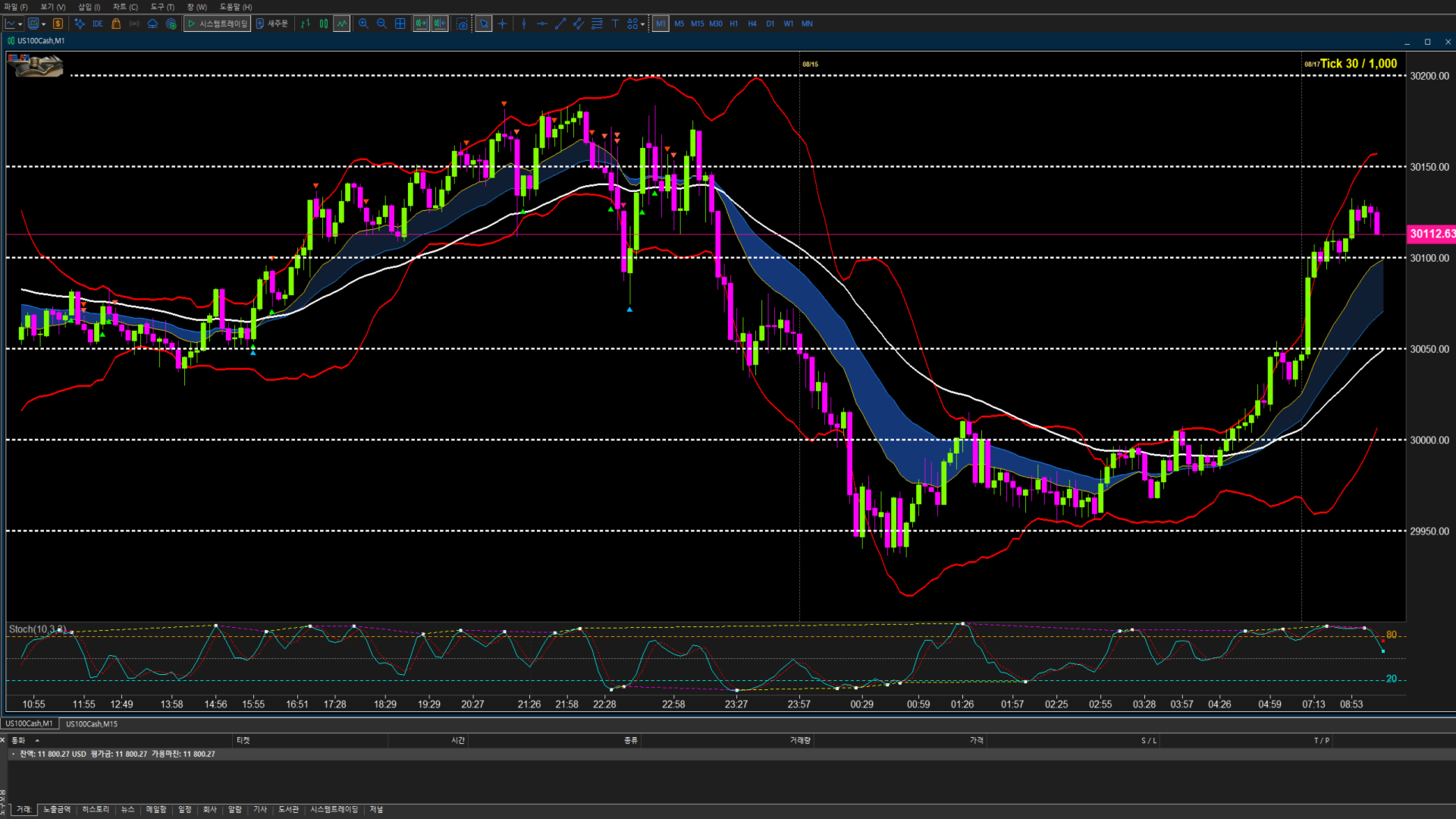
EMA 15 / 30 / 50

  • Pre-configured EMA 15, EMA 30, and EMA 50
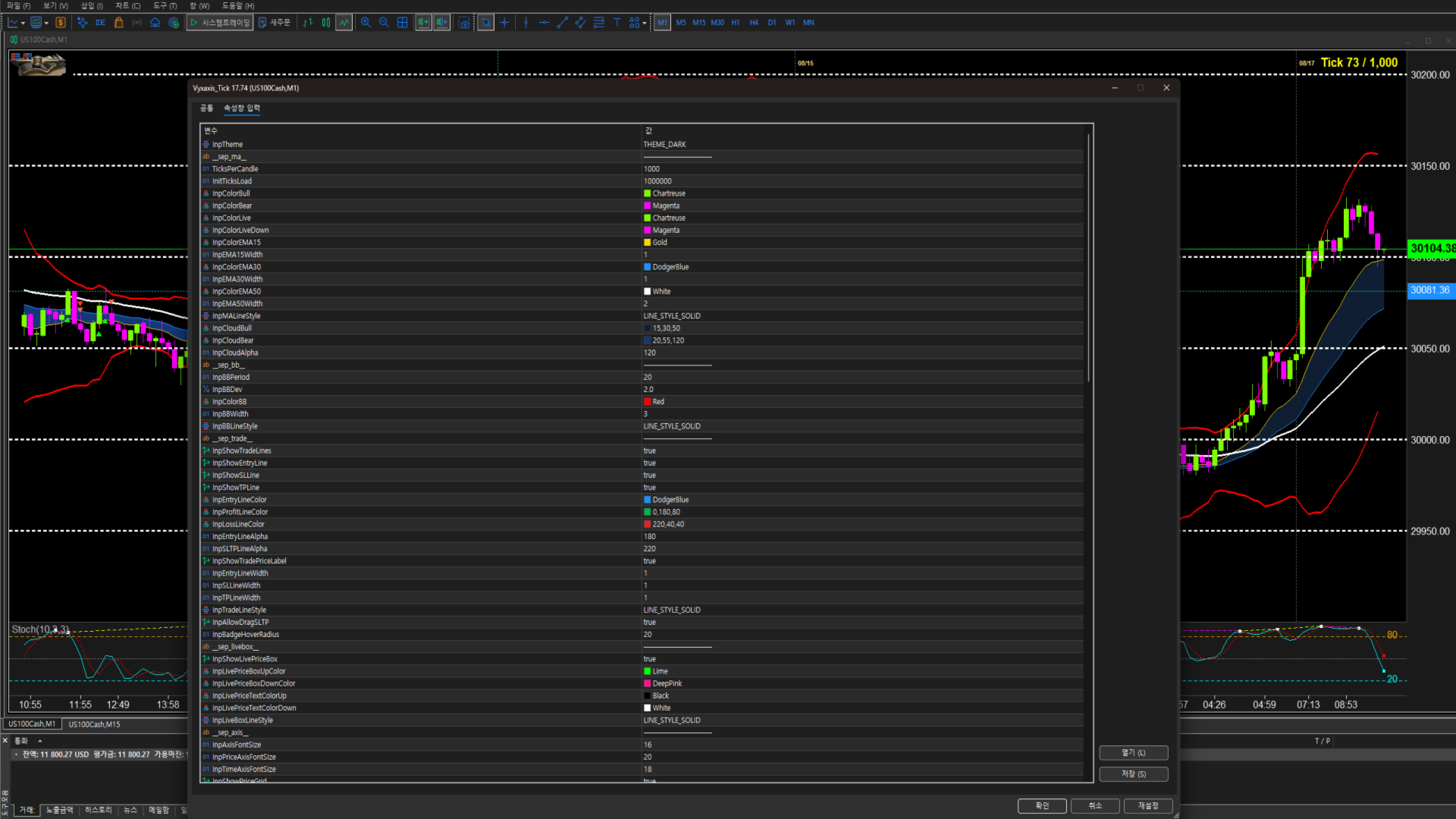
  • Customizable EMA periods and parameters
  • Visual EMA Cloud rendering
  • Golden Cross and Dead Cross detection
  • EMA30 breakout monitoring on the tick chart
  • Cross-timeframe EMA30 monitoring for additional market context

The reference timeframe for cross-timeframe EMA30 monitoring is configurable in the settings, allowing traders to select the timeframe that matches their own trading style.

Bollinger Bands

Monitor price volatility and the relationship between price and the upper, middle, and lower bands directly within the tick-chart environment.
Parameters can be configured according to preferred analysis styles.

Stochastic & Stochastic Divergence

Monitor momentum and short-term market conditions with configurable Stochastic parameters, featuring built-in Stochastic Divergence detection to track discrepancies between price movements and indicator momentum.
To maximize practical trading efficiency, the Stochastic alert system is intentionally designed with refined crossover logic:

  • Bullish Crossover (Crossing above 20): Remaining below 20 often indicates a prolonged downtrend. The alert triggers specifically when the indicator turns upward and crosses above the 20 level, signaling potential bullish momentum.
  • Bearish Crossover (Crossing below 80): Staying above 80 can reflect a strong continuing uptrend. The alert triggers specifically when the indicator turns downward and crosses below the 80 level, signaling potential bearish momentum.

REAL-TIME ALERTS & NOTIFICATIONS

VYXAXIS TICK continuously monitors supported technical conditions while the chart is running.
When a configured condition is detected, the alert system can notify the trader without requiring constant visual monitoring of the chart.

Supported Alert Conditions

  • Golden Cross — detects bullish EMA crossovers
  • Dead Cross — detects bearish EMA crossovers
  • EMA Breakout — detects price breakouts above or below the tick-chart EMA30 and monitors cross-timeframe EMA30 conditions
  • Stochastic / Divergence (20 Up & 80 Down) — monitors momentum reversals, triggers on crossing above 20 or crossing below 80, and detects bullish/bearish Stochastic Divergence

The reference timeframe for cross-timeframe EMA30 monitoring can be changed in the settings.

Multiple Notification Methods

  • Local Sound Alerts — audible notifications through MetaTrader 5
  • MT5 Push Notifications — receive supported alerts on a connected mobile device
  • Alert History Log — review triggered alerts within the utility
  • WebRequest / Webhook Notifications — supported through the separate VYXAXIS Dispatcher architecture

Custom Sound Alerts

Personalize your notification environment with your preferred .wav sound files.
Place the sound files in the appropriate MetaTrader 5 Sounds directory and enter the filename in the MT5 sound settings.
Examples:

  • alert.wav
  • alert2.wav
  • news.wav

Different sounds can be assigned to different notifications according to your trading workflow.

Professional Alert Frequency Control

  • Once Only — triggers the alert only once when the condition is detected
  • Once Per Bar — alerts when the condition is met, but limits the alert to one notification per bar
  • Once Per Bar Close — alerts only after the bar closes and the condition is confirmed
  • Real-Time (Every tick) — monitors the condition on every incoming tick and can trigger alerts immediately as the condition changes

Alerts inform the trader; they do not execute trades automatically.
VYXAXIS TICK does not trade for you — it tells you when the monitored condition occurs.

DUAL-MONITOR WORKFLOW

VYXAXIS TICK is designed to work naturally with a dual-monitor trading environment.

Monitor 1 — VYXAXIS TICK

Use a dedicated tick chart for:

  • Tick-level analysis
  • Technical indicators
  • Real-time alerts
  • Visual trade management
  • Historical tick analysis

Monitor 2 — VYXAXIS TICK or Standard MT5 Chart

The second monitor can be used in two ways.

Option 1 — Another VYXAXIS TICK
Run another independent VYXAXIS TICK instance with a different tick-bar setting.
For example:

  • 1,000 ticks + 10,000 ticks
  • 2,000 ticks + 5,000 ticks

Each chart maintains its own independent tick configuration.

Option 2 — Standard MT5 Chart
Use the standard MT5 chart for conventional timeframe analysis such as:

  • 1-minute
  • 5-minute
  • 15-minute
  • Other standard MT5 timeframes

The trader remains responsible for configuring the standard MT5 chart according to their own preferences.
VYXAXIS TICK does not configure or manage the standard MT5 chart.

ADVANCED CHART NAVIGATION

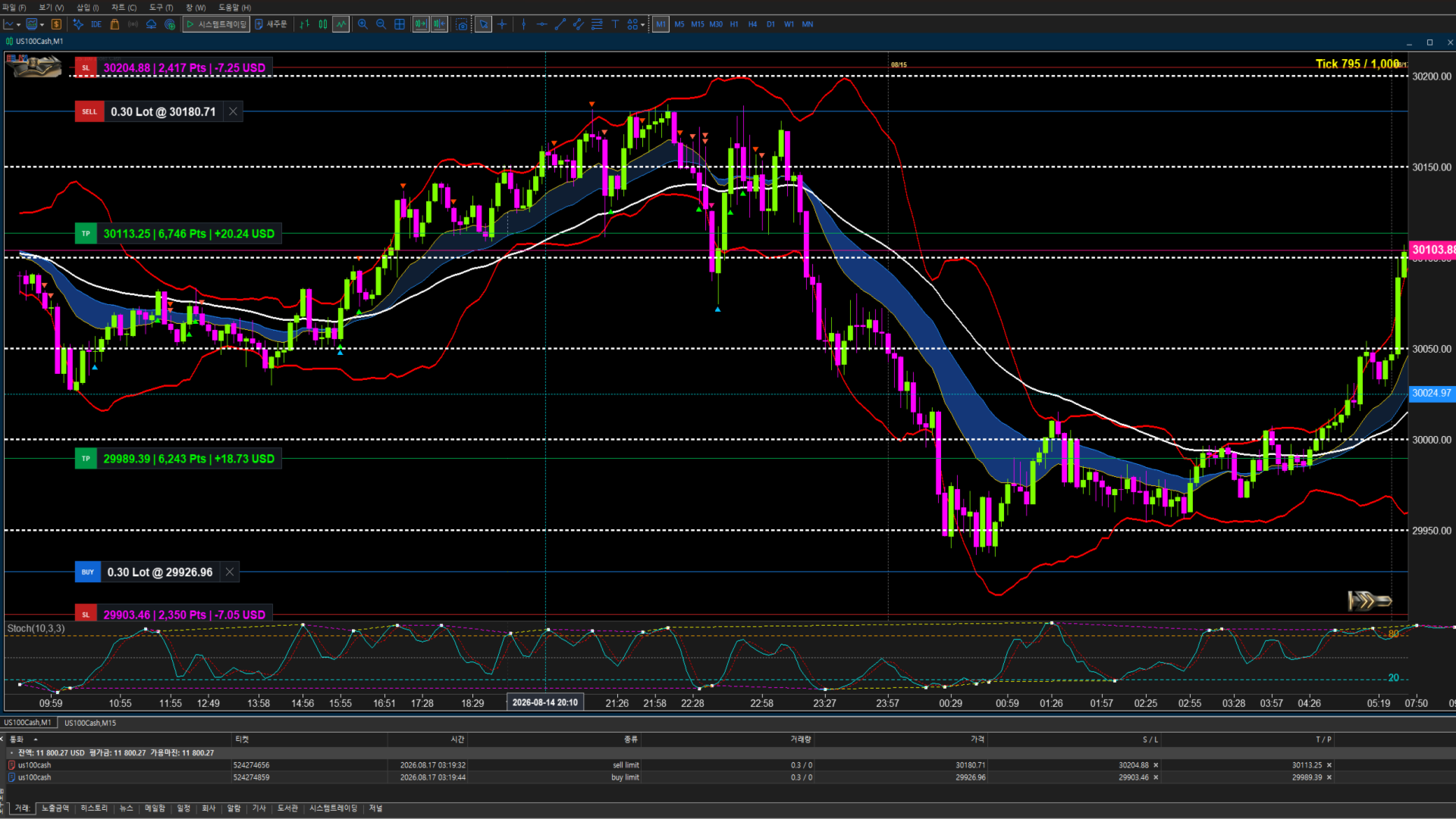
Review the historical tick data loaded by VYXAXIS TICK and inspect previous market movement directly on the chart.
Move through available historical data, examine specific market areas, and return to the current market when required.

One-Click Return to Live Market

When viewing historical tick data, VYXAXIS TICK allows traders to instantly return to the latest market position with a single click.

  • Navigate backward through historical tick data
  • Examine previous market activity
  • Return to the latest live market position with one click
  • Quickly resume real-time market monitoring without manually scrolling back

This makes it easy to move between historical analysis and the live market without losing your place.

VPS & CLOUD ENVIRONMENT

VYXAXIS TICK can be used in a VPS or cloud-based MetaTrader 5 environment.
When MetaTrader 5 remains running on a VPS, chart processing and supported alert functions can continue operating without requiring your personal computer to remain powered on.
For traders using WebRequest or Push notifications, VYXAXIS Dispatcher can be kept running independently in the MT5 environment.
Actual performance depends on:

  • Broker data availability
  • Broker tick-feed characteristics
  • VPS resources
  • Network conditions
  • MetaTrader 5 configuration
  • Market activity

IMPORTANT BROKER DATA INFORMATION

VYXAXIS TICK processes the tick data available through your MetaTrader 5 broker.
Different brokers can provide different:

  • Tick frequencies
  • Historical tick quantities
  • Tick timestamps
  • Bid/Ask data
  • Trading-session data
  • Symbol specifications

Therefore, the appearance and amount of historical tick data may differ between brokers even when the same symbol and tick setting are selected.
VYXAXIS TICK does not generate missing broker data and cannot guarantee identical tick history between different brokers.

KEY FEATURES

  • Dedicated professional tick-chart environment
  • Tick-bar settings from 1 to 10,000 ticks
  • Independent multi-tick chart instances
  • Two independent VYXAXIS TICK charts can run simultaneously
  • VYXAXIS TICK + standard MT5 time-based chart workflow
  • Same-symbol multi-tick analysis
  • Up to 1,000,000 historical ticks
  • Real-time tick processing and continuous chart updates
  • Visual Entry Price, TP, and SL management
  • Drag-and-drop TP/SL controls
  • Manual break-even and manual profit protection
  • Dynamic Points / Percentage / Price / Expected P/L telemetry
  • EMA 15 / 30 / 50 and visual EMA Cloud
  • Bollinger Bands
  • Stochastic and Stochastic Divergence detection
  • Smart Stochastic alert logic (Cross Above 20 / Cross Below 80)
  • Golden Cross and Dead Cross detection
  • EMA30 breakout monitoring and configurable cross-timeframe EMA30 monitoring
  • Real-time technical alerts with professional alert frequency control
  • Local sound notifications and custom .wav sound support
  • MT5 Push Notifications and WebRequest/Webhook support via Dispatcher architecture
  • Internal alert history log
  • Advanced historical tick navigation with One-Click Return to Live Market
  • Asynchronous rendering
  • API micro-caching
  • Non-blocking notification processing
  • VPS / cloud environment support
  • Broker-independent architecture
  • Standard MT5 chart configuration remains under the trader's control

VYXAXIS DISPATCHER

VYXAXIS Dispatcher is a separate FREE MT5 Expert Advisor.
It is designed to process notification delivery independently from VYXAXIS TICK.
Dispatcher functions include:

  • WebRequest delivery
  • Supported MT5 Push notification delivery
  • Independent notification processing
  • Separate network communication from the main tick-chart workflow

IMPORTANT:
VYXAXIS Dispatcher is not included in the VYXAXIS TICK EX5 file.
Users who require the Dispatcher architecture must download VYXAXIS Dispatcher separately from the MQL5 Market.
VYXAXIS Dispatcher is optional.
VYXAXIS TICK itself can operate as a tick-chart utility without the Dispatcher.
The Dispatcher is recommended when using WebRequest or notification workflows where separating network communication from chart processing is desirable.

FREQUENTLY ASKED QUESTIONS

Q: What is VYXAXIS TICK?
A: VYXAXIS TICK is a professional tick-chart utility for MetaTrader 5. It provides tick-based market visualization, technical analysis, visual trade management, historical tick navigation, and real-time alerts for manual traders.

Q: Does VYXAXIS TICK trade automatically?
A: No. VYXAXIS TICK does not automatically open or close trades and does not execute an automated trading strategy.

Q: Does it use AI?
A: No. VYXAXIS TICK does not use AI, neural networks, or AI-based trading decisions.

Q: Does it use grid or martingale strategies?
A: No. There is no grid trading or martingale trading logic.

Q: What tick settings are supported?
A: VYXAXIS TICK supports tick-bar settings from 1 tick to 10,000 ticks.

Q: How do the Stochastic alerts work?
A: Instead of triggering continuously inside overbought or oversold zones, alerts trigger specifically when the Stochastic line crosses above 20 or crosses below 80. Stochastic Divergence detection is also supported.

Q: Can I run two VYXAXIS TICK charts at the same time?
A: Yes. Multiple independent VYXAXIS TICK instances can run simultaneously, including multiple instances for the same symbol with different tick settings.

Q: Can I use two monitors?
A: Yes. You can use two independent VYXAXIS TICK charts across two monitors, or use VYXAXIS TICK on one monitor and a standard MT5 time-based chart on the other.

Q: Can I use a normal 1-minute chart on the second monitor?
A: Yes. The second monitor can use the standard MT5 chart with 1-minute, 5-minute, 15-minute, or another standard timeframe.

Q: Why does my historical tick data look different from another broker?
A: Tick data is supplied by the broker. Different brokers may provide different tick frequencies, historical data quantities, timestamps, and market-feed characteristics.

Q: Why don't I have as much historical tick data as expected?
A: Historical tick availability depends on your broker and trading server. VYXAXIS TICK can process the data available through MT5 but cannot create historical data that the broker does not provide.

Q: How much historical tick data does VYXAXIS TICK load?
A: VYXAXIS TICK can load up to 1,000,000 historical ticks. This is the historical loading limit; real-time incoming ticks continue to be processed.

Q: Can I go back and inspect previous market activity?
A: Yes. VYXAXIS TICK supports historical tick navigation.

Q: How do I return to the current market after going back?
A: Use the One-Click Return to Live Market function to immediately return to the latest market position.

Q: Can I move TP and SL directly on the chart?
A: Yes. TP and SL can be adjusted by dragging their controls directly on the chart.

Q: Does VYXAXIS TICK automatically move my Stop Loss into profit?
A: No. Break-even and profit protection are manual functions. You decide when and where to move the Stop Loss.

Q: Can I protect my profit manually?
A: Yes. You can manually move the Stop Loss to the entry price for break-even or move it further into profit to protect part of the gain.

Q: Does the telemetry show my expected profit or loss?
A: Yes. While dragging TP or SL, the telemetry can show points, percentage, price, and estimated Expected P/L for the selected level.

Q: Why does the telemetry disappear after I release the mouse?
A: This is intentional. The temporary telemetry is displayed while adjusting the level so the chart remains clean during normal analysis.

Q: Why does the chart sometimes receive a very large number of ticks?
A: Major market openings and significant market events can generate extremely high tick activity, particularly on highly liquid instruments.

Q: Can high tick activity affect notification processing?
A: Notification delivery can involve network communication and may sometimes take longer than normal. VYXAXIS TICK supports a separate Dispatcher architecture that can process WebRequest and supported Push notification delivery independently from the main tick-chart workflow.

Q: What is VYXAXIS Dispatcher?
A: VYXAXIS Dispatcher is a separate FREE MetaTrader 5 Expert Advisor designed to process notification delivery independently from VYXAXIS TICK.

Q: Is VYXAXIS Dispatcher included with VYXAXIS TICK?
A: No. VYXAXIS Dispatcher is a separate free MQL5 Market product. It is not included in the VYXAXIS TICK EX5 file.

Q: Where can I get VYXAXIS Dispatcher?
A: VYXAXIS Dispatcher is available as a separate FREE product in the MQL5 Market. Users who want to use the Dispatcher architecture must download and install it separately.

Q: Is VYXAXIS Dispatcher required for the tick chart?
A: No. The Dispatcher is not required for the tick chart itself. It is specifically intended for notification delivery.

Q: How do I install VYXAXIS Dispatcher?
A: Download the FREE VYXAXIS Dispatcher from the MQL5 Market, install it in MetaTrader 5, attach it to a separate MT5 chart, and keep it running while using Dispatcher-based notifications.

Q: Why should I keep the Dispatcher separate?
A: During periods of extreme market activity, thousands of ticks can arrive in a short time. Keeping notification delivery separate helps prevent slow network requests from directly interfering with the main tick-chart processing workflow.

Q: My WebRequest does not work. What should I check?
A: Check the MetaTrader 5 WebRequest permissions under Tools → Options → Expert Advisors. Make sure the required URL is added to the allowed WebRequest URL list. Also verify that VYXAXIS Dispatcher is installed and running when the Dispatcher architecture is being used.

Q: My Push notification does not arrive. What should I check?
A: Check your MT5 notification settings, MetaQuotes ID configuration, notification permissions, alert conditions, and VYXAXIS Dispatcher configuration if the Dispatcher workflow is being used.

Q: I cannot see any tick data. What should I check?
A: First confirm that the symbol is receiving market data in MetaTrader 5. Also check whether the broker provides tick data for that symbol and whether the market is currently active.

Q: Does VYXAXIS TICK work with every broker?
A: VYXAXIS TICK is designed to work with MetaTrader 5 market data, but the available tick history and data characteristics depend on the broker and symbol.

Q: Can I use VYXAXIS TICK on a VPS?
A: Yes. VYXAXIS TICK can operate in a VPS or cloud-based MT5 environment, provided MetaTrader 5 is configured and running correctly.

Q: Why is performance different between my PC and VPS?
A: Performance can vary depending on CPU, memory, network latency, broker data volume, terminal configuration, and market activity.

Q: Does VYXAXIS TICK configure my normal MT5 chart?
A: No. The standard MT5 chart remains under the trader's control. You can configure its timeframe, indicators, templates, and appearance independently.

Q: Does VYXAXIS TICK provide investment advice?
A: No. VYXAXIS TICK is a software utility and does not provide investment advice or guaranteed trading results.

Q: Does VYXAXIS TICK guarantee that alerts will always arrive instantly?
A: No. Alert delivery can depend on MetaTrader 5, broker connectivity, network conditions, mobile notification services, WebRequest destinations, VPS performance, and other external factors.

Q: What should I do if I have a problem that is not covered here?
A: Please contact the seller through the MQL5 Market product page. Describe the problem clearly and, where possible, include the symbol, broker, MT5 environment, relevant settings, and a screenshot of the issue. Telephone support is not provided. Support is handled through the MQL5 Market product communication system.

MANUAL TRADING ONLY

VYXAXIS TICK is a manual trading utility.
It provides chart visualization, trade management tools, market information, and alerts — but it does not make or execute trading decisions.

  • No AI trading or neural networks
  • No automated entry strategies
  • No automated trading algorithms
  • No grid trading
  • No martingale trading logic
  • No automatic break-even
  • No automatic trailing stop

VYXAXIS TICK provides advanced tools and visual information.
The trading decision remains entirely yours.

IMPORTANT INFORMATION

VYXAXIS TICK does not provide investment advice and does not guarantee trading results.
Order execution, spreads, tick availability, latency, and other trading conditions depend on your broker and account environment.
Historical tick availability may vary between brokers and symbols.
Different brokers may provide different tick data, historical depth, timestamps, and market-feed characteristics.
The product cannot guarantee identical tick data across different brokers.
VYXAXIS TICK is designed to assist manual traders with market visualization, analysis, position management, and alerts. It does not guarantee profitability or trading performance.
Always use appropriate risk management when trading financial markets.
Trade responsibly.
推荐产品
Gap Hunter MT5
Rafi'u Indra Pratama
GAP HUNTER (Sr) Capture market opportunities during Gap openings and High Impact News with precise timer-based execution. GAP HUNTER is an Expert Advisor specifically designed to capitalize on price movement opportunities created by market gaps at specific times and high impact News like NFP (Non Farm Payrolls) and Core CPI (Consumer Price Index). Unlike trading robots that open multiple positions throughout the day, GAP HUNTER uses a simple yet effective approach no overtrading, focused on pr
Copiador MT5
Luciana Andrea Maggiori
Copiador – La Mejor Herramienta para Copiar Operaciones en MetaTrader 4 Este no es un simple copiador de operaciones que   únicamente   permite copiar transacciones de forma local entre diferentes cuentas de MetaTrader 4 en cualquier dirección y cantidad. ¡Por supuesto que lo hace!   ¡Pero Copiador hace mucho más!     Descubre sus características y beneficios a continuación FUNCIONALIDADES DESTACADAS:   Copiado entre brokers diferentes : Puedes copiar operaciones desde una cuenta e
NeuroPrice Navigator 2.0 — TCNN‑LSTM Neural Network EA with Attention Mechanism Brief Description NeuroPrice Navigator 2.0 is a fully automated trading advisor for MetaTrader 5 that uses a hybrid TCNN‑LSTM neural network with a Feature Attention mechanism to predict price direction. The advisor self‑trains on historical data, adapts to changing market conditions, and includes a built‑in multi‑level risk management system. How It Works The advisor is built on a proprietary neural network model co
AuriGuard Ultra
Biannel Reynoso Rubio
AuriGuard Ultra – Institutional-Grade SMC Sniper System for XAUUSD (Gold) AuriGuard Ultra   is a premium, fully automated Expert Advisor (EA) designed exclusively for trading Gold (XAUUSD). Built on the principles of Smart Money Concepts (SMC) and institutional market cycles, this EA is engineered to trade alongside major market participants while maintaining an ironclad, institutional-grade risk management framework. Unlike retail grid or martingale bots that risk total account blow-ups, AuriGu
Next Price : $399.00 EuroClimb EA: Your Ultimate Companion for EURUSD Downtrends! Unlock the power of precision trading with EuroClimb , the Expert Advisor built exclusively to capitalize on EURUSD’s bearish trends. Tailored for short positions, EuroClimb ensures you never miss an opportunity in a downtrending market. Key Features: Timeframe : M15 Specialized Short Selling : Exclusively focuses on short trades, delivering optimized performance for downtrends. Accessible Entry : Start trad
Shuriken Ichimoku
Ignacio Agustin Mene Franco
Shuriken Ichimoku — EA XAUUSD M15 Institutional algorithmic trading system for gold (XAU/USD), designed to operate on the M15 timeframe with a technical approach based on Ichimoku Kinko Hyo, price action patterns (Pin Bar, Fair Value Gap, Breakout), and aggressive yet controlled risk management. Strategy Shuriken Ichimoku combines the Ichimoku cloud (Tenkan-sen, Kijun-sen, Senkou Span A/B) as the primary trend filter with three price action entry engines: Pin Bar — detects rejection cand
GOLD DUALSENSE ENGINE v2.2 English Market Version Gold punishes the first reaction. DualSense waits for the second move. Gold moves fast. But speed itself is not the real danger. The real danger is believing that the first move is the true direction. You buy after a sharp drop — and Gold breaks the low again. You sell after a strong rally — and price pushes even higher. Support appears to fail, only for price to reclaim it seconds later. A breakout looks real, then collapses back into the range.
FxStrike999_SPT_bot  prop helper 者,独机器人也,专为有心理学者与有心者设之。 孰不止损,孰不利,终丧存款。 然有吾机器人,将有所决!  有FxStrike999_SPT_bot,君将及新,存款将稳步增长  君将不复忧君头寸,机器人身置止损分定利 (3個獲利回吐級別,能夠為每個級別設置固定百分比), 它還會在突然反轉的情況下拖網您的止損,以便 盡可能多地保存您的利潤:)此外,只需按一下,您就可以關閉所有虧損交易或所有盈利交易, 甚至一鍵完成所有交易。控制面板顯示所有最必要的功能,可以一鍵關閉所需的百分比 通過在框中輸入 1 到 100% 之間的值來定位(有 3 個這樣的框,您可以在每個框中輸入您的固定百分比。願你安好。維護機器人開發團隊!
XAU ATHENA MOMENTUM SUPREMACY  Multi-Timeframe Momentum Scalper (No Grid / No Martingale) XAU Athena Momentum Supremacy  is an elite, institutional-grade Expert Advisor engineered exclusively for the XAUUSD (Gold) market. Named after Athena, the Greek Goddess of Wisdom and Strategic Warfare, this system executes precision-timed entries by detecting Multi-Timeframe Momentum Confluence on the H1 chart. Unlike dangerous Grid or Martingale systems, Athena fires a single surgical strike per signal
KS 多重独立策略自动交易 EA 1.9 概览 这是一款专业级的 MQL5 智能交易系统(EA),主要专为 MetaTrader 5 平台上的黄金交易(XAUUSD)而设计。它支持多种独立的交易策略、先进的风险管理功能,并集成了各类过滤机制以优化交易表现。该 EA 重点强调自动化操作、利润保护,以及与 Telegram 和 Discord 等外部​​工具的集成。它适用于任何时间周期,并可针对特定的交易时段及新闻事件进行个性化配置。其核心功能归纳如下: **核心交易策略** 该 EA 允许(通过参数设置)同时启用一种或多种独立的交易策略: - **趋势延续/反转(Persistence/Anti-Persistence)**:在指定的回溯周期内(例如 7 根 K 线)分析 K 线形态,依据设定的比率阈值来判断趋势是延续还是发生反转。 - **RSI 极值策略(RSI Extremes)**:基于 RSI 指标的超买/超卖水平(例如 70/30)进行交易,支持自定义周期及时间框架。提供三种模式:标准模式(传统用法)、同向反转模式(顺势动量型)、反向反转模式(逆势套利型)。此外还包含单信
Aura Neural Gold AI
Napat Puangjunkum
AURA NEURAL GOLD AI — The Machine Learning Simulation Engine "Trade with logic, not emotion. Let the Neural Matrix calculate the conviction." > Aura Neural Gold AI discards traditional single-indicator strategies. It uses a 4-Model Neural Matrix to score the market's conviction and dynamically adjust your lot size. Most Expert Advisors rely on simple line crossings (like Moving Averages or MACD). Aura Neural Gold AI- steps into the future. Inspired by machine learning architectures, it utili
Black Viper GOLD
Ignacio Agustin Mene Franco
Black Viper GOLD v2.0 — Expert Advisor MT5 Pair: XAU/USD | Timeframe: M1 (Scalping) | Minimum Capital: $1,000 USD Overview Black Viper GOLD is a professional Expert Advisor for MetaTrader 5, specifically designed to trade the XAU/USD pair on the M1 timeframe using a high-precision scalping strategy. It combines four advanced technical analysis systems with dynamic risk management, session filters, and an aggressive turbo mode, all within a robust framework focused on capital preservation. In
XAU SHADOW VANGUARD STRIKE Micro-Spike Breakout Engine - Track the hidden footprints of institutional decoy tests before the real breakout. Xau Shadow Vanguard Strike is an advanced institutional Expert Advisor engineered around the "Shadow Vanguard Decoy Theory". Based on ancient battlefield tactics, institutional market makers often send "Vanguard" micro-spikes into a resistance or support level to test retail reaction before pulling back. This EA maps these exact footprints. If a level is te
XAUUSD、M1、Hedging Account Gold Adaptive Execution — Professional XAUUSD Trading System Gold Adaptive Execution is a fully automated Expert Advisor developed specifically for XAUUSD trading on MetaTrader 4 and MetaTrader 5. The EA combines an adaptive market-signal engine with ATR-based protection, trend confirmation and execution-quality monitoring. It is designed for traders who want systematic gold trading without manually watching the market around the clock. Key Features Fully automated XAU
Aureum one millon shot Avarubenuy
Ruben Jesus Gonzalez Rodriguez
这里是为您翻译的中文版本,采用了专业且极具吸引力的文案风格,非常适合在 MQL5 社区的亚洲市场推广: 由 AVARUBENUY 为 AVA Internacional Group 设计并编程。 Aureum One Million Shot – 黄金终极速度 (Gold Terminal Velocity) Aureum One Million Shot 是一款专为寻求在黄金 (XAUUSD) 市场实现爆发式增长的交易者设计的高频算法系统。该机器人已在真实市场条件下经过优化,通过“极限管理 (Turbo Management)”策略在极端波动中获取高额利润。 工作原理 该系统采用基于 指数移动平均线 (EMA) 交叉和 相对强弱指数 (RSI) 过滤器的分析引擎,精准捕捉微观趋势中的入场点。一旦信号触发,机器人将执行激进的风险管理方案,旨在短时间内最大化复利效应。 系统目标 核心目标是在最短时间内达成巨额资金里程碑(如我们测试中展示的 150 万 目标)。这是一款“一击即中”的利器,旨在通过超过 3.40 的获利因子,将小额账户提升至机构级水平。 风险管理与警示 (高风险) 这是一个
TradeTech Titan
Vasile Silviu Urs
TradeTech Titan专家顾问(EA)利用一系列标准指标来启动交易。一旦满足开仓条件,EA会添加一个额外的精细可调滤波器或阈值层,以确保最佳的进场点。阈值范围为1到100,提供可定制的交易过滤。 每笔交易都使用虚拟止损和虚拟止盈值保护。EA避免使用如马丁格尔系统或任何涉及增加手数的方法等高风险策略,并通过一次只开一单的方式确保控制良好的交易。 所使用的指标包括:加速振荡器,适应性移动平均线,超强振荡器,空头力量,多头力量,商品通道指数,DeMarker,双EMA,信封,分形适应MA,MACD,移动平均线,抛物线SAR,相对强弱指数,相对活力指数,随机指标,Trix,TEMA和威廉姆斯%R。每个指标都可以通过设置启用或禁用,以定制交易过滤过程。 默认设置为AUD/USD对的H1时间框架。其他设置可以在"评论"部分找到。
Shadow Ema Pro
Ignacio Agustin Mene Franco
Shadow EMA Pro — Expert Advisor for XAUUSD M5 The smart way to trade Gold on the 5-minute chart Shadow EMA Pro is a 100% automated Expert Advisor, specifically designed for trading XAUUSD (Gold) on the M5 timeframe. It combines classic trend-following logic with high-precision entries through a multi-filter confluence system, achieving consistent performance with robust capital protection built into its core. Recommended initial capital: $1,000 USD Optimized for: XAUUSD · M5 · ECN Broker
US30 US100 Ultimate Pro Trading EA
Ali Hussein Abdalkareem Alhadithy
ULTIMATE PRO TRADING EA Ultimate Pro Trading EA is a professional automated trading system designed for traders who are looking for precision, stability, and advanced market analysis. This Expert Advisor represents the result of more than 15 years of real trading experience in financial markets. Through years of market observation, testing, and development, a complete trading system has been engineered to identify high-probability trading opportunities.   Full User Control The Expert Advis
Super Rebate Mix System
Mr Punnatorn Tunbee
Basic working principles of EA will have 2 main systems. 1. Timed order opening means that at the specified time the EA will open 1 Buy order and 1 Sell order. 2. When the graph is strong, the EA will remember the speed of the graph. is the number of points per second which can be determined You can set the number of orders in the function ( Loop Order ). The order closing system uses the trailling moneym Loss system, but I set it as a percentage to make it easier to calculate when the capital
Smart Scalper GOLD
Ignacio Agustin Mene Franco
Smart Money Concepts Scalper Professional Trading System for Gold (XAUUSD) OVERVIEW The Smart Money Concepts Scalper EA is an advanced algorithmic trading system specifically designed for trading the Gold (XAUUSD) market. This Expert Advisor uses institutional trading concepts to identify high-probability entry points by tracking Order Blocks, Fair Value Gaps, and market structure breakouts. Developed with professional traders in mind, this EA combines modern Smart Money principles with dis
Combat MT5
Alessandro Grossi
Sei pronto a Combattere? Stop Loss fisico a protezione del capitale e take profit invisibile, virtuale a percentuale, elaborazione dei dati inclusi tra due time frame o in single mode Possibilità di regolare la frequenza dei segnai generati per impostare una strategia estrema di primo grado, moderata o placata Può essere attivato su qualsiasi time frame in quanto opera esclusivamente sui periodi selezionati negli input CombatFrom e CombatTo rendendo libera la navigazione per la consultazione e
Position Manager Pro v1.0 (MT5) Dual Magic Number Independent Group Manager with Live P&L Dashboard Overview Position Manager Pro   is a powerful trade management Expert Advisor for MetaTrader 5 that operates as an   overlay manager   — it does not open positions itself, but instead manages and monitors positions opened by other EAs or manually by the trader. The core concept is   two fully independent groups , each identified by a unique   Magic Number . Each group has its own Take Profit, Stop
FREE
Steady Gold Pro
Pongsakorn Kaew-arun
Gold Adaptive Navigator MTF Professional Multi-Timeframe Strategy for XAUUSD Gold Adaptive Navigator MTF is a high-precision Expert Advisor specifically engineered for Gold (XAUUSD). Unlike standard EAs, this system utilizes a Dual-Regime Engine that distinguishes between strong trending markets and sideways consolidation, ensuring the highest probability entries. Optimized for the Current Gold Bull Market In the current market environment where Gold is showing strong bullish momentum, this E
Trillonario del ORO
Cesar Juan Flores Navarro
Asesor Experto Trillonario del Oro es un  EA de riesgo extremo (Super extremo - Sea millonario en un mes) se pone a la venta el codigo fuente del Bot  Asesor Experto Trillonario del Oro a  1000.00 USD ( mil dolares americanos) COORDINACION INTERNA Salio la versión 2.0 ,,,,  https://www.mql5.com/es/market/product/189718?source=Site +Profile+Seller Asesor Experto Trillonario del Oro es un sistema de trading automatizado de altísimo riesgo , diseñado para operar el mercado del oro (XAUUSD) con una
EA Stork MT5
Mikhail Rudyk
The trading robot (scalper) works according to the totality of signals of several indicators. And checks the price speed. It is advisable to trade on TF M5 (best results). Input parameters: Fix Lot - trades with a fixed lot Use autolot - the robot itself selects the lot depending on the depot and with an increase in the depot increases the lot Min Distance Between Deals - is the minimum distance between transactions For currencies you can not increase this parameter. For every 1500 $ 0.01 lot
Electonyk HFT
Punza Yannick Kakungula
I PRESENT TO YOU THE ELECTRON IS ROBOT A HIGH FREQUENCY ROBOT THAT CAN TRADE THE US30 PAIR IS GOLD          PERIOD:PERIOD 1 MINUTE OR 1 HOUR THIS ROBOT MUST BE USED TO SET UP A PROP FIRM ACCOUNT AND BE FINANCED                                                      PARAMETER TO ADJUST ON THE ROBOT                                                                                                           STOP LOSS1 SET TO:75                                                  LIMIT TIME RANGE        
Quant Ladder Pro
VALU VENTURES LTD
Ladder Quant EA - Multi-Session Expert Advisor The Ladder Quant EA is an advanced Expert Advisor for MetaTrader 5, designed to optimize forex trading across major market sessions. It integrates multiple strategies, including breakout, reversal, and range-bound trading, into a robust system. Tailored for major currency pairs, it combines sophisticated risk management with customizable settings. Professional Multi-Session Forex Trading Robot Version:   1.06 - Enhanced Edition Category:   Expert A
FREE
MetaC4Engine
Langtha Prosanta Daudung
Four   strategies. Four machine-learning gates. One router that decides which one to trust. Built for gold on the 15-minute chart, MetaEngine C4 does not hunt for a single perfect setup. It runs four independent strategies in parallel, scores every signal through its own trained gate, and only route the highest-confidence candidate to the market. Protection is permanently enabled. It cannot be switched off. (Gates trained on tick-derived XAUUSD M15 history, 2003–2026) We recommend testing for a
XauUsdQuantProAI
Jaider Miguel Herrera Turizo
XAUUSD Quant Pro AI: Walk-Forward Adaptive Engine (步进式自适应引擎) XAUUSD Quant Pro AI 绝不是简单的指标交叉;它是一款专为驾驭黄金(Gold)极端波动性而设计的机构级量化交易套件。 市场上 99% 的 EA 交易系统都死于一个致命缺陷:过度优化(Curve-fitting)。它们死记硬背历史数据,却在实盘中彻底崩溃。XAUUSD Quant Pro AI 通过整合带有样本外验证(Walk-Forward Optimization)的遗传算法引擎解决了这一难题。该算法不带有任何主观假设:它自我学习、在盲数据中自我审计,并在每天午夜跟随当前黄金的市场环境进行自我进化。 核心大脑:7阶段机器学习引擎 (Machine Learning Engine) 该机器人在后台进行隐蔽的数学优化,不会造成终端卡顿,经历严苛的 7 个阶段: 阶段 0 (ML反馈循环): 审计您账户近期的实际胜率(Win Rate)。如果市场充满噪音,AI 会变得更加严格;如果市场趋势清晰,则采取激进姿态。 阶段 1, 2 和 3 (入场
该产品的买家也购买
Adam FTMO MT5
Vyacheslav Izvarin
5 (2)
ADAM EA Special Version for FTMO Please use ShowInfo= false for backtesting ! Our 1st EA created using ChatGPT technology Trade only GOOD and checked PROP FIRMS  Default parameters for Challenge $100,000 Tested on EURUSD and GBPUSD only  Use 15MIN Time Frame Close all deals and Auto-trading  before Weekend at 12:00 GMT+3  Friday For Prop Firms MUST use special Protector  https://www.mql5.com/en/market/product/94362 --------------------------------------------------------------------------------
Check EA performance  https://www.mql5.com/en/signals/2376164?source=Site +Profile+Seller Spot vs Future Arbitrage EA for MT5 Spot vs Future Arbitrage EA is an automated Expert Advisor designed for MetaTrader 5 that operates using price differences between Gold spot and Gold futures instruments. The strategy opens positions on both instruments simultaneously to take advantage of temporary differences between spot and futures prices. Requirements The trading account must provide both Gold spot
Mt5BridgeBinary
Leandro Sanchez Marino
我自动其商业策略的使用二进制 MT5 和我们 Mt5BridgeBinary 我发送的命令其二进制账户和我名单: 开始使用这种方式容易! 专家顾问也容易形成、优化和实现抗寒试验; 还在测试中我们可以预测其长期盈利能力,所以我们创造了 Mt5BridgeBinary 连接其最佳战略二进制文件。 特点: 它可以使用很多战略如我所愿。 (专家顾问)。 他不需要额外的程序。 随函附上我方- EA 没有导入的时限。 它可以想象所有的公开行动。 他只需要执行我们 EA 只在一个图形采取所有的订单。 -它不需要复杂的配置,以使我们的就业工作。 输入参数: 电子邮件: 有关其电子邮件帐户的二进制文件。 -标记: 代码访问它生成的二进制来操作。 -数量操作: 该合同价值。 位置警报: 会启用/禁用警报作业时开放。 -小组菲尔斯滕: 它显示所有打开的行动。 注: -期限的合同: 请参阅《资产指数来了解这笔总额中,最小和最大期限的合同。 - Volatile 性质指标不能在德国、法国、西班牙、新加坡、澳大利亚、意大利和卢森堡。
Xrade EA
Yao Maxime Kayi
Xrade EA is an expert advisor as technical indicator. For short period trade it's the best for next previsions of the trend of the market. +--------------------------------------------------------------------------------------- Very Important Our robot(data anylizer) does'nt take a trade procedure. If using only our robot you must take positions by yoursels +--------------------------------------------------------------------------------------- The technical indiator provide for a given sma
PROMOTION!! $499 until 1 Mar. After that, EA will be $1,050 Developed and tested for over 3 years, this is one of the safest EAs on the planet for trading the New York Open. Trading could never be easier.  Trade On NASDAQ US30 (Dow Jones Industrial Average) S&P 500  What Does The EA do? The EA will open a Buy Stop Order and a Sell Stop Order(With SL and TP) on either side of the market just a few seconds before the NY Open.  As soon as 1 of the 2 trades is triggered, the EA automatically delete
Saving data from the order book. Data replay utility: https://www.mql5.com/en/market/product/71640 Library for use in the strategy tester: https://www.mql5.com/en/market/product/81409 Perhaps, then a library will appear for using the saved data in the strategy tester, depending on the interest in this development. Now there are developments of this kind using shared memory, when only one copy of the data is in RAM. This not only solves the memory issue, but gives faster initialization on each
Bionic Forex
Pablo Maruk Jaguanharo Carvalho Pinheiro
Bionic Forex - Humans and Robots for profit. Patience is the key. The strategies are based on: - Tendency - Momentum + High Volatility - Dawn Scalper + Support Resistence. Again, patience is the key. No bot is flawless, sometimes it will work seamlessly, sometimes it simply won't.  it's up to you manage its risk and make it a great friend to trade automatically with fantastic strategies. Best regards, Good luck., Pablo Maruk.
FTMO Sniper 7
Vyacheslav Izvarin
Dedicated for FTMO and other Prop Firms Challenges 2020-2024 Trade only GOOD and checked PROP FIRMS  Default parameters for Challenge $100,000 Best results on GOLD and US100  Use any Time Frame Close all deals and Auto-trading  before  US HIGH NEWS, reopen 2 minutes after Close all deals and Auto-trading  before Weekend at 12:00 GMT+3  Friday Recommended time to trade 09:00-21:00 GMT+3 For Prop Firms MUST use special  Protector  https://www.mql5.com/en/market/product/94362 --------------------
Chart Walker Analysis Engine
Dushshantha Rajkumar Jayaraman
Chart Walker Analysis Engine | Machine-led instincts Recommended Time Frames M30, H1 TRADING INTEGRITY: CHART WALKER NEVER REPAINTS ITS SIGNALS. What you see is EXACTLY what you get. Unlike standard indicators that alter past data to look profitable, the Chart Walker Analysis Engine locks its signals into market history the exact millisecond a candle closes.  ONCE PRINTED, IT STAYS FOREVER.  No vanishing Signals. No shifted entries. No historical manipulation. Every buy and sell alert remains
The Wall Street Player (Master version). This EA tailored as a Discipline, Money and Risk Management tool is a powerful Trade Station utility designed for Forex, Cryptos, Commodities, Shares, Deriv synthetic pairs and any CFDs Market. It is designed to fit your strategy as a winner, and take your Edge of the market to the NEXT-LEVEL. The only thing to do is to get It on your chart and appreciate the possibilities and chart management abilities it has to offer for realizing that discipline and a
The Wall Street Player (Ultimatum version). This EA tailored as a Discipline, Money and Risk Management tool is a powerful Trade Station utility designed for Forex, Cryptos, Commodities, Shares, Deriv synthetic pairs and any CFDs Market. It is designed to fit your strategy as a winner, and take your Edge of the market to the NEXT-LEVEL. The only thing to do is to get It on your chart and appreciate the possibilities and chart management abilities it has to offer for realizing that discipline and
Sabira Reactive
Gounteni Dambe Tchimbiandja
IMPORTANT NOTE THIS EA IS NOT FULLY AUTOMATED, IT ONLY TAKES POSITIONS IN ZONES YOU DEFINE IT ASSISTS YOU. SO YOU NEED TO WATCH THE CHART CLOSELY THE MAIN POINT OF THIS EA IS TO FORCE THE TRADER TO RESPECT ENTRY RULES <<CONFIRMATION IS THE KEY>>. SO THE TRADER WILL ONLY LOOK FOR ZONES THE EA WILL LOOK FOR CONFIRMATION CANDLES AND ENTER IF A CONFIRMATION IS FOUND FOR EXAMPLE: If price is in a Bullish zone. Rule, look for buys. If Bullish Candlestick Pattern  or any other bullish candle pattern s
GT Trade Manager
Alexander Martin Koenig
This Utility is designed for price action strategies, trading flags and retests, such as Guerrilla Trading and similar strategies It allows to: place pending orders for retests (on the Retest line or x PIPs away from the retest line) place orders for flag formations calculate lotsizes based on account size, currency pair and risk percentage split trades and place multiple trades if lot size exceeds max lot size given by broker manage trades with a trailing SL/TP behind the most recent highs/lows
GOLD robot4trade
Vyacheslav Izvarin
GOLD robot4trade(FTMO 版)v1.5 由 Robot4Trade.com 提供|AI 智能增强|挑战账户全力支持 产品简介 Advanced Forex EA 是一款新一代外汇自动交易系统,专为高性能、稳定性和完全兼容 FTMO、MyForexFunds 等 prop firm 要求而设计。 本 EA 结合了经典可靠的技术指标(如 MA、RSI、ATR)与现代风险控制与资金保护功能,包括每日回撤限制、智能入场逻辑,以及实时数据显示面板,帮助用户随时掌握交易状态。 无论是挑战账户、模拟测试还是实盘资金管理,这款工具都能为您提供一体化的自动交易解决方案。 ️ 策略逻辑 均线交叉入场(快速与慢速 SMA) RSI 滤波:避免在超买/超卖区间入场 基于 ATR 的止损/止盈,动态适应市场波动 固定或按风险比例控制交易手数 阶梯再入逻辑:当价格远离时才加仓,且逐步增加手数 时间过滤器:仅在设定交易时间内执行操作 每日最大亏损保护:防止过度交易,保障挑战账户通过率 可选跟踪止损:基于 ATR 波动设定追踪距离 图表面板:实时显示资金、回撤、持仓等重要信息
Goldusd
Osama Benalhadi
Key Fixes Applied Added   #include <Trade/Trade.mqh>   → Required for   CTrade   class. Initialized   CTrade trade   → Needed to execute trades. Fixed array handling for EMA values   → Used   CopyBuffer()   correctly. Normalized SL/TP prices   → Used   NormalizeDouble()   to avoid "invalid stops" errors. Corrected price checks   → Used   iHigh()   &   iLow()   for previous candle. Adjusted point values   → Changed TP/SL to   points   (1 pip = 10 points in 5-digit brokers). How to Test This EA Co
Divergence Sniper EA
Mohammed Lamine Kasmi
Divergence Sniper EA Smart Institutional Logic – Without the Noise This is not your typical retail trading bot. Divergence Sniper EA is built on a simple yet powerful concept: price divergence between EURUSD and GBPUSD. It identifies abnormal behavior between these correlated pairs—often signaling hidden institutional activity—and acts with precision when the edge is real. No overtrading. No noise. Just calculated entries. Clean logic based on actual price behavior, not lagging indicators.
GBPUSD indicator
Shoxjaxon Muzaffarov
GBPUSD indicator.mq5 – Smart Signal Arrow Indicator Mark.mq5 is a professional-grade, fully autonomous signal indicator designed for serious traders who want visual, consistent trade signals with smart logic and advanced filtering. Built for GBPUSD M15 , it generates Buy , Sell , Buy Stop , and Sell Stop signals using a custom combination of Alligator (Lips) , RSI , DEMA , and DeMarker indicators — and it even writes signal data to a .csv file for automation or external trade management. K
此工具可帮助您管理交易。您可以设置目标 1、2、3(以点数为单位)以及您希望在这些目标位平仓的手数百分比。例如,您已将目标 1、2、3 设置为 5$、10$ 和 15$,大小分别为 40%、30%、30%。现在,如果您在 xauusd 4220 上入场,交易量为 0.1 手,那么它将在 5$ 目标位平仓 0.04 手,在 10$ 目标位平仓 0.03 手,剩余交易量将在 15$ 目标位平仓。 您也可以设置止损点(以点数为单位)。 止损点和目标位将在您交易时自动设置。 此外,还有追踪止损条件,因此在触及 tp1 后,止损可以移至入场点;在触及 tp2 后,止损可以移至 tp1。您可以打开或关闭此条件。 图表上会有一个面板显示所有止损和止损的详细信息,以便您轻松查看点数。 Cǐ gōngjù kě bāngzhù nín guǎnlǐ jiāoyì. Nín kěyǐ shèzhì mùbiāo 1,2,3(yǐ diǎnshù wèi dānwèi) yǐjí nín xīwàng zài zhèxiē mùbiāo wèi píng cāng de shǒushù bǎifē
advanced version of 20pips challenge... semi auto... in 30 profitable steps 20$ account grows to 50000$+ , if sl hit only 1 step down...  with a beautiful dashboard... manually enter the trade according to your strategy... all calculation is automatic.. the lot size, the take profit distance... while stoploss (sl) must be set manually... and     best of luck :)
BeansAssist
Ivanvielle Bonifacio Dupaya
BeansAssist *Major update 3.00 released. Kindly update your copy of BeansAssist Gives you fruitful information of the price of the symbol that you are trading. Improve your trades simply by following the suggestion that it gives you. Tracks deal stats daily so you keep track of your performance. Don't let emotions take control, be a better and profitable trader with BeansAssist to guide you. *Note: This utility is not for free 
AllviewTool Nexus — Advanced Trading Utility Panel for MetaTrader 5 Hurry to buy before the end of the promotion -10% 31.03.2026 AllviewTool Nexus is a professional multi-functional trading utility designed to enhance decision-making, risk management, and market analysis within MetaTrader 5. The application does not execute trades automatically; instead, it provides traders with structured insights, analytical tools, and a clear visual interface to support disciplined and consistent trading. The
BOT NOTIF - 6 - DUAL MODE - BB is a Notifier-type Expert Advisor (EA) specifically designed to monitor market saturation points (Overbought/Oversold) with high accuracy through a three-layer filter: RSI, Wick Validation (Candle Tail), and Bollinger Bands. This bot does not execute automated trades (Auto-Trade); instead, it acts as a smart assistant that sends visual signals and comprehensive Telegram notifications, including real-time chart screenshots. It is ideal for traders seeking price reve
Auto Stop-Loss Guardian Protect Every Manual Trade Automatically ================================================== Are you a manual trader who struggles with emotional decision-making? Do you often forget to set stop-losses or hesitate to cut losses? Auto Stop-Loss Guardian is designed specifically for manual traders who want automatic, disciplined risk management without interfering with their trading decisions. ================================================== WHAT THIS EA DOES =======
New Bar Close Helper Auto Stop-Loss & New Candle Auto-Close for Manual Orders This EA is a risk management utility for manual traders. It does not open trades automatically. Features: - Auto-detects manual orders (Magic Number = 0) - Sets Stop-Loss at previous candle extreme (Low for Buy, High for Sell) - Auto-closes all managed positions when next new candle opens - Supports all timeframes and trading symbols Risk Warning: Forex trading involves significant risk of loss. Past performance d

Aqui está a descrição completa para o MQL5 Marketplace: Boleta Poupa Dólar — Smart Trading Panel for MetaTrader 5 Boleta Poupa Dólar is a professional one-click trading panel designed for active traders who need full control over their positions directly from the chart. Built for speed, clarity, and precision, it combines order management, hedge protection, progressive lot sizing, and a unified trailing stop — all in a compact, draggable panel. Key Features One-Click Trading Buy and sell market
Propfolio LQ Advanced EA Propfolio LQ Advanced is an institutional-grade algorithmic trading system designed specifically to navigate the strict risk requirements of proprietary trading firms. Engineered by Propfolio Solutions, this Expert Advisor does not rely on outdated grid or martingale systems. Instead, it utilizes pure Smart Money Concepts (SMC) to detect, validate, and trade verified liquidity sweeps and structural shifts on the 5-minute timeframe. Designed to protect trader capital from
Echo Simulator Trader v3 expands the simulation engine of v2 with 5 independent Property Sets (P1–P5). Each set can run on its own timeframe, magic number, position limits, and pip-interval grid logic — allowing you to test and run completely different strategies simultaneously within one EA. Simulated trades feed into a unified performance analyzer that decides which strategies graduate to real trading. With enhanced multi-magic support, pip-based round-level entries (mean reversion or breakou
Trade Manager Ultra — Exemplar Trade Manager Ultra — by Exemplar is the definitive, on-chart trading terminal engineered specifically for professional manual traders, scalpers, and Prop-Firm funded traders. Built natively for MetaTrader 5, TM-Ultra completely replaces the clunky default order window with a high-resolution, TradingView-style interface. It evolves past our TM-Pro version by introducing the Angel-Prop Protection Suite , a Holographic Data HUD , the Discipline Engine , and a Quant
XAU/USD is not a preset on top of a generic engine here. It is the whole project , one instrument, one model stack, built for it and nothing else. It started as research rather than as a product. What you get is the software itself, running on your account, at your broker, with the risk settings under your hand. Three models that disagree Direction and size are scored by an ensemble: a transformer, a gradient-boosted tree ensemble, and a recurrent network. Same feature set, three different induc
Pro Trading Panel MT5
Victor Gabriel Silva Regis
Chinese (Simplified) Boleta Scalper NQ — MT5 专业机构级快速执行交易面板 以剥头皮交易所需的速度执行交易——无需将双手离开键盘。 Boleta Scalper NQ 是一款专为 MetaTrader 5 开发的专业交易面板,专门面向指数期货(NQ)交易者,为其提供快速下单、风险管理以及完整的市场可视化分析,无需浪费时间操作 MT5 原生菜单。  一个面板,三种交易模式 SCALPER —— 市价快速交易模式,支持预设手数、Stop Loss 和 Take Profit,并可实时调整。 PENDING —— 挂单模式,可在确认下单之前直接在图表上预览 TP/SL 位置。 SNIPER —— 高精度交易模式,适用于更加严格的入场策略,并拥有独立的控制界面。 每种模式都拥有独立界面,仅显示当前所需功能,避免界面杂乱。  可自定义快捷键 只需按下一键即可完成买入、卖出、全部平仓或将 Stop Loss 移动至 Break Even,所有快捷键均可在输入参数中自由配置。 集成风险管理(ASQ Risk Guard) 按百分比设置每日最大亏损
作者的更多信息
VYXAXIS Dispatcher is a free companion utility for Vyxaxis Tick. It processes WebRequest and supported Push notifications independently from the main Vyxaxis Tick chart workflow. Requires Vyxaxis Tick. VYXAXIS Dispatcher does not generate trading signals, execute trades, or provide a trading strategy. It is designed to separate notification delivery from the main tick-chart processing workflow, helping reduce the possibility of network-related delays affecting Vyxaxis Tick during periods of high
FREE
筛选:
无评论
回复评论