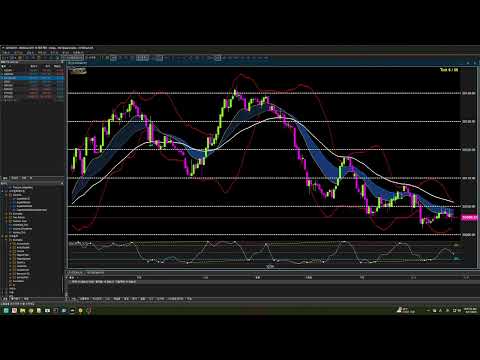
Vyxaxis Tick
- Utilità
- Versione: 17.74
- Attivazioni: 5

VYXAXIS TICK
Strictly Manual Trading
No automated trading. No grid trading. No martingale.
VYXAXIS TICK
See Clearly. React Faster. Trade Your Way.
Brand Pronunciation: VYXAXIS is pronounced “VIX-A-SIX”.
VYXAXIS TICK is a professional tick-chart trading utility for MetaTrader 5, designed for manual traders who want detailed market visualization, real-time market alerts, and a faster, more intuitive way to manage open positions.
It combines a dedicated tick-chart engine, visual trade management, dynamic trade telemetry, integrated technical analysis, historical tick navigation, and real-time alerts in a single trading workspace.
IMPORTANT: VYXAXIS TICK is a manual trading utility. It does not automatically open or close trades and does not execute an automated trading strategy.
IMPORTANT: VYXAXIS Dispatcher is a separate FREE product and is NOT included inside the VYXAXIS TICK product file. Users who want to use the Dispatcher architecture must download VYXAXIS Dispatcher separately from the MQL5 Market and attach it to a separate MT5 chart.
VISUAL TRADE MANAGEMENT
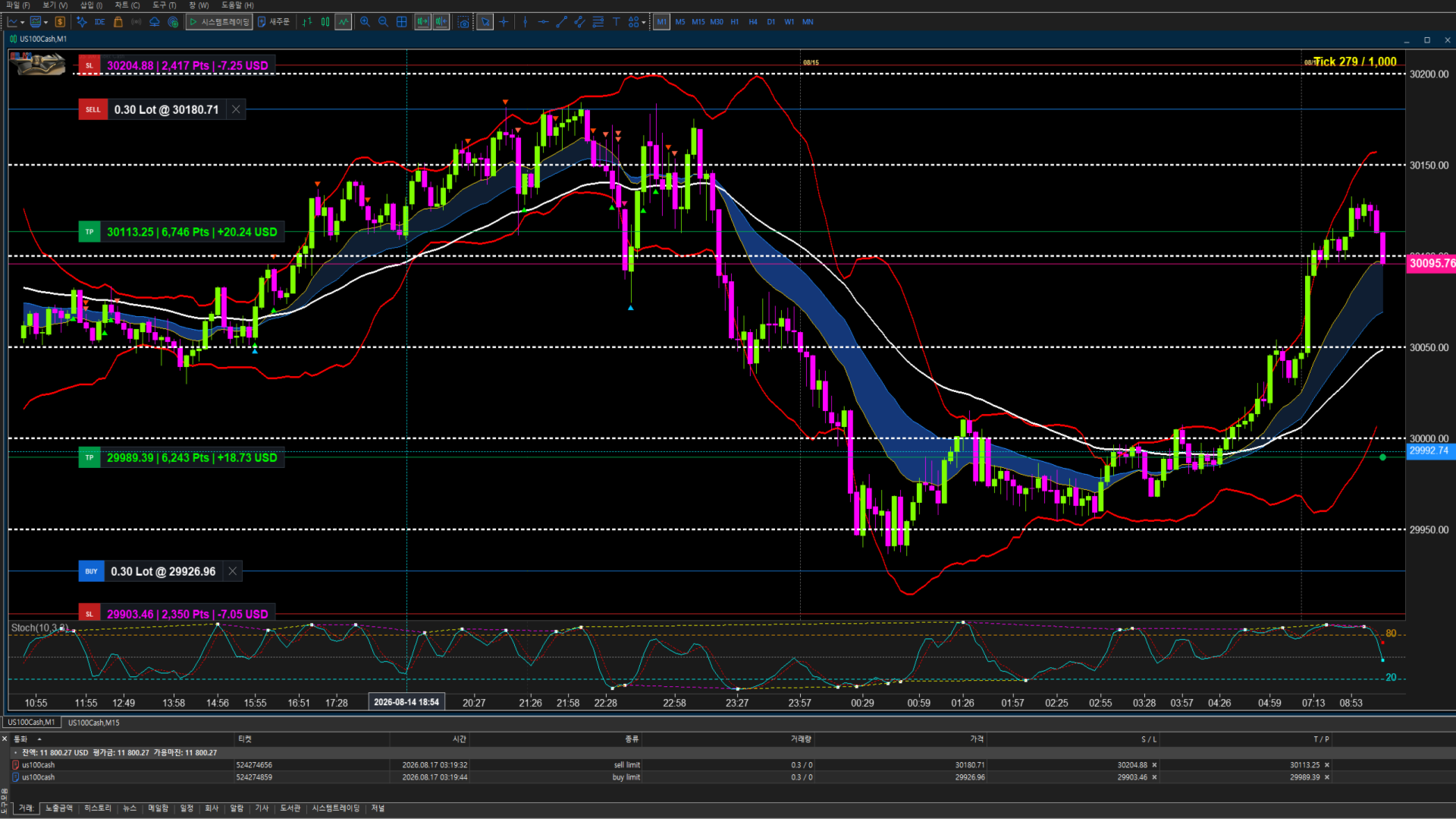
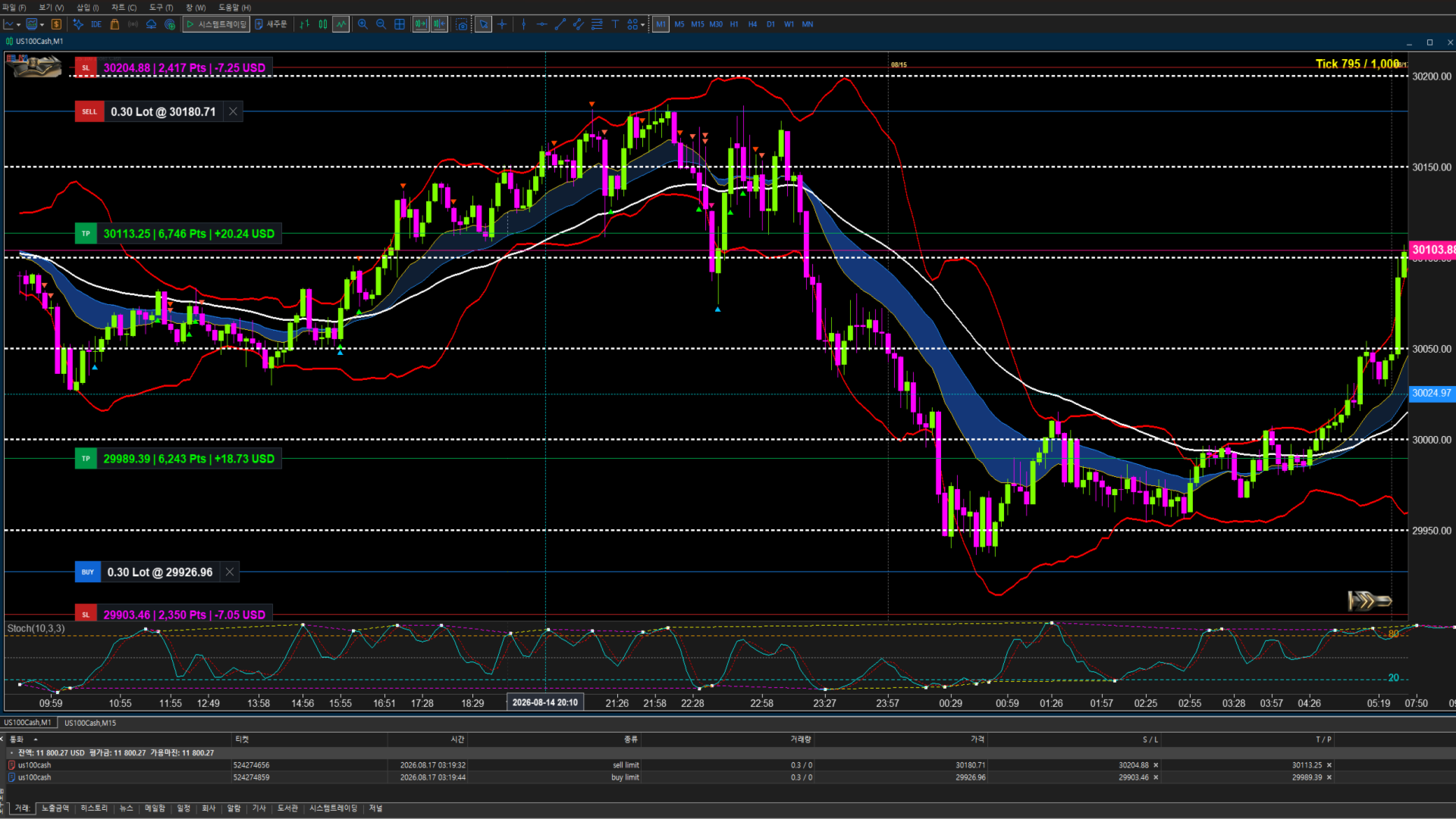
Entry Price, TP & SL — Directly on the Chart
VYXAXIS TICK works with the standard MetaTrader 5 trading interface.
Simply use the normal Buy or Sell button to enter a position. After the position is opened, VYXAXIS TICK automatically displays the Entry Price, Take Profit (TP), and Stop Loss (SL) directly on the tick chart.
- Buy / Long: TP is positioned above the entry price and SL is positioned below the entry price.
- Sell / Short: TP is positioned below the entry price and SL is positioned above the entry price.
No manual price calculation is required. Enter the trade, then simply drag the TP or SL control to the desired price.
Drag-and-Drop TP / SL
- Drag TP to change the take-profit level
- Drag SL to change the stop-loss level
- Adjust levels directly from the chart
- Keep Entry Price, TP, and SL visible while analyzing the market
- See updated trade information while moving the level
VYXAXIS TICK keeps important trade levels visible inside the trading workspace so the trader can manage an open position without repeatedly opening the standard position dialog.
Manual Break-Even & Profit Protection
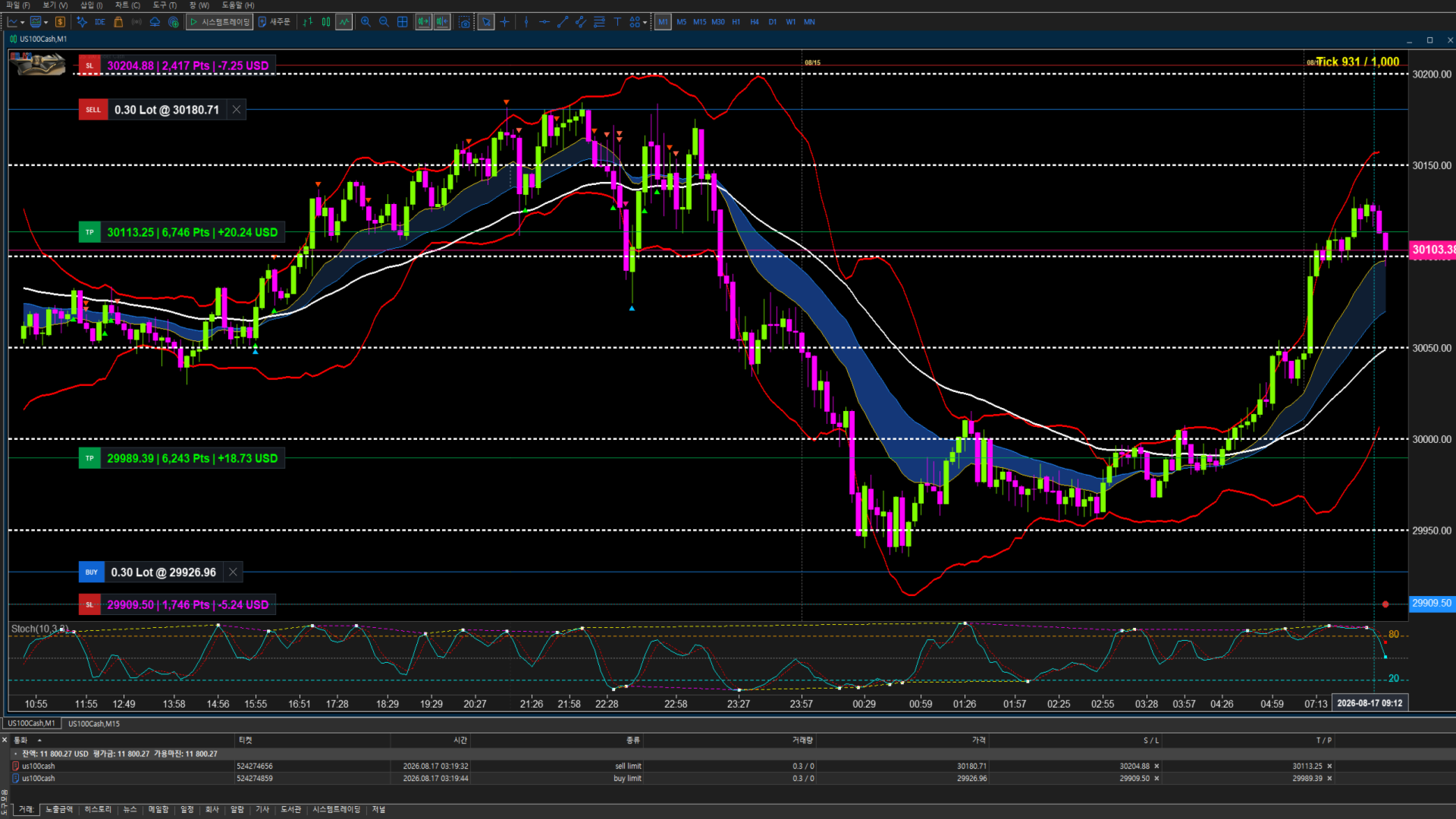
When a position moves into profit, traders can manually move the Stop Loss above or below the entry price to protect the position.
- Buy / Long: Drag the SL above the Entry Price to secure break-even or protect part of the profit.
- Sell / Short: Drag the SL below the Entry Price to secure break-even or protect part of the profit.
The new SL level is sent to MetaTrader 5 for the open position.
No automated break-even or trailing algorithm is used.
The trader remains fully in control of when and where the SL is moved.
Manual Profit Protection: Move the SL with the mouse, place it at the entry price for break-even, or move it further into profit to protect gains.
VYXAXIS TICK provides direct visual control over manual profit protection without taking the trading decision away from the trader.
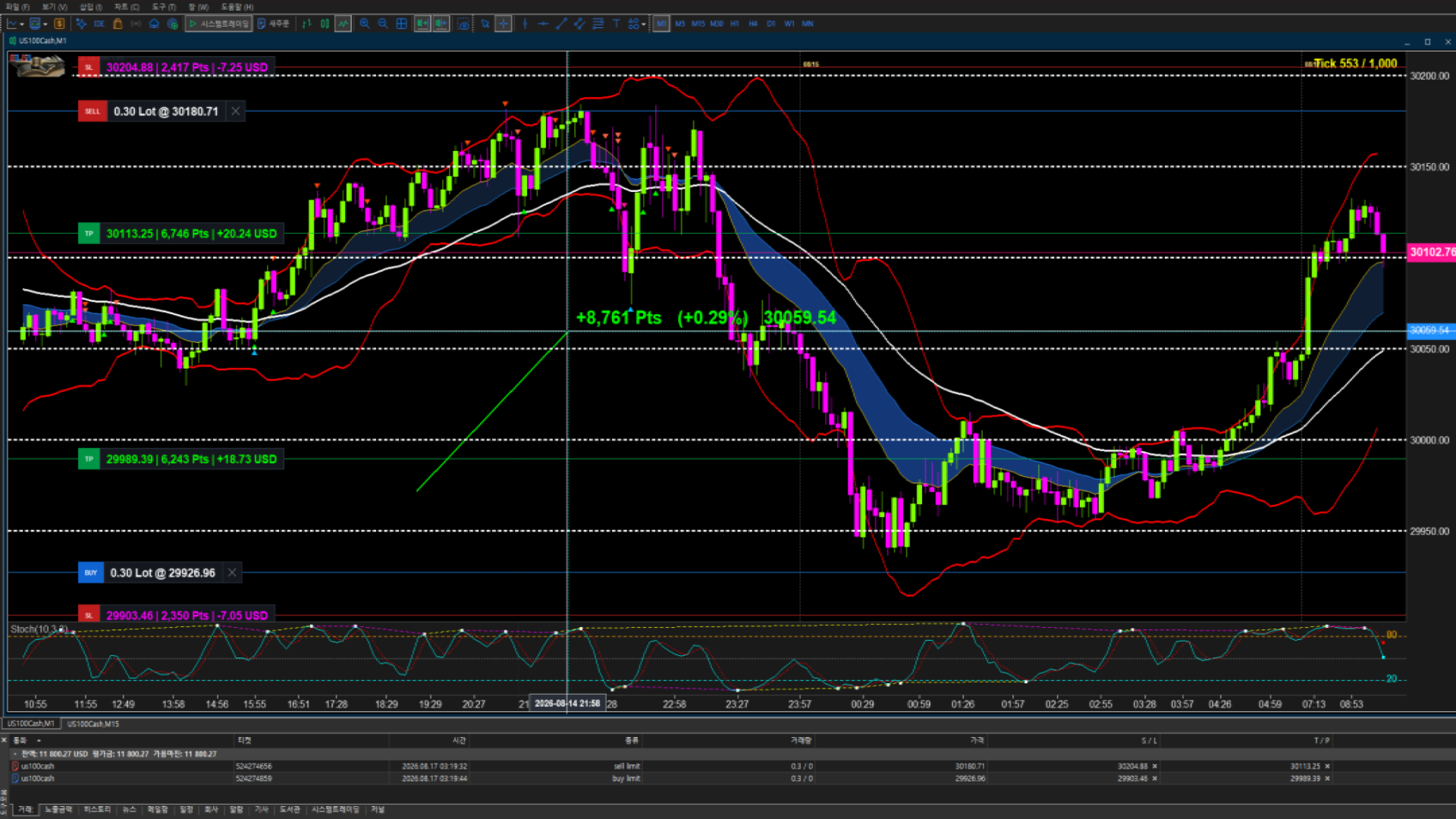
DYNAMIC TRADE TELEMETRY
VYXAXIS TICK provides real-time trade information while dragging a TP or SL control.
The telemetry shows the potential effect of the selected price level before the level is released:
- Points (P) — distance from the relevant trade level
- Percentage (%) — relative price movement
- Asset Price — exact price represented by the dragged level
- Expected P/L — estimated position result at the selected level
Move the level. See the numbers. Make the decision.
Intelligent Workflow: Telemetry appears while the TP or SL control is being dragged. Once the mouse button is released, the temporary information disappears automatically, keeping the chart clean during normal market analysis.
MULTI-TICK WORKSPACE
Independent Tick Chart Instances
VYXAXIS TICK supports multiple independent tick-chart instances running at the same time.
Multiple VYXAXIS TICK charts can be opened simultaneously, including multiple charts for the same symbol with different tick-bar settings.
Tick-bar Settings: 1 to 10,000 Ticks
Each VYXAXIS TICK instance maintains its own chart state and tick-bar configuration, allowing different tick perspectives to operate independently.
Dual-Monitor Workflows
A dual-monitor setup can be configured in several ways.
Option 1 — Two Independent VYXAXIS TICK Charts
For example:
- Monitor 1: 1,000-tick VYXAXIS TICK
- Monitor 2: 5,000-tick VYXAXIS TICK
Or:
- Monitor 1: 1,000-tick VYXAXIS TICK
- Monitor 2: 10,000-tick VYXAXIS TICK
Different tick settings can be used simultaneously, including on the same symbol.
Option 2 — VYXAXIS TICK + Standard MT5 Chart
One monitor can display VYXAXIS TICK while the second monitor displays a standard MetaTrader 5 time-based chart.
For example:
- Monitor 1: VYXAXIS TICK
- Monitor 2: Standard MT5 1-minute chart
The standard MT5 chart can use 1-minute, 5-minute, or another preferred timeframe.
This allows traders to combine tick-based market analysis with conventional time-based chart analysis.
Example Workflows
VYXAXIS TICK + VYXAXIS TICK
- 1,000-tick + 5,000-tick
- 1,000-tick + 10,000-tick
- 5,000-tick + 10,000-tick
- VYXAXIS TICK + standard MT5 1-minute chart
- VYXAXIS TICK + standard MT5 5-minute chart
- Multiple VYXAXIS TICK charts for the same symbol with different tick-bar settings.
Use smaller tick settings for more detailed short-term market analysis and larger tick settings for broader market structure and trend development.
VYXAXIS TICK is designed specifically for independent multi-chart and multi-monitor workflows.
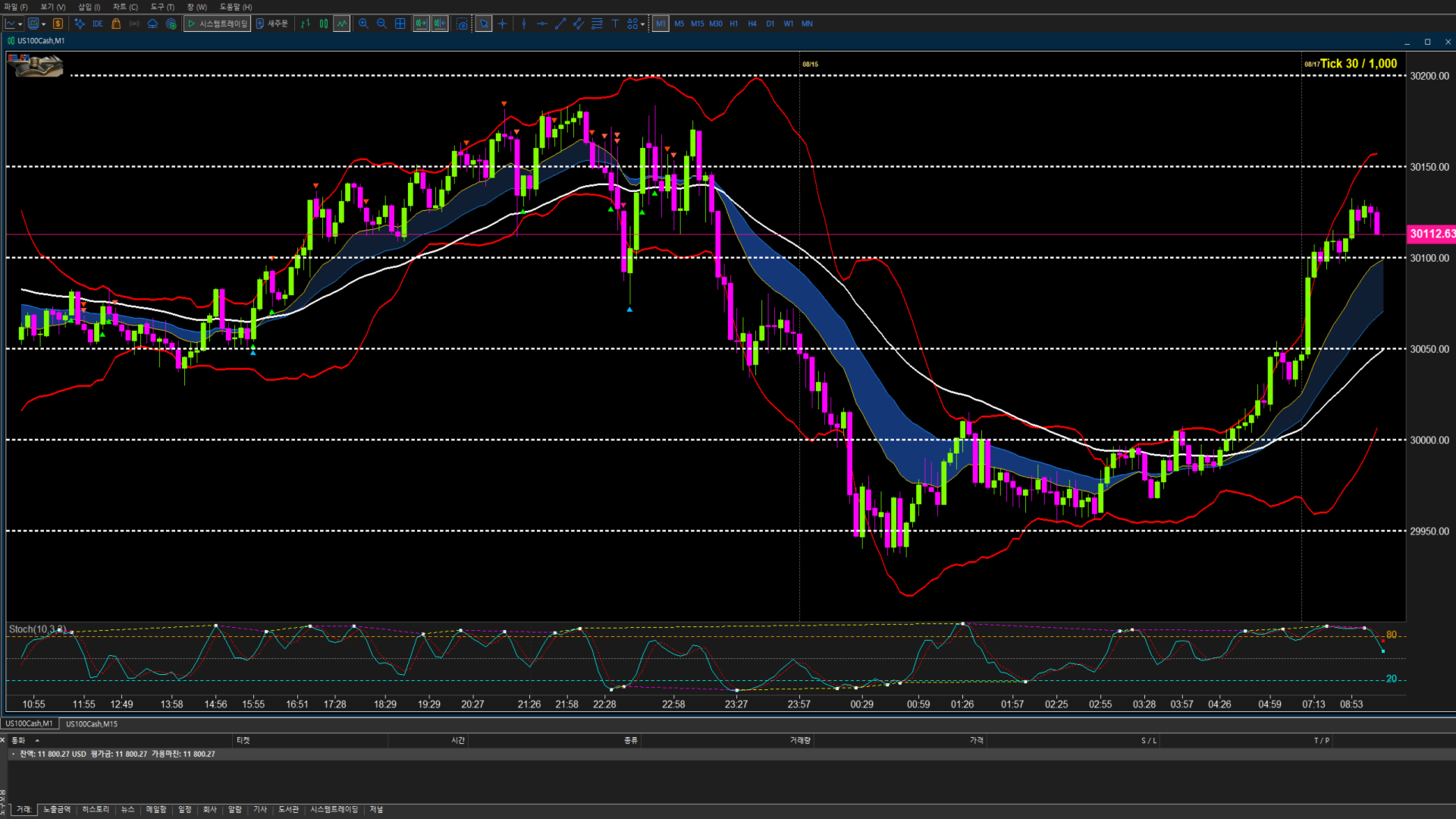
PROFESSIONAL TICK CHART
VYXAXIS TICK provides a dedicated tick-based chart environment for traders who want to examine market movement beyond standard time-based charts.
Instead of grouping price activity only by fixed time intervals, the tick chart builds market bars from incoming tick activity.
VYXAXIS TICK uses the market data provided to MetaTrader 5 by the trader's broker. It is designed to work with MetaTrader 5 market data from different brokers and symbols.
Tick Chart Features
- Real-time tick data processing
- Configurable tick-bar settings from 1 to 10,000 ticks
- Historical tick chart support
- Up to 1,000,000 ticks for historical loading
- Smooth chart navigation and historical movement analysis
- Continuous updating as new market ticks arrive
- Clear, precise time axis with readable timestamps
- Crosshair time and price display
- Precise identification of historical market activity
Precise Time Reference: VYXAXIS TICK provides a clear time axis and crosshair-based time and price display, allowing traders to identify the time corresponding to a selected point on the chart.
Historical tick availability depends on the broker and trading server.
VYXAXIS TICK loads up to 1,000,000 historical ticks to maintain fast startup and stable chart operation.
Important: The 1,000,000-tick limit applies to historical data loading. Incoming real-time ticks continue to be processed as market data arrives.
EXTREME TICK BURST HANDLING & STABILITY
During major market openings and significant market events, highly liquid instruments can generate extremely large numbers of incoming ticks in a very short period.
VYXAXIS TICK is engineered to handle high-frequency tick bursts while maintaining a responsive trading workspace.
Asynchronous Rendering
Tick processing and UI rendering are separated to help keep chart updates controlled during periods of high tick activity.
API Micro-Caching
Frequently requested MetaTrader 5 data is micro-cached and throttled where appropriate to reduce unnecessary API calls and CPU load.
NON-BLOCKING NOTIFICATION PROCESSING
VYXAXIS TICK supports a separate VYXAXIS Dispatcher architecture for notification delivery.
The VYXAXIS Dispatcher is a completely separate MT5 Expert Advisor designed to process WebRequest and supported Push notification delivery independently from the main VYXAXIS TICK chart.
This separation is designed so that a slow network response or notification service does not directly block the main VYXAXIS TICK tick-processing workflow.
IMPORTANT: VYXAXIS Dispatcher is NOT included in the VYXAXIS TICK product file.
Because MetaTrader Market products are distributed with a single EX5 product file, VYXAXIS Dispatcher is provided as a separate FREE MQL5 Market product.
Users who want to use the Dispatcher architecture must download VYXAXIS Dispatcher separately from the MQL5 Market.
INSTALLING VYXAXIS DISPATCHER
After purchasing and installing VYXAXIS TICK:
- Download the FREE VYXAXIS Dispatcher separately from the MQL5 Market.
- Install VYXAXIS Dispatcher in MetaTrader 5.
- Attach VYXAXIS Dispatcher to a separate MT5 chart.
- Keep the Dispatcher EA running while using VYXAXIS TICK with Dispatcher-based notifications.
- Configure the required WebRequest URL permissions under Tools → Options → Expert Advisors.
The Dispatcher does not replace VYXAXIS TICK.
The Dispatcher is not required for the tick chart itself.
The Dispatcher is specifically designed to handle notification delivery separately from the main tick-chart processing.
Recommended Architecture
- Market Tick Processing → VYXAXIS TICK
- Notification Delivery → VYXAXIS Dispatcher
This architecture is especially useful during periods when market activity produces very large tick volumes.
Recommended Setup During Extreme Market Activity
For traders who use WebRequest or Push notifications, VYXAXIS Dispatcher can be attached to a separate MT5 chart or workspace and kept running independently.
Keeping notification delivery separate helps reduce the possibility of notification-related network delays affecting the main tick-chart workflow.
Actual performance depends on broker data, terminal resources, VPS resources, network conditions, and market activity.
INTEGRATED TECHNICAL ANALYSIS
EMA 15 / 30 / 50
- Pre-configured EMA 15, EMA 30, and EMA 50
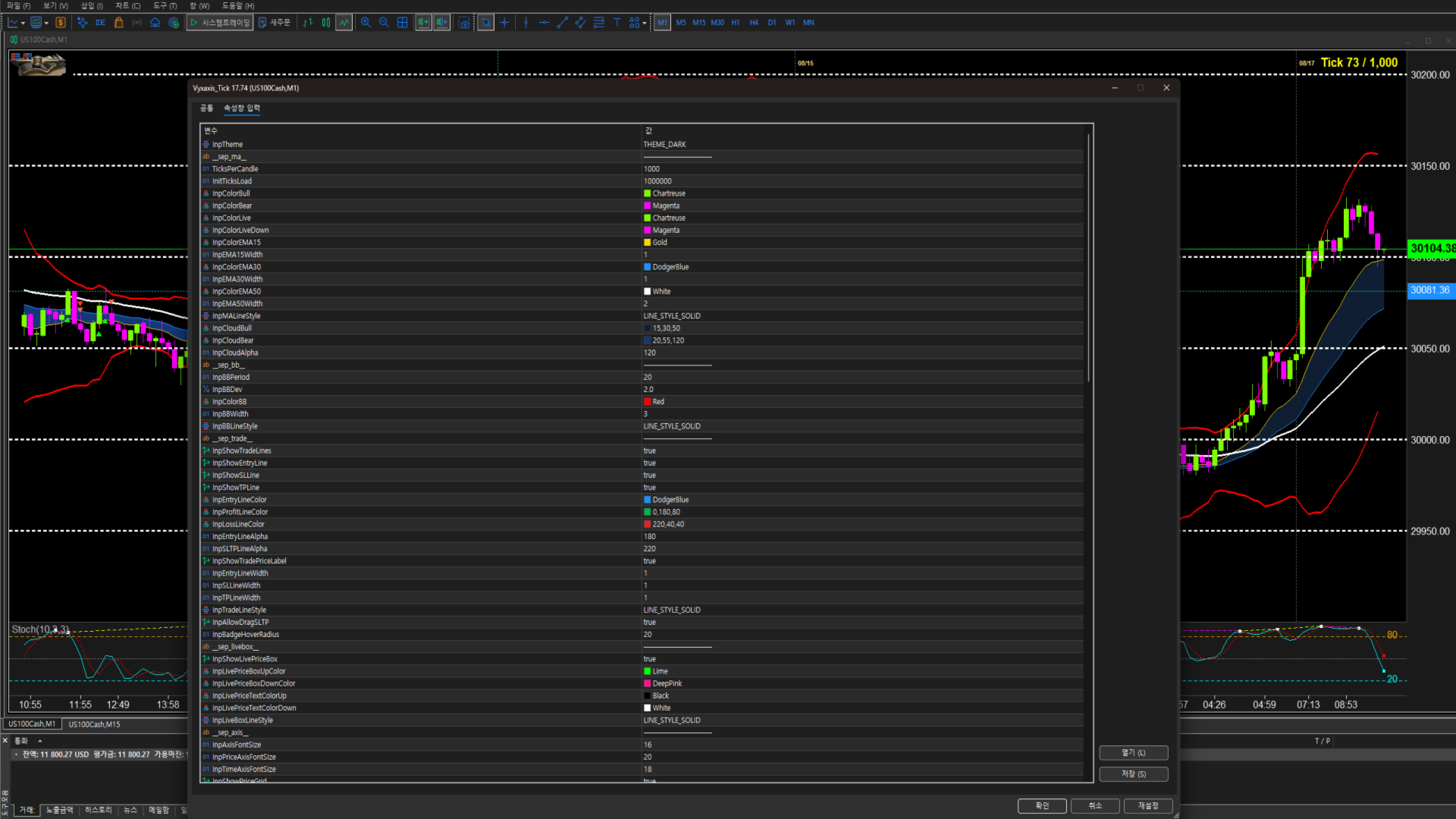
- Customizable EMA periods and parameters
- Visual EMA Cloud rendering
- Golden Cross and Dead Cross detection
- EMA30 breakout monitoring on the tick chart
- Cross-timeframe EMA30 monitoring for additional market context
The reference timeframe for cross-timeframe EMA30 monitoring is configurable in the settings, allowing traders to select the timeframe that matches their own trading style.
Bollinger Bands
Monitor price volatility and the relationship between price and the upper, middle, and lower bands directly within the tick-chart environment.
Parameters can be configured according to preferred analysis styles.
Stochastic & Stochastic Divergence
Monitor momentum and short-term market conditions with configurable Stochastic parameters, featuring built-in Stochastic Divergence detection to track discrepancies between price movements and indicator momentum.
To maximize practical trading efficiency, the Stochastic alert system is intentionally designed with refined crossover logic:
- Bullish Crossover (Crossing above 20): Remaining below 20 often indicates a prolonged downtrend. The alert triggers specifically when the indicator turns upward and crosses above the 20 level, signaling potential bullish momentum.
- Bearish Crossover (Crossing below 80): Staying above 80 can reflect a strong continuing uptrend. The alert triggers specifically when the indicator turns downward and crosses below the 80 level, signaling potential bearish momentum.
REAL-TIME ALERTS & NOTIFICATIONS
VYXAXIS TICK continuously monitors supported technical conditions while the chart is running.
When a configured condition is detected, the alert system can notify the trader without requiring constant visual monitoring of the chart.
Supported Alert Conditions
- Golden Cross — detects bullish EMA crossovers
- Dead Cross — detects bearish EMA crossovers
- EMA Breakout — detects price breakouts above or below the tick-chart EMA30 and monitors cross-timeframe EMA30 conditions
- Stochastic / Divergence (20 Up & 80 Down) — monitors momentum reversals, triggers on crossing above 20 or crossing below 80, and detects bullish/bearish Stochastic Divergence
The reference timeframe for cross-timeframe EMA30 monitoring can be changed in the settings.
Multiple Notification Methods
- Local Sound Alerts — audible notifications through MetaTrader 5
- MT5 Push Notifications — receive supported alerts on a connected mobile device
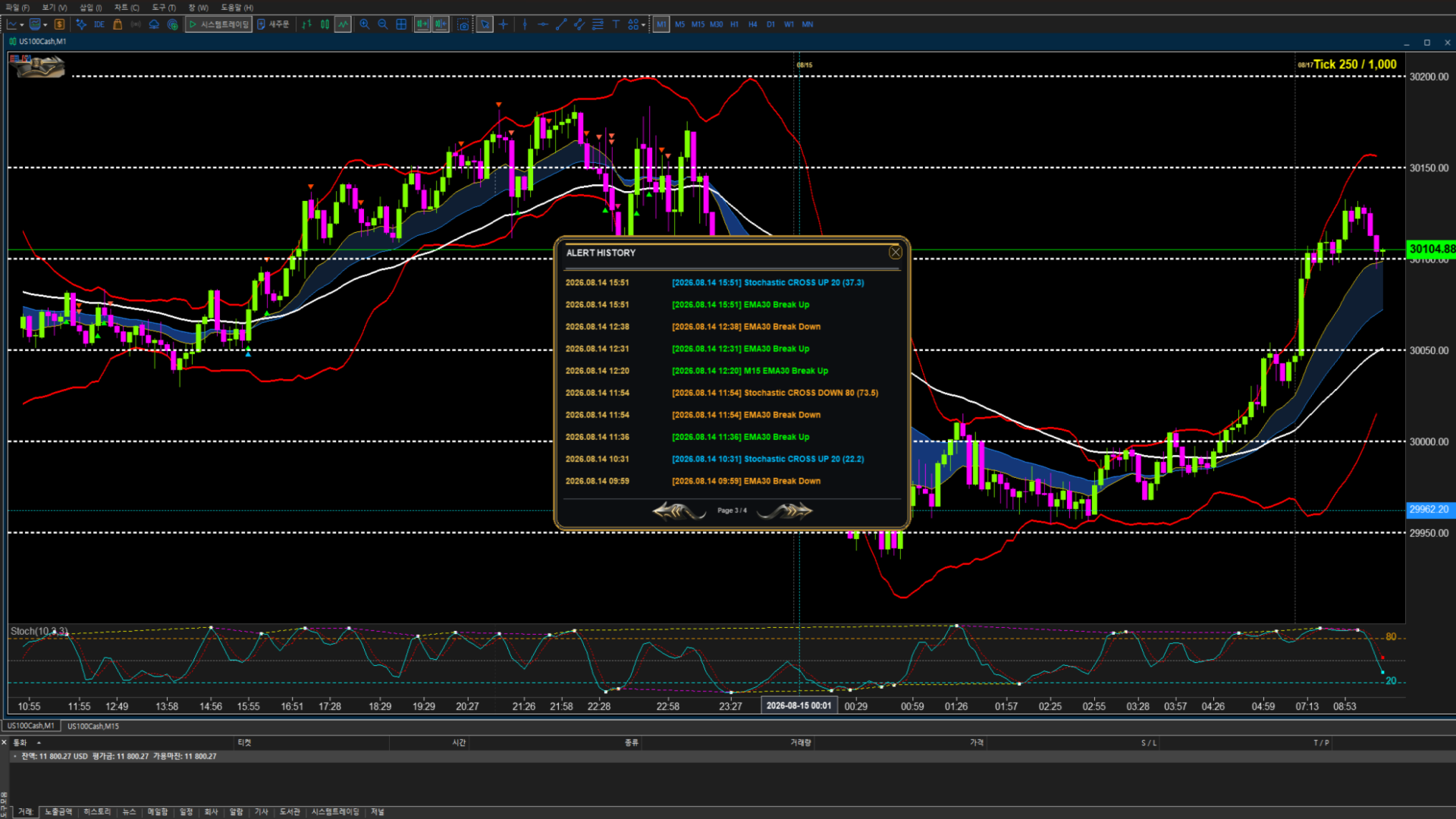
- Alert History Log — review triggered alerts within the utility
- WebRequest / Webhook Notifications — supported through the separate VYXAXIS Dispatcher architecture
Custom Sound Alerts
Personalize your notification environment with your preferred .wav sound files.
Place the sound files in the appropriate MetaTrader 5 Sounds directory and enter the filename in the MT5 sound settings.
Examples:
- alert.wav
- alert2.wav
- news.wav
Different sounds can be assigned to different notifications according to your trading workflow.
Professional Alert Frequency Control
- Once Only — triggers the alert only once when the condition is detected
- Once Per Bar — alerts when the condition is met, but limits the alert to one notification per bar
- Once Per Bar Close — alerts only after the bar closes and the condition is confirmed
- Real-Time (Every tick) — monitors the condition on every incoming tick and can trigger alerts immediately as the condition changes
Alerts inform the trader; they do not execute trades automatically.
VYXAXIS TICK does not trade for you — it tells you when the monitored condition occurs.
DUAL-MONITOR WORKFLOW
VYXAXIS TICK is designed to work naturally with a dual-monitor trading environment.
Monitor 1 — VYXAXIS TICK
Use a dedicated tick chart for:
- Tick-level analysis
- Technical indicators
- Real-time alerts
- Visual trade management
- Historical tick analysis
Monitor 2 — VYXAXIS TICK or Standard MT5 Chart
The second monitor can be used in two ways.
Option 1 — Another VYXAXIS TICK
Run another independent VYXAXIS TICK instance with a different tick-bar setting.
For example:
- 1,000 ticks + 10,000 ticks
- 2,000 ticks + 5,000 ticks
Each chart maintains its own independent tick configuration.
Option 2 — Standard MT5 Chart
Use the standard MT5 chart for conventional timeframe analysis such as:
- 1-minute
- 5-minute
- 15-minute
- Other standard MT5 timeframes
The trader remains responsible for configuring the standard MT5 chart according to their own preferences.
VYXAXIS TICK does not configure or manage the standard MT5 chart.
ADVANCED CHART NAVIGATION
Review the historical tick data loaded by VYXAXIS TICK and inspect previous market movement directly on the chart.
Move through available historical data, examine specific market areas, and return to the current market when required.
One-Click Return to Live Market
When viewing historical tick data, VYXAXIS TICK allows traders to instantly return to the latest market position with a single click.
- Navigate backward through historical tick data
- Examine previous market activity
- Return to the latest live market position with one click
- Quickly resume real-time market monitoring without manually scrolling back
This makes it easy to move between historical analysis and the live market without losing your place.
VPS & CLOUD ENVIRONMENT
VYXAXIS TICK can be used in a VPS or cloud-based MetaTrader 5 environment.
When MetaTrader 5 remains running on a VPS, chart processing and supported alert functions can continue operating without requiring your personal computer to remain powered on.
For traders using WebRequest or Push notifications, VYXAXIS Dispatcher can be kept running independently in the MT5 environment.
Actual performance depends on:
- Broker data availability
- Broker tick-feed characteristics
- VPS resources
- Network conditions
- MetaTrader 5 configuration
- Market activity
IMPORTANT BROKER DATA INFORMATION
VYXAXIS TICK processes the tick data available through your MetaTrader 5 broker.
Different brokers can provide different:
- Tick frequencies
- Historical tick quantities
- Tick timestamps
- Bid/Ask data
- Trading-session data
- Symbol specifications
Therefore, the appearance and amount of historical tick data may differ between brokers even when the same symbol and tick setting are selected.
VYXAXIS TICK does not generate missing broker data and cannot guarantee identical tick history between different brokers.
KEY FEATURES
- Dedicated professional tick-chart environment
- Tick-bar settings from 1 to 10,000 ticks
- Independent multi-tick chart instances
- Two independent VYXAXIS TICK charts can run simultaneously
- VYXAXIS TICK + standard MT5 time-based chart workflow
- Same-symbol multi-tick analysis
- Up to 1,000,000 historical ticks
- Real-time tick processing and continuous chart updates
- Visual Entry Price, TP, and SL management
- Drag-and-drop TP/SL controls
- Manual break-even and manual profit protection
- Dynamic Points / Percentage / Price / Expected P/L telemetry
- EMA 15 / 30 / 50 and visual EMA Cloud
- Bollinger Bands
- Stochastic and Stochastic Divergence detection
- Smart Stochastic alert logic (Cross Above 20 / Cross Below 80)
- Golden Cross and Dead Cross detection
- EMA30 breakout monitoring and configurable cross-timeframe EMA30 monitoring
- Real-time technical alerts with professional alert frequency control
- Local sound notifications and custom .wav sound support
- MT5 Push Notifications and WebRequest/Webhook support via Dispatcher architecture
- Internal alert history log
- Advanced historical tick navigation with One-Click Return to Live Market
- Asynchronous rendering
- API micro-caching
- Non-blocking notification processing
- VPS / cloud environment support
- Broker-independent architecture
- Standard MT5 chart configuration remains under the trader's control
VYXAXIS DISPATCHER
VYXAXIS Dispatcher is a separate FREE MT5 Expert Advisor.
It is designed to process notification delivery independently from VYXAXIS TICK.
Dispatcher functions include:
- WebRequest delivery
- Supported MT5 Push notification delivery
- Independent notification processing
- Separate network communication from the main tick-chart workflow
IMPORTANT:
VYXAXIS Dispatcher is not included in the VYXAXIS TICK EX5 file.
Users who require the Dispatcher architecture must download VYXAXIS Dispatcher separately from the MQL5 Market.
VYXAXIS Dispatcher is optional.
VYXAXIS TICK itself can operate as a tick-chart utility without the Dispatcher.
The Dispatcher is recommended when using WebRequest or notification workflows where separating network communication from chart processing is desirable.
FREQUENTLY ASKED QUESTIONS
Q: What is VYXAXIS TICK?
A: VYXAXIS TICK is a professional tick-chart utility for MetaTrader 5. It provides tick-based market visualization, technical analysis, visual trade management, historical tick navigation, and real-time alerts for manual traders.
Q: Does VYXAXIS TICK trade automatically?
A: No. VYXAXIS TICK does not automatically open or close trades and does not execute an automated trading strategy.
Q: Does it use AI?
A: No. VYXAXIS TICK does not use AI, neural networks, or AI-based trading decisions.
Q: Does it use grid or martingale strategies?
A: No. There is no grid trading or martingale trading logic.
Q: What tick settings are supported?
A: VYXAXIS TICK supports tick-bar settings from 1 tick to 10,000 ticks.
Q: How do the Stochastic alerts work?
A: Instead of triggering continuously inside overbought or oversold zones, alerts trigger specifically when the Stochastic line crosses above 20 or crosses below 80. Stochastic Divergence detection is also supported.
Q: Can I run two VYXAXIS TICK charts at the same time?
A: Yes. Multiple independent VYXAXIS TICK instances can run simultaneously, including multiple instances for the same symbol with different tick settings.
Q: Can I use two monitors?
A: Yes. You can use two independent VYXAXIS TICK charts across two monitors, or use VYXAXIS TICK on one monitor and a standard MT5 time-based chart on the other.
Q: Can I use a normal 1-minute chart on the second monitor?
A: Yes. The second monitor can use the standard MT5 chart with 1-minute, 5-minute, 15-minute, or another standard timeframe.
Q: Why does my historical tick data look different from another broker?
A: Tick data is supplied by the broker. Different brokers may provide different tick frequencies, historical data quantities, timestamps, and market-feed characteristics.
Q: Why don't I have as much historical tick data as expected?
A: Historical tick availability depends on your broker and trading server. VYXAXIS TICK can process the data available through MT5 but cannot create historical data that the broker does not provide.
Q: How much historical tick data does VYXAXIS TICK load?
A: VYXAXIS TICK can load up to 1,000,000 historical ticks. This is the historical loading limit; real-time incoming ticks continue to be processed.
Q: Can I go back and inspect previous market activity?
A: Yes. VYXAXIS TICK supports historical tick navigation.
Q: How do I return to the current market after going back?
A: Use the One-Click Return to Live Market function to immediately return to the latest market position.
Q: Can I move TP and SL directly on the chart?
A: Yes. TP and SL can be adjusted by dragging their controls directly on the chart.
Q: Does VYXAXIS TICK automatically move my Stop Loss into profit?
A: No. Break-even and profit protection are manual functions. You decide when and where to move the Stop Loss.
Q: Can I protect my profit manually?
A: Yes. You can manually move the Stop Loss to the entry price for break-even or move it further into profit to protect part of the gain.
Q: Does the telemetry show my expected profit or loss?
A: Yes. While dragging TP or SL, the telemetry can show points, percentage, price, and estimated Expected P/L for the selected level.
Q: Why does the telemetry disappear after I release the mouse?
A: This is intentional. The temporary telemetry is displayed while adjusting the level so the chart remains clean during normal analysis.
Q: Why does the chart sometimes receive a very large number of ticks?
A: Major market openings and significant market events can generate extremely high tick activity, particularly on highly liquid instruments.
Q: Can high tick activity affect notification processing?
A: Notification delivery can involve network communication and may sometimes take longer than normal. VYXAXIS TICK supports a separate Dispatcher architecture that can process WebRequest and supported Push notification delivery independently from the main tick-chart workflow.
Q: What is VYXAXIS Dispatcher?
A: VYXAXIS Dispatcher is a separate FREE MetaTrader 5 Expert Advisor designed to process notification delivery independently from VYXAXIS TICK.
Q: Is VYXAXIS Dispatcher included with VYXAXIS TICK?
A: No. VYXAXIS Dispatcher is a separate free MQL5 Market product. It is not included in the VYXAXIS TICK EX5 file.
Q: Where can I get VYXAXIS Dispatcher?
A: VYXAXIS Dispatcher is available as a separate FREE product in the MQL5 Market. Users who want to use the Dispatcher architecture must download and install it separately.
Q: Is VYXAXIS Dispatcher required for the tick chart?
A: No. The Dispatcher is not required for the tick chart itself. It is specifically intended for notification delivery.
Q: How do I install VYXAXIS Dispatcher?
A: Download the FREE VYXAXIS Dispatcher from the MQL5 Market, install it in MetaTrader 5, attach it to a separate MT5 chart, and keep it running while using Dispatcher-based notifications.
Q: Why should I keep the Dispatcher separate?
A: During periods of extreme market activity, thousands of ticks can arrive in a short time. Keeping notification delivery separate helps prevent slow network requests from directly interfering with the main tick-chart processing workflow.
Q: My WebRequest does not work. What should I check?
A: Check the MetaTrader 5 WebRequest permissions under Tools → Options → Expert Advisors. Make sure the required URL is added to the allowed WebRequest URL list. Also verify that VYXAXIS Dispatcher is installed and running when the Dispatcher architecture is being used.
Q: My Push notification does not arrive. What should I check?
A: Check your MT5 notification settings, MetaQuotes ID configuration, notification permissions, alert conditions, and VYXAXIS Dispatcher configuration if the Dispatcher workflow is being used.
Q: I cannot see any tick data. What should I check?
A: First confirm that the symbol is receiving market data in MetaTrader 5. Also check whether the broker provides tick data for that symbol and whether the market is currently active.
Q: Does VYXAXIS TICK work with every broker?
A: VYXAXIS TICK is designed to work with MetaTrader 5 market data, but the available tick history and data characteristics depend on the broker and symbol.
Q: Can I use VYXAXIS TICK on a VPS?
A: Yes. VYXAXIS TICK can operate in a VPS or cloud-based MT5 environment, provided MetaTrader 5 is configured and running correctly.
Q: Why is performance different between my PC and VPS?
A: Performance can vary depending on CPU, memory, network latency, broker data volume, terminal configuration, and market activity.
Q: Does VYXAXIS TICK configure my normal MT5 chart?
A: No. The standard MT5 chart remains under the trader's control. You can configure its timeframe, indicators, templates, and appearance independently.
Q: Does VYXAXIS TICK provide investment advice?
A: No. VYXAXIS TICK is a software utility and does not provide investment advice or guaranteed trading results.
Q: Does VYXAXIS TICK guarantee that alerts will always arrive instantly?
A: No. Alert delivery can depend on MetaTrader 5, broker connectivity, network conditions, mobile notification services, WebRequest destinations, VPS performance, and other external factors.
Q: What should I do if I have a problem that is not covered here?
A: Please contact the seller through the MQL5 Market product page. Describe the problem clearly and, where possible, include the symbol, broker, MT5 environment, relevant settings, and a screenshot of the issue. Telephone support is not provided. Support is handled through the MQL5 Market product communication system.
MANUAL TRADING ONLY
VYXAXIS TICK is a manual trading utility.
It provides chart visualization, trade management tools, market information, and alerts — but it does not make or execute trading decisions.
- No AI trading or neural networks
- No automated entry strategies
- No automated trading algorithms
- No grid trading
- No martingale trading logic
- No automatic break-even
- No automatic trailing stop
VYXAXIS TICK provides advanced tools and visual information.
The trading decision remains entirely yours.
IMPORTANT INFORMATION
VYXAXIS TICK does not provide investment advice and does not guarantee trading results.
Order execution, spreads, tick availability, latency, and other trading conditions depend on your broker and account environment.
Historical tick availability may vary between brokers and symbols.
Different brokers may provide different tick data, historical depth, timestamps, and market-feed characteristics.
The product cannot guarantee identical tick data across different brokers.
VYXAXIS TICK is designed to assist manual traders with market visualization, analysis, position management, and alerts. It does not guarantee profitability or trading performance.
Always use appropriate risk management when trading financial markets.
Trade responsibly.