Grid True Strength Index EA
- Uzmanlar
- Sürüm: 3.15
- Etkinleştirmeler: 5

Free trial first: run Grid True Strength Index EA in the MetaTrader 5 Strategy Tester with visual mode on, and see for yourself which crossings it takes and which it leaves alone.
A LATE SIGNAL IS THE MOST EXPENSIVE SIGNAL A GRID CAN TAKE.
A grid that starts at the end of a move spends its whole cycle paying for that start. William Blau's True Strength Index smooths price change twice, which removes much of the noise, and the price of that calm is delay. Grid True Strength Index EA respects both sides of that bargain: it listens to the smooth line, and it refuses to act once the line has already travelled too far. After a cycle begins, a complete management engine works the book down through group closures and partial slices.
Share a screenshot of your order with me, and I will personally select a free product from my catalogue to send you as a gift.
The short version
• A new cycle needs TSI to cross its signal line on a finished bar. Forming candles are not used by default, so an accepted signal does not repaint.
• TSI is worked out inside the EA from the chart's closes. There is no external indicator file and no DLL.
• First in this product: the Stretch Guard, which refuses a crossing when TSI is already too far out on the signal side.
• The Climb Guard wants fresh gain in TSI, and the Gap Guard turns down crossings won by a hair.
• The Range Guard ignores tight boxes, and a slow EMA 200 keeps cycles on the side of the larger trend by default.
• Past crossings appear on the live chart: a small arrow for accepted, a grey dot for refused.
• Results are banked by combining the oldest and newest orders, and a heavy old order can be retired one slice at a time.
• There is no stop loss and no forced close-all. Reaching a limit stops new levels; orders already open stay under management.
----------
Start here
Open EURUSD H1, keep the 0.01 starting lot and the additive ladder, and choose Scan only for your first session. You will see every plan on the panel without a single order being sent, and one button arms the EA when you feel ready. Repeat the tests below on your own broker's feed first, since spread, swap and commission all change the outcome.
----------
Measured results
Every figure comes from the Strategy Tester: defaults, 1 minute OHLC, 1:100 leverage, 2025.01.01 to 2026.09.30, one broker's demo data. Copy those settings and you can check the method yourself.
• EURUSD H1, $10,000: net +725.31, maximal equity drawdown 351.06 (3.44%), 341 trades. No stop-out, no margin refusal.
• EURUSD H1, $1,000,000: net +725.31, maximal equity drawdown 351.06 (0.04%), 341 trades. No stop-out, no margin refusal.
• XAUUSD D1, $10,000: net +13.18, maximal equity drawdown 1.56 (0.02%), 4 trades. No stop-out, no margin refusal.
• XAUUSD D1, $1,000,000: net +13.18, maximal equity drawdown 1.56 (0.00%), 4 trades. No stop-out, no margin refusal.
These describe one past stretch of data and forecast nothing. Four gold trades are far too few to mean anything. The money drawdown is identical at both deposits because lots do not scale with balance, so 351.06 would weigh much more on a small account; balances under $10,000 were not tested. The guard defaults were chosen after trying a handful of values on this same period, which flatters any result, so these figures are not independent proof. Netting was not verified and the account mode of these runs is unconfirmed, so treat your own account type as untested until you have run it.
----------
What the new guard did in testing
On EURUSD H1 at $10,000 we ran the defaults with the Stretch Guard on and off. Off: net +1,095.11, drawdown 796.76 (7.96%), 422 trades. On at 25: net +725.31, drawdown 351.06 (3.44%), 341 trades. So in this one test the guard gave up about a third of the profit and removed more than half of the drawdown. On XAUUSD D1 it changed nothing, and at settings of 40 or higher it changed nothing on either symbol while the stricter early guards were in place. It is a trade-off, seen on a single sample, and not a free gain. Set it to 100 to turn it off, and compare on your own symbols.
----------
Why a double-smoothed reading
Most oscillators smooth once and still jitter. TSI smooths the close-to-close change twice, then divides by the same treatment of its absolute size. The result lives on a fixed scale of -100 to +100, whatever the symbol or price level. That fixed scale is what makes a rule like the Stretch Guard possible: the same number means the same degree of travel on a currency pair and on gold. The cost is lag, because a smooth line is always describing the recent past.
----------
Inside one cycle
1. Reading. On each new bar the EA rebuilds TSI and its signal line from finished bars.
2. Crossing. TSI passes above the signal line for BUY, below it for SELL.
3. Climb Guard. TSI must have moved in that direction over the last few bars.
4. Gap Guard. The separation from the signal line must be real.
5. Stretch Guard. TSI must not be beyond your maximum on the signal side.
6. Range Guard. The recent window, measured in ATR, must be wide enough.
7. Trend filter. By default the close must be on the matching side of the slow EMA. It can also fade that side, or be off.
8. Rhythm. Accepted signals are kept apart by a quiet gap of bars, and a signal can wait a few bars if a level cannot be placed straight away.
9. Ladder. Levels follow ATR or fixed points, with a floor, a top limit and an optional freeze. BUY and SELL grids can run together or alone.
10. Harvest. Groups of oldest and newest orders are closed once their joint result, after swap and commission, beats the target. If the oldest order is too heavy, a slice of it goes instead.
11. Checks. Closures that would reopen a level at once are blocked, each leg is confirmed against deal history, failed legs are retried, and a plan is dropped when the book changes before sending.
12. Hedge cycle, optional. Off by default and not exercised in our tests. When enabled it keeps a balanced pair on a chosen symbol and retires it in equal slices, paid by a small surcharge on closures the grid already makes.
----------
On the chart
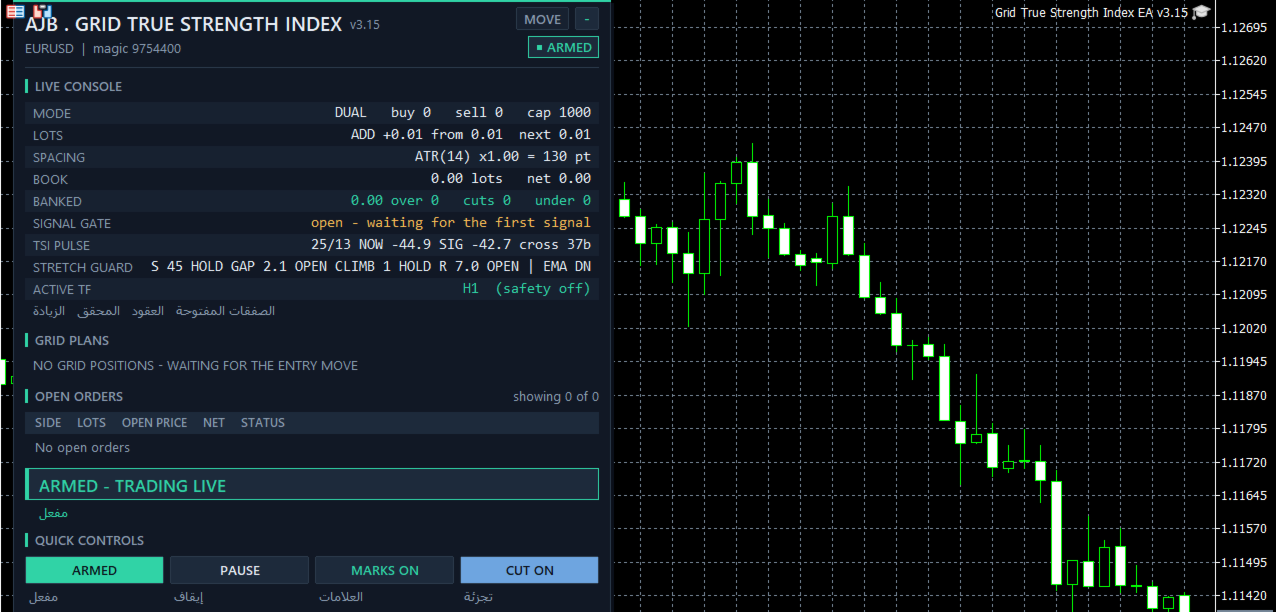
The panel stays on the left, leaving the right side and the price scale open. You get symbol, magic number, a status pill, grid mode, lot step, spacing, banked result, the book, each side's closing plan and the order list. The TSI PULSE row gives the two lengths, the current TSI, its signal line and the bars since the last crossing. The STRETCH GUARD row shows the favoured side, then Stretch, Gap, Climb and Range with OPEN or HOLD beside each, and finally the EMA side. Buttons control Armed / Scan only, Pause / Resume, chart marks and slicing. The Hedge Vault card is designed to dock below the main panel, but it stayed hidden in our screenshots because the hedge is off, so that live dock was not checked. In a non-visual backtest nothing is drawn.
----------
Limits you set
Nothing here closes the book to protect you: limits only stop further levels.
Each order passes a free margin check with a safety buffer before it is sent.
Caps on levels per grid, orders per side and lot per order keep the ladder finite. MinMarginLevelPercent and MaxAccountRiskPercent start at off, and you should think about setting them for your own account.
An optional margin-level timeframe safety lifts the signal and spacing to a higher timeframe as margin falls. It is off by default and its paths were not exercised in our tests.
Copies are separated by symbol and magic number, so give each chart its own numbers.
Scan only shows all decisions with no orders sent.
----------
Is it for you?
Yes if you value patience, would rather skip a late entry than chase it, like many small closures, and will size lots to your own balance. No if you need a stop loss on each order, a guaranteed monthly number, or a robot to leave unattended with big lots on a small deposit.
----------
Common questions
Does it repaint? Accepted signals, chart marks and both panel rows read finished bars.
Which markets were tested? EURUSD H1 and XAUUSD D1. Anything else is for you to test.
What should I tune first? InpTSIStretchMax, then InpTSIClimbMin. Change one at a time and judge drawdown alongside net result.
Why so few gold trades? The default guards and the 30 bar gap leave little room on a daily chart. Looser guards give more trades; with all three point guards and the Range Guard off, XAUUSD D1 at $10,000 made 28 trades, net +80.81, drawdown 161.06 (1.60%). That is a test run and not the default.
Can I shorten TSI? Yes. Shorter lengths react sooner and cross more often, so check the guards again afterwards.
Does it run on netting accounts? A separate margin cap exists for them, but netting behaviour is unverified.
----------
All settings
Grid levels
TradeMode - dual BUY and SELL grids by default, or one direction.
GridSpacePoints - distance between levels in fixed spacing mode (25).
GridSpaceMultiplier - widens deeper levels when above 1.0 (1.0 = even).
MaxGridLevels - ceiling on levels in one grid (1000).
UpDirectionIsBuy - which side an upward move arms.
EAMagicNumber - number stamped on grid orders (9754400).
GridOrderComment - text stamped on grid orders (GTSI).
OneOrderPerBar - allows only one new level per bar.
Lots
InitialLotSize - first level's volume (0.01).
LotSizingMode - additive by default, multiply as the option.
LotMultiplier - multiply mode factor per level (1.25).
LotAddStep - additive mode increase per level (0.01; 0 uses the starting lot).
MaxOrderVolume - largest lot for one order (1.0).
UseAutoLot - ties the starting lot to balance (off).
AutoLotBaseBalance - balance that equals the starting lot (1000).
AutoLotAllowDecrease - permits auto lot below the starting lot (off).
ATR spacing
GridSpacingMode - ATR by default, fixed points as the option.
ATRTimeframe - timeframe for the ATR (current chart).
ATRPeriod - ATR length (14).
ATRSpacingFactor - ATR multiple used as spacing (1.0).
ATRBarShift - bar read for ATR; 1 is the last finished bar.
ATRMinSpacingPts - spacing floor in points (50; 0 none).
ATRMaxSpacingPts - spacing top limit in points (5000; 0 none).
ATRFreezeOnStart - holds one spacing through a cycle (off).
Profit target
DesiredProfitPerClosure - base target in deposit currency (2.0).
ProfitMultiplier - final scale from 1.00 to 2.00.
ProfitTargetMode - scaled by default: larger, deeper books aim higher.
ProfitVolumePower - effect of closing volume on the target (1.0; 0 off).
ProfitDepthBonus - added target per extra open level (0.10).
ProfitMaxMultiple - top of the scaled target, as multiples of base (50).
ProfitMaxReachFraction - holds the target inside this fraction of a grid step (0.50).
Fragment scanner
UseMultiLegScan - tries multi-order groups ahead of the plain pair (on).
MaxOldestLegs - most old orders per closure (3).
MaxNewestLegs - most new orders per closure (6).
ScanPriority - ranking of valid groups; largest group first by default.
NeverBankLessThanPair - a group must also pass the pair target (on).
RequireCloseVolumeExceedsTarget - newest volume must exceed oldest volume (on).
MinCloseVolumeRatio - required ratio between those volumes (1.5).
Target slicing
EnableTargetSlicing - permits partial closure of the oldest order (on).
FragProfitWeightPower - profit weighting per closing lot (1.5).
FragMinSlicePercent - smallest slice, percent of the target order (20).
FragAllowMultiCloser - lets several new orders fund one slice (on).
FragPreferFullClosure - picks a full closure if both are possible (on).
Reopen guard
ReopenGuard - stops closures that would instantly reopen a level (step based).
ReopenGuardCushion - safe distance as a share of one step (0.90).
Account protection
MinMarginLevelPercent - blocks new levels under this margin level (0 off).
MaxAccountRiskPercent - blocks new levels past this floating loss, percent of balance (0 off).
NetMaxMarginPercent - netting only: cap on net position margin, percent of equity (5.0).
MaxTotalOrders - hard order cap per side (1000).
Execution and checks
RunMode - Armed or Scan only.
CloseSequence - sending order of legs; oldest first by default.
MaxSlippagePoints - slippage allowance (30).
MaxSpreadPoints - no trading above this spread (7500).
MinSecondsBetweenClosures - pause between closures per side (5).
CloseAttemptsPerLeg - tries before the retry queue (3).
VerifyTimeoutSeconds - how long a stuck leg is watched (90).
DeferWhenMarketClosed - waits for the session rather than halting (on).
MarketClosedRetrySeconds - retry spacing while orders are refused (30).
AutoResumeAfterSeconds - seconds until a halt clears itself (300; 0 waits for you).
NoPartialRetryMinutes - minutes until partial closes are tried again after a broker refusal (15; 0 never).
AbortIfBookChanged - cancels a plan if a leg changed (on).
UseFullCommission - includes commission on both sides (on).
CommissionPerLot - backup figure (0 reads history).
CloseOrderComment - text on closing deals.
Hedge cycle
EnableHedgeCycle - master switch (off).
HedgeSymbols - comma list; repeat a symbol for extra turns (XAGUSD).
HedgeSymbolRotation - how the next symbol is chosen (per cycle).
HedgeMaxSymbolsInTester - rotation limit, tester only (2; 0 none).
HedgeCycleLots - lots per side of the pair (0.01).
HedgeSliceLots - lots retired per side each slice (0.01).
HedgeFragmentBonus - bonus over the slice cost (100).
HedgeBonusIsPercent - bonus read as percent; false means money (on).
HedgeMaxSurcharge - money cap per closure (0 none).
HedgeMaxSurchargePercent - largest target increase, percent (50).
HedgeMagicNumber - number on hedge legs, must differ from the grid (9754401).
HedgeReopenOnFinish - starts a new cycle after one ends (on).
HedgeStartRequiresTrade - first cycle waits for a grid trade (on).
HedgeIntegritySeconds - leg balance check interval (5).
HedgeAutoRepair - fixes a lone leg automatically (on).
HedgeNakedAction - response to a lone leg; re-hedge by default.
HedgeMaxSpreadPoints - hedge spread limit (0 off).
HedgeSlippagePoints - hedge slippage allowance (30).
HedgeAttemptsPerLeg - tries per hedge leg (3).
HedgeVerifyTimeout - watch time for a stuck hedge leg (90).
HedgeCommissionPerLot - backup hedge commission (0 reads history).
HedgeOrderComment - text on hedge deals.
Weekly cash day
WeeklyCashDay - pauses new cycles and slices around withdrawals (off).
CashDayOfWeek - 0 Sunday, 1 Monday, and so on (1).
CashCutoffHour - server hour that stops new slices (21).
Panel and chart
ShowPanel - panel on or off.
PanelX and PanelY - offsets from the chart edge (12, 15).
PanelFontSize - base text size (9).
ShowArabic - second language line (on).
ShowChartMarks - plans and levels on the chart (on).
MaxTableRows - order rows per grid (13).
PanelCorner - anchoring corner.
Entry trigger
EntryTriggerMode - TSI strategy by default.
SignalBarShift - 1 is the last finished bar.
SignalBarsDelay - bars between accepted signals (30; 0 every).
SignalValidBars - bars a signal stays usable (3).
SignalAllowBuy and SignalAllowSell - enable each side.
SignalReverse - flips direction (off).
True Strength Index
InpTSILong - first, longer smoothing (25).
InpTSIShort - second, shorter smoothing (13).
InpTSISignal - length of the signal line EMA (7).
InpTSIClimbMin - Climb Guard: points of TSI gain required (1; 0 off).
InpTSIClimbBars - Climb Guard: bars the gain is measured across (3).
InpTSIGapMin - Gap Guard: least separation from the signal line (0.2; 0 off).
InpTSIStretchMax - Stretch Guard: furthest TSI may be on the signal side (25; 100 off).
InpTSIRangeMinATR - Range Guard: least window width in ATR (5; 0 off).
InpTSIRangeBars - Range Guard: window length in bars (20).
InpTSIATRPeriod - Range Guard: ATR length (14).
InpTSITrendFilter - 1 with the EMA side, 2 against it, 0 off (1).
InpTSITrendMAPeriod - trend EMA length (200).
InpShowSignalArrows - arrows where a cycle armed (on).
InpShowTSIOnChart - past crossings on the live chart (on).
Debug
DebugMode - extra journal detail (off).
Margin timeframe safety
UseMarginTFSafety - master switch (off).
Level1MarginPct and Level1TF - 6000 percent moves work to M15.
Level2MarginPct and Level2TF - 5000 percent moves work to H1.
MarginTFHysteresisPct - recovery needed before stepping back (500).
----------
The honest part
Grids carry serious risk. They add to losing positions, there is no stop loss, and one long trend can hold the book open for a long time or, with lots too big for the balance, end in a stop-out and a heavy loss. TSI lags by design and says nothing certain about the next bar. Nothing here promises a profit. Choose lots that survive a bad run, test with your own broker, and risk only money you can afford to lose. No DLLs or additional files are needed.
If you try it, a short and honest review of how it behaved for you, good or bad, helps the next trader decide.