
ALYAS Position Tool
- Göstergeler
-
Salim Alyas Rasho
 I develop practical technical indicators for MetaTrader 5 under the ALYAS brand, with a focus on clear visualization, simplicity, and ease of use.
My goal is to create reliable and useful trading tools that help traders analyze the market with greater clarity and efficiency. - Sürüm: 1.1
- Güncellendi: 22 Eylül 2026
- Etkinleştirmeler: 5
ALYAS Position Tool - NextGen is a MetaTrader 5 analytical tool designed for position planning, risk analysis, market structure analysis, and trade scenario visualization.
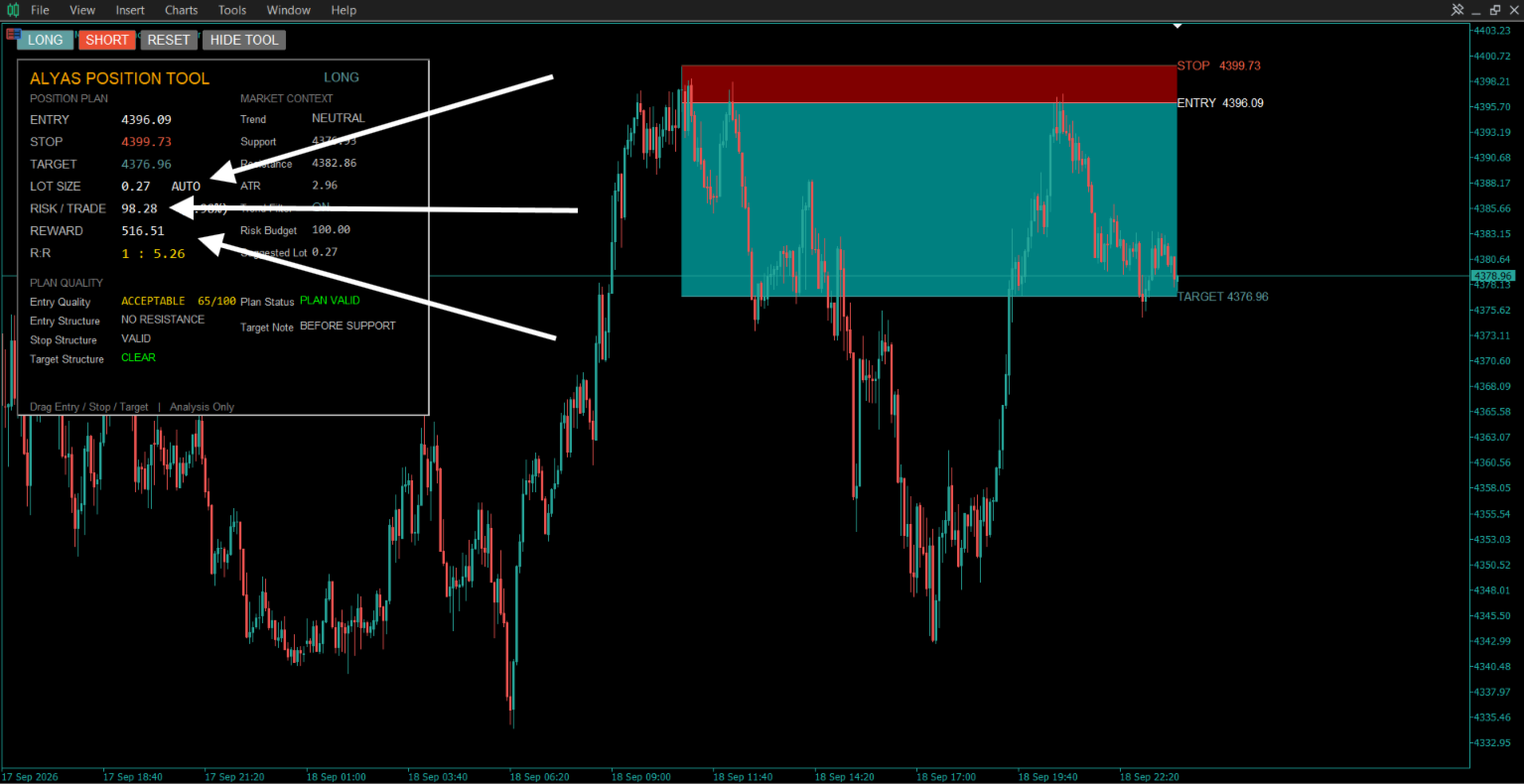
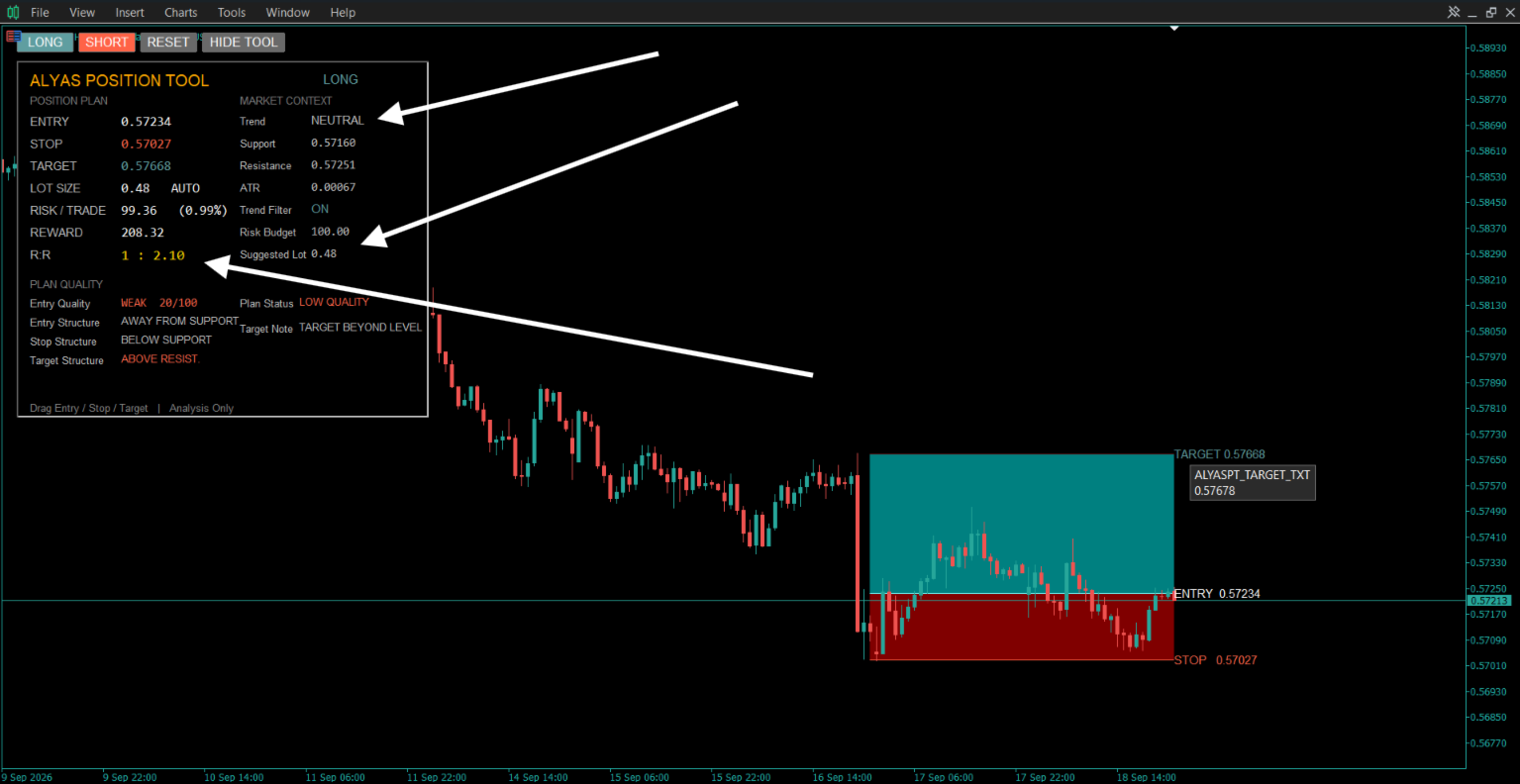
The tool provides an interactive position-planning interface directly on the chart, allowing traders to visualize and adjust Entry, Stop Loss, and Take Profit levels while monitoring the associated risk, reward, position size, and market context.
It is designed as an analysis and planning tool and does not execute trades or place orders.
Position Planning
The Position Tool displays three main levels:
- ENTRY
- STOP
- TARGET
The levels can be adjusted directly on the chart.
When a level is moved, the tool automatically updates the related calculations, including:
- Risk amount
- Risk percentage
- Potential reward
- Risk-to-reward ratio
- Position size
- Plan status
- Structural analysis
The tool supports both:
- LONG
- SHORT
position scenarios.
Smart Market Analysis
ALYAS Position Tool includes an optional market analysis engine that uses:
- ATR
- Fast EMA
- Slow EMA
- Recent swing highs
- Recent swing lows
- Support and resistance levels
The analysis can automatically identify nearby market structure and use it when constructing a position plan.
The market context dashboard can display:
- Current trend state
- Support
- Resistance
- ATR
- Trend filter status
- Risk budget
- Suggested lot size
The detected trend states are:
- BULLISH
- BEARISH
- NEUTRAL
The trend state is determined from the relationship between the selected fast and slow EMA values together with the current market price.
Automatic Position Construction
The tool can optionally construct an initial position plan automatically.
Depending on the selected settings, the tool can calculate:
- Entry level
- Stop Loss level
- Target level
- Suggested position size
The automatic construction can use nearby market structure and ATR-based distances.
Users can disable the automatic functions and manually control the position levels.
Risk Management
ALYAS Position Tool calculates the estimated monetary risk based on:
- Account balance or optional reference balance
- Selected risk percentage
- Entry price
- Stop Loss price
- Position volume
- Symbol trading specifications
The tool uses MetaTrader's OrderCalcProfit calculation for estimating monetary price movement where available.
The dashboard displays:
- Risk / Trade
- Risk Percentage
- Risk Budget
- Lot Size
- Suggested Lot
The suggested lot calculation uses the selected risk budget and the distance between Entry and Stop Loss.
The tool also respects the symbol's available:
- Minimum volume
- Maximum volume
- Volume step
Reward and Risk-to-Reward Analysis
The tool calculates the potential reward between Entry and Target and displays the resulting Risk-to-Reward ratio.
Example:
1 : 2.00
means that the calculated potential reward distance is approximately twice the calculated risk distance.
The target can also be automatically adjusted according to the selected reward/risk setting and available market structure.
Smart Target Analysis
When enabled, the Smart Target Engine considers nearby structural levels such as resistance for LONG scenarios and support for SHORT scenarios.
The dashboard provides target-structure information such as:
- CLEAR
- AT RESISTANCE
- AT SUPPORT
- ABOVE RESIST.
- BELOW SUPPORT
- NO RESISTANCE
- NO SUPPORT
This information is intended to help visualize the relationship between the planned target and nearby market structure.
Position Quality Analysis
The tool includes an optional analytical scoring model that evaluates the current position plan using several internal conditions, including:
- Trend direction
- Distance from support or resistance
- Stop Loss distance relative to ATR
- Nearby structural levels
The dashboard displays:
- Entry Quality
- Entry Structure
- Stop Structure
- Target Structure
- Plan Status
The entry analysis may display:
- GOOD
- ACCEPTABLE
- WEAK
The plan status may display conditions such as:
- PLAN VALID
- LOW QUALITY
- LOW R:R
- STOP WARNING
- STRUCTURE WARNING
- INVALID
These classifications are analytical outputs based on the indicator's calculation rules and should not be interpreted as guaranteed trade signals or predictions.
Interactive Chart Tool
The Entry, Stop and Target levels are interactive chart objects.
Users can drag the levels directly on the chart to modify the position plan.
When levels are moved, the tool recalculates the relevant:
- Risk
- Reward
- R:R
- Position size
- Structure analysis
- Plan status
The complete position tool can also be moved horizontally on the chart.
LONG / SHORT Mode
The tool supports two position modes:
LONG
Used for planning scenarios where:
Stop < Entry < Target
SHORT
Used for planning scenarios where:
Target < Entry < Stop
The tool automatically maintains the basic structural relationship between these levels when they are manually adjusted.
Visual Position Zones
Optional chart zones visually separate:
- Risk Zone
- Profit Zone
This provides a quick visual representation of the relationship between the planned risk and potential reward.
Users can independently customize:
- Entry color
- Stop color
- Target color
- Risk zone color
- Profit zone color
- Line width
Dashboard
The optional dashboard provides a compact overview of the current position plan.
Position Plan
- Entry
- Stop
- Target
- Lot Size
- Risk / Trade
- Reward
- R:R
Market Context
- Trend
- Support
- Resistance
- ATR
- Trend Filter
- Risk Budget
- Suggested Lot
Plan Quality
- Entry Quality
- Entry Structure
- Stop Structure
- Target Structure
- Plan Status
- Target Note
The dashboard can be enabled or disabled from the indicator settings.
Customization
The tool provides settings for:
Position
- Position Side
- Risk Percentage
- Reward/Risk
- Lot Size
- Reference Balance
- Reference Balance Mode
Market Analysis
- Automatic Zones
- Zone Lookback
- Swing Strength
- ATR Buffer
- ATR Period
- Fast EMA
- Slow EMA
- Trend Filter
Automatic Construction
- Automatic Entry
- Automatic Target
- Automatic Lot
Target Analysis
- Structure Target
- Minimum Target ATR
- Structure Buffer ATR
Display
- Show Zones
- Show Labels
- Show Dashboard
Interaction
- Drag Tolerance
- Line Width
Risk Calculation
The tool uses the selected account balance or optional reference balance to calculate the intended risk budget.
For example, with:
Balance = $10,000
Risk = 1%
the calculated risk budget is:
$100
The suggested position size is then calculated according to the distance between Entry and Stop Loss and the trading specifications of the selected symbol.
Actual trading costs such as spread, commission, swaps, slippage, and execution conditions may affect real trading results.
Important Notes
ALYAS Position Tool - NextGen is an analytical and position-planning tool.
It:
- Does not execute trades
- Does not place orders
- Does not manage open positions
- Does not guarantee profitable results
- Does not guarantee that a calculated plan will work
- Does not constitute financial advice
All calculations are based on the selected symbol, timeframe, market data, and user-defined settings.
The suggested Entry, Stop, Target and Lot Size values are analytical calculations and should be independently evaluated by the user before making any trading decision.
Usage
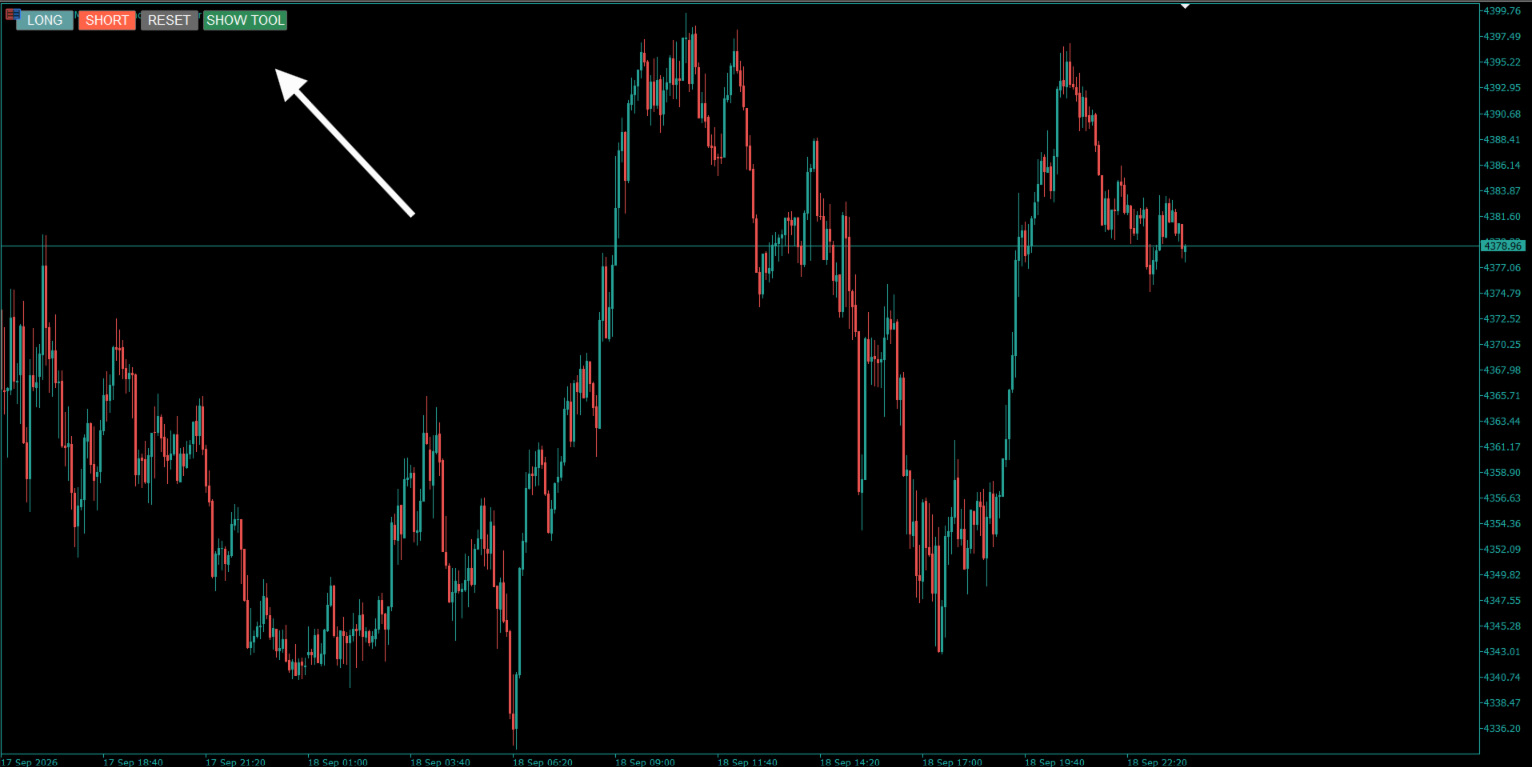
- Attach ALYAS Position Tool - NextGen to a MetaTrader 5 chart.
- Select LONG or SHORT.
- Configure the desired risk and reward settings.
- Enable or disable automatic market analysis.
- Review the automatically constructed position plan.
- Drag Entry, Stop or Target directly on the chart if required.
- Monitor the calculated risk, reward, R:R, position size and structural information from the dashboard.
The tool automatically follows the symbol and timeframe of the chart to which it is attached.
Support & Feedback
Thank you for using this indicator.
If you find it useful in your market analysis, your feedback is greatly appreciated. A review helps other traders discover the product and provides valuable feedback for future improvements and updates.
For questions, suggestions, or technical support, please feel free to contact me through the MQL5 platform.
Thank you for your support.






































Kullanıcı değerlendirmeye herhangi bir yorum bırakmadı