Sniper Grade Bot

SNIPER GRADE BOT — COMPLETE USER GUIDE

1. WHAT SNIPER GRADE BOT DOES


Sniper Grade Bot watches the market and looks for trading opportunities in different market situations.


The available trading modes are:

- Trending

- Ranging

- Correction

- Scalp

- Synthetic


It can use:

- Market Buy

- Market Sell

- Buy Limit

- Sell Limit

- Buy Stop

- Sell Stop


It also has protections for spread, daily loss, maximum trades, account equity, economic news, market spikes, entry-price movement, loss streaks, pending-order expiry and broker trading restrictions.


2. HOW THE TRADING MODES WORK


For normal Forex, metals, commodities and similar instruments, Trending, Ranging and Correction can be checked independently when enabled.


If more than one produces a valid opportunity, the program compares confidence values and uses the valid opportunity with the highest confidence. If confidence is exactly equal, the preference is Trending, then Ranging, then Correction.


The market condition can also be displayed on the chart when the dashboard is enabled.


3. SCALP MODE


Scalp mode watches the M1 chart and can check for opportunities during live price movement rather than waiting only for the next M5 candle.


There is at least a 5-second interval between scalp execution attempts.


Before a scalp trade can be placed, the program checks protections including spread, daily drawdown, trading time, trading days, maximum open trades, equity floor, news filter, optional spike protection, optional minimum confidence, optional DXY filter, loss-streak protection and entry/SL/TP validity.


4. SYNTHETIC INSTRUMENTS


Synthetic instruments can be automatically recognized when Auto Detect Synthetic is true. The default is ON.


When a synthetic instrument is detected and synthetic trading is enabled, the program uses the separate synthetic trading rules.


Synthetic trading has additional controls for M15 confirmation, pending orders, stop orders, liquidity sweep requirement, abnormal spikes, spread, pending-order expiry and different synthetic families.


5. LOT SIZE AND RISK


Use Fixed Lot Size — Default: OFF.

When OFF, position size is calculated from percentage risk. When ON, the specified fixed lot size is used.


Fixed Lot Size — Default: 0.10 lot.


Risk Per Trade — Default: 1.0%.

The file limits this setting to a maximum of 5%. Position size is calculated after the final stop-loss position has been checked.


6. MAXIMUM DAILY LOSS


Maximum Daily Drawdown — Default: 10%.

This is based on the account balance at the beginning of the UTC trading day.


For example, with a $1,000 opening balance and a 10% limit, the daily loss allowance corresponds to $100.


The daily starting balance is maintained rather than simply being reset whenever the terminal restarts.


7. FIXED TAKE-PROFIT SETTINGS


TP1 = 1.0R

TP2 = 1.8R

TP3 = 3.0R


R means the distance between entry and stop-loss. If entry-to-SL is 10 points, 1R is 10 points, 1.8R is 18 points and 3R is 30 points.


8. ENGINE TP OVERRIDE


Override Engine TPs With Fixed RR — Default: OFF.


When OFF, the program keeps the take-profit levels supplied by the selected trading mode. When ON, the three global RR settings are used.


9. TP1 AND TP2 PARTIAL CLOSING


TP1 Close % — Default: 50%.

TP2 Close % — Default: 25%.


These settings specify how much of the position is intended to be closed at those milestones. The file also describes TP1 as the point associated with moving the stop toward breakeven and TP2 as the partial-close milestone.


10. TRAILING STOP


Enable Trailing Stop — Default: ON.

Trailing Step — Default: 150 points.


11. SPREAD PROTECTION


Maximum Spread — Default: 1000 points.


If current spread is above the allowed limit, the program will not proceed with a new trade. Synthetic instruments have additional spread controls.


12. ENTRY PRICE PROTECTION


Maximum Entry Drift — Default: 40 points.


For a market trade, the program compares the opportunity price with the current executable price. If price has moved farther than allowed, the trade is rejected instead of chasing the market.


13. REQUOTE PROTECTION


Maximum Requote Retries — Default: 2.


If a market order is rejected because of a price change, requote or similar price-related condition, the program can retry according to this setting. Pending orders are not silently moved to a different entry price.


14. MARKET ORDERS


BUY: sent at the current executable Buy price.

SELL: sent at the current executable Sell price.


Before sending, the program checks entry, SL/TP direction, broker minimum distance, spread, position size and whether the symbol is allowed to trade.


15. BUY LIMIT


A Buy Limit is used when the desired Buy entry is below the current market price. The requested price must satisfy the required distance from the market.


16. SELL LIMIT


A Sell Limit is used when the desired Sell entry is above the current market price. The requested price must satisfy the required distance from the market.


17. BUY STOP


A Buy Stop is used when the desired Buy entry is above the current market price. The requested price must satisfy the required distance from the market.


18. SELL STOP


A Sell Stop is used when the desired Sell entry is below the current market price. The requested price must satisfy the required distance from the market.


19. PENDING ORDER EXPIRY


Pending Order Expiry — Default: ON.

Hours — 0.

Minutes — 45.


With the default settings, a pending order can have an expiry of 45 minutes. The expiration time is calculated from when the pending order is placed.


If pending expiry is OFF, the broker's normal continuing-order behavior is used. The broker must support specified pending-order expiration for the requested expiry to be used.


20. SMART MONEY CONCEPT CONFLUENCE


Supply & Demand Zones — ON.

Inverse FVG — ON.

Fibonacci OTE — ON, referring to the 61.8%–78.6% retracement area.

Price Action Detection — ON, including pin bars and engulfing candles.

Divergence Detection — ON, including MACD and RSI divergence.

CVD Delta — ON.

Chart Patterns — ON, including patterns such as double tops, double bottoms and flags.


These settings are described in the main file as additional confirmation/confluence rather than replacing the primary trading decision.


22.MINIMUM CONFLUENCE SCORE


Minimum Confluence Score controls how much supporting confirmation is required for each trading mode.


The setting is separate for each mode:


- Scalp — Minimum Confluence Score

- Trending — Minimum Confluence Score

- Ranging — Minimum Confluence Score

- Correction — Minimum Confluence Score

- Synthetic — Minimum Confluence Score


Each trading mode has its own ON/OFF setting.


When a mode's minimum confluence check is ON, the trading opportunity must meet or exceed the minimum confluence score you set for that mode. If it does not reach the required score, that opportunity is not allowed through the confluence check.


When the setting is OFF for a mode, that mode does not use its minimum confluence score as a requirement.


The five settings work independently. Changing the minimum confluence score for Scalp does not change the setting for Trending, Ranging, Correction or Synthetic.


Example:

If the Scalp minimum confluence score is set to 4.0 and the Scalp confluence check is ON, a Scalp opportunity with a score below 4.0 is rejected by this check. A different minimum can be used for Trending, Ranging, Correction and Synthetic.


Minimum Confluence Score is different from Minimum Confidence. Confluence represents supporting confirmations, while Confidence represents the overall strength assigned to a trading opportunity.


22.MINIMUM CONFIDENCE


Enable Global Minimum Confidence — Default: OFF.

Minimum Confidence — Default: 0.65.


When enabled, a signal below the specified confidence level is rejected. The setting accepts values from 0.00 to 1.00.


23.LOSS-STREAK PROTECTION


Loss-Streak Guard — Default: ON.

Loss-Streak Expiration — Default: 4 hours.


The file describes this as a precision guard that reacts after multiple consecutive losses.


24.DXY FILTER


DXY Filter — Default: OFF.

DXY Symbol — Default: USDX.


When enabled, the program checks DXY direction before allowing applicable trades. The file identifies bullish, bearish and neutral/unavailable conditions.


The filter accounts for whether USD is the base or quote currency and handles inverse DXY instruments. Crypto and automatically detected synthetic instruments are excluded. If the broker does not provide the requested DXY symbol, the file is designed to bypass the DXY filter.


25.ECONOMIC NEWS FILTER


News Filter — Default: OFF.

News Blackout — Default: 30 minutes.


When enabled, the program checks the MT5 economic calendar before allowing a trade.


26.TRADING HOURS


Session Management — Default: OFF.


Time Filter — Default: OFF.

When enabled: 07:00–23:00 UTC.


Avoid Asian Session — Default: OFF.

When enabled, the program avoids 00:00–07:00 UTC.


27.DAYS OF THE WEEK


Monday Trading — ON.

Friday Trading — ON.

Friday Stop Hour — 22:00 UTC.


These controls are used when session management is applicable.


28.MAXIMUM NUMBER OF TRADES


Maximum Trades Per Symbol — Default: 1.

Maximum Total Trades — Default: 3.


These limits control the number of concurrent trades.


29.EMERGENCY EQUITY FLOOR


Equity Floor — Default: OFF.

Minimum Equity — Default: 9000.


When enabled, if account equity falls below the configured threshold, new trading is blocked.


30.SPIKE PROTECTION


Spike Detector — Default: OFF.


When enabled, the program can look for abnormal movement using:

- Large candle range: 2.5 × ATR

- Extreme wick: 70%

- Opening gap: 1.0 × ATR

- Three-candle acceleration

- Tick-speed burst: 1000 points/second over 2 seconds

- Spread blowout: 3 × recent average spread


Post-Spike Waiting Period — Default: 2 M5 bars.


Crypto is excluded from the normal spike detector, while automatically detected synthetic instruments use their own protection.


31.SYNTHETIC SPIKE PROTECTION


Synthetic Spike Protection — Default: ON.

Spike Threshold — Default: 3 × M5 ATR.

Waiting Period — Default: 2 M5 bars.


32.SYNTHETIC PENDING ORDERS


Pending Limit Orders — ON.

Stop Orders — ON.


Synthetic mode can use pullback-style pending entries and breakout-style stop entries when conditions produce them.


33.SYNTHETIC LIQUIDITY SWEEP REQUIREMENT


Require Sweep — Default: OFF.


When enabled, the synthetic setup requires the specified M5 liquidity event.


34.SYNTHETIC M15 CONFIRMATION


M15 Confluence — Default: OFF.


When enabled, M15 information is added as additional confirmation.


35.SYNTHETIC PENDING ORDER PROTECTION


Pending Invalidation — ON.

Maximum Pending Lifetime — 6 M5 bars, approximately 30 minutes.


The program can cancel an invalidated synthetic pending setup when price moves sufficiently far from the setup according to the configured ATR threshold.


36.SYNTHETIC FAMILY SETTINGS


Boom:

- Minimum confidence: 0.74

- Stop multiplier: 1.35 ATR

- Minimum displacement: 0.70 ATR


Crash:

- Minimum confidence: 0.74

- Stop multiplier: 1.35 ATR

- Minimum displacement: 0.70 ATR


Volatility:

- Minimum confidence: 0.75

- Stop multiplier: 1.15 ATR

- Minimum displacement: 0.55 ATR


Step:

- Minimum confidence: 0.75

- Stop multiplier: 1.15 ATR

- Minimum displacement: 0.55 ATR


Other synthetic families:

- Minimum confidence: 0.75

- Stop multiplier: 1.15 ATR

- Minimum displacement: 0.55 ATR


37.HOW A NORMAL TRADE GETS THROUGH THE CHECKS


1. Check the M5 bar.

2. Check spread.

3. Check synthetic protections if applicable.

4. Check spike protection if enabled.

5. Check daily drawdown.

6. Check trading time.

7. Check trading day.

8. Check maximum open trades.

9. Check equity floor.

10. Check economic news.

11. Update DXY information if enabled.

12. Determine the current market condition.

13. Evaluate enabled trading modes.

14. Select the valid signal with the highest confidence.

15. Apply minimum-confidence protection if enabled.

16. Apply DXY protection if enabled.

17. Apply loss-streak protection if enabled.

18. Add applicable volume-profile confirmation.

19. Apply fixed RR settings only if TP override is ON.

20. Check Entry, SL and TP.

22.Calculate position size.

23.Check broker distance requirements.

24.Place the trade.

38.HOW A SCALP TRADE GETS THROUGH THE CHECKS


1. M1 market movement.

2. Spread check.

3. Daily-loss check.

4. Time/day check.

5. Maximum-trade check.

6. Equity check.

7. News check.

8. Optional fast spike checks.

9. Scalp opportunity analysis.

10. Minimum confidence if enabled.

11. DXY check if enabled.

12. Loss-streak protection.

13. Optional RR override.

14. Entry/SL/TP safety check.

15. Trade execution.


39.STOP-LOSS AND TAKE-PROFIT SAFETY


Before sending an order, the program checks the broker's minimum distance requirements.


For a Buy, SL must be below entry and TP above entry.

For a Sell, SL must be above entry and TP below entry.


If the broker requires a greater minimum distance, the program adjusts the final SL/TP outward to satisfy those requirements. Position size is calculated using the final stop-loss distance.


40.PENDING ORDERS ARE NOT TREATED LIKE MARKET ORDERS


A pending order is allowed to remain away from the current market because that is the purpose of a pending order.


The market-price drift protection is not used to force a pending entry closer to the current price. Instead, the program checks whether the pending entry satisfies broker minimum-distance requirements.


41.WHAT HAPPENS IF THE BROKER REJECTS A TRADE?


The program checks the broker's actual response. A trade is considered accepted only when the broker returns an accepted result.


For market orders, price-related rejection can cause another attempt according to the configured retry count. With Maximum retries = 2, additional attempts can occur for requote, price unavailable or price changed conditions.


The program does not repeatedly retry every type of rejection.


42.DUPLICATE SYNTHETIC SETUPS


Synthetic setups have additional protection against entering the same setup repeatedly.


The program remembers an accepted synthetic setup and checks existing trades and pending orders for the same setup identity.


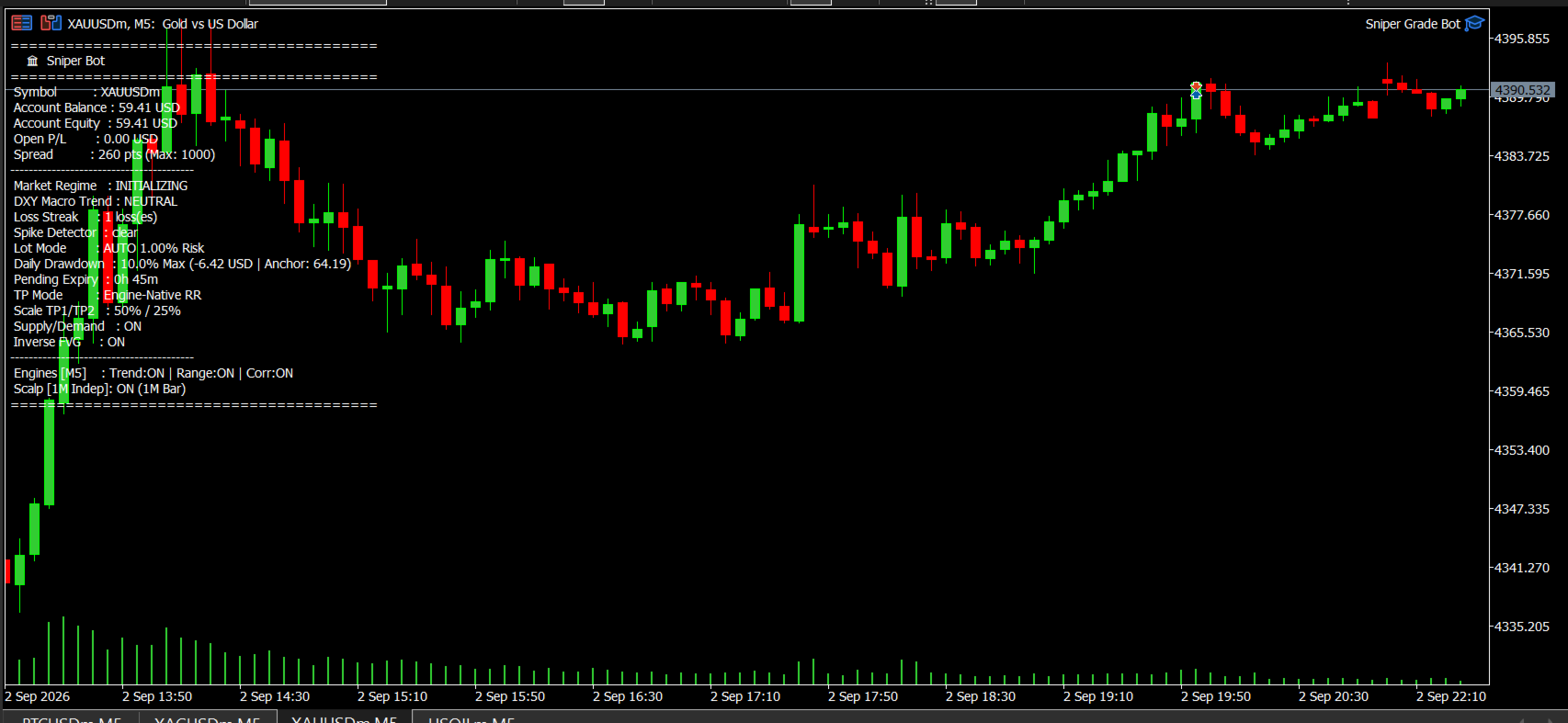
43.ON-SCREEN DASHBOARD


Show HUD Dashboard — Default: ON.


When enabled, the chart can display:

- Symbol

- Balance

- Equity

- Current profit

- Account currency

- Current spread

- Maximum allowed spread

- Market condition

- DXY condition

- Consecutive losses

- Spike status

- Lot/risk mode

- Daily-loss information

- Pending-order expiry

- TP mode

- Trending status

- Ranging status

- Correction status

- Scalp status


44.MOBILE PUSH NOTIFICATIONS


Push Notifications — Default: OFF.


When enabled, the program can send a mobile notification after a successfully accepted trade, including Buy/Sell, symbol, lot size, entry and TP3.


45.EMAIL NOTIFICATIONS


Email Alerts — Default: OFF.

46.VERBOSE LOGGING


Verbose Logging — Default: OFF.


When enabled, additional information can be printed in the MT5 log.


47.MAGIC NUMBER


Magic Number — Default: 888111.


This identifies trades belonging to this trading program. If you run multiple automated programs on the same account, keeping their identification numbers separate is important.


48.MAIN SETTINGS AT A GLANCE


Setting | Default | Simple meaning

Fixed Lot | OFF | Automatically calculate position size

Fixed Lot Size | 0.10 | Lot size when fixed-lot mode is ON

Risk Per Trade | 1% | Target account risk per trade

Max Daily Loss | 10% | Daily loss protection

TP Override | OFF | Keep each mode's own TP settings

TP1 / TP2 / TP3 | 1R / 1.8R / 3R | Global RR levels if override is ON

Trailing Stop | ON | Use trailing protection

DXY Filter | OFF | Ignore DXY direction by default

News Filter | OFF | No news blocking by default

Loss-Streak Guard | ON | Protection against repeated losing conditions

Minimum Confidence | OFF | No global confidence cutoff by default

SMC confirmations | ON | Additional market confirmations

Minimum Confluence Score | Separate for each mode | Set the minimum supporting confirmation for Scalp, Trending, Ranging, Correction and Synthetic

Session Management | OFF | Time/day restrictions not active by default

Synthetic Detection | ON | Automatically recognize synthetic instruments

Trending / Ranging / Correction | ON / ON / ON | Main trading modes enabled

Scalp | ON | Scalp mode enabled

Max Trades/Symbol | 1 | One concurrent trade per symbol

Max Total Trades | 3 | Three concurrent trades maximum

Pending Expiry | ON / 45 min | Pending orders can expire

Equity Floor | OFF | Minimum equity protection disabled by default

Max Entry Drift | 40 points | Reject stale market entries

Requote Retries | 2 | Retry certain market-price failures

Dashboard | ON | Show information on chart

Push / Email Alerts | OFF / OFF | Notifications disabled by default

Verbose Logs | OFF | Keep logs quiet

Max Spread | 1000 points | Reject excessive spreads

Spike Detector | OFF | Normal spike detector disabled


49.WHAT YOU SHOULD CHECK BEFORE LIVE TRADING


Before using a live account, check the account, risk, trading modes, spread, pending expiry, DXY filter, news filter, minimum confidence, loss-streak guard, spike protection, equity protection and notifications according to your intended setup.


50.IMPORTANT DIFFERENCE BETWEEN OFF AND ON


DXY Filter = OFF means the DXY check is not used to block a trade.

News Filter = OFF means the economic-news protection is not used.

Minimum Confidence = OFF means the global minimum-confidence gate is not used.

Minimum Confluence Score = OFF for a mode means that mode's minimum confluence requirement is not used.

Spike Detector = OFF means the normal spike detector is not used.


Turning these settings ON adds their corresponding checks.


51.SIMPLE EXPLANATION OF THE WHOLE SYSTEM


Think of Sniper Grade Bot as a security-controlled trading assistant:

Market arrives

→ It checks whether trading is safe

→ It checks the available trading opportunities

→ It compares valid opportunities

→ It chooses the strongest valid opportunity when several normal modes qualify

→ It checks the final entry, stop-loss and target

→ It calculates the position size

→ It checks broker requirements

→ It places the order

→ It monitors the trade according to the configured protections


The program does not simply see a setup and immediately trade it. There are several safety checks between finding an opportunity and actually placing the trade.


52.BEGINNER GLOSSARY


Buy — You expect the price to rise.

Sell — You expect the price to fall.

Buy Limit — A Buy waiting below the current market price.

Sell Limit — A Sell waiting above the current market price.

Buy Stop — A Buy waiting above the current market price.

Sell Stop — A Sell waiting below the current market price.

Stop-Loss — The price level used to limit the loss if the trade moves against you.

Take-Profit — The price level used to close a trade when the intended target is reached.

Spread — The difference between the Buy and Sell prices.

RR / R — A way of comparing potential target distance with stop-loss distance.

Confidence — The strength value assigned to a trading opportunity.

Confluence — Additional information supporting a trading opportunity.

DXY — A measure of the U.S. dollar's strength against a group of major currencies.

ATR — A measure used to compare current price movement with typical price movement.

Drawdown — The amount by which the account has fallen from the relevant starting level.

Equity — The current account value including open-trade profit or loss.

Synthetic — A synthetic market recognized by the program as belonging to the synthetic-instrument category.

Önerilen ürünler
Aurus Robot MT5
Dmitriq Evgenoeviz Ko
Aurus Robot MT5 — Intelligent Adaptive Trading Algorithm Aurus Robot MT5 is a professional trading system that combines classic technical analysis with modern statistical data processing methods. The Expert Advisor is designed for traders who value precise entry and strict risk management. Key Features: Adaptive algorithm: The robot analyzes volatility and market structure in real time, adjusting order and take-profit distances to the current phase (trend or flat). Multi-factor analysis: The sy
Quantum Forge
Kgotlaetsile R Mabote
# Quantum Forge EA - Channel Breakout Strategy ## Product Overview Quantum Forge is a professional-grade automated trading system built for MetaTrader 5. It implements a sophisticated channel breakout strategy that identifies high-probability trade entries when price breaks above or below a dynamic price range. The EA is designed with institutional-grade risk management and universal broker compatibility. ## Core Strategy Logic The EA calculates the highest high and lowest low over a config

Pips Kicker
Andrey Barinov
5 (3)
Pips Kicker is a professional trend following mean reversion trading system. It continuously analyzes current market structure, calculates the most relevant parameters, and combines them with advanced market filters to identify high-probability trading opportunities. Take advantage of the current launch promo price . ONLY 10 copies of Pips Kicker are available at $499. Price will be increased after that. LIMITED TIME BUY 1 GET 1 FREE offer. Buy Pips Kicker and get 1 of my other Market EAs for
Glazing Index Pullback
Dharma Surya Sadhana
Glazing Index Pullback buys short, sharp pullbacks in US stock indices (S&P 500, Nasdaq 100, Dow 30) while their long-term trend is up, and exits on the first bounce. It makes one decision per day per index. Every trade has a stop and is sized by a fixed risk percentage of equity. How it works Once per day, the EA checks each index for a long-term uptrend and a short-term oversold pullback. When both are present, it buys at the next open. It exits when the price has recovered. A typical trade la
XAU ZENITH GRID PROTOCOL  Institutional Averaging Engine & Basket Recovery Protocol Xau Zenith Grid Protocol  represents the pinnacle of institutional-grade automated trading software. Fusing the concept of dynamic grid-based averaging- (inspired by AnE Gold Grid) with our proprietary Basket Take-Profit Engine- and Aegis Drawdown Armor, this robot is built exclusively for XAUUSD (Gold).  By tracking extreme overbought and oversold market conditions on the M15 timeframe, the EA scales into th
VIX Momentum Pro EA - Ürün açıklaması Genel bakış VIX Momentum Pro, VIX75 Sentetik Endeksleri için özel olarak tasarlanmış sofistike bir algoritmik ticaret sistemidir. Algoritma, sentetik volatilite piyasasında yüksek olasılıklı ticaret fırsatlarını tanımlamak için özel momentum tespit teknikleri ile birleştirilmiş gelişmiş çoklu zaman dilimi analizi kullanır. Ticaret stratejisi Expert Advisor, birden fazla zaman diliminde fiyat hareketlerini analiz eden kapsamlı momentum tabanlı bir yaklaşımla
YenFlow
Kelly Philip Aketch
This is a machine learning trend following strategy based on the Ichimoku Kinko Hyo indicator combined with market volatility and volume metrics. It works best on the H1 Chart . The signals utilized to begin trading are carefully vetted via the machine learning capability, and a sophisticated algorithm ensures that the trader remains in the trend for as long as possible. Features. This is a fully automated multi-symbol expert advisor. It works on the following symbols USDJPY, AUDJPY, CHFJPY, EU
XAUUSD Liquid AI – M1 Momentum Scalping Expert Advisor ORIGINAL PRICE $2500 TAKE THE OPPORTUNITY NOW WHILE OFFER LASTS XAUUSD Liquid AI is an automated trading system that analyses short-term price momentum using micro-trend analysis, volatility filters and adaptive trade management. The Expert Advisor combines momentum analysis, exponential moving averages, candle structure, tick volume and Average True Range (ATR) calculations to determine trade entries according to its configured rules. The
Quantum Athena X
Bogdan Ion Puscasu
4.05 (22)
Daha Akıllı Kontrol. Daha Gelişmiş Hassasiyet. Quantum Athena X'e hoş geldiniz — Quantum Athena'nın hassasiyetini, verimliliğini ve disiplinli uygulamasını temel alan, odaklanmış ALTIN ticaret sisteminin yeni nesli. Quantum Athena X, Quantum Athena ile aynı sadeleştirilmiş temel motor ve özenle seçilmiş 6 strateji üzerine inşa edilmiştir. Her strateji, mevcut ALTIN piyasa koşulları için ayrı ayrı geliştirilmiş ve optimize edilmiştir; yeni ve güçlü Özel Mod ise yatırımcıların hangi stratejiler
Odin Omni Regime AI The Apex Omni - Advanced Regime Switching & Neural Matrix Protocol Odin Omni Regime AI is the ultimate institutional-grade automated trading system, meticulously engineered for XAUUSD (Gold). Powered by a cutting-edge triple ONNX machine learning architecture (Brain, State-Aware Risk, and Omni Regime), this EA dynamically adapts to ever-changing market conditions. It doesn't just predict the market; it identifies the *type* of market (trending, ranging, or highly volatile) a
Pacific Matrix Pro MT5
William Alfonso Machado Aguirre
THE ULTIMATE INSTITUTIONAL LOW-CORRELATION PORTFOLIO: PACIFIC MATRIX PRO MT5 Most multi-currency grid robots marketed online rely on dangerous, unlimited grid levels (7 to 10+ layers), 2.0x compounding martingales, and ZERO Stop Loss . When a black swan trend hits, they hold massive floating drawdowns exceeding -$10,000 and inevitably blow accounts. Pacific Matrix Pro MT5  takes the legendary mean-reverting statistical edge of the Pacific Triad ( `AUDCAD, AUDNZD, NZDCAD` ) and re-engineers
EtherNova MT5
Kuldeep Pradeep Nikam
Ethereum AI Trading Bot for MT4 & MT5 – Intelligent Level Trading Powered by Python AI and Agentic Automation The Ethereum AI Trading Bot is a next-generation Expert Advisor developed for MetaTrader 4 and MetaTrader 5, combining intelligent level-based trading with AI-assisted market analysis. Designed for ETHUSD traders, the system integrates technical market structure, dynamic support and resistance levels, and external Python-based analytical tools to enhance trading decisions while maintain
MangoFX Initial
Olisa Chigozie Ufondu
MangoFX Initial – Smart Trend EA with Tesla‑Style Risk Management MangoFX Initial is a fully automated Expert Advisor designed for traders who value disciplined risk control, flexible entry logic, and transparent performance monitoring. Whether you are a conservative swing trader or prefer a more aggressive delayed‑entry approach, this EA adapts to your style while protecting your capital with daily, yearly, and floating equity limits. Key Advantages · Two Trading Modes in One EA   · Standa
KALVEX Market Intelligence READ THE MARKET. WAIT FOR THE REACTION. EXECUTE WITH STRUCTURE. KALVEX Market Intelligence is a MetaTrader 5 Expert Advisor built around a structural approach to market analysis and automated execution. KALVEX does not rely on a single indicator or a fixed trading signal. It evaluates market context, price behaviour, structure, momentum and live conditions before an entry is considered. MARKET CONTEXT KALVEX uses the M30 timeframe to establish the broader market
EuroPulse Ribbon Flow — EMA Ribbon + ADX Trend Following EA (Swap-Free) PRODUCT OVERVIEW EuroPulse Ribbon Flow is a premium automated trading solution designed for MetaTrader 5, specialized for the EURUSD currency pair. The EA implements a simplified yet powerful trend-following strategy: • EMA 20/50 crossover for trend direction • ADX 14 for trend strength confirmation • ATR-based stop loss and take profit • Daily loss protection • Swap-Free mode for Islamic accounts WHY EUROPU
Born to Kill Zone  is a trading strategy in the financial markets where traders aim to profit from short- to intermediate-term price movements.  In conducting the analysis, this EA incorporates the use of a moving average indicator . As we are aware, moving averages are reliable indicators widely utilized by professional traders Key components include precise entry and exit strategies, risk management through stop-loss orders, and position sizing. Swing trading strikes a balance between active
Swingy3
Bashier Awny Husein Ismail Alhafy
Swingy3: The Institutional Pivot & Swing Execution Engine Swingy3 is an algorithmic trading system designed for MetaTrader 5, focusing on high-conviction price action swings and institutional-grade risk management. Unlike standard retail indicators, Swingy3 analyzes market structure through dynamic pivot points and multi-timeframe confluence to identify entries where momentum and exhaustion align. The Strategy The core of Swingy3 is its advanced Pivot Analysis engine. It detects institutional "S
Hyperion X
Premananth R
Hyperion X is a multi-currency automated trading system developed for XAUUSD on the M5 timeframe. It uses advanced algorithmic logic and data-driven analysis to identify trading opportunities based on predefined market conditions. ️ Important Note: Hyperion X is a logic-based EA designed to execute trades according to its programmed strategy. No trading logic or strategy can win every trade or perform profitably under all market conditions. Losses are a normal part of trading. Please review the
NanoTrade Pro
Vadim Podoprigora
NanoTrade Pro NanoTrade Pro   is a state-of-the-art automated trading advisor designed to optimize your trading strategy in the fast-paced financial markets. Leveraging advanced algorithms and real-time data analysis, NanoTrade Pro automates the scalping process, enabling traders to capitalize on small price movements with remarkable precision and efficiency. Basically, the advisor does not use any risk systems with increasing volume or increasing the number of open orders. Before buying, be s
Xau Genesis Omni-breakout Protocolthe Ultimate God-tier Breakout Matrix Xau Genesis Omni-Breakout Protocol-  is a professional-grade God-Tier Expert Advisor engineered specifically for XAUUSD (Gold). It merges the core principles of institutional breakout trading with advanced 3D dimensional support and resistance calculations. The EA uses a highly responsive MagicTrail algorithm to lock in profits during explosive moves and features the acclaimed Aegis Shield to protect your capital. Whether y
PCV Chaser Forex
HALLGREY VENTURES
PCV Chaser — FOREX Pro Edition PCV Chaser Forex Pro is an institutional-grade, fully automated trading engine engineered specifically for Forex market execution. Operating on an automated M15 structural expansion model, it captures clean momentum breakouts while eliminating emotional bias and manual trade intervention. Core Features Automated Structure Engine: Continuously monitors market cycles on the M15 timeframe to identify high-probability momentum expansion phases. Institutional Risk Prote
FALAH HARVEST EA         Donchian Breakout + Smart Pyramiding Falah Harvest EA is a professional trend-breakout system  built on the classic Donchian Channel logic — the same  principle behind the legendary Turtle Traders. It enters on confirmed breakouts of the 20-period channel  and rides the trend with controlled pyramiding: adding  to winners only when price advance
Synthesis X Neural EA
Thanaporn Sungthong
Forget Everything You Know About Trading Robots. Introducing Synthesis X Neural EA , the world's first Hybrid Intelligence Trading System . We have moved beyond the limitations of simple, indicator-based EAs to create a sophisticated, two-part artificial intelligence designed for one purpose: to generate stable, consistent portfolio growth with unparalleled risk management. Synthesis X is not merely an algorithm; it is a complete trading architecture. It combines the immense analytical power of
Alphabet AI MT5
Sergei Pomytkin
3.43 (7)
Alphabet AI , ortalamaya dönüş stratejisi üzerinde çalışan bir danışmandır; bu, piyasaların güçlü sapmalardan sonra ortalama değerlerine geri dönme doğal özelliğini kullandığı anlamına gelir. Algoritma, varlığın mevcut fiyatını sürekli olarak analiz eder ve hesaplanan ortalama seviyelerle karşılaştırır. Fiyat ortalama değerinden önemli ölçüde saptığında, danışman bunu bir eylem sinyali olarak yorumlar: Üst sınır aşıldığında, fiyat düşüşü bekleyerek kısa pozisyonlar açar ve alt sınırın altına dü
Secura Gold Wave
KINGSLEY IFEANYI IWUFRED
4.5 (2)
Secura Gold Wave EA v1.0 Institutional-Grade Pullback Trading System for Higher Timeframes Trade with the rhythm of the market using   Secura Gold Wave EA , a professional expert advisor built for patient, higher-timeframe traders. It systematically identifies high-probability pullback entries within a confirmed trend, using a multi-moving-average framework for precision. Core Strategy: Identifies price retracements to a dynamic moving average, waiting for a strong confirmation candle to signa
FREE
Hexagon Forge Xau
Ignacio Agustin Mene Franco
Hexagon Forge Xau v1.0 Premium Expert Advisor for XAU/USD (Gold) Hexagon Forge Xau is an advanced and visually stunning trading system designed specifically for trading the gold market (XAU/USD). It focuses on high-probability price action combined with powerful trend filters. The EA detects classic continuation and reversal patterns, reinforced by modern technical confirmations, all within a futuristic hexagonal panel that provides comprehensive, real-time information. Main Strategy Combine
Quantum Titan MT5
Bogdan Ion Puscasu
4.73 (45)
Kurumsal düzeyde ticareti Quantum ekosistemine getiren Quantum Titan, hassasiyet, disiplin ve kanıtlanmış canlı piyasa performansı için yeni bir standart belirliyor. Altın uzman danışmanından daha fazlasını bekleyen yatırımcılar için geliştirilen Titan, kuantum işlem teknolojisinin bir sonraki evrimini temsil ediyor. Dünya çapında ömür boyu geçerli lisans sayısı kesinlikle 1.000 ile sınırlıdır. 1000 kopyanın tamamı satıldıktan sonra Quantum Titan artık satışta olmayacak. Lansmana özel indirim
Gold Trend Swing
Luis Ruben Rivera Galvez
5 (1)
Send me a message so I can send you the setfileGiriş için 498 dolar, 1298 dolara ulaşana kadar her ay 100 artacak XAUUSD (ALTIN) için Otomatik İşlem Botu. Bu botu XAUUSD (GOLD) H1 grafiklerinize bağlayın ve kanıtlanmış bir stratejiyle otomatik olarak işlem görmesini sağlayın! Basit ama etkili otomasyon arayan yatırımcılar için tasarlanan bu bot, düşük ila orta spreadler için optimize edilmiş teknik göstergeler ve fiyat hareketlerinin bir kombinasyonuna dayalı işlemleri yürütür. Bot Nasıl Ça
NUMUW GROWTH EA         Adaptive EMA Crossover + H4 Trend Confirmation Numuw Growth EA is a trend-following Expert Advisor that  trades EMA crossovers on H1, strictly validated by the  H4 trend direction and an adaptive ADX strength filter. Instead of taking every crossover, Numuw Growth EA waits  for the market to prove its strength — the current ADX  must exceed its ow
Orvyn
Fallou Assane Konate
Orvyn est un Expert Advisor MT5 qui trade automatiquement pour toi, sur le Forex, les métaux et les indices. Il combine des entrées de type scalping avec une gestion de position en grille, et intègre des protections pour garder le contrôle de ton capital : Stop Loss global, Equity Stop et lot maximum. Simple à installer et à régler, il peut tourner 24h/24 sans que tu surveilles les graphiques. Teste-le d'abord sur un compte démo, puis passe en réel à ton rythme. Vous avez une semaine de plus pou
Bu ürünün alıcıları ayrıca şunları da satın alıyor
Syna
William Brandon Autry
4.87 (31)
Syna 7 - İşlemin Yanında Kalan Yapay Zekâ Çoğu işlem sistemi, pozisyona girdikten sonra düşünmeyi bırakır. Syna bırakmaz. Syna 7, analizden çıkışa kadar sürece dahil kalmak üzere tasarlanmış bir yapay zekâ işlem asistanı ve otonom işlem sistemidir. Güncel koşulları izleyebilir, işlemin bağlamını hatırlayabilir, haberleri ve volatiliteyi değerlendirebilir, pozisyonları yönetebilir, hesapları koordine edebilir ve emir açıldıktan sonra da kararlarını yeniden değerlendirmeyi sürdürebilir. İşlem, gi
Pulse Pro MT5
Mian Rameez Ali
Two lines, always circling — 21 and 49. Most of the time they say nothing. Then they cross, and the system stops waiting. It closes what it was holding, opens what the cross demands, and sets its stop and target without asking twice. Risk is sized off the account itself, not fixed guesses — one bad calculation and it simply declines to trade at all. No indecision, no averaging in. Every new bar gets exactly one verdict. Built for any symbol, any timeframe. Fast against slow — the rest is ari
GoldMajor
Metin Erkamoglu
MATADOR GOLD XAUUSD M5 Expert Advisor for MT5 MATADOR GOLD is an automated trading Expert Advisor (EA) developed for MetaTrader 5, with a primary focus on short-term Gold (XAUUSD) trading using M5 market signals. Unlike a signal-only indicator, MATADOR GOLD combines market analysis, automated trade execution, and position management in one trading system. The EA evaluates market conditions using its internal signal engine and can automatically open, manage, and close positions when its trading r
SPARTAN GOLD SNIPER AI - V7.2 ULTIMATE The All-In-One Gold Solution: Smart Scalping and Professional Swing Trading. Spartan Gold Sniper is not just an EA; it is a complete trading system designed specifically for XAUUSD (Gold). Version 7.2 introduces the Smart Adaptive Engine, making it the most flexible bot on the market for both small accounts and large Prop Firm capitals. Critical Requirements Latency: You must use a VPS with less than 20ms latency (Recommended: MQL5 Built-in VPS). Account:
GoldPilot Pro
Viktoriia Khassan
GoldPilot Pro – AI-Powered Gold Trading GoldPilot Pro is a fully automated AI-based trading system designed specifically for XAUUSD (Gold) . Built for traders of all levels, it delivers smart, adaptive trading powered by a self-learning engine. Key Features: AI-Driven & Self-Learning Learns from its own trades – success or failure – and improves over time. Account Flexibility Works seamlessly with accounts starting from $30 up to $100,000+ . Smart Risk Control You define your Risk
Velora MT5
Ahmad Aan Isnain Shofwan
The Intelligent Grid EA — A Team of Smart Modules Following the 5-star success of its MT4 predecessor, Velora has been completely rebuilt for MT5 with a fundamental shift in design. Most grid EAs are one engine doing many jobs. Velora is different. Inside Velora, there is a team. Four smart modules, each with one specialty, working together so the system stays adaptive at every stage of a trade — from the moment of entry, to scaling decisions, to the exit. Meet the team: VSE — Velora Smart Entr
NextGen PRO
Muhammad Maaz
NextGen PRO NextGen PRO is an automated Expert Advisor designed for trading XAUUSD (Gold) on MetaTrader 5. It uses a trend-following approach with Buy Stop and Sell Stop pending orders, grid-based order placement, batch lot progression, money-based risk management, daily limits and weekend trading restrictions. Strategy The EA determines the market direction using the closed M5 candle and two moving averages. When the market is identified as an upward trend, the EA places Buy Stop orders above
USDJPY Classic AI Currency portfolio for USDJPY featuring 5 authentic AI strategies This EA utilizes Machine Learning models (ONNX) to analyze and predict statistical patterns of price movements on the USDJPY 1-hour chart. By incorporating five independent strategies with different characteristics, it overcomes the vulnerabilities of single-logic systems and achieves a diversified portfolio capable of responding to various market conditions. 3 Core Technologies Authentic AI Model (ONNX) Integra
Neurolite EA gbpusd
Aliaksandr Salauyou
The Neurolite Expert Advisor offers trade decisions based on a neural network trained using a 10-year history of real tick data. The trading is performed only on GBP/USD. Its main peculiarity is a small amount of input parameters so as to facilitate the working process of users. The Neurolite EA will fine-tune all the parameters for you. Trading Strategy The system does NOT use dangerous strategies such as averaging or martingale, but strictly adheres to the neural network instructions. Stop lo
Neurolite EA eurusd
Aliaksandr Salauyou
The Neurolite Expert Advisor offers trade decisions based on a neural network trained on 5-years of real tick data. Trading is performed only on the EUR/USD currency pair. Its main peculiarity is a small amount of input parameters so as to facilitate the working process of users. The Neurolite EA will fine-tune all the parameters for you. This Expert Advisor is based on the previously released Neurolite EA gbpusd , which was adjusted for successful trading on the EUR/USD currency pair. Trading
A scalper system only work during Asian hours. Several unique indicators to detective the price fluctuation. Dynamic TP/SL level according to market conditions. Fixed stoploss to protect the capital, very low risk of losing a lot of money. No need to obtain SET files. The parameters are the same for each currency pair. It is optimized to work on EURAUD . It is recommended to use Eagle Scalper on M15 chart. It is recommended to run it on a real ECN broker with very low spread . It is recommended
Snake EURUSD
Thurau Baerbel
Snake EURUSD Real EA is a fully automatic Forex Trading Expert Advisor. The robot can run on any pair, but the results are better on EURUSD M15. The system can run with any broker that also provides Floating Spread. Advantages The EA does not use systems like martingale, hedging, etc. The EA uses SL and Trailing Stop to make a profit. In addition, you can also set TP (EURUSD at 93 for me). Best test results with 99.0% in the backtest. It is not necessary to close the EA during the press release
BenefitEA Mt5
Vsevolod Merzlov
Benefit EA Uses only hedging accounts.     Benefit EA is a non-indicative flexible grid adviser with special entry points that provide a statistical advantage, revealed through the mathematical modeling of market patterns. The EA does not use stop loss. All trades are closed by take profit or trailing stop. It is possible to plan the lot increments. The "Time Filter" function is set according to the internal time of the terminal as per the displayed time of the instrument's server, not the oper
On Control EA MT5 V2 Game-Changing Software For The Forex Market  On Control EA was created to help traders like you maximize their income. How would you like to gain access to a world-class proprietary piece of software designed for one purpose, to improve your Forex strategy? Let’s be honest, it can be hard to understand which technical analysis & trading signals you should follow. With On Control EA, you now have a powerful tool that will enhance your Forex trading strategy & elevate your in
The adviser uses a strategy based on the use of 7 Envelopes  indicators, on each timeframe (M5, M15, M30, H1, H4) there are 7 Envelopes indicators. Trading is based on the “Price Action” strategy, the adviser searches for a simultaneous signal on 5 time frames: M5, M15, M30, H1, H4 and then opens an order. The EA uses the built-in Martingale and Averaging algorithm. The adviser uses economic news to achieve more accurate signals. Hidden Take Profit, Break Even and Trailing Stop are used. Attenti
MoneyMaker stableATM Lite is an automatic intelligent trading system for foreign exchange! Lite edition just support MetaTrader 5! The purpose of MoneyMaker stableATM Lite is to stabilize profits, not to give you the ability to get rich overnight! MoneyMaker stableATM Lite is only applicable to EUR / USD currency trading, and cannot be used for other currency exchange trading, other CFD product trading, and commodity tradingor futures commodity trading! MoneyMaker stableATM Lite is only suitabl
NorthEastWay MT5
PAVEL UDOVICHENKO
4.5 (8)
NorthEastWay MT5, tamamen otomatik bir "pullback" ticaret sistemidir ve özellikle AUDCAD, AUDNZD, NZDCAD gibi popüler "pullback" döviz çiftlerinde ticaret yapmak için etkilidir. Sistem, Forex piyasasının temel modellerini kullanır: herhangi bir yönde ani bir hareketten sonra fiyatın geri dönmesi. Zaman Çerçevesi: M15 Temel Döviz Çiftleri: AUDNZD, NZDCAD, AUDCAD Ek Döviz Çiftleri: EURUSD, USDCAD, GBPUSD, EURCAD, EURGBP, GBPCAD EA'yı satın aldıktan sonra lütfen bana özel mesaj gönderin. Sizi özel
Bonnitta EA MT5
Ugochukwu Mobi
3.38 (21)
Bonnitta EA, Bekleyen Pozisyon stratejisine (PPS) ve çok gelişmiş bir gizli ticaret algoritmasına dayanmaktadır. Bonnitta EA'nın stratejisi, gizli bir özel gösterge, Trend çizgileri, Destek ve Direnç seviyeleri (Fiyat Eylemi) ve yukarıda belirtilen en önemli gizli ticaret algoritmasının bir kombinasyonudur. 3 AYDAN FAZLA GERÇEK PARA TESTİ OLMADAN BİR EA ALMAYIN, BONNITTA EA'YI GERÇEK PARA ÜZERİNDE TEST ETMEM VE SONUCU AŞAĞIDAKİ BAĞLANTIDAN GÖRMEM 100 HAFTADAN FAZLA (2 YILDAN FAZLA) ALDI. BONNI
Expert. Automatic and manual trading. Ready-made trading system based on Elliott waves and Fibonacci retracement levels . It is simple and affordable. Display of the marking of Elliott waves (main or alternative option) on the chart. Construction of horizontal levels, support and resistance lines, a channel. Superposition of Fibonacci levels on waves 1, 3, 5, A Alert system (on-screen, E-Mail, Push notifications).    visual panel for opening orders in manual trading. visual panel for setting up
Shadow Legends MT5 EA.-it's a fully automated expert Advisor designed to trade EURUSD. It is based on machine learning analysis and genetic algorithms.  The Expert Advisor contains a self-adaptive market algorithm that uses price action patterns. The expert Advisor showed stable results for EURUSD in the period 2000-2021.  No dangerous money management techniques, no Martingale, no netting, scalping or hedging.  Suitable for any brokerage conditions.Test only on real accounts.Recommended broker
Golden Lucks
Godbless C Nygu
The GOLDEN LUCKS is a cutting-edge Expert Advisor that pushes the boundaries of modern trading by integrating advanced artificial intelligence with the latest trading technologies. Built on the state-of-the-art GPT-4o platform, it leverages the unparalleled power of neural networks to adapt dynamically to ever-changing market conditions. What sets this EA apart is its use of advanced discrete Fourier visualization within the ATFNet framework. This innovative feature equalizes the frequency spec
Reactor MT5   is a fully automatic Expert Advisor for   Intraday   Trading.  it is   based on  m any indicators . The Expert was tested on the whole available historical period on   EURUSD, GBPUSD, USDCAD, AUDUSD and USDJPY M15  currency pair with exceptional results. You can download the demo and test it yourself. My tests were performed with the real tick date with   99,90% accuracy , actual spread, and additional slippage. The basic strategy starts with Market order in counter trend and tren
QuantXProTrader EA
Netlux Digital Kft.
QXS PRO TRADER Expert Advisor QuantXProTrader is an Expert Advisor based on Profitable Price Action strategy. It is compatible with our QXS Trend indicator and work automatically by Trend detection on Multiple assets. Each and Everything in this EA is perfect Just you need to set input parameters. Take Profit, Stop loss, Trailing Stop, Trailing Step, Lot Size Adjust it as per your account capital and equity. Recommended TIMEFRAMES are: M15, M30 and H1  Before Installing Expert Advisor on chart
TickToker
Oxana Tambur
>>>>>>>>>>>>>> more then 90% discount ($ 3750 >>> $ 345), Special offer is valid for 3 months from the start of sales <<<<<<<< <<<<<<<< The trading robot has been trading on a real account since 2018. We will show our account to everyone who plans to buy a trading robot. To do this, contact us. TickToker is a fully automatic Expert Advisor designed for the    EUR/GBP,EUR/SGD,AUD/NZD,EUR/CHF   currency pairs.  Does not use Martingale and Grid, all trades are covered by Stop Loss and Take Profit.
Strategy: 1.This EA is a trend trade, used for USDCHF H1 charts. 2.This EA is  using indicators such as the Bolling band and moving average. 3. The initial amount of this EA is only $1000.This EA has a profit of over $3000. 4.The EA has detailed test data from January 2018 to June 2021, which is stable and profitable. 5.If you just want to put a small amount of money to get double reward, this EA trader is your best choice!
Marvelous EA Tanıtımı: Nihai Ticaret Yardımcınız Marvelous EA ile Forex piyasasının tüm potansiyelini ortaya çıkarın. Kârınızı maksimize etmek ve riskleri en aza indirmek için tasarlanmış, en son teknolojiye sahip bir otomatik ticaret çözümüdür. Bu özenle hazırlanmış ticaret algoritması, dinamik Forex piyasasında hassas ve verimli bir şekilde gezinmek için gelişmiş özelliklerle donatılmıştır. ALTIN - XAUUSD - H1 Gerçek hesap performansı: https://www.mql5.com/tr/signals/ 2321875 Temel Özellik
AI Nodiurnal EA MT5
Ugochukwu Mobi
5 (2)
AI Nodiurnal EA, ticaret stratejilerini optimize etmek ve dinamik döviz piyasasındaki performansı artırmak için son teknoloji makine öğrenimi teknolojisini kullanarak geliştirilmiş bir Forex robotudur. "Nodiurnal" terimi, tipik günlük (gündüz) ticaret saatleri boyunca değil, aynı zamanda standart olmayan dönemlerde de adaptasyon ve işlem yapma yeteneğini yansıtarak, döviz ticareti için sürekli ve adaptif bir yaklaşım sağlar. Ayarlar: Para Birimi Çifti üzerindeki varsayılan ayarlar: EURUSD H1. Öz
Arrival
Yuriy Bykov
Kurulumu ve kurulumu kolay otomatik danışman. Ne ızgara ne de martingale. Koydum ve unuttum. Esnaf aynı anda birden fazla enstruman. Pozisyonların açılmasına yönelik sinyaller oluşturmak için oynaklığı ve eğilimlerin ve uçuşların varlığını analiz eder. 100 $ ile 800 $ arasında bir depozito yatırırken, bir dizi agresif strateji kullanılır. 800 dolardan fazla bir hesap boyutu için danışman otomatik olarak ılımlı stratejilere geçer. EURGBP M15'e kurulması önerilir. Çok para birimi ticareti için ç
Neuro Control EA
STEPHANE LAURENT CHRISTIAN LARUAZ
NEW: Rent this EA as a -> SIGNAL <- Neuro Control EA is a proportional–integral–derivative controller ( PID controller ) enhanced with: - a perceptron deep learning module - a grid module - a volume-based soft martingale - a money management system Neuro Control EA rental licenses come preconfigured and ready to drop on a H1 EUR/USD x500 $1000 mql5 no-hedging account. It is ready to use as is: simply drop it on a H1 EUR/USD x500 $1000 mql5 account no-hedging account and it works. Exists on other
NorthSide
Uche Celestine Obi
NorthSide, retracement modelini ticaret yapan bir ticaret algoritmasıdır, esas olarak NZDCAD, AUDNZD ve AUDCAD üzerinde çalışır ve diğer çiftlerde de kullanılabilir. Martingale ya da riskli bir strateji yok. Zaman çizelgeleri: M1 ile M5 önerilir, ancak herhangi bir yerde çalışabilir. Ana para çiftleri: NZDCAD, AUDCAD,AUDNZD Otomatik parti sistemini sabit parti için false olarak ayarlayın. Güvenlik sistemi bir koruma olarak çalışır ve stratejiye büyük olumsuz etkisi olmadan devre dışı bırakı
Yazarın diğer ürünleri
Sentinel Trade
Emmanuel Chinedu Ifechukwu
Sentinel Trade Engine Kullanıcı Kılavuzu Sentinel Trade Engine'e hoş geldiniz! Bu kılavuz, işlem hesabınızı ana sinyal sistemimize bağlamak ve Sentinel Trade Engine'i kurmak için gereken adımları ayrıntılı şekilde açıklayacaktır. Kurulum için teknik bilgi veya programlama deneyimi gerekmez. Aşağıdaki basit adımları uygulamanız yeterlidir; Sentinel Engine geri kalan işlemleri kendisi gerçekleştirecektir. --- 1. Sentinel Sistemi Nasıl Çalışır? Sentinel sistemi, doğrudan MetaTrader 5 (MT5) p
Snipersmc
Emmanuel Chinedu Ifechukwu
SNIPERSMC MT5 INDICATOR Complete User Guide 1. What SniperSmc Is SniperSmc is a MetaTrader 5 chart indicator designed to identify potential Buy and Sell opportunities using Smart Money Concepts, market structure, price gaps, liquidity behavior, volume information and higher-timeframe direction. It does not automatically open trades. When a valid setup is found, the indicator can show a Buy arrow, a Sell arrow, the suggested entry price, the type of order that should be used, important market
Nexora Prime
Emmanuel Chinedu Ifechukwu
NEXORA PRIME — Complete User Guide ================================== A practical guide for setting up, understanding, and operating NEXORA PRIME in MetaTrader 5 COMPLETE INPUT REFERENCE ============================ Every user-facing input in the packaged version is described below. Values shown are the packaged defaults. Lot Size & Account Sizing ------------------------- Setting: Use Fixed Lot Size Input: InpUseFixedLot Default: false Purpose: Choose fixed-lot sizing instead of percentage-ris
Filtrele:
Değerlendirme yok
Değerlendirmeye yanıt