AI Gold Session Breakout
- Uzmanlar
- Sürüm: 2.41
- Güncellendi: 7 Mart 2026

Download the demo version and use (.set) files .
- Download the optimized .set files from the links provided below (see the Comments section).
- Open your MT5 terminal and go to File -> Open Data Folder.
- Navigate to the folder: MQL5 > Profiles > Presets . Copy and paste your downloaded .set files here.
- Attach the EA to a chart or open the Strategy Tester.
- Go to the Inputs tab.
- Right-click anywhere in the inputs list or click the Load button at the bottom.
- Select the corresponding .set file for your currency pair and click Open.
- The settings are now applied. You are ready to start!
Important Notice — Before You Buy
All backtests were conducted using historical data on the RoboForex platform. Due to differences in spread, swap, server latency, and other broker-specific conditions, final results may vary between brokers.
Set files are mandatory — do not run the EA without them. Two sets of configuration files are provided: one for 2-digit brokers and one for 3-digit brokers, to account for different broker quote formats.
Before purchasing, please test the EA in your broker's MT5 Strategy Tester or on a demo account. Only buy if you are satisfied with the results on your specific broker and platform.
AI Gold Session Breakout is a professional Expert Advisor for gold trading (XAUUSD) on the MetaTrader 5 platform. It runs on the 5-minute chart, 5 days a week, and is built on the most proven gold trading strategy — the interaction between the Asian and London trading sessions. The logic is simple and effective: during the Asian session (typically 00:00–08:00 GMT) the gold market forms a relatively tight range. When the London session opens, significant liquidity and volatility is generated, which very often breaks through the upper or lower boundary of the Asian range. A breakout above the Asian high triggers a BUY entry; a breakout below the Asian low triggers a SELL entry.
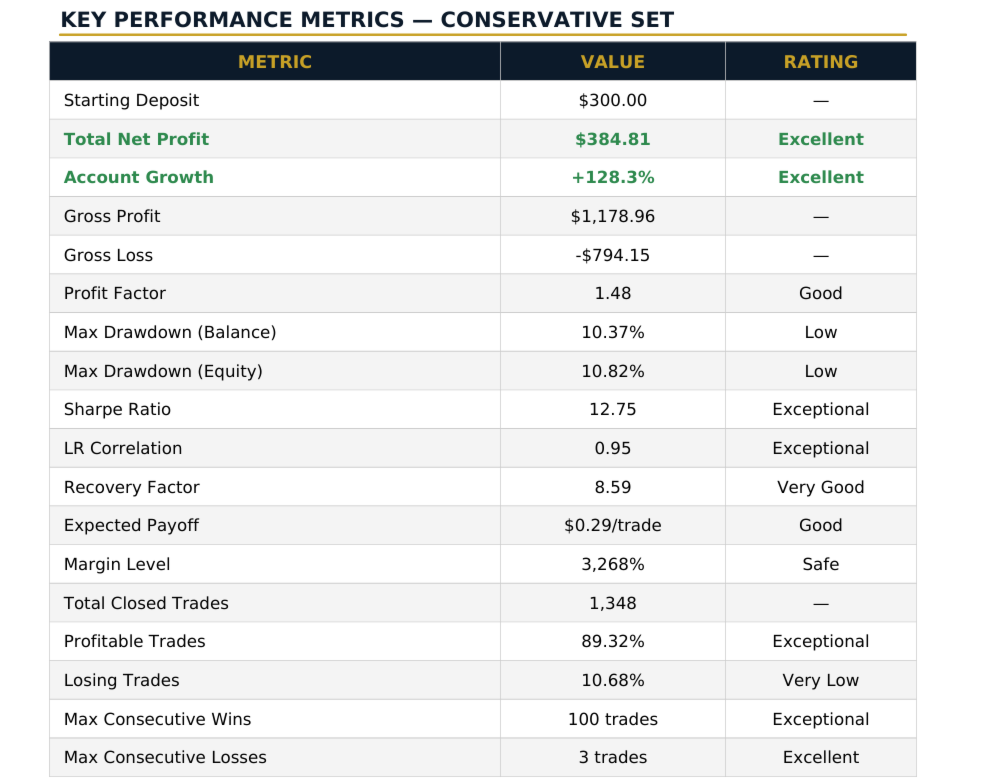
The Role of Artificial Intelligence The final version of the bot was fine-tuned using artificial intelligence. The AI analyzed thousands of parameter combinations on 4 years of history with 98% tick quality to find the optimal settings for each risk profile. The result: three distinct .SET files, each with proven backtest results
AI Gold Session Breakout is not a scalper — do not expect instant profits. Quick profits are closer to gambling than to sustainable long-term returns. The bot is designed as a long-term investment partner that:
✦ May have 10–12 consecutive losing trades — this is normal and expected
✦Detailed information about the robot and the tests can be found in the attached files, translated into 5 languages May have over 100 consecutive winning trades
✦ Delivers a clear, smooth upward equity curve without deep drawdowns
✦ Operates without martingale — risk per trade is a fixed percentage of the account
✦ Includes intelligent money management to protect against excessive drawdown
BROKER GMT SETTING
The most critical parameter for correct bot operation Why is it so important? The bot determines the Asian session based on your broker's server clock. If you enter the wrong GMT offset, the bot will calculate the session in the wrong time window and will trade at the wrong time — or not trade at all. This is the only parameter you need to set manually after loading the .set file. How to find your broker's GMT offset? Method 1 — MT5 platform (easiest) Look at the top-left corner of MT5 when the market is open. The current server time is displayed there. Compare it with the current UTC/GMT time (e.g. at time.is/UTC) and calculate the difference in hours. If server time is 15:00 and UTC is 12:00, the offset is +3. Method 2 — Google Search for "[Your broker] server GMT offset" in Google. Example: "RoboForex server GMT offset" → GMT+3. Method 3 — Broker's official website Most brokers publish their server time information in sections like "FAQ", "Trading conditions" or "Account types".
Don't forget to support me with a positive comment and a five-star rating. Thank you!