İş tamamlandı

Tamamlanma süresi: 13 gün
Müşteri tarafından geri bildirim
Reliable work, great skills and speed of implementation. I recommend and personally use his skills the next time. Thank you Ismail.
Geliştirici tarafından geri bildirim
Perfect. Clear and detailed rules defined. Testing and confirmation was fast.

İş Gereklilikleri

Trade Panel for MT4 and MT5 platform


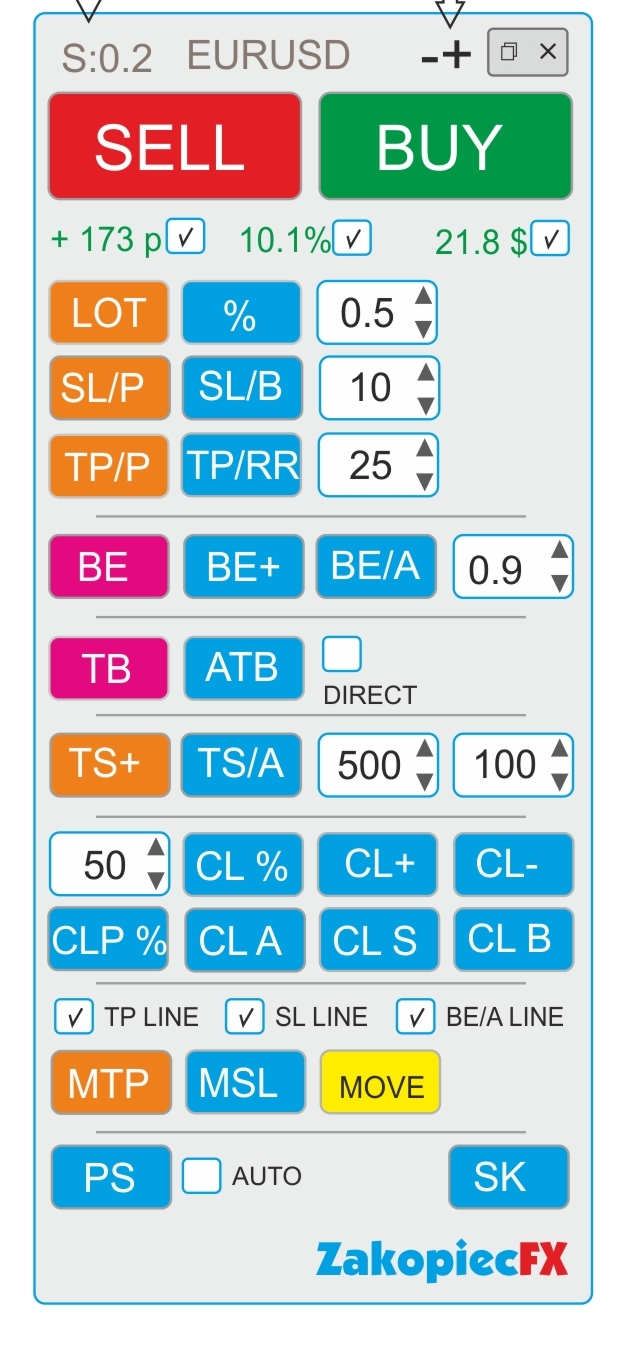
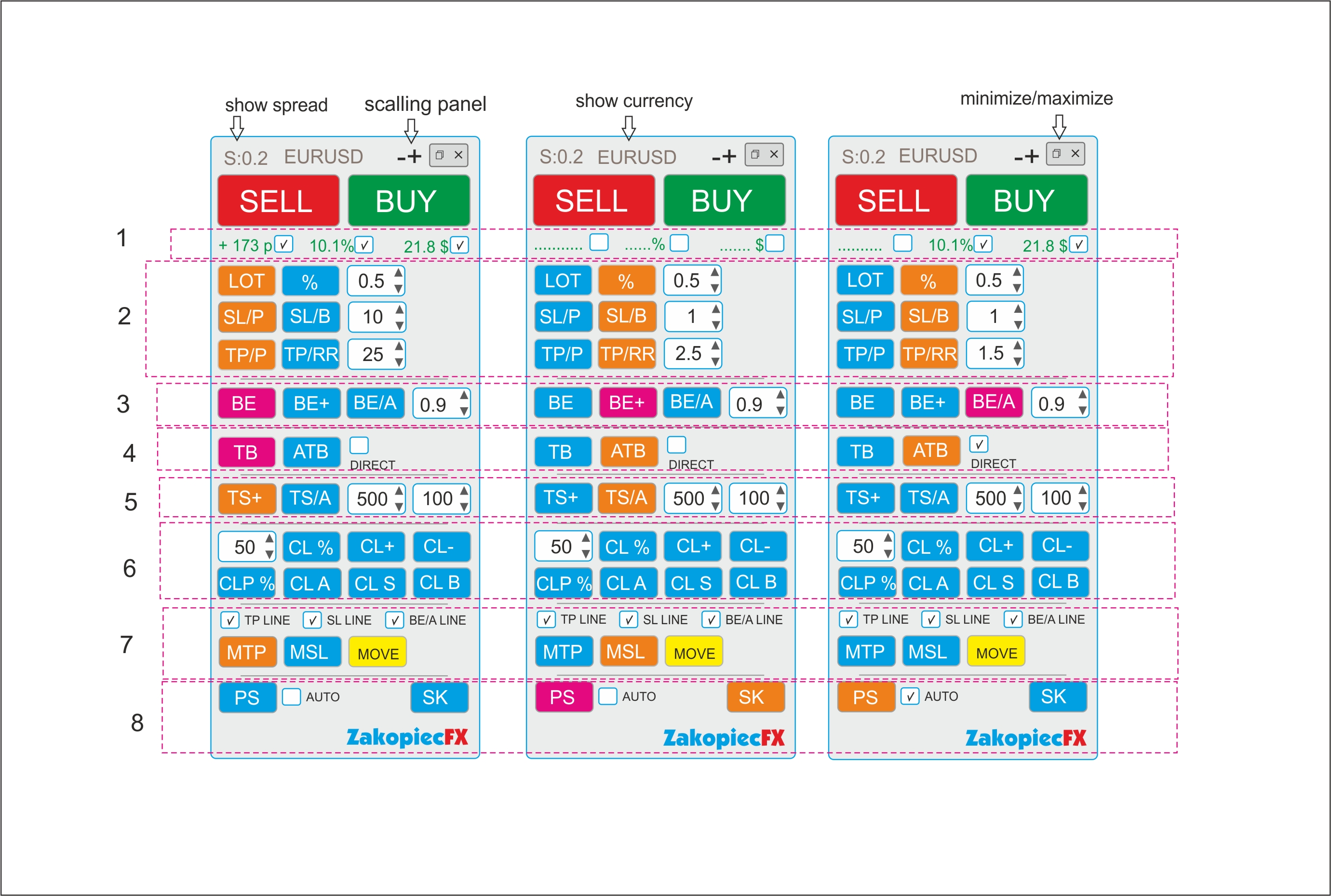
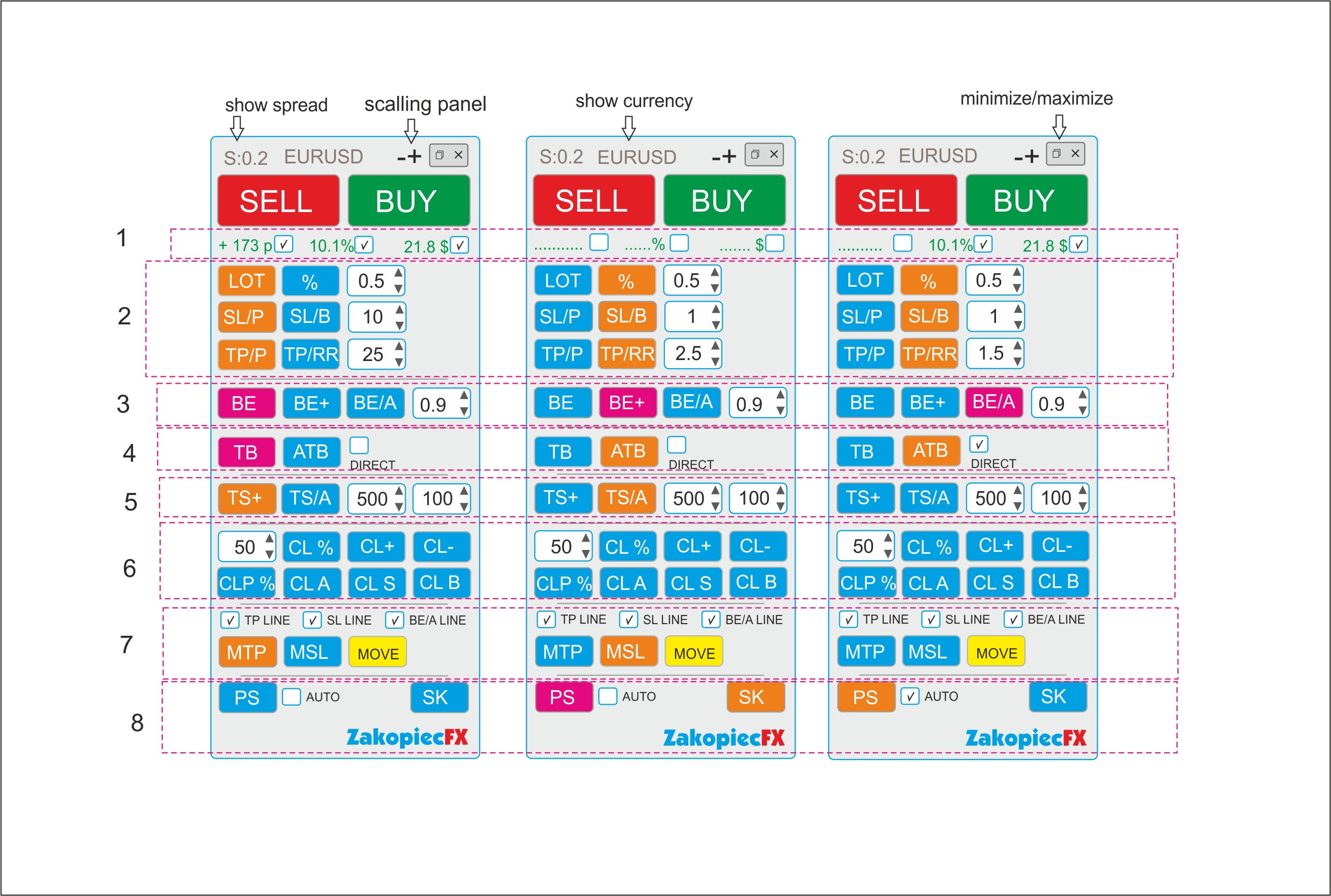
A) Panel description:
- ELEGANT Beauty look like on a screenshot
- FAST not to much complicated code and slowly
- minimize and maximize the panel
- use a strategy tester (for testing)
- shows spread
- shows the currency
- possibility to move the panel to any place on the chart

- (-) and (+) scaling on top panel
B) Section Settings (Inputs)
- automatic scalable in the settings (true/false)
- setting the magic number
- comment setting
- SL line color
- SL line style
- TP line color
- TP style style
- color line BE, BE+, BE/A
- style line BE, BE+, BE/A
- MTP color line
- MTP style line
- MSL color line
- MSL style line
-C) Hot Keys Settings (Inputs) - setting option
- Buy (B)
- Sell (S)
- close percent % (A)
- Close All (C)
- Close Profit (P)
- Close loss (L)
- Breakeven BE (W)
- Breakeven Average BE/A (Q)
- showing the line to shift TP (MTP) (E)
- showing the line to shift SL (MSL) (R)


Section 1

  • If the selected shows the value in pips (points), in currency, percentage. Choosing any to be marked

Section 2

BUTTONS (LOT and %)
- buttons switch between (LOT) and (%). The buttons change the use of risk (lots or %)
Example:
- Turn on the button (LOT) - the button is turned off (%)

- button LOT enabled (Orange) is % off (Blue) and vice versa.
- In the field, enter the amount of LOTS if (LOT), percentage if (%)
- you can use arrows to change the value

BUTTONS SL/P and SL/B

The SL/P and SL/B buttons switch each other
Example:
SL/P enabled (Orange) is SL/B off (Blue) and vice versa.
SL/P means the size of SL in pips (points). Value in the field or changed with arrows
SL/B means SL above or under the candle (bar). How many last candles (bars) - value in the field or changed with arrows

BUTTONS (TP/P and TP/RR)
- buttons switch between (TP) and (TP/RR). The buttons set the distance for profit
Example:
- Turn on the button (TP/P) - the button is turned off (TP/RR)

- TP/P enabled (Orange) isTP/RR off (Blue) and vice versa.
- In the field, enter the amount of pips(points) if (TP/P), risk reward if (TP/RR)

- Value in the field or changed with arrows

Section 3

-The BE button is clicking (PINK) Not ON/OFF.
- After clicking if the order is profitable, the SL* sets to profit.
-Value set in the field.
- If there are more orders, each profitable set SL* to their own profit (be)
- Value in the field or changed with arrows


-The BE+ button is clicking( PINK).
-After clicking if the order is profitable, the SL* sets to profit. Value set in the field.
-If there are more orders, the clicking sets the AVERAGE BE for profit orders. (SL*)
-If there is some non -profit, it does not move SL


-The BE/A button is clicking (PINK).
-After clicking, if all orders have a minimum average profit, it sets all SL* to profit in a common place. If there is no average profit, it does not move SL
-Value set in the field.


Section 4

-TB is the clicking (PINK) button.
-After clicking, SL* is moved to below or above the last closed candle (bar).
-If there are more orders, all SL are moved to below or above the last closed candle (bar).


-ATB is ON/OFF (ORANGE) button. Auto Traling Bar (Candle)
-After ON, All SL * is moved to below or above the last closed candle (bar).
- If still ON, after closing the next candle, SL moved, and again, and again
- Marked box DIRECT moved only if closed candle is this some direction (if buy candle must be bulish and vice versa)


Section 5
- TS is ON/OFF button (ORANGE). Is order (orders) is profitable for example 500 point SL * moved to 100 points.
-Each order has separate TS. Value in the field or changed with arrows

-TS/A is ON/OFF button (ORAGNE) Trailing SL Avarage all open orders.
-Value in the field or changed with arrows


Section 6

CL% button is clicking (PINK). After click is closing % all orders
CLP % button is clicking (PINK). After click is closing % just profitable orders

CL+ button is clicking (PINK). After click is closing all profitable orders
CL- button is clicking (PINK). After click is closing all loss orders
CLA button is clicking (PINK). After click is closing all orders

CLS button is clicking (PINK). After click is closing all Sell orders
CLB button is clicking (PINK). After click is closing all Buys orders

Section 7

Marked box TP line show TP line before open orders on chart
Marked box SL line show SL line before open orders on chart
Marked box BE/A Line show BE Average line on chart

MTP is ON/OFF button. After click on chart showed TP line for set new TP for all orders.
Move this line new place and after push button MOVE (yellow) all TP* set new place.
After this operation button MTP is OFF

MSL is ON/OFF button. After click on chart showed SL line for set new SL for all orders.
Move this line new place and after push button MOVE (yellow) all SL* set new place.

After this operation button MSL is OFF


Section 8

PS button is Printshot chart (all charts will be better) and save default folder
IF marked box auto – mean make auto screen after every open order
SK button is ON/OFF hot keys. If ON hot keys worked. If OFF doesn't work hot keys


*If some orders have not TP or(and) SL set new


Dosyalar:

Yanıtlandı

1
Geliştirici 1
Derecelendirme
(51)
Projeler
69
35%
Arabuluculuk
4
25% / 75%
Süresi dolmuş
0
Serbest
2
Geliştirici 2
Derecelendirme
(390)
Projeler
416
30%
Arabuluculuk
74
19% / 72%
Süresi dolmuş
52
13%
Çalışıyor
3
Geliştirici 3
Derecelendirme
(85)
Projeler
168
44%
Arabuluculuk
3
67% / 0%
Süresi dolmuş
5
3%
Çalışıyor
Yayınlandı: 1 kod
4
Geliştirici 4
Derecelendirme
(467)
Projeler
486
75%
Arabuluculuk
6
67% / 17%
Süresi dolmuş
0
Çalışıyor
5
Geliştirici 5
Derecelendirme
(9)
Projeler
19
16%
Arabuluculuk
3
67% / 0%
Süresi dolmuş
0
Serbest
6
Geliştirici 6
Derecelendirme
(41)
Projeler
78
40%
Arabuluculuk
0
Süresi dolmuş
0
Serbest
7
Geliştirici 7
Derecelendirme
(168)
Projeler
199
48%
Arabuluculuk
3
33% / 33%
Süresi dolmuş
2
1%
Çalışıyor
8
Geliştirici 8
Derecelendirme
(295)
Projeler
473
40%
Arabuluculuk
103
41% / 23%
Süresi dolmuş
78
16%
Meşgul
Yayınlandı: 2 kod
9
Geliştirici 9
Derecelendirme
(54)
Projeler
102
23%
Arabuluculuk
12
25% / 17%
Süresi dolmuş
13
13%
Serbest
10
Geliştirici 10
Derecelendirme
(322)
Projeler
499
67%
Arabuluculuk
5
40% / 0%
Süresi dolmuş
4
1%
Serbest
Yayınlandı: 8 kod
11
Geliştirici 11
Derecelendirme
(69)
Projeler
146
34%
Arabuluculuk
13
8% / 62%
Süresi dolmuş
26
18%
Serbest
Yayınlandı: 6 kod
Benzer siparişler
Hello, I'm looking to find out the cost of creating a mobile trading robot. I've tried to describe it as thoroughly as possible in the following document. I look forward to your response. I'd like to know the costs, delivery time, and how you plan to implement it before making a decision
I have an existing MT5 Expert Advisor (“E-Core”). I need an experienced MQL5 developer to integrate a structured risk management upgrade and a higher timeframe trend filter into the current code. Two files will be provided: 1️⃣ E-Core Source Code (Current Version) 2️⃣ Update Instructions File (contains exact inputs, functions, and logic to integrate) The developer must: Integrate the update logic
I have a working MT5 Expert Advisor. I am NOT looking to change the strategy logic. I only need professional optimization and performance improvement. Requirements: • Parameter optimization • Risk adjustment • Max drawdown reduction • Forward testing report • Optimization for Gold (XAUUSD) Please provide previous optimization reports
DO NOT RESPOND TO WORK WITH ANY AI. ( I CAN ALSO DO THAT ) NEED REAL DEVELOPING SKILL Hedge Add-On Rules for Existing EA Core Idea SL becomes hypothetical (virtual) for the initial basket and for the hedge basket . When price hits the virtual SL level , EA does not close the losing trades. Instead, EA opens one hedge basket in the opposite direction. Original basket direction Hedge basket direction (opposite) Inputs
Hello, I am a user of the "BUY STOP SELL STOP V6" trading bot, which is an advanced Grid System bot. The bot is primarily designed for Gold (XAUUSD), but I want it to work on all currency pairs. "The bot contains a privacy/protection code that prevents it from running on other accounts or being modified on any platform, as it has a client account number lock mechanism" --- Bot Description & Current Settings Bot Type
Hello, I have a breakout EA with reversal logic. I own the full source code for both MT4 and MT5 versions. I need the modifications implemented for both MT4 and MT5 versions. I need several modifications: – Multiple reversals with configurable parameters – Breakeven functionality – Entry only after candle close beyond range + offset – Time-based activation – Alternative offset calculation logic – Automatic close at
Hi I have a simple task (hopefully) I have a custom strategy that I built with the help of Claude Anthropic - everything is finished and I zipped it with power shell but when importing it NT8 gives me the error message that the file was made from an older, incompatible version or not a NinjaScript. My folder structure is correct as far I can see so I don't know what the issues is and it's costing me too much to go
Do you happen to have a profitable strategy for MNQ? it is urgent if any one can help me with this i will be happy to discuss with you and move forward to pay for it kindly let me know the amount thank fill free to bid
Subject: Development of Ultra-High Precision Confluence Indicator - M1 Binary Options (Non-Repaint) ​ Hello, I am looking for a Senior MQL5 Developer to create a custom "Surgical Precision" indicator for MetaTrader 5, specifically optimized for 1-minute (M1) Binary Options trading. The system must integrate three distinct layers of algorithmic analysis. ​ 1. Core Logic: Triple-Layer Confluence ​The signal (Call/Put)
Looking for an experienced MQL5 developer to design and develop a custom Expert Advisor (EA) for MetaTrader 5. The purpose of this EA is not just automated trading, but also to help me better structure, test, and refine my personal trading strategy

Proje bilgisi

Bütçe
80+ USD