모든 주문
모든 주문
 규칙
규칙
작업 종료됨

명시
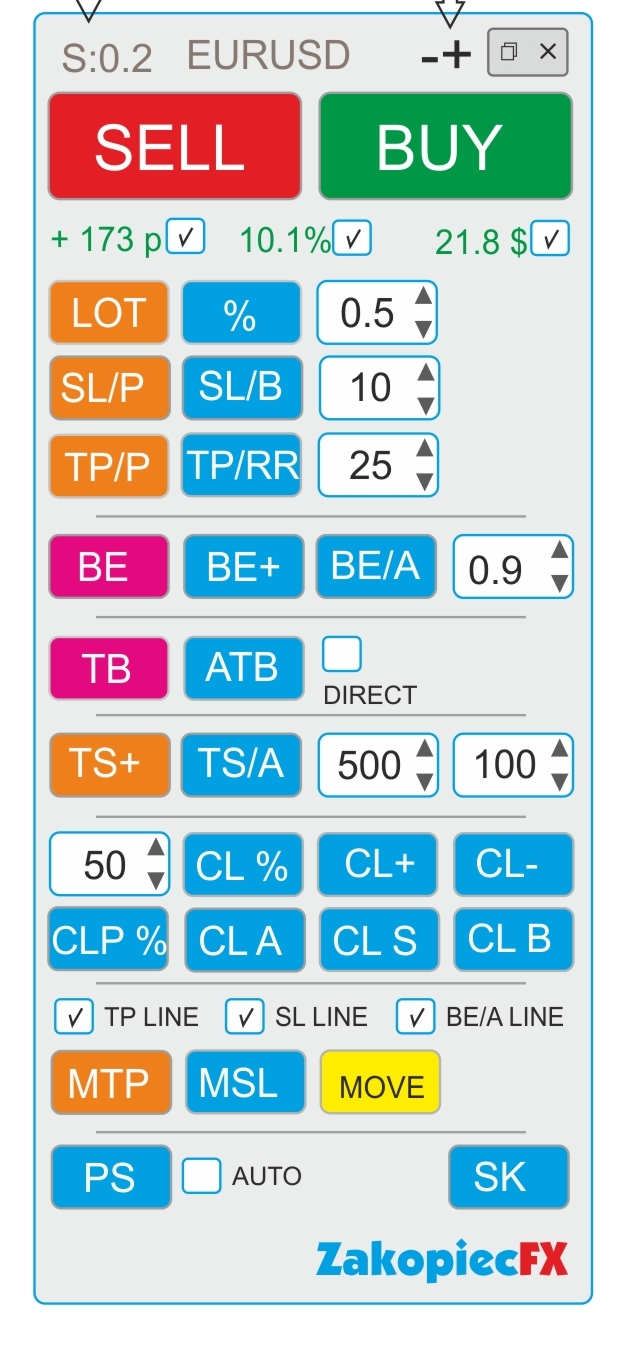
A) Panel description:
- ELEGANT Beauty look like on a screenshot
- FAST not to much complicated code and slowly
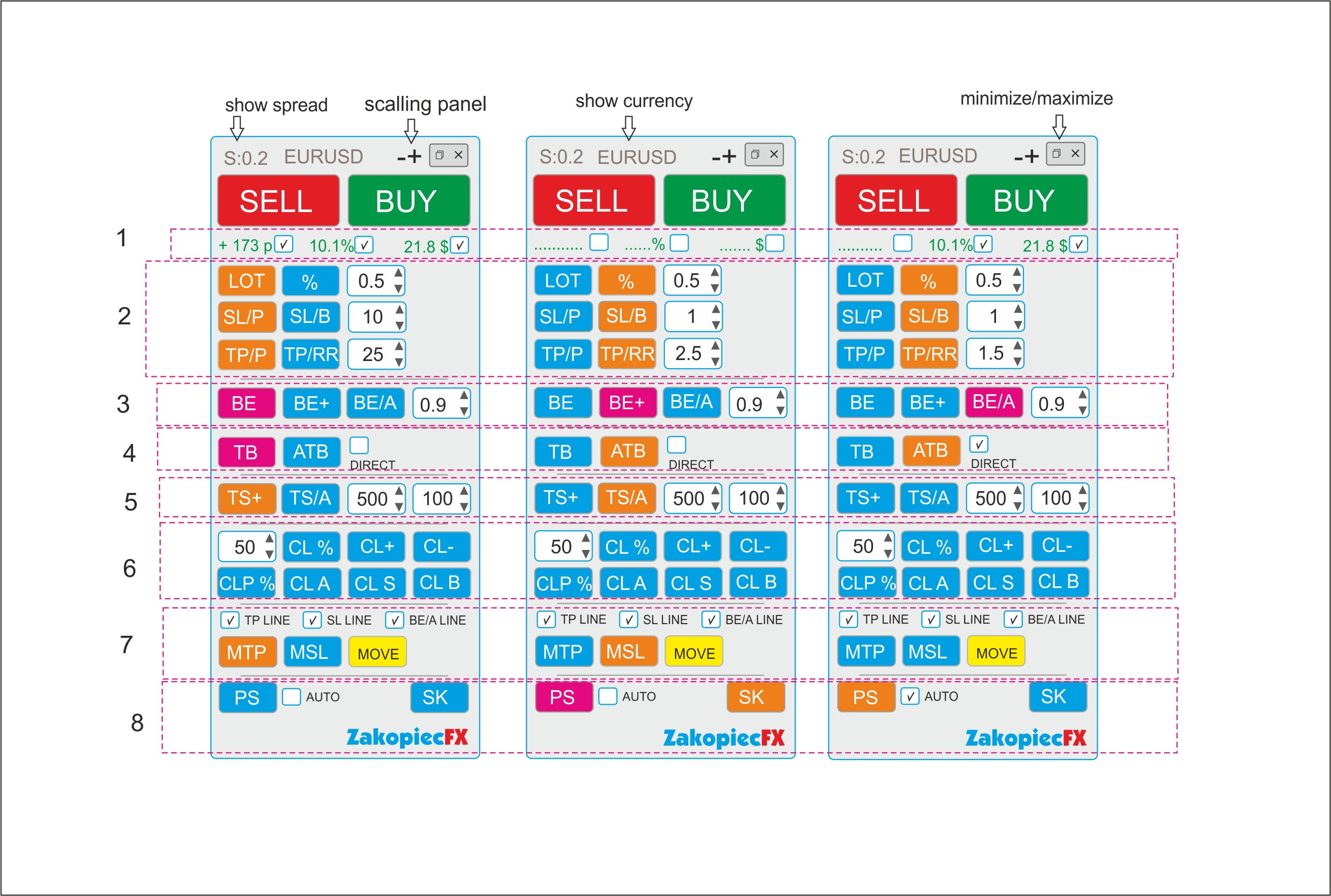
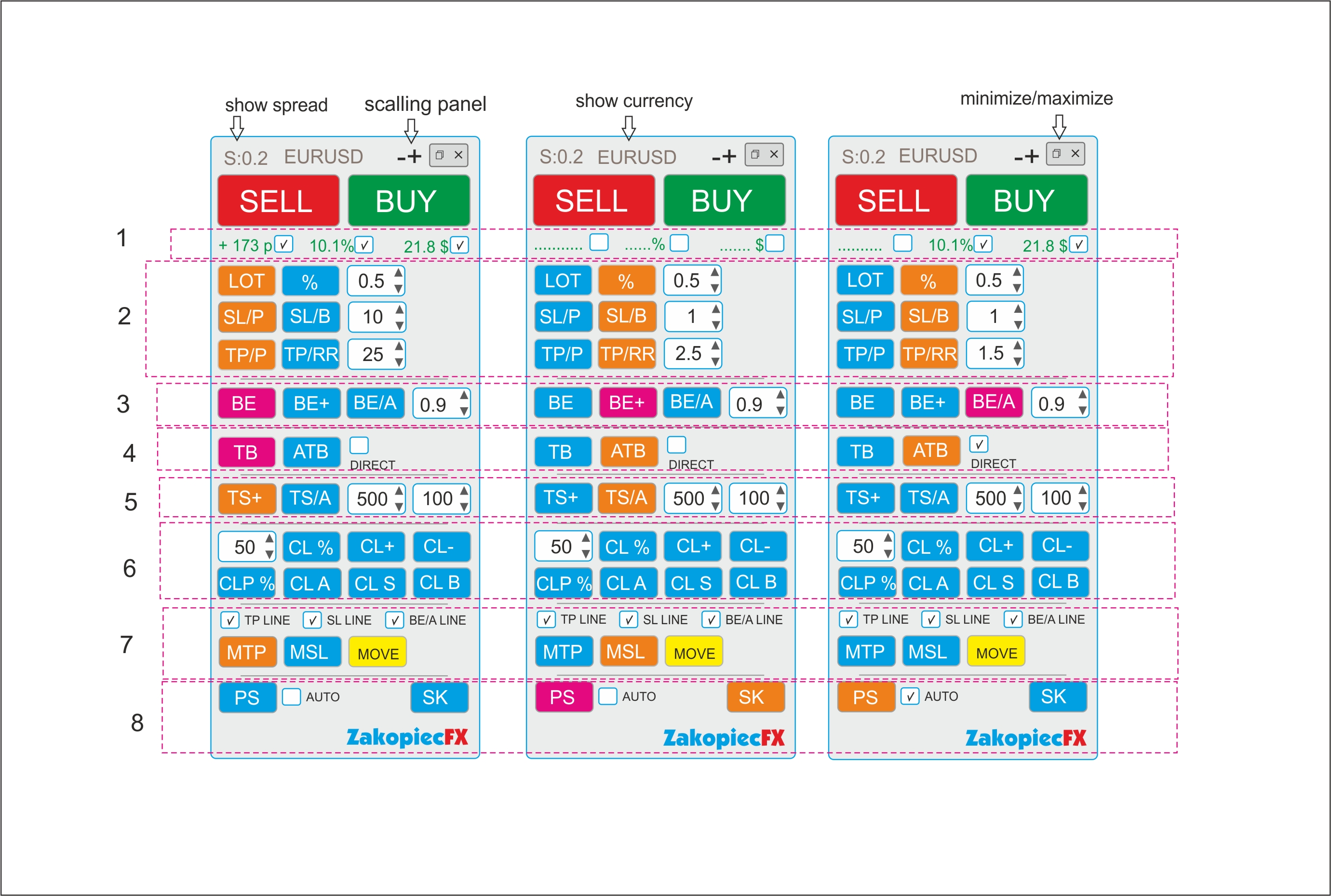
- minimize and maximize the panel
- use a strategy tester (for testing)
- shows spread
- shows the currency
- possibility to move the panel to any place on the chart
- (-) and (+) scaling on top panel
B) Section Settings (Inputs)
- automatic scalable in the settings (true/false)
- setting the magic number
- comment setting
- SL line color
- SL line style
- TP line color
- TP style style
- color line BE, BE+, BE/A
- style line BE, BE+, BE/A
- MTP color line
- MTP style line
- MSL color line
- MSL style line
-C) Hot Keys Settings (Inputs) - setting option
- Buy (B)
- Sell (S)
- close percent % (A)
- Close All (C)
- Close Profit (P)
- Close loss (L)
- Breakeven BE (W)
- Breakeven Average BE/A (Q)
- showing the line to shift TP (MTP) (E)
- showing the line to shift SL (MSL) (R)
Section 1
- If the selected shows the value in pips (points), in currency, percentage. Choosing any to be marked
Section 2
BUTTONS (LOT and %)
- buttons switch between (LOT) and (%). The buttons change the use of risk (lots or %)
Example:
- Turn on the button (LOT) - the button is turned off (%)
- button LOT enabled (Orange) is % off (Blue) and vice versa.
- In the field, enter the amount of LOTS if (LOT), percentage if (%)
- you can use arrows to change the value
BUTTONS SL/P and SL/B
The SL/P and SL/B buttons switch each other
Example:
SL/P enabled (Orange) is SL/B off (Blue) and vice versa.
SL/P means the size of SL in pips (points). Value in the field or changed with arrows
SL/B means SL above or under the candle (bar). How many last candles (bars) - value in the field or changed with arrows
BUTTONS (TP/P and TP/RR)
- buttons switch between (TP) and (TP/RR). The buttons set the distance for profit
Example:
- Turn on the button (TP/P) - the button is turned off (TP/RR)
- TP/P enabled (Orange) isTP/RR off (Blue) and vice versa.
- In the field, enter the amount of pips(points) if (TP/P), risk reward if (TP/RR)
- Value in the field or changed with arrows
Section 3
-The BE button is clicking (PINK) Not ON/OFF.
- After clicking if the order is profitable, the SL* sets to profit.
-Value set in the field.
- If there are more orders, each profitable set SL* to their own profit (be)
- Value in the field or changed with arrows
-The BE+ button is clicking( PINK).
-After clicking if the order is profitable, the SL* sets to profit. Value set in the field.
-If there are more orders, the clicking sets the AVERAGE BE for profit orders. (SL*)
-If there is some non -profit, it does not move SL
-The BE/A button is clicking (PINK).
-After clicking, if all orders have a minimum average profit, it sets all SL* to profit in a common place. If there is no average profit, it does not move SL
-Value set in the field.
Section 4
-TB is the clicking (PINK) button.
-After clicking, SL* is moved to below or above the last closed candle (bar).
-If there are more orders, all SL are moved to below or above the last closed candle (bar).
-ATB is ON/OFF (ORANGE) button. Auto Traling Bar (Candle)
-After ON, All SL * is moved to below or above the last closed candle (bar).
- If still ON, after closing the next candle, SL moved, and again, and again
- Marked box DIRECT moved only if closed candle is this some direction (if buy candle must be bulish and vice versa)
Section 5
- TS is ON/OFF button (ORANGE). Is order (orders) is profitable for example 500 point SL * moved to 100 points.
-Each order has separate TS. Value in the field or changed with arrows
-TS/A is ON/OFF button (ORAGNE) Trailing SL Avarage all open orders.
-Value in the field or changed with arrows
Section 6
CL% button is clicking (PINK). After click is closing % all orders
CLP % button is clicking (PINK). After click is closing % just profitable orders
CL+ button is clicking (PINK). After click is closing all profitable orders
CL- button is clicking (PINK). After click is closing all loss orders
CLA button is clicking (PINK). After click is closing all orders
CLS button is clicking (PINK). After click is closing all Sell orders
CLB button is clicking (PINK). After click is closing all Buys orders
Section 7
Marked box TP line show TP line before open orders on chart
Marked box SL line show SL line before open orders on chart
Marked box BE/A Line show BE Average line on chart
MTP is ON/OFF button. After click on chart showed TP line for set new TP for all orders.
Move this line new place and after push button MOVE (yellow) all TP* set new place.
After this operation button MTP is OFF
MSL is ON/OFF button. After click on chart showed SL line for set new SL for all orders.
Move this line new place and after push button MOVE (yellow) all SL* set new place.
After this operation button MSL is OFF
Section 8
PS button is Printshot chart (all charts will be better) and save default folder
IF marked box auto – mean make auto screen after every open order
SK button is ON/OFF hot keys. If ON hot keys worked. If OFF doesn't work hot keys
*If some orders have not TP or(and) SL set new