Trabajo finalizado

Plazo de ejecución 13 días
Comentario del Cliente
Reliable work, great skills and speed of implementation. I recommend and personally use his skills the next time. Thank you Ismail.
Comentario del Ejecutor
Perfect. Clear and detailed rules defined. Testing and confirmation was fast.

Tarea técnica

Trade Panel for MT4 and MT5 platform


A) Panel description:
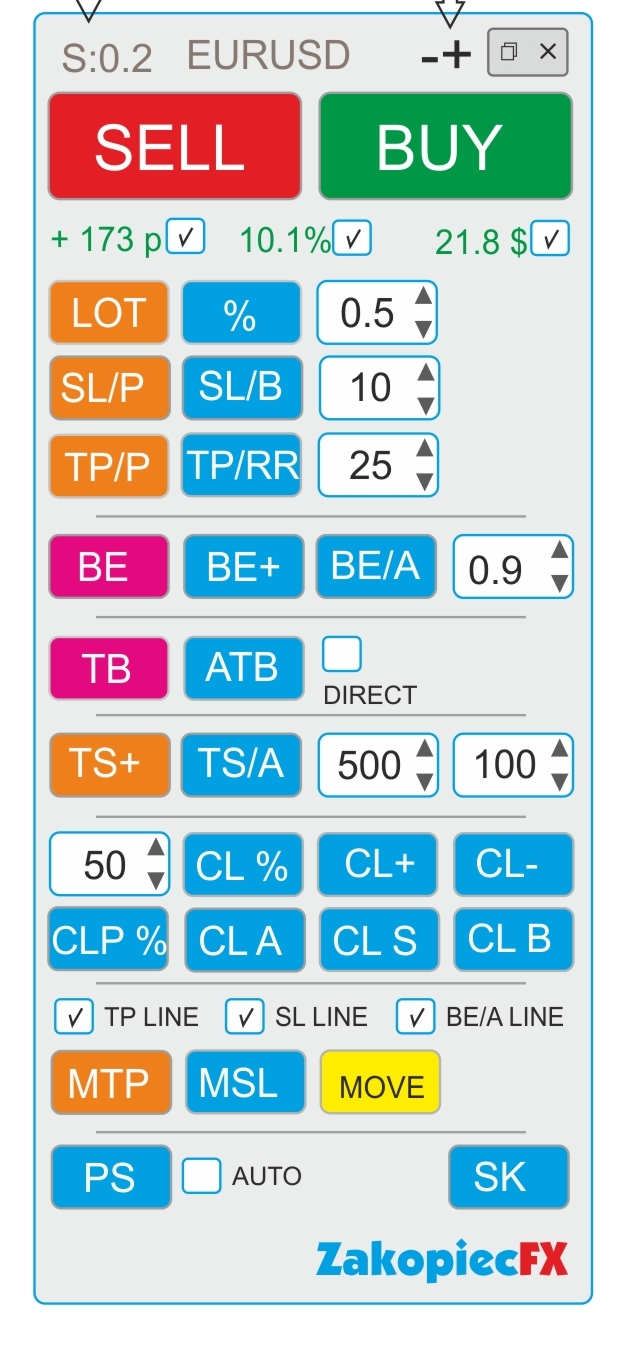
- ELEGANT Beauty look like on a screenshot
- FAST not to much complicated code and slowly
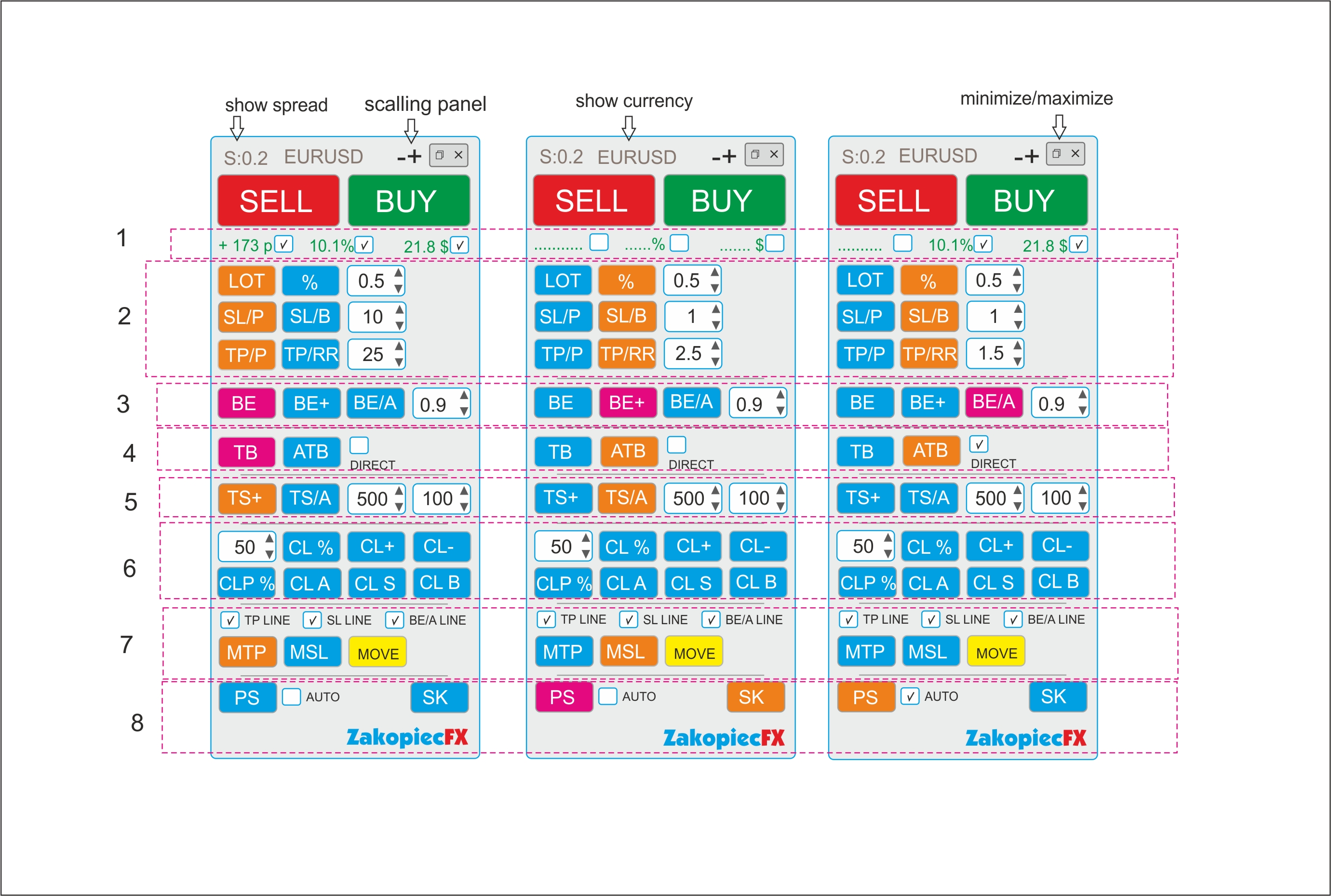
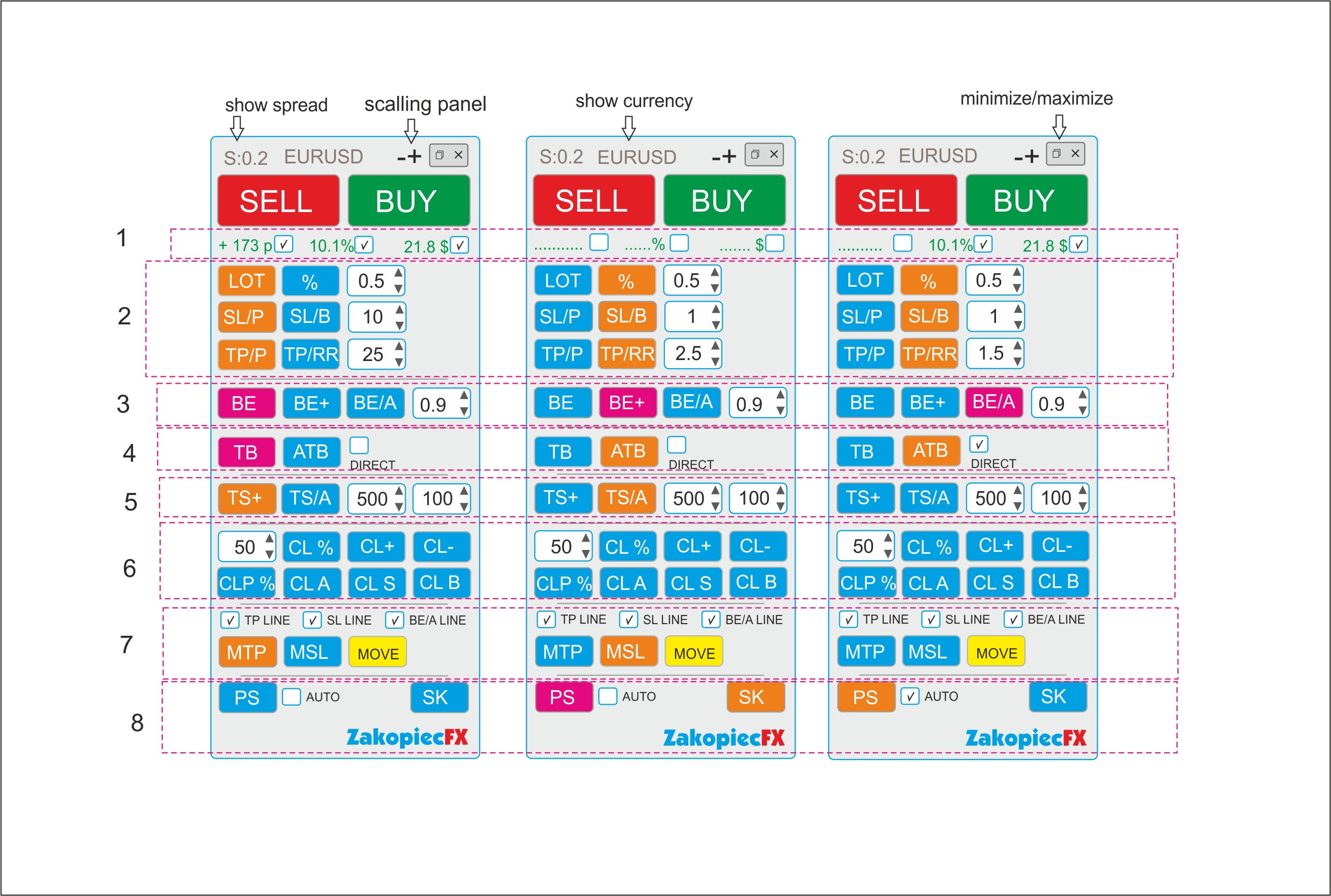
- minimize and maximize the panel
- use a strategy tester (for testing)
- shows spread
- shows the currency
- possibility to move the panel to any place on the chart

- (-) and (+) scaling on top panel
B) Section Settings (Inputs)
- automatic scalable in the settings (true/false)
- setting the magic number
- comment setting
- SL line color
- SL line style
- TP line color
- TP style style
- color line BE, BE+, BE/A
- style line BE, BE+, BE/A
- MTP color line
- MTP style line
- MSL color line
- MSL style line
-C) Hot Keys Settings (Inputs) - setting option
- Buy (B)
- Sell (S)
- close percent % (A)
- Close All (C)
- Close Profit (P)
- Close loss (L)
- Breakeven BE (W)
- Breakeven Average BE/A (Q)
- showing the line to shift TP (MTP) (E)
- showing the line to shift SL (MSL) (R)


Section 1

  • If the selected shows the value in pips (points), in currency, percentage. Choosing any to be marked

Section 2

BUTTONS (LOT and %)
- buttons switch between (LOT) and (%). The buttons change the use of risk (lots or %)
Example:
- Turn on the button (LOT) - the button is turned off (%)

- button LOT enabled (Orange) is % off (Blue) and vice versa.
- In the field, enter the amount of LOTS if (LOT), percentage if (%)
- you can use arrows to change the value

BUTTONS SL/P and SL/B

The SL/P and SL/B buttons switch each other
Example:
SL/P enabled (Orange) is SL/B off (Blue) and vice versa.
SL/P means the size of SL in pips (points). Value in the field or changed with arrows
SL/B means SL above or under the candle (bar). How many last candles (bars) - value in the field or changed with arrows

BUTTONS (TP/P and TP/RR)
- buttons switch between (TP) and (TP/RR). The buttons set the distance for profit
Example:
- Turn on the button (TP/P) - the button is turned off (TP/RR)

- TP/P enabled (Orange) isTP/RR off (Blue) and vice versa.
- In the field, enter the amount of pips(points) if (TP/P), risk reward if (TP/RR)

- Value in the field or changed with arrows

Section 3

-The BE button is clicking (PINK) Not ON/OFF.
- After clicking if the order is profitable, the SL* sets to profit.
-Value set in the field.
- If there are more orders, each profitable set SL* to their own profit (be)
- Value in the field or changed with arrows


-The BE+ button is clicking( PINK).
-After clicking if the order is profitable, the SL* sets to profit. Value set in the field.
-If there are more orders, the clicking sets the AVERAGE BE for profit orders. (SL*)
-If there is some non -profit, it does not move SL


-The BE/A button is clicking (PINK).
-After clicking, if all orders have a minimum average profit, it sets all SL* to profit in a common place. If there is no average profit, it does not move SL
-Value set in the field.


Section 4

-TB is the clicking (PINK) button.
-After clicking, SL* is moved to below or above the last closed candle (bar).
-If there are more orders, all SL are moved to below or above the last closed candle (bar).


-ATB is ON/OFF (ORANGE) button. Auto Traling Bar (Candle)
-After ON, All SL * is moved to below or above the last closed candle (bar).
- If still ON, after closing the next candle, SL moved, and again, and again
- Marked box DIRECT moved only if closed candle is this some direction (if buy candle must be bulish and vice versa)


Section 5
- TS is ON/OFF button (ORANGE). Is order (orders) is profitable for example 500 point SL * moved to 100 points.
-Each order has separate TS. Value in the field or changed with arrows

-TS/A is ON/OFF button (ORAGNE) Trailing SL Avarage all open orders.
-Value in the field or changed with arrows


Section 6

CL% button is clicking (PINK). After click is closing % all orders
CLP % button is clicking (PINK). After click is closing % just profitable orders

CL+ button is clicking (PINK). After click is closing all profitable orders
CL- button is clicking (PINK). After click is closing all loss orders
CLA button is clicking (PINK). After click is closing all orders

CLS button is clicking (PINK). After click is closing all Sell orders
CLB button is clicking (PINK). After click is closing all Buys orders

Section 7

Marked box TP line show TP line before open orders on chart
Marked box SL line show SL line before open orders on chart
Marked box BE/A Line show BE Average line on chart

MTP is ON/OFF button. After click on chart showed TP line for set new TP for all orders.
Move this line new place and after push button MOVE (yellow) all TP* set new place.
After this operation button MTP is OFF

MSL is ON/OFF button. After click on chart showed SL line for set new SL for all orders.
Move this line new place and after push button MOVE (yellow) all SL* set new place.

After this operation button MSL is OFF


Section 8

PS button is Printshot chart (all charts will be better) and save default folder
IF marked box auto – mean make auto screen after every open order
SK button is ON/OFF hot keys. If ON hot keys worked. If OFF doesn't work hot keys


*If some orders have not TP or(and) SL set new


Archivos adjuntos:

Han respondido

1
Desarrollador 1
Evaluación
(51)
Proyectos
69
35%
Arbitraje
4
25% / 75%
Caducado
0
Libre
2
Desarrollador 2
Evaluación
(390)
Proyectos
416
30%
Arbitraje
74
19% / 70%
Caducado
52
13%
Trabaja
3
Desarrollador 3
Evaluación
(84)
Proyectos
163
43%
Arbitraje
3
67% / 0%
Caducado
5
3%
Trabaja
Ha publicado: 1 ejemplo
4
Desarrollador 4
Evaluación
(462)
Proyectos
483
75%
Arbitraje
5
80% / 0%
Caducado
0
Trabaja
5
Desarrollador 5
Evaluación
(9)
Proyectos
19
16%
Arbitraje
3
67% / 0%
Caducado
0
Libre
6
Desarrollador 6
Evaluación
(41)
Proyectos
78
40%
Arbitraje
0
Caducado
0
Libre
7
Desarrollador 7
Evaluación
(167)
Proyectos
197
48%
Arbitraje
3
33% / 33%
Caducado
2
1%
Trabaja
8
Desarrollador 8
Evaluación
(294)
Proyectos
470
39%
Arbitraje
102
40% / 24%
Caducado
78
17%
Trabajando
Ha publicado: 2 ejemplos
9
Desarrollador 9
Evaluación
(54)
Proyectos
102
23%
Arbitraje
12
25% / 17%
Caducado
13
13%
Libre
10
Desarrollador 10
Evaluación
(322)
Proyectos
499
67%
Arbitraje
5
40% / 0%
Caducado
4
1%
Libre
Ha publicado: 8 ejemplos
11
Desarrollador 11
Evaluación
(69)
Proyectos
146
34%
Arbitraje
13
8% / 62%
Caducado
26
18%
Libre
Ha publicado: 6 ejemplos
Solicitudes similares
// Add this to your EA after ExportState() function void SendToBase44(const string state, const string dir, double entry, double sl, double tp) { string url = " https://preview-sandbox--ee0a32a725b788974de435e8cef40b7a.base44.app/api/functions/receiveEAState "; string headers = "Content-Type: application/json\r\n"; string json = "{" "\"symbol\":\""+_Symbol+"\","
For only developer who understand Chaos/ Profiunity trading system by Bill WIlliams, Create The Profitunity System Trading based on Bill Williams Chaos theory, Trade based on Trend Affirmation in Daily, entry in H4, using Williams Fractal, Williams Alligator, Awesome Oscillator, Accelerator Oscillator, Market Facilitation Index. Balance Line, entry on Reversal, add on while market show continuation sign. Please quote
Hi, I am looking for someone who has already developed a high-performance Gold EA that can outperform the one shown in my screenshot. If you have such an EA, please apply for this job. Please describe how the EA works (for example, whether it uses a grid system) and provide backtest results along with the set files. If the EA meets my expectations, you can make the necessary adjustments and I will use it as my own
I am looking of an Expert Advisor (EA) that has undergone independent validation and demonstrates a capability to successfully navigate prop firm challenges, as well as efficiently manage funded accounts. It is imperative that you provide a comprehensive explanation of the strategy utilized by your EA, along with a demo version that has a 30-day expiration. This will facilitate extensive back testing and forward
I want to check if this indicator is repainting or not Whick mean the results of back testing is legit or not if anyone can help me to review it kindly to well to contact me i will be happy to work and go on long term work with anyone thanks
1.Sinyal Perdagangan : Sinyal beli: garis MACD utama memotong garis sinyal ke atas (macd_current>signal_current && macd_previous<signal_previous). Sinyal jual: garis MACD utama memotong garis sinyal ke bawah (macd_current<signal_current && macd_previous>signal_previous). Gambar di bawah menunjukkan kasus beli dan jual. 2. Posisi ditutup pada sinyal yang berlawanan: Posisi beli ditutup pada sinyal jual, dan posisi
Project Description I am looking to collaborate with an experienced MQL5 / algorithmic trading developer who also has hands-on experience with Large Language Models (LLMs) and AI-driven systems. This is a long-term partnership opportunity , not a one-off paid freelance job. I bring 9 years of practical Elliott Wave trading experience , applied in live market conditions. The objective is to translate Elliott Wave
specification High-Frequency Candle Momentum Scalper 1. Strategy Overview Core Logic: The EA identifies the current color of the active candle (Bullish or Bearish). Entry Trigger: It opens positions only after a specific duration of the candle has passed (e.g., after 30 seconds on a 1-minute candle) to confirm the direction. 2. Entry Logic (The "Half-Candle" Rule) Timeframe: M1 (Default, but adjustable). Time Filter
can anyone help me with building a complete automated pine code strategy and indicator that work for both FXs & CFDs and have a high winning rate proved through back testing. I have a very complex current code that developed mostly using AI but lots of gaps are there although it translate exactly what I have in my mind. So, you are free to decide whether wo build a complete new code or fix my current working code ( i
Je cherche un développeur pour un bot Fundednext pour le passage de challenge jusqu'au trading quotidien après le passage.le robot va s'occuper du compte du début à la suite du compte de 15k chez Fundednext.après le passage aux challenges,le robot doit être capable de me fournir 6-10% mensuel de rendement de ce compte. Il doit être capable de passer le challenge dans un bref délai de 2-3 semaine ou soit 10-15 jours

Información sobre el proyecto

Presupuesto
80+ USD