Trade Panel for MT4 and MT5 platform

Lavoro terminato

Tempo di esecuzione 13 giorni
Feedback del cliente
Reliable work, great skills and speed of implementation. I recommend and personally use his skills the next time. Thank you Ismail.
Feedback del dipendente
Perfect. Clear and detailed rules defined. Testing and confirmation was fast.

Specifiche

Trade Panel for MT4 and MT5 platform


A) Panel description:
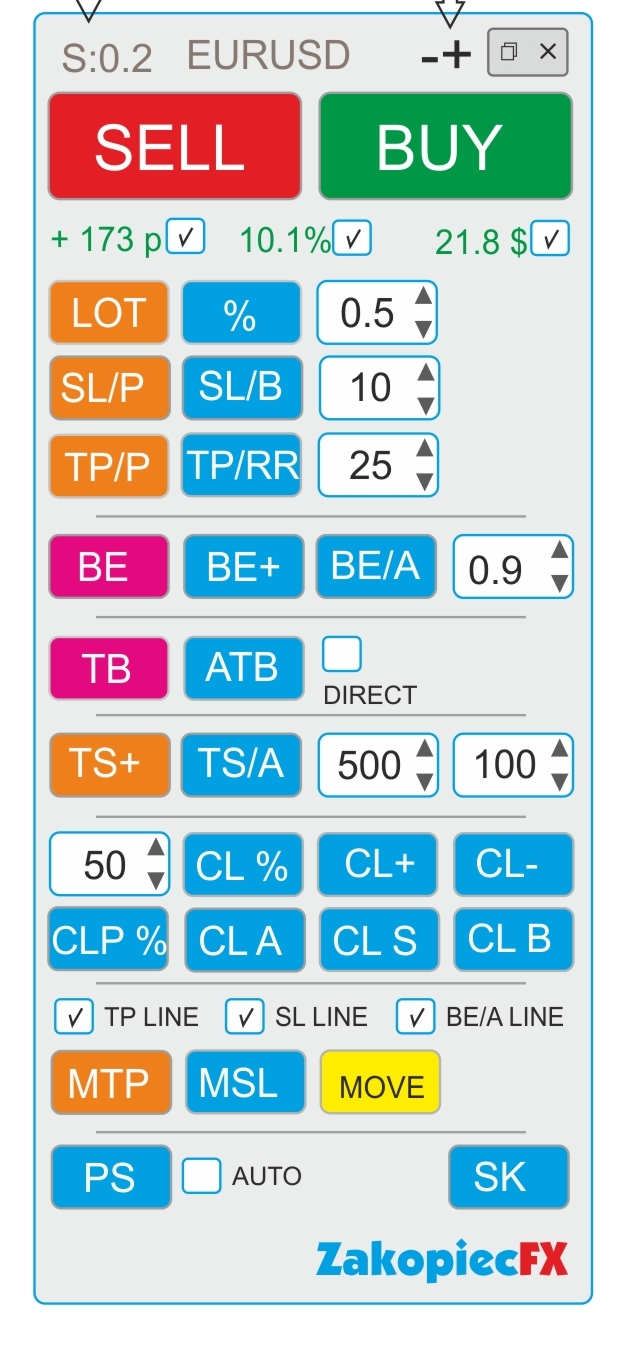
- ELEGANT Beauty look like on a screenshot
- FAST not to much complicated code and slowly
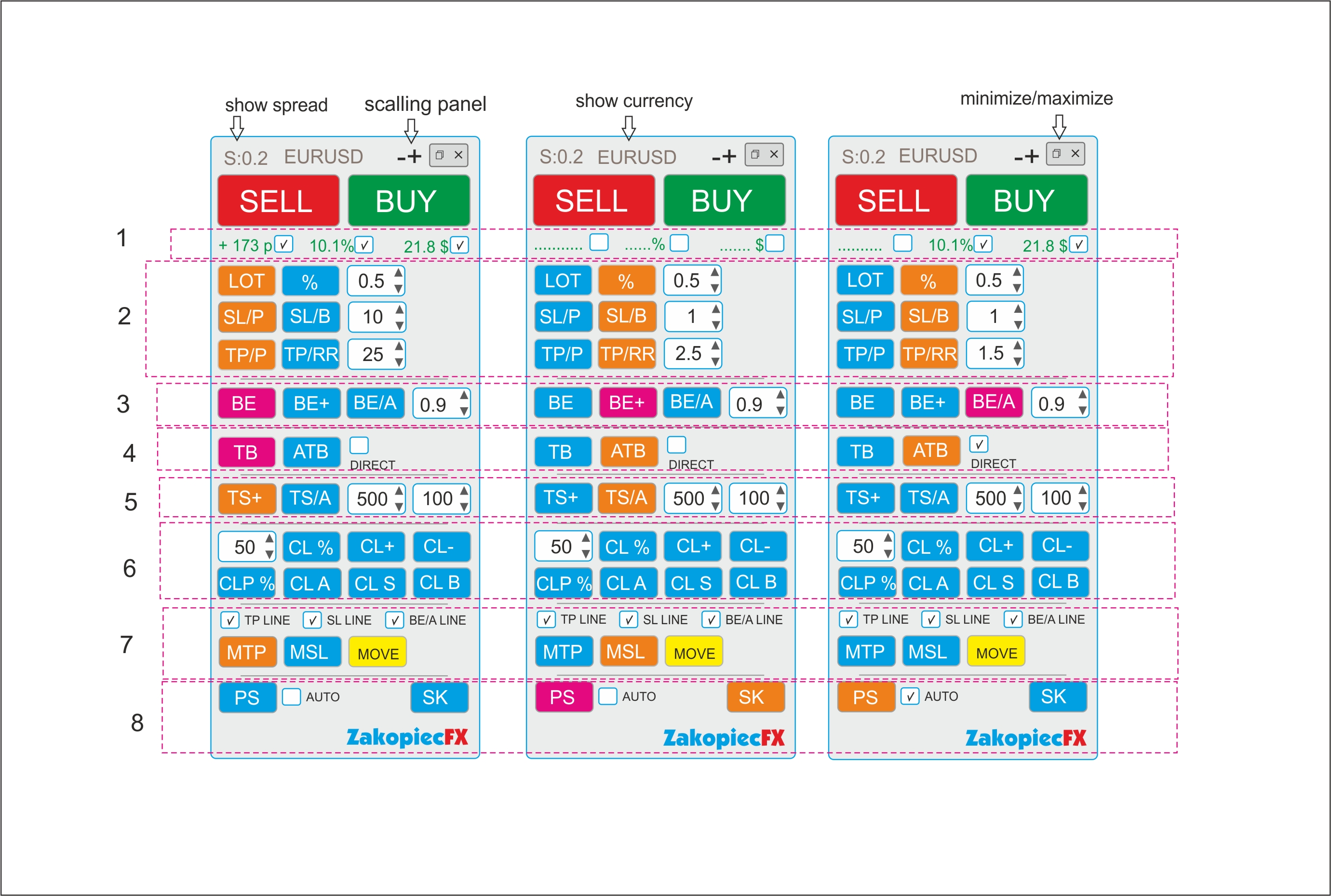
- minimize and maximize the panel
- use a strategy tester (for testing)
- shows spread
- shows the currency
- possibility to move the panel to any place on the chart

- (-) and (+) scaling on top panel
B) Section Settings (Inputs)
- automatic scalable in the settings (true/false)
- setting the magic number
- comment setting
- SL line color
- SL line style
- TP line color
- TP style style
- color line BE, BE+, BE/A
- style line BE, BE+, BE/A
- MTP color line
- MTP style line
- MSL color line
- MSL style line
-C) Hot Keys Settings (Inputs) - setting option
- Buy (B)
- Sell (S)
- close percent % (A)
- Close All (C)
- Close Profit (P)
- Close loss (L)
- Breakeven BE (W)
- Breakeven Average BE/A (Q)
- showing the line to shift TP (MTP) (E)
- showing the line to shift SL (MSL) (R)


Section 1

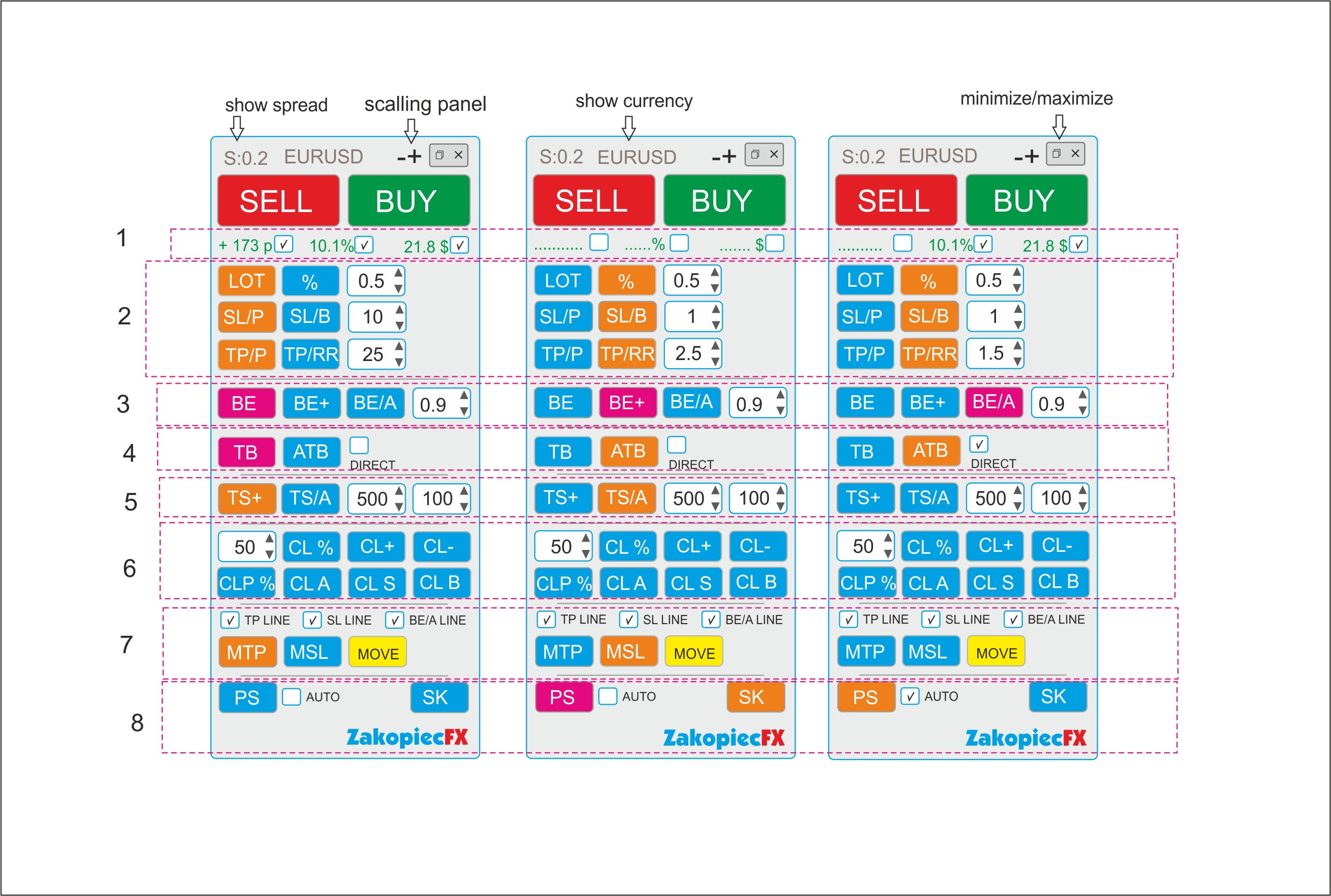
  • If the selected shows the value in pips (points), in currency, percentage. Choosing any to be marked

Section 2

BUTTONS (LOT and %)
- buttons switch between (LOT) and (%). The buttons change the use of risk (lots or %)
Example:
- Turn on the button (LOT) - the button is turned off (%)

- button LOT enabled (Orange) is % off (Blue) and vice versa.
- In the field, enter the amount of LOTS if (LOT), percentage if (%)
- you can use arrows to change the value

BUTTONS SL/P and SL/B

The SL/P and SL/B buttons switch each other
Example:
SL/P enabled (Orange) is SL/B off (Blue) and vice versa.
SL/P means the size of SL in pips (points). Value in the field or changed with arrows
SL/B means SL above or under the candle (bar). How many last candles (bars) - value in the field or changed with arrows

BUTTONS (TP/P and TP/RR)
- buttons switch between (TP) and (TP/RR). The buttons set the distance for profit
Example:
- Turn on the button (TP/P) - the button is turned off (TP/RR)

- TP/P enabled (Orange) isTP/RR off (Blue) and vice versa.
- In the field, enter the amount of pips(points) if (TP/P), risk reward if (TP/RR)

- Value in the field or changed with arrows

Section 3

-The BE button is clicking (PINK) Not ON/OFF.
- After clicking if the order is profitable, the SL* sets to profit.
-Value set in the field.
- If there are more orders, each profitable set SL* to their own profit (be)
- Value in the field or changed with arrows


-The BE+ button is clicking( PINK).
-After clicking if the order is profitable, the SL* sets to profit. Value set in the field.
-If there are more orders, the clicking sets the AVERAGE BE for profit orders. (SL*)
-If there is some non -profit, it does not move SL


-The BE/A button is clicking (PINK).
-After clicking, if all orders have a minimum average profit, it sets all SL* to profit in a common place. If there is no average profit, it does not move SL
-Value set in the field.


Section 4

-TB is the clicking (PINK) button.
-After clicking, SL* is moved to below or above the last closed candle (bar).
-If there are more orders, all SL are moved to below or above the last closed candle (bar).


-ATB is ON/OFF (ORANGE) button. Auto Traling Bar (Candle)
-After ON, All SL * is moved to below or above the last closed candle (bar).
- If still ON, after closing the next candle, SL moved, and again, and again
- Marked box DIRECT moved only if closed candle is this some direction (if buy candle must be bulish and vice versa)


Section 5
- TS is ON/OFF button (ORANGE). Is order (orders) is profitable for example 500 point SL * moved to 100 points.
-Each order has separate TS. Value in the field or changed with arrows

-TS/A is ON/OFF button (ORAGNE) Trailing SL Avarage all open orders.
-Value in the field or changed with arrows


Section 6

CL% button is clicking (PINK). After click is closing % all orders
CLP % button is clicking (PINK). After click is closing % just profitable orders

CL+ button is clicking (PINK). After click is closing all profitable orders
CL- button is clicking (PINK). After click is closing all loss orders
CLA button is clicking (PINK). After click is closing all orders

CLS button is clicking (PINK). After click is closing all Sell orders
CLB button is clicking (PINK). After click is closing all Buys orders

Section 7

Marked box TP line show TP line before open orders on chart
Marked box SL line show SL line before open orders on chart
Marked box BE/A Line show BE Average line on chart

MTP is ON/OFF button. After click on chart showed TP line for set new TP for all orders.
Move this line new place and after push button MOVE (yellow) all TP* set new place.
After this operation button MTP is OFF

MSL is ON/OFF button. After click on chart showed SL line for set new SL for all orders.
Move this line new place and after push button MOVE (yellow) all SL* set new place.

After this operation button MSL is OFF


Section 8

PS button is Printshot chart (all charts will be better) and save default folder
IF marked box auto – mean make auto screen after every open order
SK button is ON/OFF hot keys. If ON hot keys worked. If OFF doesn't work hot keys


*If some orders have not TP or(and) SL set new


File:

Con risposta

1
Sviluppatore 1
Valutazioni
(51)
Progetti
71
37%
Arbitraggio
4
25% / 75%
In ritardo
1
1%
Gratuito
Pubblicati: 1 codice
2
Sviluppatore 2
Valutazioni
(390)
Progetti
416
30%
Arbitraggio
74
19% / 72%
In ritardo
52
13%
In elaborazione
3
Sviluppatore 3
Valutazioni
(85)
Progetti
174
44%
Arbitraggio
3
100% / 0%
In ritardo
5
3%
Gratuito
Pubblicati: 1 codice
4
Sviluppatore 4
Valutazioni
(472)
Progetti
491
75%
Arbitraggio
6
67% / 17%
In ritardo
0
In elaborazione
5
Sviluppatore 5
Valutazioni
(9)
Progetti
19
16%
Arbitraggio
3
67% / 0%
In ritardo
0
Gratuito
6
Sviluppatore 6
Valutazioni
(41)
Progetti
78
40%
Arbitraggio
0
In ritardo
0
Gratuito
7
Sviluppatore 7
Valutazioni
(170)
Progetti
203
47%
Arbitraggio
5
20% / 60%
In ritardo
3
1%
Gratuito
8
Sviluppatore 8
Valutazioni
(298)
Progetti
478
40%
Arbitraggio
105
40% / 24%
In ritardo
82
17%
Caricato
Pubblicati: 2 codici
9
Sviluppatore 9
Valutazioni
(54)
Progetti
102
23%
Arbitraggio
12
25% / 17%
In ritardo
13
13%
Gratuito
10
Sviluppatore 10
Valutazioni
(322)
Progetti
499
67%
Arbitraggio
5
40% / 0%
In ritardo
4
1%
Gratuito
Pubblicati: 8 codici
11
Sviluppatore 11
Valutazioni
(69)
Progetti
146
34%
Arbitraggio
13
8% / 62%
In ritardo
26
18%
Gratuito
Pubblicati: 6 codici
Ordini simili
Should be as it but no alarms, also we need to add a deep search so he can see all the preves candles and a memory function so its not slowing down the indicator. for higher time frames daily 4h 1h around 365 days and for lower time frames we do up to 20k bars but both flexible so i can change it later. the memory is important so the indicator is not always recalculating everything when a new candle shows especially
Creating a bot using the Parabolic indicator with a simple interface.. I want a bot that uses the Parabolic SAR indicator only, with these orders attached to it. Boot name : HEMIN .FX Magic number : 000000 …………………………………………………. Trade behavior : regular OR inverse OR only long "buy" OR only short "sell" Timeframe : ………… Period: ……… ………………………………………………….. Lot size : ……………… Break even in points : …
Hi, I need an experienced NinjaTrader 8/NinjaScript developer to finish or rebuild an automated futures strategy, ideally by the end of this week. I already have the complete TradingView Pine Script reference strategy, an existing ~2,000-line NinjaScript implementation, Playback logs, and known historical benchmark trades. MOST IMPORTANT REQUIREMENT: TRADINGVIEW ↔ NINJATRADER PARITY. The Pine Script is the reference
I am looking for a developer experienced in EAs, MT5 and trade management optimization to help me add an intelligent early-exit system to my existing XAUUSD trading robot. The EA is already fully functional and performs best on the M15 timeframe. The entry strategy, BUY/SELL logic, sessions and core structure are already implemented. The work should focus exclusively on adding early exits for trades that are
I need a custom MQL5 indicator for MetaTrader 5. The indicator must automatically print entry, stop loss, and take profit zones on the chart using dots. A critical requirement is that these dots must be non-lagging and absolutely non-repainting. Additionally, the indicator needs to identify and display current supply and demand zones. Please provide the mq5 source code and the ex5 file upon completion
PHANTOM PROTOCOL V1 35 - 150 USD
PHANTOM PROTOCOL V1 – MT5 EXPERT ADVISOR SPECIFICATION Develop a professional MetaTrader 5 (MT5) Expert Advisor named “PHANTOM PROTOCOL V1”. PRIMARY MARKET: - XAUUSD (Gold) - Designed primarily for M15 and H1 timeframes. - The EA must work with both 3-digit and 2-digit gold pricing where applicable. TRADING LOGIC: Use pure price-action and market-structure analysis rather than relying on a single indicator. The EA
I need an experienced trading-data specialist who can help me obtain 3–4 years of historical market data compatible with NinjaTrader 8 . The data will be used for trading strategy development, backtesting, and analysis
Project Overview I have an existing MT5 Expert Advisor (EA) written in MQL5. The source code ( .mq5 ) will be provided. The underlying strategy is a trend-following system that performs well during trending market conditions, but requires professional quantitative research to improve its ability to identify and avoid highly sideways/range-bound market conditions. The objective of this project is not to build a new EA
Most of the expert is already coded . Create a panel to show the Ratio for the Range . Trigger is based on ratio . Show Distribution / project starts after we clear Distribution
Title: Simple background trading bot for my Oanda account (v20 REST API) Overview Hi, I need a simple, lightweight event based standalone trading bot that connects directly to my Oanda account using broker’s standard REST API (V20 account) via VPS The bot just needs to look at group of 5 currency pairs (manually selectable and adjustable) in different 4 baskets, do some basic percentage math every period, and place

Informazioni sul progetto

Budget
80+ USD