Trabalho concluído

Tempo de execução 13 dias
Comentário do cliente
Reliable work, great skills and speed of implementation. I recommend and personally use his skills the next time. Thank you Ismail.
Comentário do desenvolvedor
Perfect. Clear and detailed rules defined. Testing and confirmation was fast.

Termos de Referência

Trade Panel for MT4 and MT5 platform


A) Panel description:
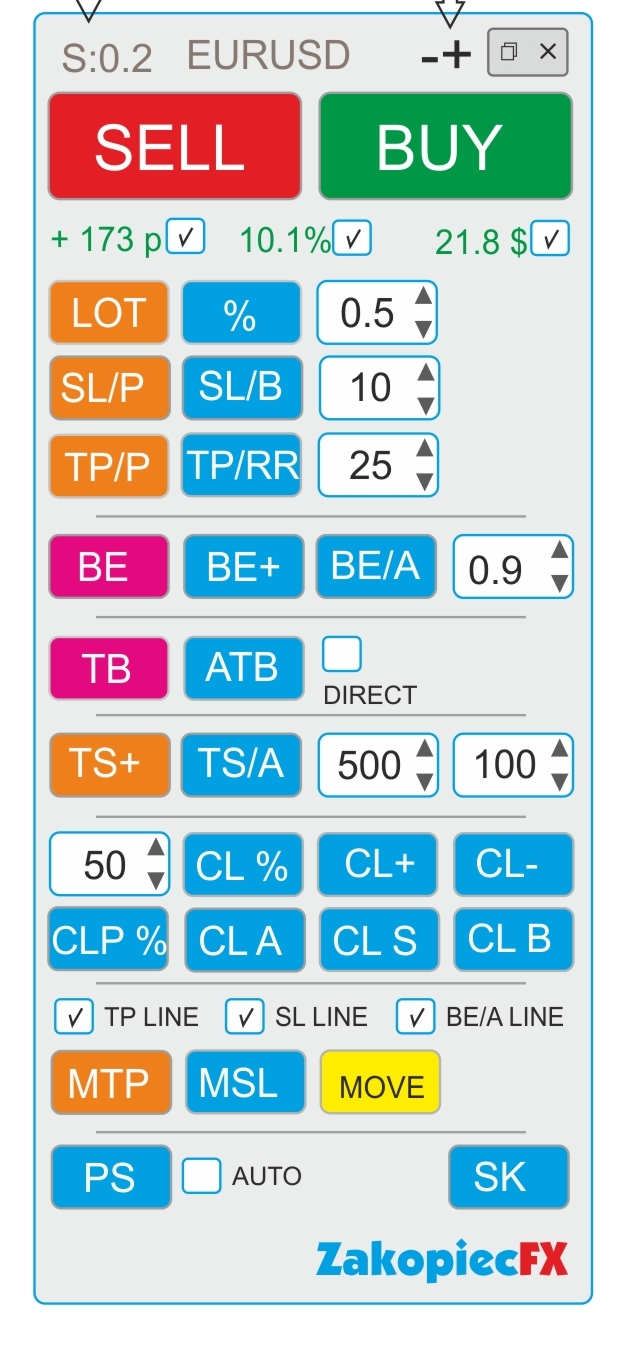
- ELEGANT Beauty look like on a screenshot
- FAST not to much complicated code and slowly
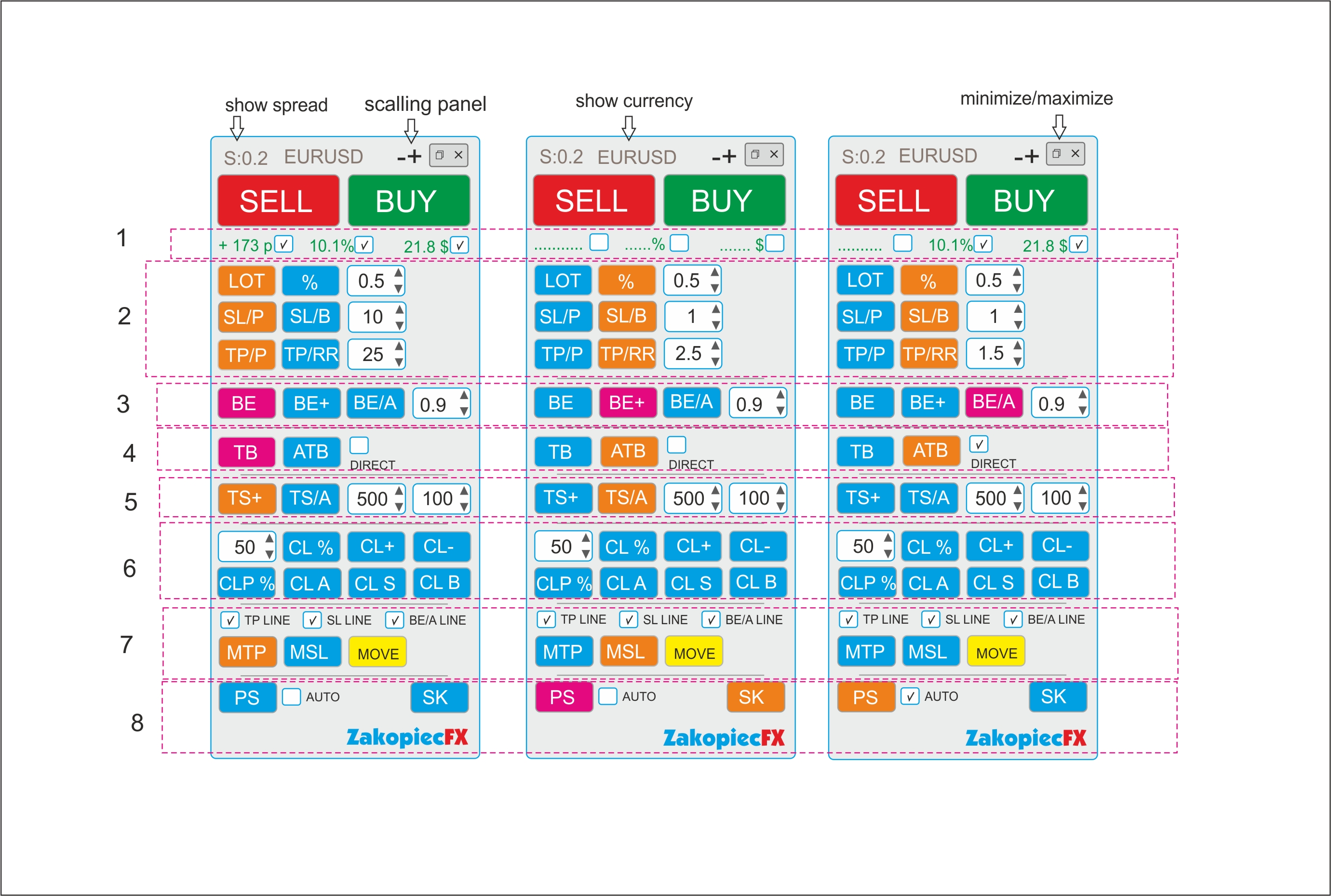
- minimize and maximize the panel
- use a strategy tester (for testing)
- shows spread
- shows the currency
- possibility to move the panel to any place on the chart

- (-) and (+) scaling on top panel
B) Section Settings (Inputs)
- automatic scalable in the settings (true/false)
- setting the magic number
- comment setting
- SL line color
- SL line style
- TP line color
- TP style style
- color line BE, BE+, BE/A
- style line BE, BE+, BE/A
- MTP color line
- MTP style line
- MSL color line
- MSL style line
-C) Hot Keys Settings (Inputs) - setting option
- Buy (B)
- Sell (S)
- close percent % (A)
- Close All (C)
- Close Profit (P)
- Close loss (L)
- Breakeven BE (W)
- Breakeven Average BE/A (Q)
- showing the line to shift TP (MTP) (E)
- showing the line to shift SL (MSL) (R)


Section 1

  • If the selected shows the value in pips (points), in currency, percentage. Choosing any to be marked

Section 2

BUTTONS (LOT and %)
- buttons switch between (LOT) and (%). The buttons change the use of risk (lots or %)
Example:
- Turn on the button (LOT) - the button is turned off (%)

- button LOT enabled (Orange) is % off (Blue) and vice versa.
- In the field, enter the amount of LOTS if (LOT), percentage if (%)
- you can use arrows to change the value

BUTTONS SL/P and SL/B

The SL/P and SL/B buttons switch each other
Example:
SL/P enabled (Orange) is SL/B off (Blue) and vice versa.
SL/P means the size of SL in pips (points). Value in the field or changed with arrows
SL/B means SL above or under the candle (bar). How many last candles (bars) - value in the field or changed with arrows

BUTTONS (TP/P and TP/RR)
- buttons switch between (TP) and (TP/RR). The buttons set the distance for profit
Example:
- Turn on the button (TP/P) - the button is turned off (TP/RR)

- TP/P enabled (Orange) isTP/RR off (Blue) and vice versa.
- In the field, enter the amount of pips(points) if (TP/P), risk reward if (TP/RR)

- Value in the field or changed with arrows

Section 3

-The BE button is clicking (PINK) Not ON/OFF.
- After clicking if the order is profitable, the SL* sets to profit.
-Value set in the field.
- If there are more orders, each profitable set SL* to their own profit (be)
- Value in the field or changed with arrows


-The BE+ button is clicking( PINK).
-After clicking if the order is profitable, the SL* sets to profit. Value set in the field.
-If there are more orders, the clicking sets the AVERAGE BE for profit orders. (SL*)
-If there is some non -profit, it does not move SL


-The BE/A button is clicking (PINK).
-After clicking, if all orders have a minimum average profit, it sets all SL* to profit in a common place. If there is no average profit, it does not move SL
-Value set in the field.


Section 4

-TB is the clicking (PINK) button.
-After clicking, SL* is moved to below or above the last closed candle (bar).
-If there are more orders, all SL are moved to below or above the last closed candle (bar).


-ATB is ON/OFF (ORANGE) button. Auto Traling Bar (Candle)
-After ON, All SL * is moved to below or above the last closed candle (bar).
- If still ON, after closing the next candle, SL moved, and again, and again
- Marked box DIRECT moved only if closed candle is this some direction (if buy candle must be bulish and vice versa)


Section 5
- TS is ON/OFF button (ORANGE). Is order (orders) is profitable for example 500 point SL * moved to 100 points.
-Each order has separate TS. Value in the field or changed with arrows

-TS/A is ON/OFF button (ORAGNE) Trailing SL Avarage all open orders.
-Value in the field or changed with arrows


Section 6

CL% button is clicking (PINK). After click is closing % all orders
CLP % button is clicking (PINK). After click is closing % just profitable orders

CL+ button is clicking (PINK). After click is closing all profitable orders
CL- button is clicking (PINK). After click is closing all loss orders
CLA button is clicking (PINK). After click is closing all orders

CLS button is clicking (PINK). After click is closing all Sell orders
CLB button is clicking (PINK). After click is closing all Buys orders

Section 7

Marked box TP line show TP line before open orders on chart
Marked box SL line show SL line before open orders on chart
Marked box BE/A Line show BE Average line on chart

MTP is ON/OFF button. After click on chart showed TP line for set new TP for all orders.
Move this line new place and after push button MOVE (yellow) all TP* set new place.
After this operation button MTP is OFF

MSL is ON/OFF button. After click on chart showed SL line for set new SL for all orders.
Move this line new place and after push button MOVE (yellow) all SL* set new place.

After this operation button MSL is OFF


Section 8

PS button is Printshot chart (all charts will be better) and save default folder
IF marked box auto – mean make auto screen after every open order
SK button is ON/OFF hot keys. If ON hot keys worked. If OFF doesn't work hot keys


*If some orders have not TP or(and) SL set new


Arquivos anexados:

Respondido

1
Desenvolvedor 1
Classificação
(51)
Projetos
69
35%
Arbitragem
4
25% / 75%
Expirado
0
Livre
2
Desenvolvedor 2
Classificação
(390)
Projetos
416
30%
Arbitragem
74
19% / 72%
Expirado
52
13%
Trabalhando
3
Desenvolvedor 3
Classificação
(85)
Projetos
169
44%
Arbitragem
3
67% / 0%
Expirado
5
3%
Trabalhando
Publicou: 1 código
4
Desenvolvedor 4
Classificação
(469)
Projetos
487
75%
Arbitragem
6
67% / 17%
Expirado
0
Livre
5
Desenvolvedor 5
Classificação
(9)
Projetos
19
16%
Arbitragem
3
67% / 0%
Expirado
0
Livre
6
Desenvolvedor 6
Classificação
(41)
Projetos
78
40%
Arbitragem
0
Expirado
0
Livre
7
Desenvolvedor 7
Classificação
(168)
Projetos
200
48%
Arbitragem
5
20% / 60%
Expirado
2
1%
Trabalhando
8
Desenvolvedor 8
Classificação
(297)
Projetos
476
40%
Arbitragem
105
40% / 24%
Expirado
81
17%
Ocupado
Publicou: 2 códigos
9
Desenvolvedor 9
Classificação
(54)
Projetos
102
23%
Arbitragem
12
25% / 17%
Expirado
13
13%
Livre
10
Desenvolvedor 10
Classificação
(322)
Projetos
499
67%
Arbitragem
5
40% / 0%
Expirado
4
1%
Livre
Publicou: 8 códigos
11
Desenvolvedor 11
Classificação
(69)
Projetos
146
34%
Arbitragem
13
8% / 62%
Expirado
26
18%
Livre
Publicou: 6 códigos
Pedidos semelhantes
24/7 Pick-and-Pack Bot 30 - 200 USD
Title: MT5 EA for XAUUSD M5 – Auto SL/TP + News Filter – Mobile Compatible Strategy: 1. Pair: XAUUSD, Timeframe: M5 2. Entry Buy: EMA(9) crosses above EMA(21) AND RSI(14) > 50 3. Entry Sell: Opposite 4. Exit: SL = 150 points, TP = 300 points. No trailing. 5. Risk: 1% of balance per trade, lot size auto-calculated 6. Time filter: Trade only 08:00–18:00 GMT+2, Mon-Thu. No Friday trades. 7. News filter: Pause 30min
24/7 Pick-and-Pack Bot 30 - 200 USD
Title: MT5 EA for XAUUSD M5 – Auto SL/TP + News Filter – Mobile Compatible Strategy: 1. Pair: XAUUSD, Timeframe: M5 2. Entry Buy: EMA(9) crosses above EMA(21) AND RSI(14) > 50 3. Entry Sell: Opposite 4. Exit: SL = 150 points, TP = 300 points. No trailing. 5. Risk: 1% of balance per trade, lot size auto-calculated 6. Time filter: Trade only 08:00–18:00 GMT+2, Mon-Thu. No Friday trades. 7. News filter: Pause 30min
Looking for a trading bot / Expert Advisor that wont make dozens of small successful trades and then one or two unsuccessful trades that wipes out your account Requirements: - MT4 capable - Use on the major currency pairs - although open to other currency pairs - Be successful in monetary terms not necessarily in how many successful trades
I need a MT5 Prop firm challenge passing EA with strict prop firm rules compliance. Any strategy can be used but win rate should be above 70%. It should have high impact news filter and a dashboard panel to monitor daily drawdown, target profit, current balance, etc. It should not have martingale, grid, hedging, etc
I want a MetaTrader 5 Expert Advisor based on Smart Money Concepts (SMC) and Power of 3 (PO3). Strategy logic: 1. Accumulation (Asian Session) - Define Asian session range (time customizable) - Mark Asian high and low - No trades during this session 2. Manipulation (London Session) - Detect liquidity sweep above Asian high or below Asian low - Must be a clear breakout with rejection (not slow drift) 3. Distribution (
Hello Developers I have a Project to get done! i have a simple strategy can you please create the automated forex ea to execute my trading strategy? i need custom ea for tradingview and mt4/mt5 correction: i need a tradingview indicator created that tells me when to buy or sell. and ea in mt4/mt5
Pro firm setup 30+ USD
Hi, I am starting a futures prop firm. Are you able to help me get data feed for this with no delays and can handle many traders on the platform. Additionally, are you able to handle charts for us
Mam kody EA Bot. Chciałbym je dokończyć, dopracować i ukończyć projekty. Chciałbym otrzymać pliki SET po ukończeniu EA. Jeśli jesteś zainteresowany, skontaktuj się ze mną. Szukam doświadczonego programisty do stworzenia dedykowanego doradcy eksperckiego (EA) do tradingu. Programista powinien posiadać solidną wiedzę z zakresu MT5, logiki strategii, wskaźników, zarządzania ryzykiem i backtestingu. Doświadczenie w
I am looking for an experienced developer to create a custom Expert Advisor (EA) for trading. The developer should have strong knowledge of MT4/MT5, strategy logic, indicators, risk management, and backtesting. Experience in building reliable and professional trading robots is preferred. Please contact me if you have done similar projects before. 9817724000
I am looking for an experienced MQL5 developer to create a custom technical indicator for MetaTrader 5. The indicator should combine Supertrend logic with Support/Resistance pullback levels to generate high-probability entry signals. 1. Core Logic The indicator must follow a two-step confirmation process: Trend Identification: Use the Supertrend indicator to determine the primary trend. Entry Signal (The

Informações sobre o projeto

Orçamento
80+ USD