Monitor Dashboard

Clear EA & Internal Strategy Performance Separation

The core purpose of MONIT Dashboard MT5 is to help traders clearly identify where their real performance comes from.

On a MetaTrader 5 account, the global balance result is often not enough. A profitable account can hide a weak EA, an overactive strategy, a manual trading loss, or one specific Magic Number group generating most of the drawdown. This becomes even more important when several Expert Advisors are running on the same account, or when a single advanced EA contains multiple internal strategies.

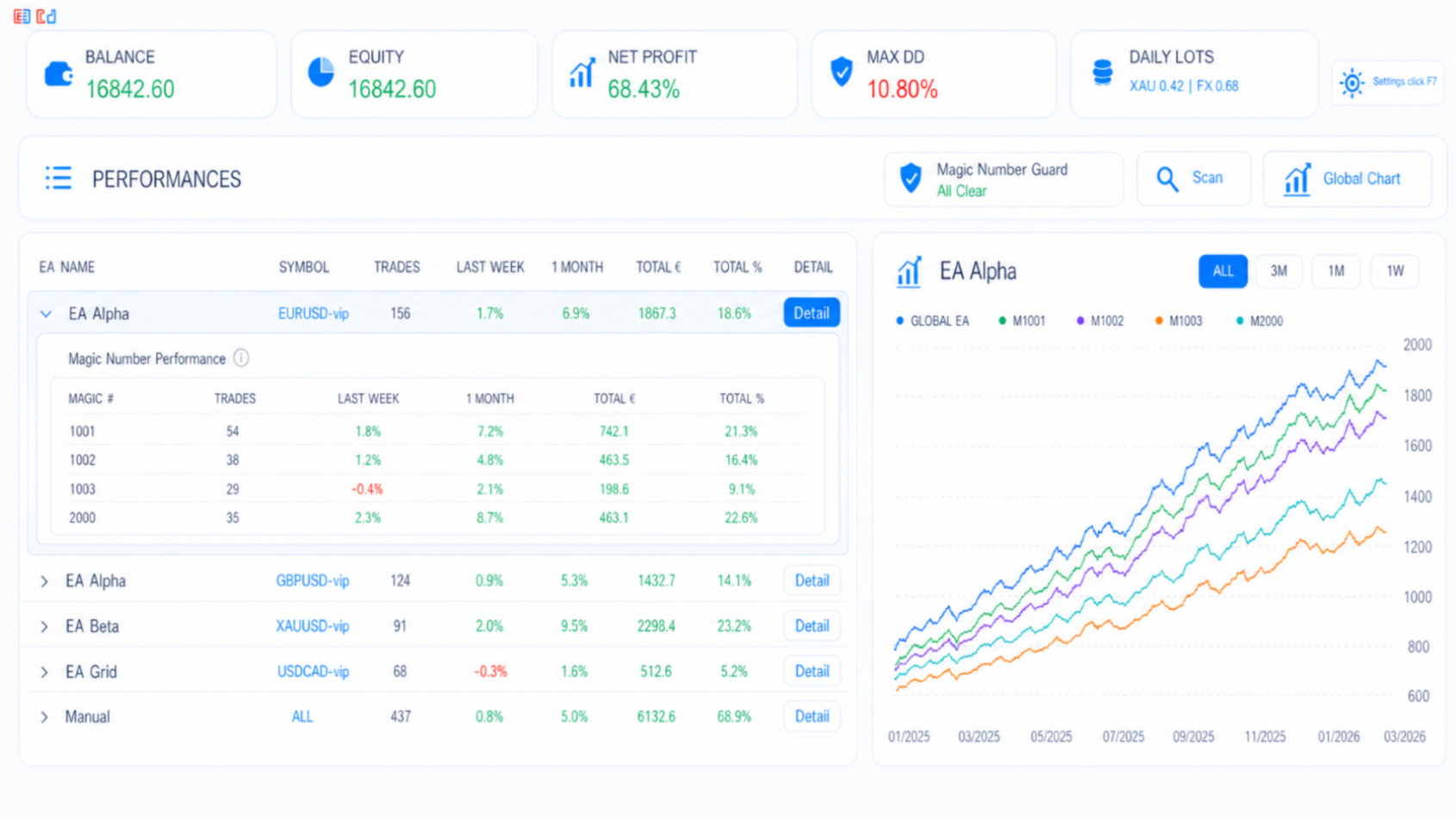
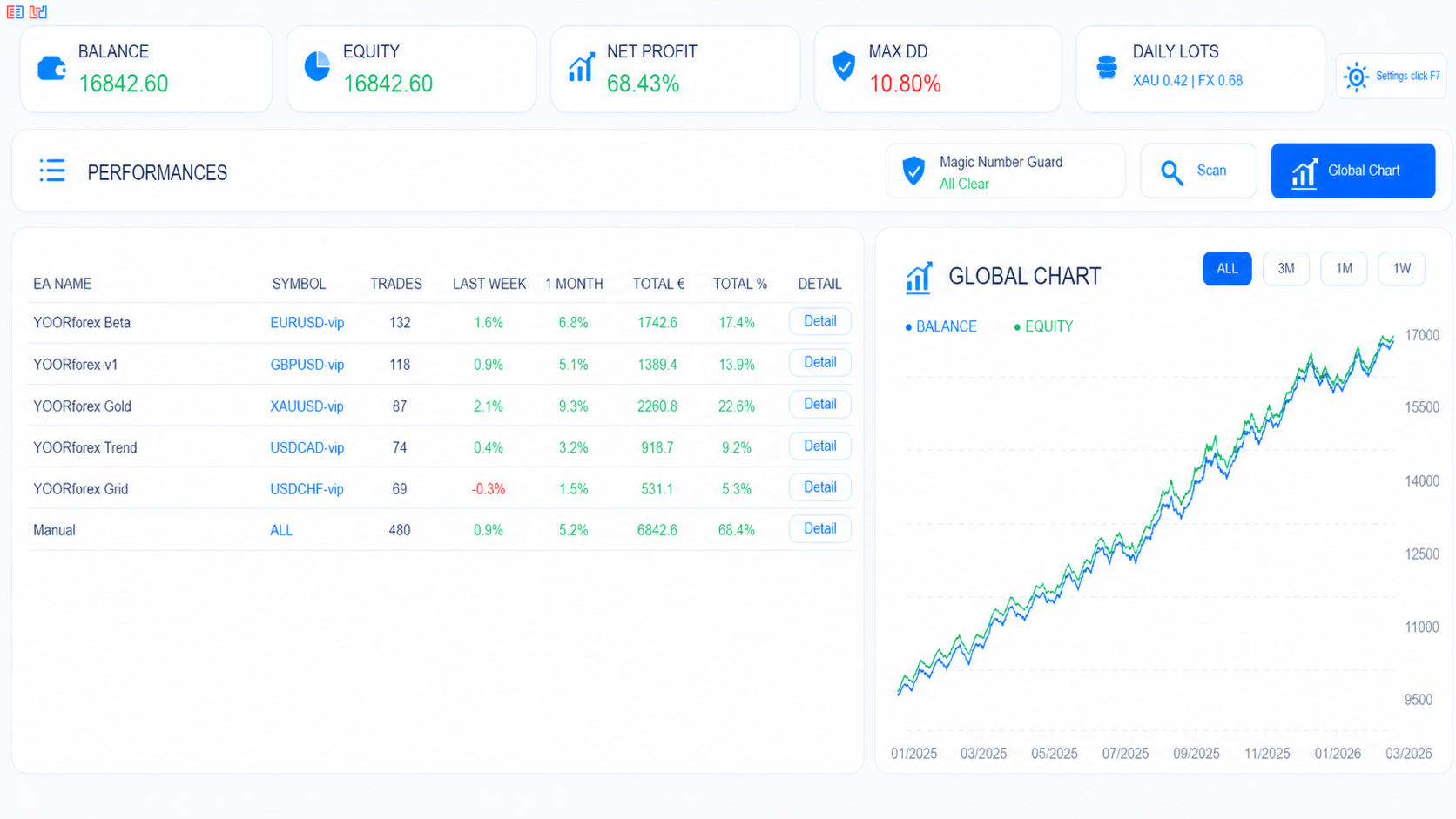
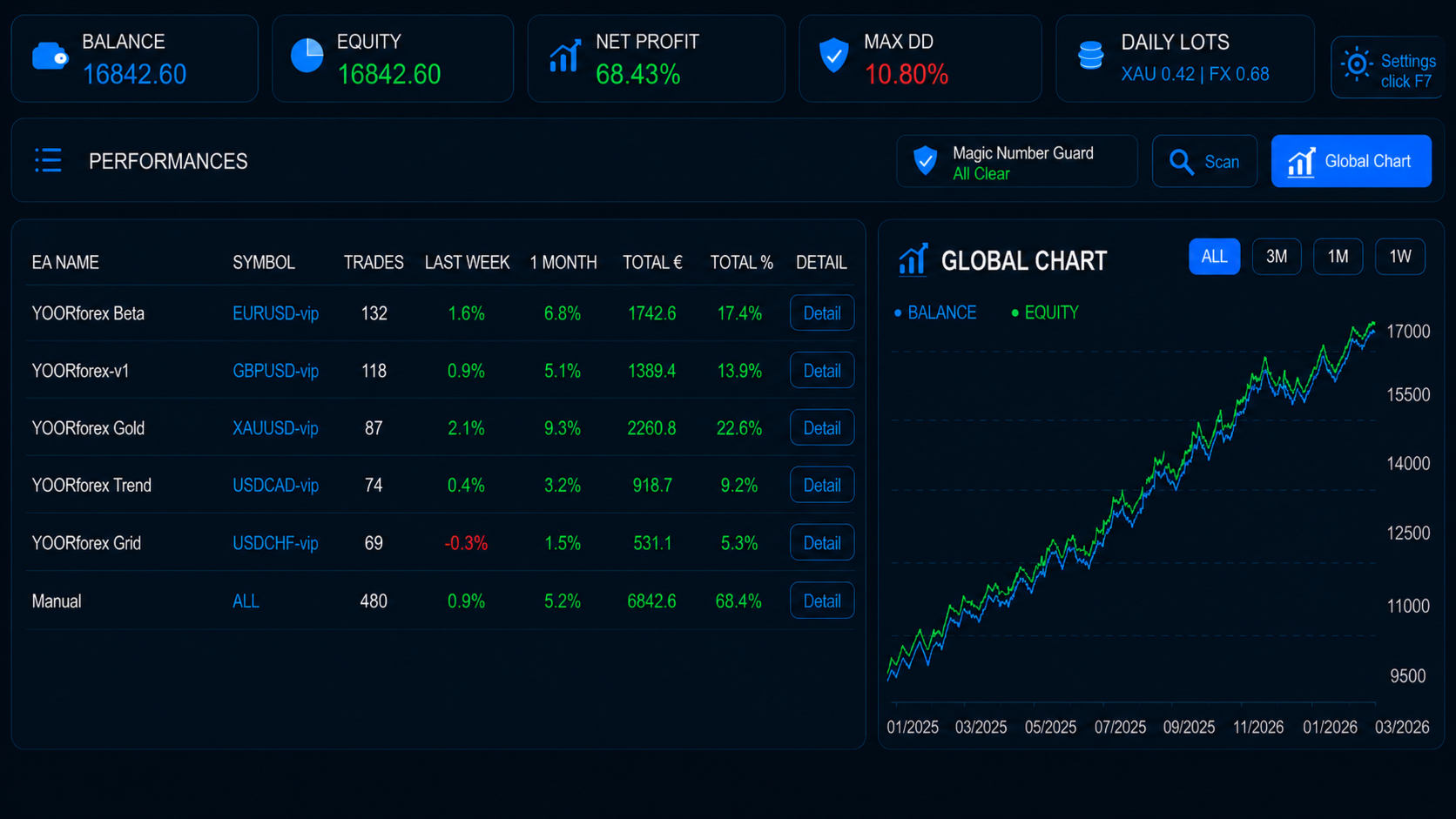
MONIT Dashboard MT5 separates and displays performance by EA, symbol, manual trades and Magic Number groups, allowing you to clearly compare each source of performance.

This means you can quickly see:

  • which EA is profitable or underperforming;
  • which symbol contributes the most to profit or drawdown;
  • how manual trades compare to automated trades;
  • which Magic Number group is responsible for specific results;
  • which internal strategy inside the same EA is really working;
  • which strategy should be optimized, reduced, disabled or monitored more closely.

For multi-strategy Expert Advisors, this is especially useful. If one EA contains several systems such as trend, grid, breakout, hedge, scalping or recovery modules, each strategy can be tracked through its own Magic Number group. Instead of judging the EA only as a single block, you can analyze the contribution of each internal strategy separately.

The main value of MONIT Dashboard MT5 is simple: you no longer monitor only your global account result — you understand exactly which EA, symbol or internal strategy is creating that result.

Regarding PROP firm compatibility, we confirm at least that with FTMO, there is absolutely no restriction, or whitelisting need. Such a tool helps improving the win-win relation of funded accounts. Feel free to ask your provider in case you want to be sure.


Installation & Quick Start

- setup your email in MT5

- use one dedicated chart for MONIT Dashboard MT5. Do not attach it to every chart.

- do an initial scan, you will receive by email all informations ready to configure the EA monitor


How to Use MONIT Dashboard MT5

Basic Usage

  1. Attach the dashboard to one chart.
  2. Let your other EAs run normally on their own charts.
  3. Check the top widgets for account status:
    • Balance
    • Equity
    • Net Profit
    • Max DD
    • Daily Lots
  4. Use the Performances table to compare EAs, symbols, manual trades and Magic Number groups.
  5. Use the Detail buttons to inspect more specific performance information when needed.
  6. Use Global Chart to view balance and equity evolution.
  7. Click Scan to check Magic Number safety.

Magic Number Guard Usage

Manual Scan

Click the Scan button to manually check the current Magic Number configuration across your active MT5 charts.

Possible results:

All Clear
No Magic Number conflict was detected.

Problem Detected
At least one possible Magic Number conflict was detected. Check the report and correct the Magic Number settings of the concerned EA charts.

You will receive an email with all issues if there is. Also, a scan report with correct syntex that you can then input in the EA monitor to begin to see performances.


Best Practice

Use unique or several Magic Number for each EA, symbol or internal strategy group.

For example:

  • EA 1 / Strategy 1 → Magic Number 1001, 1003, 1004
  • EA 1 / Strategy 2 → Magic Number 1002
  • EA 2 / Main Strategy → Magic Number 2001, 2002
  • Manual trades → no EA Magic Number

This allows MONIT Dashboard MT5 to separate performance clearly and makes the Magic Number Guard more useful.

Important Notes

MONIT Dashboard MT5 does not open, close or modify trades.

It is designed to monitor:

  • account performance;
  • EA performance;
  • manual trades;
  • symbol performance;
  • Magic Number groups;
  • internal strategies inside the same EA;
  • possible Magic Number conflicts.

For best results, test the utility first on a demo account and confirm that the displayed information matches your trading setup.
Рекомендуем также
You already have positions open. The question is whether the episode is still under control. Floating P/L tells you the result. It does not tell you the condition. A position group can still show a small gain while inventory load, hold time, adverse drift, weakening recovery, and spread expansion are already building pressure in the background. By the time the P/L number turns negative, the episode is already stressed. Episode Health Monitor was built to surface those conditions before they beco
Risk-o-meter is a Risk calculator Panel designed to help people who are new to trading, better understand how much they are risking for potential profit or loss. Inputs: 1. Enter your Risk in % or currency 2. Enter your Return Ratio 3. Enter your Lot Size Results: 1. SL line 2. TP Line Features: 1. By moving the SL line, lot size will adjust to keep Risk fixed. 2. By moving the TP line, Risk Ration will adjust to keep Risk fixed.  
TradePilotmt5
Hossein Khalil Alishir
TradePilot Expert Advisor (EA) for MetaTrader 5 TradePilot is a professional and user-friendly Expert Advisor (EA) for MetaTrader 5 (MT5) . It simplifies automated trading , risk management , and trade execution with a smart trading panel . Perfect for beginners and experienced traders looking for a reliable trade manager EA with automated lot size calculation and smart position management. Key Advantages User-Friendly Trading Panel: Customizable panel with buttons and hotkeys for fast ex
ID Trade_Bot BS - an effective tool for automated trading using RSI Trade_Bot BS is an efficient solution for automated trading based on RSI, allowing flexible parameter customization and risk management. Thanks to the ability to choose a trading mode, dynamic Stop-Loss and Take-Profit levels, and trading mode adjustment (buying, selling, or both), it is suitable for various trading strategies. Key Features: Uses the RSI indicator to determine market conditions. Automatically opens an
Smart trail sl Pro
Emerson Capiral Romero
Here is your fully updated, high-converting product description layout. It has been completely re-written to weave in all of your new pro-tier features—the on-chart control panel , the percentage-based partial take-profit matrix , the timeframe global persistence caching , and crystal-clear Buy/Sell multi-mode execution math . Short Description (Max 190 c Full Description Smart Trail SL Pro is the ultimate institutional-grade risk, capital preservation, and trade management utility engineered s
Mine Farm is one of the most classic and time-tested scalping strategies based on the breakdown of strong price levels. Mine Farm is the author's modification of the system for determining entry and exit points into the market... Mine Farm - is the combination of great potential with reliability and safety. Why Mine Farm?! - each order has a short dynamic Stop Loss - the advisor does not use any risky methods (averaging, martingale, grid, locking, etc.) - the advisor tries to get the most
One sharp gold move can change the whole account situation in seconds. When several XAUUSD positions are open, daily loss, floating drawdown and risk room can move faster than most traders can calculate manually. Equity Protector Pro MT5 is built for that situation. It keeps the main account-risk numbers visible on the chart and helps the trader manage risk through predefined protection rules. This is not a signal system. It does not predict market direction, does not generate buy or sell entrie
Inverted_Chart_EA Utility Expert Advisor Inverted_Chart_EA creates and maintains a mirror-inverted chart of any symbol and timeframe. It automatically generates a custom instrument (e.g. US30_INV ) and keeps its price history updated in real time, with bars mirrored around a chosen pivot. This utility gives traders a new way to analyze the market from a different perspective by flipping the chart upside down. Why use an inverted chart? Highlight hidden patterns – price formations that look ordin
DDKiller Pro
Njaratahiry Michael Randrianiaina
Stop Blowing Your Account. Once and For All. DDKiller Pro is the MT5 risk guardian that runs silently on your chart and shuts down trading the moment you hit a limit — whether you're grinding a prop firm challenge or managing your own CFD account. The problem every trader knows: You set your rules. You break them anyway. One revenge trade. One overleveraged position. One session that erases a month of gains. DDKiller Pro removes that decision from your hands entirely. What it does: The second yo
Signal Copy Multiplier automatically copies trades on the same account, for example, to get a better entry and adjusted volume on a subscribed signal. MT4-Version:  https://www.mql5.com/de/market/product/67412 MT5-Version:  https://www.mql5.com/de/market/product/67415 You have found a good signal, but the volume of the provider's trades is too small?  With Signal Copy Multiplier you have the possibility to copy trades from any source (Expert Advisor, Signal, manual trades) and change the volume
| Fully-automated Smart Money Concept (ICT) inspired trading solution with multi-strategy capabilities | Built by a grid trader >> for grid traders.  This is MT5 version, click  here  for  Blue CARA MT4  (settings and logics are same in both versions)     Real monitoring signal  -->  Cara Gold Intro Blue CARA EA   ('CARA') - short for  C omprehensive  A lgorithmic   R esponsive   A dvisor is a next-gen  multi-currency    multi-timeframe  EA base on the widely known (and perhaps the most popul
Trade Copier Professional — Локальное решение для копирования сделок  Trade Copier Professional — это надёжная локальная система копирования сделок для MetaTrader 4/5. Она позволяет трейдерам мгновенно дублировать позиции на нескольких счетах на одном компьютере, оснащена встроенными средствами безопасности и профессиональной панелью управления.   Обзор   Советник работает в режимах Master и Slave из одного файла, с лёгким переключением. Сделки могут копироваться между терминалами MT4 и MT5 бе
Tool Auto Modify SLTP – Protect Your Trades, Optimize Your Strategy In trading, risk is always present. Just one forgotten SL/TP can turn a promising trade into a loss. Even experienced traders occasionally make mistakes. That’s why Tool Auto Modify SLTP was created – to keep you protected and let you focus on your strategy. Key Features: Manage Orders for All Symbols: Monitor and adjust SL/TP for all your trading pairs. Three Flexible Risk Modes: Point-Based: Set fixed SL/TP distances. Account
Trading Utility for Forex Currency Pairs Only not for Gold  Functions Auto Lot Calculation based on Risk Auto stoploss  Auto TakeProfit Breakeven Auto Close Half % Close in percentage with respect to the PIPs Pending Orders BuyLimit Sell Limit with distances BuyStop Sell Stop    with distances Trading Informations Risk in percentage For Multiple trades Combine Takeprofit and Combine Stoplosses
Bober Real MT5
Arnold Bobrinskii
4.88 (16)
Bober Real MT5 — полностью автоматический советник для торговли на рынке Forex. Робот создан в 2014 году и за этот период сделал множество прибыльных сделок, показав более 7000% прироста депозита на моем личном счете. Было выпущено много обновлений, но версия 2019 года считается самой стабильной и прибыльной. Робот можно запускать на любых инструментах, но лучшие результаты достигаются на EURGBP , GBPUSD , таймфрейм M5 . Робот не покажет хорошие результаты в тестере или на реальном счете, если
Smart TP SL Manager MT5 is a position management utility for MetaTrader 5. It is designed to work with positions that are already open and to help manage protection rules directly from the chart. Many trading problems happen after the entry. A position may be opened correctly, but then left without Stop Loss, moved to breakeven too late, or managed inconsistently when several trades are open. This tool is built for that part of the workflow. The utility does not search for entries, generate trad
Timeframe Trading Limiter
AL MOOSAWI ABDULLAH JAFFER BAQER
Timeframe Trading Limiter is a professional risk management and trade discipline utility designed for MetaTrader 5. It empowers traders to enforce strict, automated limits on the number of trades and the maximum allowable drawdown within each trading period, based directly on the chart timeframe selected. Whether you are a discretionary trader prone to overtrading, a prop firm challenge participant needing to adhere to strict rules, or an algorithmic trader running multiple strategies, this tool
Net Exposure & Net Average Price is a lightweight utility Expert Advisor for MetaTrader 5 hedge accounts . This tool helps traders instantly understand their true market exposure when multiple Buy and Sell positions are open on the same symbol. What the EA Does The EA displays a clear on-chart panel showing: Total Buy Trades Total Buy Lots Total Sell Trades Total Sell Lots Net Lots (Net Exposure) Net Average Price (hedge-adjusted breakeven) The Net Average Price represents the true breakeven
Perfect Trade EA Indicator 2026 for XAUUSD MT5 Премиальный многоуровневый самообучающийся индикатор с режимом автоторговли для XAUUSD Perfect Trade EA Indicator 2026 — это не просто индикатор и не обычный советник с примитивным входом по шаблону. Это премиальный торговый комплекс для MetaTrader 5, созданный для работы с XAUUSD, который объединяет в себе: - многоуровневый анализ рынка; - интеллектуальную фильтрацию сигналов; - режим автоматической торговли; - продвинутое сопровождение сделки;
This EA is there to take your trade closing stress away. Quickly close as many trades as you have opened at the click of a button, INCLUDING PENDING ORDERS. This works on the MT5 platform whether it be currencies, Indices, stocks or Deriv synthetic indices. I have saved it under utilities as it is a utility, however, to install this, you have to save the file in you "EA" folder. That is; Go to "File", then "Open Data Folder", "MQL5" and then "Experts". Paste this file there. Restart MT5 and you'
Guard Scalper EA is a Scalper Robot based on market trend analys. Guard Scalper EA will look for potential High Probability entries as trigger for entry into the market. Guard Scalper EA is good for use on pairs with low spreads such as EURUSD, GBPUSD, or USDJPY Recommendation : Please add and running  Guard Scalper   EA on low spread pairs such as EURUSD, GBPUSD, or USDJPY on M5 timeframes. You can running on that pairs simultanuously Attention : You can start to trade with $ 300 Minimum initi
Утилита для автоматического управления ордерами и рисками.   Позволяет взять максимум с прибыли и ограничить свои убытки.   Создан практикующим трейдером для трейдеров.   Утилита  проста в использовании,  работает с любыми рыночными ордерами, открытыми трейдером вручную или при помощи советников. Может фильтровать сделки по магическому номеру. Одновременно утилита может работать с любым количеством ордеров.  Имеет такие функции: 1. В ыставление уровней стоплосс и тейкпрофит; 2. З акрытие сделок
Turbo Close All is a powerful and versatile script designed to help traders quickly and efficiently manage their trading positions and pending orders on MetaTrader 5. With its advanced features and customizable settings, this script is an essential tool for traders who want to streamline their trading process and maintain control over their positions and orders. Key Features: Comprehensive Closing Options: Turbo Close All allows you to close all market positions and/or delete pending orders bas
DYJ MOBILE GAMING TRADING WINNER может использовать ваши различные терминалы (MOBILE PHONE, WEB, TRADINGVIEW, MT5) для ручной торговли, а затем автоматически обрабатывается EA. Мобильная торговля может использовать различные режимы сетки советника, режим скальпирования, режим хеджирующего арбитража и режим независимого ордера для открытия позиций вручную. Советник может автоматически устанавливать стоп-лосс для мобильного открытия. И используйте свой мобильный телефон, чтобы открывать сетку,
Менеджер символов или Сеточный менеджер, разработан для группировки ордеров в одну позицию (по символу и по направлению). Эта утилита будет полезна сеточникам и мультивалютникам, тем у кого может быть открыто множество ордеров по нескольким парам. Вы сможете видеть общее количество лотов, общую прибыль, и устанавливать виртуальные стоплосс и тейкпрфит. Для установки реального ТП (или СЛ) необходимо сначала задать виртуальное значение, а затем ввести в этой ячейке команду: "set". Если вы хотите
Финансовый Робот SolarTrade Suite: LaunchPad Market Expert - предназначенный для открытия торговых сделок! Это торговый робот, который использует особые инновационные и передовые алгоритмы для рассчета своих значений, Ваш Помошник в Мире Финансовых Рынков. Испольуйте наш набор индикаторов из серии SolarTrade Suite чтобы лучше выбрать момент для запуска этого робота. Проверьте другие наши продукты из серии SolarTrade Suite внизу описания. Хотите уверенно ориентироваться в мире инвестиций и фи
Fast execution utility for manual traders. Drag-and-drop visual trading, split take-profits, and single-ticket management system. Speed, Precision, and Risk Control. KAB Trade Manager is built for traders who need to execute fast but keep risk tight. It integrates all essential tools into floating, collapsible windows. Core Functions: Instant Order Execution:   Market and Pending orders with automatic Lot sizing based on SL distance. Focus Ticket Manager:   A dedicated window to monitor and mana
Trading panel for manual trading. Has a fairly wide functionality. Allows you to automatically calculate the order size, open both market and pending orders. It has a wide range of options for closing orders, it is possible to partially close orders, close orders after reaching a certain profit or loss, separately close profitable and unprofitable, buy and sell, as well as pending orders. The panel also contains a simple implementation of a grid of pending orders, reverse and lock functions, tr
Universal Counter-Trend Grid EA — Smart Grid Trading, Redefined. For MT4 version :  https://www. mql5.com/en/market/product/143356 Tired of EAs that only work in one market condition? Universal Counter-Trend Grid EA is engineered to capitalize on the market's most rewarding moments — when price stretches too far and is ready to snap back to equilibrium. With intelligent grid technology and a multi-layer confirmation system , this EA captures opportunities that manual traders often miss.
С этим продуктом покупают
Quant AI Agents
Ho Tuan Thang
5 (1)
Quant AI Agents are independent trading Expert Advisors. Instead of trading using a fixed strategy like other conventional EAs, Quant AI Agents   is a   multi-agent AI trading framework   that turns natural-language strategy prompts into live.  WANT THE SAME RESULTS AS MY LIVE SIGNAL?   Use the exact same brokers I do:   IC MARKETS , IC TRADING   .  Unlike the centralized stock market, Forex has no single, unified price feed.  Every broker sources liquidity from different providers, creating un
AI Agent Supervisor is NOT an Expert Advisor. AI Agent Supervisor   is a   multi-agent AI risk & portfolio supervisor   that watches every EA on your account and intervenes in real time.  WANT AN AI PORTFOLIO MANAGER WATCHING YOUR FLEET 24/7?   Run your fleet on the same brokers I do:   IC MARKETS , IC TRADING   .  Unlike the centralized stock market, Forex has no single, unified price feed.  Every broker sources liquidity from different providers, creating unique data streams. The Supervisor r
Farmed Hedge Yield Farming | All Markets (Manual - Hybrid - Semi/Automated EA) MULTI-ASSET SUPPORT Trade any asset available on your broker - Forex: Major, Minor, Exotic pairs - Crypto: BTC, ETH, XRP, SOL, BNB - Stocks: Apple, Tesla, Amazon, Google, etc. - Commodities: Gold, Silver, Oil, Gas - Indices: US30, NAS100, SPX500, DAX40 - Any CFD your broker offers VERIFIED TRADING RESULTS - Farmed Hedge Yield Axi Copy:  https://www.mql5.com/en/signals/2356376 - Farmed Hedge Yield Exn Copy:   https:/
YuClusters
Yury Kulikov
4.93 (42)
Внимание: Ознакомиться с работой программы можно с помощью бесплатной версии  YuClusters DEMO . YuClusters это профессиональная система анализа рынка. Для трейдера открываются уникальные возможности анализа потока ордеров, объемов торговли, движения цены используя различные графики, профили, индикаторы, графические объекты. YuClusters оперирует данными на основе ленты сделок или тиковой информации, в зависимости от того, что доступно в котировках финансового инструмента.  YuClusters позволяет с
Суть: используя юзер-интерфейс вы настраиваете параметры, которым должен соответствовать график до входа в позицию(позиции), настраиваете какие входные модели использовать, настраиваете правила по которым надо завершать торговлю и планирование. А всю рутину по наблюдению за графиком и исполнению Lazy Trader берет на себя. полное описание  :: 3 ключевых видео [1] -> [2] -> [3]  :: [ ДЕМО-ВЕРСИЯ ] Что он умеет? - Понимает структуру рынка по Ларри Вильямсу - Понимает Swing-структуру рынка по Майк
MT5 Trading Deck
Manuel Michiels
5 (2)
One button. One trade. MT5 Trading Deck is a hotkey trading panel for MetaTrader 5 that turns the platform into a keyboard-driven execution cockpit. Stop loss, take profit and lot size are pre-calculated for every key; the moment you press, a market order is live on the broker. A complete technical user manual is attached in the product Comments section. It documents every input parameter, the full hotkey map, the recommended Stream Deck XL layout, and the advanced workflows for Pre-Limit orders
Gamma Edge Pro MT5 — GexBot Classic API Integration Gamma Edge Pro   brings institutional-grade   Gamma Exposure (GEX) data   directly onto your MetaTrader 5 chart — the same data used by professional options traders to anticipate price magnets, hedging flows, and dealer positioning. Powered by the   GexBot Classic API , this indicator automatically maps options market data from US-listed instruments onto any   MT5 CFD instrument   — Forex pairs, Gold, indices, and more — with intelligent price
Unlimited Trade Copier Pro - это мощный инструмент для удаленного копирования сделок между несколькими счетами MetaTrader 4/MetaTrader 5, расположенными удаленно друг от друга, по сети интернет. Это идеальное решение для провайдеров сигналов, которые хотят поделиться своей торговлей с другими трейдерами по всему миру. Один поставщик может копировать сделки на неограниченное количество счетов-получателей, а один получатель также может копировать сделки неограниченного количества провайдеров. Пост
Crystal Trade Manager – Advanced MT5 Risk and Trade Control Utility Overview Crystal Trade Manager (CTM) is a professional MetaTrader 5 utility designed for risk management, trade automation, and instant execution control. It provides traders with an integrated system for protecting equity, managing daily drawdowns, controlling lot sizes, and applying automation features such as automatic SL/TP, break-even, and trailing stop. The tool is suitable for manual traders, prop-firm challenge particip

EA price is reduced to 50% discount for limited time period. Spot vs Future Arbitrage EA for MT5 Spot vs Future Arbitrage EA is an automated Expert Advisor designed for MetaTrader 5 that operates using price differences between Gold spot and Gold futures instruments. The strategy opens positions on both instruments simultaneously to take advantage of temporary differences between spot and futures prices. Requirements The trading account must provide both Gold spot and Gold futures instruments
******************************* ***************** ********************** ***************** ********************** ************************* GoldMine Train — советник по стратегии трендовой торговли для золота. Оператор определяет основное направление тренда и дает команду поезду двигаться. Поезд будет непрерывно КУПИТЬ/ПРОДАТЬ в этом направлении. Объем лота будет зависеть от баланса счета и заданного коэффициента кредитного плеча. Когда оператор меняет направление тренда, поезд останавливае
Mt5 To InterativeBrokers Copier allows you to copy deals from MT5 account to Interactive Brokers. With this, you can run your EA strategy on a MT5 Demo/Real Account, then copy all the deals to Interactive Brokers account real time. Features: 1. Copy or Invert-Copy deals Realtime from MT5 to IB Account. 2. Synchronizing positions of both accounts periodicaly, in case any missing copying. 3. You can choose only Buy position or Sell position. Symbols Setup: General Format:  {MT Symbol} -> {IB S
Introduction Our system is more than just a tool—it’s your personal guide in the dynamic trading landscape. Expertly developed and optimized using advanced strategies, this groundbreaking predictor gives traders a powerful edge. It’s not just about the features; it’s about a trading journey that stands out from the crowd. Get ready for an enhanced trading experience like never before! What It Does Next Candle Prediction: Imagine gaining insights into the market’s next move before it happens. Our
Here is the corrected, MQL5-compliant version of your second product description. I have removed the custom bullet point symbols, cleaned up the list formatting to use standard markdown, and organized the setup guide into clean, numbered steps. PropFolio Command Manager Pro is an advanced, multi-symbol execution terminal designed to automate your custom arrow indicators. Simply enter the name of your arrow indicator into the settings, and the Command Manager will monitor up to 30 currency pairs
Reward Multiplier is a semi-automatic trade manager based on pyramid trading that opens additional orders with the running profit of your trades to maximize return exponentially without increasing the risk. Unlike other similar EAs, this tool shows potential profit/loss and reward to risk ratio before even entering the first trade! Download Demo here  (starting lot is fixed at 0.01) Contact me to get a 7 days trial version of the product with full functionality. Guide + tips here MT4 version  
Trading Chaos Expert
Gennadiy Stanilevych
5 (11)
Этот программный продукт не имеет аналогов в мире, поскольку он является универсальным "пультом управления" торговых операций, начиная от получения торговых сигналов, автоматизации входа в позиции, установки стоп-лоссов и тейк-профитов, а также трейлинга прибыли одновременно по множеству сделок в одном открытом окне. Интуитивно понятное управление экспертом в "три клика" на экране монитора позволяет полноценно использовать все его функции на разного рода компьютерах, включая планшетные. Взаимоде
Features   With MT5 to Interactive Brokers(IB) Trader, you can: 1. Load chart data from IB to MT5, and Analyze with all standard or customer Indicators. 2. Place Orders to IB Account Directly in MT5. 3. Make your Own EAs upon IB Securities by only making minus changes of the trading function. Usage 1) Installation Copy the "Mt5ToIBTraderEn.ex4" and sample files to [MT5 Data Folder]->MQL5->Experts.  2)  MT5 Settings Add the IP Address to the MT5 Allowed URLs in 'Tools->Options->Expert Adviso
TICK CHART SERVICE - Профессиональный сервис тиковых графиков для MT5 tg @eeevleee КРАТКОЕ ОПИСАНИЕ Tick Chart Service - это инновационный сервис для MetaTrader 5, который создает полноценные тиковые графики из любого инструмента в режиме реального времени. Система преобразует поток тиков в кастомный символ, позволяя торговать и ана
Professional Order & Risk Management EA for MT5 Профессиональный инструмент управления ордерами и рисками, разработанный для трейдеров, которые стремятся к точному контролю риска, размера позиции и управления сделками. Экспертный советник предназначен для систематической и дисциплинированной торговли, предоставляя расширенные функции управления ордерами, расчёта риска и сопровождения позиций. Функции Expert Advisor Автоматический расчёт размера лота Автоматически рассчитывает размер лота на о
News Trader Pro - уникальный робот, позволяющий торговать на новостях по вашей стратегии. Он загружает все новости с нескольких популярных Forex-сайтов. Вы можете выбрать любую новость и настроить стратегию на торговлю по ней, а затем советник News Trader Pro будет торговать автоматически по выбранной стратегии на этой новости. Выход новости позволяет выиграть пипсы, так как в это время, как правило, происходит большое значение цены. Благодаря этому инструменту торговля на новостях стала проще,
Если вы хотите рисовать линии Поддержки и Сопротивления, просматривать: дневные уровни открытия рынка, классические уровни разворота, уровни разворота Фибоначчи, трендовые линии, уровни Фибоначчи, время до закрытия свечи, а также текущий спред. Если вы хотите выставлять ваши ордера с точным лотом, который отвечает вашему желаемому риску стоп-лосса. Если вы хотите делать все это и много другое всего одним кликом, тогда это идеальный инструмент для вас. Этот инструмент позволит вам чувствовать себ
The new version of  MirrorSoftware 2021  has been completely rewriten and optimized.  This version requires to be loaded only on a single chart because  it can detect all actions on every symbol and not only the actions of symbol where it is loaded. Even the  graphics and the configuration mode  have been completely redesigned. The MirrorSoftware is composed of two components (all components are required to work):  MirrorController  (free indicator): This component must be loaded into the MASTER
ClusterSecond
Rafil Nurmukhametov
4.78 (32)
Утилита позволяет строить различные виды графиков: Секундный график от 1 секунды до 86400 секунд Тиковый график от 1 тика и выше Объемный график Дельтовый график Ренко график Рендж график Демоверсия утилиты https://www.mql5.com/ru/channels/clustersecond Встроенные индикаторы для объемного анализа:  дневной профиль рынка и профиль рынка выбираемого таймфрейма, Cluster Search, Imbalance, VWAP, Dynamic POC, VAH, VAL профиль стакана цен вертикальный объем с различными вариантами отображения, дельта
Программа (скрипт) выводит на монитор информацию о корпоративных отчетах и дивидендах акций; информация скачивается с сайта   investing.com: Дата отчета Прибыль на акцию (EPS) Доход (Revenue) Рыночная капитализация Размер дивидендов Дата выплаты дивидендов Дивидендный доход Продукт нельзя протестировать в тестере   (так как там нет возможности получать информацию из интернета). Перед использованием :   н еобходимо добавить   2   URL  https://ru.investing.com/earnings-calendar/Service/getCalend
Telegram Notify MT5 Telegram Notify MT5 is an utility tool to bridge your MetaTrader 5 activities to your Telegram chat/channel. It is useful for monitoring your MetaTrader 5 account by sending a notification to your particular Telegram chat/channel when someone/EA is placing trades, modifying order's TP/SL, closing trades and etc. This EA does not place any trade for your account. This EA also could be a convenient tool for monitoring other's EA trading activities or a tool for publishing your
Telegram ChartSnap MT5 is an utility tool to bridge your MetaTrader 5 activities to your Telegram chat/group/channel. It will screen shot your MetaTrader 5 chart and send it to your dedicated Telegram chat/group/channel through a Telegram bot. The whole process will keep repeating based on a time cycle that predetermined by the user. It is a convenient tool for those who like to get access to their favorite system/dashboard that only available at MetaTrader Desktop. Beside that, trader can easi
Утилита для полуавтоматической торговли. Применяет невидимые для брокера динамические уровни установки стоп-ордеров, стоп-лосса, тейк-профита и трейлинг-стопа. Подходит для работы с любыми брокерами, включая американских брокеров с требованием FIFO.  MT4 версия советника ссылка Сделки можно открывать при помощи кнопок или линий. Для того чтобы советник открывал позицию по линии: нанесите на график линию и переименуйте. При пересечении ее ценой советник выполнит соответствующую команду. OPEN_SEL
The  Easy Strategy Builder (ESB)  is a " Do It Yourself " solution that allows you to create a wide range of the automated trading strategies without any line of codes. This is the world’s easiest method to automate your strategies that can be used in STP, ECN and FIFO brokers. No drag and drop is needed. Just by set conditions of your trading strategy and change settings on desired values and let it work in your account. ESB has hundreds of modules to define unlimited possibilities of strategi
Quick operation, quick purchase, sale, empty operation. Provide three buttons: Buy, Sell, empty. Buy: Quickly place more orders after clicking, default 1 hand, profit point and stop-loss point are 110 points, after successful order can be manually modified. Sell: Quickly place an empty order after clicking, default 1 hand, profit point and stop-loss point are 110 points, can be manually modified after the order is successful. Empty: Quickly clear all orders, including purchase and s
Copier MT5
Volodymyr Hrybachov
5 (1)
Copier MT5 - это самый быстрый и надежный копировщик сделок между несколькими счетами MetaTrader 4 (МТ4) и MetaTrader 5 (МТ5) установленными на одном компьютере или VPS сервере. Сделки копируются со счета MASTER на счет SLAVE, копирование происходит за счет обмена информации через текстовый файл со скоростью менее 0.5 сек., параметр настраивается. Копировщик сделок контролирует все изменения на MASTER-счете с высокой точностью, регулирует уровни SL и TP, поддерживает частичное и полное закрытие
Фильтр:
Нет отзывов
Ответ на отзыв