Nash Equilibrium

I am pleased to present to you a powerful EA, and everything about this EA is HUGE: profit, drawdown, number of orders, deposit.
EA trade all 28 symbols x 5 timeframes (M15,M30,H1,H4,D1), individual timeframes and currencies (not symbols) can be disabled.
Simple calculation: 28*5 = 140 signals to trade, and * 2 directions(buy/sell) = 280. If you are interested, read on.

1. How it was created:

EA was created when, after writing EA for manual basket trading, I was looking for an idea to automate it. Then I watched the movie “A Beautiful Mind” again and was inspired by the following scene. To understand how everything works, you just need to understand what John Nash is talking about in following scene:
https://www.youtube.com/watch?v=LJS7Igvk6ZM
THE BEST RESULT WOULD COME FROM EVERYONE IN THE GROUP DOING WHAT'S BEST FOR HIMSELF AND THE GROUP, that's how EA works.
I will explain grouping below. That is why buy and sell signals are not the most important thing. It is enough for them to be potentially profitable. What is important is managing groups (baskets and baskets in groups).

2. Minimum requirements:

Minimum deposit:  $5,000 for 1:500 leverage, $25,000 for 1:100 (the account must be able to handle a large number of positions, the EA will handle any number)
Maximum ping:      50 ms (30 ms is better than enough), small delays during closing work in favor of EA
Working time:        24 hours/5 days
Without meeting these conditions, it is a waste of your time and money.

3. Why cheap rent:

I set EA rent at a very low price for 6 months because it is not possible to perform backtests for all symbols in MT4. The only thing you can do is some optimization for take profit on one symbol (for reference), because everything is calculated for 28 currency pairs x 5 timeframes in real time anyway.
The EA rent is time-limited, and my suggestion is as follows: a) 2-3 months of learning and understanding, b) 3 months of real account, c) earn and buy. You just need to understand how it works and what the risks are and it is high.

4. Generating your own parameters:

The EA has the same SAFE, MODERATE, and AGGRESSIVE parameters encoded as in the following EA: Short Trend Reversal Using this EA, you can generate your own signal parameters (this EA was created for this purpose) and enter them into the ‘ReadFromFile.txt’ file.
The file with details will be created when you enable the Activity:ReadFromFile option for the first time on any timeframe.

5. EA as a manager:

Additionally, EA can work as an independent manager for your EA or supplement it. You need to apply logic for OrderMagicNumber(). Details can be found in the EA directory in the ‘ReserveMagic.txt’ file, which will be created after launching EA. If you attach my previous EA Short Trend Reversal to a chart opened with this EA, orders can be managed in manage mode (External or Main&External). The EAs are compatible.
You can send to EA from another EA/indicator/script EventChartCustom to close or open orders.

closing orders CustomEvents from other EA,indicator or script

char EAManageMode = 0; 0 - Main, 1 - External, 2 - Main&External
long currChartID = ChartID();
EventChartCustom(EAChartID,201,currChartID,EAManageMode,"M15"); /*close all M15*/ returned: EventChartCustom(currChartID,299,0,1,"M15");
EventChartCustom(EAChartID,202,currChartID,EAManageMode,"M30"); /*close all M30*/ returned: EventChartCustom(currChartID,299,0,2,"M30");
EventChartCustom(EAChartID,203,currChartID,EAManageMode,"H1");  /*close all H1*/  returned: EventChartCustom(currChartID,299,0,3,"H1");
EventChartCustom(EAChartID,204,currChartID,EAManageMode,"H4");  /*close all H4*/  returned: EventChartCustom(currChartID,299,0,4,"H4");
EventChartCustom(EAChartID,205,currChartID,EAManageMode,"D1");  /*close all D1*/  returned: EventChartCustom(currChartID,299,0,5,"D1");
EventChartCustom(EAChartID,200,currChartID,EAManageMode,"ALL"); /*close all ALL*/ returned: EventChartCustom(currChartID,299,0,0,"ALL");

open orders CustomEvents from other EA,indicator or script

char ManageMode = 0; //0 - Main, 1 - External, 2 - Main&External
char tf_idx;
switch(_Period) {
   case PERIOD_M15: tf_idx = 1; break;
   case PERIOD_M30: tf_idx = 2; break;
   case  PERIOD_H1: tf_idx = 3; break;
   case  PERIOD_H4: tf_idx = 4; break;
   case  PERIOD_D1: tf_idx = 5; break;
   default: break;
}
ushort EventID = (ushort)StringFormat("3%d%d",tf_idx,ManageMode);
long currChartID = ChartID();
double Lots = 0.01;
string trade_cmd = "STRONG,EUR,EURUSD"; //example
EventChartCustom(EAchartID,EventID,currChartID,Lots,trade_cmd); returned: EventChartCustom(currChartID,300,ChartID(),Lots,"STRONG,EUR,EURUSD");

6. GUI, CLI:

GUI resolution made for FullHD (1920x1080), I have no plans for 4k (if you buy, ask by PM), the GUI engine is my own creation.
You can see the clickables by typing in the command-line: show demo.
You can see the list of CLI by clicking ‘i’ on the top bar of the GUI. The list of commands is quite long and described in EA, so there is no need to describe everything here.

7. Events reading:

EA has the ability to send pending orders a few seconds before macroeconomic data readings and delete them after the reading. Data is downloaded from ForexFactory (HIGH IMPACT) automatically and in local mode uses a *.txt file. This functionality is only available to buyers, it is blocked in the rent version. In the rental version, pending orders for readings can be sent manually. You can see the commands by clicking ‘i’ on the top GUI bar.
Events do not work on VPS.

8. Modes (group description):

each buy/sell signal generates 4 players
example: EURUSD sell signal
dual: (4 orders) (higher risk, greater DD movements, greater profit)
        EA sends two SELL orders and recognizes them as:        WEAK EUR and STRONG USD
                                    + 2 x opposite pending BUY STOP: STRONG EUR and WEAK USD
single: (2 orders) (lower risk, smaller DD movements, smaller profit)
        EA sends one SELL order but recognizes it as:              WEAK EUR or STRONG USD
                                + 1 x opposite pending BUY STOP:   STRONG EUR or WEAK USD
The following groups are created from the above example:
group(-1): or groupM15,groupM30,... ‘Group Mxx orders (all orders)’ (I call it clearing the table)
    - groups all orders regardless of direction, simple (sum of orders) * (Group Mxx profit per order)
    - rarely reaches TakeProfit but it depends on the TakeProfit set for TF (difference: Mxx Profit per order and Group Mxx orders) (averaging mode has a big impact, but it is very risky)
group0: (per timeframe, main group)
    - STRONG OR WEAK on each timeframe has its own TakeProfit and these are entered all the time: Mxx Profit per order
group1:
    - (STRONG, WEAK for all orders) is created from group0 (per timeframe) and has its own TakeProfit but has additional execution conditions (group definition and orders are for more than 1 timeframe)
group1ext:
    - groups the two above STRONG&WEAK, with similar conditions, and one of group1 cannot be empty (also depends on group definition and the difference between TP group1 and group1ext) (table clearing)
groupN: (table clearing):
    - I have never seen TP execution (left side of the GUI) you can combine and display groups (-1) in any configuration.
As you can read above, you can only choose the appropriate TakeProfit. Without backtesting on all symbols, it is impossible to set this with 100% certainty (don't  forget what D. Trump did in 2025, it is impossible to generate perfect settings).

9. Settings:

settings affecting risk:
 - Initial Lots,
 - Averaging Method,
 - Averaging steps,
 - TF activity,
 - Pending rules1,
 - Pending rules2

Enable GUI GUI ON/OFF
GUI 3D 3D ON/OFF
Start/Stop (Broker Time) Start/Stop trading
BrokerOffset (remember saving time change) difference between local and broker time (it is safer to set it manually)
Initial Lots do not change if you have previously enabled averaging and have open orders
Pending Lots Initial Lots, Same as previous opened order
Averaging Method NONE, simple: Initial Lots*(cnt+1), fibo: Initial Lots * fibo[cnt] e.g. [1,1,2,3,...]
Averaging steps array size for averaging method, max 7
Enable Factor for calculations ONLY after switch from averaging
Manual limits noLimits, byTotalOrders, byMarginLvL, byTotalAndMargin, byTotalOrMargin
EA working mode DualMode, SingleMode (description above)
Disable order distance limits disabling distance limits for new orders, 3rd signal parameter
        Timeframe settings (groups0, trading signals):
Enable TF enabling TF trading TF=(M15, M30, H1, H4, D1)
TF base MagicNumber min 4digits, different for each TF (leave default)
TF Profit per order group0, (0 disabling)
Group TF orders group(-1), all orders
Group TF Profit per order group(-1) profit per order
TF activity Safe, Moderate, Aggressive, ReadFromFile (read description above)
        Group Baskets (group1, group1ext):
Group all STRONG enable/disable grouping STRONG orders (group1)
Group all WEAK enable/disable grouping WEAK orders (group1)
Group all STRONG&WEAK enable/disable grouping STRONG&WEAK orders(group1ext)
Group definition minimal orders in groups1 to close TakeProfit
STRONG TakeProfit for STRONG basket (group1)
WEAK TakeProfit for WEAK basket (group1)
Optimization for backtesting only, sets the same TP for both of the above
STRONG&WEAK TakeProfit for STRONG&WEAK baskets (group1ext)
Add D1 to STRONG&WEAK groups Add D1 orders to calculations
        Group Timeframes (groupN):
Group timeframes set1-set11 grouping groups(-1), groupsN
Group set1-set11 profit per order TP for created groupsN
        Pending settings:
Save/Restore pendings OFF, SaveToFile, InternalArray. save/restore pending orders for overnight spread. on VPS, EA uses an internal array
Save after StopTrading [min] (0 = OFF)
Restore before StartTrading [min] (0 = OFF)
Save/Restore behavior for external pendings: Do Not Touch, Save/Restore As Is, Take Ownership
Delete old Pending distance delete pendings if distance is more than N pips
Open Pending rules1 (if other pending exist): Reject When Pending Exist, Move Existing, Add Even When Pending Exist
Open Pending rules2 (if other buy or sell exist): Reject When Opened Exist, Add If Below Highest/Above Lowest, Add Even When Opened Exist
        AutoEvents (buyers only):
AutoEvents enable/disable, events are downloaded directly from ForexFactory with below settings. events do not work on VPS
Timeframe timeframe to trade
Distance place pending orders with N pips distance
Expiration[s] expiration is coded, max 23m:59s converted to seconds
Before[s] place pending orders N seconds before, max 23m:59s converted to seconds
        Manage settings:
Coma separated list excluded baskets here you can disable baskets. disabling more than two does not make sense. exaple:CHF,JPY
EA suffix usefull for multiple instances, max 5letters
External EA OrderComment() part of the text is enough to recognize
Manage mode Main, External, Main&External
External pendings delete behavior DoNotTouch: if true and Manage Mode is External or Main&External EA will not delete pending orders from external EA
External ChartEvents receiver enable/disable receiving CustomChartEvents to close or open orders from other EA or indicator
        Notification/Alerts/Logs:        there is no need to describe
Send heartbeat every N hours (0 disable), sends a push notification “Alive and Kicking” every N hours
        Graphics settings:        there is no need to describe, fonts: Arial Narrow, Arial Nova, Bahnschrift (check if you have it installed)

10. Indicator for analysis:      https://www.mql5.com/en/code/65634

11. External indicator with prohibited import dll (you need it for some features):

#property copyright     "https://www.mql5.com/en/market/product/Nash Equilibrium"
#property link          "https://www.mql5.com/en/market/product/154150"
#property description   "NashEquilibrium ChartEvents"
#property version       "1.00"
#property strict
#property indicator_chart_window

#import "user32.dll"
   int GetParent(int hWnd);
   int SetWindowPos(int hWnd,int hWndInsertAfter ,int X,int Y,int cx,int cy,int uFlags);
   int MoveWindow(int hWnd,int X,int Y,int nWidth,int nHeight,int bRepaint);
#import
#import "shell32.dll"
   int ShellExecuteW (int hwnd, string lpOperation, string lpFile, string lpParameters, string lpDirectory, int nShowCmd);
#import
//----------
int OnInit(void)  {
   return(INIT_SUCCEEDED);
}
//----------
void OnDeinit(const int reason) {
}
//----------
int OnCalculate(const int rates_total,
                const int prev_calculated,
                const datetime &time[],
                const double &open[],
                const double &high[],
                const double &low[],
                const double &close[],
                const long &tick_volume[],
                const long &volume[],
                const int &spread[]) {
   return(rates_total);
}
//----------
void OnChartEvent(const int id, const long &lparam, const double &dparam, const string &sparam) {  int customEventID,parent;
   if(id>CHARTEVENT_CUSTOM) {//Print(lparam," | ",dparam," | "sparam);
      customEventID = id - CHARTEVENT_CUSTOM;
      switch(customEventID) {
         case 1: parent = GetParent((int)ChartGetInteger(0,CHART_WINDOW_HANDLE));         SetWindowPos(parent,0,0,0,(int)lparam,(int)dparam,0x0002); break; //GUI ON
         case 2: parent = GetParent((int)ChartGetInteger(0,CHART_WINDOW_HANDLE));         SetWindowPos(parent,0,0,0,(int)lparam,(int)dparam,0x0002); break; //GUI OFF
         case 3: ShellExecuteW(NULL, "open", "explorer",TerminalInfoString(TERMINAL_DATA_PATH)+"\\MQL4\\Files\\"+sparam, NULL, 1);     break;
         case 4: ShellExecuteW(NULL, "open", "notepad", TerminalInfoString(TERMINAL_DATA_PATH)+"\\MQL4\\Files\\"+sparam, NULL, 1);     break;
         default: break;
      }
      if(customEventID>=11 && customEventID<40) {
         int Width = 282,Height = 363;
         long chartID = lparam;
         parent = GetParent((int)ChartGetInteger(chartID,CHART_WINDOW_HANDLE));
         int _X = (int)ObjectGetString(chartID,"X",OBJPROP_TEXT);
         int _Y = (int)ObjectGetString(chartID,"Y",OBJPROP_TEXT);
         MoveWindow(parent,_X,_Y,Width,Height,true);
      }
      else if(customEventID==100) {
         Print(sparam);
         //Your commands
      }
   }
}

12. At the end

Finally, if you have read this far, I would be very grateful for any suggestions for improvements. I can also add additional entry signals (they must work on all timeframes and symbols). MACD divergence I will add and inform.
Рекомендуем также
The Gold Titan — это автоматизированный торговый советник для платформы MetaTrader, разработанный для работы с инструментом XAU/USD (золото). Алгоритм анализирует рыночные данные и совершает сделки в соответствии с заданными параметрами, поддерживая трейдера в процессе принятия торговых решений. Основные характеристики: • Оптимизация под XAU/USD Советник учитывает особенности инструмента золото/доллар США, что делает его адаптированным к высокой волатильности этого актива. • Комбинированный ана
The Arrow Scalper
Fawwaz Abdulmantaser Salim Albaker
1 (2)
Dear Friend..  I share with you this simple Expert Adviser .. it is full automatic  this Expert Adviser following the trend of the pair you install on or any stocks or indices , it is works like that: - when the trend on H4 chart show a start of up trend the expert will wait till the 15M & 1H charts show an up trend the EA will open a buy order directly , and do the same for down trend and open a sell order the buy or sell  order lot size and take profit and stop loss will measured manually  by
FREE
SFire Gold EA
Jacques Scholtz Fourie
This EA is a grid-based trading system. It incorporates several advanced features to manage trades dynamically and adapt to market conditions. Here's a summary of its functionality: I am happy to provide my settings file. Recomendation would be to run on a 20 000 cent account. Key Features: 1. Grid Trading Strategy:    - The EA uses a grid-based approach to open buy and sell trades at predefined price intervals.    - It dynamically adjusts the grid levels based on market conditions and risk se

Basket Recovery System : is useful for trading multiple pair on a single account, single chart. Functions Of this Ea with a simple click on a button in any Symbol row, this Utilities will, Open new Order, Set Lot, Close Order, Reverse Order, Add new Symbol, Delete Symbol, with a simple click on a Navigation Button, this Utilities will, Select all Symbol Available on Broker, ReSet Symbol Lots, Close all Order, Set Low Risk for all Symbol, Remove all Pair with spread above 2two.
FREE
TOKYO SNIPER USDJPY                     Точная торговля в Токийскую сессию Живой сигнал:    • MQL5 сигнал: https://www.mql5.com/ru/signals/2359128    • Полная история за 1+ год: Поиск «HACHI FXTF» на myfxbook.com    («HACHI» = название продукта для японского рынка) 22-летний бэктест (2004-2025) | Качест
TSO Loss Management - это советник, который включает в себя усовершенствованные механизмы покрытия убытков от проигрышных сделок. Адаптируется к различным рыночным условиям и управляет каждой позицией, чтобы как можно быстрее покрыть убытки при минимальном риске. Он использует все инструменты советника TSO Signal Builder - почти бесконечные стратегии входа/выхода. Добавьте Negative Management к любой стратегии, чтобы устранить убыточные сделки. Отложенные ордера не устанавливаются. Можно работат
Details of each condition Type 1. Set no use Hedging Martingale, to open the order by yourself only through the push button. TP and SL follow setting. Set Setting_Hedging =false;     Use_Signal =false;  Type 2. Semi Auto Recovery Zone You have to open the order by yourself only through the push button. If in the wrong direction and Set true on Hedging Martingale, EA will fix the order with the zone system by use Hedging Martingale Set Setting_Hedging =true;     Use_Signal =false;  Type 3. Use
Торговая стратегия представляет собой "сеточную" технологию с элементами мартингейла.  Робот рассчитан на просадки в 700-800 пунктов без отката. Для торговли подойдут основные валютные пары, такие как EURUSD, GBPUSD, USDJPY, USDCHF, AUDUSD, USDCAD.  Общие настройки Разрешение торговли на продажу   -      Разрешить | Запретить открывать Sell ордера и выставлять SellStop отложенные ордера. Разрешение открывать первый ордер   - Разрешить | запретить боту самому открывать первый ордер Sell сетки.
NewsCatcher Pro
Evgeniy Scherbina
4.71 (14)
Советник NewsCatcher Pro открывает как отложенные, так и рыночные ордеры на основе данных из календаря mql5.com . В режиме реальной торговли NewsCatcher Pro автоматически скачивает календарь, открывает, сопровождает и закрывает ордеры. NewsCatcher Pro может торговать любые новости из календаря на любом символе, доступном в МетаТрейдере, включая золото, нефть и кросс-курсы. Чтобы изменить символ, перейдите в представление стратегии. Советник NewsCatcher Pro работает по двум стратегиям: Стратегия
This is an fully automated Forex EA  Can be used with TP and SL settings with trailing stop as Martingale The robot works on all Currency Pairs and all Time Frames. The higher the Frame so higher the possibility of the trade accuracy. Be aware that using a different Broker can result in different results . I wish everyone who purchases the EA maximum sucess and good trading results Please trade carefully and responsibly. Thank you and Happy trading everyone
The Expert Advisor works on sharp price movements; it can apply open position locking and pyramiding. Virtual stops are used (take profit, trailing stop), to limit losses, order locking and stop loss are used in% of balance. At the same time, several dozens of orders can be opened and the advisor will need free funds to exit the locks and close all positions for total profit, this should be taken into account when choosing the number of instruments for trading. The work of the adviser does not
Set TP & SL by Price – Auto Order Modifier for MT4 Автоматически устанавливает точные уровни TP и SL на любую сделку ️ Работает со всеми парами и советниками, фильтрация по символу или magic number Этот советник позволяет вам задавать точные уровни Take Profit (TP) и Stop Loss (SL), используя ценовые значения (например, 1.12345 на EURUSD). Без пунктов или пипсов — только точное управление ордерами по цене, для всех ордеров или отфильтрованных по графику или magic number. Основные функци
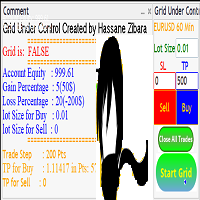
grid under control is an EA that opens an orders buy or sell or both, if the market moves an adverse move the EA will open new trade if the first trade is to buy the EA will open buy or if the first trade is to sell the EA will open sell after trade step as you insert in parameters take a look for the pictures and controller the EA is very simple and easy to use try it for free.
Multicurrency Scalper
Corentin Petitgirard
4 (4)
Hello everyone, Today I want to share with you a sclaping strategy who can works on many currency pair timeframe M1 . Multicurrency Scalper is not a spread sensitive scalper . Multicurrency Scalper is an expert with a backtest around 67% of winrate . Multicurrency Scalper is very easy to use . Multicurrency Scalper do not use any dangerous strategy . Multicurrency Scalper can work on XAUUSD, EURUSD, GBPUSD, USDJPY, AUDCAD, EURCHF and many others. This expert is free because results are variab
FREE
Der rebound EA handelt vollautomatisch  Du bekommst hier einen tollen EA mit extra Zubehör, Kostenlos ! Er verwendet keine gefährlichen Strategien wie Martingale oder Gritter usw. Bei diesem EA kannst du vieles nach deinen Wünschen, oder nach meinem Set einstellen. Zusätzlich hat er einen News Filter, er pausiert die trades während der eingestellten Zeit. Zusätzlich erhöht er auf Wunsch die lots Grösse automatisch. Der Backtest und die trades wurden mit Fusion Markets gemacht Hebel 1:500 Zer
FREE
This EA is a breakthrough EA. When the monitoring market changes rapidly, fluctuates rapidly in one direction, and exceeds the set threshold, the EA will quickly place an order and quickly adopt a mobile stop loss strategy to complete capital preservation and profitability. Advantages of this EA: 1. The transaction is very fast to the closing of the position, and it is never procrastinated. 2. After the transaction, the accuracy rate is very high. 3. Place an order with compound interest, and th
RocketGold EA
Muhammad Muṣṭafā ʿAbd Al-jawād Aḥmad
================================================================  HOURLY MARTINGALE EA — MQL5 MARKET DESCRIPTION ================================================================ --- SHORT DESCRIPTION (subtitle) --- Smart candle-based Martingale EA with auto lot scaling, live dashboard, and per-candle P&L labels. Works on any symbol and any timeframe. Minimum deposit $100 — recommended $500 (Cent). ---------------------------------------------------------------- --- FULL DESCRIPTION --- Hou
Gold Pulse MT4
Ivan Martinez Guillen
5 (1)
GoldPulse MT4 — Professional Gold Scalper GoldPulse MT4 is a fully automated Expert Advisor designed exclusively for XAUUSD on MetaTrader 4. The strategy is based on pure price action. The EA reads the market bar by bar and only opens trades when Gold shows clear directional conviction, avoiding noise and false signals. When no valid setup is present, it waits. Recovery System When a trade moves against the initial entry, GoldPulse activates a conditional grid recovery. New positions are only ad
Spd EA
David Binka Kumatse
THE PRODUCT This Spd Expert is an EA to be used on multiple chosen pairs simultaneously. Every order has a TP and an SL, so there is nothing to fear. You just have to be patient as EA trades to grow your account. After purchasing the EA, you can also message me for my optimized settings.    Recommended TimeFrame is 1H TRADE PLAN Consider a recommended minimum starting capital of $100 and an initial lotsize of 0.01 yielding a minimum profit of $20 over 12 months of trading on a single pair. Then
Семи Мартингейл EA Спасибо, что выбрали этого советника. Это инструмент, который, я считаю, должен быть у каждого трейдера. Я сам являюсь трейдером, создавая этот советник для личного пользования, и нахожу его очень прибыльным (не говоря уже об этих жадных трейдерах). С помощью этого инструмента очень ЛЕГКО и ВОЗМОЖНО достичь цели 5% в месяц. Для серьезного трейдера вы удивитесь, как скоро вы получите обратно то, за что заплатили, и даже больше. Давайте помогать друг другу и ДОЛЖНЫ БЫТЬ ПРИБЫЛЬН
Принцип работы советника основан на открытии сделок при получении сигнала от своих индикаторов. Закрытие происходит при поступлении противоположного сигнала. Настройки упрощены до минимума, можно выставить только рабочий лот. Советник настроен на работу на паре EUR/USD, таймфреймы  M5, M15, M30, H1 Советник не  использует в торговле, мартингейл и усреднение. Мониторинг советника   https://www.mql5.com/ru/signals/795297
Breaking News
David Zouein
3.67 (3)
Советник Breaking News торгует на новостях. Робот анализирует рынок во время выхода важных новостей и определяет уровни входа на основе ценовых колебаний в это время. Направление торговли определяется интеллектуальной адаптивной системой советника. Благодаря уникальному интеллектуальному методу сопровождения сделок, советник позволяет максимально снизить просадку и торговать с минимальным депозитом от 50$. Для удобства использования советник содержит минимальное количество входных параметров. Оп
Project IG MT4
Ruslan Pishun
1.78 (9)
Советник не скальпер. Советник использует стратегию основанную на пробое локальных уровней поддержки и сопротивления, также использует реверс и отбой от уровней поддержки и сопротивления. Советник основан на оригинальной авторской стратегии.  Реал мониторинг:   https://www.mql5.com/en/signals/author/profi_mql Подробное описание стратегии здесь: https://www.mql5.com/ru/blogs/post/728430 Ссылка на общее обсуждение советника:  https://www.mql5.com/ru/blogs/post/728430 Используется скрытый Тейк п
Grid Trading
Waseem Raza
5 (3)
Grid Trading - полуавтоматический советник для ручной торговли по сетке в один клик. Обычный режим Вы нажимаете на кнопку Sell или Buy на графике, затем эксперт добавит уровни стоп-лосс, тейк-профит для сделки, а функции трейлинг-стопа и безубытка позаботятся о сделке, если она не сможет достичь цели профита. Хеджирование При выборе торговли с использованием хеджирования, советник начнет торговлю по сетке, которая начинается с противоположного входа и продолжается, пока все сделки не будут зак
EA Excess
Svyatoslav Kucher
EA Excess  - автоматический советник использующий в качестве сигнала для входа сравнение волатильности нескольких периодов, и при определенном превышении ее значения открывает сделки, если дополнительные фильтры активированы и также находятся на нужных значениях. Советник имеет возможность настройки торговли в определенное время, и дополнительную возможность увеличения лотности ордера, или серии ордеров после убытков. ВАЖНО:  обратите внимание на параметры GMT! Для того, чтобы получить корректны
Ksm: Умное Решение для Автоматизированной Торговли на Форексе Ksm – это инструмент для автоматизации торговли на Форексе, который применяет современные методы анализа временных данных для работы с множеством валютных пар и различных временных интервалов. Основные Возможности и Преимущества Мультивалютная поддержка : Ksm позволяет работать с множеством валютных пар, что помогает трейдерам адаптировать стратегии к разным рыночным условиям. Новые валютные пары можно легко добавить. Анализ временных
Этот советник,торгует как со стоп лосом,так может торговать без него,с увеличением лота(мартингейл) и без увеличения лота(без мартингейла).Советник торгует в продолжение импульса.Имеет ряд фильтрующих индикаторов. Этот советник не боится больших спредов(есть защита),так же имеет защиту от максимального лота и имеет  торговлю от процента депозита. Мартингейл имеется двух типов(путём сложения от первоначального лота,и путём умножения на коэффициент). Закрытие происходит по тейк профиту(имеет част
ATTENTION : The Tiger Security EA can not be tested in the MT4 strategy tester !!!  TigerSecurity EA  robot is a fully automated robot for  Forex trade.  TigerSecurity EA  is a combination numerous special trend strategy ,that It provides the possibility the best entries of the trade . TigerSecurity EA robot is designed  for medium and long term trading ,the robot will help you deal with and manage emotions ,and you don't need worry about news release any more !!  The trend is the key ,the Tige
Uses of EA - Trailingstop: Move stoploss continuously. - Breakeven: Move the stoploss once. Custom parameters: All OrderOpenTime:     + true: acts on all order     + false: only affect the order opened since EA run All OrderType:     + true: acts on all order.     + false: only the order is running (Buy, Sell) TraillingStop: true (Use), false (do not use)     TrailingStop Save (Point)     TraililngStop Distance (Point) BreakEven: true (Use), false (do not use)     BreakEven Save (Point)     Brea
FREE
Rebate Virtual Grid
Sergii Onyshchenko
3 (1)
This is a Virtual Grid EA  with  positive (for traders) slippage. I recommend it for pair EURUSD. EA may be use as Rebate generator. Works ok during news and gaps (with depo >1000$). Working timeframe M1 . Strategy The system does not use regular takeprofits and stop loss. Martingale is not used. EA use unique indicator (for open "Zero"). Monitoring (5EAs) _ https://www.mql5.com/en/signals/508303 Parameters (one of the safest) Rebate Virtual Grid                          MM_Type    0  MM: 0-mi
С этим продуктом покупают
Scalping Robot Pro is a  professional trading system  designed specifically for fast and precise scalping on XAUUSD using the M1 timeframe. The system is built to capture short term market movements with accurate execution and controlled risk management. It focuses on real time price behavior, momentum shifts, short term volatility, and selective grid based trade management techniques to identify high probability  trading opportunities  in the gold market. Scalping Robot Pro is optimized for tra
Exotic Bot   - это мультивалютный многофункциональный советник, работающий на любом тайм-фрейме и в любых рыночных условиях. За основу работы робота взята система усреднения с негеометрической прогрессией построения торговой сетки. Встроенные системы защиты: специальные фильтры, контроль спреда, внутреннее ограничение времени торговли. Построение торговой сетки с учетом важных внутренних уровней. Возможность настройки агрессивности торговли. Работа отложенными ордерами с трейлингом ордеров. Сов
BEWARE of SCAM! SCIPIO GOLD BOT is only distributed by MQL5.com. Please note: this is not a commercial BOT, but a professional one. Distribution is limited to 100 copies in total, and the price may increase without notice. Thisi is MT4 versione, Mt5 version is here:  https://www.mql5.com/it/market/product/148820 The differences that make SCIPIO EA unique are: + no variable settings or settings that the TRADER must enter + only opens one trade at a time + always uses close and fixed STOP LOSSES
Exorcist Bot   - это мультивалютный многофункциональный советник, работающий на любом тайм-фрейме и в любых рыночных условиях. - За основу работы робота взята система усреднения с негеометрической прогрессией построения торговой сетки. - Встроенные системы защиты: специальные фильтры, контроль спреда, внутреннее ограничение времени торговли. - Построение торговой сетки с учетом важных внутренних уровней. - Возможность настройки агрессивности торговли. - Работа отложенными ордерами с трейлингом
XG Gold Robot MT4
MQL TOOLS SL
4.27 (41)
The XG Gold Robot MT4 is specially designed for Gold. We decided to include this EA in our offering after   extensive testing . XG Gold Robot and works perfectly with the   XAUUSD, GOLD, XAUEUR   pairs. XG Gold Robot has been created for all traders who like to   Trade in Gold   and includes additional a function that displays   weekly Gold levels   with the minimum and maximum displayed in the panel as well as on the chart, which will help you in manual trading. It’s a strategy based on  Price
Trend Radar — торговый советник для MetaTrader 4 Краткое описание Trend Radar — торговый советник (EA) для MetaTrader 4, который открывает сделки на основе собственной модели анализа ценового канала с фильтрацией по углу наклона и ширине коридора. Советник сочетает чёткую сигнальную логику с гибким управлением риском и полным контролем над каждым этапом сопровождения сделки — от входа до трейлинг-стопа. Принцип работы Анализ канала. Советник строит ценовой канал по последним SignalBarCount барам
We proudly present our cutting-edge robot, the  Big Forex Players EA  designed to maximize your trading potential, minimize emotional trading, and make smarter decisions powered by cutting-edge technology. The whole system in this EA took us many months to build, and then we spent a lot of time testing it. This unique EA includes three distinct strategies that can be used independently or in together. The robot receives the positions of the  biggest Banks  (positions are sent from our database t
I will support only my client. สำหรับลูกค้า Parameters General Trade Settings Money Management  Lot : Fixed (can change) Strategies  - M30 Strategies you can using both it is fixed with MA, Bollinger band, Candlestick Levels Close Functions  - M30 Strategies MagicNumber  - individual magic number. The EA will only manage position of the chart symbol with this magic number. NextOpenTradeAfterMinutes  - 8 minutes is default, can change it MaxSpread  - upto currency pairs, MaxSlippage  - upto cur
Профессиональный эксперт форекс   Gyroscope (для пар EURUSD, GBPUSD, USDJPY, AUDUSD, USDCHF, EURGBP, EURJPY, NZDUSD, USDCAD, EURCHF, AUDJPY, CADJPY)  ализирующий рынок при помощи индекса волн эллиота. Волновая теория Эллиотта — интерпретация процессов на финансовых рынках через систему визуальных моделей (волн) на ценовых графиках.  Автор теории Ральф Эллиотт выделил восемь вариантов чередующихся волн (из них пять по тренду и три против тренда). Движение цен на рынках принимает форму пяти волн
DAX Robot is an advanced automated trading system developed specifically for the   DAX 40 Index   on the H1 timeframe. Designed to handle the fast paced nature of one of Europe's   most actively traded indices , the robot continuously analyzes market conditions and automatically executes trades based on its built in trading logic. The system focuses on identifying high probability   trading opportunities   by combining trend analysis, market momentum, and volatility based conditions. DAX Robot
RiskShield Dragon   — автоматизированный мультивалютный советник Объединяя интеллектуальные алгоритмы, надёжные системы защиты и гибкие настройки, RiskShield Dragon обеспечивает стабильный доход при минимальных рисках. --- ## Ключевые преимущества * **Мультивалютность и многопоточный режим**: поддержка более 20 пар (EURUSD, GBPUSD, USDJPY, AUDUSD, NZDJPY и др.) одновременно на любом таймфрейме. * **Минимальный депозит от 10 000**: оптимизирован для работы с депозитом от 10 000 единиц счёта.
Stp
Vladislav Filippov
Чтобы эксперт работал правильно, не забудьте закинуть файлы в директорию соглашения (... AppData \ Roaming \ MetaQuotes \ Terminal \ Common \ Files) STP - это автоматизированный торговый советник основанный на нейротехнологии, работающий на часовом таймфрейме. Советник настроен для торговли по стратегии безопасной торговли от уровней, предполагающей открытие краткосрочных сделок и закрытие их при достижении положительной динамики доходности в несколько пунктов, что дает возможность пользователю
Gold HFT Scalper Pro MT4
Sivakumar Paul Suyambu
1 (1)
Gold HFT Scalper Pro MT4 A high-frequency tick scalper engineered exclusively for GOLD (XAUUSD). Places BUY_STOP and SELL_STOP pending orders just above and below the live market, automatically re-centres them on every tick, and exits with a dynamic trailing stop — all with built-in daily loss protection and real-margin validation before every order. XAUUSD Only -  No Martingale -  No Grid -  Low Drawdown -  Fully Automated -  M1 Timeframe Symbol XAUUSD Timeframe (period) M1 Minimum deposit 500
Signal (GOLD/XAUSD) - 16 months active and over 6,800 trades on a Standard account (1:400 leverage):   https://www.mql5.com/pt/signals/2278431 Product for MetaTrader 4:   https://www.mql5.com/pt/market/product/159627 Product for MetaTrader 5:   https://www.mql5.com/pt/market/product/160313 The Apache MHL Moving Average Expert Advisor, or simply "Apache MHL," is a robot that operates on the GOLD/XAUSD asset using strategies based on moving averages and risk management with Martingale. The use
AccountUP Algo
Aurelian-eusebio Enescu
Short Description: Advanced, stable multi-order EA featuring dual-mode Trailing/Breakeven, hidden levels, and steady 80% Win Rate. Engineered for robust capital growth with tight ~10% Drawdown. Non-overoptimized. Long Description : AccountUP Algo is a premium, fully automated Expert Advisor engineered for stable, long-term equity growth without exposing your account to extreme market risks. Designed with a deep focus on capital preservation, this EA delivers a smooth, almost linear equity curv
Benefit EA - безиндикаторный гибкий сеточный советник со специальными точками входа, обеспечивающие статистическое преимущество,выявленное с помощью математического моделирования рыночных паттернов. В советнике не используется стоп-лосс, все сделки закрываются по тейк-профиту или трейлинг-стопу. Есть возможность планирования увеличений лота. Функция «Фильтр времени» - устанавливается в соответствии с внутренним временем терминала, согласно отображаемому времени сервера инструмента, запущенного в
Https://www.mql5.com/zh/users/gzd811   работает на  EURUSD  м15   Int  Slippage  =100  ;  //  цена сделки  может принять  в  Slippage   Extern  двойной  только излишки  = 200  ;  //  максимальной  только выиграть   Extern  двойной  =  10  крупнейших  //  стоп  стоп  ;   Extern  двойной  изоляции  мобильных  стоп  стоп  //  максимальная  точка  =  0  ;   Extern  двойной  мобильных  стоп  стоп  //  =  20  крупнейших  ;   Extern  двойной  паритета  стоп  стоп  //  крупнейших  =  2  ;   Extern  int
Meat EA
Roman Kanushkin
5 (1)
Советник Meat EA - это полностью автоматическая, 24-х часовая торговая система, торгующая на основе анализа движения тренда на базе встроенного индикатора и трендовом индикаторе Moving Average, основана на системе скальпинга и хеджирования. Система оптимизирована для работы на паре EURUSD с таймфреймом M30, рекомендуется работать с ECN/STP-брокером с низким спредом, низкой комиссией и быстрым исполнением. Мониторинг сигналов Рабочая валютная пара/таймфрейм: EURUSD M30. Преимущества советник ник
PointerX основан на собственном осцилляторе и встроенных индикаторах (Pulser, MAi, Matsi, TCD, Ti, Pi) и работает независимо. Вы можете создавать собственные стратегии на основе PointerX . Теоретически возможны все стратегии, основанные на индикаторах, кроме мартингейла, арбитража, гридов, нейронных сетей или торговли новостями. PointerX включает в себя 2 набора индикаторов Управление всеми индикаторами Настраиваемый осциллятор Управление тейк-профитом Управление стоп-лоссом Управление сделками
Советник MILCH COW HEDGE версии 1.12 работает прежде всего по стратегии хеджирования. Преимущество советника заключается в использовании любой возможности в любом направлении. Не только открывает сделки, но и выбирает подходящее время для закрытия открытых позиций, чтобы начать торговать снова. Советника рекомендуется использовать на парах с высокой волатильностью валют, таких как GBPAUD, AUDCAD Тестирование советника за период с 01.01.2016 по 09.12.2016 показало удвоение счета четыре раза Интер
Данный робот использует пользовательский скрытый осцилляторный индикатор, а также анализирует реакцию рынка. Он торгует в основном во время повышенной волатильности. Он работает при помощи нескольких отложенных ордеров с разными размерами лотов и активно модифицирует их позиции. Использует расширенное управление капиталом. Установка TradingMode позволяет также работать в соответствии с условиями FIFO. Показывает успешные результаты на различных рынках и различных таймфреймах. Наилучшие результат
Avato
Nikolaos Bekos
Советник Avato - один из наших автономных инструментов. (Сигнал на основе советника будет в будущем представлен на сайте). Он разработан на основе комбинированной формы хеджирования и мартингейла и использует сложные алгоритмы и фильтры для размещения сделок. Эксперт использует стоп-лосс и тейк-профит, размер лота рассчитывается автоматически на основе соответствующих настроек. Это готовый инструментарий для опытных трейдеров. Разработан для рынка золота, однако его можно протестировать и на дру
Торговый робот генерирует сигналы об изменениях тренда. Генерация сигналов может происходить с использованием различных стратегий. При открытии позиция оснащается тейк-профитом и стоп-лоссом. Если позиция становится прибыльной, на основе указанных значений (TrailingStep и DistanceStep) для нее устанавливается динамический стоп-лосс и постоянно подтягивается. Это позволяет всегда закрывать позиции в плюсе. Параметры Основные настройки LotSize = 0.01 - Фиксированный размер позиции; LotAutoSize = f
Внимание : Значение спреда, проскальзывание брокера и скорость VPS влияют на результаты торговли советника. Рекомендации: золото со спредом до 3, USDJPY со спредом до 1,7, EURUSD со спредом до 1,5. Чем лучше условия, тем лучше будут результаты. Значение задержки между VPS и сервером брокера должно быть не выше 10 мс. Кроме того, чем меньше стоп-уровень брокера, тем лучше. Идеальным является стоп-уровень = 0. Советник основан на системе пробоя, а после открытия сделок он сопровождает все открытые
Советник работает прежде всего по стратегии хеджирования и стратегии кратных. Он поддерживает использование любой возможности в любом направлении, как и MILCH COW MIX, но с увеличенным количеством совершаемых сделок. Советник Milch Cow Mix начинает открывать хеджирующие сделки на первом уровне, но этот советник открывает хеджирующие сделки на каждом уровне. Не только открывает сделки, но и выбирает подходящее время для закрытия открытых позиций, чтобы начать торговать снова. Советника рекомендуе
MILCH COW Turbo - мультивалютная стратегия. Поддерживает до 10 валют (GBPJPY, GBPUSD, EURCHF,EURGBP, EURJPY, EURUSD, USDCAD, USDCHF, USDJPY). При Trade_Calc = false включена только одна пара. Советник использует специальный индикатор для установки ордеров Buy stop, Buy limit, Sell stop и Sell limit Примечание: при Pendingorders = false советник использует цены, отображаемые на графике в реальном времени (покупка и продажа). В этом случае советник использует скрытые стоп-ордера. Отложенные ордера
AnyWay
Mohamed Nasseem
"ANYWAY EA" - это инструмент для управления сделками с другой концепцией, который не запускает трейлинг с фиксирования прибыли. Он просто переносит стоп-лосс на 1. SL будет перемещаться с шагом 1, поэтому с каждым пипсом SL будет устанавливаться на 19, 18, 17 и т.д. Брокеры видят это и ничего не могут с этим сделать. А в этом время вы будете ожидать, пока советник зафиксирует пункты, которые он накопил. Все уровни стоп-лосс и тейк-профит можно скрыть от брокера, выбрав SLnTPMode = Client. Запуск
Perfection
Mikhail Senchakov
Perfection - это мультивалютный, полностью автоматизированный и безопасный торговый робот. Робот предназначен как для портфельной торговли, так и для торговли на одном инструменте. Советник не использует усредняющие методы, объем позиций строго регулируется. Ордера открываются только в сторону движения рынка по принципу сетки. Благодаря этому, робот чувствует себя уверенно на любых сильных движениях. Алгоритм принятия решений не использует индикаторы, вместо этого робот самостоятельно рассчитыва
The Expert Advisor itself uses anomalies in momentum to identify short term bursts within the market to capture profit. With the use of the standard deviation and variance, the EA looks for changes in the Average True Range in order to place trades at peaks and troughs within the market that have the highest probability of establishing a new trend. It uses a number of different mathematical principles as well as embedded custom indicators.   When using this expert advisor, there are four require
Советник Milch Cow Zone работает с убыточными сделками без использования стоп-лосса и обеспечивает прибыльный или по крайней мере безубыточный результат независимо от направления рынка при закрытии ордеров в соответствии с механизмом интеллектуального хеджирования "back-and-forth" (туда-сюда). Советник работает, меняя общее направление сделки с помощью более крупных хеджирующих сделок в противоположных направлениях. Робот начинает с открытия одной сделки по тренду, сделки по вашему выбору либо х
Фильтр:
Нет отзывов
Ответ на отзыв