 MetaTrader 5
 Эксперты
 Индикаторы
 Библиотеки
 Утилиты
 Виджеты
 Правила
Смотри обучающее видео по маркету на YouTube
Как купить торгового робота или индикатор
Запусти робота на
виртуальном хостинге
виртуальном хостинге
Протестируй индикатор/робота перед покупкой
Хочешь зарабатывать в Маркете?
Как подать продукт, чтобы его покупали
Торговые библиотеки для MetaTrader 5
 Набор полезных торговых библиотек поможет ускорить разработку торговых приложений.
ПОСМОТРЕТЬ ВСЕ МОИ БЕСПЛАТНЫЕ ПРОДУКТЫ
SignalXpert был разработан мной, чтобы предоставить трейдерам, использующим индикатор RangeXpert , мощный инструмент для анализа. RangeXpert служит фундаментом системы – он выявляет точные рыночные области и предоставляет данные, которые SignalXpert анализирует в реальном времени, генерируя четкие и готовые к использованию сигналы. Это позволяет одновременно отслеживать до 25 различных активов на разных таймфреймах и выявлять важнейшие рыночные движения в
FREE

Скрипт UZFX - Set Stop Loss to Breakeven Instantly для MetaTrader 5 (MT5) - это мощный инструмент, который позволяет трейдерам быстро перемещать стоп-лосс всех открытых позиций к их цене входа, обеспечивая безрисковые сделки. Этот скрипт особенно полезен для эффективного управления активными сделками, гарантируя, что при благоприятном движении позиции трейдер будет защищен от возможных потерь.
(Посетите профиль и проверьте все другие продукты MT4/MT5) (Пожалуйста, не забудьте оставить отзыв)
FREE

Простая в использовании, быстрая, асинхронная библиотека WebSocket для MQL5.
Он поддерживает: ws:// и wss:// (защищенный веб-сокет "TLS") текстовые и бинарные данные Он обрабатывает: фрагментированное сообщение автоматически (передача больших объемов данных) кадры пинг-понга автоматически (подтверждение активности) Преимущества: DLL не требуется. Установка OpenSSL не требуется. До 128 соединений Web Socket из одной программы Различные уровни журнала для отслеживания ошибок Возможна синхронизац
Скрипт UZFX - Close All Open Buy & Sell Orders Instantly для MetaTrader 5 (MT5) - это мощный инструмент, позволяющий трейдерам немедленно закрыть все активные рыночные позиции одним исполнением. Этот скрипт идеально подходит для экстренного управления торговлей, помогая трейдерам быстро выйти из рынка во время высокой волатильности, новостных событий или корректировки стратегии.
Функции: Закрывает все открытые позиции на покупку и продажу по всем символам. Использует последнюю цену Bid/Ask дл
FREE

EAPADPRO Library for MetaTrader 5 — это бесплатная профессиональная библиотека интерфейса для добавления современной информационной панели в ваш Expert Advisor. Библиотека предназначена для MQL5-разработчиков, которые хотят дать своим торговым программам более чистую, информативную и профессиональную визуальную подачу прямо на графике MetaTrader 5. Expert Advisors для MetaTrader 5 часто содержат сложную логику, множество настроек, фильтры по Magic number, правила исполнения ордеров и внутренние
FREE

Modern Dark Chart Theme for MT5 Upgrade your MetaTrader 5 chart into a clean, dark, professional trading workspace. Your chart is your trading office. It is where you analyze the market, test Expert Advisors, review setups, record videos, share screenshots, and make trading decisions. If your MT5 chart looks old, bright, noisy, or unprofessional, your trading environment can feel distracted before you even start your analysis. Modern Dark Chart Theme for MT5 helps you create a cleaner, darker,
FREE

NATS (Niguru Automatic Trailing Stop) will help you achieve more profits, by setting the trailing stop automatically. Pair this NATS application with EA, or can also be used as a complement to manual trading.
A trailing stop is a powerful tool in trading that combines risk management and profit optimization.
A trailing stop is a type of market order that sets a stop-loss at a percentage below the market price of an asset, rather than a fixed number. It dynamically adjusts as the asset’s pric
FREE
Скрипт UZFX - Margin Required and Max Lot Size для MetaTrader 5 (MT5) разработан, чтобы помочь трейдерам быстро определить маржу, необходимую для открытия позиции в 1 лот, и рассчитать максимальный размер лота, которым они могут торговать, исходя из текущего капитала счета. Этот инструмент необходим для управления рисками и определения размера позиции, позволяя трейдерам эффективно планировать свои сделки.
Функции:
Рассчитывает маржу, необходимую для открытия сделки на 1 лот по выбранному си
FREE

Библиотека ModernUI для MetaTrader 5 ModernUI — это библиотека пользовательского интерфейса для MetaTrader 5, размещаемая прямо на графике. Она помогает разработчикам MQL5 создавать более аккуратные панели советников, дашборды, окна настроек, формы, таблицы, диалоги, боковые панели и компактные торговые интерфейсы внутри среды графика MT5. Она создана для разработчиков, которым нужен более профессиональный интерфейсный слой, чем набор разрозненных графических объектов, но при этом важно сохранит
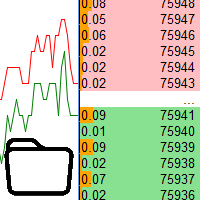
Использование в тестере стратегий данных с биржевого стакана Основные возможности: Одновременное использование нескольких инструментов, до 7 штук Визуализация стаканов С визуализацией стаканов доступно моделирование реального времени, так же ускорение или замедление Работа с библиотекой: Для данного продукта ещё необходима утилита для сохранения данных: https://www.mql5.com/ru/market/product/71642 Утилита для управления скоростью: https://www.mql5.com/ru/market/product/81409 Включаемый файл:
FREE

UZFX - Delete All Drawing and Objects on Chart Instantly - это простой, но мощный скрипт для MetaTrader 5 (MT5), предназначенный для мгновенного удаления всех объектов рисования с активного графика. Этот скрипт будет полезен трейдерам, которым необходимо быстро очистить график от рисунков технического анализа, линий тренда, инструментов Фибоначчи, текстовых меток и других объектов, не удаляя их вручную по одному.
Функции:
Удаляет все объекты и рисунки на активном графике. Работает мгновенно
FREE

Key Features: 200+ Fully Implemented Patterns across all categories Advanced Market Structure Analysis Smart Money Integration (Wyckoff, Order Blocks, Liquidity) Professional Risk Management Multi-Timeframe Analysis AI-Powered Confidence Scoring Advanced Visualization Real-time Alerts Pattern Categories: Single Candle Patterns (Hammer, Doji, Marubozu, etc.) Multi-Candle Patterns (Engulfing, Stars, Harami, etc.) Chart Patterns (Head & Shoulders, Cup & Handle, Triangles, etc.) Harmonic Pattern
FREE

Библиотека WalkForwardOptimizer позволяет выполнить пошаговую и кластерную форвард-оптимизацию ( walk-forward optimization ) советника в МетаТрейдер 5. Для использования необходимо включить заголовочный файл WalkForwardOptimizer.mqh в код советника и добавить необходимые вызовы функций. Когда библиотека встроена в советник, можно запускать оптимизацию в соответствии с процедурой, описанной в Руководстве пользователя . По окончанию оптимизации промежуточные результаты сохраняются в CSV-файл и наб
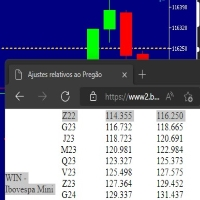
Este script marca no gráfico do ativo BRA50 da active trades o ponto de ajuste do contrato futuro do Mini Índice Brasileiro (WIN),
***ATENÇÃO*** para este script funcionar é necessário autorizar a URL da BMF Bovespa no Meta Trader. passo a passo: MetaTrader 5 -> Ferramentas -> Opções -> Expert Adivisors * Marque a opção "Relacione no quadro abaixo as URL que deseja permitir a função WebRequest" e no quadro abaixo adicione a URL: https://www2.bmf.com.br/ este indicador usa a seguinte página par
FREE

This library allows you to automatically filter events by symbol. Additionally, it requires the use of "flags" to classify events based on their importance (high, low, etc.). Properties: Our library is simple and only requires the export of four functions to work properly. Requirements: The library uses OnTimer , so it is not compatible with programs that also use this event. If your bot utilizes OnTimer , this may interfere with the library’s functionality and prevent event filtering. We recomm
FREE
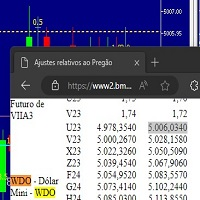
Este script marca no gráfico do ativo MINDOL da activ trades o ponto de ajuste do contrato futuro do Mini Dolar (WDO),
***ATENÇÃO*** para este script funcionar é necessário autorizar a URL da BMF Bovespa no Meta Trader. passo a passo: MetaTrader 5 -> Ferramentas -> Opções -> Expert Adivisors * Marque a opção "Relacione no quadro abaixo as URL que deseja permitir a função WebRequest" e no quadro abaixo adicione a URL: https://www2.bmf.com.br/ este indicador usa a seguinte página para buscar o a
FREE

Trading Notes is an innovative tool designed for traders to streamline their decision-making process by allowing them to write and display important reminders or short details directly over their trading charts. This essential feature ensures that traders have quick access to their personalized checklist before opening any positions, enhancing their trading efficiency and accuracy. MT4 Version - https://www.mql5.com/en/market/product/120613 Join To Learn Market Depth - https://www.mql5.co
FREE

Отображение статического текста — это легковесный и удобный экспертный советник (EA) для MetaTrader 5, разработанный для вдохновения и обучения трейдеров путем отображения мотивирующих торговых советов прямо на графике. Благодаря элегантному черному фону в центре и белому тексту в моноширинном шрифте, этот EA предоставляет краткие, практичные советы в виде сменяющихся фрагментов, чтобы поддерживать дисциплину в торговле. Идеально подходит как для новичков, так и для опытных трейдеров, он пропага
FREE

Turn your manual trades into fully automated profit machines! This powerful MT5 EA takes over the moment you open a position — no delays, no stress. It instantly places Stop Loss and Take Profit, activates customizable trailing, and locks in profits while protecting your capital
Perfect for scalpers: Every trade is immediately secured, giving you the freedom to focus on sniping the best entries while the EA handles all the management work in the background.
Auto SL/TP Full trailin
FREE

CRingBuffer - Числовой кольцевой буфер с лёгким высокопроизводительным статистическим движком
CRingBuffer — это мощная библиотека MQL5 для числового анализа скользящих окон. После каждой вставки она сразу предоставляет среднее значение, дисперсию, стандартное отклонение, процентиль, z-оценки, отслеживание min/max и нормализованные значения — всё в O(1) до O(n log n). Содержание: Область применения
Два режима работы Базовая статистика Статистика Уэлфорда (численно устойчива, рекомендуется для б
FREE

Скрипт UZFX - Delete Only Pending Orders для MetaTrader 5 (MT5) - это простой, но эффективный инструмент, который автоматически удаляет все отложенные ордера (Buy Limit, Sell Limit, Buy Stop, Sell Stop) с торгового счета. Этот скрипт идеально подходит для трейдеров, которые хотят мгновенно удалить свои отложенные ордера, не затрагивая активные позиции на рынке.
Смотрите все мои другие индикаторы и советники для MT4/MT5 >> ЗДЕСЬ Особенности: Удаляет все отложенные ордера (Buy Limit, Sell Limit
FREE

Japan Bank Holiday and Gotobi Library отвечает на календарные вопросы рынка иены прямо в вашем советнике, индикаторе или скрипте: выходной ли сегодня у японских банков, день ли готоби, когда следующий токийский фиксинг и сколько сейчас времени в Японии по серверу вашего брокера. Все правила вычисляются, поэтому таблицу праздников обновлять не нужно. За 1980-2027 годы результаты день в день совпадают со списком государственных праздников Кабинета министров Японии. Без DLL, без веб-запросов, без ф
FREE

Start earning profits by copying All trades are sent by our successful Forex trader & are extremely profitable. You can earn profits by copying trades daily Trial Period included You'll also get access to extremely powerful trading education which is designed in a simple way for you to become a profitable trader, even if you have no trading experience. https://ec137gsj1wp5tp7dbjkdkxfr4x.hop.clickbank.net/?cbpage=vip
FREE

Overview AlgoNLP.mqh is a standalone MQL5 library that converts human-written trading instructions into structured trade intents that your Expert Advisor (EA) or indicator can understand. Do leave a review if you like :D
Also check out my new Indicator : ALGOCHAMP v3 Plus Example input: Buy gold at 2370 with TP 0.3% and SL 1% Output intent: Side: BUY | Type: LIMIT | Symbol: XAUUSD | Entry: 2370 | TP: 0.3% | SL: 1% | Lot: 0.00 This enables you to build chat-controlled or Telegr
FREE

This library will allow you to send your trades using your MT5 EA bot and its very easy to integrate on any EA which you can do yourself with the script code which is mentioned in documentation. This product allows trading operations via API For MEXC chart : Renting Crypto Charting for OHLC data or Crypto Ticks with Order Book Depth is optional - Supports MEXC API calls - Place Limit, SL Limit and Take Profit Limit Orders - Place Market, SL-Market, TP-Market orders - Modify Limit order - C

MT5 to Delta Exchange API Bridge EA Connector allows your expert advisor with mq5 file to integrate and communicate with Delta Exchange using API Keys You can place order, check balance and other order managements using Delta Exchange API - Place Limit, SL Limit and Take Profit Limit Orders - Place Market, SL-Market, TP-Market orders - Cancel Order - Query Orders - Change Leverage, margin - Get Position info and many more, details available at demo script Script Documentation

Stop training your models on the future. Every quant developer knows the nightmare: a beautiful backtest, then live trading falls apart. The number-one silent killer is lookahead bias — reading a higher-timeframe bar that has not closed yet, or labeling rows with information from the future. One wrong bar shift and your entire dataset is poisoned, and you will never see it in the backtest. MTF Data Core is the multi-timeframe data engine behind kouaAlgo's data tools — now free for MQL5 developer
FREE

Universal MarketInfo Service Library for MT4 & MT5
Bring simplicity and power to your trading projects with the Universal MarketInfo Service — a professional library that exposes a unified API for both MetaTrader 4 and MetaTrader 5.
No more rewriting code for each platform. With this library, you can: Access symbol data, OHLC prices, spreads, and volatility with a single call. Query account balance, free margin, stop levels, and lot constraints. Work with currency precision, pip values, and n
FREE

MT4/5通用交易库( 一份代码通用4和5 ) #import "K Trade Lib5.ex5" //简单开单 long OrderOpen( int type, double volume, int magic, string symbol= "" , string comment= "" , double opprice= 0 , double sl= 0 , double tp= 0 , int expiration= 0 , bool slsetmode= false , bool tpsetmode= false ); //复杂开单 void SetMagic( int magic, int magic_plus= 0 ); void SetLotsAddMode(int mode=0,double lotsadd=0); long OrderOpenAdvance( int mode, int type, double volume, int step, int magic, string symbol= "" , string comm
FREE

Read-only basket analytics library for grid and averaging EAs. Real breakeven, what-if, stress test and stop-out distance. Sends no orders.
What it is A library that reads your open positions and tells you the real state of a grid or averaging basket. It does not trade. It sends no orders. It has no entry logic. You call it from your own EA.
What it tells you - Breakeven of the basket, with swap and commission counted - The price where the basket nets a money amount you choose - Where the ave
FREE

Библиотека EX5 Signal Copier — профессиональный механизм отслеживания торговых событий для MetaTrader
Превратите любой советник в мощный инструмент копирования сделок, обработки сигналов или автоматизации — без написания сложной логики отслеживания сделок.
Библиотека EX5 Signal Copier — это высокопроизводительная система, управляемая событиями, которая фиксирует каждую торговую активность в MetaTrader 5 и преобразует её в структурированные сигналы, которые вы можете использовать для создания:

Scan a fixed list of assets (Ibovespa) in the chosen timeframe (TimeFrame). For each pair and for various periods. Calculate a regression model between the two assets (and, if desired, using the bova11 index as a normalizer). Generate the spread of this relationship, its mean, standard deviation, speculative deviation, and betas (B1 and B2). Apply an ADF test without exclusion (cointegration/stationarity). Calculate the Z-score of the current exclusion (how many standard deviations are away from
FREE

INTRODUCING MML Data Bridge The demand for bridging external data and machine learning with trading platforms is higher than ever. MetaTrader 5 is a powerful environment for trading and back testing, but without a data bridge, MT5 is largely isolated from using any external data. MML Bridge is a developer tool that allows users to bridge external data into MT5 for back testing, live trading, and optimization. It's built for ease of use, providing users with a simple function API that drip-feeds
FREE

Друзья, присоединяйтесь к нам!
Задать свои вопросы и пообщаться с единомышленниками: MetaCOT Public Group
Информационный канал MetaCOT: новости, отчетность CFTC и сигналы: MetaCOT Channel
Желаю нам удачной торговли и новых прибыльных сигналов! Внимание! Последнее время, некоторые страны блокируют доступ к сайту cftc.gov . Из-за этого, пользователи из этих стран ставят низкий рейтинг продукту. MetaCOT всегда придерживался самых высоких стандартов качества и не связан с этими блокировками. Пож
FREE

This lightweight utility library provides essential functions for MQL5 developers to streamline and simplify expert advisor (EA) and indicator development. Whether you’re building trading algorithms or managing chart resources dynamically, this library offers clean and reusable building blocks to enhance your code quality and reduce repetition. Key Features Price Access Functions ASK(string symbol) – Get the current Ask price. BID(string symbol) – Get the current Bid price. Account Information
FREE

This simple logging library is designed to provide clear and contextual log output with minimal hassle. It exposes five methods: LogError Message (message) LogWarn Message (message) LogInfo Message (message) LogDebug Message (message) LogTrace Message (message) Each method prints the provided message to the console only if the severity level meets or exceeds the current threshold set by a global variable logLevel. This means you control the verbosity of your application's logs by adjusting logL
FREE

Эта библиотека предназначена для помощи в управлении сделками, расчета лота, трейлинга, частичного закрытия и других функций.
Расчет лота Mode 0: фиксированный лот. Mode 1: Лот по Мартингейлу (1,3,5,8,13) может по-разному использоваться для расчета при убытке=1, при прибыли=0. Mode 2: Лот по Множителю (1,2,4,8,16) может по-разному использоваться для расчета при убытке=1, при прибыли=0. Mode 3: Лот по Инкременту (1,2,3,4,5) может по-разному использоваться для расчета при убытке=1, при прибыли=0.

Друзья, присоединяйтесь к нам!
Задать свои вопросы и пообщаться с единомышленниками: MetaCOT Public Group
Информационный канал MetaCOT: новости, отчетность CFTC и сигналы: MetaCOT Channel
Желаю нам удачной торговли и новых прибыльных сигналов! Внимание! Последнее время, некоторые страны блокируют доступ к сайту cftc.gov . Из-за этого, пользователи из этих стран ставят низкий рейтинг продукту. MetaCOT всегда придерживался самых высоких стандартов качества и не связан с этими блокировками. Пож

Это упрощенная и эффективная версия библиотеки для walk-forward анализа торговых экспертов. Она собирает данные о торговле эксперта во время процесса его оптимизации в тестере MetaTrader и сохраняет их в промежуточные файлы в каталоге MQL5\Files. Затем на основе этих файлов автоматически строится кластерный walk-forward отчет и уточняющие его rolling walk-forward отчеты (все они - в одном HTML-файле). С помощью вспомогательного скрипта WalkForwardBuilder MT5 можно на тех же промежуточных файлах

Order Book, известный также как Market Book, глубина рынка, стакан цен, Level 2, - это предоставляемая брокером динамически обновляемая таблица с данными по текущим объемам торговых заявок на покупку и продажу для различных уровней цен вблизи Bid и Ask конкретного финансового инструмента. MetaTrader 5 предоставляет возможность трансляции стакана цен , но только в реальном времени. Данная библиотека OrderBook History Library позволяет считывать состояния стакана в прошлом из архивов, создаваемых

Cryptocurrency analysis has never been easier with Crypto Charts for MetaTrader 5. Now, trading on BitMEX has never been easier with BitMEX Trading API for MetaTrader 5. BitMEX Trading API library was built to be as easy to use as possible. Just include the library into your Expert Advisor or Script, call the corresponding methods and start trading! Features
Trade on BitMEX and BitMEX Testnet. Build and automate your strategies. Concern more with the trading strategy logic and less with the co

Teclado trader, é uma BIBLIOTECA que você pode chamar no OnChartEvent para abrir posição de compra/venda/zerar, os botões padrões são: V = venda C = compra Z = zerar posições a mercado S = zerar posições opostas e depois a mercado X = zerar posições opostas
Além da função de teclado, é possível mostrar os estados do ExpertAdvisor usando o MagicId, com informação de:
lucro mensal, semanal, diario, e posição aberta, para isto use o OnTick, ou qualquer outro evento (OnTimer / OnTrade / OnBookEven

Goliath MT5 - scalper fully automated Expert Advisor for medium-volatile forex markets
P roperties: The Library trades 10 currency pairs (USDCHF, EURCHF, EURGBP, AUDUSD, USDCAD, GBPUSD, EURUSD, NZDUSD, CADCHF, EURAUD, EURCAD, AUDJPY) The Library does not use martingale The Library sets a fixed stop loss and take profit for all orders The Library only trades a user input volume The Library can be installed on any currency pair and any timeframe Recommendations: Before using on a real account, t

The library is used to develop automatic trading on Binance Spot Market from MT5 platform. Support all order types: Limit, Market, StopLimit and StopMarket Support Testnet mode Automatically display the chart on the screen Usage:
1. Open MQL5 demo account 2. Download Header file and EA sample https://drive.google.com/uc?export=download&id=1kjUX7Hyy02EiwTLgVi8qdaCNvNzazjln Copy Binance.mqh to folder \MQL5\Include Copy BinanceEA-Sample.mq5 to folder \MQL5\Experts 3. Allow WebRequest from MT5

Gold plucking machine Золотая выщипывание машины является советником разработан специально для торговли золотом. Операция основана на открытии ордеров с использованием индикатора быстрых и медленных линий, поэтому советник работает в соответствии со стратегией «Trend Follow», что означает следовать тренду. Заказать с помощью политики сетки без операции стоп - лосса, поэтому убедитесь, что счет достаточен. magic number - is a special number that the EA assigns to its orders.
Lot Multipli

The library is used to develop automatic trading on Binance Futures Market from MT5 platform. Support Binance Futures USD-M and COIN-M Support Testnet mode Support all order types: Limit, Market, StopLimit, StopMarket, StopLoss and TakeProfit Automatically display the chart on the screen Usage:
1. Open MQL5 demo account 2. Download Header file and EA sample https://drive.google.com/uc?export=download&id=17fWrZFeMZoSvH9-2iv4WDJhcyxG2eW17
Copy BinanceFutures.mqh to folder \MQL5\Include Copy Bina

MT4/5通用交易库( 一份代码通用4和5 ) #ifdef __MQL5__ #define KOD_TICKET ulong #define KOD_MAGIC long #else #define KOD_TICKET long #define KOD_MAGIC int #endif class ODLIST; #import "K Trade Lib Pro 5.ex5" //祝有个美好开始,运行首行加入 void StartGood() ; //简单开单 long OrderOpen( int type, double volume, int magic, string symbol= "" , string comment= "" , double opprice= 0 , double sl= 0 , double tp= 0 , int expiration= 0 , bool slsetmode= false , bool tpsetmode= false ); //复杂开单

Binance Library MetaTrader 5 connects your Expert Advisors, indicators, and scripts to Binance.com and Binance.US directly from MetaTrader 5. It is a developer library for building custom Binance integrations inside MT5, not a standalone trading robot or copier. The library helps you add Binance instruments to Market Watch, read symbol specifications, load current and historical market data, check wallet balances, manage orders, and track open positions. It supports Spot, USD-M futures, and COI

1. What is this The MT5 system comes with very few optimization results. Sometimes we need to study more results. This library allows you to output more results during backtest optimization. It also supports printing more strategy results in a single backtest. 2. Product Features The results of the optimized output are quite numerous. CustomMax can be customized. The output is in the Common folder. It is automatically named according to the name of the EA, and the name of the same EA will be au

T5L Library is necessary to use the EAs from TSU Investimentos, IAtrader and others. It contains all the functions framework needed to Expert Advisors working properly. ツ
- The Expert Advisors from TSU Investimentos does not work without this library, the T5L library can have updates during the year - At this Library you will find several funcionalities like order sends, buy and sell, trigger entry points check, candlestick analyses, supply and demmand marking and lines, and much more.

AO Core - ядро алгоритма оптимизации, это библиотека, построенная на авторском алгоритме HMA (hybrid metaheuristic algorithm). Обратите внимание на продукт MT5 Optimization Booster , который позволяет очень просто управлять штатным оптимизатором МТ5.
Пример применения AO Core описан в статье: https://www.mql5.com/ru/articles/14183 https://www.mql5.com/ru/blogs/post/756509
Данный гибридный алгоритм основан на генетическом алгоритме и содержит лучшие качества и свойства популяционных алгоритмов

EA Toolkit is a library that allows any developer to quickly and easily program Advisor experts. It includes many functions and enumerations such as trailing stop, lot, stop loss management, market trading authorisations, price table updates, trading conditions and many more.
Installation + Documentation : You will find all the information to install this library and the documentation of its functions on this GitHub : https://github.com/Venon282/Expert-Advisor-Toolkit WARNING : The installat

Want to get all events like Previous/Forecast/Actual values for each news to analyze/predict it? By this simple library you can do it easily,Just import/integrate the library into your system,then get all possible values for each news Even In Strategy Tester . Note: Please add the address " https://www.forexfactory.com/ " of news feed at your MT5 tab > Tools > Options > Expert Advisors > Check Allow web request for listed URL. Since the WebRequest() function can't be called from indicator ba
A Simple Moving Average (SMA) is a statistical indicator used in time series analysis. This indicator represents the arithmetic mean of a sequence of values over a specific period of time. SMA is used to smooth short-term fluctuations in data, helping to highlight the overall trend or direction of changes. This aids analysts and traders in better understanding the general dynamics of the time series and identifying potential trends or changes in direction. More information you can find in Wiki

Эта библиотека позволит вам управлять сделками с использованием любого вашего советника, и ее очень легко интегрировать в любой советник, что вы можете сделать самостоятельно с помощью кода сценария, упомянутого в описании, а также демонстрационных примеров на видео
- Размещайте лимитные ордера, SL-лимитные и тейк-профитные лимитные ордера.
- Размещайте ордера Market, SL-Market, TP-Market
- Изменить лимитный ордер
- Отменить заказ
- Запрос заказов
- Изменение кредитного плеча, маржи
- По

Hello everyone! I am a professional MQL programmer , Making EAs, Indicators and Trading Tools for my clients all over the world. I build 3-7 programs every week but I seldomly sell any ready-made Robots. Because I am fastidious and good strategy is so few... this EA is the only one so far I think its good enough to be published here.
As we all know, the Ichimoku indicator has become world popular for decades, but still, only few people knows the right way of using it, and if we check the clo

Применяя эти методы, мне удалось прийти к тонкому выводу, который имеет решающее значение для понимания важности уникальных стратегий в современной торговле. Хотя нейросетевой советник показал впечатляющую эффективность на начальных этапах, в долгосрочной перспективе он оказался крайне нестабильным. Различные факторы, такие как колебания рынка, изменения тенденций, внешние события и т. д., приводят к хаотичности его работы и в конечном итоге приводят к нестабильности. Получив этот опыт, я принял

Introducing "TG Risk Service Manager" — your comprehensive toolkit for swift and precise risk management and lot size calculations in the dynamic world of trading. Designed to streamline development processes and enhance trading strategies, this indispensable library equips developers with essential tools for optimizing risk assessment and trade profitability. Metatrader4 Version | All Products | Contact Key Features:
Efficient Lot Size Calculation : Harness the power of precise lot size c

Introducing "TG Trade Service Manager" — your all-in-one solution for seamless trade management in both MQL4 and MQL5 environments. With a focus on speed, reliability, and convenience, this powerful library simplifies the complexities of trade execution and management, empowering developers with a single interface for enhanced efficiency. Metatrader4 Version | All Products | Contact Key Features:
Unified Interface : TG Trade Service Manager" provides a unified interface for MQL4 an

Данная библиотека предлагается как средство для использования API OpenAI напрямую в MetaTrader максимально простым способом. Для получения дополнительной информации о возможностях библиотеки прочитайте следующую статью: https://www.mql5.com/en/blogs/post/756106 The files needed to use the library can be found here: Manual ВАЖНО: Для использования EA необходимо добавить следующий URL для доступа к API OpenAI как показано на приложенных изображениях Для использования библиотеки необходимо включит

This trailing stop application will helping trader to set the trailing stop value for many open positions, that apply a grid or martingale strategy as a solution.
So if you apply a grid or martingale strategy (either using an EA or trading manually), and you don't have an application to set a trailing stop, then this application is the solution.
For EAs with a single shot strategy, just use the FREE trailing stop application which I have also shared on this forum.

KP TRADE PANEL EA is an EA MT5 facilitates various menus. KP TRADE PANEL EA is an EA skin care in MT5 is an EA that puts the system automatically in download EA MT5 to test with demo account from my profile page while some Trailing Stop Stop Loss require more than 0 features EA determines lot or money management calculates lot from known and Stop loss TS = Trailing stop with separate stop loss order Buy more AVR TS = Trailing stop plus

Here is the English translation of your description for the EA (Expert Advisor): --- This is a time -based automatic trading EA . It allows you to set the exact time for trading , down to the second , and specify the maximum number of orders . You can choose to place either buy or sell orders . It is possible to set take profit and stop loss points . Additionally , you can specify how long after placing
Простая в использовании библиотека, предоставляющая разработчикам доступ к ключевым торговым статистикам для их MQL5 экспертов. Доступные методы библиотеки: Данные аккаунта и прибыль: GetAccountBalance() : Возвращает текущий баланс аккаунта. GetProfit() : Возвращает чистую прибыль от всех сделок. GetDeposit() : Возвращает общую сумму депозитов. GetWithdrawal() : Возвращает общую сумму снятий. Анализ торговли: GetProfitTrades() : Возвращает количество прибыльных сделок. GetLossTrades() : Возвраща

Trading Forex with our platform offers several key advantages and features: Real-time Data : Stay updated with live market data to make informed decisions. User-Friendly Interface : Easy-to-navigate design for both beginners and experienced traders. Advanced Charting Tools : Visualize trends with interactive charts and technical indicators. Risk Management : Set stop-loss and take-profit levels to manage your risk. Multiple Currency Pairs : Access a wide range of forex pairs to diversify your tr

The Hybrid Metaheuristic Algorithm (HMA) is a cutting-edge optimization approach that combines the strengths of genetic algorithms with the best features of population-based algorithms. Its high-speed computation ensures unparalleled accuracy and efficient search capabilities, significantly reducing the total time required for optimization while identifying optimal solutions in fewer iterations. HMA outperforms all known population optimization algorithms in both speed and accuracy. Use Cases AO

* * * * * Основные транзакции XAUUSD, если во время тестирования рекомендуется настроить на XAUUSD, другие торговые объекты не могут гарантировать рентабельность * * * * * * * * * * * * * * * *
Оставьте сообщение, которое нужно протестировать (вы ответите в первый раз после просмотра), чтобы защитить результаты работы, необходимо ввести определенные параметры, параметры по умолчанию системы не могут достичь эффекта, показанного в отзыве скриншота!
Оставьте сообщение, которое нужно протестиров

Этот продукт разрабатывался в течение последних 3 лет. Это самая продвинутая кодовая база для работы со всеми видами кода искусственного интеллекта и машинного обучения на языке программирования MQL5. Он использовался для создания множества торговых роботов и индикаторов на основе ИИ в MetaTrader 5. Это премиум-версия бесплатного и открытого проекта по машинному обучению для MQL5, ссылка здесь: https://github.com/MegaJoctan/MALE5 . Бесплатная версия имеет меньше функций, менее документирована и

This Pine Script implements a Gaussian Channel + Stochastic RSI Strategy for TradingView . It calculates a Gaussian Weighted Moving Average (GWMA) and its standard deviation to form an upper and lower channel. A Stochastic RSI is also computed to determine momentum. A long position is entered when the price closes above the upper Gaussian band and the Stoch RSI K-line crosses above D-line . The position is exited when the price falls back below the upper band. The script includes commission, cap

Pionex API EA Connector для MT5 – Бесшовная интеграция с MT5 Обзор Pionex API EA Connector для MT5 позволяет бесшовно интегрировать MetaTrader 5 (MT5) с Pionex API . Этот мощный инструмент дает возможность трейдерам выполнять и управлять сделками, получать информацию о балансе и отслеживать историю ордеров — всё прямо из MT5 . Основные функции Управление аккаунтом и балансом Get_Balance(); – Получение текущего баланса аккаунта на Pionex . Исполнение и управление ордерами orderLimit(string
А знаете ли вы, почему MetaTrader Market - лучшее место для продажи торговых стратегий и технических индикаторов? Разработчику у нас не нужно тратить время и силы на рекламу, защиту программ и расчеты с покупателями. Всё это уже сделано.

Вы упускаете торговые возможности:
- Бесплатные приложения для трейдинга
- 8 000+ сигналов для копирования
- Экономические новости для анализа финансовых рынков
Регистрация
Вход
Вы принимаете политику сайта и условия использования
Если у вас нет учетной записи, зарегистрируйтесь