EasyFX Trader

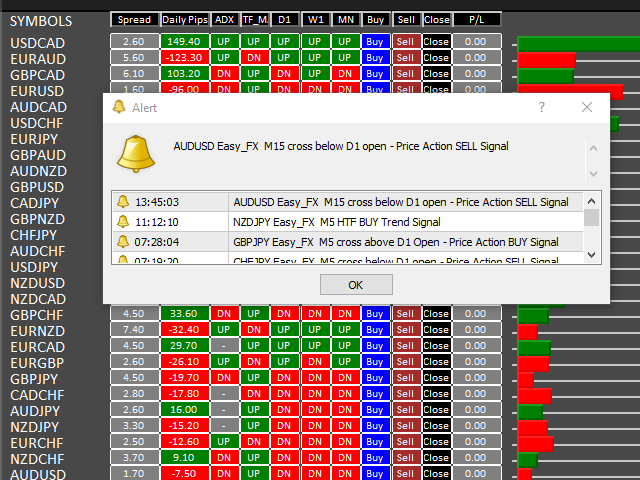
The EasyFX Trader is a very unique and customizable dashboard for manual trading. It is placed in the Expert folder but is not an auto trading robot. You input all the parameter and the dashboard will monitor and let you know when there is a good trading opportunity. The tool is simple to use whether you're experienced or just a beginner. It was designed for all types of trading styles including price action, day, swing, trend trader, or scalper. Each column is described below.

When you load the dashboard it you to input the symbols for your broker. You have the option to input all the symbols or just the pairs you want to monitor. You will also need to input the period for ADX. The default is 14. Also the upper  timeframe moving average. The default is set to 1HR. You also need to set the moving average for the Daily, Weekly and monthly timeframes to get trend direction. The default settings can be accepted.

The Symbol column lists all the symbols for your broker. Simply click on any of the symbols and it brings up that chart as your current chart. To bring up any chart just click on the symbol and it will bring up that chart. For example if the dashboard is running on EURUSD and you click on GBPUSD it will replace EURUSD chart with GBPUSD.

The Spread column display the current spread for each pair. 

The Daily Pips column displays the pips movement for each pair from the Daily Open to current close. If the color is green, the pair is moving up. If the color is red the pair is going down. The symbols are sorted by the biggest pip movers at the top. This lets you know which are the best pairs to trade and the direction you should be trading. If the color is green only look for Buy trades. If the color is red only look for Sell trades.

The ADX column display UP and green when the pair is trending up on the particular pair. It will display DN and red if the pair is trending down. If the color is grey then that pair is ranging. Choose a pair that is either green and UP to buy or red and DN to sell.

The TF_MA column shows the moving average trend of any upper timeframe you choose. For example if you want to scalp on the 5M chart you may set this to 1HR chart to know what direction the trend is on this upper timeframe. If the color is green and UP then only look for Buy trades on the lower 5M chart. If the color is red and DN only look for Sell trades on t he lower 5M chart.

Use the same principle above for 5M and 1HR as the trend for other timeframes you wish to trade. You can pair the 15M and the 1H or 4H. The 30M with 4H. The 1HR with 4HR, the 4H with the Daily. The Daily with the Weekly. This principle is best to help you stay in the trend and trade more successfully.

For all these pairings you will get a popup alert when the lower timeframe aligns with and going in the direction of the upper timeframe. For example, if the 1HR chart is in an uptrend and the 5M chant begins to trend up, you will get a popup alert to tell you that there is a Buy Signal for the respected pair. The popup alert will sound for any two timeframes you choose to trade. 15M and the 1H or 4H. The 30M with 4H. The 1HR with 4HR, the 4H with the Daily. The Daily with the Weekly.

Use any oscillator like Stochastics, CCI or RSI for entry. 

The D1, WI and MN columns show the moving average trend on these upper timeframes. If the color is green and UP the trend is going up on the individual timeframe. If the color is red and DN the trend is going down on that particular timeframe. If you're a trend or swing trader and they all have the same color (green and UP or red and DN) then it may be a good time to go to the 1HR or 4HR charts to look for an entry in the direction of the color. These trends can run for several hundreds or thousands of pips.

The Buy, Sell, Close and P/L columns are self explanatory. Click on the Buy and it will open a buy trade at current market value  for the selected pair. If you click on Sell it will open a sell trade at current market value  for the selected pair. If you click on Close it will close the open trade for the selected pair. The P/L column shows each open trade whether they are in profit or loss.

The final column shows the direction of the daily candle. If the color is green then the buyers are in control and pushing price up. You should only look for buying opportunities. If the color is red then sellers are in control and pushing price down. You should only look for selling opportunities.
Produtos recomendados
Virtual Collider Manual   is a trading assistant with a built-in panel for manual trading. It automatically moves a position opened by a trader in profit using innovative adaptive grid algorithm of averaging and adaptive pyramiding Know-how of the grid algorithm of averaging and pyramiding of the   Virtual Collider Manual   trading robot is based on fully automatic adaptation of all characteristics of dynamically build order grid and pyramid with actual price movement with no need for adjusting
Expert Advisor for MT4 Useful utility MUST have for all traders.  With 1 click button, you're able to close all your open positions. Its come with a warning pop up notification when you click to close all your trades, to avoid an accident press the button. Just press 'Yes' to confirm or 'No' to cancel it. The expert will close all your open positions no matter what pairs you currently open or directions. Just attach the expert on 1 of your chart, and you're good to go.
Utility, which draws buy or sell trendlines, which can also become support or resistances able to close any position on the screen Algorithm that calculates the gain of the position, at the touch closure of the line.   The benefits you get: Works on forex and CFD, timeframe from M1 to Weekly. Easy to use screen control panel. Audible warning messages at the touch of the line. Easy to use.
Savage Trades M.T.A.  is a Manual Trade Assistant expert advisor. This EA contains self-adaptive market algorithm, which uses price action patterns and standard trading indicators. 1.) Quickly Execute trade entries with the click of a button with your own predetermined Stop Loss and Take Profit. 2.) Non-Repainting retracement and reversal warnings indicated by arrows and system alert. 3.) Auto adjusting Support and Resistance levels with strength indicated by color shade. 4.) Auto adjusting Fibo
Trade Assistant Pro 36 in 1
Makarii Gubaydullin
4.76 (21)
Ferramenta Multifuncional: Calculadora de Lotes, Ordens Grid, Proporção R/R, Gerenciador de Trades, Zonas de Oferta e Demanda, Price Action e muito mais Versão Demo   |   Manual do usuário O Assistente de Trading não funciona no testador de estratégias: você pode baixar a Versão Demo AQUI para testar a utilidade . Entre em contato para qualquer dúvida / ideias de melhoria / em caso de encontrar um bug Se você precisa de uma versão MT5, está disponível aqui Simplifique, acelere e automatize seu
BreakEven Grid Utility for MT4 BreakEven Grid is a powerful utility for manual trade management on the MetaTrader 4 platform. It provides a convenient on-screen panel with buttons to help you manage your open positions with a single click.  Features: Set BE+Profit: Automatically sets Take Profit to breakeven + desired profit in pips or money. Close BUY/SELL: Instantly close all Buy or Sell orders for the current symbol. Close +$/-$/Old/New: Close only profitable, losing, oldest or newest tra
Short Description: FTMO Protector PRO MT4 is an EA designed to protect your funded account by managing risk and ensuring compliance with the Prop Firm's trading rules. This EA automatically monitors equity levels, closes trades when profit targets or drawdown limits are reached, and provides a visual display of key account metrics. EA w orks with all different Prop Firm service providers. Overview: FTMO Protector PRO MT4 is an Drawdown Safeguard Expert Advisor meticulously crafted for traders
Smartility
Syed Oarasul Islam
This utility is designed to help you with your Manual Trading. It allows different ways of closing trades. It can display total number of BUY and SELL orders individually and also their individual profits. It can enter trades without stopl loss and take profits. However upon selecting UseStopLossTakeProfit from the settings it can use best possible stop loss and take profits based on the market conditions. Upon selecting the CloseOppositeTrades  from the settings it can close opposite trades. Fo
DOWNLOAD FREE DEMO VERSION FROM HERE **TradeMonitorPro Expert Advisor** The TradeMonitorPro Expert Advisor is a powerful tool designed to help you effectively monitor and manage your trading activities in the forex market. This EA offers a range of useful features that allow you to keep track of your open trades, floating daily gains and losses (floating drawdown), as well as margin levels and the volume of open lots. For a correct counting of the Trading Volume, enable the complete history in
Gold Excavator is a professional trading solution based on advanced Pattern Recognition , enhanced with elements of Machine Learning and Neural Networks . It evaluates probabilities of future price movement and executes trades accordingly. Highlights Institution-grade analytics => advanced market projections and filtering of trading conditions Optional Gridding functionality => can be enabled as an additional trade management feature Reliable execution + monitoring of Terminal Connection and Au
TradePilot
Hossein Khalil Alishir
TradePilot Expert Advisor (EA) for MetaTrader 4 TradePilot is a professional and user-friendly Expert Advisor (EA) for MetaTrader 4 (MT4) . It simplifies automated trading , risk management , and trade execution using a smart trading panel . Perfect for beginners and experienced traders looking for a reliable trade manager EA with automated lot size calculation . Key Advantages User-Friendly Trading Panel: Customizable panel with buttons and hotkeys. Smart Risk Management: Supports percen
Risk Commander
Adisorn Soodkanueng
Product Name: Risk Commander: Trade Assistant & Strategy Simulator Risk Commander is more than just a trade panel—it is a complete Manual Trading Ecosystem . It serves two powerful purposes: Live Assistant: Helps you execute trades with speed, precision, and perfect risk management in real-time markets. Training Simulator: Fully compatible with the Strategy Tester (Visual Mode) , allowing you to practice manual trading on historical data without risking a cent. NEW! Built-in Simulator Mode S
| Fully-automated Smart Money Concept (ICT) inspired trading solution with multi-strategy capabilities | Built by a grid trader >> for grid traders.  This is MT4 version, click  here  for  Blue CARA MT5  (settings and logics are same in both versions)     Real monitoring signal  -->  Cara Gold Intro Blue CARA EA   ('CARA') - short for  C omprehensive  A lgorithmic R esponsive A dvisor is a next-gen  multi-currency    multi-timeframe  EA base on the widely known (and perhapse most popular) Inn
Utilitário para pedidos automáticos e gerenciamento de riscos. Permite tirar o máximo dos lucros e limitar suas perdas. Criado por um trader praticante para traders. O utilitário é fácil de usar, funciona com qualquer ordem de mercado aberta manualmente por um trader ou com a ajuda de consultores. Pode filtrar negociações por número mágico. O utilitário pode trabalhar com qualquer número de pedidos ao mesmo tempo. Tem as seguintes funções: 1. Definir níveis de stop loss e take profit; 2. F
H4 GBPUSD Trend Scalper is a trend signal scalper The EA trades according to the trend strategy using original built-in indicator for opening and closing orders. The external inputs for limiting trading on Fridays and Mondays are available. The purpose of the strategy is to use the current trend with the most benefit. According to the results of testing and working on demo and real accounts, the best results achieved by using the Н4 timeframe on the GBP/USD pair Works on MetaTrader 4 Build 971+
Fixação automática de lucro ao atingir o lucro alvo EquityTargetCloser   — é um consultor especialista utilitário para MetaTrader 5 que fecha automaticamente todas as posições de mercado e exclui as ordens pendentes assim que   o patrimônio (Equity) exceder o saldo atual no valor de lucro especificado . Após fechar todas as posições, o alvo aumenta automaticamente: o novo limite = novo saldo + lucro especificado. O EA não abre negociações, apenas gerencia as posições existentes, ajudando a fixar
Margin Call Shield – Defend Your Margin on Your Terms Margin Call Shield   is a tool for MetaTrader 4 traders who want to decide for themselves which open positions are closed during margin call situations before the platform does so automatically based on its internal rules. By default, the broker or platform decides which positions to close, often using undisclosed algorithms. Margin Call Shield lets you set this order according to your own strategy. Why Was Margin Call Shield Created? In a  
MT4/5通用交易库(  一份代码通用4和5 ) #ifdef __MQL5__      #define KOD_TICKET ulong      #define KOD_MAGIC   long #else        #define KOD_TICKET long      #define KOD_MAGIC   int #endif class ODLIST; #import "K Trade Lib Pro 4.ex4"       //祝有个美好开始,运行首行加入    void StartGood() ;    //简单开单    long OrderOpen( int type, double volume, int magic, string symbol= "" , string comment= "" , double opprice= 0 , double sl= 0 , double tp= 0 , int expiration= 0 , bool slsetmode= false , bool tpsetmode= false );    //复杂开单
Stealth Mode TP/SL Manager with AI Protection This AI-powered tool manages Stop Loss and Take Profit dynamically using either price-based or profit-and-loss (PnL) calculations while hiding these levels from the market . Also the this tool is very important to   PROP FIRMS   accounts , so you can set your stoploss to not hitting the daily stop loss ! Key Features: Supports BUY, SELL, or both position types. Flexible symbol selection: Manage the current chart, all symbols, or specific symbols (se
Trading Helper
Siarhei Vashchylka
Trading Helper - Program for trading and money management. It works with pending and immediate orders, and is equipped with trailing stop, breakeven and take profit functions. Manual (Be sure to read before purchasing) Advantages 1. Comfortable trading in a few clicks. Immediate and pending orders are available in the panel 2. Fixed percent method. The panel can select the lot size based on a predetermined risk 3. Trading with a fixed lot. In a few clicks, select a lot and open a Trade 4. Posi
Panel "panel_kjutaMultiTerminal" for trading. Opens, modifies, closes and deletes trading and pending orders from the chart using virtual lines, buttons and the active information terminal. Automatically opens an order by indicator levels. Hints in Russian, English or disabled. It has a number of functions for trailing virtual Take Profit lines and limit orders. Displays information on the active information terminal.  Hides and includes virtual lines S/L , T / P, buttons "<>","M","X", as well a
The Ichimoku Kinko Hyo, or Ichimoku for short, is a technical indicator used to gauge momentum along with future areas of support and resistance. Ichimoku technical indicators include five lines called Tenkan-sen, Kijun-sen, Senkou Span A, Senkou Span B, Chickou Span.   Rent EA, buy EA Connect via Skype link to exchange details: https://join.skype.com/invite/X1Y3At5EwsvY Support email:  sealteamhn@gmail.com Hotline: Mr.Tu 0971678888 
Vizzion
Joel Protusada
Vizzion is a fully automated scalping Expert Advisor that can be run successfully using GBPJPY currency pair at H1 timeframe. Very Important This Expert Advisor can not run with any EAs in the same account. As part of the money management plan, it calculates and monitors the Margin Level % and assumes that all open trades are created by it. If you want an Expert Advisor that trades in a daily basis, this EA is not for you because using this requires a patience to wait for a few days or weeks on
Trading panel for manual trading. Has a fairly wide functionality. Allows you to automatically calculate the order size, open both market and pending orders. It has a wide range of options for closing orders, it is possible to partially close orders, close orders after reaching a certain profit or loss, separately close profitable and unprofitable, buy and sell, as well as pending orders. The panel also contains a simple implementation of a grid of pending orders, reverse and lock functions, tr
Stormtrooper EA  基于货币特性的交易算法。 Stormtrooper 的策略结合了布林通道上、下阻力和支撑,以及行情波动率、分时收盘点位的一种交易算法。 推荐使用货币AUDCAD或NZDCAD进行操作 ,我用 2000 美元和1:500 的杠杆对其进行了测试,请查看下面的真实账户, 结果证明 Stormtrooper 极其稳定、且富有侵略性。 Stormtrooper 首次发布售价599美金,会根据信号展示结果进行逐渐涨价,最终售价为1999美金。(6月30日前特惠价599$,过后将回复原价,欢迎咨询购买.......) Stormtrooper  无论在测试还是实盘中,都展现了持续的稳定性。对此身边的朋友,在用过一段时间后,都给出了极高的评价。如果您对我的EA策略感兴趣,请您直接消息与我联系,以获取更多关于产品的信息以及我推荐的经纪人。相信我,如果选择我的EA策略,一定会收获满意的结果与回报,您将与我实盘真实账户同步。 结果展示 真实账户:   https://www.mql5.com/zh/signals/1798191 特征: 建议用于15min时间
Manual BackTester Panel
Dimitr Trifonov
4.2 (5)
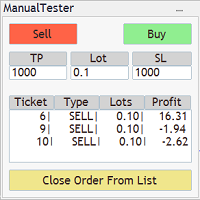
The Manual BackTester Panel utility allows to simulate the manual trading in the MetaTrader 4 strategy tester. The panel works only in the virtual mode of the MetaTrader 4 strategy tester. The demo version allows to open and close ten orders, then the program will automatically turn off. The utility has no parameters at initialization. Panel Description: The panel has Buy and Sell buttons for placing market orders. It is possible to set the Take Profit and the Stop Loss in the TP and SL fields,
Gyroscopes
Nadiya Mirosh
Gyroscope        professional forex expert   (for EURUSD, GBPUSD, USDJPY, AUDUSD, USDCHF, EURGBP, EURJPY, NZDUSD, USDCAD, EURCHF, AUDJPY, CADJPY pairs)   alyzing the market using the Elliot Wave Index. Elliott wave theory is the interpretation of processes in financial markets through a system of visual models (waves) on price charts. The author of the theory, Ralph Elliott, identified eight variants of alternating waves (of which five are in the trend and three are against the trend). The mov
Expert Advisor to Automatically Trade Moving Averages price breakouts & retests .  ​ Complete trading solution with automated Entry , Take Profit , partial profit , Stoploss and also auto breakeven where SL is moved to Entry once tp1 / first target is reached , Moving averages are used to identify trends and confirm reversals ,  They are effective in all time frames . from 1 min scalping to 4hr or Daily charts swings ,  ​ With MA Trade Panel EA we can automatically buy / sell when price breaks
Golden Gestion TP SL
Matthias Hubert Patrick Snidaro
Auto SL/TP Manager EA – Gestion Automatique Intelligente Auto SL/TP Manager EA est un Expert Advisor conçu pour automatiser la gestion des commandes avec une efficacité maximale et une grande discrétion. Il gère automatiquement : Le Stop Loss (SL) et le Take Profit (TP) Le Profit Lock (verrouillage progressif des bénéfices) Le Trailing Stop avec plusieurs méthodes avancées L' affichage masqué du SL et du TP pour plus de discrétion (non visible par le courtisan) C'est l'outil idéal pour les
How to Use the Features       MT5 VERSION   TRADE COPIER Select Role: On the account sending trades, choose Sender (Master Account) . On the account receiving trades, choose Copier (Receiver Account) . Lot Size Mode: Same Lot Size as Master: Ignores multipliers, copies exactly what the Master has. Multiply Master Lot Size: Uses the "Lot Multiplier" field (e.g., Master 0.10, Multiplier 2.0 = Copier 0.20). Use Fixed Lot Size: Ignores Master's volume entirely, uses the "Fixed Lot Size" field for ev
Os compradores deste produto também adquirem
The product will copy all telegram signal to MT4   ( which you are member  ) , also it can work as remote copier.  Easy to set up, copy order instant, can work with almost signal formats, image signal, s upport to translate other language to English Work with all type of channel or group, even channel have "Restrict Saving Content", work with  multi channel, multi MT5 Work as remote copier: with signal have ticket number, it will copy exactly via ticket number. Support to backtest signal. How to
Crystal Trade Manager PRO – Sistema Avançado de Gestão de Risco e Controle de Operações para MT4 Versão Gratuita: https://www.mql5.com/en/market/product/150632 Visão Geral Crystal Trade Manager PRO (CTM) é uma ferramenta profissional de execução de ordens e gestão de risco desenvolvida para MetaTrader 4. Foi projetada para traders que necessitam de disciplina, forte proteção de capital e automação inteligente dentro do MT4. O sistema controla o risco, protege o patrimônio da conta, aplica limite
The product will copy all  Discord  signal   to MT4   ( which you are member  ) , also it can work as remote copier.  Easy to set up. Work with almost signal formats, support to translate other language to English Work with multi channel, multi MT4. Work with Image signal. Copy order instant, auto detect symbol. Work as remote copier: with signal have ticket number, it will copy exactly via ticket number. How to setup and guide: Let read all details about setup and download Discord To MetaTrader
ManHedger MT4
Peter Mueller
5 (2)
THIS EA IS A SEMI-AUTO EA, IT NEEDS USER INPUT. Manual & Test Version Please TEST this product before   BUYING  and watch my video about it. Contact me for user support or bug reports, or if you want the MT5 version! MT5 Version I do not guarantee any profits or financial success using this EA. With this Expert Advisor, you can: Implement your own   Zone Recovery   strategy to capitalize on trending markets. Create   Grid   trading strategies, to profit from ranging markets. Place orders easil
Live Forex Signals é projetado para negociação em sinais do site   https://live-forex-signals.com/en   e   https://foresignal.com/en . Live Forex Signals for MetaTrader 5  https://www.mql5.com/ru/market/product/81448 Parâmetro Nome de usuário e senha se você tiver uma assinatura para sites live-forex-signals.com/foresignal.com. então você deve preencher esses parâmetros com suas credenciais; se não houver assinatura, deixe os campos em branco; Comment Comentário sobre transações abertas Risk r
Averaging Helper
Sergey Batudayev
5 (2)
Auxiliar de Média - Este tipo de instrumento auxiliar de negociação ajudará você a calcular a média de suas posições anteriormente não lucrativas usando duas técnicas: média padrão hedge com posterior abertura de posições conforme a tendência O utilitário tem a capacidade   de classificar várias posições abertas em diferentes direções ao mesmo tempo, tanto para compra quanto para venda. Por exemplo, você abriu uma posição para venda e a segunda para compra, e ambas não são lucrativas, ou uma est
Custom Alerts AIO: Monitoramento inteligente de múltiplos mercados – pronto para uso, sem configuração Visão geral Custom Alerts AIO é uma ferramenta avançada de varredura de mercado que funciona imediatamente após a instalação — sem necessidade de configurar indicadores adicionais. Inclui internamente todos os principais indicadores da Stein Investments (FX Power, FX Volume, FX Dynamic, FX Levels e IX Power), permitindo que você monitore facilmente todas as principais classes de ativos: Forex
With this Expert Advisor, you can seamlessly integrate various channel, arrow, and reversal indicators. It offers the flexibility to use all popular channel trading strategies, while also providing powerful tools to customize your trading conditions and risk management system.   The Expert Advisor opens orders when the price crosses the channel boundaries. Multiple crossing conditions are available for customization: Price touches boundary on re-entry into the channel Price touches boundary on

Unlimited Trade Copier Pro is a tool to copy trade remotely to multiple MT4, MT5 and cTrader accounts at different computers/locations over internet. This is an ideal solution for you if you are a signal provider and want to copy your trades to other receivers globally on your own rules. One provider can copy trades to multiple receivers and one receiver can get trade from multiple providers as well. The provider can even set the subscription expiry for each receiver, so that receiver will not b

--------------Welcome to use [MQL5 Signal Analyze Master]------------------  Function: Draw order tracks of MQL5 MT4 and MT5 signal on MT4 chart. [Using guide] 1.Use it as Experts. 2.Download history record from MQL5 signal(MT4 signal or MT5 signal).  3.Paste history record file below "MQL4/Files/" 4.Load [Signal Analyze Master] on the symbol chart what you want to analyze. 5.Paste the history record file name to parameter 'FileName' 6.Select  SignalType  match the history you download on MT4


EasyInsight AIO MT4
Alain Verleyen
4 (2)
EASY Insight AIO – A solução tudo-em-um para trading inteligente e sem esforço Visão geral Imagine analisar todo o mercado — Forex, Ouro, Cripto, Índices e até Ações — em segundos, sem precisar examinar gráficos manualmente, instalar indicadores ou lidar com configurações complicadas. EASY Insight AIO é sua ferramenta definitiva de exportação para trading com IA, pronta para usar. Ela oferece um panorama completo do mercado em um único arquivo CSV limpo — pronto para análise imediata no ChatGP
Strategy Builder offers an incredible amount of functionality. It combines a trade panel with configurable automation (covert indicators into an EA), real-time statistics (profit & draw down) plus automatic optimization of SL, TP/exit, trading hours, indicator inputs. Multiple indicators can be combined into an single alert/trade signal and can include custom indicators, even if just have ex4 file or purchased from Market. The system is easily configured via a CONFIG button and associated pop-up
This is an Expert Adviser use for manual trading as a background EA or combine with external EA to open orders. Loss Recovery Trading is one of your options to handle the lose positions instead of using stop loss by setting a zone recovery area and target to exit the turn rounds sequence. How It Work? If the market goes against your first positions direction at the specific of losing points, the EA will open an opposite direction position with calculated larger lot size and also keep the first
Trade Copier for MT4   Supports multiple master and slave terminals   Local operation without DLL usage   Optional slow monitoring mode   Compatible with prop firm and personal accounts Trade Copier MT4 To MT4 Advanced Multi-Account Trade Copier for MT4/MT5 – Master & Slave Synchronization This Expert Advisor is a fully automated multi-account trade copying system designed for professional traders who require fast, stable, and flexible synchronization between MT4/MT5 accounts. It supports
O painel FFx Hidden Manager vai ajudar facilitando o gerenciamento de suas ordens diretamente no gráfico. Abaixo a descrição de todos os recursos: TP, SL e Trailing Stop ficam ocultos Cada ordem tem a sua própria linha no gráfico Arrasta e solta (Drag & Drop) qualquer linha para alterar o TP/SL, conforme sua necessidade Opção para mover automaticamente a linha SL no empate (breakeven) quando TP # 1 for atingido Opção para escolher o tipo de TP/SL (por pips ou preço) Opção para escolher o tipo de
FFx Risk Calculator panel will help you to calculate very easily your trades size, SL or the risk directly on the chart. All features are described below: Option to select which parameter to calculate: Risk, Stop Loss or Lot Size The panel will show if the lot size is allowed according to the current account free margin Button to maximize/minimize the panel Drag and Drop the panel anywhere on the chart How to use it? Select the parameter you want to be calculated. It will be based on the 2 other
News Trader Pro
Vu Trung Kien
4.38 (16)
News Trader Pro é um robô único que permite a negociação com notícias pela sua estratégia pré-definida. Ele carrega pedaços de notícias de vários sites populares de Forex. Você pode escolher qualquer notícia e programar a estratégia para negociar, então o News Trader Pro vai operar com essa notícia através de uma estratégia selecionada automaticamente quando a notícia for publicada. As notícias dão a oportunidade de ter pips desde que o preço tenha um grande movimento com a publicação. Agora, co
FFx Watcher PRO
Eric Venturi-Bloxs
The FFx Watcher PRO is a dashboard displaying on a single chart the current direction of up to 15 standard indicators and up to 9 timeframes. It has 2 different modes: 1. Watcher mode: Multi Indicators User is able to select up to 15 indicators to be displayed User is able to select up to 9 timeframes to be displayed 2. Watcher mode: Multi Pairs User is able to select any number of pairs/symbols User is able to select up to 9 timeframes to be displayed This mode uses one of the standard indicat
Transaction Repeater Full
Alexandr Bryzgalov
5 (4)
Baixe uma copiadora de negócios fácil de usar e personalizar. Nada supérfluo, tudo é apenas o mais necessário. Pode fazer cópias para frente e para trás (reversa). Com a cópia direta, ele assume o controle de Stop Loss e Take Profit de cada pedido. Repete as modificações do mercado e limita os pedidos colocados na conta principal. É possível copiar nos modos "um para muitos" e "muitos para um". Atenção: O produto destina-se a copiar transações apenas dentro de um PC ou VPS com acesso ao desktop.
The product combines a manual trade panel with the ability to perform actions automatically in a highly configurable way. Actions include capturing indicator values and then based on those values raising alerts, open/close or partially close trades, scale-in, setting up pending orders, adjusting stop loss, take profit and more. On-chart controls can be configured, such as tick boxes and buttons, so can be fully interactive. The EA also handles money management, news events, hidden stop loss, tak
Elliott Wave Counter é um painel para marcação manual rápida e fácil de usar das ondas Elliott. Pode-se selecionar uma cor e um nível de marcas. Também existem funções para remover a última marcação e toda a marcação feita pela ferramenta. A marcação é feita com um clique. Clique cinco vezes - tenha cinco ondas! O Elliott Wave Counter será um ótimo instrumento tanto para iniciantes quanto para analistas profissionais de ondas Elliott. Guia de instalação e entradas do Elliott Wave Counter se você
If you wish to draw Support and Resistance lines, view: daily market opening, classical pivot levels, Fibonacci pivot levels, trend lines, Fibonacci levels, the remaining time to candle closing, and current spread. If you seek to place your orders with the exact lot that meets your desired stop loss risk. If you wish to do all this and more with just one click, then this is the perfect tool to use. This tool will allow you to feel more relaxed when deciding to open orders, as well as predicting
Unlimited Binary Options Copier Remote is a powerful tool to copy binary options trades remotely between multiple accounts at different locations over internet. This is an ideal solution for signal provider, who want to share his binary options trades with the others globally on his own rules. One provider can copy trades to unlimited receivers and one receiver can get trade from unlimited providers as well. The provider can set the subscription expiry for each receiver, so that receiver will no
Professional and highly customizable utility for automated trading. It can become an indispensable to any trader regardless of the skills. It will help to save the time that would be required for daily routine activities and it will allow to develop custom strategies. The utility can also work manually opened orders and orders opened by any other EAs. This can be applied to attempt to recover the losing trades or even save the trader form losing the deposit. The utility allows to automate the tr
O Telegram Publisher Agent   é um complemento que permite que os traders enviem sinais para seus canais e grupos do Telegram em tempo real. Com mensagens personalizáveis, capturas de tela de gráficos e outros recursos, a ferramenta ajuda os traders a compartilhar suas ideias e estratégias de negociação com seus seguidores. A ferramenta também apresenta um belo design com alternância de tema claro e escuro, proporcionando aos usuários uma experiência de negociação estética e funcional. O Telegram
如果产品有任何问题或者您需要在此产品上添加功能,请联系我 Contact/message me if you encounter any issue using the product or need extra feature to add on the base version. There is Demo version of this panel Dashboard Babon Scalping System Demo in my product list, please try it out to get familiar with all functionalities for free, LINK . This system basically utilizes TDI, Heiken Ashi Trend, Price Trend on H1 time-frame and TMA on H1&H4 time-frame to generate the trend (big picture). Then the system will zoom in to genera
Pairs Trade
Oleg Pechenezhskiy
The Pairs Trade indicator is a utility for semi-automatic pair trading. It allows combining the charts of two arbitrary instruments, even if the schedules of their trading sessions are different. It displays a spread chart in the form of a histogram with an overlaying moving average. It calculates the swap that will be charged for the synthetic position (in the deposit currency). It is possible to set a level for automatic opening of a synthetic position on the spread chart (analogous to the 'se
Corporate Report
Pavel Verveyko
5 (1)
The script displays info about the share's corporate reports and dividends. The data is downloaded from   investing.com : Report date Profit per share (EPS) Revenue Market capitalization Amount of dividends Date of payment of dividends Dividend income The product cannot be tested in the tester (since it is not possible to receive data from the Internet). Before launching:  Add 2   URL   https://ru.investing.com/earnings-calendar/Service/getCalendarFilteredData  and   https://ru.investing.com/di
This Stacker EA will: Automatically set Stop loss on a new order Automatically set Take profit on a new order Stack (or open up to 4 additional orders at the same time) when a new order is placed, the SL/TP can be preset individually for each order. Provides a transparent replacement for the standard 1-click trading buttons in MetaTrader 4 (1 click still works and SL/TP will automatically be set as well as Stacking). Automatically calculate lot order size according to preset risk management perc
This small tool takes over the manually opened positions and treats them according to the predefined settings with the dynamic stop loss and Money Management, which predicts which position size should be used for the trade. The program dynamically tracks the stop loss as soon as the position comes into the plus. Possible commissions and swaps are taken into calculation. It should only be installed on one chart window per symbol. Settings LotRiskPercent = 25 - Percentage of the item size. Calcul
Filtro:
Sem comentários
Responder ao comentário