Mandelbrot
- Experts
- Versão: 1.1
- Atualizado: 13 outubro 2026
- Ativações: 5

Automated Trading Expert Advisor for MetaTrader 4 / MetaTrader 5
About the Product
Mandelbrot is an automated trading Expert Advisor focused on flexible position sizing, trading-series management, order protection, and configurable execution controls.
The architecture is designed around several independent layers of trade management. These include position-size calculation, series-depth control, fixed profit and loss levels, trailing protection, pending-order management, and trading-environment settings.
Mandelbrot allows traders to choose between automatic position sizing based on a configured risk level and a fixed lot size.
All major trade-management parameters are available directly in the Expert Advisor settings.
Money ManagementMandelbrot supports both dynamic and fixed position sizing.
AutoLotSizing
AutoLotSizing — enables or disables automatic position-size calculation.
When enabled, the position size is calculated using the RiskPercent parameter.
When disabled, the Expert Advisor uses the fixed position size specified by FixedLotSize.
RiskPercent
RiskPercent — percentage of capital used for automatic position-size calculation.
The parameter determines the risk level taken into account when calculating the trading volume.
FixedLotSize
FixedLotSize — fixed position size in lots.
Used when automatic position sizing is disabled.
MaxOrdersInSeries
MaxOrdersInSeries — maximum number of orders allowed within a single trading series.
Limits the depth of the position sequence and defines the maximum number of orders that can belong to the same series.
LotMultiplier
LotMultiplier — position-size multiplier for subsequent positions.
Defines how the volume of a subsequent position relates to the preceding position within the series.
Take Profit & Stop LossMandelbrot provides fixed profit and loss levels for position management.
TakeProfitPoints
TakeProfitPoints — distance to the profit-taking level in points.
Defines the target level at which the position can be closed with a profit.
StopLossPoints
StopLossPoints — distance to the protective level in points.
Defines the level at which the position is closed when the configured loss limit is reached.
Trailing StopMandelbrot supports dynamic position management after the price moves in the profitable direction.
TrailingStopEnabled
TrailingStopEnabled — enables or disables the trailing stop.
TrailingStartPoints
TrailingStartPoints — distance in points from the initial entry after which the trailing mechanism becomes active.
Before this level is reached, the protective level remains outside the trailing mode.
TrailingStepPoints
TrailingStepPoints — trailing-stop adjustment step in points.
Defines the minimum price movement required for a subsequent adjustment of the protective level.
Pending OrdersThe Expert Advisor includes a dedicated mechanism for managing pending orders.
PendingOrderDistance
PendingOrderDistance — distance in points used when placing a pending order relative to the calculated entry level.
The parameter controls how far the pending order is positioned from the current trading level.
PendingTrailingEnabled
PendingTrailingEnabled — enables or disables pending-order trailing.
PendingTrailingDistance
PendingTrailingDistance — pending-order trailing distance in points.
When enabled, this parameter defines the distance used to adjust the pending entry level as market conditions change.
Trading Series ProtectionSeriesGuardLevel
SeriesGuardLevel — additional protection level for a trading series.
The mechanism is designed to provide additional control over extended sequences of positions.
This parameter is available when the corresponding protection module is enabled. A value of 0 disables the mechanism.
General SettingsAllowBuyOrders
AllowBuyOrders — enables or disables Buy positions.
AllowSellOrders
AllowSellOrders — enables or disables Sell positions.
These independent controls allow Mandelbrot to operate on Buy positions only, Sell positions only, or both directions.
MagicID
MagicID — unique identifier assigned to the Expert Advisor's orders.
Used to separate Mandelbrot trades from positions opened by other Expert Advisors or manual operations on the same trading account.
When running multiple instances of the Expert Advisor, different identifiers should be used.
OrderComment
OrderComment — custom order comment used to identify trades in the trading history.
Provides an additional way to distinguish operations belonging to a particular Expert Advisor instance.
BrokerFillingType
BrokerFillingType — order-filling policy for MetaTrader 5.
Defines the trade-request filling type according to the execution modes supported by the broker.
This parameter is available only in the MetaTrader 5 version.
EcnAccountMode
EcnAccountMode — ECN account operating mode.
Designed to account for specific trade-execution characteristics of ECN broker infrastructure.
Management ArchitectureMandelbrot combines several independent trade-management layers:
Position Sizing → Series Control → Order Protection → Trailing → Pending Order Management → Execution
This structure provides separate control over:
-
initial position size;
-
subsequent position-size adjustments;
-
maximum series depth;
-
Take Profit and Stop Loss levels;
-
trailing activation and adjustment step;
-
pending-order placement distance;
-
pending-order trailing;
-
Buy and Sell permissions;
-
trade identification;
-
broker-specific execution settings.
-
Automatic or fixed position sizing
-
Configurable risk-based volume calculation
-
Maximum trading-series depth control
-
Adjustable position-size scaling
-
Fixed Take Profit and Stop Loss levels
-
Independent trailing-stop controls
-
Configurable trailing activation level
-
Adjustable trailing-step distance
-
Pending-order support
-
Pending-order trailing
-
Additional trading-series protection
-
Independent Buy and Sell controls
-
MagicID-based trade separation
-
Custom order comments
-
MetaTrader 4 and MetaTrader 5 support
-
Dedicated MT5 order-filling configuration
-
ECN account operating mode
Before using Mandelbrot on a live account, it is recommended to test the Expert Advisor in the Strategy Tester and on a demo account.
When using automatic position sizing, particular attention should be paid to the combination of RiskPercent, MaxOrdersInSeries, and LotMultiplier. Together, these parameters determine how trading exposure can change as a position series develops.
When using fixed position sizing, consider FixedLotSize together with the maximum series depth.
The parameters TakeProfitPoints, StopLossPoints, TrailingStartPoints, and TrailingStepPoints should also be evaluated together because they define the overall structure of open-position management.
Risk WarningTrading financial markets involves a high level of risk and may result in partial or complete loss of capital.
Mandelbrot is a software tool for automated trading and does not guarantee profits.
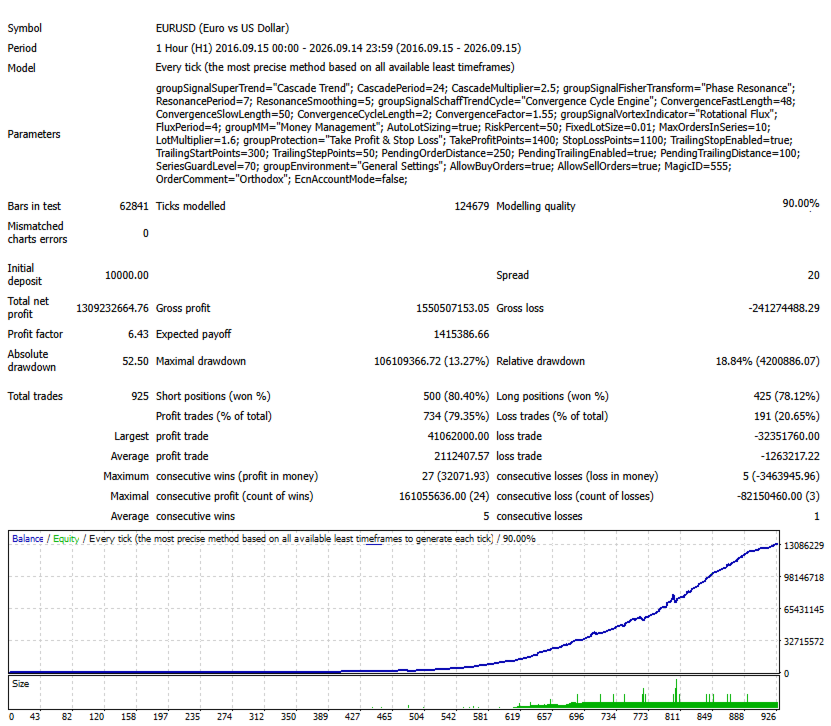
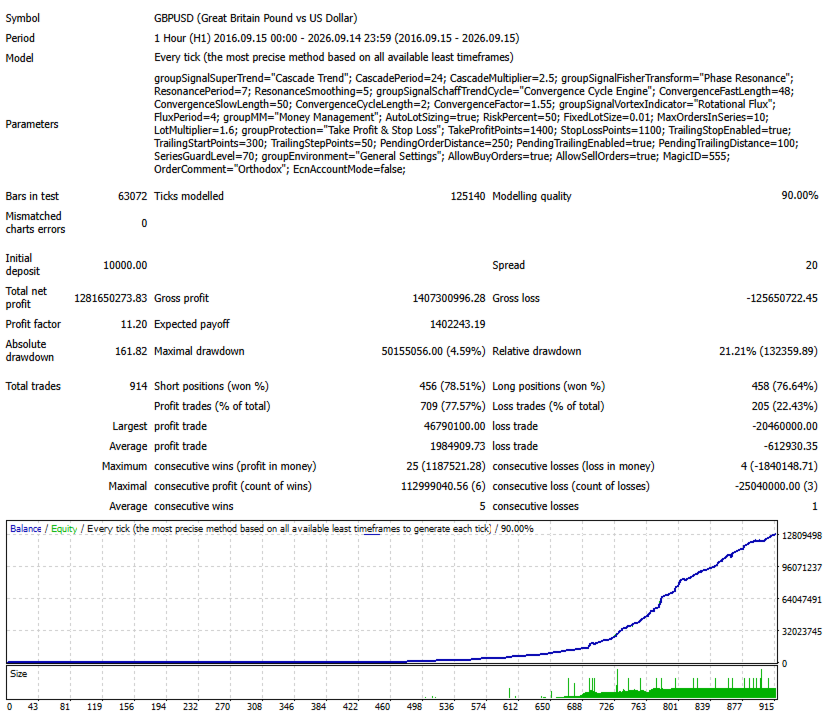
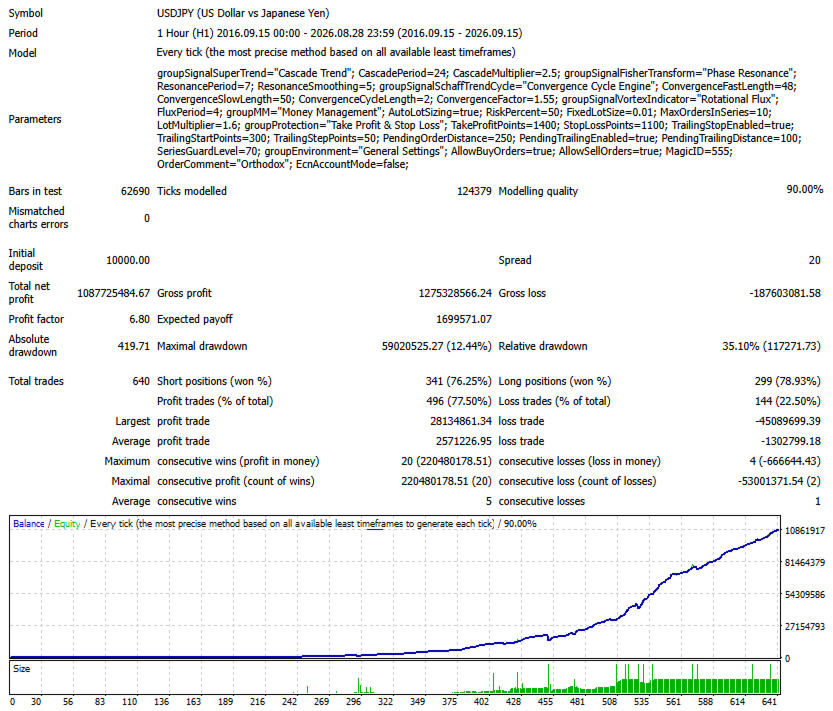
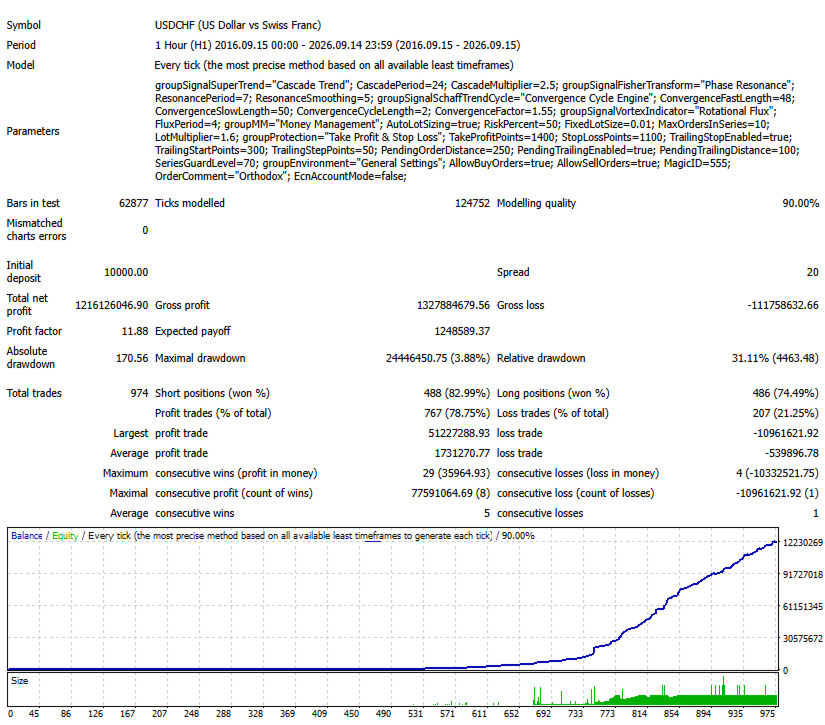
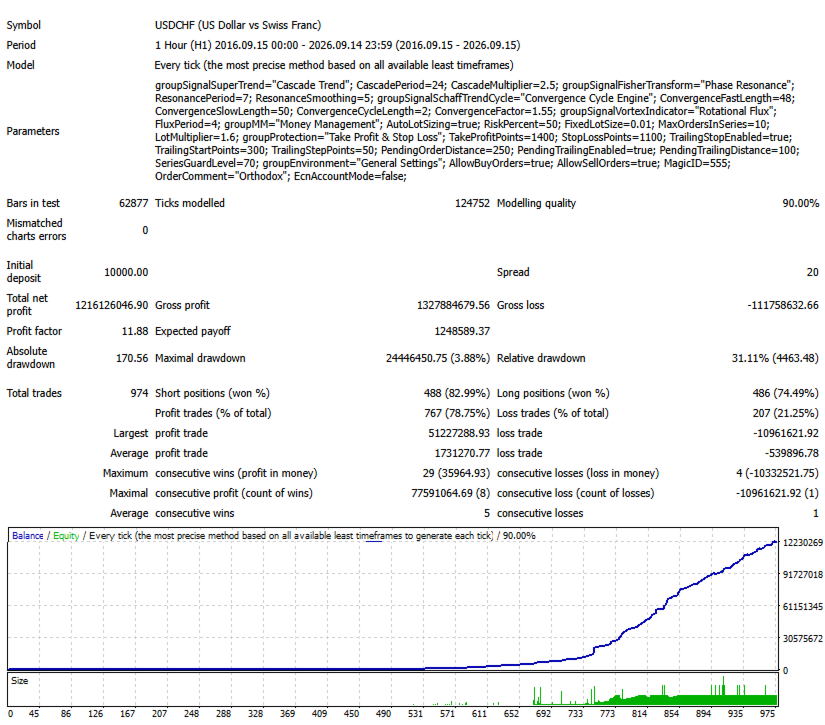
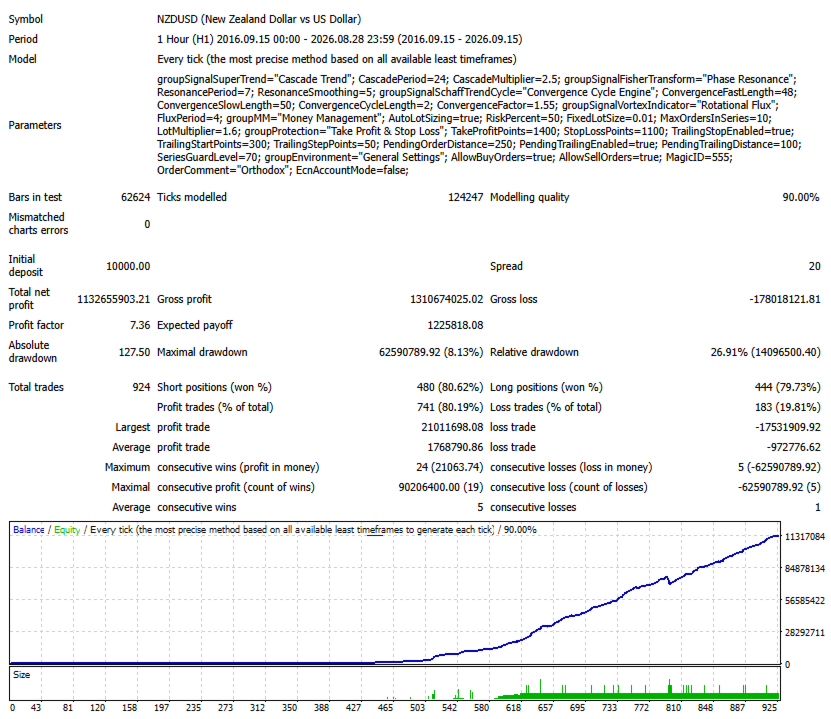
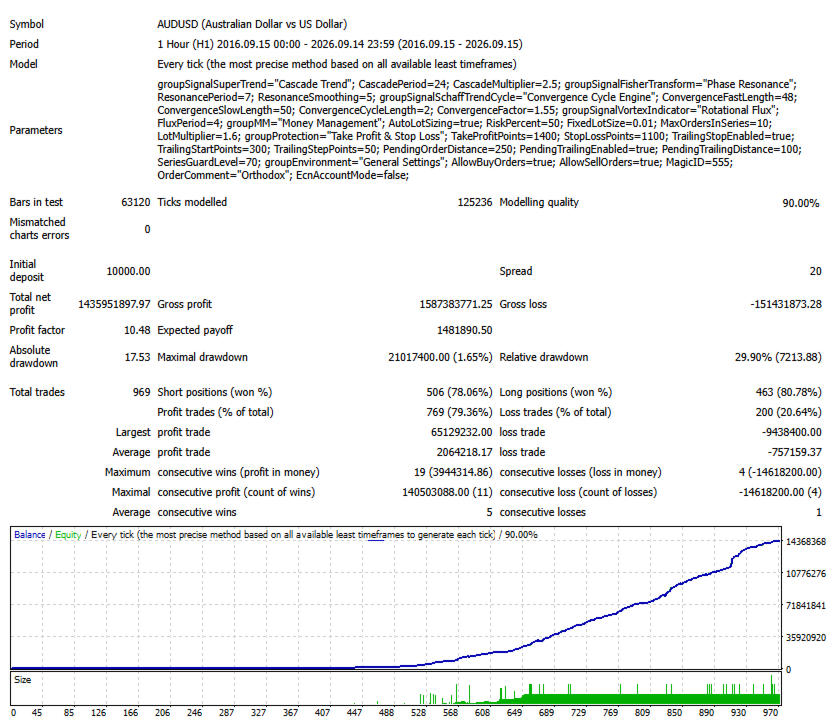
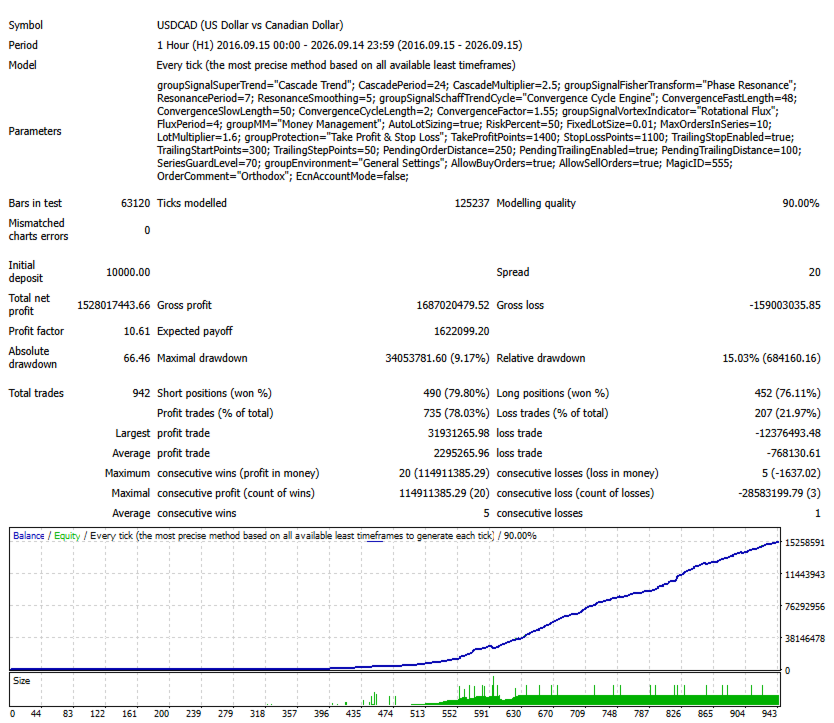
Backtest results and past performance do not guarantee future results. Actual execution may differ from historical testing due to spreads, slippage, liquidity, broker conditions, and other market factors.
Before using the Expert Advisor on a live account, perform your own testing and evaluate the level of risk you are prepared to accept.
Use only capital that you can afford to lose.
Mandelbrot is designed for traders who require detailed control over position sizing, trading sequences, position protection, and execution settings.