Mandelbrot

MANDELBROT

Automated Trading Expert Advisor for MetaTrader 4 / MetaTrader 5

About the Product

Mandelbrot is an automated trading Expert Advisor focused on flexible position sizing, trading-series management, order protection, and configurable execution controls.

The architecture is designed around several independent layers of trade management. These include position-size calculation, series-depth control, fixed profit and loss levels, trailing protection, pending-order management, and trading-environment settings.

Mandelbrot allows traders to choose between automatic position sizing based on a configured risk level and a fixed lot size.

All major trade-management parameters are available directly in the Expert Advisor settings.

Money Management

Mandelbrot supports both dynamic and fixed position sizing.

AutoLotSizing

AutoLotSizing — enables or disables automatic position-size calculation.

When enabled, the position size is calculated using the RiskPercent parameter.

When disabled, the Expert Advisor uses the fixed position size specified by FixedLotSize.

RiskPercent

RiskPercent — percentage of capital used for automatic position-size calculation.

The parameter determines the risk level taken into account when calculating the trading volume.

FixedLotSize

FixedLotSize — fixed position size in lots.

Used when automatic position sizing is disabled.

MaxOrdersInSeries

MaxOrdersInSeries — maximum number of orders allowed within a single trading series.

Limits the depth of the position sequence and defines the maximum number of orders that can belong to the same series.

LotMultiplier

LotMultiplier — position-size multiplier for subsequent positions.

Defines how the volume of a subsequent position relates to the preceding position within the series.

Take Profit & Stop Loss

Mandelbrot provides fixed profit and loss levels for position management.

TakeProfitPoints

TakeProfitPoints — distance to the profit-taking level in points.

Defines the target level at which the position can be closed with a profit.

StopLossPoints

StopLossPoints — distance to the protective level in points.

Defines the level at which the position is closed when the configured loss limit is reached.

Trailing Stop

Mandelbrot supports dynamic position management after the price moves in the profitable direction.

TrailingStopEnabled

TrailingStopEnabled — enables or disables the trailing stop.

TrailingStartPoints

TrailingStartPoints — distance in points from the initial entry after which the trailing mechanism becomes active.

Before this level is reached, the protective level remains outside the trailing mode.

TrailingStepPoints

TrailingStepPoints — trailing-stop adjustment step in points.

Defines the minimum price movement required for a subsequent adjustment of the protective level.

Pending Orders

The Expert Advisor includes a dedicated mechanism for managing pending orders.

PendingOrderDistance

PendingOrderDistance — distance in points used when placing a pending order relative to the calculated entry level.

The parameter controls how far the pending order is positioned from the current trading level.

PendingTrailingEnabled

PendingTrailingEnabled — enables or disables pending-order trailing.

PendingTrailingDistance

PendingTrailingDistance — pending-order trailing distance in points.

When enabled, this parameter defines the distance used to adjust the pending entry level as market conditions change.

Trading Series Protection

SeriesGuardLevel

SeriesGuardLevel — additional protection level for a trading series.

The mechanism is designed to provide additional control over extended sequences of positions.

This parameter is available when the corresponding protection module is enabled. A value of 0 disables the mechanism.

General Settings

AllowBuyOrders

AllowBuyOrders — enables or disables Buy positions.

AllowSellOrders

AllowSellOrders — enables or disables Sell positions.

These independent controls allow Mandelbrot to operate on Buy positions only, Sell positions only, or both directions.

MagicID

MagicID — unique identifier assigned to the Expert Advisor's orders.

Used to separate Mandelbrot trades from positions opened by other Expert Advisors or manual operations on the same trading account.

When running multiple instances of the Expert Advisor, different identifiers should be used.

OrderComment

OrderComment — custom order comment used to identify trades in the trading history.

Provides an additional way to distinguish operations belonging to a particular Expert Advisor instance.

BrokerFillingType

BrokerFillingType — order-filling policy for MetaTrader 5.

Defines the trade-request filling type according to the execution modes supported by the broker.

This parameter is available only in the MetaTrader 5 version.

EcnAccountMode

EcnAccountMode — ECN account operating mode.

Designed to account for specific trade-execution characteristics of ECN broker infrastructure.

Management Architecture

Mandelbrot combines several independent trade-management layers:

Position Sizing → Series Control → Order Protection → Trailing → Pending Order Management → Execution

This structure provides separate control over:

  • initial position size;

  • subsequent position-size adjustments;

  • maximum series depth;

  • Take Profit and Stop Loss levels;

  • trailing activation and adjustment step;

  • pending-order placement distance;

  • pending-order trailing;

  • Buy and Sell permissions;

  • trade identification;

  • broker-specific execution settings.

Key Features
  • Automatic or fixed position sizing

  • Configurable risk-based volume calculation

  • Maximum trading-series depth control

  • Adjustable position-size scaling

  • Fixed Take Profit and Stop Loss levels

  • Independent trailing-stop controls

  • Configurable trailing activation level

  • Adjustable trailing-step distance

  • Pending-order support

  • Pending-order trailing

  • Additional trading-series protection

  • Independent Buy and Sell controls

  • MagicID-based trade separation

  • Custom order comments

  • MetaTrader 4 and MetaTrader 5 support

  • Dedicated MT5 order-filling configuration

  • ECN account operating mode

Setup and Usage

Before using Mandelbrot on a live account, it is recommended to test the Expert Advisor in the Strategy Tester and on a demo account.

When using automatic position sizing, particular attention should be paid to the combination of RiskPercent, MaxOrdersInSeries, and LotMultiplier. Together, these parameters determine how trading exposure can change as a position series develops.

When using fixed position sizing, consider FixedLotSize together with the maximum series depth.

The parameters TakeProfitPoints, StopLossPoints, TrailingStartPoints, and TrailingStepPoints should also be evaluated together because they define the overall structure of open-position management.

Risk Warning

Trading financial markets involves a high level of risk and may result in partial or complete loss of capital.

Mandelbrot is a software tool for automated trading and does not guarantee profits.

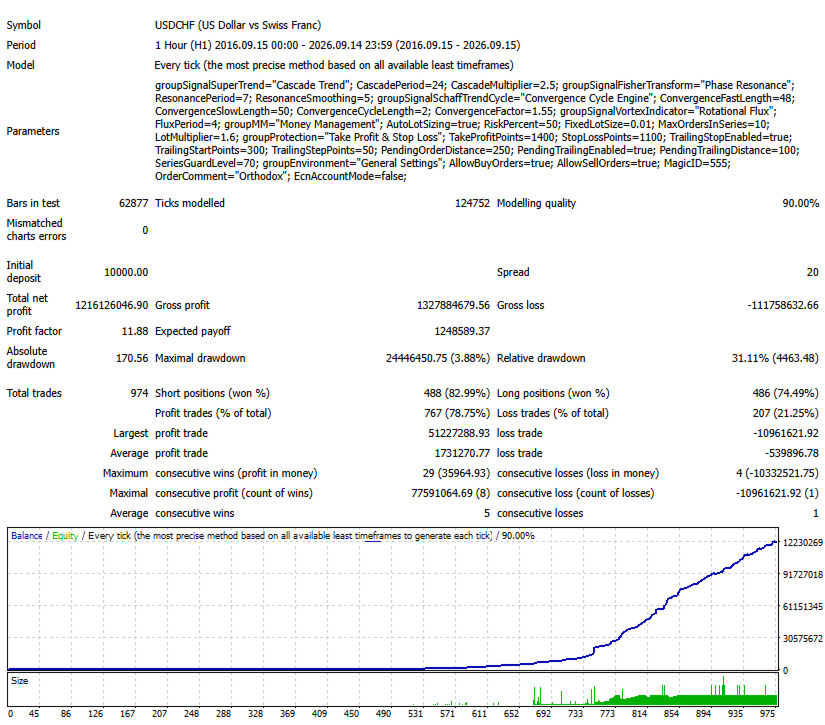
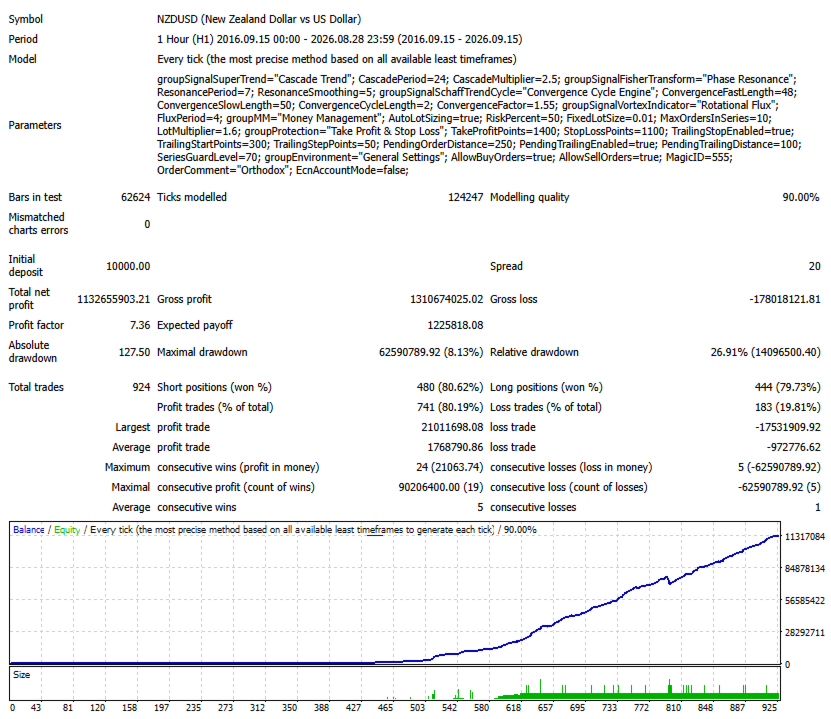
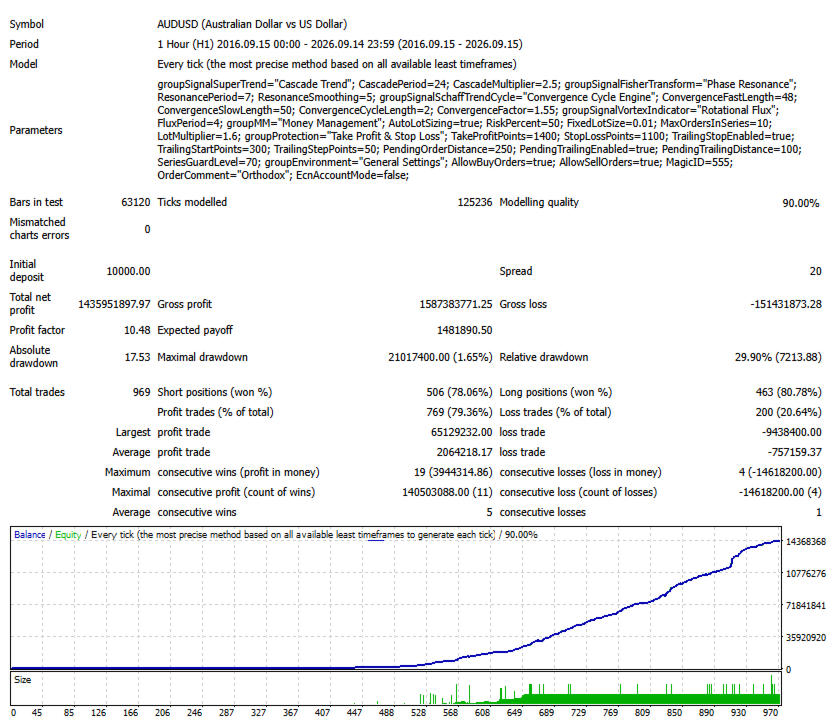
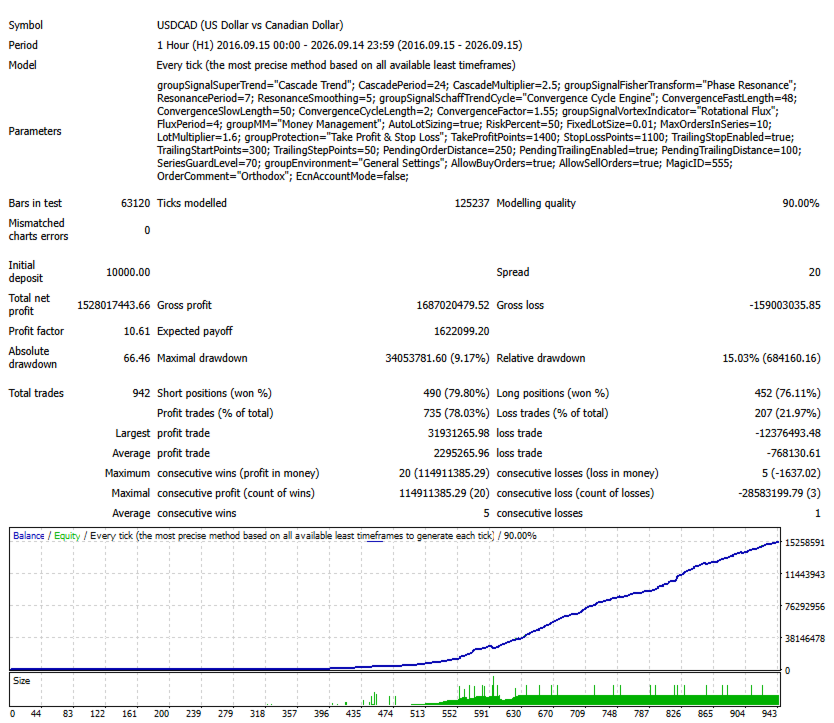
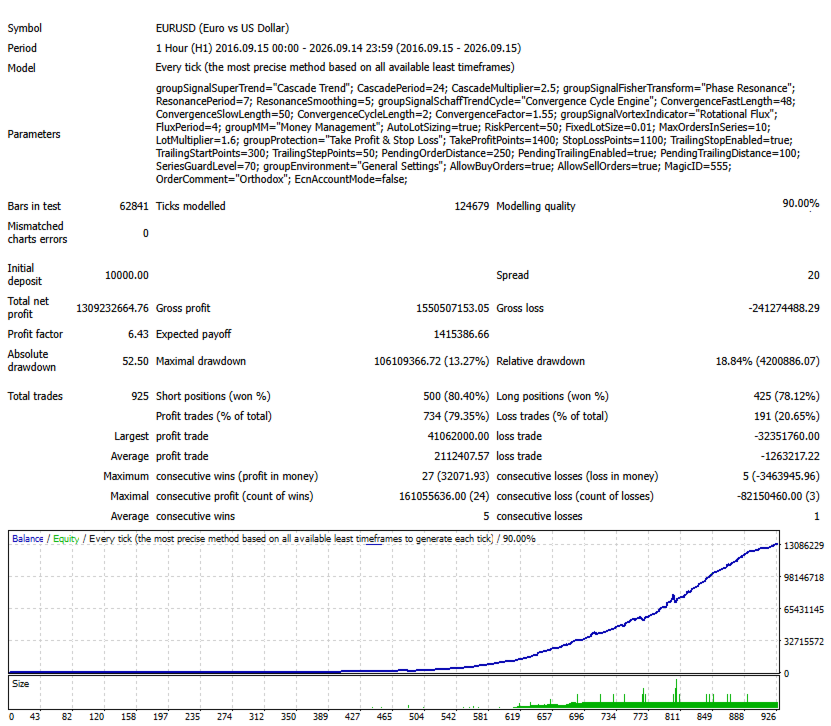
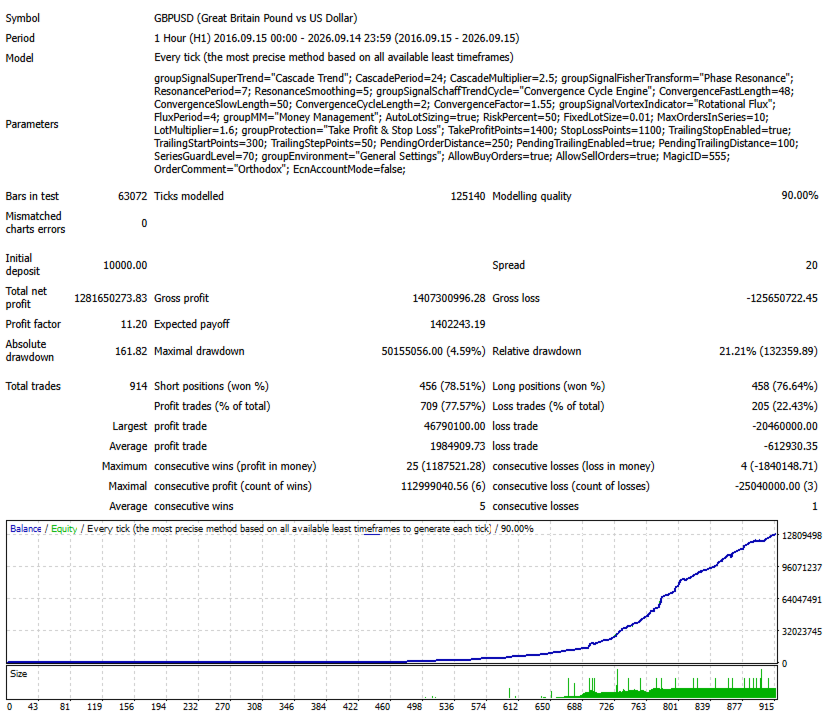
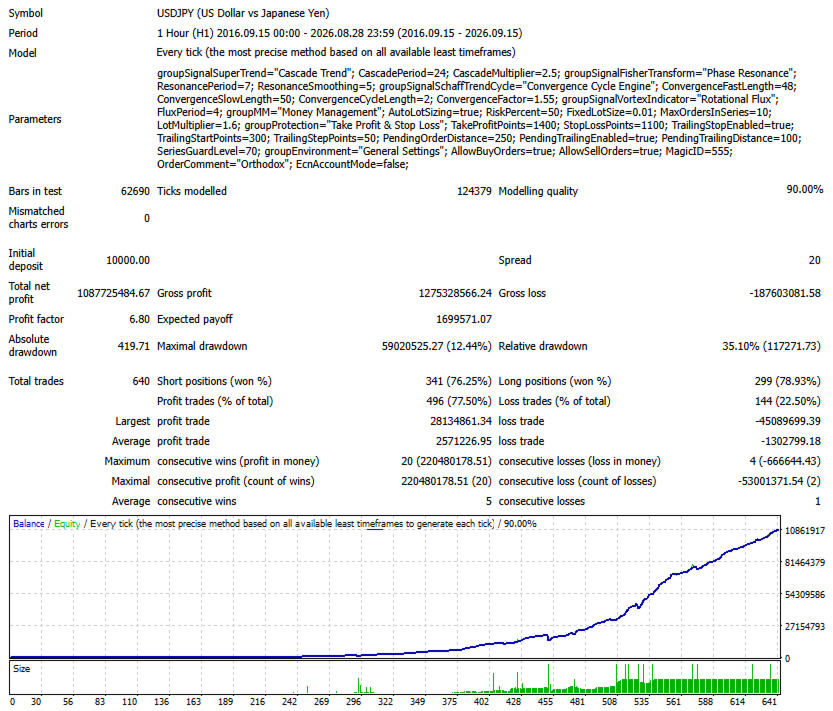
Backtest results and past performance do not guarantee future results. Actual execution may differ from historical testing due to spreads, slippage, liquidity, broker conditions, and other market factors.

Before using the Expert Advisor on a live account, perform your own testing and evaluate the level of risk you are prepared to accept.

Use only capital that you can afford to lose.

Mandelbrot is designed for traders who require detailed control over position sizing, trading sequences, position protection, and execution settings.
제작자의 제품 더 보기
Trend Anthropoid is a trend indicator that allows you to effectively determine the direction of the current trend, as well as identify potential reversal points. The indicator makes it possible to classify the direction of price movement by determining its strength. Solving this problem helps to enter the market on time and get the desired result. Let's start with the benefits. Allows you to determine the current trend. You can quickly understand which trend is currently developing in the mark
Trend Logic
Yvan Musatov
The Trend Logic indicator provides an opportunity to classify the direction of price movement by determining its strength. Solving this problem helps to enter the market on time and make a good profit. It is extremely important for any trader to correctly determine the direction and strength of the trend movement. Unfortunately, there is no single correct solution to this problem. Many traders trade at different time frames. For this reason, the received signals are perceived subjectively. The
Trend Goblin
Yvan Musatov
The Trend Goblin indicator identifies the mainstream trend. They help to analyze the market on a selected time frame. Easy to set up and works on all pairs and all time frames. Trend indicators provide an opportunity to classify the direction of price movement by determining its strength. Solving this problem helps investors enter the market on time and get good returns. It is extremely important for any trader to correctly determine the direction and strength of the trend movement. Unfortunat
Adapter
Yvan Musatov
Индикатор Adapter определяет господствующую тенденцию, помогает анализировать рынок на выбранном временном интервале. Прост в настройке и работает на всех парах и всех временных интервалах. Индикаторы тренда дают возможность классифицировать направление ценового движения, определив его силу. Решение этой проблемы помогает инвесторам вовремя войти в рынок и получить хорошую отдачу. Для любого трейдера крайне важно правильно определить направление и силу трендового движения. К сожалению, единств
The Analytical Trend indicator can track sustained price movement in a specific direction. In this case, the movement itself can be downward, upward or sideways, when the market movement does not have a pronounced direction. The indicator works on the basis of two moving averages and an oscillator. Using the signal search algorithm, the indicator generates signals in the form of arrows. Flexible settings allow you to receive more accurate signals for opening positions. You can quickly understan
The Supernatural channel is determined using a special algorithm, marker points are used to determine the movement of the channel. The Supernatural channel consists of two lines, red and blue, that make up the channel. Simple, visual and efficient use. Can be used for intra-channel trading. The indicator does not redraw and does not lag. Works on all currency pairs and on all timeframes.
Channel Oscillations is a non-redrawing channel indicator based on moving averages. The key difference between the Channel Oscillations indicator and other channel indicators is that Channel Oscillations does not take into account simple moving averages, but double-smoothed ones, which, on the one hand, makes it possible to more clearly determine the market movement, and on the other hand, makes the indicator less sensitive.
Diogenes
Yvan Musatov
Introducing the Diogenes trend indicator! The indicator analyzes market dynamics for pivot points. Shows favorable moments for entering the market in stripes. The principle of operation of the indicator is to automatically determine the current state of the market when placed on a chart. Ready-made trading system. Can be used as a channel indicator or level indicator! This indicator allows you to analyze historical data and, based on them, display instructions for the trader for further action
The Trend Champion indicator works on all timeframes and currency pairs. The indicator should be used as an auxiliary tool for technical analysis, it helps to determine the direction of the trend: either upward or downward price movement for a particular currency pair. Can be used along with oscillators as filters. Trend Champion is a trend indicator. Arrows indicate favorable moments and directions for entering the market. The indicator can be used both for pipsing on small periods and for lo
Qubit Trend
Yvan Musatov
The Qubit Trend indicator works using the cyclical-wave dependence function. Thus, all entry points will be optimal points at which movement changes. Entry points should be used as potential market reversal points. The default indicator settings are quite effective most of the time. You can customize them based on your needs. But do not forget that the approach must be complex, the indicator signals require additional information to enter the market.
Trend Mobile
Yvan Musatov
The regression channel is one of the most popular technical analysis tools among traders. First, the indicator draws a trend line between two points, then on its basis it builds a channel of two parallel lines, which will be at the same distance from the regression line. The term linear regression belongs to the field of statistics. The center line of the channel is the trend line. To calculate it, the least squares method is used. The line above the center line acts as resistance for the pric
Control Shot
Yvan Musatov
Control Shot - Unique indicator for identifying trends. The new system adapts to the market, eliminates additional conditions and copes with its task. A revolutionary new way to identify the start of a trend early. The trend indicator, shows signals, can be used with an optimal risk ratio. It uses reliable algorithms in its calculations. Shows favorable moments for entering the market with arrows, that is, using the indicator is quite simple. Tired of adjusting the indicator settings, wasting
Planned transition is a trend indicator that will help a trader to determine the direction of trade. The indicator has a complex algorithm of work. But for the user, only two lines remain, the red line indicates a sell trend, and the blue line indicates a buy trend. Thus, it is quite simple to interpret the indicator signals. The indicator works on different timeframes; to work with lower timeframes, it is recommended to decrease the indicator period for more frequent entries. To work on higher
Modify Trend
Yvan Musatov
Modify Trend - Unique indicator for identifying trends. The indicator has a complex algorithm of work. But for the user there are only two colors of arrows, red indicates a sell trend, blue indicates a buy trend. Thus, it is quite easy to interpret the indicator signals. The indicator works on different timeframes; to work with lower timeframes, it is recommended to decrease the indicator period for more frequent entries. To work on higher timeframes, on the contrary, increase. The new system ad
Just download the Quarter Strike indicator and embrace your dream. Trading within the volatility range has always attracted traders, because most often it is simple instruments that turn out to be the most profitable. The Quarter Strike indicator is a variant of constructing a price channel that gives signals of sufficiently high accuracy on any instruments and time periods. Bias or other additional parameters are not applied, that is, the indicator evaluates only the real dynamics. By default
Trinitys
Yvan Musatov
The Trinity indicator will tell you whether you have configured the indicator correctly, while you can specify the history interval in the bars that interests you. Look at the numbers on the chart near the arrows! These are pips of profit from a series of entries on the indicator. Profit pips are calculated at the specified interval. The signal can be read without any problems by any bot. Trading within the volatility range has always attracted traders, because most often it is simple instrumen
Spv
Yvan Musatov
The SPV indicator clearly reflects the cyclical nature of the market. Just one key setting! If it is equal to one, then a fast cycle is displayed, but if, for example, the parameter is 12, then the indicator looks for a cycle in the last 12 bars. You can see the ups and downs of the indicator alternate and have such dependence on the market, which can be used to draw conclusions to predict price behavior. Also, indicators can be combined with each other. Also, the indicator can indicate the qual
SPV Cross
Yvan Musatov
The SPV Cross indicator is based on the SPV  indicator. Works as two indicators together on the same chart. With different settings, you can react to the intersection of lines. Clearly reflects the cyclical nature of the market. Just two key settings! It works on the basis of the principle - one is fast and the other is slow. You can see the ups and downs of the indicator alternate and have such a relationship with the market, which can be used to draw conclusions to predict price behavior. The
SPV Corr
Yvan Musatov
The SPV Corr indicator displays the average percentage correlation between the bar's body and its shadows. A very effective system for building various filters and market entry confirmations. It fixes cyclicality and can be used in trading in different ways. You can see the ups and downs of the indicator alternate and have such a relationship with the market, which can be used to draw conclusions to predict price behavior. Also, indicators can be combined with each other. The value of the indica
SPV Body
Yvan Musatov
The SPV Body indicator displays the average analysis of the intersection of adjacent bars. The indicator can easily detect unusual market movements which can be used as a filter. For clarity, poke the graphs to the very beginning of the history when the bars were incomplete, and the indicator will easily display this anamaly. A very effective system for building various filters and confirmations of market entry, to exclude anomalies from trading. It also fixes cyclicity, it turns out that the in
The SPV Volatility indicator is one of the most effective filters. Volatility filter. Shows three volatility options. The so-called limit, real, and the last most effective filter for the filter is the percentage filter. Percentage display of folatility shows the ratio of limit to real volatility. And thus, if we trade in the middle of the channel, then it is necessary to set a condition that the percentage is less than a certain indicator value. If we trade on the channel breakout - following t
Mastodon
Yvan Musatov
Mastodon - displays potential market entry points. According to the wave theory, Mastodon displays the course of a large wave, while the oscillator can specify the entry point, that is, catch the price movement inside it, i.e. small “subwaves”. By correctly understanding the wave nature of price movements and using the Mastodon indicator in conjunction with an oscillator, you can create your own trading system, for example, entering the market after a large wave has formed and then exiting whe
GladiatorGo
Yvan Musatov
The advantage of working with the Gladiator signal indicator is that the trader does not need to conduct technical analysis of the chart on his own. The tool generates ready-made signals in the form of directional arrows. The indicator is considered effective as it does not redraw its signals. This tool is an arrow (signal) one and works without redrawing. Its signals are based on a robust algorithm. Gladiator does not change its readings. Daily and session ranges can be useful for confirming

Signal Casablanca - Arrow technical indicator in the Forex market without redrawing. Able to give hints with minimal errors. It combines several filters, displaying market entry points with arrows on the chart. You can note the accuracy and clarity of the signals of this pointer indicator. Having seen a signal to buy, a trader opens an order without expecting that after a while the initial hint may change to the completely opposite one or simply disappear, having lost its relevance. The signal w

Fargo
Yvan Musatov
Fargo does not change its readings, it is a technical indicator in the Forex market without redrawing. It combines several filters to display market entry arrows on the chart. You can note the accuracy and clarity of the signals of this pointer indicator. When a suitable moment for buying appears, the indicator generates a signal exactly at the moment of its appearance and not below or above the current candle. The arrow will be exactly at the price where the signal appears and will not change
Wonderful
Yvan Musatov
Trend Expert. It works by entering the market with only one buy order and another sell order. It does not form a series of rendering, and therefore you can work with them starting from $ 100! Which is great for beginners. To enter, it uses a system of indicators and a system of dynamic correction of stops depending on volatility, which can be disabled in the settings, but in this case, you will significantly reduce the efficiency of the bot. The bot implements a money management system, which c

Catch
Yvan Musatov
Catch is a reversal indicator and is part of a special category of instruments. it not only analyzes the price movement, but also indicates the points of possible reversals. This facilitates fast and optimal opening of buy or sell orders (depending on the current situation). In this case, the historical data of the analyzed asset must be taken into account. It is the correct execution of such actions that largely helps traders to make the right decision in time and get a profit.
Matios
Yvan Musatov
The Matios indicator visually unloads the price chart and saves analysis time: no signal - no deal, if an opposite signal appears, then the current deal should be closed. This is an arrow indicator for determining the trend. According to the wave theory, Matios displays the course of the wave, while the oscillator can specify the entry point, that is, catch the price movement inside it, i.e. small “subwaves”. By correctly understanding the wave nature of price movements and using the Matios in
Sting
Yvan Musatov
Sting implements indicator technical analysis and allows you to determine the state of the market in the current period and make a decision on a deal based on certain signals. Sting is the result of mathematical calculations based on data on prices and trading volumes. Sting creates signals to perform operations on strong trend movements; it is more expedient to use it for trading when the trend is weakening or sideways. It is used as an additional one, regardless of the phase of the trend mov
Labyrinth
Yvan Musatov
Labyrinth - Trend Expert Advisor. It works by entering the market in lots of buy and sell. It does not form a series of rendering, and therefore you can work with them starting from $ 1000! Which is great for beginners. The bot implements a money management system, which consists in a competent calculation of the risk depending on the deposit. For the correct calculation of the volume, you need to specify the base deposit for calculating the risk. By default, we are talking about a $ 1000 depos
필터:
리뷰 없음
리뷰 답변