Recovery Assistant Pro MT4
- Utilitários
- Versão: 1.2
- Atualizado: 10 agosto 2026
- Ativações: 5

Recovery Assistant Pro for MT4
Manual Recovery Trading Assistant
Recovery Lot Size Calculation
Supported Assets
Recovery Based on Target USD
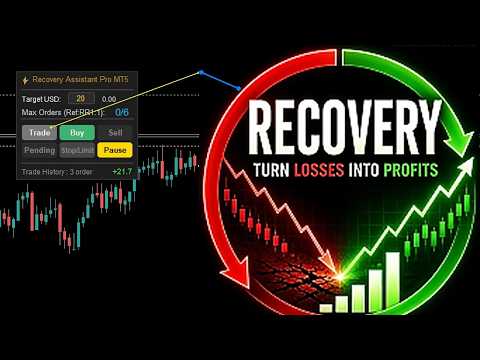
Recovery Control Panel
Automatic Recovery Hedge System
One Recovery Cycle at a Time
Automatic Trading Cycle Management
Real-Time Trade History
Target USD : 1-2% of account balance (Higher values reduce the number of possible Recovery attempts.)
Timeframe : M5 or higher
Account Type : Hedge + Commission-Free
Recovery Assistant Pro MT4
After the launch promotion ends, the price will increase to $129 USD.
Manual Recovery Trading Assistant
- Recovery Assistant Pro is an easy-to-use Manual Trading Assistant EA for Recovery trade calculations and management.
- Helps calculate the appropriate Lot Size.
- Designed to calculate Recovery trade parameters based on floating loss and the selected Target USD.
- Simplifies Recovery calculations that would otherwise require manual calculation.
- The trading panel provides direct access to the main Recovery functions from the chart.
- Includes a Recovery system that supports multiple currency pairs and switching to another supported symbol.
1. Main Features
Recovery Lot Size Calculation The EA automatically calculates the appropriate Lot Size using the following information:
- Loss amount
- Target USD
- TP distance
- Estimated Spread
- Swap
Supported Assets
- Forex
- Gold (XAUUSD)
- Indices
- Oil
- Cryptocurrency
Recovery Based on Target USD
- Each new Recovery order is calculated based on the current floating loss and the specified Target USD.
Recovery Control Panel
- The trading panel provides direct access to all important Recovery functions from the chart.
- Monitor Recovery status in real time and control trading with just one click.
- The panel displays important information such as:
- Editable Target USD
- Real-time Profit/Loss (all symbols)
- Maximum Recovery Orders
- Trading Summary
- Quick action buttons:
- Buy
- Sell
- Open Order
- Pending Order
- Pause Recovery
________________________________________________
Drag the trading lines directly on the chart. No need to manually type price levels.
| Trading Line | Purpose |
|---|---|
| Target USD Line | Take Profit Level |
| Pause Line | Hedge Point and Pause Recovery |
| Pending Line | Stop / Limit Order |
Automatic Recovery Hedge System
- After opening an order, the EA automatically prepares the next Recovery step.
- The system places an opposite Pending Order at the Pause price level.
- When Hedge is activated, the EA automatically removes the Take Profit.
- The EA can calculate a Recovery trade on another symbol based on the floating loss of the selected positions.
- The EA calculates the Lot Size using the total floating loss across the account and the selected Target USD.
- For example, a Recovery trade can be opened on EURUSD, GBPUSD, BTCUSD,
or another supported asset while existing positions are held on XAUUSD. - Supports Recovery calculations across multiple supported symbols and asset types.
- The user decides when to Buy, Sell, or place Pending Orders.
One Recovery Cycle at a Time
- The EA prevents opening duplicate Recovery cycles while the current Recovery cycle is still active,
allowing the Recovery process to follow the designed sequence.
Automatic Trading Cycle Management
- When TP is reached, the EA closes all related positions and Pending Orders, then starts a new Recovery cycle.
Real-Time Trade History
- Displays the profit summary of the latest Recovery cycle (all symbols).
Uses a shared data system between all EA instances running on different symbols in the same terminal.
2. Suitable For
- Recovery Trading
- Manual Trading
- Multi-Currency and Multi-Asset Trading
- Cross-Pair Recovery
- Money Management using Target USD
3. Highlights
- Lot Size Calculation
- On-Chart Recovery Control Panel
- Cross-Pair & Multi-Asset Recovery
- Automatic Hedge Preparation
- Target USD Trade Management
- Real-Time Floating Loss Monitoring
- Chart-Based Trading Control
- Time Candle Countdown (Candle countdown timer attached to the current price line)
- Automatically Restores Trading Lines if they are accidentally deleted
- Easy to Use
4. How It Works
- Drag the TP and Pause lines on the chart.
- Click Buy / Sell / Pending , The EA calculates the Lot Size from Floating Loss + Target USD.
- Open the order , Set TP , Automatically place a Hedge Pending Order at the Pause Line.
- When TP is reached, the EA closes all related positions and Pending Orders.
- Price reaches the Pause Line , Hedge is activated, and the system waits for the next Recovery cycle.
- Multi-Symbol Operation: The system can operate across different symbols,
allowing you to switch to another trading symbol without resetting the EA.
5. How to Use
- Click Trade or Pending on the panel. (The draggable trading lines will appear on the chart.)
- Drag the lines to set the TP and Pause (Hedge).
- Click Buy or Sell.
6. Recommended Settings
Target USD : 1-2% of account balance (Higher values reduce the number of possible Recovery attempts.)Timeframe : M5 or higher
Account Type : Hedge + Commission-Free
Important Notes
- This EA is a Manual Trading Assistant, not an automated trading EA.
- This system is designed for traders who understand Recovery and Hedge trading.
- The EA does not use a Stop Loss (SL) for Recovery positions.
Keep the EA running while the Recovery cycle is active,
until a Hedge is activated according to the system to hold the current floating profit/loss level.
Recovery Assistant Pro MT4
Manual Recovery trading assistant with visual controls and multi-symbol support.
Launch Price: $69 USD
After the launch promotion ends, the price will increase to $129 USD.
Please check the current price displayed on the MQL5 Market before purchasing.
________________________________________________________________
Tag: Recovery, Recovery Trading, Recovery Tool, Manual Trading, Trading Assistant, Trade Assistant,
Smart Recovery, Manual Trading Tool, Lot Size Calculator, Risk Management,
Trade Management, Recovery ea, Target USD, Recovery System, Recovery Panel,