Artemis One EA MT5
- Experts
- Versão: 1.10
- Atualizado: 1 junho 2026
- Ativações: 20

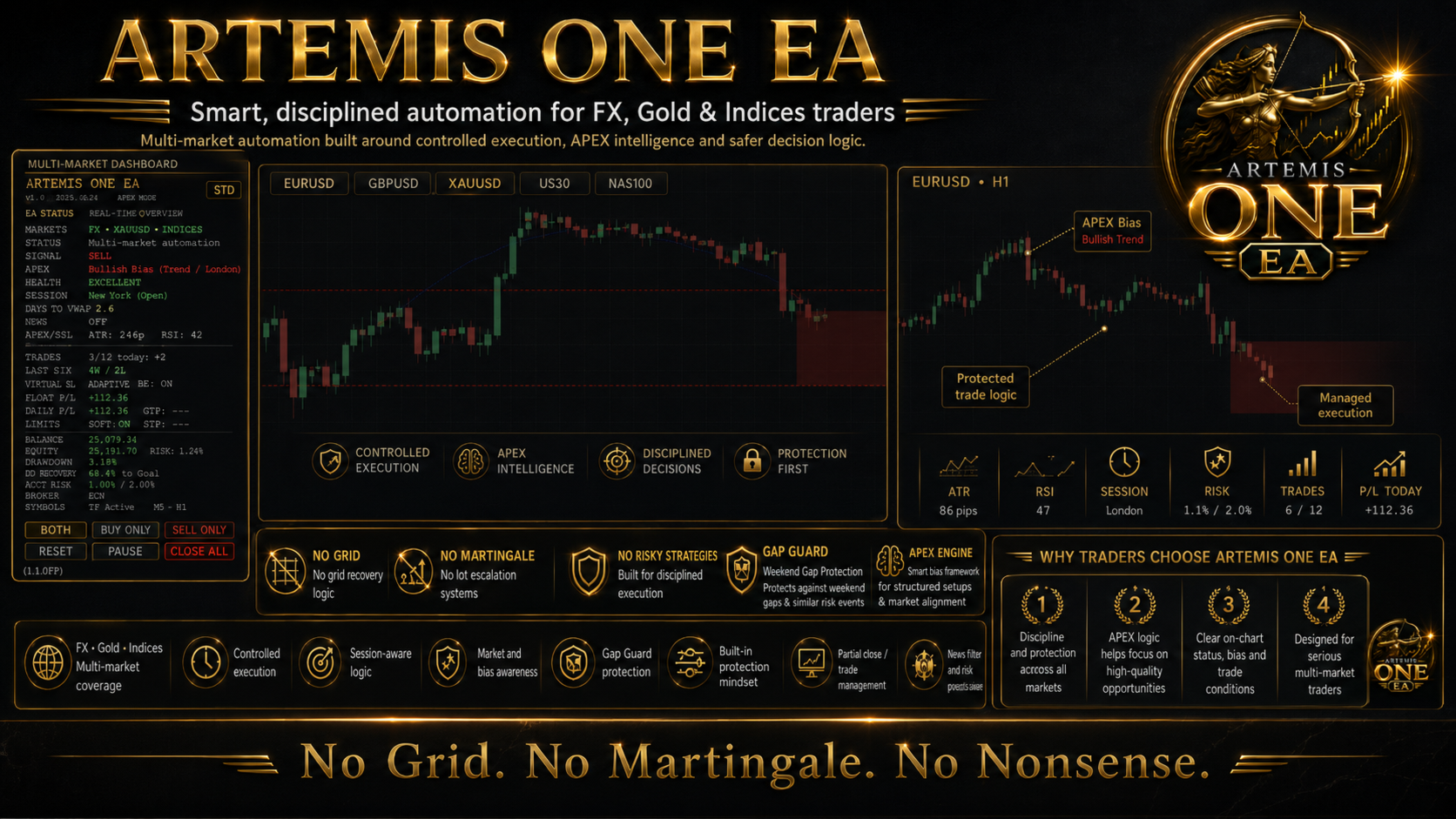
Artemis ONE EA — APEX-Powered Multi-Symbol Trading Engine for MT5
Artemis ONE EA is a fully automated Expert Advisor for MetaTrader 5, built around adaptive strategy selection, structured trade entries, ATR-based trade management, and configurable account protection.
The EA is designed for major forex pairs, metals, and selected non-crypto CFD markets, with a balanced default setup prepared around XAUUSD H1. Crypto markets are not recommended due to weekend trading, extreme spread variation, and gap behaviour that can affect automated execution. Artemis ONE EA can be used with Majors, Minors and Exotic pairs as well as Indices like US30 and NAS.
At the core of Artemis ONE is the Artemis APEX Engine, a fully automatic strategy-selection layer that analyses market conditions before selecting the most suitable internal strategy or blocking trading when conditions are unsuitable.
Artemis APEX Engine
APEX stands for: Adaptive Positioning & Execution
The Artemis APEX Engine analyses trend strength, volatility, range behaviour, expansion conditions, and higher-timeframe bias before routing the EA to the most suitable built-in strategy.
Instead of forcing one fixed strategy in all market conditions, APEX can adapt between the internal strategy modes. In trending markets, it can prioritise Break of Structure or EMA Momentum. During London or New York breakout windows, it can route to session breakout logic. In cleaner ranging conditions, it can allow RSI Reversal logic. If the market is too unstable, excessively volatile, or unsuitable, APEX can block new entries according to the protection settings.
This gives Artemis ONE an adaptive structure while keeping the decision process rule-based and transparent.
Built-In Strategy Modes
Artemis ONE includes both fully automatic and manual strategy selection.
The default mode is Artemis APEX Engine, which automatically selects from the EA’s internal strategies based on market state.
Users can also manually select individual modes, including Break of Structure, EMA Crossover with RSI Filter, London Open Breakout, New York Open Breakout, London + New York Breakout, and RSI Reversal.
This allows users to trade with adaptive APEX mode or focus on one preferred strategy style.
Default Configuration
The default settings are configured as a balanced starting point, with XAUUSD H1 used as the primary reference setup.
The EA uses APEX strategy selection, H1 timeframe preset behaviour, 1% risk-based position sizing, percentage-based daily profit and loss limits, account-level risk control, and practical trade-frequency limits.
Artemis ONE can also be configured for other forex pairs, metals, and selected CFD symbols. Users should always backtest and forward test their chosen symbol, timeframe, and broker conditions before using the EA on a live account.
Set files for Gold and FX Majors included in Comment 2.
ATR-Based Stops, Targets and Trade Management
Artemis ONE uses ATR-based calculations to adapt trade placement to current market volatility. Stop loss, take profit, TP1, TP2, break-even, and trailing stop levels can be calculated dynamically instead of using fixed distances on every trade.
The EA supports partial close at TP1, break-even stop adjustment, ATR trailing stop, optional TP2 exit, and optional opposite-signal close.
A conservative exit option is also included: users can choose to close 100% of the position at TP1 if they prefer a single-target exit style.
Risk and Protection Features
The EA supports fixed manual lot sizing and percentage-based risk sizing. In risk percentage mode, position size is calculated using the selected account risk percentage and the stop loss distance.
Artemis ONE also includes daily profit and loss limits, optional trade closure when daily limits are reached, equity stop, minimum balance protection, drawdown alerts, account-level open risk control, spread filtering, session filtering, trading day filtering, and duplicate instance protection.
These tools do not remove trading risk, but they help define clear operating boundaries for automated trading.
Artemis Gap Guard
Artemis ONE includes Artemis Gap Guard, a protection module designed to monitor abnormal market gaps, weekend reopen conditions, and post-gap spread behaviour.
If a significant gap is detected, Gap Guard can block new trades for a configurable cooldown period. It can also require spread conditions to normalise before allowing new entries again.
Optional extreme-gap trade closure is available, but it is disabled by default. This feature cannot prevent broker gaps or guarantee stop-loss fills, but it can help the EA avoid opening new trades immediately after unstable price jumps or illiquid market reopen conditions.
News and Session Control
Artemis ONE includes flexible news protection with manual news time slots, built-in recurring high-impact news windows, and optional live news feed mode. The live news feed mode requires WebRequest permission in MetaTrader 5.
Users can choose how many minutes before and after news events new trades should be blocked. There is also an optional setting to close open trades during news windows.
Session controls allow the EA to focus on selected trading hours and support dedicated London and New York breakout behaviour.
Artemis Graphite Panel
The EA includes the Artemis Graphite visual panel for live chart monitoring.
The panel can display EA status, APEX market state, routed strategy, higher-timeframe bias, Gap Guard status, trade levels, entry price, stop loss, TP1, TP2, signal arrows, profit zones, break-even markers, partial close markers, and trade activity information.
Users can choose the default panel mode: Standard, Compact, or Detailed. The panel can also be positioned in any chart corner: top left, top right, bottom right, or bottom left.
Recommended Setup
Platform: MetaTrader 5
Default reference setup: XAUUSD H1
Suitable markets: Forex pairs, metals, and selected non-crypto CFDs
Not recommended: Crypto symbols
Default mode: Artemis APEX Engine
Supported presets: M15, M30, H1, H4, D1
Lot sizing: Fixed lot or account risk percentage
VPS: Recommended for continuous operation
Testing: Backtest and forward test on demo before live use
Setfiles: See comment 2
Artemis ONE can be configured for different supported symbols, timeframes, and trading styles. Users should test their preferred settings with their own broker before using the EA on a live account.
Important Risk Notice
Artemis ONE is an automated trading tool and does not guarantee profits. Trading results can be affected by market conditions, spread, slippage, broker execution, liquidity, gaps, news events, leverage, and account settings.
The optional loss recovery function increases risk and is disabled by default. Use it only if you understand how recovery-based position sizing can increase drawdown.
Always test the EA with your broker and preferred settings before using it on a live account.