 MetaTrader 5
 Experts
 Indicadores
 Bibliotecas
 Utilitários
 Widgets
 Regras
Conheça o Mercado MQL5 no YouTube, assista aos vídeos tutoriais
Como comprar um robô de negociação ou indicador?
Execute seu EA na
hospedagem virtual
hospedagem virtual
Teste indicadores/robôs de negociação antes de comprá-los
Quer ganhar dinheiro no Mercado?
Como apresentar um produto para o consumidor final?
Novas ferramentas de negociação para MetaTrader 5 - 78
 Abaixo estão os programas de negociação que simplificam o trading no MetaTrader 5. Passe o mouse sobre um produto para ler uma descrição mostrando seu propósito.
Utility Description This is a useful utility that can help traders to Stay in touch with their Accounts and hear about account critical conditions. With this utility, traders will receive notifications of broker server connectivity status. Different forms of notifications are supported such as Android or IOS phone notifications, Email messages or Popup Alerts. Also any changes on positions can be sent as a notification based on user settings. All above features can be customized using the EA inp

Painel de Comércio Completo para o método "No Nonsense Forex": Este painel encapsula quase tudo o que necessitará para executar o seu próprio algoritmo NNFX, ajudando-o a negociar ainda mais rápido e fácil. Tem 3 partes: Painel de Símbolos Alterne rapidamente para qualquer símbolo nas suas tabelas, premindo o seu nome. Informações adicionais podem ser apresentadas no painel: negociações abertas actualmente, correlação dessas negociações com outros símbolos (excepto se o seu stop loss estiver no
Fundamental Scanner is a Non-Repaint, Multi Symbol and Multi Time Frame Dashboard based on Fundamental Signals Indicator . Fundamental Signals Indicator has a powerful calculation engine that can predict market movement over 3000 pips (30000 points). The indicator is named fundamental because it can predict trends with large movements, no complicated inputs and low risk.
Features :
Multi-Symbol Support (Support automatic listing of market watch symbols) Multi-TimeFrame Support (Over 7 custo
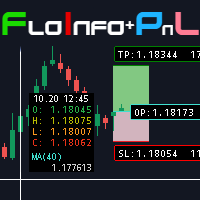
Floating data window and Risk Reward Profit and Loss tool. The FloInfo floating data window brings you OHLC and indicator data to your mouse cursor.
The PnL tool included allows you to set Risk/Reward and Profit/Loss tools onto your chart to help you manage your orders and risk management. Included with the FloInfo tool you also get the PnL tool which allows you to quickly find the risk/reward ratio. For more details on all the features and how to use this product please see the link to the gu

Order Entry Tool with several additional features. Money management feature - As in the free version but in this pro version the lot & risk calculations are updated as you drag the lines making it much easier to setup the order. Close all - Will close all orders opened with the tool in one click. Intelligent trailing stop loss - Attempts to maintain a trailing stop loss just behind the last identified structure in the 1H chart in order to try and avoid unwanted stop-outs. Adjustments are made ev

This utility allows creating any amount of grid orders just by clicking with the mouse.
Instructions:
Trading mode
Deleting mode
Press ctrl and click with mouse to start drawing a grid While drawing, press shift to cancel Release buttons to send orders
Press shift and click with mouse to draw a removal line
Release buttons to confirm removal: EA deletes every pending order that the line touches
Inputs: - 3 options to calculate the grid sizing: Fixed points distance between grid level
FREE

Скрипт для удаления всего лишнего с графиков в терминале MetaTrader.
- Простота использования: Достаточно просто перетянуть скрипт на график - Скорость выполнения: В течении нескольких секунд скрипт выполнит свою работу и очистит график полностью.
Скрипт адаптирован для MT5 Скрипт на русском языке Версия: 1.0 ............ Скрипт от Venom Team ............

The VR Object Delete All script solves the problem of garbage on the chart. it is often necessary to completely clear the chart of everything that is put on it, comments, lines, objects. The script completely deletes everything, even those objects that are not visible. When working, VR Object Delete All writes everything it does in the terminal log, as well as the names of objects to delete. Displays the number of deleted objects as a separate line. in case of any errors, it will display an erro
FREE

Эксперт - торговый помощник, созданный по одноимённой торговой стратегии Оракул в сотрудничестве с ее автором Нео. Определяет на графиках в автоматическом режиме разворотные импульсные модели и строит по ним Вилки Нео - авторский инструмент, позволяющий определять циклы движения цены и указывающий на ожидаемую цель TakeProfit . Поиск ведется на всех заданных периодах графиков одновременно с фильтрацией совпадений. Осуществляется фильтрация неверных Вилок с указанием кода ошибки. Утилита имеет

Small expert of great use. Close All by Magic Number allows you to speed up the closing of all open positions with a certain magic number. Thanks to this expert, it is possible to manage multiple strategies at the same time without the risk of making mistakes. You can close all discretionary trades, all experts, all spreads... The position of the button can be customized so as not to disturb any other indicators
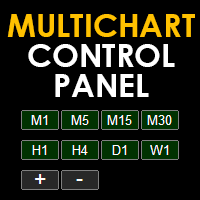
Multichart Control Panel is a small panel that can change the timeframe and zoom level of all open chart with just one click. Simple, intuitive and fast.
Inside there is a simple hidden function: the buttons have a light red color when working on a demo account and a light green color when working on a real account. This little trick helps all traders who for some reason often switch from a demo account to a real one not to get confused and not to make involuntary mistakes.

VR Assistant Charts é uma ferramenta conveniente para traders que trabalham com objetos gráficos na janela do terminal de negociação MetaTrader. O programa permite alterar a cor, estilo, espessura e outras características das linhas de tendência, níveis de Fibonacci, leques de Gann e outros elementos gráficos no terminal MetaTrader com um clique do mouse. Configurações, arquivos de configuração, versões demo, instruções, solução de problemas podem ser obtidos em [blog]
Você pode ler ou escrever

Torne seus níveis Take Profit, Stop Loss e Trailing Stop invisíveis para o corretor! Opção principal: STEALTH MODE Virtual Trailing Stop Virtual Take Profit Ponto de equilíbrio virtual Virtual Stop Loss Vida útil dos pedidos virtuais AVISO: O Expert Advisor não faz pedidos sozinho. Você mesmo deve abrir os pedidos (inclusive por meio do painel de Especialistas) ou usar um Especialista terceirizado em outro gráfico do mesmo par de moedas. Especifique o número mágico "-1" nas configurações do Espe

Cesta UR
O melhor que você pode fazer é evitar que seus pedidos se transformem em perdas. Agora você pode relaxar e deixar que o UR Basket cuide disso.
Vantagens de usar a Cesta UR:
Todos os parâmetros podem ser alterados dinamicamente no painel gráfico do seu gráfico - você NÃO precisa reiniciar o EA para alterar os parâmetros ou recuperar as configurações usadas! Você pode acompanhar seus pedidos através de: - Número mágico - Comentário EA - Ambos mencionados acima - Todas as sua
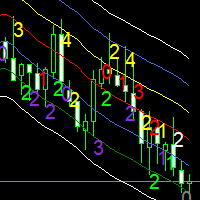
Moving averages are a simple and serious indicator for evaluating the development of a price. But which configuration to choose? 12 periods ? 20 periods? There is not a single moving average setup for all instruments, at all times, for all time periods, simply because not all instruments have the same volatility, they are all very different. They have a signature. The Signature App is a powerful decision support tool. It is based on the use of moving average envelopes. The program calculates th

The utility draws reversal levels using the formulas for each of the selected number of candles:
Pivot = (high + close + low) / 3 R1 = ( 2 * Pivot) - low S1 = ( 2 * Pivot) - high R2 = Pivot + (R1 -S1) R3 = high + ( 2 * (Pivot - low)) S2 = Pivot - (R1 - S1) S3 = low - ( 2 * (high - Pivot)) H = high L = low U = if the candle is bullish, then close. Otherwise - open D = if the candle is bullish, then open. Otherwise - close
On any timeframe.
After a new candle closes on the calculated timeframe
FREE

Capital protector MT5 is an Expert Advisor who works based on the profit and loss of your account. Its functions include: Closing of all orders when a certain profit or loss is reached. Remove any other Expert Advisor installed on a secondary chart when a certain profit or loss is reached. Send a notification to the mobile when a certain loss or profit is reached. To configure the Expert Advisor you will only have to program the loss limit that you are willing to lose or the profit limit that

This EA will read news from MQL website and create global variable to indicate if there is a news reported within the specified time frame. You can then read these global variable in your EA to filter out trades. Global variable format - News_CHF, News_EUR, News_GBP, News_JPY and News_USD If value is 0 means no news. If value is 1 means there is news reported within the specified time frame.
Please comment to give suggestion to improve it.
FREE

Сообщения в Telegram из MT5 о торговых событиях: Открытие/закрытие сделок; Выставление/удаление отложенных ордеров. Версия утилиты для MT4 здесь: https://mql5.com/8bjjy Настройки Telegram:
Создайте своего бота. Для этого напишите для пользователя @BotFather команду /newbot , и следуйте инструкциям. В результате вы получите Token бота, примерно такой: 1245680170:BBGuDFVkTYIPtjSaXMgQEhdfg7BOQ6rl8xI. Узнайте свой ID в Telegram, для этого напишите пользователю @userinfobot любое сообщение.
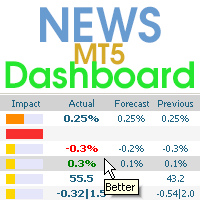
Este painel exibe notícias atuais de três fontes: do site ForexFactory.com (calendário FFC), do site Investing.com e do Calendário Econômico de mql5.com. Você pode classificar as notícias por impacto e por país e exibi-las no gráfico com um clique. Ao manter pressionada a tecla 'Ctrl', você pode selecionar várias 'moedas' ou 'impactos' diferentes para classificar. Além disso, este utilitário mostra não apenas a previsão, mas também os valores reais após aparecerem no site. Você pode definir uma

This is a simple and very effective utility for closing orders with one click. You will need it if you have a number of open orders on your balance and it takes too long to close them manually, which might lead to an extra loss of money on the account. The utility consists of an external panel with two buttons " Close by Filter" and " Close ALL" , which is convenient to move around the graph. You can set the Close ALL utility so that orders are closed as soon as the specified profit or loss va

"Support or Resistance Alert Broken" is a simple and very intuitive tool that allows you to create or eliminate horizontal and trend supports and / or resistances with a simple click.
When the support or resistance line is broken by the closing price at the end of the current candle, the "Support or Resistance Alert Broken" tool will send an alert with sound, as well as a notification to the MT4 or MT5 mobile application. This tool can send alerts from multiple pairs at the same time.
Utility
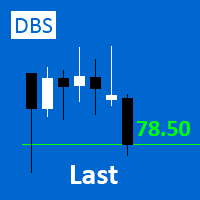
A small utility displays the value of the last price (Last) to the right of the chart. The Last price is the price at which the last deal was executed. Utility is convenient to use for screens with small print, for visual observation of the price level (value) or for people with poor eyesight. You can customize: Growth color Fall color Text font Font size Offset text
FREE

The utility draws pivot levels based on a selection from day week month The previous candlestick of the selected timeframe is taken and the values for the levels are calculated using the following formulas:
Pivot = (high + close + low) / 3 R1 = ( 2 * Pivot) - low S1 = ( 2 * Pivot) - high R2 = Pivot + (R1 -S1) R3 = high + ( 2 * (Pivot - low)) S2 = Pivot - (R1 - S1) S3 = low - ( 2 * (high - Pivot));
The style and thickness for all lines are adjusted.
The colors for the R, Pivot and S lines ar
FREE
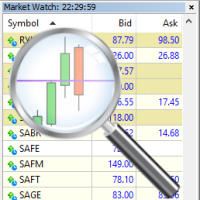
For those who trade false breakouts (FBo) levels. The False Breakout Finder (FBoFinder) service was written primarily for trading stocks and their CFDs on daily charts. It will search for you for various false breakouts of extremes on hundreds and thousands of instruments from the Watchlist, which will save you in the long run many hours of daily routine selection of securities before the market opens. In the process of enumerating instruments, securities with a ban on trading are ignored. If a

Order Entry - Probably the easiest way to enter an order If you like this perhaps you might consider buying the pro version https://www.mql5.com/en/market/product/64353?source=Site +Profile+Seller An aid for entering orders. Features: * Drag & drop tool to adjust price, stop loss and take profit levels. * Calculates lot sizes automatically based on risk entered, currency pair and stop loss / price levels.
Description It enables you to visually enter a trade's price, stop loss and take profit
FREE

Este é um otimizador automático de parâmetros para o indicador Trend Line PRO Com facilidade e rapidez, você selecionará os parâmetros ideais para o seu indicador favorito Trend Line PRO. A otimização leva apenas alguns segundos. O otimizador permite que você encontre os melhores parâmetros para cada par e período: Amplitude, TP1-TP3, StopLoss, bem como os valores Para Time Filter e HTF Filter na seção selecionada do histórico (Days)
Para otimizar diferentes períodos de tempo, você precisa d
Chart State Saver for MT5 is utility which helps to save states of all your charts even if they will be closed. And then all saved charts' states can be easily loaded back to charts.
It stores templates for each particular currency pair and automatically applies them to charts once they will be opened at next time. Also they can be applied to the charts by your own needs. Thus you can close any chart at your MT5 without scaring to lose chart's data like drawls, messages, chart styling and so on

RENKO PRICE ACTION ATR é um "Expert Advisor" desenvolvido através da construção do Gráfico Renko aonde cada BRICK tem o tamanho calculado através do ATR do período selecionado pelo usuário. Os gráficos Renko são projetados para filtrar movimentos menores de preços, desta forma tornando mais fácil que os traders concentrem-se em tendências importantes. Devido à sua eficiência em detecção de tendências de preços é possível também identificar com muita clareza suportes e resistências assim como as

Bonus when buying an indicator or an advisor from my list. Write to me in private messages to receive a bonus. Manual Assistant MT5 is a professional manual trading tool that will make your trading fast and comfortable. It is equipped with all the necessary functions that will allow you to open, maintain and close orders and positions with one click. It has a simple and intuitive interface and is suitable for both professionals and beginners.
The panel allows you to place buy and sell orders w
FREE

Overview The Expert Advisor sends notifications to a mobile phone, via e-mail or plays a sound in case any changes are detected on the trading account: opening/closing positions, changing order or position parameters, balance or leverage. Also, the Expert Advisor can inform that Equity on the trading account has dropped below a specified value or Free Margin is small compared to Margin. The Expert Advisor does not trade, it only monitors your account.
Launching the Expert Advisor You should all

O algoritmo encontra a posição menos lucrativa em sua conta e, em seguida, o programa determina as posições lucrativas que podem cobrir a perda. Este lucro é usado para fechar pedido não lucrativo no modo automatizado. O sistema é capaz de trabalhar nos pedidos não rentáveis mais distantes ou selecioná-los de acordo com determinados tickets com seleção manual. Ou seja, o utilitário fecha uma ordem perdida usando uma ou um grupo de ordens vencedoras. Oportunidades:
Pedidos de fechamento

Auto SLTP Maker MT5 is an assistant for all those who forget to set StopLoss and/or TakeProfit in deal parameters, or trade on a very fast market and fail to place them in time. This tool automatically tracks trades without StopLoss and/or TakeProfit and checks what level should be set in accordance with the settings. The tool works both with market and pending orders. The type of orders to work with can be set in the parameters. It can track either trades for the instrument it runs on, or all

This Tradepanel is an Utility for Traders Who want ot use Basic MoneyManagement for Calculation of Lotsize I have created the basic edition only to give an Overview with Limited Functionality Full Features are available with Auto TradePanel Pro. (This is Only Because it can not be Tested in Strategy Tester ). Complete Description is available at "Auto TradePanel Pro". in This Version Basic Functionality ( Calculation of Lotsize ) open /close Positions is working in the same way as in Pro
FREE
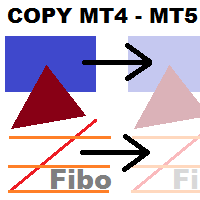
This utility copies graphic objects from the MASTER chart to the SLAVE chart. Install it as an indicator. The version for MT4 is here: https://www.mql5.com/en/market/product/61937 It can work in the following modes: Master CHART to Slave CHART in one MT4 or MT5 Master MT4 to Slave MT4 (one or more) Master MT4 to Slave MT5 (one or more) Master MT5 to Slave MT5 (one or more) Master MT5 to Slave MT4 (one or more) You can use multiple Master-Slave groups by setting the ID parameter . You can copy al
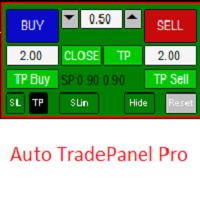
This Tradepanel is an Utility for Traders Who want ot use Basic MoneyManagement for Calculation of Lotsize and have Some automated Functions. Auto Stoploss and Auto Takeprofit are available. BE AWARE: This Panel does not work in StrategyTester a Demo "Auto TradePanel Basic" Version is available to get an Overview. The Tradepanel Calculates Lotsize based on RiskFaktor and checks if Marginrequirement is met . Each Position is Opened with a StopLoss, defined in percent. if a Position already exis

Painel de negociação para o método Forex No Nonsense Melhore sua velocidade de negociação enquanto mantém seus gráficos limpos
Características: -Dimensionamento da posição: ao clicar em Comprar/Vender, esta ferramenta abre 2 negócios com a quantidade de lotes que melhor se aproxima do seu risco (porcentagem do saldo que é utilizado em cada negócio). Esqueça o cálculo de valores de pip!
-SL e TP: cada negociação é aberta com um Stop Loss em 1,5*ATR, e uma das duas metades com um Take Profit
FREE

Smart Copy is an Easy-to-Use EA that supports Multi Copying Metatrader4 and Metatrader5 and Local/Remote Copying. (Remote Version is coming soon)
Free version is available on Smart Copy Local Free MT5
Specifications :
Real Time, Multi Terminal - Multi Account - MT4/MT5 trade copying Copy from netting to hedge and hedge to netting is supported.
Fast and instant copy
All settings are input visually. Easy modifying symbol names, prefix, suffix Enable/Disable copying
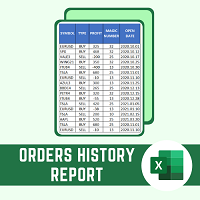
Esse script produz um relatório do histórico de operações em formato CSV. O relatório é muito útil para quem executa mais de um EA com magic numbers diferentes na mesma conta. Você pode definir alguns filtros para gerar o relatório: 1) Data inicial dos ativos no histórico da conta. 2) Data final dos ativos no histórico da conta. 3) Nome do Ativo 4) Magic Number das ordens 5) Adicionar balance/costs
DÚVIDAS SOBRE INSTALAÇÃO DE PRODUTOS NO META TRADER Você também pode encontrar algumas instruções
FREE

PAINEL DE TOPOS E FUNDOS HISTORICOS Esse é um painel que não abre ordens somente gerencia todos os Symbols e calcula os topos e fundos e apresenta o calculo em relação ao topo e fundo em 5 Anos, 2 Meses e 1 Semana.
Ele é ideal para filtrar os pares que estão nas regiões boas para operar. Você pode filtrar o range e escolher se considerar o corpo ou a sombra da vela no mensal. Boa Sorte...
FREE

Draws trend lines from the high and / or low values of the week. The color and thickness of the levels are customizable. All trend lines can be edited. Suitable levels of the past can be renamed and other properties changed. Levels are re-read only on the H1 timeframe once an hour.
...
FREE
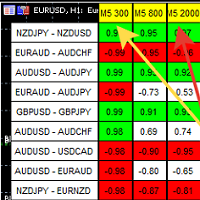
A script showing the correlation for three selected zones at once (TF-bar) In the parameters, select 3 options The data is displayed sorted by the first zone The script also creates a file in which it writes all the data without sorting. In this way, you can expand the number of zones to any number and perform the analysis in exsel
Parameters:
TF_Trade1 =PERIOD_M5; BarsCor1 = 300; TF_Trade2 =PERIOD_M5; BarsCor2 = 800; TF_Trade3 =PERIOD_M5; BarsCor3 = 2000; K = 0.8; WindSize
FREE

This non-trading expert utilizes so called custom symbols feature to build custom charts based on history of real ticks of selected standard symbol. New charts imitate one of well-known graphic structures: Point-And-Figure (PnF) or Kagi. The result is not exactly PnF's X/O columns or rectangular waves of Kagi. Instead it consists of bars, calculated from and denoting stable unidirectional price moves (as multiples of the box size), which is equivalent to XO columns or polygonal lines. These Poi
FREE
This non-trading expert utilizes so called custom symbols feature ( available in MQL API as well) to build custom charts based on history of real ticks of selected standard symbol. New charts imitate one of well-known graphic structures: Point-And-Figure (PnF) or Kagi. The result is not exactly PnF's X/O columns or rectangular waves of Kagi. Instead it consists of bars, calculated from and denoting stable unidirectional price moves (as multiples of the box size), which is equivalent to XO colum

What is Risk of Ruin? Risk of ruin is the probability of an individual losing substantial amounts of money through investing, trading or gambling, to the point where it is no longer possible to recover the losses or continue. Risk of ruin is typically calculated as a loss probability, also known as the "probability of ruin."
Input Parameters StartPeriod: Set the first date from where you like the program to calculate. Your current account performance will be measured. EndPeriod: Set the last da
FREE

This script calculates the SQN (System Quality Number) value of your account within a time interval that you will set. Keep in mind that trades with no initial stoploss value won't be calculated because of the nature of the system! The calculations will be made on your current account.
What is SQN? Van K. Tharp proposed a formula for System Quality Number (SQN) that measured strategy performance and could be used as a custom objective for optimizing strategy parameters. The formula was present
FREE

This script is a very useful tool when it comes to practicing chart analysis.
If you activate this script, you are going to be thrown down on a random chart position. The active chart is used where you are right now. You need to have at least 6000 historical bars. You can set the number of bars at: Tools->Charts tab->"Max bars in chart"
Should you have any questions, comments feel free to contact me.
FREE
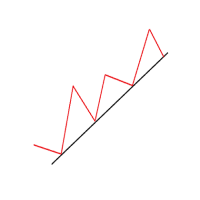
Another simple but effective tool that answer to one important question in a rapid way: If I want to risk X money and I want my stop loss here, how many lots I need to use? You can easily attach this tool to graph, draw an horizontal trendline and this tool give to you a suggested lot values to lose/gain money you have specified into setting page. Interface is also fully customizable.
I'm available for further customizations based on user needs.
Best, Mirko

This utility keep you notified about r eal-time increase of volume on every simbol you have into your market watch. Basically it compute the 30 days back volume and compare it with current volume: if you set, for example, 75% into setting page, you will receive telegram (and also on-screen) notification when current volume is above 75% of maximum of last 30-days volume. To configure Telegram notification: Go to Metatrader, "Windows->Options->Expert Advisor-> WebRequests for URL" and write "http

OneClickClose-Pro EA allow users to easily close all positions at once with multiple options with simple UI.
Options Includes::
1. Close All Positions
2. Close All Buy Positions
3. Close All Sell Positions
4. Close All Position GreaterThan or Equal to Profit
5. Close All Position LessThan or Equal to Profit
6. Close All Position By Symbol
7. Option to Set Deviation
8. Option to Set Maximum Retry (If position close fails)
MT4 Versio
FREE
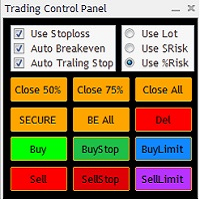
The Trading Control Panel EA let you: - Calculated lot size based on the (% or $ risk) - Place multiple (Market/Limit/Stop) trades at same time - Manage all open trades (move SL to BE, take partial profit, close all trades) This is a handy tool for those who wont to open multiple orders without spending time on lot calculations. When opening multiple orders the first order has the first TP and all other orders get the second TP.

Total trade manager allows you to manage your trade to maximise your profits and minimise your losses. This is an essential for traders that are looking for consistency within their trading. The features: Partial Stop Loss: This feature allows you to close a partial percentage of your trade once it goes into negative. So if your stop loss is 20 pips, you could close 75% of your trade at 10 pips and let the remainder of the position to continue running. Auto Stop Loss: This means that once you p

Quick Close Button provides you with a quick, fast, effective, and handy way to close orders, positions, bearish and bullish open, profiting and losing positions. Available options: Close All: close all orders and positions. Close Profit: close all positions in profit. Close Loss: close all positions in loss. Close Stop: close all stop orders. Close Buy: close all buy positions. Close Sell: close all sell positions. Close Orders: close all orders
Close Positions: close all positions # : Hides /

Symbol Manager or Grid Manager, designed to group orders into one position (by Symbol or by Magic Number). This utility will be useful to multi-currency traders (many EAs), who can have multiple orders on several pairs. You will be able to see the total number of lots, the total profit, and set virtual stop loss and virtual take profit. To set a real TP (or SL), you must first set the virtual value, and then enter the command in this cell: "set". If you want to set real TP/SL for all orders at

When creating, modifying and moving a trend line, two anchor points will be selected: high / low, open / close, median or weighted from the candlestick prices.
For high / low, open / close, if the anchor point is above the candlestick, the upper price will be taken, below the candlestick - the lower one. If the point is inside the candlestick, then if the first point is higher than the second, then the first one goes up, the second goes down. Conversely, if the second is higher than the first.
FREE

Telegram Simple
é um APP que permite enviar suas análises técnicas ou operações, diretamente para o seu canal de telegramas, de forma rápida e simples, sem complicações. - Percorra os símbolos do painel - Lista de símbolos totalmente configurável - Mudança rápida de intervalo de tempo do painel - Envie comentários e capturas de tela
para mais detalhes: tradingxbots@gmail.com
This non-trading expert utilizes so called custom symbols feature ( available in MQL API as well) to build renko charts based on history of real ticks of selected standard symbol. RenkoFromRealTicks generates custom symbol quotes, thus you may open many charts to apply different EAs and indicators to the renko. It also transmits real ticks to update renko charts in real time. The generated renko chart uses M1 timeframe. It makes no sense to switch the renko chart to a timeframe other than M1. T

S imple arrow with alert on chart. This is NOT an entry indicator but a direction indicator. It uses MACD signal line to show you possible future direction of a trend. Please use it with other filters or confirmations to trade properly. Recommended for scalping and short term trades. Made for EURUSD M5 but it should work on every major pair on M5 timeframe. For MT4 version please go here! *If you need fully automated trading system. Please check this EA here! FEATURES: Very simple directional i
FREE

Calculadora de Volume
Esse indicador mostra o volume para se usar em uma operação baseado no valor máximo de stop aceitável e no tamanho do stop.
Desse jeito você não vai usar uma calculadora para toda vez fazer a conta do volume que vai usar. Esse indicador facilita e agiliza muito a sua vida.
Indicado para qualquer tipo de trader: Scalper, DayTrader, SwingTrader
FREE

As simple as title, this is a telegram notificator to be always updated about your open position. It send basically 3 message: When you reach a stop loss; When you reach a take profit; When you reach a margin call; If you want I'm available to do all customization for you, like send chart pictures, particular message or to interact with Metatrader with Telegram custom command.
How to configure: Go to Metatrader, "Windows->Options->Expert Advisor-> WebRequests for URL" and write "https://api.tel

This is a utility for closing orders or baskets of orders for the total profit or loss. Can work multicurrency, can work with orders opened manually. Has additional trailing profit. Capabilities: Closing an order for the current symbol or for all symbols Closing individual orders or whole baskets of orders Stopping the utility in one click Trailing function for total profit Setting TP and SL in money, in points or as a percentage of the deposit Closing all BUY or SELL orders or closing all orde

O EA Ordem Fácil auxilia a abertura de ordens de compra e venda pendentes usando as teclas SHIFT, CTRL e o clique do mouse. Para criar uma ordem de compra pendente, aperte a tecla SHIFT (apenas uma vez) e clique com o botão esquerdo do mouse no gráfico, acima do preço. Para criar uma ordem de venda pendente, aperte a tecla CTRL (apenas uma vez) e clique com o botão esquerdo do mouse no gráfico, abaixo do preço.
Enquanto a ordem não é aberta, ao movimentar o mouse no gráfico, no canto esquerdo e

The utility opens copies of open trades. It is very convenient if you use the Signals service and want to increase the volume of transactions.
Settings: Symbols: all symbols only current symbol Orders: Buy Sell Magic Any Magic Input Magic Lot size Original - lot size from original order; Fix Lot - fix lot size (input); Lot X Mult - lot size X koef; Stop Loss From sender - Stop Loss from original; Without - without Stop Loss; Plus Fix - Stop Loss from original order + fix points; Fix Point -
FREE
Funcionalidades da Botti Tools
1 - Coloca automaticamente valor de Take Profit e Stop Loss, pré definido anteriormente, em Ordens Pendentes quanto em Posições a Mercado
2 - Baseado na quantidade de pontos de Stop Loss definido e o valor monetário especificado ele calcula qual o volume deve se usar para aquela ordem.
3 - Após X pontos ele coloca a ordem no breakeven
4 - Ele cancela o Take Profit a X pontos de distãncia desse e coloca o Stop Loss de tal maneira a garantir Y pontos de ganho
5
FREE

Titan Boom Crash is meant to be traded on 6 Symbols of the Boom and Crash Stnthetic Indexes. There are 3 versions of both these symbols which are the 1 Spike per 300 ticks and 500 ticks and 1000 ticks. The Titan Boom Crash utilises mathematical equations to select trades. Use the strategy tester to select your preferred timeframe and settings, taking into account that a breakeven function and trailing stoploss have been incorporated into its code.
Signal Settings
the user can now select

The script allows users to easily one click for adjust lot order, buy, sell and close positions if their profit/loss reaches or exceeds a value specified in USD. BUY - Click for order long position. LOT - standard 0.1 lot. You can adjustable in control panel. SELL - Click for order short position. CLOSE ALL - Click for close all position. CLOSE BUY - Click for close all only long position. CLOSE SELL - Click for close all only short position. TAKE PROFIT (USD) - standard 10 USD. You can adj
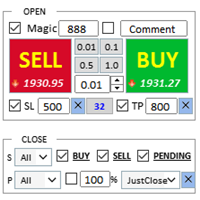
Assistente: Assistente de Comércio-MT4 (clique para baixar) Assistente de Comércio-MT5 (clique para baixar)
Leia atentamente as instruções de operação.
Noções básicas: Suporte para seleção e troca de idiomas (atualmente suporta chinês e inglês) Reconhecimento automático de idioma Apoiar tecla de atalho para abertura e fechamento vinculação, use teclas de atalho para abrir e fechar posições rapidamente... fechamento de tecla de atalho. Suporta até 30 teclas de at
FREE

Object replicator is an indicator that allows you to replicate an object in one or as many charts as you like. This indicator is the solution to replicate part of your analysis in exactly the same position and price of a trend line, Fibonacci, vertical line, horizontal line, etc. Download the MT4 version here
Install the indicator on the source chart and follow the steps below: To activate the indicator, simply press the (Activate) button. Once the (Activate) button is pressed, a (Receive o

Broker & Account Info / Network Connection / Historical Order Benchmarks / Market Watch Symbols / Current Order Status
Features:
1. Symbol’s Trading Privileges – Ensure the symbol is tradable.
2. Order Execution Mode – Check the broker’s execution type.
3. Trade Session Hours – Verify the trading hours.
4. Min/Max Lot Sizes – Check the allowed lot range.
5. Max Pending Orders – Confirm the maximum number of pending orders allowed.
6. Freeze Point & Pending Order Distance – Minimum distance re
FREE

Tenha a boleta do ProfitChart no seu Metatrader! ........................
Agora é possível ter a boleta do profit no seu Metatrader. Envie ordens de compra e venda, acompanhe o mercado e simule estratégias em momentos de mobilidade, diretamente do seu Metatrader5. Gestão de riscos e otimização de lucros são dois princípios básicos de qualquer operação bem-sucedida. Nesse sentido, utilize as ferramentas de STOPMOVEL, TRAILING STOP, STOPGAIN E ORDENS PARCIAIS DE SAÍDA.
Funcionalidades do
Você sabe por que o mercado MetaTrader é o melhor lugar para vender as estratégias de negociação e indicadores técnicos? Não há necessidade de propaganda ou software de proteção, muito menos problemas de pagamentos. Tudo é providenciado no mercado MetaTrader.

Você está perdendo oportunidades de negociação:
- Aplicativos de negociação gratuitos
- 8 000+ sinais para cópia
- Notícias econômicas para análise dos mercados financeiros
Registro
Login
Você concorda com a política do site e com os termos de uso
Se você não tem uma conta, por favor registre-se