Copy Telegram to MT4 DEMO

Copying trading signals from the Telegram channel to MetaTrader.

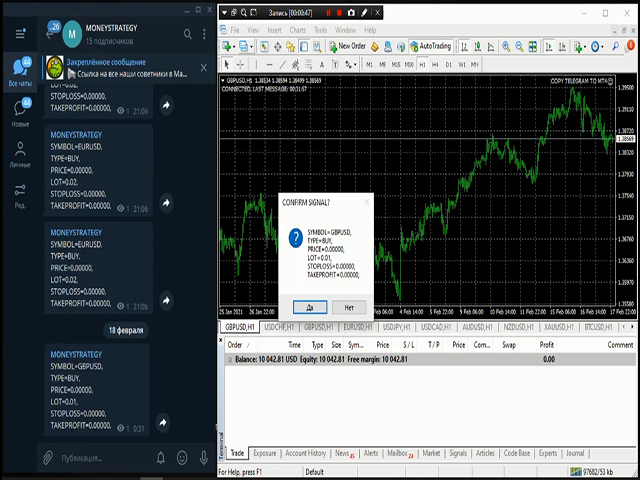
The utility will help you easily and simply copy transactions from your Telegram channel or chat to the MetaTrader trading terminal almost instantly ⏳

This is a DEMO version, restrictions - minimum lot

👉 Operational support in telegram chat: https://t.me/forex4up_chat

Template for signals in the Telegram channel, chat (can be changed in the parameters)

SYMBOL=EURUSD,
TYPE=SELL,
PRICE= 0.00000 ,
LOT= 0.01 ,
STOPLOSS= 0.00000 ,
TAKEPROFIT= 0.00000 ,

🛠   The utility is easy to use, everyone can customize it and at the same time has a lot of functionality:  

  • copying market orders
  • copying pending orders
  • copy stop loss and take profit
  • setting your own   stop loss and take profit
  • replacing a symbol, for example, instead of EURUSD, open with GBPUSD
  • reversal of deals, for example, open SELL instead of BUY
  • manual confirmation of transactions
  • changing and setting up a trading lot


Customization

  1. Service -> Settings -> Expert Advisors -> Allow WebRequest for the following URLs: https://api.telegram.org
  2. IN   Telegram   go to @BotFather and create a bot
  3. Copy the bot's Token and enter it in the EA parameters
  4. Create your channel and make it public
  5. Add the bot you created to your channel and make it an administrator
  6. Follow the link: https://api.telegram.org/bot [TOKEN_BOTA ]/sendMessage?chat_id=@ [USERNAME_KANALA ]&text=TEST. Replace the brackets [] with your values. In my case https://api.telegram.org/bot1285429093:AAERdfBAsdy5Vq8FotJWQZxLejXR8rRiZJ4/sendMessage?chat_id=@moneystrategy_mql&text=TEST
  7. After clicking on the link, the channel ID will be displayed, it will look something like this: -1001459355041 (13 digits with a "-" sign)
  8. Enter the channel ID in the advisor settings

😎 Done. Now you can receive signals from the Telegram channel or chat in MetaTrader

You can test it in the test channel https://t.me/moneystrategy_mql

The paid version is available at the link: https://www.mql5.com/en/market/product/62381


🚀 Free Telegram signals https://t.me/forex4up


Options:

  • BOT_TOKEN   - Token bot;
  • CHANNEL_ID   -   Channel ID ;
  • NAME_SYMBOL - variable name symbol
  • NAME_ORDER_TYPE   - variable name order type
  • NAME_OOP   - variable name open price
  • NAME_LOT   - name of the variable trading lot
  • NAME_STOP_LOSS   - name of the stop loss variable
  • NAME_TAKE_PROFIT   - name of the take profit variable
  • VALUE_SPLIT   - separator between values
  • PARAMETER_SPLIT - separator between parameters
  • PREFIX_SYMBOL   - character prefix, if any;
  • SYMBOL_SUFFIX   - character suffix, if any;
  • CHANGE_SYMBOL_NAME - replace the symbol name, for example GOLD = XAUUSD or EURUSD = GBPUSD, the separator is ","
  • SAME_LOT - use the same lot
  • LOT_MULTIPLIER - lot multiplier
  • PLUS_LOT - additional lot
  • FIXED_LOT - fixed lot
  • MAXIMUM_LOT - maximum lot
  • SYNCHRONIZE_SL_TP - sync stop loss and take profit
  • DEFINED_SL     - own stop loss in pips
  • DEFINED_TP - own take profit in pips
  • REVERSE_COPY - reversal of orders, reverse of deals
  • MANUAL_CONFIRMATION - manual confirmation
  • MAGIC_NUMBER - magic number of deals
  • ORDERS_COMMENT - comment to orders


추천 제품
OTRX Fimathe Backtest is a tool for the Trader or Enthusiast who uses the Fimathe technique created by Trader Marcelo Ferreira to carry out his training and validate if he can obtain profitability. In this tool you will be able to: 1. Define whether you are looking for a buy or sell entry. (Trend). 2. Define by clicking twice on the horizontal lines where your Reference Zone and your Neutral Zone will be. 3. Monitor the entry, subcycle and exit of the trade. 4. Trading Summary, Daily, Week
FREE
ExpertLines
Josemar Pinheiro
1 (1)
ExpertLines is a productivity expert to open orders by the breaking of the buy or sell lines, providing risk x reward and pips information on every trade. The expert can close the opened order by virtual lines of stop loss and take profit or by close buy or sell button. He also has a trailing stop resource if enabled. All this in a fast and easy way. Arm your trade with ExpertLines and have a good trade. Main Parameters Magic_Number - It is the magic number that the expert advisor uses to ident

FREE
EasyClose MT4
Nina Yermolenko
4 (1)
A simple and convenient utility for closing orders. It can close both all orders together as well as buy, sell or pending orders separately. Has an intuitive graphical interface. MT5 version of the utility -  https://www.mql5.com/en/market/product/78599 If you like this utility, take a look at my other products -   https://www.mql5.com/en/users/nina_yermolenko/seller

FREE
Grid Assistant Pro
Alessandro De Cristofaro
Grid Assistant Pro – Utility for Managing Grid Strategies on MetaTrader 4 Grid Assistant Pro is a professional utility that helps traders manage and monitor unidirectional grid strategies directly from the MT4 chart. It provides a visual dashboard , clear controls, and automated risk protection features for precise and efficient grid operation. Key Features Visual Dashboard Real-time metrics: Balance, Equity, Floating P/L, Drawdown %, Free Margin Grid status: active and pending or
FREE
FREE UNTIL FEBRUARY 14, 2023 SPEND MORE TIME WITH YOUR FAMILY. ENJOY LIFE… DO NOTHING. This version is only auto set of Takeprofit and StopLoss Main Version  of  TropangFX:   MT4 Version  |  MT5 Version Recommended timeframe:   H1 Supported currency pairs:  GBPUSD, EURUSD, EURCHF ,   USDCAD, USDCHF ,  AUDCAD, EURCAD, EURAUD and many more... Requirements The EA requires good brokerage conditions:   low spread   and   slippage   during the rollover time. I advise using a really   good ECN brok
FREE
VisualRiskTool VisualRiskTool is a professional trade execution panel and risk management utility designed for MetaTrader. It streamlines the process of opening and managing positions by automating complex lot size calculations and providing a visual interface for setting stop-loss and take-profit levels directly on the chart. Core Functionality: Precision Risk Management The primary goal of VisualRiskTool is to eliminate manual calculation errors. By defining a fixed risk percentage (e.g., 0.5%
FREE
This is a DEMO version of the Smarter Trade Manager Smarter Trade Manager  is an advanced trade management tool that can monitor and manage your manual and EA trades according to the settings you choose. It works as an Expert Advisor (EA), it does not open any trades but it closes trades as per the auto closing settings or when manually pressing any of the close buttons. FEATURES: Three-dimensional  interactive  view of your trades Trade Summary, P/L, Alerts, Closure by  Currency Trade Summary,
FREE
Fully functional manual trade panel with risk/reward, auto SL, lot size calculation, one-click trading, hidden (virtual) stop loss/take profit and pending orders, scale in and out of trades (partial close), news events and more. Works with all symbols not just currency pairs. Brings an incredible amount of functionality to MetaTrader for free and for both demo and live accounts. Features Lot size calculation - based on % of account to risk, fixed amount or dynamic lots Automatic take profit base
FREE
PZ Trade Pad EA
PZ TRADING SLU
4.29 (31)
This simple visual expert advisor allows you to trade easily from the chart. It handles risk management for you and can perform several useful tasks with your existing trades, saving time and making risk-management for each individual trade easier.  [ Installation Guide | Update Guide | Troubleshooting | FAQ | All Products   |  Get Help ] Trade easily from the chart Trade with precise risk management, hassle free Trade pending order with drag and drop price selection Set SL and TP levels with
FREE
Email Drawdown Alert
Roman Starostin
5 (12)
Free informative Indicator-helper. It'll be usefull for traders who trade many symbols or using grid systems (Averaging or Martingale). Indicator counts drawdown as percent and currency separate. It has a number of settings: Count deposite drawdown according equity value and send e-mail or notifications to user if DD more than set; Sending e-mail when max open orders reached; Shows price and remaining pips amount before MarginCall on current chart and Account generally; Display summary trade lot

FREE
LineBreakeven
Andrea Fontanini
Good morning, The following indicator is very useful when managing multiple trades on the same instrument. It allows you to see the average entry price for BUY and SELL trades. If there is an imbalance (as shown in the example photo), the indicator will display the averages of the SELL/BUY trades and a GOLD line that marks the breakeven price (excluding swap and commissions).
FREE
EA News
Konstantin Kotlov
3.4 (5)
EA News that includes multiple strategies for trading rapid price swings. It is designed to simplify the placement of pending orders at a specified distance from the price of price channel. The EA can trade both the price breakouts and rebounds. There are two trading modes: Automatic - the EA downloads the news from the site http://ec.forexprostools.com/. When it finds the symbol of the currency pair and the specified volatility of the news, it places pending orders several minutes before the re
FREE
Info Tool
Aleksei Semenko
5 (1)
Information panel displaying traded lots for pairs, as well as the minimum margin level and maximum drawdown.  The info panel will be indispensable when calculating the affiliate program and expert advisor tests. In the settings, you can add up to 10 of your favorite pairs, customize the panel display colors and its location. Check out my other products, maybe they will be useful to you.
FREE
Averager NEW
Oleg Popov
4 (7)
Expert Advisor Features trailing profit in the deposit currency (Trailing Stop Money) closing by a profit or loss in the deposit currency opening orders at a specified time managing positions opened manually or by another Expert Advisor calculating initial lot based on the current balance limiting the maximum lot volume choosing trading type several types and methods of averaging visually displays the current breakeven price, draws horizontal lines "Line break even BUY"-blue, "Line break even S
FREE
SL and TP Setter
Giacomo Barone
4 (1)
You can manually open a trade (one click), and this EA will take care of setting the SL and TP. SL and TP are set based on the number of pips you specify in the input screen. You can also choose monetary SL and TP. SL and TP are determined based on the weighted average price (WAP), so if you open a new trade, SL and TP will be updated according to the new WAP. The WAP is not unique but differentiated between buy and sell trades (this is useful only if you open opposite trades on the same chart)
FREE
IntraScalpermt4
Mangesh Popat Ubale
IntraScalpermt4 Indicator   is an advanced, dynamic level-providing strategy/ Signals built in proven price action principles. At the start of every trading session, it automatically calculates the decisive   Levels —a key point that DECIDER guides high-probability trade opportunities. Indicators Including:- 1.  Day Trading Levels. 2.  IntraTrend Line for Scalping using M1 TF. 3.  Dynamic IntraScalper providing supply or demand zone on chart. 4.  EA Setting/Documentation in Indicator=> About T
FREE
LT Round Numbers
Thiago Duarte
4.75 (4)
Round numbers (or key levels) is an amazing strategy. These numbers are strong support and resistance levels. So what this indicator does is draw horizontal lines on the chart to help you find these levels. Configurations: 1St level: Color - lines color. Style - lines style. Width -  lines width. 2Nd level: Second level lines? -  turn off second level lines. Color -  lines color. Style -  lines style. Width -  lines width. Space between lines in points -  I don't need explain :) Display at backg
FREE
OnTicks
Corentin Petitgirard
2.63 (8)
Now free! Discover the Expert Advisor that never loses and multiplies your profits at lightning speed! Imagine a trading tool that wins at every tick, leaving no room for loss. That’s exactly what our Expert Advisor offers: a cutting-edge algorithm designed to provide you with consistent and rapid profits! Thanks to its market intelligence, it constantly opens positions, capturing every opportunity to maximize your gains. The more you use it, the faster you’ll see your profits skyrocket. Why
FREE
This simple but useful script calculates the lot in % of the deposit. It is indispensable for risk management. There is only one customizable parameter: MaxRisk - risk in % for lot calculation. The product works as a standard script. Launch it once on an appropriate chart and start trading using the calculated lot value. Genious is simplicity! Happy trading!
FREE
Close Button
Wang Yu
4.76 (38)
如果产品有任何问题或者您需要在此产品上添加功能,请联系我 Contact/message me if you encounter any issue using the product or need extra feature to add on the base version. Close Button provides you an intuitive, effective, and handy way to close your orders based on their type. The utility provides seven close options: Close All: close all orders, including trading and pending ones. Close Profit: close all orders which are in profit. Close Loss: close all orders which are in loss. Close Stop: close all stop orders. Close L
FREE
NotifyMe Free for MT4
Denis Zyatkevich
5 (5)
Overview The Expert Advisor sends notifications to a mobile phone, via e-mail or activates an audio alarm in case a position is opened or closed on the trading account. The Expert does not trade, it only monitors your account and orders. Launching the Expert Advisor For the Expert Advisor to work, place the file NotifyMe_free.ex4 in terminal_folder/experts (probably it will be placed there automatically). NotifyMe_free should appear in the Expert Advisors section of the Navigator window. If not
FREE
Free automatic fibonacci
Tonny Obare
4.67 (49)
Free automatic Fibonacci is an indicator that automatically plots a Fibonacci retracement based on the number of bars you select on the BarsToScan setting in the indicator. The Fibonacci is automatically updated in real time as new highest and lowest values appears amongst the selected bars. You can select which level values to be displayed in the indicator settings. You can also select the color of the levels thus enabling the trader to be able to attach the indicator several times with differe
FREE
VR Color Levels MT4
Vladimir Pastushak
5 (1)
VR 컬러 레벨은 추세선, 직사각형, 텍스트 등의 요소를 사용하여 기술적 분석을 적용하는 사람들에게 편리한 도구입니다. 차트에 직접 텍스트를 추가하고 스크린샷을 찍는 것이 가능합니다. 설정, 세트 파일, 데모 버전, 지침, 문제 해결 등은 다음에서 얻을 수 있습니다. [블로그] 다음에서 리뷰를 읽거나 작성할 수 있습니다. [링크] 버전 [MetaTrader 5] 표시기 작업은 한 번의 클릭 으로 수행됩니다. 이렇게 하려면 선이 있는 버튼을 클릭하세요. 그러면 커서 아래에 추세선이 나타납니다. 그런 다음 커서를 움직여 선 위치 를 선택하고 다시 클릭하여 수정하면 됩니다. 표시기 의 특징은 스타일과 색상의 모든 변경 사항이 자동으로 저장되고 나중에 새로 생성된 모든 그래픽 개체에 적용된다는 것입니다. 이 지표에는 서로 다른 스타일의 추세선을 설정하기 위한 두 개의 독립 버튼, 서로 다른 스타일의 두 개의 독립 직사각형, 자체 스타일이 있는 하나의 텍스트 필드 및 스크린샷 생성용 버튼
FREE
Scalping Day Trading Support Utility Scalping One MT4 free One position is displayed with one button. View P & L, Lot, and Point in real time. It is possible to switch the display of positions of only chart currencies and all currency pairs.  (The free version has only 3 positions) Supports automatic identification in Japanese and English   Account currency notation corresponds to dollar, euro, pound, yen (automatic identification) The timeline drawing function can be linked with the clock disp
FREE
When executing an order, whether through the Metatrader ticket on a computer or the Metatrader app on a mobile device, either manual or pending, Easy Trade will automatically set the take profit and stop loss levels, as well as a limit order with its respective take profit and stop loss levels. It follows the trading strategy for market open (US30, US100, US500), but it can be applied to any market asset.
FREE
ForexBob 1 Click Button is very impresive forex tool for scalpers: 1. Helpful in Closing multiple trades in just Single Click. 2. Scalper can benefits the most who always eager to close multiple trades in averaging and lock the profits fast. 3. It helps to avoid latency and so profits can be locked where we need. 4. Easy to Install, same as we install any expert advisor. 5. Speed of closing trades depends on your broker's server speed. If you find any improvements we are open to your feedback
FREE
Breakeven Manager MT4
Ibrahim Olalekan Ganiu
Hello, trading champs! I trust you are doing well. Have you experienced entering a position where the market initially moves in your favour or approach your takeprofit then suddenly the market reversed opposite your position? Well, it has happened to me numerous times and today I decide to fight back. I present to you a trade manager that help you protect your position(s). This project helps you set your position(s) to breakeven either when a certain amount of pips you specify is reached or a
FREE
This is a basic tool that displays the Pip Value and Margin  required for each symbol. It displays the same information for both a standard lot and the amount based on lot amount entered in the input section. It allows you to use different colors for each line Font Size FontType (Based on what fonts are installed in the system folder on the pc. Set to Ariel by default if the font entered is not available.) Allows X &Y coordinates so you can decide where on the chart the info is displayed.
FREE
Magics Scanner Flip addon
Dimitri Nepomniachtchi
This addon will pick up opened orders of experts by magic number and transfer to EA`s HOLDER inverted. If your trading bot opens a Buy order, then EA`s HOLDER will open a Sell order. If your trading bot opens a Sell order, then EA`s HOLDER will open a Buy order. Then EA`s HOLDER works with the orders opened by it according to your settings: - Copy, do not copy exit. - Change the stops to your own. SL TP. Original or Real or leave the original. - Set trailing, there are two of them. This can work
FREE
SX Theme Setter MT4
Mojtaba Sarikhani
5 (1)
SX Theme Setter is intended for changing chart appearance in 2 modes: - Gradient background mode: In this mode, the indicator creates a gradient background for your chart. Colors, steps and gradient type can be selected by user. - Color theme: Color theme mode provides more than 50 built-in different color themes which can be selected from a list. Most of these themes are converted from official color themes of real trading platforms of the past and present. Try them out and see if they suit
FREE
이 제품의 구매자들이 또한 구매함
Local Trade Copier EA MT4
Juvenille Emperor Limited
4.96 (110)
Local Trade Copier EA MT4 를 사용하여 매우 빠른 거래 복사 경험을 해보세요. 1분 안에 간편하게 설정할 수 있으며, 이 거래 복사기를 사용하면 Windows 컴퓨터 또는 Windows VPS에서 여러 개의 MetaTrader 터미널 간에 거래를 0.5초 미만의 초고속 복사 속도로 복사할 수 있습니다. 초보자든 전문가든 Local Trade Copier EA MT4 는 다양한 옵션을 제공하여 사용자의 특정 요구에 맞게 맞춤 설정할 수 있습니다. 이는 수익 잠재력을 높이려는 모든 사람을 위한 최고의 솔루션입니다. 지금 사용해보시고 이것이 왜 시장에서 가장 빠르고 쉬운 무역용 복사기인지 알아보세요! 팁: 여기 에서 데모 계정에서 Local Trade Copier EA MT4 데모 버전을 다운로드하여 사용해 볼 수 있습니다. 다운로드한 무료 데모 파일을 MT4 >> File >> Open Data Folder >> MQL4 >> Experts 폴더에 붙여넣고 터미널
Trade Assistant MT4
Evgeniy Kravchenko
4.43 (195)
거래당 위험 계산, 라인을 사용한 손쉬운 신규 주문, 부분 청산 기능을 통한 주문 관리, 7가지 유형의 트레일링 스탑 및 기타 유용한 기능을 제공합니다. 추가 자료 및 지침 설치 지침 - 애플리케이션 지침 - 데모 계정용 애플리케이션 평가판 라인 기능       - 차트에 개시선, 손절매, 차익실현을 표시합니다. 이 기능을 사용하면 새로운 주문을 쉽게 하고 개봉 전에 추가 특성을 볼 수 있습니다. 위기 관리       -       위험 계산 기능은 설정된 위험과 손절매 주문의 크기를 고려하여 새 주문의 볼륨을 계산합니다. 이를 통해 손절매 크기를 설정하고 동시에 설정된 위험을 존중할 수 있습니다. 로트 계산 버튼 - 위험 계산을 활성화/비활성화합니다. 필요한 위험 값은 위험 필드에 0에서 100 사이의 백분율 또는 예금 통화로 설정됩니다. 설정 탭에서 위험 계산 옵션을 선택합니다. $ 통화, % 잔액, % 지분, % 자유 마진, % 사용자 정의, % AB 이전 일, % AB
Trade Manager EA에 오신 것을 환영합니다. 이 도구는 거래를 보다 직관적이고 정확하며 효율적으로 만들기 위해 설계된 궁극적인 리스크 관리 도구 입니다. 단순한 주문 실행 도구가 아닌, 원활한 거래 계획, 포지션 관리 및 리스크 제어를 위한 종합 솔루션입니다. 초보자부터 고급 트레이더, 빠른 실행이 필요한 스캘퍼에 이르기까지 Trade Manager EA는 외환, 지수, 상품, 암호화폐 등 다양한 시장에서 유연성을 제공합니다. Trade Manager EA를 사용하면 복잡한 계산은 이제 과거의 일이 됩니다. 시장을 분석하고 진입, 손절 및 익절 수준을 차트의 수평선으로 표시한 후 리스크를 설정하면, Trade Manager가 이상적인 포지션 크기를 즉시 계산하고 SL 및 TP 값을 실시간으로 표시합니다. 모든 거래가 간편하게 관리됩니다. 주요 기능: 포지션 크기 계산기 : 정의된 리스크에 따라 거래 크기를 즉시 결정합니다. 간단한 거래 계획 : 진입, 손절, 익절을 위한
Copy Cat More Trade Copier MT4 (복사 고양이 MT4) 는 단순한 로컬 트레이드 카피어가 아니라, 오늘날의 거래 환경을 위해 설계된 완전한 리스크 관리 및 실행 프레임워크입니다. Prop Firm 챌린지부터 개인 계좌 관리까지, 강력한 실행력, 자본 보호, 유연한 설정, 고급 거래 처리 기능을 통해 모든 상황에 적응합니다. 이 카피어는 Master(송신자) 와 Slave(수신자) 모드 모두에서 작동하며, 실시간으로 시장가/지정가 주문, 거래 수정, 부분 청산, Close By 작업을 동기화합니다. 데모 및 실계좌 모두 호환되며, 거래용 비밀번호 또는 투자자 비밀번호로도 사용할 수 있습니다. Persistent Trade Memory 기술을 통해 EA, 터미널, VPS가 재시작되더라도 거래가 복원됩니다. 여러 Master와 Slave를 동시에 관리할 수 있으며, 브로커 간 차이는 접두사/접미사 자동 감지 또는 심볼 매핑으로 처리됩니다. 매뉴얼/설정: Copy C
TradePanel MT4
Alfiya Fazylova
4.84 (94)
Trade Panel은 다기능 거래 도우미입니다. 이 애플리케이션에는 50개 이상의 수동 거래 기능이 포함되어 있으며 대부분의 거래 작업을 자동화할 수 있습니다. 주의! 할인은 2026년 5월 5일까지 유효합니다. 2026년 5월 6일부터 가격은 80달러가 됩니다. 구매하기 전에 데모 계정에서 데모 버전을 테스트할 수 있습니다. 데모 계정용 애플리케이션 체험판 다운로드: https://www.mql5.com/en/blogs/post/750865 . 전체 지침 여기 . 거래. 한 번의 클릭으로 거래를 수행할 수 있습니다: 리스크 자동 계산과 함께 예약 주문 및 포지션 열기. 한 번의 클릭으로 여러 주문 및 포지션 열기. 주문 그리드 열기. 예약 주문 및 포지션을 그룹별로 닫기. 포지션 방향 전환 (Buy 닫기 > Sell 열기, Sell 닫기 > Buy 열기). 포지션 잠금 (부족한 포지션을 열어 Buy와 Sell 포지션의 수량을 동일하게 만들기). 모든 포지션 한 번의 클릭으로 부분
Trade copier MT4
Alfiya Fazylova
4.58 (33)
Trade Copier는 거래 계정 간의 거래를 복사하고 동기화하도록 설계된 전문 유틸리티입니다. 복사는 공급자의 계정/단말기에서 동일한 컴퓨터 또는 vps에 설치된 수신자의 계정/단말기로 발생합니다. 프로모션 - 이미 "Trade copier MT5"를 구매하셨다면, "Trade copier MT4"를 무료로 받으실 수 있습니다 (MT4 → MT5 및 MT4 ← MT5 복사용). 조건에 대한 자세한 정보를 원하시면, 개인 메시지를 통해 저희에게 문의해 주시기 바랍니다! 구매하기 전에 데모 계정에서 데모 버전을 테스트할 수 있습니다. 데모 버전 여기 . 전체 지침 여기 . 주요 기능 및 이점: 복사기는 "МТ4> МТ4", "МТ4> МТ5", "МТ5> МТ4" 복사를 지원합니다. 복사기는 데모 계정 > 실 계정, 실 계정 > 데모 계정, 데모 계정 > 데모 계정 및 실제 계정 > 실 계정 복사를 지원합니다. 복사기는 읽기 전용 암호가 적용된 투자자 계정에서 복사를 지원합니다. 하
Exp COPYLOT CLIENT for MT4
Vladislav Andruschenko
4.65 (66)
MetaTrader 4용 전문 트레이드 복사기 MetaTrader 4 용 빠르고 안정적이며 전문적인 트레이드 복사기입니다. COPYLOT 은 MetaTrader 4 와 MetaTrader 5 터미널 간에 Forex 거래를 복사할 수 있으며, 다양한 계좌 유형과 운용 방식에 맞춰 유연한 동기화 환경을 제공합니다. COPYLOT MT4 버전 지원 방식: MetaTrader 4 → MetaTrader 4 MetaTrader 5 Hedge → MetaTrader 4 MetaTrader 5 Netting → MetaTrader 4   MT5 버전 상세 설명 + DEMO + PDF 구매 방법 설치 방법 로그 파일 확인 방법 테스트 및 최적화 방법 Expforex의 모든 제품 MetaTrader 5 버전 을 사용하면 MetaTrader 5 → MetaTrader 5 및 MetaTrader 4 → MetaTrader 5 복사도 지원됩니다: COPYLOT CLIENT for MT5 COPYLOT 은
The product will copy all telegram signal to MT4   ( which you are member  ) , also it can work as remote copier.  Easy to set up, copy order instant, can work with almost signal formats, image signal, s upport to translate other language to English Work with all type of channel or group, even channel have "Restrict Saving Content", work with  multi channel, multi MT5 Work as remote copier: with signal have ticket number, it will copy exactly via ticket number. Support to backtest signal. How to
Edge Zone EA
FXsolutions
5 (1)
With this Expert Advisor you will follow the sound trading principle Buy Low and Sell High by default ! And you can do that even with a normal day job . You will be even able to trade on lower timeframes which you could never do without such an Expert Advisor. And the best thing is that you are in control! You can tell the Edge Zone EA where it has to enter and where it has to exit. And you can do that even many hours before the trade will occur . This EA is therefore an excellent assistant for
Auto Trade Copier
Vu Trung Kien
4.76 (85)
Auto Trade Copier is designed to copy trades to multiple MT4, MT5 and cTrader accounts/terminals with 100% accuracy. The provider and receiver accounts must be on the same PC/VPS. With this tool, you can copy trades to receiver accounts on the same PC/VPS. All trading actions will be copied from provider to receiver perfectly. This version can be used on MT4 accounts only. For MT5 accounts, you must use Auto Trade Copier for MT5 . Reference: - For MT4 receiver, please download Trade Receiver Fre
Exp SafetyLock PRO
Vladislav Andruschenko
4.57 (28)
SAFETYLOCK for MetaTrader 4 는 급격한 시장 반전에 대비해 반대 방향의 안전 주문을 자동으로 배치하여 열린 포지션을 보호하도록 설계된 프리미엄 거래 보호 유틸리티입니다. 트레이더 또는 Expert Advisor (EA)가 포지션을 열자마자 SAFETYLOCK for MT4 는 반대 방향의 해당 대기 주문(Buy Stop 또는 Sell Stop)을 생성합니다. 시장이 원래 거래에 불리하게 움직이면 대기 주문이 활성화되어 보호 잠금 구조를 형성하며, 이를 통해 트레이더는 드로우다운을 제어하고 복구 로직을 더욱 효율적으로 구성할 수 있습니다. 이 Expert Advisor는 포지션을 유연하게 관리할 수 있도록 해줍니다. 원래 거래를 닫거나, 활성화된 안전 포지션에 트레일링을 적용하거나, 더 큰 랏으로 잠금 구조를 확장하거나, 시장 상황에 따라 여러 안전 관리 시나리오를 조합할 수 있습니다. SAFETYLOCK for MT4 는 또한 대기 주문 가격의 동적 이동을 지원
The News Filter
Leolouiski Gan
5 (25)
이 제품은 뉴스 시간 동안 모든 전문가 어드바이저 및 수동 차트를 필터링하여 수동 거래 설정이나 다른 전문가 어드바이저가 입력한 거래가 파괴될 수 있는 급격한 가격 상승으로부터 걱정하지 않아도 됩니다. 이 제품은 또한 뉴스 발표 전에 열린 포지션과 대기 주문을 처리할 수 있는 완전한 주문 관리 시스템이 함께 제공됩니다. The News Filter  를 구매하면 더 이상 내장 뉴스 필터에 의존할 필요가 없으며 이제부터 모든 전문가 어드바이저를 여기서 필터링할 수 있습니다. 뉴스 선택 뉴스 소스는 Forex Factory의 경제 캘린더에서 얻어집니다. USD, EUR, GBP, JPY, AUD, CAD, CHF, NZD 및 CNY와 같은 어떤 통화 기준으로 선택할 수 있습니다. Non-Farm (NFP), FOMC, CPI 등과 같은 키워드 식별을 기준으로 선택할 수도 있습니다. 저, 중, 고 영향을 가지는 뉴스를 필터링할 수 있도록 선택할 수 있습니다. 차트와 관련된 뉴스만 선택하
Trade Manager MT4 DaneTrades
Levi Dane Benjamin
4.09 (11)
거래 관리자는 위험을 자동으로 계산하는 동시에 거래를 빠르게 시작하고 종료하는 데 도움을 줍니다. 과잉 거래, 복수 거래 및 감정 거래를 방지하는 데 도움이 되는 기능이 포함되어 있습니다. 거래를 자동으로 관리할 수 있으며 계정 성과 지표를 그래프로 시각화할 수 있습니다. 이러한 기능은 이 패널을 모든 수동 거래자에게 이상적으로 만들고 MetaTrader 4 플랫폼을 향상시키는 데 도움이 됩니다. 다중 언어 지원. MT5 버전  |  사용자 가이드 + 데모 트레이드 매니저는 전략 테스터에서 작동하지 않습니다. 데모를 보려면 사용자 가이드로 이동하세요. 위기 관리 % 또는 $를 기준으로 위험 자동 조정 고정 로트 크기 또는 거래량과 핍을 기반으로 한 자동 로트 크기 계산을 사용하는 옵션 RR, Pips 또는 Price를 사용한 손익분기점 손실 설정 추적 중지 손실 설정 목표 달성 시 모든 거래를 자동으로 마감하는 최대 일일 손실률(%)입니다. 과도한 손실로부터 계정을 보호하고 과도한
Telegram to MT4 Coppy
Sergey Batudayev
3.89 (9)
Telegram에서 MT4로:   최고의 신호 복사 솔루션 최첨단 유틸리티인   Telegram to MT4를   사용하여 거래를 간소화하세요. DLL 없이도 Telegram 채널과 채팅에서 MetaTrader 4 플랫폼으로 거래 신호를 직접 복사할 수 있습니다. 이 강력한 솔루션은 탁월한 정밀도와 맞춤 설정 옵션을 통해 원활한 신호 실행을 보장하여 시간을 절약하고 효율성을 높여줍니다. [ Instructions and DEMO ] 주요 특징 직접 Telegram API 통합 전화번호와 보안 코드를 통해 인증하세요. 사용자 친화적인 EXE 브리지를 사용하여 채팅 ID를 손쉽게 가져오고 관리하세요. 여러 채널/채팅을 추가, 삭제, 새로 고침하여 동시에 신호를 복사합니다. 고급 필터를 사용한 신호 파싱 사용자 정의 예외 단어(예: "보고서", "요약")가 포함된 원치 않는 신호를 건너뜁니다. 유연한 SL 및 TP 형식을 지원합니다: 가격, 핍 또는 포인트. 신호가 가격 대신 지점을 지정
Work with gold and Japanese yen. Now working without pips! While you are trading,  Auto StopLoss Defender  doing all the routine work. "Must have" for scalping. Best way to save account balance in case of force majeure.(Internet connection loss, power outage, sharp change in price direction) The Utilite automatically adds a stop loss to open and pending orders that have no stoploss set. The anti-requote system is built into the Utilite. That means  the stop loss will be registered anyway! In the
Trading History MT4
Siarhei Vashchylka
5 (9)
Trading History - A program for trading and money management on the history of quotes in stratagy tester. It can work with pending and immediate orders, and is equipped with trailing stop, breakeven and take profit functions. Very good for training and testing different strategies. Manual (Be sure to read before purchasing) Advantages 1. Allows you to test any trading strategy in the shortest possible time 2. An excellent simulator for trading training. You can gain months of trading experience
Drawdown Manager MT4는 MetaTrader 4를 사용하는 트레이더에게 필수적인 유틸리티로, 거래 자본을 보호하고 손실을 관리하여 투자 안전을 보장하도록 설계되었습니다. 개인 트레이더와 프로프라이어터리 트레이딩 회사 모두에게 이상적인 이 도구는 거래 전략의 무결성과 자본 보안을 유지하기 위한 강력한 솔루션을 제공합니다. 실시간 알림 및 사용자 정의 가능한 위험 매개변수와 같은 고급 기능을 갖춘 Drawdown Manager MT4는 거래 활동을 효과적으로 모니터링하고 제어할 수 있도록 보장합니다. 손실 거래를 종료하거나 즉각적인 알림을 받기를 원하든, 이 유틸리티는 거래 성과를 향상하고 잠재적 손실을 최소화하도록 맞춤화되었습니다. MQL 제품 설치 가이드 | MT4/MT5에서 구매한 MQL 제품 업데이트 | 일반 문제 해결 가이드 | 지표 설정 / 가이드 주요 기능 팝업 알림: 신호 이벤트에서 MetaTrader 알림 팝업을 발생시켜 거래 설정을 놓치지 않도록 합니다.
VirtualTradePad mt4 Extra
Vladislav Andruschenko
4.85 (61)
한 번의 클릭으로 거래할 수 있는 거래 패널.   위치 및 주문 작업!   차트 또는 키보드에서 거래. 거래 패널을 사용하면 차트에서 클릭 한 번으로 거래하고 표준 MetaTrader 컨트롤보다 30배 빠르게 거래 작업을 수행할 수 있습니다. 거래자의 삶을 더 쉽게 만들고 거래자가 훨씬 빠르고 편리하게 거래 활동을 수행할 수 있도록 도와주는 매개변수 및 기능의 자동 계산. 차트의 무역 거래에 대한 그래픽 팁 및 전체 정보. MT5 버전 전체 설명   +DEMO +PDF 구입 방법 설치하는 방법     로그 파일을 얻는 방법     테스트 및 최적화 방법     Expforex의 모든 제품 열기 및 닫기, 반전 및 잠금, 부분 닫기/오토로트. 가상/실제 손절매/이익 실현/후행 정지/손익분기점, 주문 그리드 .... MetaТrader 4   의 주요 요청 거래 제어판   : 구매, 판매, 구매 중지, 구매 제한, 판매 중지, 판매 제한, 닫기, 삭제, 수정, 후행 중지, 손절매,
Smart Copy Local MT4
Kyra Nickaline Watson-gordon
5 (7)
Smart Copy is an Easy-to-Use EA that supports Multi Copying Metatrader4 and Metatrader5 and Local/Remote Copying. (Remote Version is coming soon) Free version is available on Smart Copy Local Free MT4 Specifications :     Real Time, Multi Terminal - Multi Account - MT4/MT5 trade copying     Copy from netting to hedge and hedge to netting is supported.     Fast and instant copy     All settings are input visually.     Easy modifying symbol names, prefix, suffix     Enable/Disable copying s
MT4 Local Trade Copier Pro
Biswarup Banerjee
3.82 (11)
트레이더를 위한 궁극적인 유틸리티 Local Trade Copier Pro MT4을 소개합니다. 이 도구는 다양한 MT4 계정 간에 거래를 효율적으로 복사하려는 트레이더를 위해 설계되었습니다. 이 강력한 도구는 여러 계정을 원활하게 활용하여 거래 전략을 자동화하고 성과를 향상시키고자 하는 트레이더를 위해 만들어졌습니다. 최소한의 지연으로 실시간 거래 복사의 이점을 경험하여 수익성 있는 기회를 놓치지 않도록 합니다. 여러 계정을 관리하든 다양한 브로커와 작업하든, Local Trade Copier Pro MT4은 귀하의 거래 요구에 맞춘 비할 데 없는 유연성과 사용자 정의를 제공합니다. MQL 제품 설치 가이드 | 구매한 MQL 제품 업데이트 MT4/MT5 | 일반 문제 해결 가이드 | 지표 설정 / 가이드 주요 기능 팝업 알림: 신호 이벤트에서 MetaTrader 알림 팝업을 발생시켜 거래 설정을 놓치지 않도록 합니다. 푸시 알림: 이동 중 모니터링을 위해 MetaTrader 모바일
Crystal Trade Manager PRO – MT4 고급 리스크 및 트레이드 관리 시스템 무료 버전: https://www.mql5.com/en/market/product/150632 개요 Crystal Trade Manager PRO(CTM)는 MetaTrader 4를 위한 전문급 거래 실행 및 리스크 관리 유틸리티입니다. 엄격한 실행, 견고한 자본 보호, 그리고 똑똑한 자동화를 필요로 하는 트레이더를 위해 설계되었습니다. 본 시스템은 계좌 리스크를 관리하고, 자본(EQ)을 보호하며, 일일 제한을 적용하고, SL/TP를 자동으로 설정하며, 전문급 기능을 갖춘 초고속 원클릭 트레이딩 패널을 제공합니다. Prop Firm 챌린지, 데이트레이딩, 스캘핑, 포트폴리오 매니저에게 최적화되어 있습니다. MT5 버전도 제공됩니다. 주요 기능 1. 고급 리스크 및 드로우다운 보호 기능 하루 드로우다운을 1%~70% 범위에서 설정 가능 설정한 한도를 초과할 경우 모든 포지션 즉시 종료 조건
Custom Alerts AIO: 다중 시장을 동시에 모니터링 – 설정 없이 즉시 사용 가능 개요 Custom Alerts AIO 는 복잡한 설정 없이 즉시 사용할 수 있는 통합 시장 모니터링 도구입니다. FX Power, FX Volume, FX Dynamic, FX Levels, IX Power 등 필요한 모든 지표가 내장되어 있어 별도의 설치나 구성 없이 알림 기능을 바로 사용할 수 있습니다. 차트 그래픽 없이 작동하며, Forex, 금속, 지수, 암호화폐 등 주요 자산군을 모두 지원합니다. 주식(Symbols)은 별도로 입력하여 추가할 수 있으나, MetaTrader에서는 일반적으로 제한적으로만 사용됩니다. 1. 왜 Custom Alerts AIO를 선택해야 하나요? 추가 라이선스가 필요 없습니다 • 모든 Stein Investments 지표가 내장되어 있어 별도 구매가 필요 없습니다. • 즉시 알림 기능을 시작할 수 있어 빠르고 간편합니다. 모든 시장을 하나의 도구로
Fast copier for sending trades to multiple MT4 / MT5 accounts. MT4 Trade Copier Master EA sends trades instantly from your master account to one or multiple slave accounts. Supports copying to: • MT5 accounts • MT4 accounts Perfect for: • Multi-account traders • Signal providers • Account managers • Personal account mirroring Main Features • Fast local trade copying • Low latency execution • Multiple slave accounts support • Copy open positions on startup • Stable file-based communication • Easy
News Filter EA: Advanced Algo Trading Assistant News Filter EA is an advanced algo trading assistant designed to enhance your trading experience. By using the   News Filter EA , you can integrate a Forex economic news filter into your existing expert advisor, even if you do not have access to its source code. In addition to the news filter, you can also specify   trading days   and   hours   for your expert. The News Filter EA also includes   risk management   and   equity protection   features
MT4 to Telegram Signal Provider 는 사용하기 쉽고 완전히 사용자 정의가 가능한 도구로, 텔레그램으로 신호를 보내어 계정을 신호 제공자로 변환할 수 있습니다. 메시지 형식은 완전히 사용자 정의가 가능합니다! 그러나 간단한 사용을 위해 미리 정의된 템플릿을 선택하고 메시지의 특정 부분을 활성화하거나 비활성화할 수도 있습니다. [ 데모 ]  [ 매뉴얼 ] [ MT5 버전 ] [ 디스코드 버전 ] [ 텔레그램 채널 ]  New: [ Telegram To MT5 ] 설정 단계별 사용자 가이드 가 제공됩니다. 텔레그램 API에 대한 지식이 필요 없으며, 개발자가 필요한 모든 것을 제공합니다. 주요 기능 구독자에게 보낸 주문 세부 정보를 사용자 정의할 수 있는 기능 예를 들어 브론즈, 실버, 골드와 같은 계층 구독 모델을 만들 수 있습니다. 골드 구독은 모든 신호 등을 받게 됩니다. ID, 심볼 또는 코멘트별 주문 필터링 주문이 실행된 차트의 스크린샷을 포함 보낸
Riskless Pyramid
Snapdragon Systems Ltd
5 (1)
Introduction This powerful MT4 trade mangement EA offers a way potentially to aggressively multiply trade profits in a riskfree manner. Once a trade has been entered with a defined stoploss and take profit target then the EA will add three pyramid add-on trades in order to increase the overall level of profit. The user sets the total combined profit target to be gained if everything works out. This can be specified either as a multiple of the original trade profit or as a total dollar amount. Fo
ManHedger MT4
Peter Mueller
5 (2)
THIS EA IS A SEMI-AUTO EA, IT NEEDS USER INPUT. Manual & Test Version Please TEST this product before   BUYING  and watch my video about it. Contact me for user support or bug reports, or if you want the MT5 version! MT5 Version I do not guarantee any profits or financial success using this EA. With this Expert Advisor, you can: Implement your own   Zone Recovery   strategy to capitalize on trending markets. Create   Grid   trading strategies, to profit from ranging markets. Place orders easil
Equity Protect Pro: 안심 거래를 위한 종합 계좌 보호 전문가 계좌 보호, 자산 보호, 포트폴리오 보호, 다중 전략 보호, 수익 보호, 수익 확보, 거래 보안, 위험 관리 프로그램, 자동 위험 관리, 자동 청산, 조건부 청산, 예약 청산, 동적 청산, 추적 손절매, 원클릭 종료, 원클릭 청산, 원클릭 복원 등의 기능을 찾고 있다면 Equity Protect Pro가 바로 필요한 프로그램입니다. 설정이 간편하고 사전 설정된 조건이 충족되면 모든 차트를 닫을 수 있으며 신호 구독 취소도 지원합니다(이는 모든 거래 프로그램도 중지됨을 의미합니다). 이 시점에서 새로운 주문이 생성되지 않으며 최종적으로 모든 주문이 종료되어 예상치 못한 손실을 효과적으로 방지하고 안심하고 거래할 수 있습니다. Equity Protect Pro (Technical Manual) Equity Protect Pro Demo Version for yo u to test   Equity Protect
Support and Resistance Dashboard for MT4 is a multi-timeframe and multi-symbol scanner and alert system that finds S/R zones and pivot points for all timeframes and symbols and alerts when price has interaction with them. If you are using support and resistance (or supply and demand) zones in your trading strategy, this dashboard and its alert and filtering system is a big time saver for you. Download demo version   (works on M 1,M5,M30,W1   timeframes) Full description of scanner parameters ->
Seconds Chart - MetaTrader 4에서 초 단위 차트를 생성하는 독특한 도구입니다. Seconds Chart 를 사용하면 초 단위로 설정된 타임프레임으로 차트를 작성할 수 있어, 표준 분 또는 시간 단위 차트에서는 불가능한 유연성과 정밀한 분석이 가능합니다. 예를 들어, S15 타임프레임은 15초 동안의 캔들로 구성된 차트를 의미합니다. 모든 인디케이터, 전문가 자문(EA), 스크립트를 사용할 수 있으며, 표준 차트와 동일한 편리함으로 작업할 수 있습니다. 표준 도구와 달리, Seconds Chart 는 초고속 타임프레임에서도 높은 정확도와 지연 없이 작업할 수 있도록 지원합니다. Seconds Chart의 장점 1초부터 900초까지 의 타임프레임 지원. 즉시 로딩 MT5 터미널의 틱 데이터베이스 가져오기로 역사적 데이터를 빠르게 불러옵니다. MT5 터미널에서 Tick Database 유틸리티를 먼저 실행해야 틱 데이터베이스를 가져올 수 있습니다. 실시간 데이터 업데
제작자의 제품 더 보기
Telegram Broadcast MT5
Volodymyr Hrybachov
3.67 (3)
TELEGRAM BROADCAST 유틸리티를 사용하면 거래를 Telegram 채널에 즉시 게시할 수 있습니다. FOREX 신호로 자신의 Telegram 채널을 오랫동안 만들고 싶었다면 이것이 필요한 것입니다. TELEGRAM BROADCAST는 다음과 같은 메시지를 보낼 수 있습니다. 거래 개시 및 종료 대기 중인 주문의 배치 및 삭제 손절매 수정 및 준비금(라스트 오더) 손실을 막고 증명을 발동합니다. 보류 중인 주문의 활성화 및 삭제: 거래 보고서 보내기 입금 및 출금에 대한 메시지 보내기 인출 또는 이익이 N 값에 도달하면 메시지를 보냅니다. 계정 모니터링 - N분마다 통계를 보냅니다. 각 메시지에 자신의 텍스트를 추가하고 몇 분 안에 지연을 게시할 수 있습니다. 모든 메시지는 유연합니다. 유틸리티는 하나의 차트에만 설치되지만 모든 기호에서 메시지를 보냅니다. 설정에서 기호를 숨길 수 있습니다. 유틸리티 구성: 서비스 -> 설정 -> 전문가 자문 -> 다음 URL에
Hero MT5
Volodymyr Hrybachov
FOREX 고문 HERO는 그리드 전략(트렌드 움직임에 대한 거래 개시) 및 피라미드화(트렌드와 거래 개시)를 사용합니다. EA는 시장 주문에 대해서만 작동합니다. N개의 지정가 주문이 집중된(가격은 이 수준을 여러 번 테스트했습니다) 할당된 시간에 극단적인 상황이 발생하면 첫 번째 거래가 시작됩니다. 가격이 수준을 돌파했지만 N초 안에 N 파인트가 통과하지 않으면 신호는 거짓으로 간주됩니다. MT4 버전 - https://www.mql5.com/en/market/product/52194 그것은 편리한 자금 관리, 각 N 잔액에 대한 초기 로트 및 그리드 및 주문 피라미드에 대한 승수를 가지고 있습니다. 그래프는 구성 및 최적화가 용이한 정보를 표시합니다. 작업 시간 프레임은 기본적으로 H1, EURUSD 기호로 EA 매개변수에 설정됩니다. 다음 쌍이 고문에게 적합합니다: GBPUSD, USDCAD, EURUSD, USDJPY, USDCHF, AUDUSD, NZDUSD ...
Hamster MT5
Volodymyr Hrybachov
5 (3)
혁신적인 그리드 어드바이저. 가격 변동성을 기반으로 전략을 적용합니다. 가격이 이전 바의 종가에서 N포인트, 현재 바의 개장 시간으로부터 N분 상승하면 거래가 시작됩니다. 할당된 시간 동안 가격이 평균 가격 변동성(ATR)의 N 값(%/포인트)을 초과하지 않으면 새 막대가 시작될 때까지 거래가 중단됩니다. 어드바이저 링크의 MT4 버전 브로커에게 보이지 않는 스탑 오더, 손절매, 이익실현, 트레일링 스탑 및 손익분기점의 동적 수준을 적용합니다. 값은 핍 또는 평균 가격 변동성(ATR)의 백분율로 지정할 수 있습니다. 차트는 주문 실행의 품질, 수신된 이익 및 현재 오픈 포지션(주문 수, 로트 수 및 이익)에 대한 정보를 표시합니다. 이전에 열린 거래를 먼저 마감해야 하는 FIFO 요구 사항이 있는 미국 중개인을 포함하여 모든 중개인과 작업하는 데 적합합니다. Expert Advisor를 처음 접하는 경우 전략 테스터에서 시각적 모드를 켜는 것이 좋습니다. 나는 모든 거래자가
Scalping Skill MT5
Volodymyr Hrybachov
스캘핑 스킬은 조용한 시간을 위한 안전한 스캘핑 전문가 어드바이저입니다. 숙련된 트레이더와 초보자 모두에게 적합합니다. FIFO 요구 사항이 있는 미국 중개인을 포함한 모든 중개인과 협력하여 우선 이전에 열린 거래를 마감합니다. EA는 Martingale 또는 order grid를 사용하지 않습니다. 모든 주문에는 가상 손절매가 수반되며 1포인트부터 핍으로 이익을 얻을 뿐만 아니라 손익분기점 및 추적 정지 기능이 있습니다. 차트는 주문 실행 속도와 슬리피지에 대한 정보를 표시합니다. 계산 기간은 EA 설정에서 설정됩니다. MT4 버전: https://www.mql5.com/en/market/product/36925 권장 사항 실제 돈으로 사용하기 전에 센트 거래 계정에서 최소한의 위험으로 고문을 테스트하십시오. 최소 보증금 - 0.01 로트에 대해 $ 300; 고문은 귀하의 예금을 보호합니다. 연속된 무익한 주문의 수가 지정된 값 을 초과하면 EA는 무익한 거래를
Copier of transactions through       Telegram           channel. Will help you instantly publish your trade in       Telegram       channel or copy trades from       Telegram           channel. The utility can work in two directions by receiving signals in MT5 and transmitting signals to       Telegram   . Telegram chat for questions and discussion: https://t.me/forex4up_chat No more missed deals No more panic Capital Management Ease of use PAY version: https://www.mql5.com/en/market/product/
FREE
Copier MT5 DEMO
Volodymyr Hrybachov
This is a DEMO version of the copier with a restriction - copies only BUY orders. Paid version:  https://www.mql5.com/en/market/product/45792 Copier MT5  is the fastest and most reliable copier of transactions between several MetaTrader 4 (MT4) and MetaTrader 5 (MT5) accounts installed on one computer or VPS server. Transactions are copied from the MASTER account to the SLAVE account, copying occurs due to the exchange of information through a text file with a speed of less than 0.5 sec., The p
FREE
The TELEGRAM BROADCAST utility helps to instantly publish your trading in the Telegram channel. If you have long wanted to create your Telegram channel with FOREX signals, then this is what you need. ATTENTION. This is a DEMO version, it has limitations - sending messages no more than 1 time in 300 seconds PAID version:  https://www.mql5.com/en/market/product/46865 https://t.me/moneystrategy_mql TELEGRAM BROADCAST can send messages: Opening and closing deals; Placing and deleting pending o
FREE
Phantom
Volodymyr Hrybachov
This is a fully automated multi-currency Expert Advisor. Does not use Martingale and grid trading. Uses stop loss to protect funds. It trades pending orders at acceptable time. Unengaged pending orders are deleted after the EA stops trading. Сделки совершаются по рынку (Market Execution) — Market Execution is applied — take profit and stop loss are placed after the order is executed and modified by the EA's settings. The EA is meant for trading EURUSD, GBPUSD, AUDUSD, USDJPY, USDCHF, USDCAD, NZD
Serpent
Volodymyr Hrybachov
The strategy is based on the MACD and Moving Average indicators. It buys when the fast MA is above the slow MA and the MACD histogram is above the signal line. It sells when the fast MA is below the slow MA and the MACD histogram is below the signal line. Designed for 4 and 5-digit quotes, use it on a VPS hosting. Launching the EA It is recommended to launch the EA on several adjacent currency pairs with the same magical numbers. For example: GBP USD , EUR USD , AUD USD , NZD USD ; or USD CAD, U
Orders Movement
Volodymyr Hrybachov
This scalping Expert Advisor does not use any indicators. Martingale is not used as well. The product displays a channel, two lines from Ask and Bid. If the channel is touched or broken by the price, the timer is enabled. Upon its expiration, the channel is modified based on new prices. Pending BuyStop and SellStop orders are placed at the specified distance from the channel levels, pending orders are modified following the channel. As soon as a pending order becomes a market one, an opposite or
Gryphon
Volodymyr Hrybachov
The strategy is based on entries according to the Fibonacci levels and the Stochastic indicator. Buys when the Stochastic indicator line is above the specified level and the price is above or equal to the opening level of Fibonacci. Sells at the opposite conditions, when the indicator line and price are located below the specified levels. Designed for 4 and 5-digit quotes, use it on a VPS hosting. Launching the EA It is recommended to launch the EA on several adjacent currency pairs with the sam
Alligator Pro
Volodymyr Hrybachov
The strategy is based on Bill Williams' indicators and my universal template. It uses Alligator, Fractals, AO and AC indicators. Buy entries: the Alligator mouth points upwards, AO and AC are in a green zone, the price is higher or equal to the last "upper" fractal. The product is designed for 4 and 5-digit quotes and should be launched on a VPS server. Expert Advisor Installation It is recommended to launch the EA on several adjacent currency pairs with the same magical numbers. For example: GB
Forex Bot
Volodymyr Hrybachov
The Expert Advisor does not use any indicators. It has a virtual trailing stop function and designed for 4-5-digit quotes. The EA opens deals in Market Execution mode. Take Profit and Stop Loss are placed after order execution and modified in accordance with the EA settings. Parameters TimeFrame – timeframe for defining the largest bar's Close price within n time period; StartBar – bar, from which the search for the largest bar starts; FinishBar – bar, at which the search for the largest bar is
Super Martingale
Volodymyr Hrybachov
1 (1)
This Expert Advisor uses martingale and order grid. An initial deal is opened when the price touches or breaks a price channel. The price channel is modified by timer in seconds. The following deals are opened by specified parameters. The EA flexibly configures step and volume, multiplier factor, amount of market orders to start increasing a step or a volume to open new orders. The EA has been adapted for 4-5-digit quotes. The EA is recommended for use on EURUSD, GBPUSD, AUDUSD, USDJPY, USDCHF,
Champion PRO
Volodymyr Hrybachov
5 (1)
A multifunctional trading robot for MetaTrader 4. The EA's basic strategy applies the range of price deviation from the average high/low values for a specified period. It has a minimum of configurable parameters, but has great functionality - the Expert Advisor can be configured for any trading style, which makes it not just a trading robot but a multi-functional flexible constructor. The EA applies order levels, stop loss, take profit and trailing stop levels invisible for brokers. The entire t
DarkForest
Volodymyr Hrybachov
3 (2)
The strategy is based on the price channel breakout. VPS is required for flawless operation, the recommended minimum deposit is 1000 units of the base currency. The EA is to be used on M5-H1 of highly liquid currency pairs with a small spread/commission (for example, EURUSD, GBPUSD, AUDUSD, USDJPY, USDCHF, USDCAD, NZDUSD, EURJPY, EURGBP and EURCHF). Features The EA features a predictive algorithm based on price patterns, as well as stop loss and take profit levels; Customizable pyramiding, hedgi
Front Running
Volodymyr Hrybachov
This is an automated Forex Expert Advisor. The strategy is based on the assumption that the market bounces in the opposite direction several times before the big bids are satisfied. It has a built-in algorithm for predicting the price movement, which allows the EA to make decisions on opening averaging orders or increasing positions. It works using pending (Stop, Limit) or market orders depending on the parameters specified. To diversify the risks, the EA works with short and long positions simu
WooHoo
Volodymyr Hrybachov
The entry signals are based on steady price movement for a certain distance within a specified time interval. VSP is required for flawless operation, the recommended minimum deposit is 1000 units of the base currency. The EA is to be used on highly liquid currency pairs with a small spread/commission (for example, EURUSD, GBPUSD, AUDUSD, USDJPY, USDCHF, USDCAD, NZDUSD, EURJPY, EURGBP and EURCHF). Features Customizable pyramiding, hedging and order grid functions; Position tracking can be one of
Candle Closing
Volodymyr Hrybachov
2 (1)
Strategy: based on candle closure, entry in the movement direction. Features The template features an adaptive forecast algorithm based on history data of price action; It has multiple filters for opening new orders; Compatible with any trading strategy, both manual or automatic (Expert Advisors); It has the maximum possible and compatible functionality: adaptive order grid, locking, averaging, rebuying. Expert Advisor Installation The quotes history must be predownloaded for all currency pairs
Joker System
Volodymyr Hrybachov
4.75 (4)
This multicurrency Expert Advisor uses an advanced adaptive trading strategy based on a position averaging. Stop loss can be calculated in currency or by drawdown in % of the balance. I recommend that you withdraw your profit regularly! The product is designed for 4 and 5-digit quotes. VPS server is recommended. Timeframes: M30-H4. Recommended minimum deposit – 1 000 units of the base currency. Setup The EA is launched on several low spread symbols simultaneously (for example, EURUSD, GBPUSD, AU
MA Channel Pro
Volodymyr Hrybachov
This is an automated Forex Expert Advisor. The trading system is based on the breakout of channel of the Moving Averages and my adaptive template. It uses a completely different approach to trading. The EA template is developed so that the signals are not followed literally, instead they provide a reason to a certain action since the signal may turn out to be false, while the price may go in the opposite direction. Depending on the basic settings, the EA may use pending (Stop and Limit) or marke
Trade System
Volodymyr Hrybachov
1 (1)
This is an adaptive grid Expert Advisor that applies Fractals and Fibo levels and is based on the price behavior. An Average weighted stop loss can be used to limit losses. Average volatility, speed and direction are also applied by the strategy. The Expert Advisor is designed for maximum effective real trading in today's market conditions. It does not require special conditions, does not depend on the trading account type, the broker, or the financial instrument. It works well with small and la
News Auto Trading
Volodymyr Hrybachov
3 (2)
This is a news Expert Advisor trading by the economic calendar. It features the following working modes: Manual – trader sets the news time on its own Automatic – the EA takes the news release time and its importance from the news website Several modes of customizable parameters allow the EA to conveniently adjust the EA to your trading strategy. The trading robot automatically determines the time zone, the news importance, the currency affected by the news release, displaying the news on a char
Not One Step Back
Volodymyr Hrybachov
This is a non-indicator Expert Advisor based on steady (no roll-backs) price movement. When the price moves a defined distance without changing a direction, one point goes to bulls or bears depending on the price movement direction. When a predefined amount of points is reached, a position is opened. The Expert Advisor uses average weighted stop loss, take profit, breakeven and trailing stop levels. Parameters PriceMove – amount of points to be passed by the price without changing direction; Win
Butterfly Platinum
Volodymyr Hrybachov
1 (2)
This Expert Advisor is designed for effective investment management and medium-term trading. Unlike the usual version of Butterfly , it starts working when the minimum required number of High/Low bars are within the specified price range. The strategy is based on the assumption that the market bounces in the opposite direction several times before the big bids are satisfied. Do not use martingale, grid and other high-risk trading strategies similar to overstaying drawdown by keeping unprofitable
Snop
Volodymyr Hrybachov
The Expert Advisor strategy is based on the moving average channel breakthrough. VSP is required for flawless operation, the recommended minimum deposit is 1000 units of the base currency. The EA is to be used on M5-H1 of highly liquid currency pairs with a small spread/commission (for example, EURUSD, GBPUSD, AUDUSD, USDJPY, USDCHF, USDCAD, NZDUSD, EURJPY, EURGBP and EURCHF). Features The EA features a predictive algorithm based on price patterns, as well as stop loss and take profit levels; Cu
Super Trader EA
Volodymyr Hrybachov
Fully automated adviser using an advanced grid algorithm and a function to protect against increased volatility during news releases. The Advisor looks for anticipated levels of reversal / continuation in a narrow price range (the proposed new level of support / resistance) based on previous movements. Applies invisible for the broker dynamic levels of setting new orders, stop-loss, take-profit and trailing stop. If you set MagicNumber = 0, then the expert can be used in semi-automatic trading.
Insider Trading
Volodymyr Hrybachov
Arbitrage-news trading EA. Works at a user-defined deviation from the price during the news release (optional). The trade is opened when the fast broker gets ahead of the slow one by the specified amount of points. The trades are opened by the direction of the fast broker price movement, works both during the news release and without the news filter. The news filter automatically determines the time zone and the currency the news is released on. To enable the news filter you need to do the follo
Joker System Stable
Volodymyr Hrybachov
5 (1)
New version of the semi-scalper multicurrency Expert Advisor that uses an advanced adaptive trading strategy based on a position averaging. It uses a completely different strategy for market entries. The new version features a new function – total trailing stop of the opened positions by equity in the deposit currency or as a percentage of profit. A virtual trailing stop can be applied to the first opened trade. A stop loss can be used to protect the capital. The product is designed for 4 and 5-
Invest System
Volodymyr Hrybachov
This scalper Expert Advisor uses instant execution pending orders. No grid and martingale. Each trade is protected by a tight stop loss. It is designed for 4-5-digit quotes. The EA is recommended for use on EURUSD, GBPUSD, AUDUSD, USDJPY, USDCHF, USDCAD, NZDUSD, EURJPY, EURGBP, and EURCHF. VPS is required for flawless operation, minimum deposit is 100 units of the base currency. Timeframe – from M15 to H4. Optimization tip! Only several parameters should be optimized for the period of the last f
필터:
리뷰 없음
리뷰 답변