
Medusa X
- Experts
-
Oon Kar Lee
 Ever wonder why the popular selling scalpers with fixed Stoploss, that you bought, never makes money after a while, even though the backtest is great?
Ever wonder why you dont make profit from the EA's that you used, after going through many of them?
There is a reason for that. - 버전: 3.1
- 업데이트됨: 16 11월 2022
- 활성화: 10
MEDUSA X is a Revolutionary Momentum and Pullback Algorithm Expert Advisor, specializing on the low spread major pairs, GBPUSD. This EA trades frequently during the day if there's a valid signal.
Real Signal: https://www.mql5.com/en/signals/1681843
Most of the time, the trades will TP 5pips with single entries. Like a experienced human trader, It utilizes additional Grid averaging trades (average of 2 or 6) of the same lotsize , to gain a winning edge, in market situations that requires it.
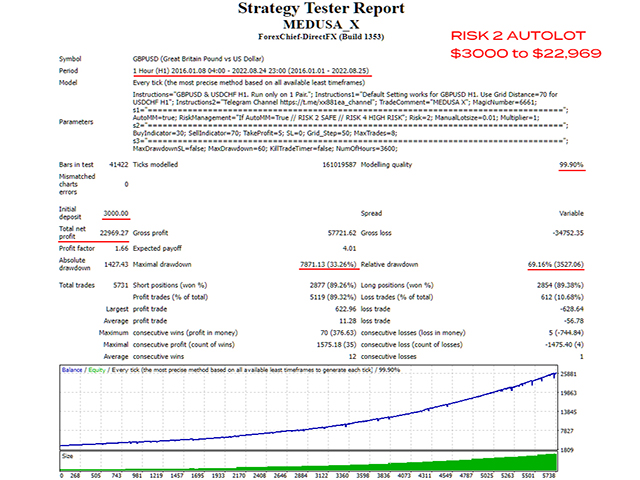
BACKTEST SETTINGS (make sure u have 90-99% tick quality from history center, and use Every Tick Model) If 99% TDS, set gmt=2 dst uk, spread 10-15
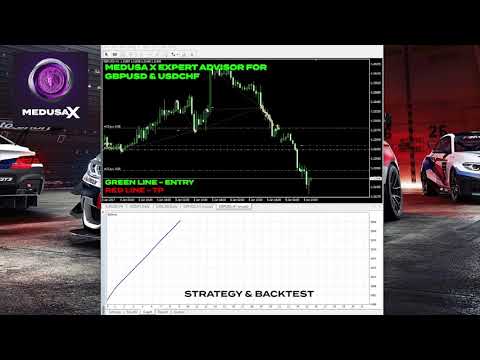
Test from 2016-2020 on GBPUSD , with a $1000 account, on H1. AUTOLOT = ON. RISK 2(I do not optimize for longer periods as adapting to current market behavior is more important)
(note: if your tester ends with a loss at the end, it means, the tester FORCED the trades to CLOSE on the end date, even though the trade hasnt had the opportunity to recover)
| Working timeframe is H1 Minimum account balance: $500. $1000 recommended. Works on GBPUSD (EA only sold here on MQL, beware of scam sellers elsewhere.Won’t work the same without my support) |
|---|
Requirements:
- 1:500
-
VPS is strongly recommended
Features:
-
Backtested with Tick Data Suite real 99% tickdata, variable spreads and slippage.
-
Good & safe ROI.
-
The EA is stress free and very easy to setup and use.
How to Install:
-
Click Buy on MQL5, Log into your MQL5 account at MT4 Tools/Options/Community, then Go to Market Tab, Choose Purchased. MEDUSA X will appear there. Click Install.
-
Open MT4/Navigator Menu, Open an empty chart of GBPUSD. (Try on Demo account first, to see if everything is working properly for your MT4)
-
Drag the EA at Navigator menu, to the GBPUSD chart. Make sure Autotrading turned on, Smiley appears on top right corner of Chart.
-
Make sure that there are no errors in Experts/Journal tab
-
That's it! Wait for Profit! (Remember to withdraw yr profit regularly)
Settings:
-
Trade Comment- Comment for EA's orders
-
Magic Number - Unique identifier for EA's orders
- AutoMM - use automatic lot calculation if true
-
Risk – AutoLot calculation based on deposit
- ManualLotsize– Manual Lotsize if AutoMM is false
- Multiplier– Coefficient for Grid orders
- MaxSlippage - slippage limit, if over limit, no trade will open
- Takeprofit – TP
- Stoploss – SL
- Gridstep - Distance of Grid
-
Maxtrades – Maximum number of averaging trades opened
-
MaxDrawdownSL – Max drawdown reached to close all positions ( I don't use this)
- KillTradeTimer= SL the trade when a certain number of hours has reached
- NumberofHrs=720 = 30 days

























































Awsome EA; after 1 month, I have 115 winning trades and only 5 negative, max 2% of DD. Author easy to contact and fast answers. My only regret is not to have bought it earlier.