DYJ WilliamsPercentRange SignalSource
- 지표
-
Daying Cao
 안녕하세요!
저는 오랜 개발 경력을 가진 소프트웨어 엔지니어로서, 자신만의 고유한 트레이딩 시스템과 풍부한 EA 거래 경험을 가지고 있습니다. 주요 거래 통화쌍은 EUR/USD, GBP/USD, USD/JPY, AUD/USD, USD/CAD, 골드 및 EUR/NZD 크로스 통화입니다.
저희의 목표는 접근 가능하고 양질의 서비스를 제공하여, 시장 참여자, 트레이더, 분석가 모두가 정보에 입각한 시기적절한 거래 결정을 내릴 수 있도록 꼭 필요한 도구를 지원하는 것입니다. - 버전: 1.5
- 업데이트됨: 11 6월 2026
- 활성화: 5
DYJ WPR - SignalSource: Multi-Currency WPR Smart Monitor & Signal Source
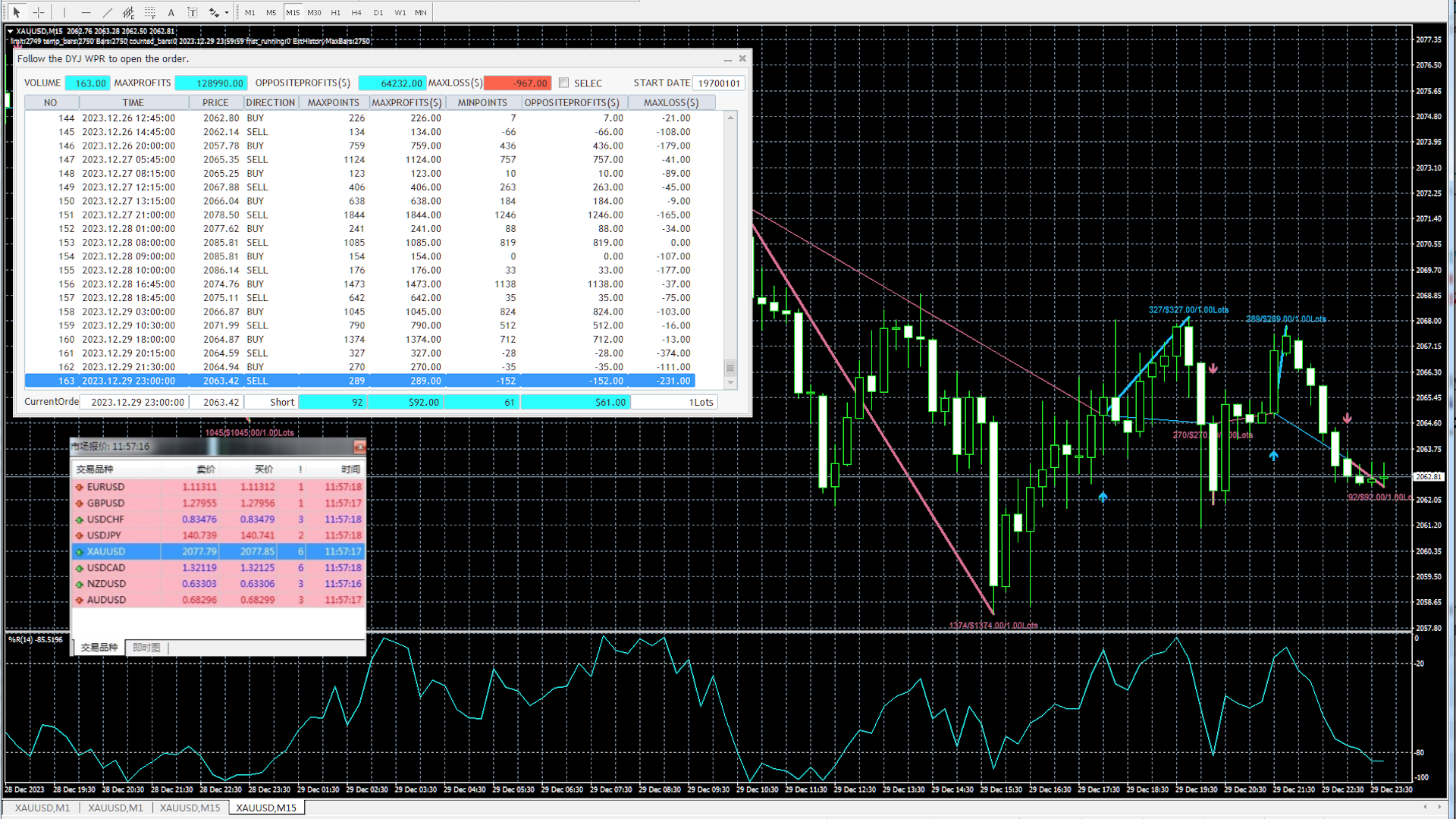
DYJ WPR - SignalSource is an advanced multi-currency monitoring and trading assistant EA based on the classic Williams %R (WPR) indicator. By attaching it to just a single chart of any currency pair, you can monitor, generate signals, and manage open/close operations across all major currency pairs in the market.
Core Features & Trading Logic-
Multi-Currency Panorama Monitoring: No need to attach the EA to multiple charts; a single chart scans and monitors signals across all symbols.
-
Classic WPR Strategy:
-
Oversold Zone (80% - 100%): Identifies price rebound turning points as long (buy) entry opportunities.
-
Overbought Zone (0% - 20%): Identifies price pullback turning points as short (sell) entry opportunities.
-
-
Intelligent Simulated Profit Estimation: Built-in simulated trading technology that evaluates the overall potential profitability of entry and exit signals in real time.
-
Flexible Profit Evaluation & Close Modes (Supports 2 Strategies):
-
Maximum Profit Mode (ByMaxProfits): Maximizes profit for a single trend wave. Recommended to use with a Trailing Stop to lock in trend profits efficiently.
-
Opposite Signal Close Mode (ByOppositeClosed): Patiently waits for an opposite signal before closing existing positions, capturing the full yield of a major trend.
-
-
Comprehensive Alerts & Visualization: Supports chart arrow alerts, pop-up notifications, and visually displays indicator lines alongside the profit/loss statistics panel.
💡 Tip: If you need to implement multi-account automated copy trading or automatically follow the open/close operations of this indicator, please download the companion utility software DYJ Follow Me.
Input Parameters
[Indicator Settings]
-
InpWPRPeriod = 14 — Calculation period for the WPR indicator.
-
InpShowArrows = true — Whether to display buy/sell signal arrows on the chart.
-
InpAlertsOn = true — Whether to enable pop-up signal alerts.
-
ArrowUpClr = DeepSkyBlue — Color for the Up (Buy) arrow.
-
ArrowDnClr = PaleVioletRed — Color for the Down (Sell) arrow.
-
InpIsDisplayIndicatorLine = true — Whether to display the WPR indicator line in the sub-window.
-
InpSimulatedVolume = 1 — Simulated trading volume/lots (recommended 0.01 lots or higher).
-
InpOnlyOppositeClosedLine = false — Whether to display only the opposite close line.
-
InpIsDisplayChartText = true — Whether to hide all text on the chart.
-
InpIsDisplayProfitsLine = true — Whether to hide all profit/loss lines on the chart.
-
MaxProfitsTextHigh = 40 — Height of the maximum profit label.
-
MaxProfitsTextLow = 20 — Height of the minimum profit (opposite) label.
-
InpIsEstimateDialog = true — Whether to hide or show the profit estimation dialog.
-
InpModeProfits = ByMaxProfits — Profit estimation mode (Options: ByMaxProfits or ByOppositeClosed).
-
InpStartDate = "19700101" — Start date for statistics and backtesting.