Follow Trend Steps MT4
- 지표
- 버전: 1.0
- 활성화: 5

Follow Trend Steps
Follow Trend Steps: See Your Price Zones Before the Market Moves
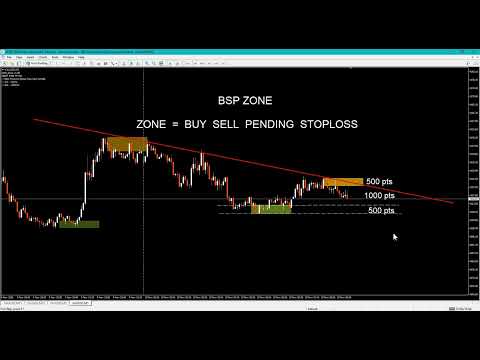
Plan your trades around clear price zones, not guesswork. Follow Trend Steps draws clean, color-coded zones directly on your chart, showing where price has recently turned and where it may react again, so you can plan entries, exits and risk with confidence. Available for Meta Trader 4 and Meta Trader 5.
Why traders use Follow Trend Steps
Every chart is full of noise. Support and resistance lines are drawn differently by every trader, and it is easy to lose time marking levels by hand. Follow Trend Steps does the marking for you. It reads recent price action, filters it with a trend reference, and places a zone box where price has shown a meaningful reaction.
The result is a chart that tells you at a glance:
- Where the upper zones are, areas above the trend reference where price has pulled back.
- Where the lower zones are, areas below the trend reference where price has bounced.
- Which zones are the most recent, because older zones fade away gradually.
You spend less time drawing and more time deciding.
Built for planning
A zone is more than a line. It has a top and a bottom, so you can see a whole area of interest instead of a single price. That makes it easier to:
- Plan entry areas and pending orders around zones
- Place stop-loss levels beyond a zone edge
- Set take-profit targets at the next zone in the opposite direction
- Compare the distance to a zone with your intended risk
- Prepare a trading plan before the session starts
Zones extend forward to the right of the price action, so you can see where they sit relative to the current price while you plan.
Clear at a glance
Follow Trend Steps was designed so the chart stays readable, even with many zones.
- Two colors, two meanings. Upper zones and lower zones use different colors, so you know the side immediately.
- Fading history. The newest zones are shown at full strength. Older zones blend gradually into the chart background, so your eyes go to what matters now.
- Pending zones are marked differently. A zone that is still developing is drawn as a dashed outline. Once it is confirmed, it becomes a solid box. You always know which zones are final and which are still forming.
- One zone per move. When price keeps pushing in the same direction, the indicator keeps only the strongest zone of that move, instead of stacking boxes on top of each other.
- No clutter. The indicator uses lightweight chart objects that stay behind the price candles and cannot be moved by accident.
Every trader works differently. Follow Trend Steps lets you shape the display to match your own style and your own chart.
You can keep it minimal, with only a few of the newest zones visible, or keep a wider history for context. Change a setting and the chart updates immediately.
Works on your chart, your way
- Works on short-term chart timeframes from M1 up to H1
- Works on forex, metals, indices and other instruments offered by your broker
- Updates live as new price data arrives
- Light on resources, with no heavy calculation or lag
- Zones are tied to price and time, so they stay in the right place as you scroll and zoom
- Includes an on-chart information note showing your broker and account type
Who is it for?
- Manual traders who want clear areas of interest on the chart without drawing them by hand
- Intraday traders who plan each session around key price areas
- Risk-focused traders who want to see the distance to a zone before they enter
- Traders building a routine, who want the same objective zones every day instead of subjective levels
Quick start
- Attach Follow Trend Steps to any chart from M1 to H1.
- Pick your upper and lower zone colors.
- Set how far the zones extend to the left and to the right.
- Choose your look-back range.
- Use the zones to plan your entries, stops and targets.
The default settings are ready to use right away. Adjust them whenever you like.
A tool to support your decisions
Follow Trend Steps is a visual planning tool. It does not open or close trades, and it does not predict the future. Zones show areas where price has reacted before, and price may or may not react there again. Use it together with your own analysis and sound risk management.
Trading involves risk. Past price behavior does not guarantee future results. Only trade with money you can afford to lose.
Get Follow Trend Steps today
Add clear, customizable price zones to your Meta Trader chart and plan your next trade with a clearer picture of the market. Download Follow Trend Steps and see your chart in a new way.
_______________________________
_______________________________
PC , Laptop , Pocket PC
Minimum Requirements:
OS: Windows 7 SP1 or later
CPU: 500 MHz processor (Pentium IV or comparable)
RAM: 512 MB
Hard Disk: 20 MB free space
_______________________________
Thank you for your support
Subscribe & Follow to stay updated on new gadgets.
_______________________________