Gold Reversal Multi Entry
- Experts
- 버전: 6.3
- 업데이트됨: 26 10월 2026
- 활성화: 10

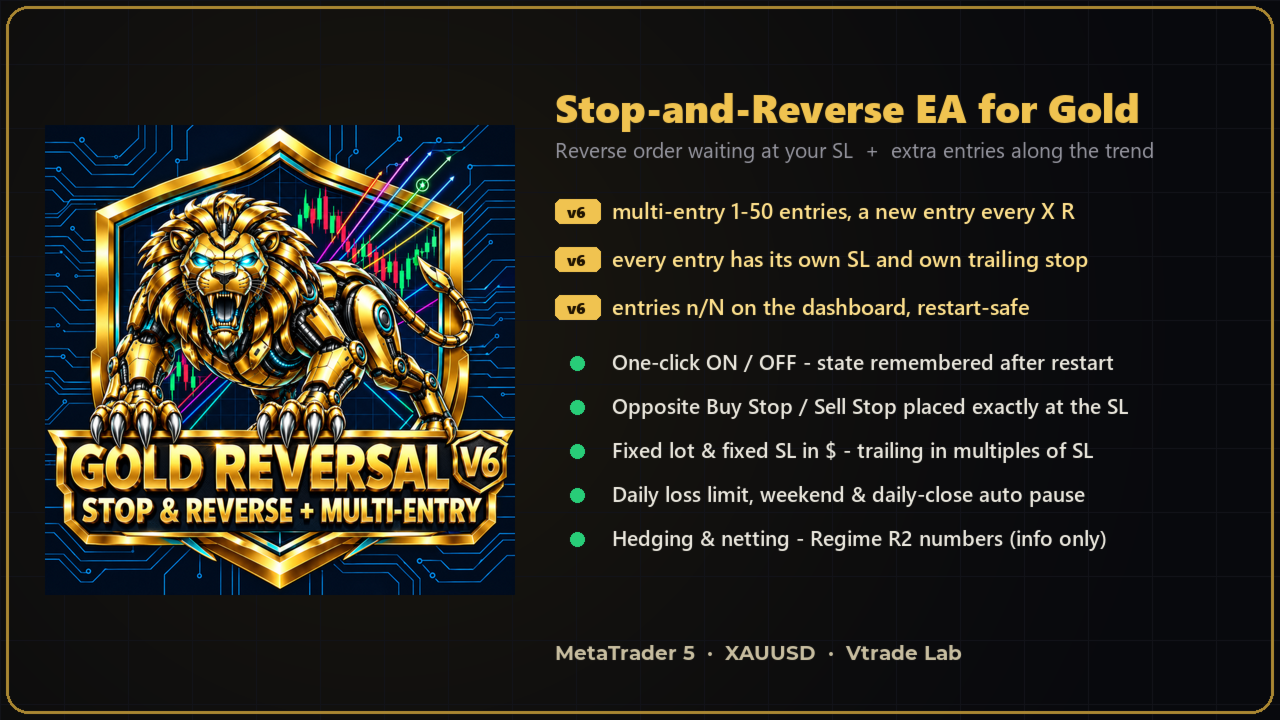
Gold Reversal Multi Entry (Gold Reversal Bot v6) is a Stop-and-Reverse Expert Advisor for XAUUSD that you control with a single ON / OFF button - now with optional MULTI-ENTRY along the trend.
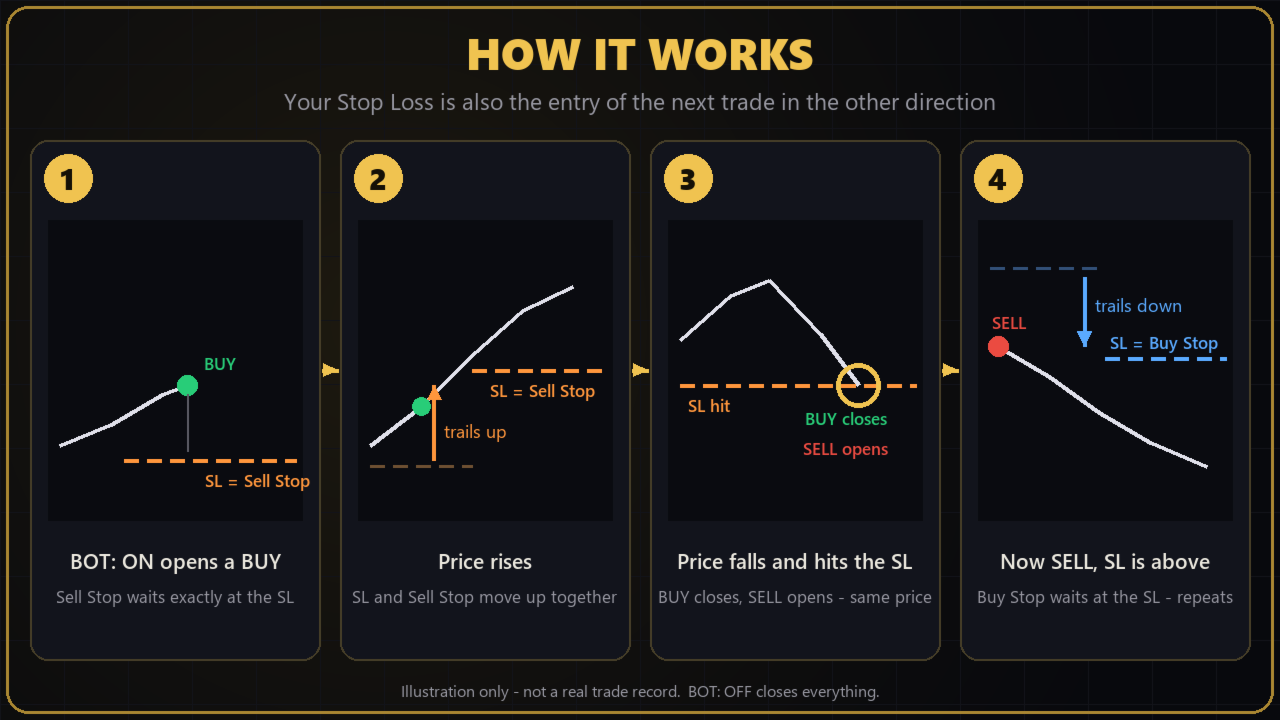
The bot holds a position with a fixed Stop Loss, and an opposite Stop order is already sitting exactly at that Stop Loss. When the market turns and hits your SL, the old position closes and the reverse order fills at the same moment - you are immediately positioned in the new direction, without watching the screen and without the delay of a manual entry. When the market keeps moving your way, v6 can add more entries, each protected by its own Stop Loss.
WHAT'S NEW IN v6
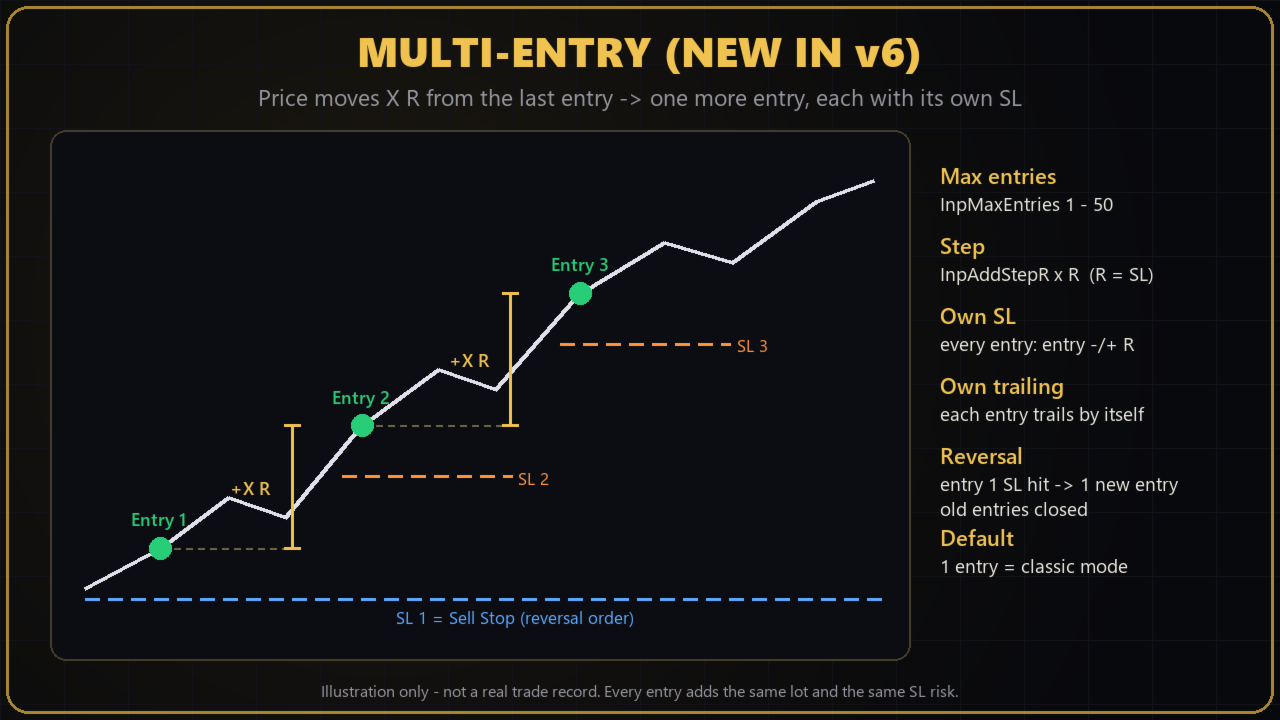
- Multi-entry mode: 1 to 50 entries per direction (InpMaxEntries)
- A new entry every X R from the last entry (InpAddStepR, R = SL distance) - for BUY and SELL trends alike
- Each extra entry has its own Stop Loss and its own trailing stop
- Reversal driven by entry 1: its SL hit - the reverse order fills as one new entry and leftover entries of the old direction are closed
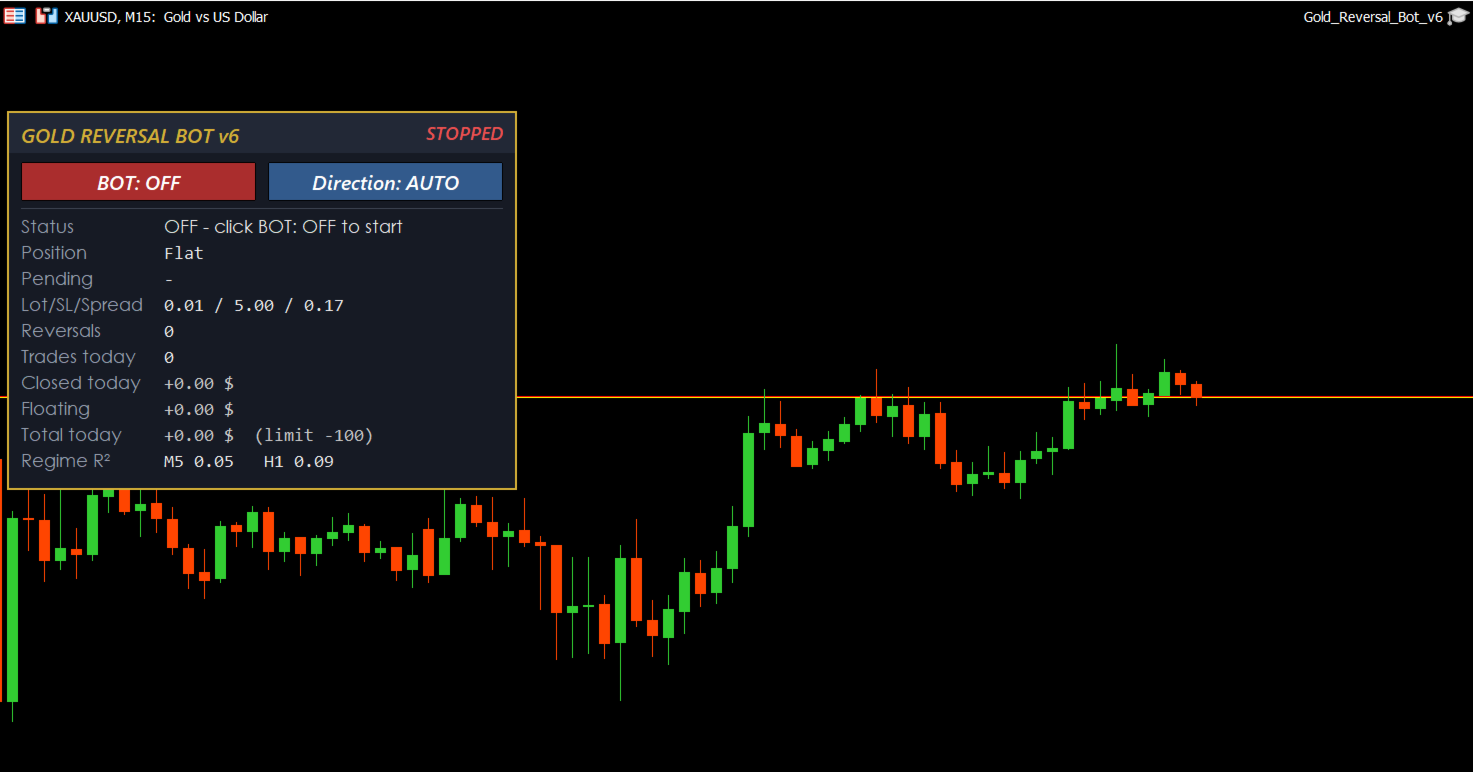
- Dashboard shows entries in use (e.g. BUY 3/5); all entries are recognised again after an MT5 restart
- Dashboard corner option: top-left / top-right / bottom-left / bottom-right
- Own magic number - runs next to v5 on the same account
- 3 presets: default, recommended, multi-entry example
- Default = 1 entry: the bot then trades exactly like the classic single-position version
HOW IT WORKS
- Click BOT: ON - the first market order opens (direction: AUTO, BUY or SELL).
- Every entry gets a fixed lot and a fixed Stop Loss.
- An opposite Buy Stop / Sell Stop is placed exactly at entry 1's SL, with its own SL already attached, so the new position is protected from the first tick.
- When the trade moves into profit, the SL trails the price and the reverse order follows it.
- Multi-entry (optional): every InpAddStepR x R in the trend direction one more entry opens, up to InpMaxEntries.
- Entry 1 SL hit - reverse order fills - the cycle repeats until you click OFF.
- Click BOT: OFF - all bot positions are closed and pending orders deleted.
KEY FEATURES
- One-click ON / OFF button, state remembered after MT5 restarts
- Direction button: AUTO (last M5 candle) / BUY / SELL for the first trade
- Fixed lot and fixed SL in dollars - easy to understand, easy to size
- The reverse order lives on the broker server: reversals still happen even if your internet drops for a moment
- Adjustable trailing stop (start level and distance as multiples of the SL)
- Automatic pauses (closes everything, stays ON, resumes by itself): around gold's daily close (wide spreads), weekend (Friday evening to Monday), and a daily loss limit - you set your own maximum loss per day in $ (e.g. 100 $)
- Max spread filter for market entries and optional limit on the number of reversals
- Before every order the bot checks free margin, trading mode, session, volume limits and the broker's freeze level - it waits instead of sending a rejected order
- Safety stop: if another EA (for example an equity or prop-firm guard) closes the bot's trade, or trades are closed outside the SL 3 times within 60 seconds, the bot switches itself OFF and shows an alert instead of re-opening trades
- Hedging accounts (recommended, required for multi-entry) and netting accounts (single position, reversal by market order)
- Clean dashboard: status, position and entries, pending order, lot / SL / spread, reversals, trades today with win rate, closed / floating / total P/L today, Regime R2
- Sharp dashboard on 100% - 200% Windows scaling, custom colours
REGIME R2 (information only)
The dashboard shows R-squared (0-1) of a linear regression of the last 20 candles on two timeframes you choose (default M5 and H1) as plain numbers. R2 measures trend strength: 0 = choppy, 1 = price moving in a straight line. Reference levels for the H1 value, from historical tests:
- below 0.30: weak trend / sideway - consider staying out, the bot tends to reverse many times
- 0.30 - 0.60: moderate trend - usable, keep watching
- above 0.60: strong trend - more favourable conditions for the bot
R2 does not show direction and does not predict the future. The levels are a reference only, not a guarantee of profit. The bot never opens, closes or blocks trades because of R2.
RECOMMENDED SETTINGS
- Symbol: XAUUSD (any gold symbol name), any chart timeframe
- Account: hedging
- Lot: 0.01. No fixed minimum balance - size the risk with the daily loss limit: about 5-10 % of your balance per day (e.g. 300 $ balance: InpMaxDailyLoss = 15-30; 1,000 $: 50-100)
- Stop Loss: 12 $ with trailing distance 2 x SL (preset included). Small SL values (below about 5 $) cause many reversals per day and the spread cost becomes too high.
- Multi-entry: start with 1 entry. If you use more, use a step of at least 3 R and remember that every entry adds the same risk (5 entries = up to 5 x lot).
- Broker: low-spread gold. Pause hours are set for GMT+0 servers and can be adjusted for GMT+2 / +3 brokers.
- Run on a VPS or a PC that stays on 24/5
INPUTS
- InpStartOn - turn ON when the EA is attached (default false - use the button)
- InpStartDir - first direction when switched ON: Auto / Buy / Sell
- InpLot - fixed lot for every order and every entry (default 0.01)
- InpSLPrice - fixed SL in $ on gold (default 5, recommended 12)
- InpMaxEntries - max entries per direction, 1-50 (default 1)
- InpAddStepR - add the next entry after price moves x R from the last entry (default 3.0)
- InpTrailStartR - start trailing when profit reaches x times the SL (default 1)
- InpTrailDistMult - trailing distance = x times the SL (default 1, recommended 2)
- InpTrailStepPrice - minimum SL step when trailing (default 0.10)
- InpMaxReversals - max reversals per ON session, 0 = unlimited
- InpMaxDailyLoss - daily loss limit in $, 0 = off (default 100)
- InpMaxSpreadPrice - max spread for market entries (default 0.40)
- InpUsePause / InpPauseFrom / InpPauseTo - daily close pause, HHMM server time (default 2055-2305)
- InpFridayCloseHour / InpMondayStartHour - weekend pause, server hours (default 20 / 1)
- InpMagic - magic number (default 6060606; change it if you run two copies on one account)
- InpR2TF1 / InpR2TF2 / InpR2Period - Regime R2 timeframes and candles (default M5, H1, 20)
- InpPanelCorner - dashboard position: top-left / top-right / bottom-left / bottom-right
- InpPanelX / InpPanelY - distance from that corner in pixels
- InpPanelBg / InpPanelBorder / InpPanelFontSize - dashboard colours and font size
STRATEGY TESTER
Buttons do not work in the Strategy Tester, so the EA switches ON automatically at the start of a test. Use "Every tick based on real ticks" for more realistic results.
HOW TO GET MORE FROM IT
The bot follows the market mechanically. Combine it with your own strategy to increase your edge - for example, use your own analysis to decide WHEN to switch the bot ON / OFF, which first direction to choose and how many entries to allow.
CHECK THE NEWS BEFORE USING THE BOT
Gold moves very fast around high-impact news (NFP, CPI, FOMC, Fed speeches). Spreads widen and stops can slip. Always check the MQL5 economic calendar before switching the bot ON, and consider switching it OFF before major news.
RISK WARNING & DISCLAIMER
Trading gold with leverage carries a high level of risk. This EA does not guarantee profit, and past or backtest results do not guarantee future results. More entries mean more exposure and larger swings in both directions. Always test on a demo account first.
The bot is a tool. All trading decisions - when to switch it ON or OFF, direction, lot size, number of entries, Stop Loss and every other setting - are made by the user. The user is solely responsible for all profits and losses. The author accepts no liability for any loss or damage arising from its use.