Trade Exit Manager
- 유틸리티
- 버전: 1.1
- 활성화: 5

Trade Exit Manager — order entry and staged position management
Trade Exit Manager is a MetaTrader 5 trading utility with two chart buttons. It places two user-configured order groups and follows a predefined exit plan: five partial-close levels, break-even stop adjustment, a hidden stop and trailing. The user chooses directions, volumes, order counts and distances. The utility does not analyze the market or generate entry signals.
Features
- Two order groups. Configure market direction, pending type, distance, lot size and target order count separately. Supported types are Buy, Sell, Buy Limit, Sell Limit, Buy Stop and Sell Stop. Pending selects market or pending execution for both groups.
- Button or scheduled entry. OPEN ORDERS starts placement in button mode. Scheduled mode uses broker server time and starts on the first incoming tick at or after the selected moment. The schedule fires once per program run.
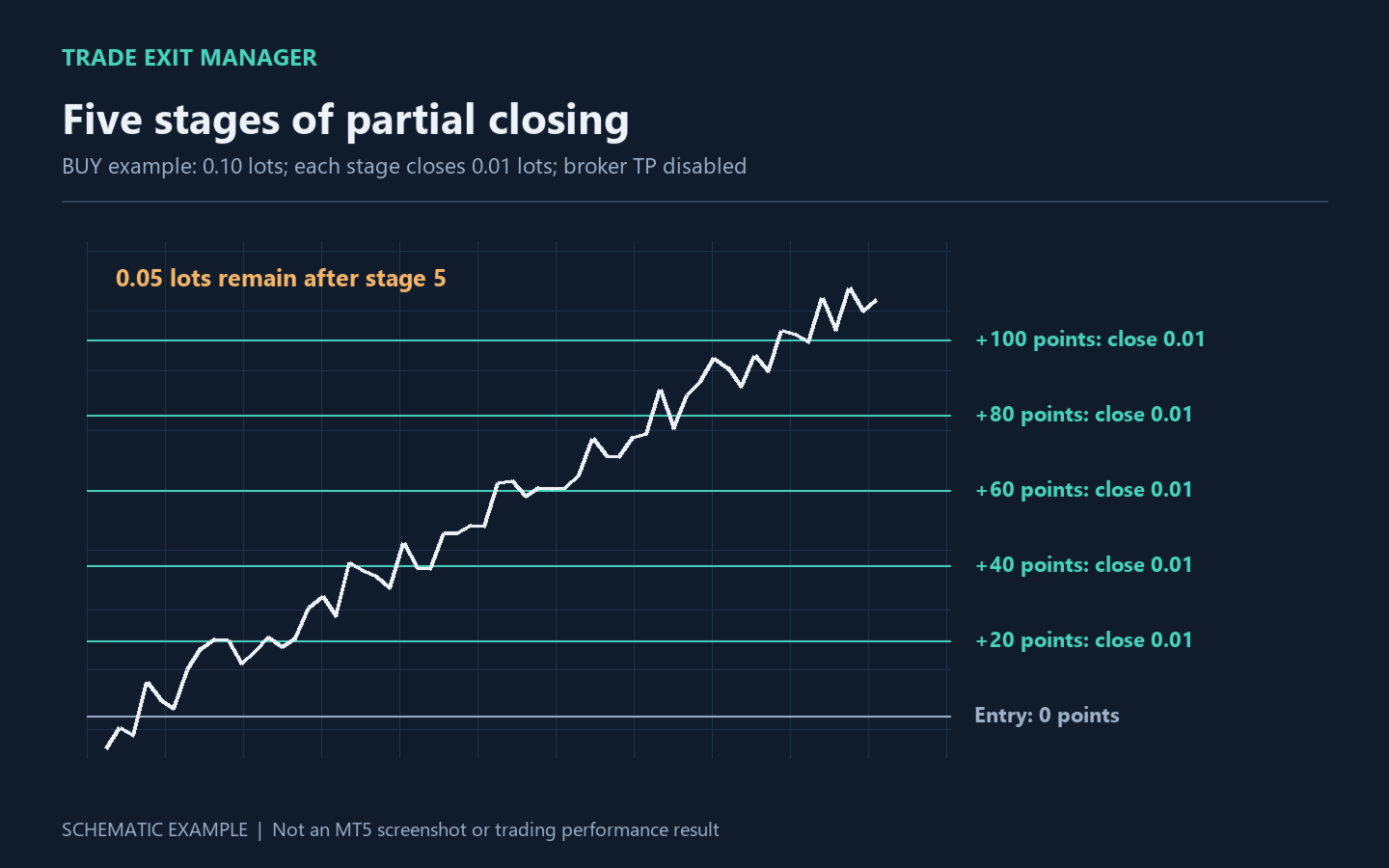
- Five partial-close levels. Profit1–Profit5 specify favorable distances from each position's entry price; CloseLot1–CloseLot5 specify fixed lot amounts, not percentages or cash profit. Completed stages are tracked per position and stored in terminal global variables.
- Break-even stop adjustment. At BETrigger, Stop Loss moves to entry plus BEDistance for Buy or entry minus BEDistance for Sell. This is a price-based level; commissions, swap and execution can still affect the actual financial outcome.
- Hidden Stop Loss. Loss triggers position closure at the configured adverse distance. The level is monitored by the utility rather than submitted as a separate broker stop.
- Broker-side SL and TP. StopLoss and TakeProfit are attached to new orders. They operate independently of hidden levels. A broker TP can close the full remaining position before later partial-close stages.
- Trailing. TrailingStart defines activation, TrailingStop defines distance from current price, and TrailingStep defines the minimum improvement. An existing stop is not moved backward to increase price risk.
- Close the current symbol. CLOSE SYMBOL closes Buy and Sell positions and deletes pending orders for the chart instrument. Other symbols are not managed.
Use cases
For discretionary trading with planned exits, reducing position volume at successive price levels, placing two pending-order groups, and managing positions already open on the current instrument. It executes your settings rather than selecting an entry strategy.
Getting started
- Use a MetaTrader 5 hedging account. Start on a demo account. Attach the utility to the required chart and enable algorithmic trading.
- Review existing positions and pending orders on that symbol: they are also managed. Run only one instance per symbol.
- Set lot sizes according to the broker's minimum and volume step. Configure order counts and Pending. Set a group's Norders to 0 to disable its entry group.
- Set Profit1–Profit5 in ascending order and choose CloseLot values. To use all five stages, disable the ordinary TakeProfit or place it beyond the final stage.
- Use button entry or choose a future server date and time. To manage existing trades without opening new ones, keep button mode and do not press OPEN ORDERS.
Inputs
- Profit1 / CloseLot1 — first level in points / lots to close; default 20 / 0.01.
- Profit2 / CloseLot2 — second level; 40 / 0.01.
- Profit3 / CloseLot3 — third level; 60 / 0.01.
- Profit4 / CloseLot4 — fourth level; 80 / 0.01.
- Profit5 / CloseLot5 — fifth level; 100 / 0.01. A zero level or volume disables that stage. Closing volume is rounded down to the broker's volume step; amounts below minimum volume are skipped. If the remaining volume would be below minimum lot size, the whole remaining position is closed.
- BETrigger / BEDistance — stop-adjustment trigger / distance from entry; 15 / 10 points. BETrigger=0 disables it.
- Loss — hidden stop distance; 50 points, 0 disables it.
- Slippage — permitted price deviation; 10 points. Broker execution rules still apply.
- OT — button or scheduled entry; button mode by default.
- OOT — opening date and time in server time. Replace the original 2025.10.10 00:00 value with a future time before using scheduled mode.
- Pending — true: pending orders; false: market orders. Default true.
- typeL / typeLp / Dist / Lot / Norders — group one: Buy / Sell Stop / 500 points / 0.1 lots / 25 orders.
- typeL2 / typeL2p / Dist2 / Lot2 / Norders2 — group two: Sell / Buy Stop / 500 points / 0.1 lots / 25 orders. Counts are target totals including existing positions or pending orders of the selected type on this symbol, rather than a guaranteed number of new orders.
- StopLoss / TakeProfit — broker SL / TP for new orders; 50 / 50 points. Zero disables the respective level.
- TrailingStart / TrailingStop / TrailingStep — activation / distance / step; 0 / 0 / 0. The first two must be positive to enable trailing.
- InpBackColor / InpColor / InpFont / InpFontSize / InpBorderColor — button background, text, font, size and border. Defaults: light background, black text, Times New Roman, size 10.
- InpBack / InpSelection / InpHidden / InpZOrder — background rendering, selection, hiding in the object list and click priority; false / false / true / 0.
Operating details
All positions and pending orders on the chart symbol are managed, including manual trades and trades opened by other EAs. There is no Magic Number filter. Pending groups are not a ladder with a separate spacing between each order: each order uses its configured distance from the current quote at placement. The opposite group is not automatically canceled after an order triggers.
Distances use symbol points (_Point), not pips. With _Point=0.01, 500 points means a 5.00 price change; with _Point=0.00001, it means 0.00500. Adjust settings for your instrument. Defaults allow 25 orders of 0.1 lots in each group; evaluate total exposure before starting.
Hidden levels, partial exits, break-even and trailing require the terminal to remain running, connected, receiving ticks and authorized to trade. Hidden protection stops when the utility stops. Execution depends on spread, liquidity, gaps and broker restrictions. Requests may be rejected; errors are logged in the Journal. Failed placement is not automatically retried. Saved partial-close stages belong to the current terminal and are not automatically transferred to another computer.
The utility does not promise returns or eliminate loss risk. Illustrations explain its operation and are not live trading results or a profitability backtest.