Institutional Orderflow EA
- Experts
- 버전: 7.0
- 활성화: 20

Hybrid Institutional Orderflow • Volume Profile • Smart Money Trading System
Trade the Market With Context — Not Guesswork.
The Institutional Flow EA is a powerful Hybrid MT5 trading system designed to help traders identify high-quality market opportunities by combining Volume Profile, Value Area, POC, Order Blocks, Fair Value Gaps, Break of Structure, Daily Market Bias, Liquidity behavior and institutional-style price action into one intelligent trading environment.
Instead of relying on a single indicator or a simple buy/sell signal, Institutional Flow EA analyzes how price interacts with volume, market structure and key institutional zones before presenting an opportunity.
It can be used in two powerful ways:
MANUAL MODE — Let the EA scan the market, rank opportunities and present the setup while YOU make the final trading decision.
AUTOMATIC MODE — Allow the EA to execute qualified opportunities automatically according to its built-in risk, trading-window and signal-management rules.
Or use the best of both worlds:
HYBRID MODE
Let the EA do the scanning and analysis. You remain in control of the final decision.
WHY INSTITUTIONAL FLOW EA?Markets are not simply moving because a moving average crossed another moving average.
Price moves through areas of liquidity, imbalance, volume concentration, supply and demand, market structure and participant positioning.
Institutional Flow EA is designed to bring several of these concepts together in one MT5 system.
Instead of asking:
“Should I buy or sell?”
The EA helps you investigate a much more useful question:
“What is price doing around important institutional levels, and is the current market structure supporting the move?”
That is the philosophy behind Institutional Flow EA.
THE CORE TECHNOLOGYInstitutional Flow EA combines multiple analytical components.
1. VOLUME PROFILE
The EA analyzes volume distribution across a selected price range and identifies important areas of market participation.
It calculates:
- POC — Point of Control
- VAH — Value Area High
- VAL — Value Area Low
- Volume concentration
- Value-area boundaries
- Price interaction with the value area
The POC represents an important concentration of traded activity.
The Value Area helps define the zone where a significant portion of market activity occurred.
This gives the trader a structural framework instead of viewing price as a collection of random candles.
2. THREE CORE TRADING STRATEGIESInstitutional Flow EA does not depend on one entry pattern.
It evaluates three different market behaviors.
STRATEGY 1 — POC FADE
This setup focuses on situations where price has previously moved outside the value area and begins showing signs of returning toward the POC.
The EA evaluates:
- Previous-session position
- Value Area boundaries
- Distance from POC
- Price contraction
- Reversal behavior
- Directional confirmation
The objective is to identify potential opportunities where price may rotate back toward the market's central volume area.
STRATEGY 2 — VALUE AREA FALSE BREAK
Markets frequently test important boundaries and then reject them.
The EA watches for price to move beyond a Value Area boundary and then quickly return back inside the range.
This creates a potential false-break / rejection scenario.
The EA evaluates:
- VAH or VAL breakout
- Rejection
- Return inside value
- Direction
- Market structure
- Supporting order-flow conditions
This allows traders to distinguish a potential failed breakout from a genuine continuation.
STRATEGY 3 — BREAKOUT CONTINUATION
Not every breakout should be faded.
When price genuinely breaks structure and demonstrates continuation, Institutional Flow EA can look for a continuation opportunity.
The system evaluates:
- Break of Structure
- Directional momentum
- Value Area interaction
- VA-edge behavior
- Pullback
- Hold/rejection of the broken area
The idea is simple:
Break → Pullback → Confirmation → Potential continuation.
This provides a completely different opportunity from the POC fade and false-break strategies.
ORDER BLOCK + FAIR VALUE GAP ENGINEOne of the most important components of Institutional Flow EA is its ability to identify potential institutional price zones.
The EA looks for combinations involving:
ORDER BLOCKS
Potential areas where significant price displacement originated.
FAIR VALUE GAPS
Three-candle imbalance structures where price has moved rapidly enough to leave an inefficient area behind.
IMPULSE
The EA evaluates whether the move away from the area has sufficient strength relative to market volatility.
BREAK OF STRUCTURE
The system does not simply draw every potential order block and call it a signal.
It looks for structural confirmation.
MITIGATION
The EA also considers whether an identified zone has already been meaningfully revisited.
This helps prevent repeatedly treating the same exhausted zone as a fresh opportunity.
DAILY MARKET BIASInstitutional Flow EA can also evaluate the broader daily environment.
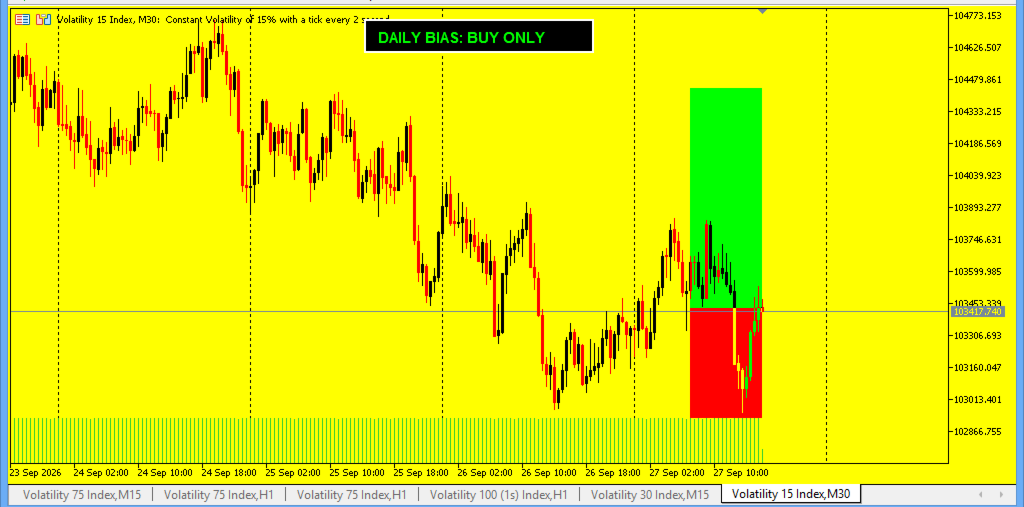
Its daily bias engine incorporates:
- EMA 20
- RSI 14
- MACD 12/26/9
- ADX 14
- ADX threshold
The purpose is to establish broader directional context.
Instead of blindly taking every setup, the trader can ask:
Is the broader market environment supporting this direction?
A setup appearing against the broader context can therefore be treated differently from one aligned with it.
HIGH-IMPACT NEWS FILTERMarkets can behave very differently around major economic announcements.
Institutional Flow EA includes a configurable news filter designed to prevent signals from being treated normally when important high-impact economic events are approaching.
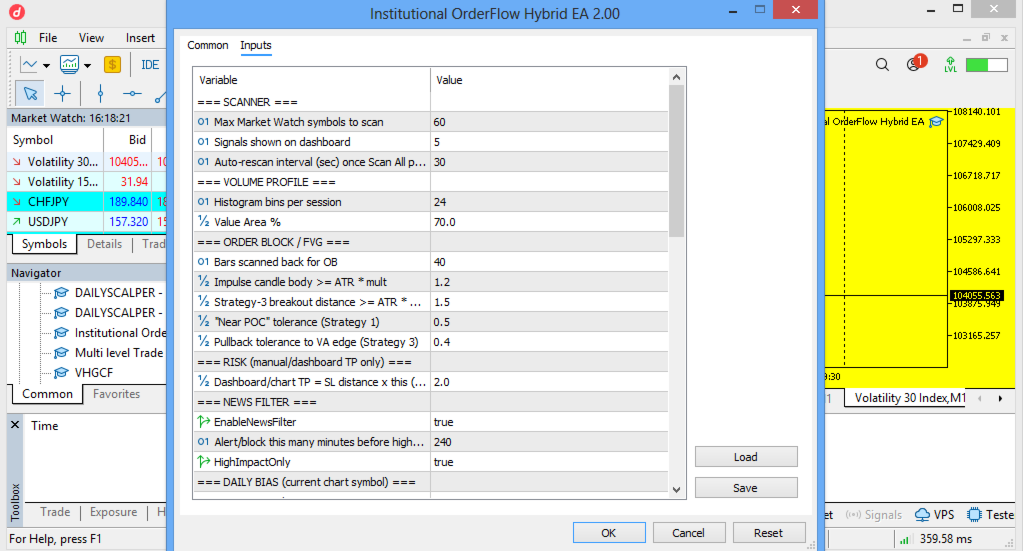
The system can be configured with:
- News filter ON/OFF
- Minutes before news
- High-impact-only filtering
This is particularly useful for traders who do not want normal technical setups competing with major scheduled economic events.
MULTI-SYMBOL MARKET SCANNEROne of the biggest advantages of the Hybrid architecture is that the trader does not have to manually inspect every chart.
The scanner can monitor multiple symbols from Market Watch.
Instead of opening dozens of charts and searching manually for setups, the EA continuously evaluates the available market universe and looks for qualifying opportunities.
The dashboard can then present the strongest opportunities for inspection.
SIGNAL RANKINGThe EA does more than simply identify a large number of potential setups.
It evaluates and ranks opportunities so that the trader can focus attention on the strongest candidates presented by the scanner.
The dashboard can display the Top Signals, allowing traders to move from:
100 charts → a shortlist → detailed analysis → trading decision.
This can dramatically simplify a multi-market workflow.
THE HYBRID ADVANTAGEThis is where Institutional Flow EA becomes especially powerful.
You are not forced to choose between:
“I want an indicator.”
or
“I want a fully automated robot.”
You can use both approaches.
MODE 1 — MANUAL TRADINGIn Manual Mode, Institutional Flow EA becomes your market intelligence assistant.
The EA performs the scanning and technical analysis.
You perform the final decision.
Recommended Manual Workflow
STEP 1 — OPEN MT5
Load Institutional Flow EA on your preferred chart.
Make sure the instruments you want the scanner to monitor are available in Market Watch.
STEP 2 — ENABLE THE SCANNER
Allow the EA to scan the market.
The scanner evaluates available symbols and searches for qualifying setups.
STEP 3 — REVIEW THE DASHBOARD
Look at the strongest opportunities presented by the dashboard.
Pay attention to:
- Symbol
- Direction
- Strategy
- Entry area
- Stop-loss area
- Take-profit area
- POC
- Value Area
- Daily bias
- News condition
- Signal quality
Do not treat the dashboard as a command to enter blindly.
Use it as an opportunity filter.
STEP 4 — IDENTIFY THE STRATEGY
Before entering, understand why the EA has identified the opportunity.
Is it:
POC Fade?
Value Area False Break?
Breakout Continuation?
Knowing the setup type helps you understand the market condition behind the signal.
STEP 5 — CHECK THE DAILY BIAS
Ask:
Is the setup aligned with the broader market environment?
A setup supported by the daily bias can be viewed differently from one fighting the broader directional context.
STEP 6 — CHECK THE NEWS FILTER
Before placing a trade, verify whether major economic news is approaching.
A technically attractive setup can behave very differently during major announcements.
STEP 7 — OPEN THE SIGNAL CHART
Select the opportunity from the dashboard.
The EA can open the relevant symbol for detailed inspection and display the important technical areas.
This gives you a closer look at:
- Price structure
- Volume Profile
- POC
- Value Area
- Order Block
- Fair Value Gap
- Entry region
- Stop region
- Target region
STEP 8 — WAIT FOR PRICE CONFIRMATION
Do not feel pressured to enter simply because a signal appears.
Allow price to demonstrate that the expected reaction is actually occurring.
For example:
Sweep → Rejection → Structure confirmation → Entry
or:
Breakout → Pullback → Hold → Entry
Patience is an important part of using the system effectively.
STEP 9 — CONTROL YOUR RISK
Never risk an amount on one trade that could seriously damage your account.
Use sensible position sizing.
The EA provides automated risk-management functionality, but traders should still understand their broker's:
- Minimum lot
- Maximum lot
- Stop distance
- Contract specification
- Margin requirement
- Spread
- Trading hours
For traders who prefer automation, Institutional Flow EA includes an automated trading engine.
When automatic trading is enabled, the EA can monitor the market and execute qualifying opportunities according to its configured rules.
The automated engine incorporates:
- Signal scanning
- Signal ranking
- Daily trade limit
- Trading window
- Position checks
- Risk-based lot calculation
- Broker stop-level checks
- Margin availability
- Volume limits
- Magic number identification
- Automatic SL/TP construction
Automation should not mean:
“Turn it on and forget about the market.”
The most professional approach is to treat automation as a controlled trading process.
STEP 1 — TEST BEFORE LIVE TRADING
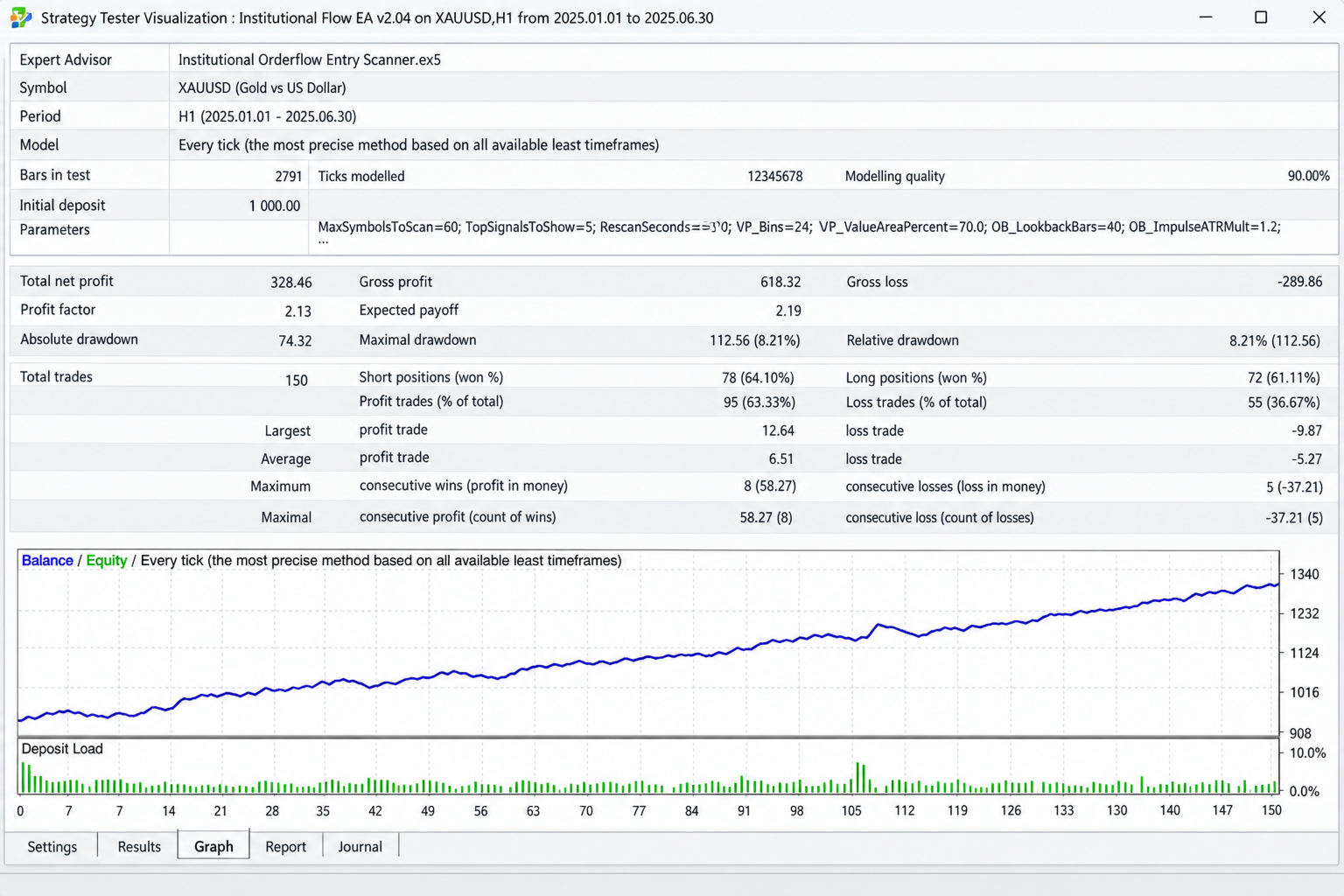
Start with the MT5 Strategy Tester.
Test the EA on your preferred:
- Symbol
- Timeframe
- Broker
- Spread conditions
- Commission
- Historical period
Run multiple tests rather than judging the EA from one short sample.
STEP 2 — USE A DEMO ACCOUNT FIRST
After backtesting, run the EA on a demo account.
This allows you to observe:
- Entries
- Exits
- Spread behavior
- News behavior
- Position sizing
- Broker execution
- Trading frequency
- Drawdown
without immediately exposing live capital.
STEP 3 — CONFIGURE YOUR RISK
The EA supports percentage-based risk sizing.
The default risk setting is designed around a controlled percentage of account balance rather than simply using an unnecessarily large fixed lot.
Always choose a risk level appropriate to your own account and tolerance.
STEP 4 — SET THE DAILY TRADE LIMIT
The EA includes a maximum-trades-per-day control.
This is important because automation should not be allowed to continuously trade every market fluctuation.
A daily limit can help keep the system's activity controlled.
STEP 5 — DEFINE THE TRADING WINDOW
The EA allows a trading window to be configured.
This gives the trader control over when automated execution is permitted.
For example, you may prefer to concentrate automated activity around the most liquid market hours rather than allowing execution throughout the entire day.
STEP 6 — KEEP THE NEWS FILTER ACTIVE
For traders who want to avoid major scheduled economic events, keeping the high-impact news filter enabled can provide an additional layer of protection against trading directly into major announcements.
STEP 7 — MONITOR THE JOURNAL
The MT5 Experts and Journal tabs are valuable when running any automated system.
Monitor:
- Trade execution
- Rejected orders
- Margin issues
- Broker stop restrictions
- News filtering
- Position sizing
- Signal generation
This is especially important when moving from backtesting to live trading.
AUTO-TRADING RISK MANAGEMENTInstitutional Flow EA incorporates several protections around automated execution.
RISK-BASED LOT CALCULATION
The EA can calculate position size based on the configured percentage of account balance.
BROKER STOP-LEVEL CHECKING
The system checks broker requirements before submitting trades.
SPREAD-BASED SAFETY DISTANCE
The EA also incorporates minimum-distance safeguards when constructing protective levels.
MARGIN CONTROL
Position size is checked against available margin.
VOLUME LIMIT CONTROL
The EA respects broker volume limitations where applicable.
ONE-TRADE CONTROL
The daily trade limit helps control excessive trading activity.
SYMBOL POSITION CHECK
The system checks whether a symbol already has an open position before attempting another automated trade.
THE BEST WAY TO USE THE HYBRID EAFor many traders, the most practical approach is not choosing between manual and automatic trading.
It is using them together.
THE PROFESSIONAL HYBRID WORKFLOW
PHASE 1 — SCAN
Let the EA scan the market.
↓
PHASE 2 — RANK
Review the strongest opportunities.
↓
PHASE 3 — UNDERSTAND
Identify the strategy:
POC Fade / False Break / Breakout Continuation.
↓
PHASE 4 — CONFIRM
Check:
- Daily bias
- Market structure
- Volume Profile
- Order Block
- FVG
- News
- Price behavior
↓
PHASE 5 — DECIDE
Choose whether the opportunity meets your personal trading rules.
↓
PHASE 6 — EXECUTE
Enter manually or allow the automated engine to execute according to its configured rules.
↓
PHASE 7 — MANAGE
Allow the predefined risk parameters to manage the position.
↓
PHASE 8 — REVIEW
Study the trade afterward.
This turns the EA from a simple signal generator into a complete market-analysis workflow.
WHO IS INSTITUTIONAL FLOW EA FOR?Institutional Flow EA is designed for traders who want a structured approach to market analysis.
FOREX TRADERS
Monitor multiple currency pairs and search for structured opportunities without manually analyzing every chart.
GOLD TRADERS
Use Volume Profile and market structure to study price behavior around important areas.
INDEX TRADERS
Apply the scanner to suitable supported instruments and evaluate breakout, rejection and value-area behavior.
INTRADAY TRADERS
Use the multi-symbol scanner to locate developing opportunities during active market sessions.
SYSTEMATIC TRADERS
Use the automated engine to execute predefined rules consistently.
MANUAL TRADERS
Use the EA as a powerful scanning and decision-support tool while retaining full control over entries.
HYBRID TRADERS
Use the scanner for discovery, human analysis for confirmation and automation when appropriate.
WHAT MAKES THE SYSTEM DIFFERENT?Many trading tools are built around one indicator.
Institutional Flow EA takes a broader approach.
It combines:
PRICE
VOLUME
VALUE
STRUCTURE
IMBALANCE
ORDER FLOW
DAILY CONTEXT
NEWS AWARENESS
into one trading environment.
The result is a system designed to help traders understand where price is trading, why the area matters and what price is doing there.
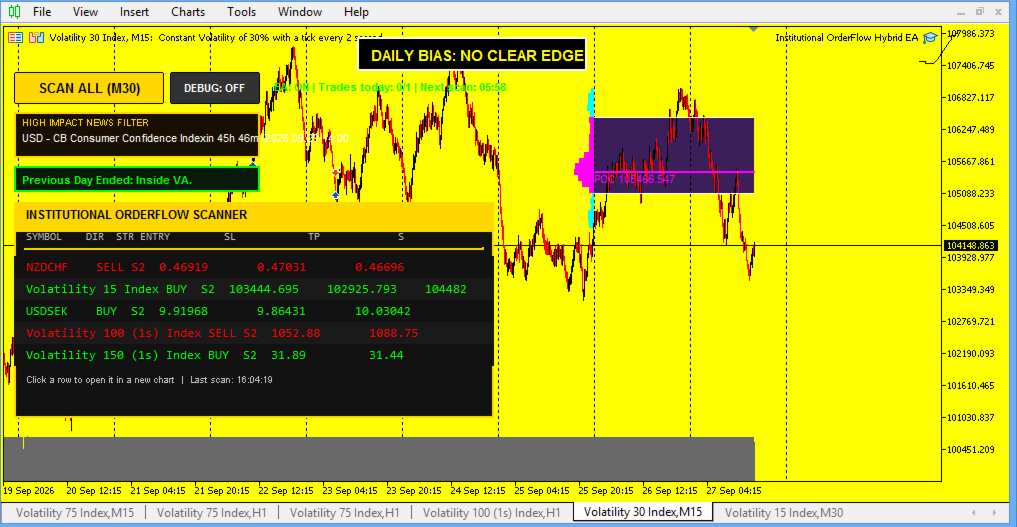
UNDERSTANDING THE DASHBOARDThe dashboard is designed to turn complex market information into a more manageable shortlist.
Rather than staring at dozens of charts, traders can quickly identify opportunities and then investigate them individually.
The dashboard can provide information such as:
SYMBOL
The instrument where the opportunity was identified.
DIRECTION
Potential BUY or SELL direction.
STRATEGY
The underlying setup type.
ENTRY
The calculated trading area.
SL
The protective stop area.
TP
The projected target.
POC
The Point of Control.
VALUE AREA
The relevant VAH and VAL boundaries.
DAILY BIAS
The broader directional context.
NEWS
Whether the news filter is affecting the setup.
A SIMPLE EXAMPLEImagine Gold has spent the previous session outside the Value Area.
Price begins moving back toward the POC.
The distance to the POC starts shrinking.
A reversal structure appears.
The daily environment supports the direction.
There is no immediate high-impact news restriction.
The scanner identifies the conditions and places the setup among its strongest opportunities.
Instead of manually discovering this entire sequence, the trader receives a structured starting point for analysis.
That is the power of the scanner.
ANOTHER EXAMPLE — FALSE BREAKImagine price moves above VAH.
Many traders immediately assume:
“Breakout — BUY.”
But price quickly rejects the level and closes back inside the Value Area.
Institutional Flow EA can recognize this as a potential false-break environment rather than automatically assuming continuation.
The trader can then inspect whether the rejection, structure and broader context support the setup.
This is an important distinction:
BREAKOUT ≠ ALWAYS CONTINUATION
Sometimes the market breaks a level specifically to attract liquidity before reversing.
BREAKOUT CONTINUATION EXAMPLENow consider the opposite situation.
Price breaks an important structure level with strong momentum.
Instead of immediately chasing the move, the EA looks for the market to pull back toward an important Value Area edge or structural zone.
If price holds the area and resumes in the breakout direction, the continuation setup becomes more meaningful.
The principle becomes:
DON'T CHASE THE BREAKOUT.
WATCH THE PULLBACK.
WATCH THE REACTION.
THEN CONSIDER THE ENTRY.
MANUAL TRADING CHECKLISTBefore taking a manual trade, consider the following:
☐ Is the setup one of the EA's defined strategies?
☐ Is the market structure clear?
☐ Where is POC?
☐ Where are VAH and VAL?
☐ Is price inside or outside value?
☐ Is there an Order Block?
☐ Is there an FVG?
☐ Has the zone already been mitigated?
☐ Does the Daily Bias support the direction?
☐ Is major economic news approaching?
☐ Is the potential reward acceptable relative to the risk?
☐ Is the position size appropriate?
☐ Am I entering because the setup is confirmed, or because I am afraid of missing the move?
This checklist can help prevent emotional entries.
AUTOMATED TRADING CHECKLISTBefore enabling Auto Trading:
☐ Backtest the EA.
☐ Forward-test on demo.
☐ Verify the broker's symbol specifications.
☐ Confirm the correct trading session.
☐ Set appropriate risk.
☐ Set the maximum number of daily trades.
☐ Confirm the news filter.
☐ Confirm the trading window.
☐ Monitor spreads.
☐ Monitor execution.
☐ Review the MT5 Journal.
☐ Never assume historical performance guarantees future results.
IMPORTANT: BACKTESTING MATTERSEvery broker is different.
Results can change because of:
- Spread
- Commission
- Slippage
- Swap
- Liquidity
- Contract specifications
- Historical data quality
- Trading hours
- Execution speed
- News conditions
Therefore, traders should always test Institutional Flow EA under the conditions closest to their intended live environment.
A strategy that performs well under one broker's historical conditions may produce different results under another.
THE EA IS A TOOL — NOT A GUARANTEEInstitutional Flow EA is designed to provide structured analysis and automated execution capabilities.
It does not guarantee:
- Profits
- Winning trades
- A specific return
- A specific drawdown
- Future performance
Financial markets remain uncertain.
The purpose of the system is to provide a repeatable framework for identifying and executing market opportunities.
Proper risk management remains essential.
WHY THE HYBRID MODEL IS POWERFULPurely manual trading can become exhausting.
The trader must:
- Scan charts
- Identify structure
- Find volume levels
- Monitor multiple markets
- Watch for breakouts
- Watch for reversals
- Check news
- Calculate risk
- Execute trades
Institutional Flow EA can automate much of the search and organization process.
But the trader can still remain involved.
That creates a powerful division of responsibility:
THE EA DOES THE HEAVY SCANNING.
THE TRADER PROVIDES THE FINAL JUDGMENT.
Or, when desired:
THE EA SCANS AND EXECUTES ACCORDING TO PREDEFINED RULES.
FROM SCREEN TIME TO SYSTEM TIMEInstead of spending hours searching through charts hoping to discover something interesting, Institutional Flow EA provides a structured workflow.
WITHOUT A SCANNER:
Open chart.
Search.
Change symbol.
Search again.
Change timeframe.
Search again.
Check news.
Check structure.
Repeat.
WITH INSTITUTIONAL FLOW EA:
SCAN → FILTER → RANK → REVIEW → CONFIRM → EXECUTE
That is the difference.
BUILT FOR THE MODERN MT5 TRADERInstitutional Flow EA was designed around the capabilities of MetaTrader 5 and the practical requirements of modern multi-market trading.
It combines:
Multi-symbol scanning
Volume Profile analysis
Value Area analysis
POC analysis
Order Block detection
Fair Value Gap detection
Break of Structure
Daily directional context
News filtering
Signal ranking
Risk-based position sizing
Trading-window control
Daily trade limits
Automated execution
into one integrated environment.
YOUR MARKET. YOUR RULES. YOUR CONTROL.Whether you are a discretionary trader who wants better market scanning or an algorithmic trader looking for automated execution, Institutional Flow EA gives you the flexibility to choose your workflow.
MANUAL TRADER?
Use the EA as your Institutional Market Scanner.
AUTOMATED TRADER?
Use the EA as your Execution Engine.
HYBRID TRADER?
Use it as both.
THE INSTITUTIONAL FLOW APPROACHThe philosophy is simple:
Don't chase candles.
Study structure.
Study volume.
Study value.
Study liquidity behavior.
Study imbalance.
Wait for price to come to important areas.
Then evaluate the opportunity.
Institutional Flow EA is built around that philosophy.
YOUR ADVANTAGE IS THE PROCESSNo indicator can remove uncertainty from financial markets.
But a structured process can remove a great deal of unnecessary confusion.
Institutional Flow EA helps transform a complicated market into a sequence of questions:
WHERE IS VALUE?
Volume Profile.
WHERE IS THE MARKET ACCEPTING PRICE?
Value Area.
WHERE IS THE MOST IMPORTANT VOLUME CONCENTRATION?
POC.
WHERE DID PRICE DISPLACE?
Order Block / FVG.
DID MARKET STRUCTURE CHANGE?
Break of Structure.
WHAT IS THE BROADER DIRECTION?
Daily Bias.
IS MAJOR NEWS APPROACHING?
News Filter.
WHICH OPPORTUNITIES DESERVE ATTENTION?
Signal Ranking.
SHOULD THE TRADE BE EXECUTED?
Manual decision or automated rules.
That is the Institutional Flow process.
FINAL WORDInstitutional Flow EA is more than a simple BUY/SELL indicator.
It is a complete MT5 trading environment designed to help traders combine Volume Profile, Value Area, POC, market structure, Order Blocks, Fair Value Gaps, daily bias and news awareness into a single workflow.
Use it manually.
Use it automatically.
Or combine both.
Let the EA scan the markets.
Let it organize the opportunities.
Let it identify the important levels.
Let it monitor the conditions.
Then use your own trading rules and risk management to decide how you participate.
SCAN SMARTER.
READ THE FLOW.
TRADE WITH STRUCTURE.
INSTITUTIONAL FLOW EA
Institutional Orderflow • Volume Profile • Smart Money Concepts • Automated Execution
Built for MT5 traders who want more than ordinary signals.