Darkhorse EA MT5
- Experts
- 버전: 3.1
- 활성화: 10

Darkhorse EA
"No computer gimmick"
Dark Horse EA is a fully automated trend-breakout Expert Advisor with a complete trade plan built in: signal, stop, break-even, trailing, optional targets, and a full layer of account protection. Every trade has a hard stop loss from the moment it opens. No martingale, no grid, no lot multiplication. The EA is a multi-symbol EA and default work with XAUUSD and USDJPY (dont need to add to seperate charts, works by attaching the EA to one chart). you can add the breakout friendly symbols in input parameters.
After purchase contact to get Two Bonus EAs (paid ones)
HOW IT TRADES
Darkhorse waits for a confirmed breakout signal on a closed bar and enters at the open of the next bar, so signals never repaint and backtests match the logic used in live trading. A built-in Smart Cloud trend filter must agree with the breakout direction before a trade is allowed, and a higher-timeframe gate (H4, D1, or both) keeps the EA trading with the larger trend. All calculations are done inside the EA from the chart's own bars. No external indicator is required.
TRADE MANAGEMENT
The initial stop is placed by ATR, so it adapts automatically to current volatility. Three exit schemes are available:
- Stop, break-even, then trail (default): the stop moves to entry once the trade reaches a set profit in R, and only then does the ATR ribbon trail begin.
- Targets: partial closes at two R-multiple targets, with break-even and trailing on the remainder.
- Flip: hold until the opposite signal, protected by a wide disaster stop.
Optional pullback add-ons can build a position in a running trend, always inside the total risk cap.
POSITION SIZING
Risk a fixed percentage of balance per trade, calculated from the real stop distance, or use fixed lots. A built-in Monte Carlo engine simulates the strategy on the chart's history and can cap your risk per trade so it stays within a drawdown limit you choose. An optional hard money cap per trade is also available. If the calculated size falls below the broker's minimum lot, the trade is skipped rather than silently increasing your risk.
EXECUTION FILTERS
- Maximum spread filter in points.
- Spread-to-stop filter: skips entries where the spread is too large a share of the stop distance.
- Entry grace window: an entry blocked by a momentary spread spike can still be taken shortly after the bar opens.
- Slippage control and automatic respect for broker stop and freeze levels.
NEWS FILTER
Uses the MetaTrader economic calendar, covering both currencies of the traded symbol. Blocks new entries before and after high-impact and medium-impact events with separate buffers, can optionally close positions ahead of high-impact news, and includes a dry-run mode that only logs what would have been blocked. A CSV file source is supported for backtesting news filtering in the Strategy Tester.
ACCOUNT GUARDRAILS
- Daily loss limit with optional flatten of all positions.
- Maximum drawdown lock measured from the equity peak.
- Cap on total open risk across all positions of the EA.
- Losing-streak control: pause new entries for a set number of bars or halve the size.
- Equity floor and a manual kill switch through a terminal global variable.
These make the EA suitable for traders who need strict loss limits, including prop firm challenge rules.
OTHER FILTERS
- Session filter by server hour, including sessions that wrap past midnight.
- Direction control: long and short, long only, or short only.
- Regime filters: minimum efficiency ratio and minimum ATR ratio to avoid dead or choppy markets.
- Evidence score gate that requires a minimum historical edge in R before trading.
TRADE LOG
Every trade is written to a CSV file with full context: entry and exit details, spread at entry, ATR, candle structure, distance to recent swing highs and lows, session hour, day of week, and exit reason. Use it to analyse exactly where the EA performs best on your broker.
SETUP
1. Attach the EA to the chart of the symbol and timeframe you want to trade.
2. Enable Algo Trading.
3. Set the maximum spread to suit your symbol and broker. This value is symbol specific.
4. Set the session hours in your broker's server time.
5. For the news filter in live trading, no extra setup is needed. The MetaTrader calendar is used automatically.
6. Use a unique magic number for each chart if you run more than one instance.
MAIN DEFAULTS
Risk per trade 10 percent, initial stop 2.0 ATR, break-even at 1R, D1 trend agreement on, daily loss limit 3 percent, maximum drawdown lock 15 percent, total open risk cap 2 percent, pause after 4 consecutive losses.
RECOMMENDATIONS
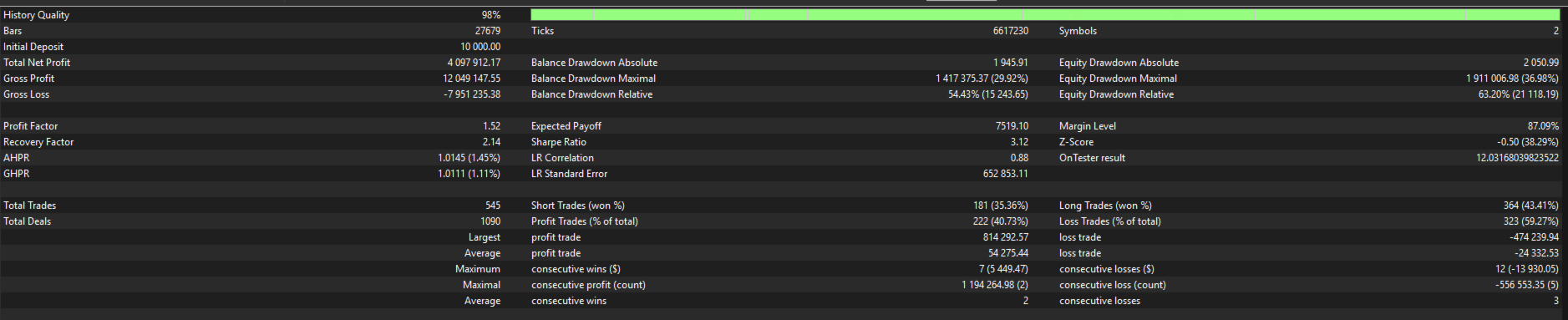
Test on your own broker's data in the Strategy Tester using "Every tick based on real ticks" before going live. Start on a demo account or with minimum risk. A low-spread ECN account and a VPS are recommended for stable execution.
RISK WARNING
Trading carries a high level of risk and past performance does not guarantee future results. Only trade with money you can afford to lose.