ALYAS Linear Regression Channel
- 지표
-
Salim Alyas Rasho
 I develop practical technical indicators for MetaTrader 5 under the ALYAS brand, with a focus on clear visualization, simplicity, and ease of use.
My goal is to create reliable and useful trading tools that help traders analyze the market with greater clarity and efficiency. - 버전: 1.0
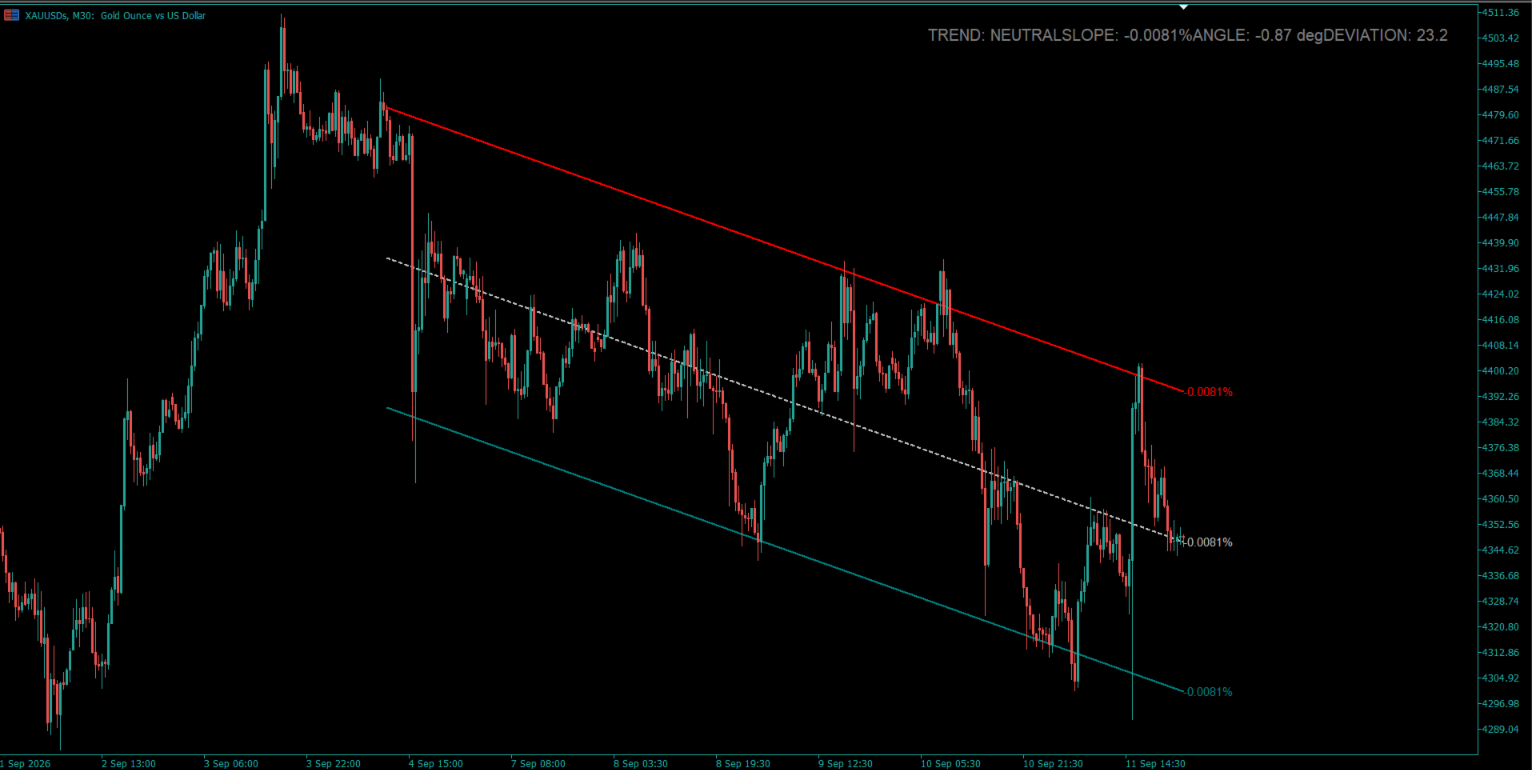
ALYAS Linear Regression Channel is a MetaTrader 5 indicator that plots a linear regression channel based on the closing prices of the selected number of bars.
The indicator consists of three main lines:
* Upper regression channel line
* Middle linear regression line
* Lower regression channel line
The channel width is calculated using the regression deviation multiplied by the selected Deviation Multiplier.
Channel Calculation
The linear regression is calculated over the selected Regression Period using the closing prices of the current chart.
The middle line represents the calculated linear regression.
The upper and lower lines are positioned around the middle regression line using the calculated regression deviation and the selected Deviation Multiplier.
This allows the channel width to adapt to price variation within the selected regression period.
Trend Information
The dashboard determines the current channel trend using the direction of the regression slope together with the current price position relative to the regression middle line.
The displayed trend states are:
* UP TREND
* DOWN TREND
* NEUTRAL
UP TREND is displayed when the regression slope is positive and the current price is above the regression middle line.
DOWN TREND is displayed when the regression slope is negative and the current price is below the regression middle line.
Otherwise, the dashboard displays NEUTRAL.
Slope and Angle
The indicator calculates the regression slope as a percentage relative to the regression end price.
It also calculates a normalized angle based on the regression slope relative to the channel deviation.
These values are displayed in the dashboard and slope labels.
Dashboard
The optional dashboard displays:
* Current channel trend
* Slope percentage
* Normalized angle
* Regression deviation
* Regression period
* Deviation multiplier
The dashboard corner, position, and font size can be customized from the indicator settings.
Slope Labels
Optional slope percentage labels can be displayed at the end of the upper, middle, and lower channel lines.
Each label uses the corresponding channel line color.
Visual Customization
The upper, middle, and lower lines can each be customized independently.
Users can select:
* Line color
* Line width
* Line style
The slope labels can also be enabled or disabled, and their font size can be adjusted.
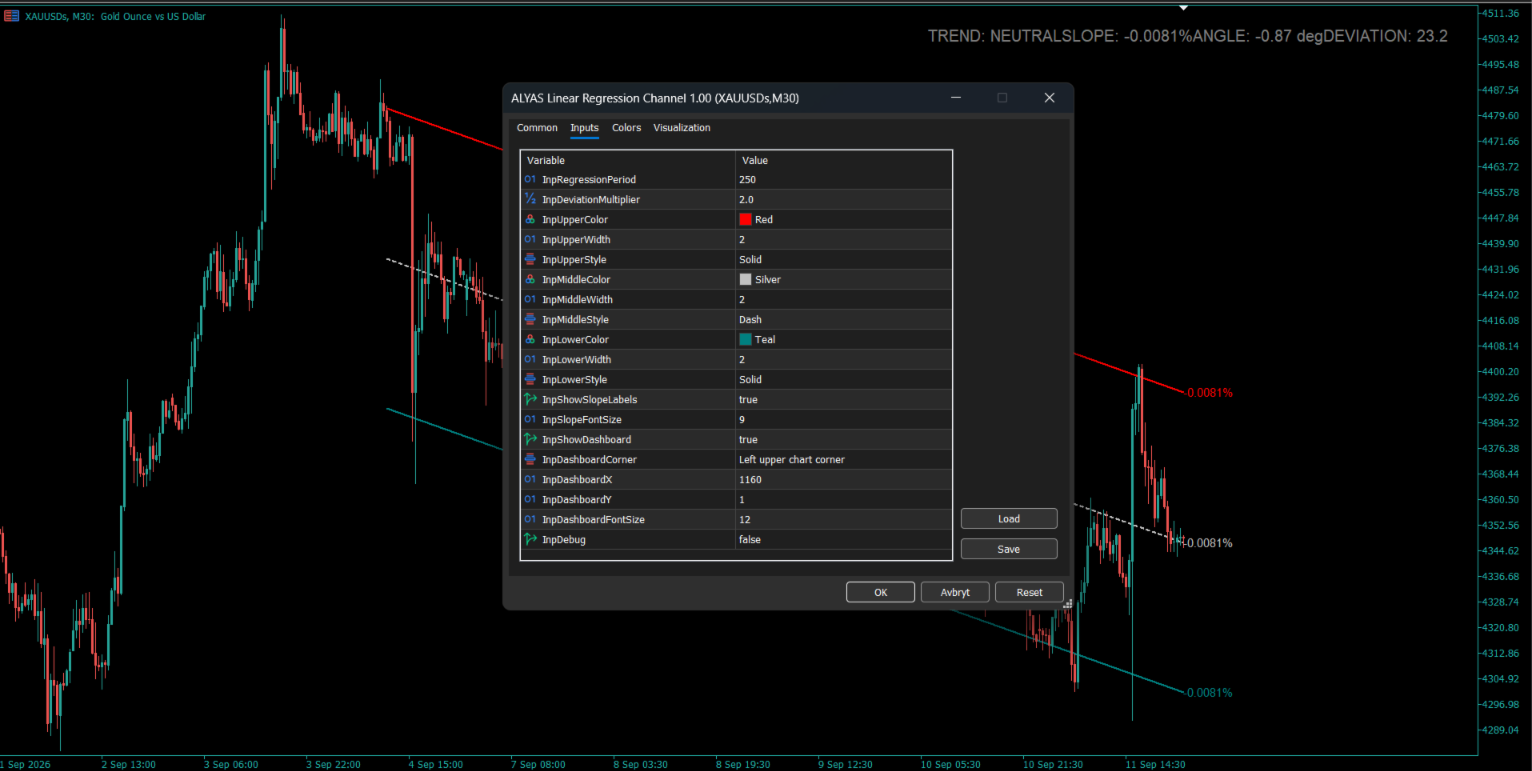
Inputs
Regression Settings
Regression Period
Defines the number of bars used for the linear regression calculation.
Deviation Multiplier
Defines the multiplier applied to the calculated regression deviation to determine the channel width.
Upper Line
Upper Line Color
Sets the color of the upper regression channel line.
Upper Line Width
Sets the width of the upper regression channel line.
Upper Line Style
Sets the style of the upper regression channel line.
Middle Line
Middle Line Color
Sets the color of the middle regression line.
Middle Line Width
Sets the width of the middle regression line.
Middle Line Style
Sets the style of the middle regression line.
Lower Line
Lower Line Color
Sets the color of the lower regression channel line.
Lower Line Width
Sets the width of the lower regression channel line.
Lower Line Style
Sets the style of the lower regression channel line.
Slope Labels
Show Slope Labels
Enables or disables the slope percentage labels displayed at the end of the channel lines.
Slope Font Size
Sets the font size of the slope labels.
Dashboard
Show Dashboard
Enables or disables the information dashboard.
Dashboard Corner
Selects the chart corner used as the dashboard reference position.
Dashboard X
Sets the horizontal position offset of the dashboard.
Dashboard Y
Sets the vertical position offset of the dashboard.
**Dashboard Font Size**
Sets the font size of the dashboard text.
Debug
**Debug**
Enables or disables debug output used for development and troubleshooting.
Usage
Attach ALYAS Linear Regression Channel to a MetaTrader 5 chart.
Select the desired Regression Period and Deviation Multiplier. The indicator calculates the regression channel using the closing prices of the current chart and displays the channel together with the selected analytical information.
The indicator follows the symbol and timeframe of the chart to which it is attached.
ALYAS Linear Regression Channel is a chart-based analytical tool. It does not execute trades, generate orders, or provide guaranteed trading results.